Tag Archive for: Google

 Panda

Google has confirmed it has released a Google Panda refresh over the weekend, over 10 months after the last update to the algorithm.

The latest refresh is unique from past updates as it went virtually unnoticed by webmasters until it was announced by Barry Schwartz. This is because it is being rolled out far slower than in the past. Previous updates were rolled out usually over a period of a few days or at most a couple weeks, but Google says this latest update could potentially take months to fully roll out, even on a site-by-site basis. However, as it is a site-wide algorithm, it will not be on a page-by-page basis.

Google was not willing to provide any information about why the rollout is being done so slowly.

Unfortunately, the slow rollout does not mean you can expect to make any last minute changes to save your site. It is too late to change your fate with Panda 4.2, although it’s always good to make any improvements you know are needed.

Schwartz also noted his personal SEO news site, which was penalized by Panda 4.1, does show an increase in organic traffic since the update. That means others who were hit by the last update may see small improvements as well.

The Panda refresh is expected to impact approximately 2-3% of queries, meaning it is a relatively small update.

While the refresh may be good news to webmasters who were impacted by 4.1, most people are less pleased – particularly by the slow rollout.

It may be months before we know the impact of the refresh thanks to the slow implementation, but, considering there hasn’t been an update since October of last year, it was past time for it to happen.
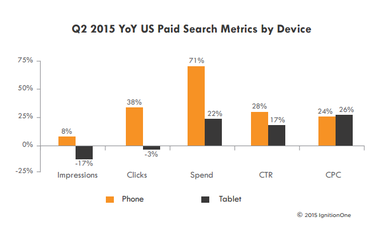
So far, 2015 is shaping up to be a huge year for the mobile internet. Between Google’s “Mobilepocalypse” and the news that searches from mobile have overtaken desktop search volume, mobile was already on the way to dominance, but a new report from IgnitionOne shows mobile search spend is also growing by leaps and bounds.

According to the recent Q2 Digital Marketing Report, paid search spending has risen 22 percent for tablets last year, and a massive 71 percent for smartphones.

Both mediums showed comparable growth in CPC and CTR (24 and 28 percent for phones, 26 and 17 percent for tablets), but smartphone clicks have outpaced those from tablets by 41 percent. The report also noted smartphone impressions had climbed 8 percent, but tablet impressions have declined by 17 percent.

“Google has incredible dominance on [the mobile] side,” says Will Margiloff, chief executive (CEO) of IgnitionOne. “But they still have, for the most part, a mobile display business and not really a native to phone and tablet business like Facebook. Google’s got their work cut out for them when it comes to mobile native or native display, and the only real player there is Facebook.”

ignitiononestudy1-370x229

The report also showed Google’s display growth was down 9 percent year-over-year while Facebook’s is up 48 percent, which gives the social platform 16 percent of the display share. In comparison, Google’s share is at 31 percent, down from 38 percent last year.

After years of debate whether another search engine could ever prove to be a meaningful challenge to Google’s market share dominance, Facebook’s recent gains suggest it may actually be social media that poses the greatest challenge to Google.

ignitiononestudy2-370x229

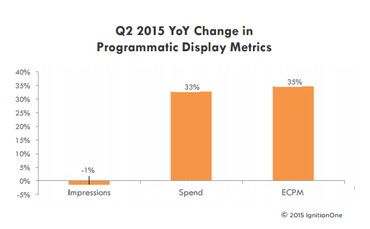
IgnitionOne’s research found programmatic data spend increased 33 percent year-over-year while eCPM rose 35 percent from last year. Impressions, however, have fallen 1 percent.

 non-clickable-areas-google-display-ads-800x513

Tell me if this has ever happened to you. As you’re browsing a website, your thumb accidentally hits an ad as you try to scroll past it, launching a new page. You close it out, and try to scroll down again only to accidentally tap the ad on the page yet again, leaving you in a loop of trying to close the page and move past it but repeatedly wind up tapping an ill-placed ad that you have no interest in.

Not only is this scenario a bad experience for the user, but it is also a nightmare for advertisers who are wasting money on valueless clicks.

This has been a growing issue for the online advertising industry as mobile browsing increases, but sites have struggled to optimize their sites (and their advertising) for mobile viewers and errant taps. Now, Google is finally making changes to hopefully solve the so-called “fat finger” ad clicks problem.

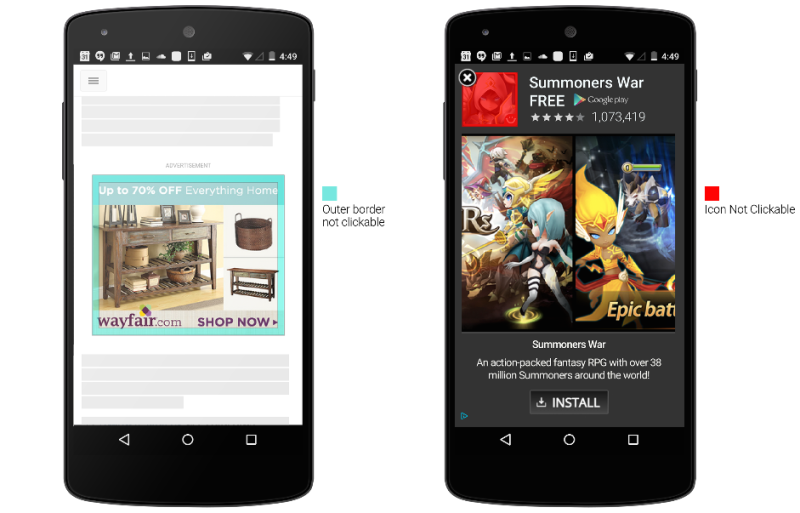
  1. First, taps close to the edge of an image ad won’t be considered clicks. Google says it has identified the border area particularly prone to accidental clicks during scrolling.
  2. Second, for in-app install ads interstitial ads like the one on the right above users won’t be able to click on the app icon because the close button is overlayed on that image. Users will need to click the call-to-action button.
  3. Finally, ads will only become clickable after they’ve been onscreen for “a short period of time”. How long that period actually is isn’t clear, but Google says the delay is to give users “enough time to examine the content of an ad”.

While most of these changes are relatively common sense (why on earth was the app icon ever considered a click?), but they are still welcomed by the advertising community who have been complaining about “fat fingers” since display ads came to mobile.

 Google-My-Business-Logo

As schools close and the temperatures soar across the country, it isn’t unusual for businesses to change their hours for the summer. It is especially common in tourist areas where shops often stay open longer to accommodate the longer days and increased store traffic.

If your business has special summer hours, now is the time to guarantee your business listing on Google shows your adjusted seasonal hours.

Today, Google launched a new initiative at gybo.com/summer to help businesses quickly check how their Google My Business listing is displaying, including whether they are currently open or closed.

Google says a recent survey of small businesses found 25% change their operating hours during summer, but only 1 percent of the businesses also adjusted their hours on Google My Business.

Considering recent studies have shown over half of all consumers use search to look for business hours, and even higher numbers use search to plan local purchases, having the wrong hours listed can be quite a big problem.

If you have special summer hours but haven’t updated your listing yet, be sure to update the listing in Google My Business. Be sure to set a reminder while you are at is so you remember to change the hours back again when fall arrives.

If you’re a business owner who has decided to get serious about your company’s online presence and marketing, you’ve almost certainly heard about search engine optimization. Unfortunately to the uninitiated, SEO can seem impenetrable with its endless technical jargon and conflicting opinions from experts about exactly how to get the best online visibility. It can feel a lot like jumping in the deep end without learning how to swim first.

Search Engine Optimization doesn’t have to seem so intimidating however. There may be a lot to learn before you are an expert, but with just a few basic ideas you can drastically improve your business’s online profile.

This infographic from SEOHalt will help guide you through the basics of SEO and give you the vocabulary you need to really get an understanding of what search engine optimization is and how it affects online marketing efforts. Once you’ve got these ideas under your wing, you’ll be ready to dive into the deeper waters of SEO without having to worry you’ll drown.

 SEOBasics

 Emojis

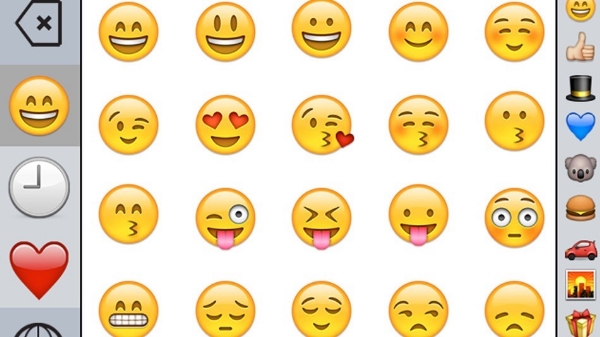
It was fun while it lasted, but Google has followed through on their promise to remove emojis from titles in search results.

In April, Expedia became the first major brand to start experimenting using emojis in search results titles. For example, a search listing for beach rentals may have included a wave emoji on Expedia listings.

It wasn’t long until many other major brands followed suit, but Google ultimately decided the trend was not something they wanted to promote. During a Google Hangout in early May, John Mueller, a webmaster trends analyst for Google, announced the search giant would be removing the emojis.

True to Mueller’s word, emojis disappeared from search results early this morning, as first noticed by Jennifer Slegg at The SEM Post.

Notably, Google has only seemed to remove the emojis from titles. Norwegian Airlines, known for creating the very first emoji URL, appears to be unaffected.

While the hearts, waves, and smiley faces are gone from Google, emojis are still currently appearing in Bing searches. Microsoft’s search engine started showing emojis in title tags shortly after they began appearing in Google, but there’s no word if they intend to follow Google in phasing them out now.

It might not be a surprise to learn that Amazon dominates the search engine results pages, but you might be surprised by just how much they lead all other major brands.

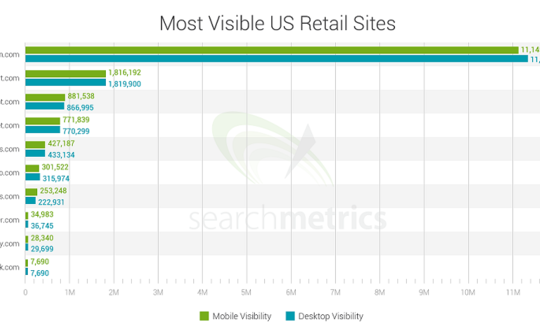
A recent performance study of 10 leading U.S. brands published by SearchMetrics makes it clear that Amazon has by far the most visibility across Google’s search results on both desktop and mobile.

searchmetrics-amazon-walmart-mobile-search-bar-chart-540x334

In the study, SearchMetrics used the top 10 retail sites listed in the National Retail Federation’s list of top 100 retailers and parsed the search results of millions of Google search terms to establish a mobile visibility score along with a desktop visibility score.

To calculate the visibility score, the study evaluated the number of times a brand appears across a keyword set, the brand’s rankings within those search engine results pages, competitiveness of keywords, and the click through rate of those results pages.

Even compared to other major competitors, Amazon is an absolute giant. With the staggering rating of 11,145,359, the online retail company dwarfs Walmart, its closest competitor with a score of 1,816,192.  Following Walmart were The Home Depot with 881,538, and Target.com, with a score of 771,839.

The focus of the study was mobile search, as it is most often the first touch point to purchase. However, the analysis also showed the rankings remain the same on desktop.

 Google-My-Business-Logo

If you run a local business and haven’t logged into Google My Business in a while you may be at risk of having Google unverify your listings, according to a statement from a Google representative today.

In a post on the Google and Your Business Help Forum, Google’s Jade Wang confirmed the news that the company has been contacting some Google My Business users that it considers to be inactive:

In some cases, we may contact Google My Business users via email to confirm that they are still actively managing a business page. If a user is unresponsive to our attempts to contact him or her and has not logged into Google My Business for a significant length of time, then we may unverify pages in the account. We’re doing this in order to continue to provide users with the best experience when they’re looking for local businesses like yours. If you find that a page in your account has been incorrectly unverified, please contact support to get assistance restoring verification.

The news was first brought to light by Brian Barwig of Integrated Digital Marketing, who posted a message today about a phone conversation he had with a Google support rep who told him that this may happen to accounts which are considered inactive for six months.

Mike Blumenthal has also shared the text of the email Google sends out to warn inactive accounts about being potentially unverified.

To help prevent this, Wang included some advice: “It’s a good idea to keep an eye on the inbox associated with your Google My Business (Locations) account. It’s also a good idea to regularly log into Google My Business (Locations) to confirm that your business information is current and accurate.”

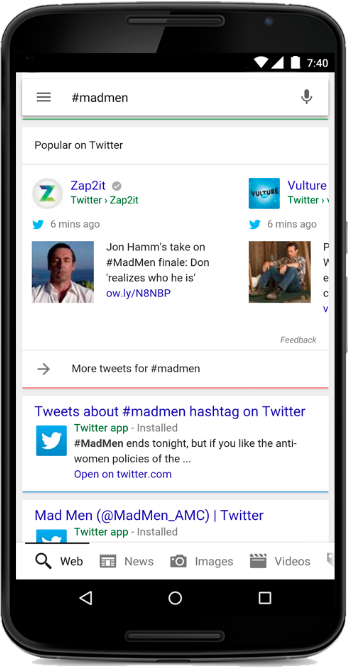
Earlier this year Google and Twitter announced a deal which promise to bring more tweets to your search results, and that promise is coming true today. Google now includes tweets in a more cohesive and graphical format on mobile devices, including a tweet carousel.

Both Twitter and Google announced the news in blog posts today, including examples of how the feature appears, such as the example below which shows how it looks if you search on #madmen.

madmen2

You can also scroll through the carousel to see more results.

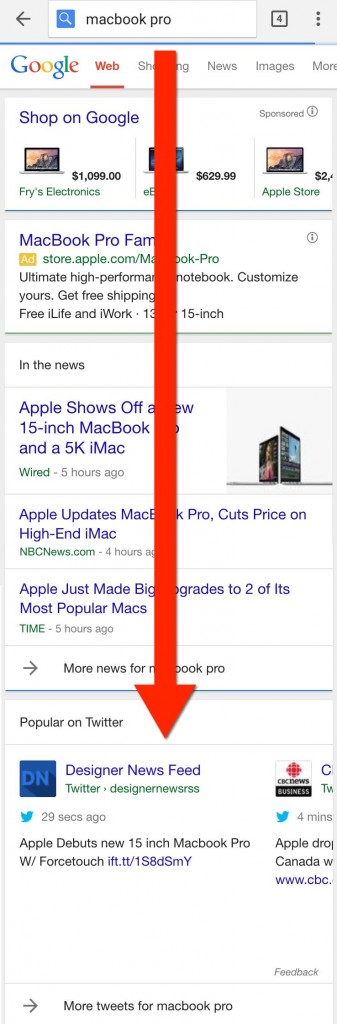
The placement of the feature isn’t always directly at the top of the page. According to Search Engine Land, the tweet carousel can appear in the middle or even the bottom of the page, as their example for “MacBook Pro” shows:

macbook-tweets1

Tweets don’t show for every search, and it is currently unclear exactly what types of searches include tweet carousels and which don’t. However, Google does say:

It’s a great way to get real-time info when something is happening. And it’s another way for organizations and people on Twitter to reach a global audience at the most relevant moments.

That suggests searches for hastags, topics, prominent figures, or trending events are most likely to include tweets.

Google has included Twitter in its search results in the past, even after their last deal ended. The new agreement simply allows for much deeper integration in the search results.

Currently, the new implementation on the search results is limited to only users in the US, in English, using either their browser in iOS or Android, or on the Google Search App. Twitter has promised further support for desktop and more languages in the near future.

Google Delivery

Google is partnering with six delivery providers across the US to establish a new service that will deliver food to your home, straight from the search results.

“Whether you’re craving deep dish pizza or pad thai, starting today you can order food from some of your favorite restaurants directly from Google search results.”

Thanks to the new service, US residents can simply type in what they want to eat, select the restaurant of their choice, then click “Place an order” without ever leaving the search engine.

From there, simply place your order, choose your preferred delivery service, and complete your order from the website.

Google’s partners in this venture currently include the following companies:

  • Seamless
  • GrubHub
  • Eat24
  • Delivery.com
  • BeyondMenu
  • MyPizza.com


The search engine will potentially add more delivery providers in the future as it expands this service.

In line with this new addition, Google is also allowing users to book appointments and make reservations directly from the SERPs.

Local businesses should be especially interested in the service as there is no complicated opt-in. Just go to your Google My Business dashboard and ensure the feature is turned on.

According to a Google help center article, links to place an order or book an appointment will appear automatically for eligible businesses.