Tag Archive for: Google

adobe-flash-player-logo-2011-540x334

Adobe Flash is all but dead and Google is putting the final nails in the coffin by dropping support for Flash-based ads in favor of ads coded in HTML5. This isn’t happening immediately, but Google announced its intention to move to HTML5 by January 2017 in order to give advertisers time to transition.

As part of this transition away from these ads, Google will no longer allow Flash formatted ads to be uploaded to the Google Display Network starting June 30th of this year. Up until then, you can still upload any Flash-based display ads you’ve been working on and they will continue to run until January.

Google notes that you should update your display ads before either of these dates for best performance, and that video ads built in Flash will not be impacted by the change.

The death of Flash is likely to be dragged out for quite some time, but this is a big loss for Adobe’s format. Adobe’s player only accounts for 5% of mobile and web video seen last year, but it has still been a major part of major online ad networks. If these ad networks no longer accept Flash, then Flash loses its one last thing keeping it relevant.

Google is always changing. Over just the past few years, the way search works has changed radically – moving to a more user-based model and mobile-first mindset.

This shift in attitudes has changed how the world’s most famous search engine works down to its very foundation, with the intent of moving away from a system that started with information and aimed to connect it with its audience. Instead, Google has made it its philosophy to start with the user and aim to provide the best search results for them.

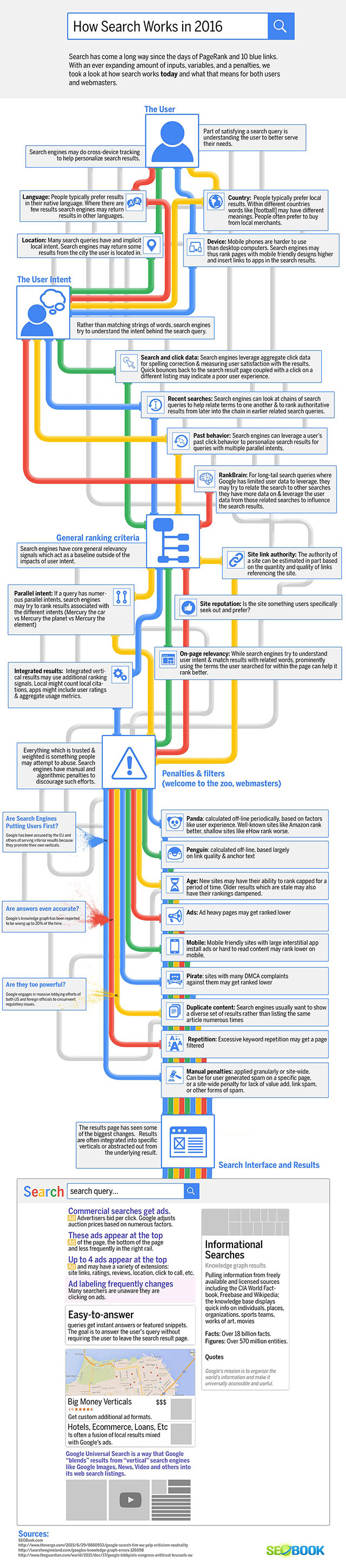
SEOBook recently shared an infographic to visualize how Google’s search engine works in 2016. It shows that in SEO and Google Search, you can’t rely on the same methods from 2013 to keep your business growing online today.

You can see the infographic below. If you can’t see the small text, a larger version is available at SEOBook.

howsearchworks

Apps

Android users will soon be able to install apps to their smartphones directly from Google search results. According to Android Police, Google has begun testing the new feature which will let users bypass the Play Store and directly install an app by performing a Google search.

To try out the feature, open the Google app on any Android phone and search for any app you want to install. Within the Google card, which previously directed users to the Play Store, you will now see an Install button.

If you press the Install button, your phone will ask for the normal permissions that appear with all Play Store app download. If you accept, the app will immediately begin downloading and installing.

The feature hasn’t been rolled out to all Android phones, so there is no guarantee you will be able to directly install the app. Many users are still being directed to the Play Store.

Ryan Whitwam of Android Police speculates the feature is just in testing currently, and will see a wider rollout in the future. He also suggests the feature is likely to be available only in the Google app and not through Chrome.

bottraffic-incapsula-050115

The bad news is half or more of your website traffic likely comes from bots. The good news is that is actually a huge improvement from in the past.

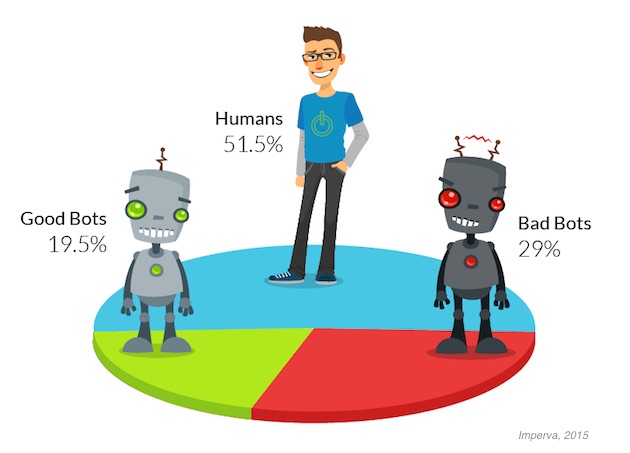
A new report from Imperva Incapsula shows that approximately 48.5% of all traffic to websites comes from bots, not actual online users. That number comes from a review of over 19 billion visits to 35,000 Incapsula client websites around the world with a minimum daily traffic count of at least 10 human visitors gathered over a 90 day period in 2015.

According to the data, 51.5% of all Web traffic comes from human users, while 29% come from “bad bots” which automate spam or other malicious activity, and 19.5% came from “good bots” which are used by search engines and other online services.

share-incapsula-050115

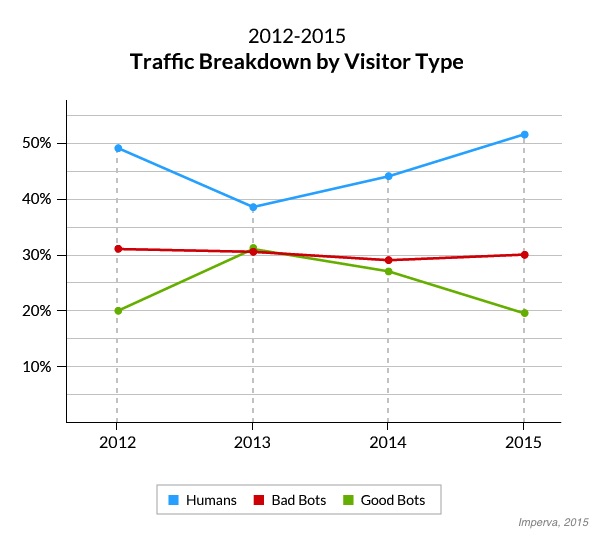
While this sounds bad, the share of human traffic is actually rising compared to past year. The report explains:

In a similar 2013 study conducted by Imperva, humans made up only 31.5% of all visits to sites, compared with 51.5% in 2015. This shift is mainly due to an increase in human traffic as more people use the Web and a decrease in good bot traffic.

size-incapsula-050115

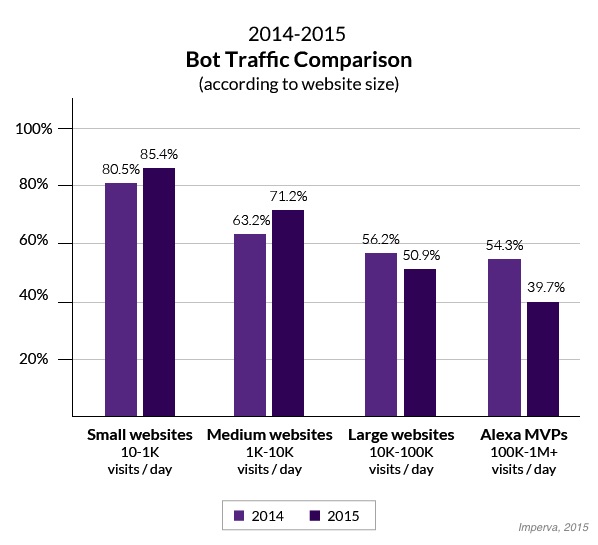
The ratio of bots-to-humans your website receives is likely influenced by how popular your site is, as the most popular sites examined showed the smallest ratio of bot traffic (39.7%). In comparison, the least popular sites included in the traffic had the highest share of bot traffic (85.4%).

No matter what percentage of your traffic comes to bots, the best solution is to continue emphasizing marketing that directly connects with real humans such as social media marketing and PPC.

google-alerts1

Google is continuing its efforts to promote privacy in search by prioritizing indexing HTTPS pages over their HTTP equivalents.

In the announcement, Google explains its long-term aim is to eventually direct users to secure webpages with a private connection. The step to only index HTTPS pages when an HTTP equivalent exists is their most recent move in this process, following the small rankings boost given to HTTPS pages last year.

Unlike the change to Google’s algorithm in August 2014, this move will not have any effect on rankings. Instead, it simply means that Googlebot will only index the HTTPS version of a URL when both an HTTPS and HTTP version exist.

While Google’s commitment to secure search may lead to more rankings boosts for HTTPS pages in the future, this change is mostly to improve the efficiency of Google’s current indexing process. As they explain in their announcement:

“Browsing the web should be a private experience between the user and the website, and must not be subject to eavesdropping, man-in-the-middle attacks, or data modification. This is why we’ve been strongly promoting HTTPS everywhere.”

Google Logo

Christmas is almost here and the New Year isn’t far behind, which means it is time for the annual end-of-the-year lists to show us what people were searching for this year. Yesterday, Google released their “Year In Search” video and list to highlight the most important topics of 2015.

The most searched for topic of the year is also possibly the most tragic; Google counted over 897 million searches about Paris this year, largely due to two major terrorist attacks in January and November. Particularly, in the immediate wake of the November attacks, Google saw the most searches about the city ever performed in the search engine’s history.

The Year In Search list also features several top news events such as Hurricane Patricia, the discovery of water on Mars, the terrorist group ISIS, and the earthquake in Nepal.

While the end of the year list features several events that united us through tragedy, it also shows the more lighthearted topics that caught our collective hearts and minds over the past year.

“Star Wars” was a huge topic of discussion for the internet, with more than 155 million searches before its world premiere. However, the most searched for film of the year was actually another highly anticipated sequel. “Jurassic World” took the lead spot, although Google didn’t detail exactly how many searches it received.

With all the focus on Donald Trump these past few months, you might expect him to lead the most searched for public figures, but The Donald only came in seventh place behind Charlie Sheen and the Orange Is The New Black character Ruby Rose.

Instead, the three most talked about public figures of the year were Lamar Odom, UFC fighter Ronda Rousey, and Caitlyn Jenner, who saw a huge spike in interest following her gender transition announcement on ABC News’ “20/20” in April.

You can see Google’s inspirational Year In Search video below, or you can browse all the Year In Search lists at Google Trends.

Source: Robert Scoble / Flickr

Source: Robert Scoble / Flickr

Most online advertisers consider conversion tracking an essential part of their toolkit. After all, why pour money into advertising if you can’t properly see how effective it is and optimize it? However, there are many businesses who are not using conversion tracking or importing goals from Google Analytics into AdWords. Google says they have a new feature just for them.

The new Smart Goals are powered by Google Analytics and aim to help businesses without a way to measure conversions evaluate their advertising efforts and optimize their campaigns.

Unlike conversion tracking and Analytics goals, Smart Goals don’t measure actions taken directly on an advertiser’s website. Instead, it uses the anonymized conversion data collected from other websites by Google Analytics to identify visits “most likely” to convert based on Google’s estimate.

The announcement explains:

To generate Smart Goals, we apply machine learning across thousands of websites that use Google Analytics and have opted in to share anonymized conversion data. From this information, we can distill dozens of key factors that correlate with likelihood to convert: things like session duration, pages per session, location, device and browser. We can then apply these key factors to any website. The easiest way to think about Smart Goals is that they reflect your website visits that our model indicates are most likely to lead to conversions.

To set up Smart Goals, advertisers will need to link their Analytics and AdWords accounts and must receive at least 1,000 clicks rom AdWords over a 30-day period “to ensure the validity of your data.” From there, select Smart Goals, under Goals in the Admin tab.

Advertisers can even preview well Smart Goals can work for their site before activating it by exploring the new “Smart Goals” page under Conversions in Analytics. This page lets you analyze the behavior of Smart Goals visits and compare those to the visits deemed unlikely to convert. If you like what you are seeing, you can then import Smart Goals into AdWords.

Once Smart Goals have been imported, advertisers can set a target cost per acquisition (CPA) with the Smart Goals being the acquisition. The announcement says, “in this way, you’re able to optimize your AdWords spend based on the likelihood of conversion as determined by our model.”

Google says Smart Goals will be rolling out over the next few weeks. While it may serve as a reasonable solution for some businesses, for most Smart Goals may seem like a bit of a stop-gap solution. To really take control of your online advertising and guarantee you are getting your money’s worth, you will want to use conversion tracking,

If you need help getting started, contact us. We can get you set up and help you optimize your advertising to ensure the best results.


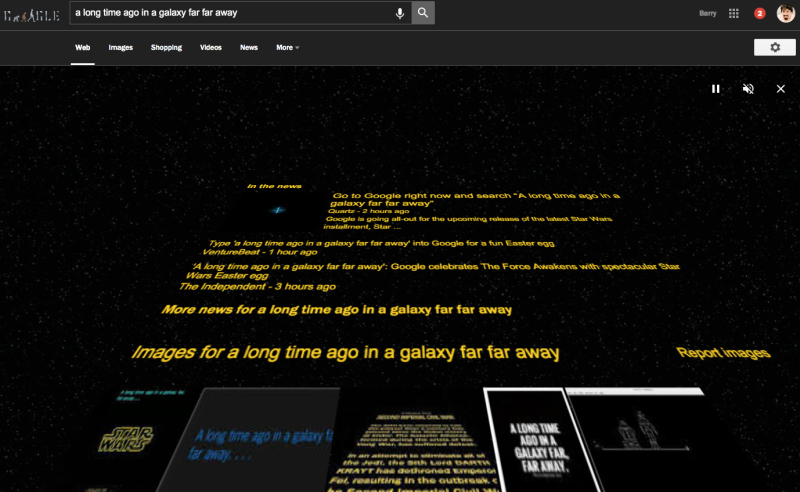
Google-star-wars-easter-egg-800x492

As the premiere of Star Wars: The Force Awakens grows closer, Google is getting in on the excitement. The company recently announced its new #ChooseYourSide campaign, and indicated it was planning a number of Star Wars Easter eggs ahead of the film’s release on December 18.

Well, you don’t have to wait for the Easter eggs to start popping up. The first surprise for Star Wars fans who use Chrome has already been found.

Just Google the famous first line from the original 1977 Star Wars movie (“a long time ago in a galaxy far far away”), and you will be treated to a page in the style of the series iconic opening crawl. Instead of an summary of intergalactic politics and jedi-related events however, the scrawl shows search results over a Star Wars-themed background.

You can find out more about the #ChooseYourSide campaign over at Marketing Land. Fans will have to keep waiting for the film’s release, but keep your eyes peeled for more exciting Easter eggs in the meantime.

For the first time, Google has released the full version of their Search Quality Rating Guidelines, a document used by Google Search Quality Rates to help determine how to rate the search results they are testing.

The document has become public in the past, through several leaks. Just this week, the October version was leaked. The search engine also released an abridged version in 2013, but now the company has decided to officially release the entire 160-page version previously only available to Search Quality Raters.

Google’s Mimi Underwood said that “ratings from evaluators do not determine individual site rankings, but are used help us understand our experiments.” She added, “The evaluators base their ratings on guidelines we give them; the guidelines reflect what Google thinks search users want.”

As expected, Underwood also implied the document will be updated over time, “as search, and how people use it, changes.”

You can download the full Search Quality Rating Guidelines here.

With Halloween in the rear-view mirror we have officially entered the holiday season, and Google is rolling out new features to help businesses prepare. Google My Business announced it is launching a new feature that allows businesses to set their holiday hours in advance, so shoppers will always know when you are open.

In the past, businesses had to manually update their hours manually if they changed their hours for the holiday season, and when the season is over you had to go back in and change the hours back.

Now, if you know ahead of time when you will start running your holiday hours, you can schedule your Google My Business page to automatically update your opening hours when the time comes. Google will also tell shoppers if what they are seeing are special holiday hours.

If your closing hours are flexible, there is also a new option to have a message displayed saying “hours may differ.”

The feature will stick around, so if you have regular special hours for other events or holidays you can also set those up ahead of time.

How to Schedule Special Hours on Google My Business

  • Log in to your Google My Business account and select the location the hours will apply to.
  • On the “Location details” page, scroll down until you see the “Special hours section” and click the link.
  • Select the date when the hours will begin and enter the opening and closing times for that day.
  • Click the box next to “Closed” if your business will be closed on a specific day. You can also set your hours to 12:00am-12:00pm if you are open 24 hours.
  • Click “Add another” to add more special hours for the location.

For more information on the features or setting up your special holiday hours ahead of time, check out Google’s help center article.