phone-875488_640

Does it seem like your ‘Contact Us’ page never actually leads to contact with customers or interested consumers? These days, every business with a website has a contact page, but few are putting the time and care into these pages that they invest in other areas of their site.

I couldn’t count the number of stylish and modern websites I’ve found with contact pages that look weeks or even years old. Sometimes the web design looks distinctly dated, like a forgotten room in a house that has since undergone numerous renovations. Even more worrying, some businesses forget to update their contact information after address or phone number changes.

Any of these issues can deter potential customers from contacting you or purchasing your products or services in the blink of an eye. The good news is, they are also easily fixable. Today, I wanted to offer you some quick ways to turn your ‘contact us’ page from one of the least effective pages on your site to a consistent source of leads and customer engagement.

Be Consistent

The most important factor when listing your contact information anywhere online is consistency. Your business name, address, phone number, and all other contact information should be exactly the same whether they are on your contact page, Facebook, or Yelp. Not only does it provide huge SEO benefits, but showing consistency and a clear identity for your business helps build trust with consumers.

Try Some Variety

Just about every ‘contact us’ page lists a local address and phone number, but often there isn’t much else on the page. While these are both important, you are also missing out if these are the only ways you are encouraging consumers to contact you.

Potential customers aren’t always in a place where they can easily make a phone call and they are not always able to make it out to your physical location. Instead, they may want to drop a quick message to you over Facebook or Twitter. Providing many different ways for your customers to contact you will make you seem more available and allow more people to reach out when they need to.

Show Some Personality

The biggest problem with the vast majority of contact pages I see are that they are just plain boring and tell nothing about who you really are. If someone comes to your ‘contact us’ page, they are looking to learn more about you. If your page is just a simple list of email addresses and phone numbers, you are missing a huge chance to build your brand identity and reinforce who you are.

Don’t Ask Too Much Too Quickly

Some contact pages include forms which ask for small amounts of user information. These can be helpful for keeping messages organized, but being overzealous can drive people away. Your contact page isn’t necessarily the best place to build your email list or ask for detailed user information. Test out shorter forms that ask less of customers initially or make signing up for email subscriptions optional. Otherwise you may find your contact page is actually pushing interested people away.

For far too many businesses, a contact page is treated as an afterthought when they should really be a priority. They are one of the most important pages on your site and act as a foundation for you to start building a relationship with consumers. If you want to really start hearing from consumers, invest time in your contact page to turn it into a page that is as welcoming and informative as the rest of your site.

HTTPS

It has now been two years since Google announced it would be making HTTPS a minor ranking signal, and a recent study from Moz shows just how many sites have made the switch since then.

After Google’s announcement, there was an initial surge in sites changing from HTTP to HTTPS, but many held back to assess just how important the security protocol was to the search engine and ultimately decided it wasn’t worth the risk. Google only considers HTTPS a minor factor in their ranking algorithm and there has been concern about potential risks when making the switch.

To check up how far along the transition is, Dr. Pete Meyer from Moz compiled data to see just how close is Google is to changing the web over to HTTPS.

Before Google started including HTTPS in its algorithm, Meyer says only around 7% of all pages featured on the first page of Google search results used the more secure protocol. A week after the switch that number had climbed to 8%. Since then, the number has steadily been rising, reaching over 30% this year.

Moz reports that “as of late June, our tracking data shows that 32.5% (almost one-third of page-1 Google results now use the “https:” protocol.”

However, Meyer says he is not convinced everyone that has made the switch was motivated by algorithms and ranking signals. Instead, he believes it is a sign that Google’s PR campaign to make HTTPS more attractive and desirable for sites is working.

Meyer also says that in another 1 to 1.5 years we are likely to see 50% of the sites shown on the first page of search results to use HTTPS, which he predicts will lead Google to strengthen the ranking signal.

Ultimately, many are still hesitant about changing their entire site’s HTML structure to HTTPS and the risks that come along with site-wide changes like this. However, Dr. Meyers says it is wise to keep an eye on how many sites in your industry are using the protocol and to be watchful for any upcoming algorithm updates that may make HTTPS even more prominent in search results.

Keeping a clean and orderly URL structure for your site can be more than just a helpful way of keeping your pages organized. SEO-friendly URL structure can also make your site easier for search engines to index and modestly improve how Google and Bing rank your site.

Unfortunately, establishing the absolute best URL structure can be a bit confusing. Some would have you believe it is more art than magic, while others would argue “everybody is doing it wrong”.

John E. Lincoln from Ignite Visibility and Brian Dean from Backlinko set out to clear up the confusion with a handy infographic that explains the best practices for keeping your URLs easy to index and easy for users to sort through, including the most common questions like URL length and keyword usage.

See the infographic below or at Search Engine Land.

SEOFriendlyURL

Google Logo

While loading speed is a crucial issue for most mobile internet users, Google’s “Mobile-Friendly Algorithm” isn’t currently using it as a ranking factor for mobile pages. However, that is likely to change when Google releases their next mobile-friendly update.

According to reports from the recent Search Marketing Summit in Sydney this week, Google Webmaster Trends Analyst Gary Illyes confirmed Google would be including page speed as a factor in the next mobile update. But, it may be months until that update arrives.

The inclusion of page speed seems like common sense. The majority of mobile users are likely to leave a page if it doesn’t load within five seconds, and some are even more impatient. From Google’s perspective, including page speed as a factor means they are more likely to help users find a site they will be happy with on the first click as often as possible.

It also makes sense considering Google introduced their version of Accelerated Mobile Pages recently.

Want to know how your site stacks up in terms of page speed or other mobile friendly factors? Google has also released updated versions of their mobile-friendliness and page speed tests for both desktop and mobile in one place.

The new tool, available here, combines all the free site evaluation tools Google offers in one easy-to-read report. You can also get a more extensive report emailed to you for deeper analysis.

As smartphone internet use has exploded in the past few years, mobile-friendly pages and search engine optimization have become the standard, but new statistics from Bing suggests the future of SEO may be all about voice search.

During the Search Insider Summit last week, Bing representatives told the crowd that a quarter of all searches performed on Bing are voice searches and the trend looks keep increasing for the foreseeable future.

Additionally, as users get more accustomed to voice search, it is changing how they are performing searches entirely. Voice searches are notably longer, tending to fall between six and 10 words, compared to just one to three words for text searches.

Part of this notable rise of voice search on Bing is likely because the company powers three of the leading voice assistants in the world. Apple’s Siri, Microsoft’s Cortana, and Amazon’s Alexa are all reliant on Bing to answer voice search queries. However, that shouldn’t discount these findings entirely.

While Google hasn’t released any statistics on voice searches performed on their platform, the company has taken clear steps to invest in voice search for future growth – such as using Google’s AI to recognize conversational speech in voice searches by having it read romance novels.

Clearly, the two largest search engines recognize that voice search will only become more prominent in the future. Likewise, marketers, SEOs, and businesses should start preparing now by investing in long-tail keywords and voice search optimization.

Social media has undeniably become one of the strongest channels businesses can use to reach out and engage with their audience. But making social media work for you means knowing which platform works best for your business.

You might think that all social media sites are essentially the same, but making that mistake can mean squandering marketing and ad budgets trying to connect with an audience that just plain isn’t interested.

The truth is every social media platform has a unique audience who interact with each other in ways specifically molded by the site they frequent. Trying to talk to Twitter users the same way you talk to Facebook users will make your message fall flat, while Instagram, Pinterest, and Snapchat users all have their own cultures built from the platform.

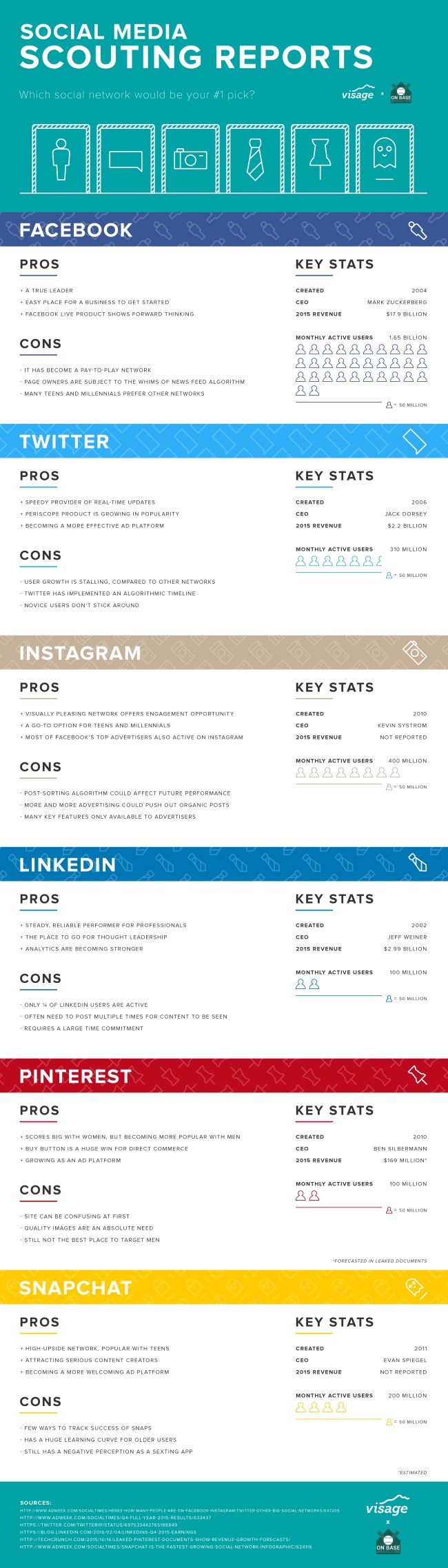
So which is right for you? It all depends on your business, your values, and who your audience is. The infographic below from Visage will walk you through the basic pros and cons of each of the most popular social media sites, along with some key stats about each social network.

Identifying the best social network for you will help you get the most out of your marketing efforts and find the most responsive audience for your brand.

pros-cons-social-networks-infographic

Google Mac Search

Roughly a month after Google announced it would be completely shutting down the Google PageRank Toolbar, the service finally went dark over the weekend.

Now, those who have the PageRank toolbar installed will not be able to see the 1-to-10 rankings of sites they visit, making the toolbar officially useless. The move also cuts data from any third-party toolbar that tries to retrieve a PageRank score.

Of course, if you’ve been using the PageRank toolbar recently, you have been working from outdated data. Google hasn’t updated the public PageRank scores in years, so it makes sense to finally shut it down for good.

It must be noted that PageRank isn’t completely gone. It just isn’t available to the public anymore. Google will keep using the PageRank algorithm internally to help evaluate websites.

For more about the legacy of PageRank and the PageRank toolbar, I recommend reading Danny Sullivan’s RIP Google PageRank score: A retrospective on how it ruined the web.

GoogleAnalytics.png

Google Analytics is an essential tool for making sure your website is performing as you would like and making improvements to keep growing, whether you are a high-level marketer or a business owner who just launched their site.

If you aren’t familiar with Analytics, however, or the technical jargon that fills your reports, it can be difficult to make sense of the huge amount of information available. That can make it hard for someone new to running a website for their business to make sense of the huge amount of information available in Google Analytics.

Thankfully, you don’t have to depend on analysts, marketers, or your company’s “computer guy”, to understand how your site is performing with Google Analytics. Search Engine Watch has put together an easy-to-understand glossary for all the jargon and confusing labels that you will come across, making it simple for you to know exactly what your reports are saying about your site.

You can see the handy guide from Search Engine Watch here.

Yesterday, we reported that a significant number of websites had been hit with Google penalties over the weekend for “unnatural outbound links.” Since then, Google has clarified that the manual penalties issued this weekend were specifically related to bloggers giving links to websites in exchange for free products or services.

Google had issued a warning a few weeks ago urging bloggers to disclose free product reviews and nofollow links in their blog posts related to these products. Now, they’ve taken action against sites who ignored the warning.

In the warning, Google told bloggers to “nofollow the link, if you decide to link to the company’s site, the company’s social media accounts, an online merchant’s page that sells the product, a review service’s page featuring reviews of the product or the company’s mobile app in an app store.”

As Barry Schwartz reports, John Mueller from Google explained the penalties in several threads on the Google support forums, telling people to look at the warning Google published recently named Best practices for bloggers reviewing free products they receive from companies. In one comment, Mueller went on to say:

In particular, if a post was made because of a free product (or free service, or just paid, etc.), then any links placed there because of that need to have a rel=nofollow attached to them. This includes links to the product itself, any sales pages (such as on Amazon), affiliate links, social media profiles, etc. that are associated with that post. Additionally, I imagine your readers would also appreciate it if those posts were labeled appropriately. It’s fine to keep these kinds of posts up, sometimes there’s a lot of useful information in them! However, the links in those posts specifically need to be modified so that they don’t pass PageRank (by using the rel=nofollow).

Once these links are cleaned up appropriately, feel free to submit a reconsideration request, so that the webspam team can double-check and remove the manual action.

If you are a blogger or company who has participated in an agreement to give free products to reviews, be sure to check your Google Search Console messages to see if you’ve been hit by the latest round of manual penalties.

 google-alerts1

Over the weekend, Google sent out a new wave of penalties, this time smacking down sites for “unnatural outbound links.” The majority of websites are safe from the latest round of manual penalties, but you may be in trouble if you’ve been attempting to manipulate the Google search results.

As Barry Schwartz has noted, this specific penalty appears to be taking the shape of Google deciding not to trust any links on the entire site.

Webmasters who received these penalties were sent emails which read:

If you see this message on the Manual Actions page, it means that Google has detected a pattern of unnatural artificial, deceptive, or manipulative outbound links. Buying links or participating in link schemes in order to manipulate PageRank is a violation of Google’s Webmaster Guidelines.

As a result, Google has applied a manual spam action to the affected portions of your site. Actions that affect your whole site are listed under Site-wide matches. Actions that affect only part of your site and/or some incoming links to your site are listed under Partial matches.

Below, you can also see a copy of the message webmasters are receiving in Google Search Console about these penalties:

google-unnatural-links-outbound-1460374556

To make sure your site is safe, be sure to log into your Google Search Console account and check your all messages box. If you see this notification about an outbound link penalty, you can find out how to fix it and submit a reconsideration request here.