People have been proclaiming that organic reach on Facebook is dead for years, thanks to moves that increasingly prioritize paid ads over regular Page posts. However, now might really be the time to start grieving. Facebook has announced sweeping changes to its News Feed that will make organic Page content even less likely to be seen.

According to Facebook, the change is ostensibly to prioritize the “social” part of their platform by putting posts from friends and family at the top of the News Feed. As this happens, “public content” (or content shared by Pages, rather than individual accounts) will be removed or pushed deeper down the feed.

However, there is a caveat that Page content that “spark conversations” will also be prioritized.

It is unclear exactly how this will be measured or enacted, but it implies that brands or publishers will have a harder time reaching users unless their content regularly receives a large number of comments.

Facebook explains the changes in a blog post, saying:

“Because space in News Feed is limited, showing more posts from friends and family and updates that spark conversation means we’ll show less public content, including videos and other posts from publishers or businesses…Page posts that generate conversation between people will show higher in News Feed. For example, live videos often lead to discussion among viewers on Facebook – in fact, live videos on average get six times as many interactions as regular videos.”

Facebook is largely trying to downplay the impact on businesses or publishers, but Zuckerberg’s own blog post acknowledges that he expects “some measures of engagement will go down” for publishers and small businesses.

Unsurprisingly, this creates more incentive for brands to buy into Facebook’s ad platform to ensure their content actually reaches their audience.

Facebook’s Adam Mosseri recommended several steps small business or brands can take that rely heavily on video content – particularly Facebook Live.

“Page posts that generate conversation between people will show higher in News Feed. For example, live videos often lead to discussion among viewers on Facebook — in fact, live videos on average get six times as many interactions as regular videos. Many creators who post videos on Facebook prompt discussion among their followers, as do posts from celebrities. In Groups, people often interact around public content. Local businesses connect with their communities by posting relevant updates and creating events. And news can help start conversations on important issues.”

These changes and the continually decreasing organic reach across Facebook may make it tempting to try to manipulate or goad users into engaging, but Mosserri says this will get you in even worse trouble.

He says “using engagement-bait to goad people into commenting on posts is not a meaningful interaction, and we will continue to demote these posts in News Feed.”
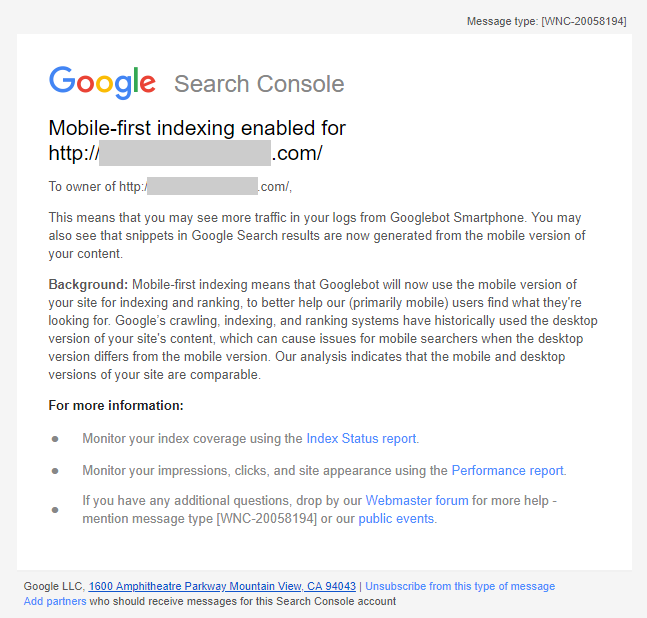
Google is sending emails to webmasters that are being migrated to the search engine’s new mobile-first index. If your site gets indexed, Google will start choosing the mobile version of your site as the default choice – meaning your site is fast enough and optimized for mobile users.

The search engine first said they would start sending notifications to websites being migrated into the mobile-first index, but the emails have only started being actually seen in the wild over the past few days.

The notifications are coming a bit late, considering Google has confirmed that it began moving websites over to the mobile-first index months ago.

You can see a copy of the email as shared by The SEM Post or read the full text below:

”Mobile-first indexing enabled for <URL>

To owner of <URL>

This means that you may see more traffic in your logs from Googlebot Smartphone. You may also see that snippets in Google Search results are now generated from the mobile version of your content.

Background: Mobile-first indexing means that Googlebot will now use the mobile version of your site for indexing and ranking, to better help our (primarily mobile) users find what they’re looking for. Google’s crawling, indexing, and ranking systems have historically used the desktop version of your site’s content, which can cause issues for mobile searchers when the desktop version differs from the mobile version. Our analysis indicates that the mobile and desktop versions of your site are comparable.”

If you operate a website that is frequently creating or changing pages – such as an e-retail or publishing site – you’ve probably noticed it can take Google a while to update the search engine with your new content.

This has led to widespread speculation about just how frequently Google indexes pages and why it seems like some types of websites get indexed more frequently than others.

In a recent Q&A video, Google’s John Mueller took the time to answer this directly. He explains how Google’s indexing bots prioritize specific types of pages that are more “important” and limit excessive stress on servers. But, in typical Google fashion, he isn’t giving away everything.

The question posed was:

“How often does Google re-index a website? It seems like it’s much less often than it used to be. We add or remove pages from our site, and it’s weeks before those changes are reflected in Google Search.”

Mueller starts by explaining that Google takes its time to crawl the entirety of a website, noting that if it were to continuously crawl entire sites in short periods of time it would lead to unnecessary strain on the server. Because of this, Googlebot actually has a limit on the number of pages it can crawl every day.

Instead, Googlebot focuses on pages that should be crawled more frequently like home pages or high-level category pages. These pages will get crawled at least every few days, but it sounds like less-important pages (like maybe blog posts) might take considerably longer to get crawled.

You can watch Mueller’s response below or read the quoted statement underneath.

“Looking at the whole website all at once, or even within a short period of time, can cause a significant load on a website. Googlebot tries to be polite and is limited to a certain number of pages every day. This number is automatically adjusted as we better recognize the limits of a website. Looking at portions of a website means that we have to prioritize how we crawl.

So how does this work? In general, Googlebot tries to crawl important pages more frequently to make sure that most critical pages are covered. Often this will be a websites home page or maybe higher-level category pages. New content is often mentioned and linked from there, so it’s a great place for us to start. We’ll re-crawl these pages frequently, maybe every few days. maybe even much more frequently depending on the website.”

Google Lighthouse SEO Audit Tool

Google has announced a new set of tools for its Chrome Lighthouse developers extension that may finally make the tool relevant for both marketers and business owners

The Lighthouse extension is adding SEO audit metrics that make the tool an easy and fast way to see how Google perceives your website and what needs a tune-up.

The browser plugin already contains audits for things like performance, progressive web apps, accessibility, and Google best practices, but the inclusion of SEO metrics make it an all-in-one way to review your website’s performance.

A small (but revealing) look at your SEO

Of course, Google isn’t giving away everything with their tool. It only contains ten of the estimated hundreds of  ranking factors, which Google seems to view as most-essential for the average webmaster.

“The current list of SEO audits is not an exhaustive list, nor does it make any SEO guarantees for Google websearch or other search engines. The current list of audits was designed to validate and reflect the SEO basics that every site should get right, and provides detailed guidance to developers and SEO practitioners of all skill levels.”

Google notes that they expect to add more metrics in the future.

What is included?

The ten SEO ranking factors measured by Google Chrome’s lighthouse extension are:

  1. Meta Viewport Element
  2. Title Element
  3. Meta Description
  4. Page has successful HTTP status code
  5. Links have descriptive text
  6. Page isn’t blocked from indexing
  7. Document has a valid hreflang
  8. Document has a valid rel=canonical
  9. Document uses legible font sizes
  10. Document avoids browser plugins

Do you need it?

The Lighthouse extension’s SEO audit feature isn’t an elite-level tool that takes hours to learn and understand. It is a quick, brief overview of just a few of your site’s SEO signals that might reveal some of the basic things you’ve been overlooking or neglecting. If you haven’t used it, I strongly recommend giving it a try and checking out your site through Google’s eyes.

Google has been encouraging webmasters to make their sites as fast as possible for years, but now they’re making it an official ranking requirement.

The company announced this week that it will be launching what it is calling the “Speed Update” in July 2018, which will make page speed an official ranking signal for mobile searches.

Google recommends checking your site’s speed using its PageSpeed report, as well as using tools like LightHouse to measure page speed and improve your loading times.

As Google’s Zhiheng Wang and Doantam Phan wrote in the announcement:

The “Speed Update,” as we’re calling it, will only affect pages that deliver the slowest experience to users and will only affect a small percentage of queries. It applies the same standard to all pages, regardless of the technology used to build the page. The intent of the search query is still a very strong signal, so a slow page may still rank highly if it has great, relevant content.

While Google says the update will only affect a “small percentage of queries”, it is impossible to tell exactly how many will be impacted. Google handles billions of queries a day, so a small piece of that could still be a substantial number of searches.

This is the first time page speed will be made a ranking factor for mobile searches, but it has been a ranking factor on desktop since 2010. It makes sense to expand this to mobile since there is a wealth of evidence showing that mobile users prioritize loading time when clicking search results. If a page doesn’t load within three-to-five seconds, they are likely to leave the page and find another relevant search result.

As Google has continuously demoted their organic listings for search results, local SEO has risen in prominence. Instead of aiming for the top search spot, more and more businesses are prioritizing claiming the top place in Google’s local search results – which typically appear before any organic listings.

Of course, getting the top spot in the local results isn’t much easier than typical SEO work. However, it is a bit different. Google prioritizes different search signals to make sure they are delivering the most valuable businesses for your searches.

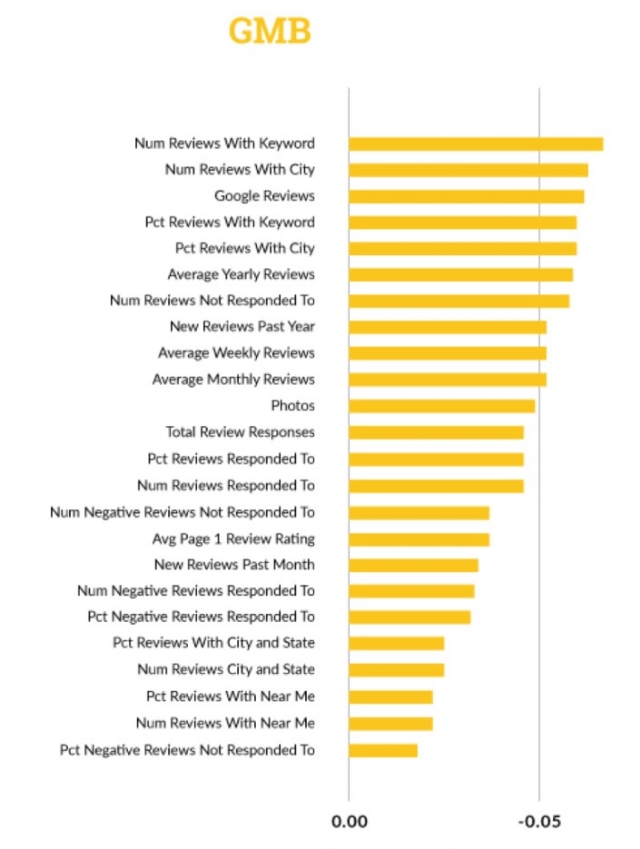
To figure out exactly what search signals matter to Google the most when sorting local results, LocalSEO Guide recently completed an in-depth review of over 200 ranking factors and 100,000 local businesses across 150 cities.

What they found shows that while organic ranking factors like links, keywords, and anchor text are important, rankings reign supreme in local search.

Specifically, “having a keyword you are trying to rank for, and a mention of the city you are working to rank in, in reviews, has a high correlation with high ranking in Google My Business results.”

The findings also indicate that engagement, such as adding photos and hours to your listing, serves as a significant ranking factor. Additionally, “responding to reviews and claiming your profiles are ways to engage with your potential customers and Google’s platform to show then you are invested.”

Elsewhere, the report suggests that traditional SEO factors such as links and on-site optimization still play a significant role in rankings. However, some off-page signals like citations and reviews on third-party sites, are declining in relevance compared to past research.

The full report details more findings and statistics to indicate exactly how those who are crushing local search are doing it. However, it is important to note that these types of studies are based entirely on correlation. We can’t say for sure exactly how Google’s systems rank local results – partially because they won’t tell and partially because they are always changing.

After a few weeks of testing, Google My Business has officially announced that all business owners can now upload videos to their Google My Business listings.

Business owners can “view videos added by customers and upload videos about their business for customers to view,” said Google’s Allyson Wright.

Videos can be up to 30 seconds in length and may take up to 24 hours to become visible on the business listing in Google Maps and local search results.

Because others like Google’s “Local Guides” can also upload videos to business listings, GMB will also soon give businesses the ability to mark offensive or inappropriate videos on their listings.

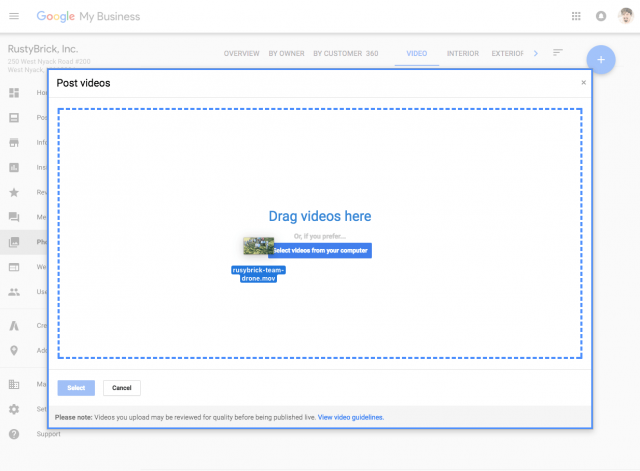
To get started adding videos to your own listings, open your Google My Business Dashboard and click “photos,” followed by the “video” tab at the top of the page. From there, select the option to “Post Videos.”

Just drag and drop your video to the box.

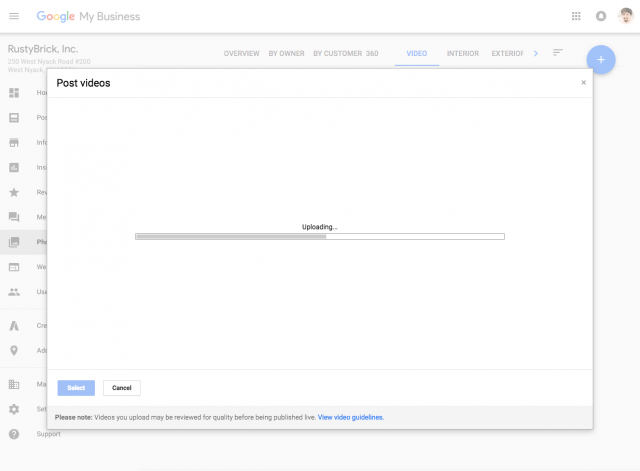
Let it upload.

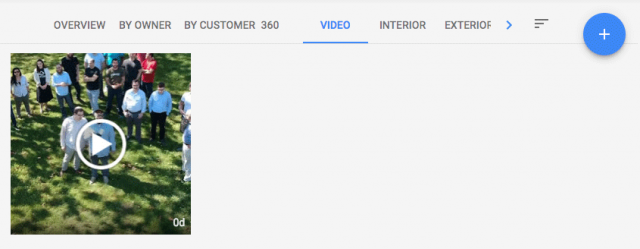
And wait for it to appear. Within about a day, the video should become visible for you and anyone who sees your listing.

Wright also provided these notes about the new feature:

  • Videos will appear in the overview tab of the Google My Business Dashboard.
  • Customer uploaded videos can be found in the “customer” tab.
  • Merchant uploaded videos can be found in the “by owner” tab.
  • All videos can be viewed together in the “videos” tab.
  • After upload, it could take up to 24 hours for the videos to appear. Once live, they will display where local photos do.

Everyone wishes there was a simple recipe to guarantee you’ll rank at the top of the search engines, but Google’s Gary Illyes says there is no such thing. In fact, there isn’t even a consistent top-three ranking factors for all content.

Instead, Illyes explains that the top-ranking factors for web pages vary depending on the query being searched. Going by that thought process, factors like links might be used to verify that something is newsworthy, while page speed, content quality, and keyword usage may be more useful for some types of content.

John Mueller, also a big figure at Google, joined the discussion to suggest that worrying about optimizing for specific ranking factors is “short-term thinking.”

Surprisingly, Illyes takes it even further by saying that links – often viewed as one of the most important signals for a website – are often not a factor in the search results at all. Long-tail search queries, in particular, are likely to pull up content with few to no links.

While this can be discouraging to brands or businesses looking for specific ways to improve their site and rank higher, the overall message is clear. A holistic approach that prioritizes people’s needs and desires is bound to benefit you, while myopically focusing on specific factors is bound to eventually leave you left behind.

As Mueller suggests – if you build something awesome, Google will come.

Your Google My Business listing is one of the best ways to make sure potential customers in your area find your business. The listings provide the information about where your business is, your hours, and what types of products or services you offer, and the listings often appear above any other regular search results.

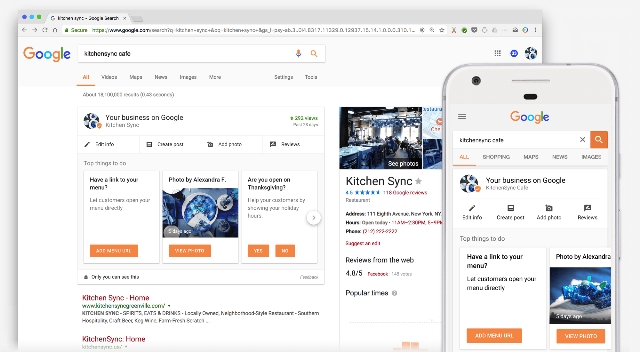
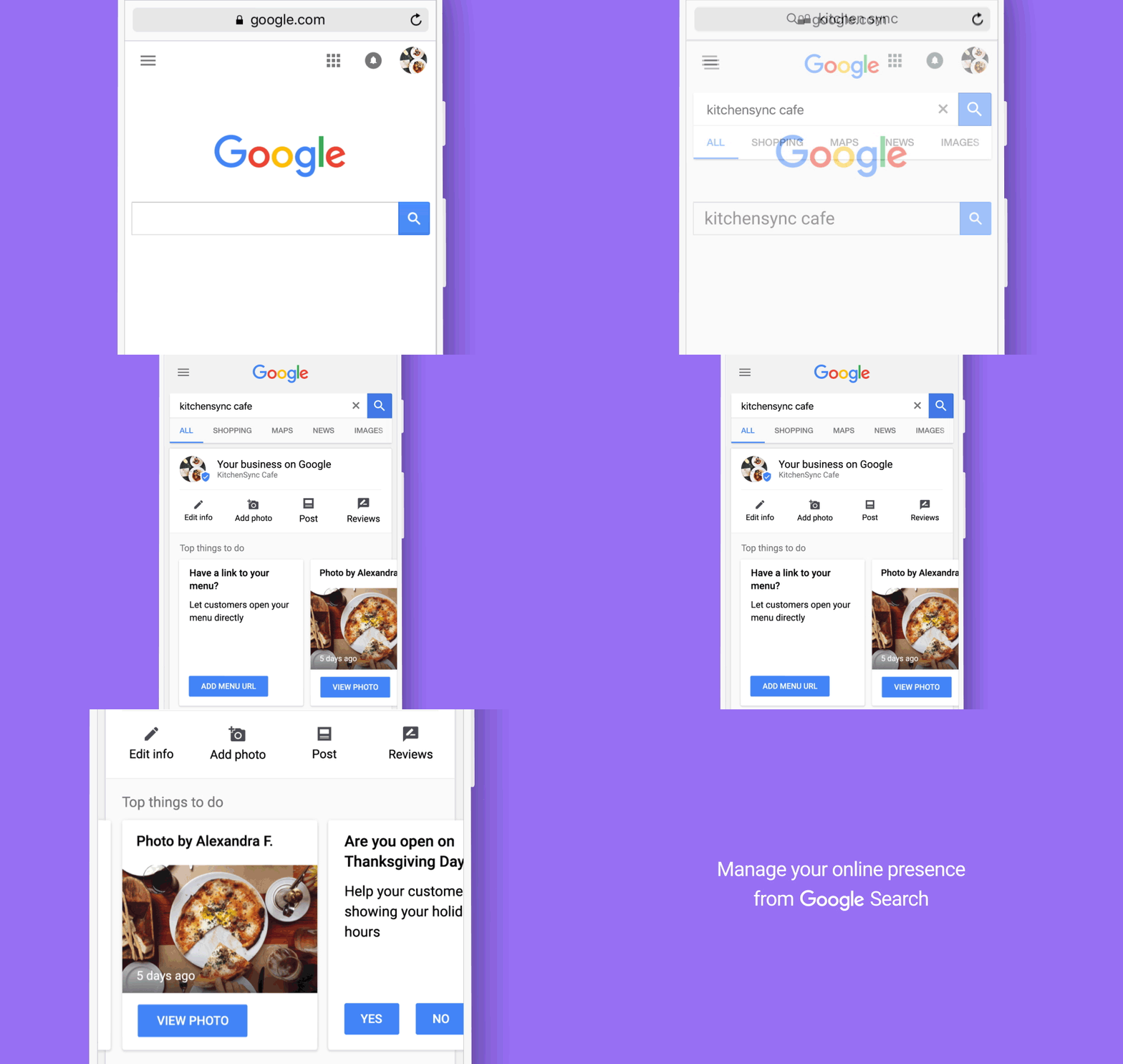
Now, Google is making it easier than ever to maintain and edit your GMB listings by letting you manage them straight from the search results pages.

When you search for your business while logged into the Google account associated with your GMB listing, you will now be shown a new dashboard where you can edit your business information, add new stylish photos, share posts about your business, and even see how many views your listing is receiving.

If you are like the many businesses who have incomplete listings or haven’t updated your business info in years, now is the time to take action. Google highlights a number of reasons that having a thorough and informational listing is important for local businesses in their announcement, including:

  • More than 80% of online searchers use the web to find local information.
  • Businesses with complete listings on Google are twice as likely to gain customer trust, and
    • 38% more likely to attract in-store visits
    • 29% more likely to see a purchase

Google has been testing the waters with putting autoplay videos in search results for a few weeks, and today they made it official. The company announced a less intrusive (and less annoying) version of autoplay videos are being rolled out to search results starting today.

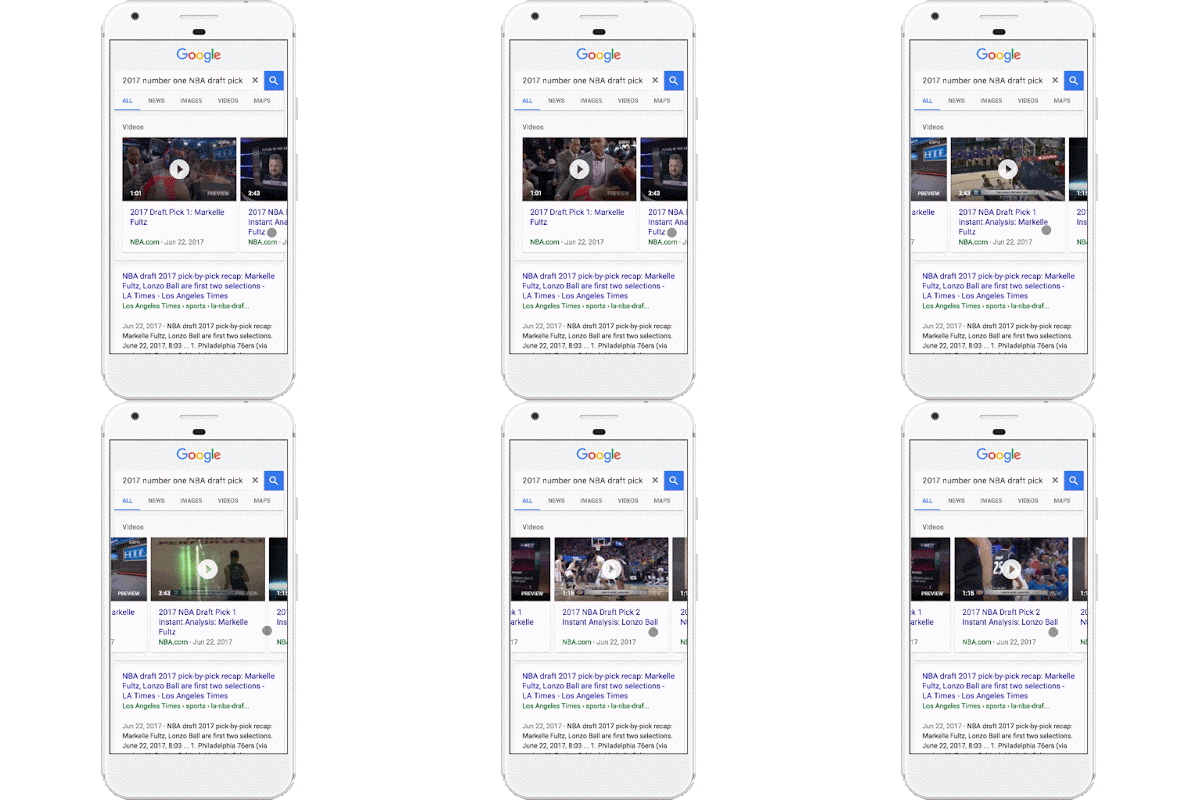
The videos will take the place of the static images that have been shown as a “preview” for video search carousel results, such as when YouTube videos are shown in the results.

You can see what this looks like in action in the GIF below:

As the company explains in the announcement, the autoplay videos will help users get a better idea of what videos contain before they decide to click.

”…you now have access to video previews directly in search results, giving you a better idea of what you’re about to watch before you tap.”

If you’re worried about the new feature eating up your data plans on mobile devices, you can breathe a sigh of relief. The search engine says autoplay video previews will only play when you are connected to wi-fi, unless you decide to enable the feature on mobile networks within the settings menu. You can also completely opt-out of the autoplay videos in the same place.

For now, only some using the Google Search or Chrome apps for Android will be able to see the autoplay videos in their searches. The feature will be rolling out to all of these users over the coming week and is expected to be expanded to other devices and search apps in the future.