Single-page websites have taken over the internet lately. More and more businesses are choosing to streamline their sites to get straight to the point, and newer brands are opting to avoid paying to create a dozen or more pages. The question is whether single-page websites are actually good for you and your brand.

Admittedly, there are a few clear benefits from single-page websites. They tend to work well on mobile devices and load more quickly than a site with numerous pages. Since more than half of all searches are now coming from mobile sources, these can help you ensure people on smartphones don’t have to wait to check out your stuff.

There are also a variety of free tools that can help set-up a stylish one-page site, while designing a full multi-page site can cost thousands of dollars.

However, it’s not all roses and sunshine when it comes to single-page websites. Here are a few things to consider before you decide to go minimalist with a one-page website for your brand:

Lack of info

The biggest problem with single-page websites is simply cramming everything your potential customers want to know all on one page.

On a multiple-page website, you can publish all sorts of content and valuable information that helps your visitors become informed and excited about your products or services. When you cut all that down to one page, you lose a lot of the details that can be a deciding factor in turning someone from a visitor to a customer.

Even with a great layout that includes separate sections for different topics or types of services, it is nearly impossible to include everything your variety of visitors want to find.

SEO limitations

Since you can’t fit in as many types of content or information, it is also hard to target as many keywords or phrases as you have in the past. Sites with lots of pages of content can cover a huge range of keywords related to your business, helping you rank on diverse search pages that might draw in different parts of your audience.

On that note, it can also be hard to keep your site looking “active” since you are only updating it for new products or when you change your business’s phone number. Rather than keeping people up-to-date, single-page websites are typically planned to be “evergreen” and need minimal updating. That may sound nice, but search engines tend to prefer sites that are regularly adding new information and resources – not stagnant sites that are only updated a few times a year at most.

Cost vs. Effect

One of the most common reasons I hear for going single-page is that it is cheaper. You don’t have to hire a web designer to customize numerous pages with unique layouts and images or have a writer fill all those pages with copy and content.

That can all be tantalizing, but as the saying goes: “you get what you pay for.” If you use a free or cheap template for your single-page website, you risk looking bland and forgettable because others are using that exact same layout.

Even if you hire someone to create a great single-page layout, it becomes hard to make your page effective. Strategized approaches get cut to fit within the limited mold, and your copy becomes broad to cover as much as possible as quickly as you can.

All-in-all, single-pages require a ton of work to be anywhere as effective as a traditional website. You have to fight an uphill battle to optimize your site for search engines and hope your content is so insanely precise that you aren’t missing any details your customers want. So, if you are choosing a one-page site for its low-cost, you should realize it will cost you one-way or the other down the road.

The final verdict

As with any trend, it can be hard to resist the urge to be up-to-date and hip. But, trends are fleeting because they often aren’t fully thought through. There will always be a small number of brands who benefit from going to a single-page site, but most discover it’s not as great or easy as they thought it would be.
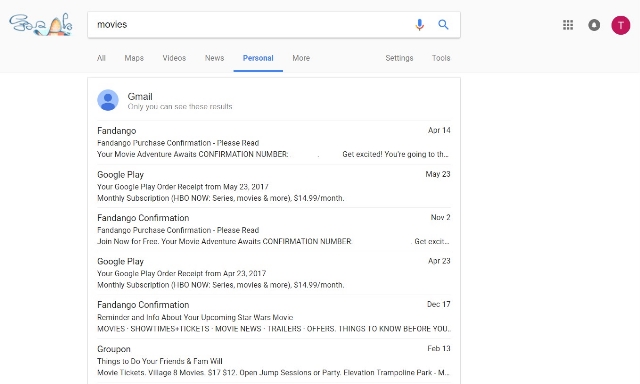
Google’s decision to constantly make their search results more personalized for every user has often been criticized for veering into the “invasion of privacy” area from time to time. Its latest experiment takes that to the extreme, with a whole new tab devoted just to you.

The search engine now allows you to filter search results for your personal information collected from Google’s apps, including Gmail, Photos, and Calendar.

The new experiment can be found for most users by clicking “More” on the search results page, which will drop down a list of search options. Click “Personal” and you’ll find only information directly related to yourself, such as events you have in your calendar or recent emails.

Most of this isn’t too eye-raising. It could even be useful in the right circumstances. Where it starts to get weird is when you search for pictures. The personal search feature finds photos that are not necessarily on the device you’re using. It also finds pictures based on the content, even when you haven’t labeled the picture.

To give you an example, I’ve taken a lot of photos of my cat on my phone. I’ve never labeled any of them as being of my cat or shared them to my computer. But, when I search “cat” within the results, I am shown my collection of pictures of my cat Magnitude.

Like this picture

The tool can also be used to find photos of people you know on your phone, as Kevin Murnane reports for Forbes.

Unsurprisingly, the “Personal” search results tab also includes ads at the bottom of the page. Reports vary between one and three ads on any personal page.

Since it is just an experiment, there is no telling whether the feature is around to stay. It first appeared a few days ago, but went offline for a period before reappearing today. It has only been spotted on Chrome for desktop devices, but it could be rolled out to other devices at some point. It could also be removed entirely, if people respond negatively to having Google snooping through their emails.

Guest posting has become a staple of online marketing. It allows you to get those coveted links that will help you rank higher on search engines AND spread your message to a wider audience. Plus, it makes you look like a bigger authority in your field.

Unfortunately, when there is something that good, people will always try to take advantage of it. There has been a rise recently in the sites using guest posts to spread spammy links or cheat their way to higher rankings. It has become such a problem, Google had to issue a staunch warning to anyone trying to misuse guest posts.

As Google explains:

Google does not discourage these types of articles in the cases when they inform users, educate another site’s audience or bring awareness to your cause or company. However, what does violate Google’s guidelines on link schemes is when the main intent is to build links in a large-scale way back to the author’s site.

The search giant does specify a few factors you should be wary of when guest posting:

  • Stuffing keyword-rich links to your site in your articles.
  • Having the articles published across many different sites; alternatively, having a large number of articles on a few large, different sites.
  • Using or hiring article writers that aren’t knowledgeable about the topics they’re writing on.
  • Using the same or similar content across these articles; alternatively, duplicating the full content of articles found on your own site (in which case use of rel=”canonical”, in addition to rel=”nofollow”, is advised).

Basically, if you are doing guest posting in good faith, you probably aren’t in danger. You have to go out of the way to start using spammy practices or pumping out low-quality content. However, if you are breaking any of these rules you put yourself at risk of being punished and losing your high rankings.

Conversely, if you are being harassed by a spammy content creator to publish bad content, Google says you can submit a complaint via the spam report form.

Online marketing can be a scary world sometimes. You invest time and money on building up your brand and improving your online visibility, but it can all come crashing down overnight. It’s terrifying to think of, but it is the reality of the internet – everything is always changing.

While there is no 100% guaranteed way to protect your brand from this risk, you can take a few steps to help you sleep easier and feel assured you won’t wake up to a marketing nightmare. As long as you cover these bases, you’ll be safe from the most common disasters that befall brands online.

Don’t let your domain get snatched up

Website domains are kind of a funny thing. They are the foundation you build all your online marketing efforts on. But, once you have it set it is incredibly easy to forget. It’s one of those things that seems like it should last forever.

But, of course, that’s not the case. If you aren’t keeping an eye on things, it can be easy to one day wake up and discover your domain registration has expired. That alone can be enough to make for a stressful morning, but in some cases you may find you have lost your domain entirely.

Having your domain snatched up when it lapses is shockingly common and can happen to businesses of any size. Even huge brands and public figures like the Dallas Cowboys and Microsoft have dropped the ball and had to pay huge amounts to regain control of their domains.

Thankfully, most registrars now offer services to help you maintain control of your domain. Some allow for auto-renewal, while others offer text message warnings before your domain expires. In the case of GoDaddy, the service keeps your domain safe for almost 20 days after it expires so that you can get them back.

Watch your rankings (properly)

I know more than a few business owners who maintain the same ritual. Every few days, they will pull up the browser of choice and check their ranking for a few specific keywords. So long as they remain fairly high on the first page, they stay happy.

If that sounds like you, I have some bad news. The search results you see aren’t necessarily what others are seeing and you may have been sliding down the page for everyone else all this time.

Online marketing disaster

Every major search engine does some form of customizing search results for individual users based on a variety of factors. This can include demographic data, location information, and search behaviors. So, if you’re regularly visiting your website or searching from inside the office, you’re pretty much guaranteed to be high-up when you search for your company.

Instead, get a real look at how you are performing by using an analytics service. There are a number of free services available, but I always recommend Google Analytics as a starting point. The learning curve can feel steep, but once you’ve got the hang of it, you can quickly find everything you want to know about your site’s performance.

Take control of your reputation

Stop me if you’ve heard this one before: A small business is gaining steam and popularity. Suddenly it all comes screeching to a halt, as your internet traffic dries up and your website stops converting. The culprit? A single bad review in the right place.

It is perhaps the scariest campfire story you can tell a business owner. Sites like Yelp have become notorious for destroying local businesses who handled a negative review the wrong way.

In some cases, the business owners just try to ignore the bad review while it festers and drives away any interested customers. Unfortunately, ignoring the problem doesn’t make it go away. In even worse situations, a business owner can let their emotions get to them and lash out at the reviewer – a move pretty much guaranteed to make you go viral for reasons you don’t want.

Neither of these is the right approach, and both can cause you headaches for a long time to come.

Thankfully, there is a right way to make sure your online reputation remains stellar no matter how scathing of a review you get from a disgruntled customer – address it head on every time. Rather than letting it get to you, keep an even head and treat every customer how you’d like to be treated. You’d be shocked to see just how many angry customers can be flipped into brand advocates so long as they feel their voice is heard.

The most important thing here is to be sure to watch all the major places people are likely to be talking about your business and be able to respond appropriately. This includes Yelp, Twitter, and Facebook. Check at least once a day to make sure you haven’t gotten any new reviews that need your attention. While you’re at it, it also never hurts to take the time to show your thanks to any positive reviews or mentions you’ve received as well.

How long does your website take to load? If it takes more than three seconds, you’re likely losing more than half of your visitors.

It is no secret that everyone wants everything as fast as possible. That is especially true on the web. The faster your page loads, the more people will stick around and the happier they will be with their experience.

What you might not know, is that your site speed can directly affect your conversions and sales.

Data from Kissmetrics shows that up to 79% of customers who aren’t satisfied with your site’s performance say they are less likely to buy from the same site again. Taking that a step further, many first-time customers may leave before they ever get a chance to see what you have to offer in the first place.

Web Development agency Skilled collected 12 case studies from real businesses in an infographic showing just how powerful page load time really is. If you’ve ever doubted the importance of keeping your site optimized to be as fast as possible, you’ll likely be a believer after seeing these:

Page Speed

Google Logo

With Google’s extensive personalization of search results for users, it has gotten harder and harder to tell when a major shakeup happens thanks to changes to Google’s algorithms. That hasn’t stopped people from guessing a major algorithm shift has occurred when they notice significant changes to how sites are performing across the board.

This happened last week when many major authorities in SEO speculated Google unleashed a major algorithm update. Of course, Google won’t confirm that any major changes happened, but Webmaster Trends Analyst for Google, John Mueller, did take the time to remind everyone “we make changes almost every day.”

Google’s Gary Illyes took the stance even further, tweeting “we have 3 updates in a day average. I think it’s pretty safe to assume there was one recently…”

The truth is, the days of the major Google algorithms like Penguin and Panda upending the search world overnight are largely over. Instead, Google has shifted to a model of constant evolution, tweaking and changing things perpetually.

When there is a new important algorithm, such as recent mobile-friendliness algorithms, the company tends to warn businesses ahead of time. Even then, these recent algorithm updates have been benign, only affecting a small number of websites.

The best plan isn’t to be on constant watch for unannounced shifts, and react. Instead, take a proactive stance by making sure your site follows all of Google’s latest best practices and provides value to searchers. If you do that, you should make it through any changes Google throws at you any time soon.

Google has officially begun rolling out the intrusive mobile interstitial penalty yesterday after months of warnings the penalty would be launched on January 10, 2017.

The roll-out was confirmed by both John Mueller and Gary Illyes yesterday.

The penalty is specifically designed to target intrusive interstitials that pop-up immediately after landing on a page from a Google mobile search result. However, it does not affect pages with delayed interstitials triggered by a click or action on the website.

Google specifies this means “pages where content is not easily accessible to a user on the transition from the mobile search results may not rank as highly.”

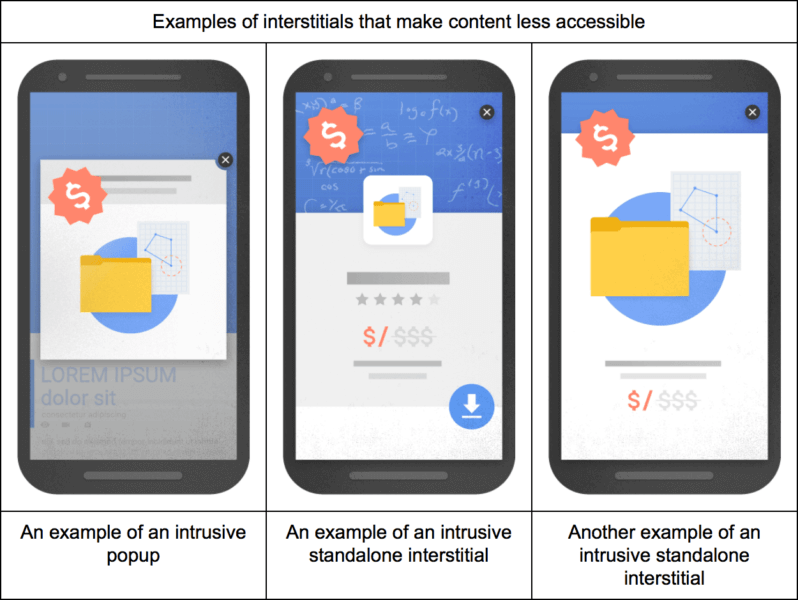
Google also detailed three specific types of interstitials it deems as problematic:

google-mobile-interstitials-penalty-bad-798x600

  • showing a popup that covers the main content, either immediately after the user navigates to a page from the search results or while they are looking through the page.
  • displaying a standalone interstitial that the user has to dismiss before accessing the main content.
  • using a layout where the above-the-fold portion of the page appears similar to a standalone interstitial, but the original content has been inlined underneath the fold.

The company also detailed three types of interstitials that would not be affected by the penalty, so long as they are “used responsibly”:

google-mobile-interstitials-penalty-good-798x600

  • Interstitials that appear to be in response to a legal obligation, such as for cookie usage or for age verification.
  • Login dialogs on sites where content is not publicly indexable. For example, this would include private content such as email or unindexable content that is behind a paywall.
  • Banners that use a reasonable amount of screen space and are easily dismissible. The app install banners provided by Safari and Chrome are examples of banners that use a reasonable amount of screen space.

Negative SEO alert

There’s a new malicious SEO tactic making the rounds and your Google My Business listings could easily be the victim, according to web security company Sucuri. The company says individuals are sneaking inappropriate or damaging photos into GMB listings with the intent of damaging a business’s reputation and image.

What makes this type of exploit unique, however, is that it doesn’t take any hacking skills to do. Unlike other negative SEO tactics, this specific technique does not include hosting images on a client server, malicious code, or even breaking into an account.

Ultimately, the attack is taking advantage of Google’s lax rules for uploading photos to a business’s location in Google Maps. Anyone can upload images to a business’s listing, and any of these images can be used for Knowledge Graph data about the business.

While Sucuri doesn’t have evidence of this, it is possible for a person to spam a business’s listing with lewd images and then send fake hits to them to increase their perceived popularity – all with the end goal of making sure they come up when people see your business online.

How to Protect Your Listings

Unfortunately, the nature of this type of attack makes it difficult to guard against. There is no way to limit who can upload photos to your listings or determine which image gets used in Knowledge Graphs. The best you can really do is to actively keep an eye on your listings and which photos are appearing next to your listings.

You can also watch to make sure no one is uploading inappropriate pictures to your Google My Business photos. While you can’t stop people from uploading lewd images, you can easily remove any associated with your location.

google-mobile

Google is making a huge change to their search engine that could have huge implications for the future of search.

Until now, Google has maintained a single search index, which cataloged the entire web for Google’s algorithm to sort through. However, that will be changing soon as Google’s Gary Illyes announced the search engine would be releasing a separate mobile search index.

The new mobile index will become Google’s “primary” index that it uses to deliver the majority of search results. At the same time, the company will continue to maintain a separate desktop search index which will be slightly less up-to-date.

The announcement came last week during a keynote address at Pubcon from Gary Illyes, webmaster trend analyst with Google. While Illyes later confirmed to Search Engine Land the rollout of the new index would be coming within “months,” he was otherwise short on details of how the mobile index will work.

It is also unclear in which circumstances Google will use which search index or just how behind the desktop index is. What is clear is that Google sees mobile as the future of search despite still seeing significant desktop usage.

Most likely, the new index means Google will be switching from a system which selectively pulls information from the single index for mobile results to a new system which uses the separate index for queries coming from mobile devices.

More information is likely to come in the near future, but for now, all we know is Google is gearing up for big changes to further prioritize mobile searchers.

Source: Robert Scoble / Flickr

Source: Robert Scoble / Flickr

Were you punished by Google’s Penguin algorithm? If you have, there is a good chance you’ve been waiting a year or longer to recover after taking all the necessary steps to have your site reconsidered.

Thankfully, as part of the latest update to Penguin, you won’t have to wait much longer to see if you’ve bounced back. Google’s Gary Illyes confirmed, via Twitter, that Penguin recoveries have already begun rolling out and will be finished within the coming days.

This means that sites that were penalized should start to show improvements within the next week. What it doesn’t mean, however, is that you can expect to return to your same former glory in the search engines.

Removing the penalty still leaves you without the bad links likely driving much of your high ranking, so you can’t expect them to help boost you back up to high spots in the search results. On the other hand, if you’ve taken the time while you’ve been penalized to build new, better links and further optimize your site, you may come out ahead once all the recoveries are finished rolling out.