Tag Archive for: Google

If you’re a business owner who has decided to get serious about your company’s online presence and marketing, you’ve almost certainly heard about search engine optimization. Unfortunately to the uninitiated, SEO can seem impenetrable with its endless technical jargon and conflicting opinions from experts about exactly how to get the best online visibility. It can feel a lot like jumping in the deep end without learning how to swim first.

Search Engine Optimization doesn’t have to seem so intimidating however. There may be a lot to learn before you are an expert, but with just a few basic ideas you can drastically improve your business’s online profile.

This infographic from SEOHalt will help guide you through the basics of SEO and give you the vocabulary you need to really get an understanding of what search engine optimization is and how it affects online marketing efforts. Once you’ve got these ideas under your wing, you’ll be ready to dive into the deeper waters of SEO without having to worry you’ll drown.

 SEOBasics

 Emojis

It was fun while it lasted, but Google has followed through on their promise to remove emojis from titles in search results.

In April, Expedia became the first major brand to start experimenting using emojis in search results titles. For example, a search listing for beach rentals may have included a wave emoji on Expedia listings.

It wasn’t long until many other major brands followed suit, but Google ultimately decided the trend was not something they wanted to promote. During a Google Hangout in early May, John Mueller, a webmaster trends analyst for Google, announced the search giant would be removing the emojis.

True to Mueller’s word, emojis disappeared from search results early this morning, as first noticed by Jennifer Slegg at The SEM Post.

Notably, Google has only seemed to remove the emojis from titles. Norwegian Airlines, known for creating the very first emoji URL, appears to be unaffected.

While the hearts, waves, and smiley faces are gone from Google, emojis are still currently appearing in Bing searches. Microsoft’s search engine started showing emojis in title tags shortly after they began appearing in Google, but there’s no word if they intend to follow Google in phasing them out now.

It might not be a surprise to learn that Amazon dominates the search engine results pages, but you might be surprised by just how much they lead all other major brands.

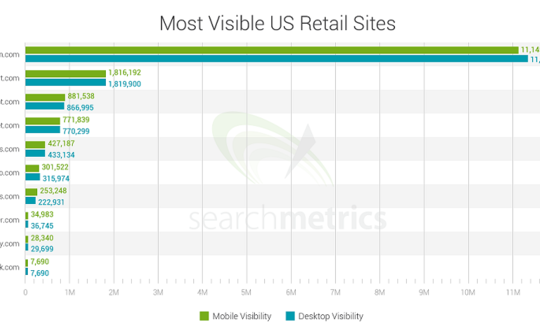
A recent performance study of 10 leading U.S. brands published by SearchMetrics makes it clear that Amazon has by far the most visibility across Google’s search results on both desktop and mobile.

searchmetrics-amazon-walmart-mobile-search-bar-chart-540x334

In the study, SearchMetrics used the top 10 retail sites listed in the National Retail Federation’s list of top 100 retailers and parsed the search results of millions of Google search terms to establish a mobile visibility score along with a desktop visibility score.

To calculate the visibility score, the study evaluated the number of times a brand appears across a keyword set, the brand’s rankings within those search engine results pages, competitiveness of keywords, and the click through rate of those results pages.

Even compared to other major competitors, Amazon is an absolute giant. With the staggering rating of 11,145,359, the online retail company dwarfs Walmart, its closest competitor with a score of 1,816,192.  Following Walmart were The Home Depot with 881,538, and Target.com, with a score of 771,839.

The focus of the study was mobile search, as it is most often the first touch point to purchase. However, the analysis also showed the rankings remain the same on desktop.

 Google-My-Business-Logo

If you run a local business and haven’t logged into Google My Business in a while you may be at risk of having Google unverify your listings, according to a statement from a Google representative today.

In a post on the Google and Your Business Help Forum, Google’s Jade Wang confirmed the news that the company has been contacting some Google My Business users that it considers to be inactive:

In some cases, we may contact Google My Business users via email to confirm that they are still actively managing a business page. If a user is unresponsive to our attempts to contact him or her and has not logged into Google My Business for a significant length of time, then we may unverify pages in the account. We’re doing this in order to continue to provide users with the best experience when they’re looking for local businesses like yours. If you find that a page in your account has been incorrectly unverified, please contact support to get assistance restoring verification.

The news was first brought to light by Brian Barwig of Integrated Digital Marketing, who posted a message today about a phone conversation he had with a Google support rep who told him that this may happen to accounts which are considered inactive for six months.

Mike Blumenthal has also shared the text of the email Google sends out to warn inactive accounts about being potentially unverified.

To help prevent this, Wang included some advice: “It’s a good idea to keep an eye on the inbox associated with your Google My Business (Locations) account. It’s also a good idea to regularly log into Google My Business (Locations) to confirm that your business information is current and accurate.”

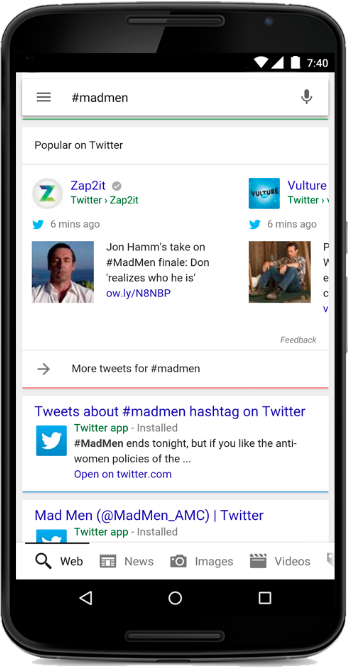
Earlier this year Google and Twitter announced a deal which promise to bring more tweets to your search results, and that promise is coming true today. Google now includes tweets in a more cohesive and graphical format on mobile devices, including a tweet carousel.

Both Twitter and Google announced the news in blog posts today, including examples of how the feature appears, such as the example below which shows how it looks if you search on #madmen.

madmen2

You can also scroll through the carousel to see more results.

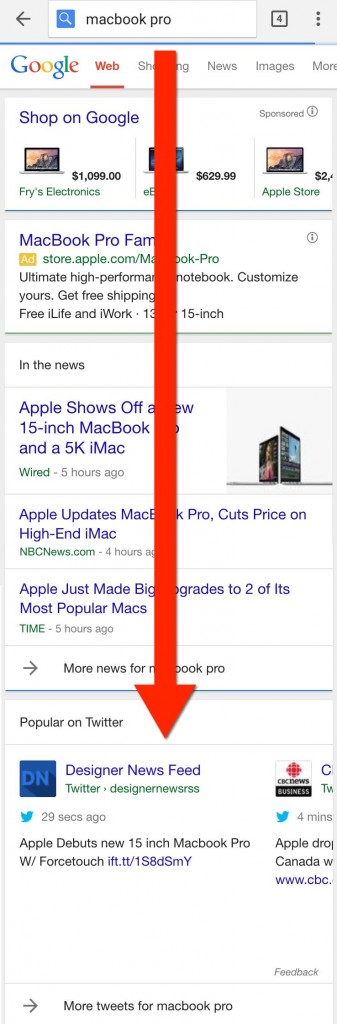
The placement of the feature isn’t always directly at the top of the page. According to Search Engine Land, the tweet carousel can appear in the middle or even the bottom of the page, as their example for “MacBook Pro” shows:

macbook-tweets1

Tweets don’t show for every search, and it is currently unclear exactly what types of searches include tweet carousels and which don’t. However, Google does say:

It’s a great way to get real-time info when something is happening. And it’s another way for organizations and people on Twitter to reach a global audience at the most relevant moments.

That suggests searches for hastags, topics, prominent figures, or trending events are most likely to include tweets.

Google has included Twitter in its search results in the past, even after their last deal ended. The new agreement simply allows for much deeper integration in the search results.

Currently, the new implementation on the search results is limited to only users in the US, in English, using either their browser in iOS or Android, or on the Google Search App. Twitter has promised further support for desktop and more languages in the near future.

Google Delivery

Google is partnering with six delivery providers across the US to establish a new service that will deliver food to your home, straight from the search results.

“Whether you’re craving deep dish pizza or pad thai, starting today you can order food from some of your favorite restaurants directly from Google search results.”

Thanks to the new service, US residents can simply type in what they want to eat, select the restaurant of their choice, then click “Place an order” without ever leaving the search engine.

From there, simply place your order, choose your preferred delivery service, and complete your order from the website.

Google’s partners in this venture currently include the following companies:

  • Seamless
  • GrubHub
  • Eat24
  • Delivery.com
  • BeyondMenu
  • MyPizza.com


The search engine will potentially add more delivery providers in the future as it expands this service.

In line with this new addition, Google is also allowing users to book appointments and make reservations directly from the SERPs.

Local businesses should be especially interested in the service as there is no complicated opt-in. Just go to your Google My Business dashboard and ensure the feature is turned on.

According to a Google help center article, links to place an order or book an appointment will appear automatically for eligible businesses.

Mobilegeddon

Mobilegeddon

In less than 24 hours, we will all be living in a post-“Mobilegeddon” world. That means Google’s mobile friendly update will start rolling out tomorrow after months and months of rumors and hints. Normally Google doesn’t announce upcoming algorithm changes ahead of time – perhaps because it creates a panic – however this time the company gave webmasters plenty of time to make sure they are prepared.

Basically, the mobile friendly algorithm aims to make sure users who are searching with smartphones are only shown sites that are properly optimized for mobile devices.

Given that Google has been heavily implying this day would come for over a year, it is slightly surprising to see the number of panicked webmasters. Google has given brands every opportunity to ensure their sites are up to snuff, but Zineb Ait Bahaiji of Google’s Webmaster Trends team confirmed the algorithm will have the largest impact of any of Google’s recent algorithms.

Google’s Penguin and Panda algorithms are infamous for their impact on search results pages, but Bahaiji told the crowd at SMX Munich that the mobile algorithm would absolutely affect more than either animal-themed algorithms.

Panda affected 12% of search queries when it was released, while Penguin impacted 3.1% of queries.

If you are concerned your site isn’t prepared for the oncoming “Mobilegeddon”, check out our previous coverage to see what you need to do to appease the search engine’s new algorithm. You can also check to see your site’s status by using Google’s mobile friendly testing tool.

Google is constantly making changes – both big and small – and the latest changes will affect how your site appears in the search results.

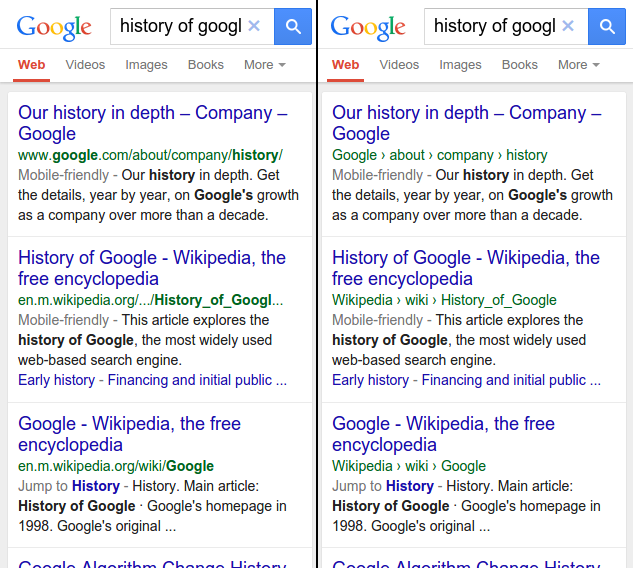
Yesterday Google announced it would be altering how URLs are shown on mobile search results. Well, altering isn’t the right word. More accurately, Google is completely removing URLs in favor of the “real world” name of the site.

Instead of showing the simple URL, the search engine will display the site’s location in a breadcrumbs-like format, as shown below:

domain_replacement_before

As Google explains in their announcement, the change intends to make searching easier for users.

“To help mobile searchers understand your website better when we show it in the mobile search results, today we’re updating the algorithms that display URLs in the search results to better reflect the names of websites…”

The new style will be rolled out gradually and are exclusive to mobile search results. For now, the change will only be affecting the US, but will likely come to other countries in the near future.

If you want to keep control of how your site name is shown, there is a simple structured data markup set you can use.

Just use this structured data markup to tell Google’s algorithms exactly how you want your website name displayed.

Google’s upcoming mobile-friendly algorithm has webmasters panicking as the deadline fast approaches. As always, when there is fear there is also plenty of misinformation.

In particular, there is one myth going around which is stirring up quite a bit of trouble.

Google has attempted to be clear that their new mobile algorithm will demote pages that don’t pass a mobile-friendliness test when they might appear in mobile search results pages. Unfortunately, that is being misconstrued.

gtxcelpoopoo-1429100580

As Barry Schwartz shared, emails are going around proclaiming Google will be completely removing sites from search results if they don’t live up to the mobile standard. Not demoted, but completely de-listed and removed from Google.

The rumor was noticed when Ashley Berman Hale, an active personality in the Google Webmaster Help Channels, posted an email she recently received with the title “Google Removing Your Site From Search Results This Month!”

The copy of the email then goes on to say, “Did you know Google will demote or delist you from their search results if you don’t have a mobile friendly site by April 21st?”

Now, the mobile algorithm on the horizon is certainly controversial among webmasters, but there is no need to be spreading outright lies. Google’s initial announcement of the algorithm was relatively vague, but they have been working hard to make sure webmasters’ questions were getting answered. It also didn’t take long for many of the experts from Google to chime in and clear the air.

Google’s Gary Illyes posted a response on Twitter:

Google’s John Mueller also posted a short statement on Google+ to make matters perfectly clear:

It’s great to get people motivated to make their website mobile-friendly, but we’re not going to be removing sites from search just because they’re not mobile-friendly. You can test your pages & reach our documentation (including some simple tweaks that might work for your CMS too) at http://g.co/mobilefriendly

Hopefully this settles the matter once and for all. Google’s algorithm WILL demote your site on mobile search results, but it WILL NOT affect you on desktop search results or completely remove you from the listings.

You would think the sky is falling given how webmasters and online marketing experts are responding to Google’s huge upcoming mobile algorithm. Sites are tossing around all manner of terrifying nicknames such as the mobilepocalypse, mobilegeddon, mobocalypse, or mopocalypse to stir up fear and panic, but the truth is the upcoming update shouldn’t be all that scary for you.

If your site serves mobile users and you care at all about your customers, you should already have made efforts to make your site mobile-friendly. While a big ranking drop seems frightening, the truth is that mobile users are probably already avoiding your site. Don’t think of the upcoming change as being forced to change your site to please search engines. Thank of it as improving your site for mobile users.

Countless sites are talking about the “mobilepocalypse” as if the world is ending, but I’ve already covered the simple set of steps you need to take to check that your site is ready for the mobile update. If you aren’t passing Google’s mobile test, this infographic from Nine Hertz will walk you through what needs to be done before the 21st.

 Mobilepocalypse