Tag Archive for: Google

Source: Robert Scoble / Flickr

Image Source: Robert Scoble / Flickr

Early this year, Google took advantage of the US Presidential election to test a new feature allowing candidates to publish messages straight to the front page of search results. Then, in March, the company expanded this test to include a tiny number of small businesses.

Now, Google is widening their tests yet again – increasing from “tens” of small business to “thousands”. Even more, the company is taking the feature international with tests in Brazil and India, as Google confirmed to Mike Blumenthal this week.

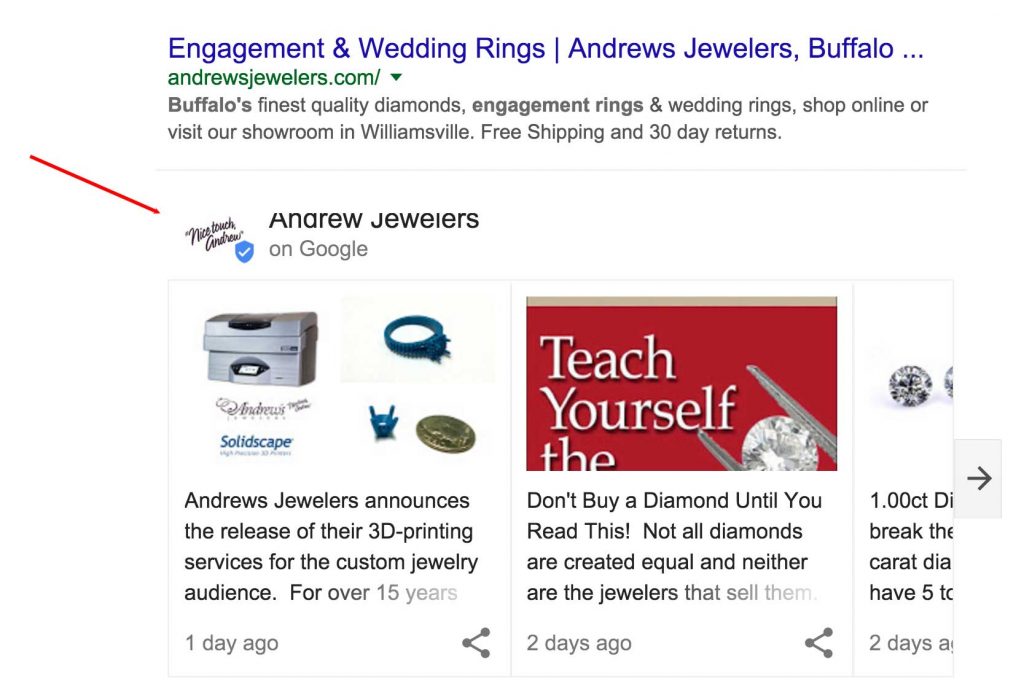
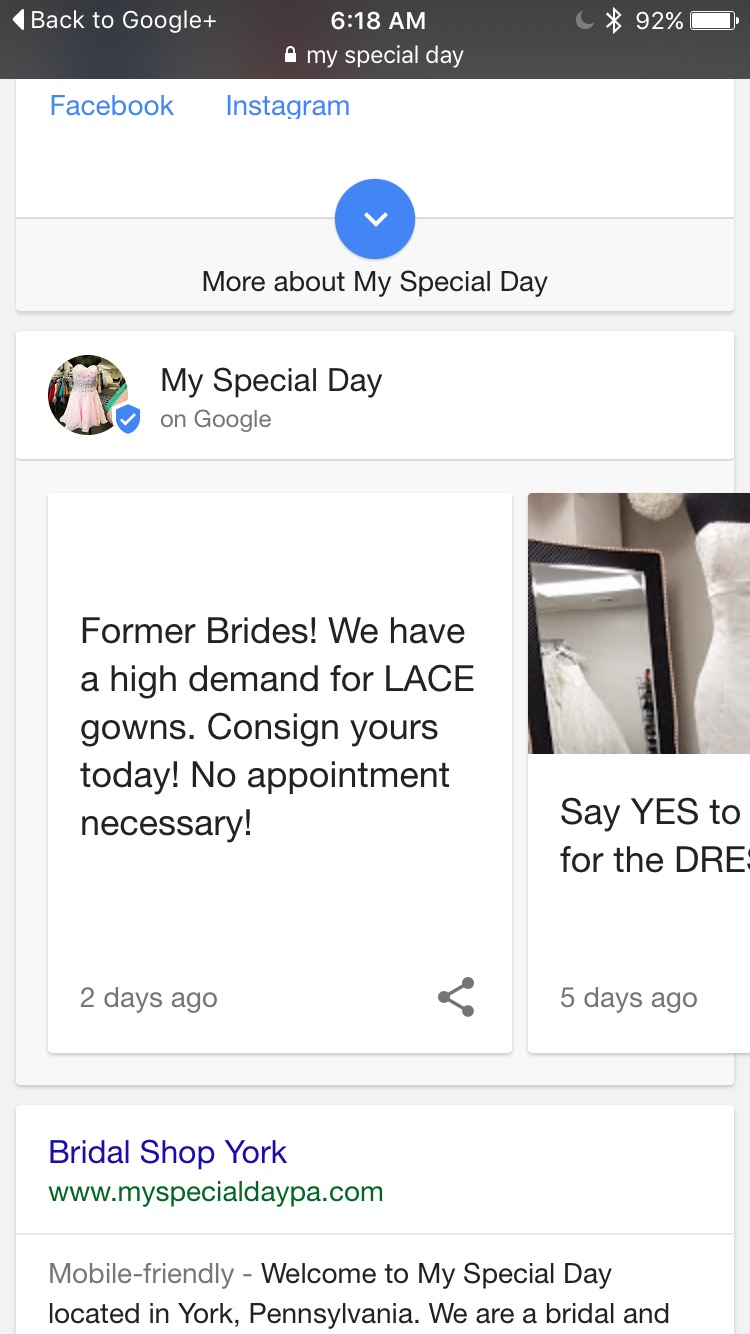
Google hasn’t announced the name of the new feature, but Blumenthal has already captured a few screenshots of these messages in search results – as you can see below:

Image Source: Mike Blumenthal

Image Source: Mike Blumenthal

The feature allows small businesses to create cards with short messages that appear on the front page of search results pages similarly to AMP articles or social media cards.

It appears that the cards show up specifically on searches for an exact business’s name. The cards can also include text, links, pictures, and even videos. Reports indicate businesses given access to the test can use a dedicated app to post content, but the public will have to wait to see.

img_1806

Image Source: Joy Hawkins

According to Blumenthal, you can expect to see more of these cards showing up in search results over the next 30 days as Google finishes rolling out the test to businesses.

Google Mobile

Since the launch of Accelerated Mobile Pages, Google has indexed over 150 million AMP pages from over 650 thousand unique domains. You probably wouldn’t know that from looking at the search results, though. Instead, searchers have only been shown the small number of AMP pages featured in the “Top Stories” carousel on some search results.

AmpBlueLinksDemo_v3_garciarobert-1

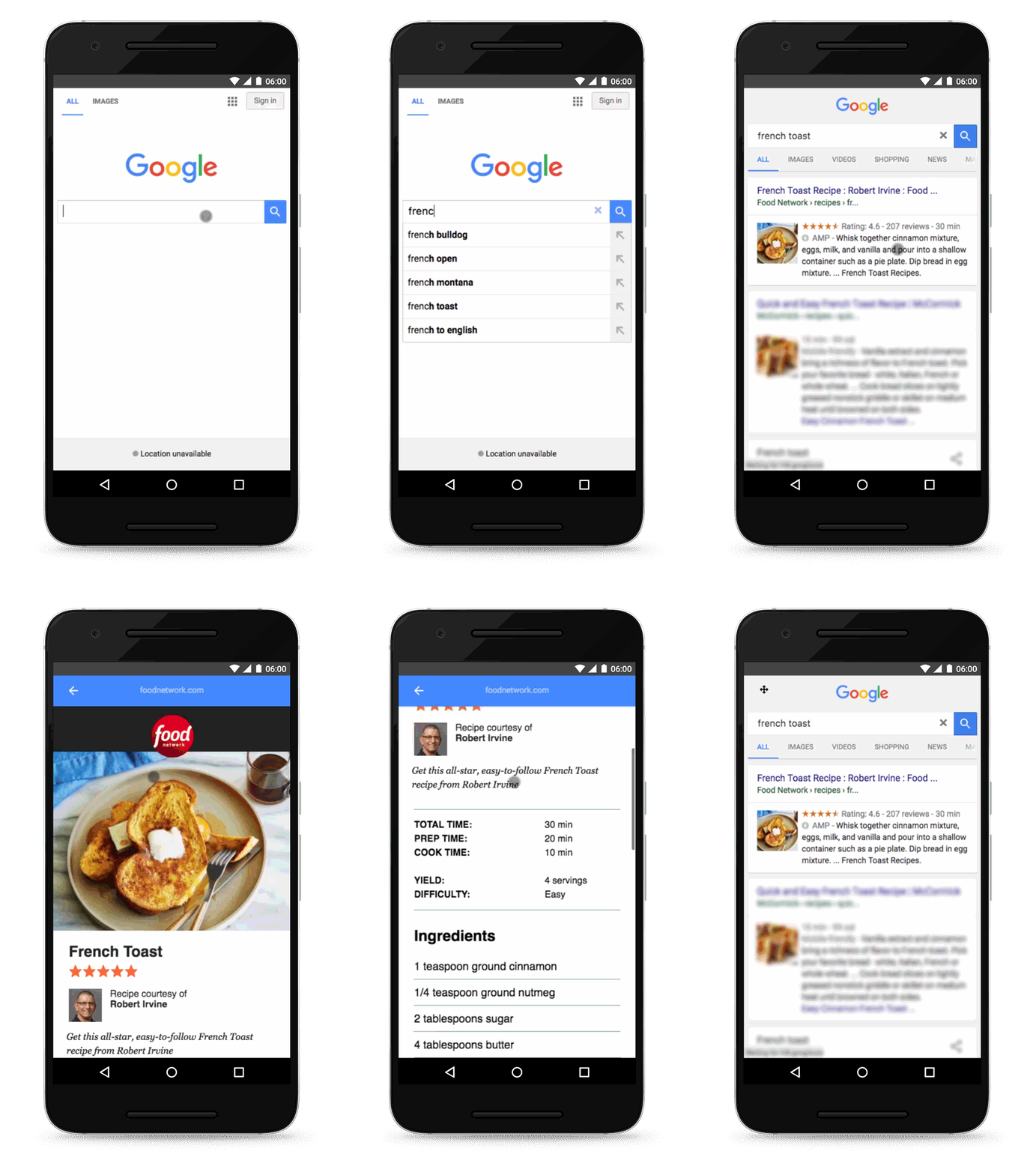
That is starting to change. Google is giving a preview of search results with considerably more Accelerated Mobile Pages in the organic search results. The pages are still marked with their usual blue lightning bolt, but now they aren’t restricted to carousels.

You can see for yourself what the expanded AMP support looks like in Google’s demo showing what their search pages will look like as AMP pages become more common in search results in the near future.

Google makes it clear the inclusion of AMP pages in organic search results doesn’t mean they are implementing an algorithmic change to how they rank sites. Ranking will work as it has been, but with these faster pages included in the possible results.

The change makes AMP pages considerably more attractive to a number of new markets, including e-commerce. For example, Disney, Genius, and Reddit have all used AMP pages, but they were unlikely to ever be found through search because they were not likely to be included in the “Top Stories” carousel.

shopping-carts

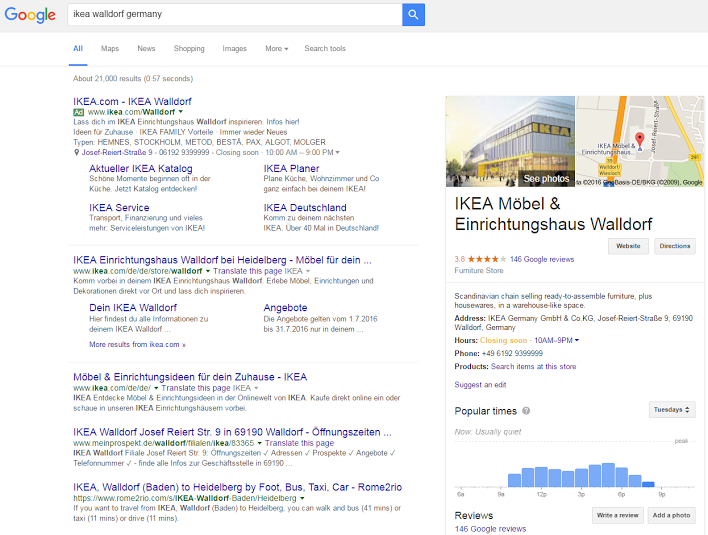
Google is rolling out a new update to its Local Inventory Ads that let allows searchers to browse in-stock products when they search for a business. That means if a users searchers for your business, they could browse your inventory straight from Google.

So far, the new features are limited to a small number of retailers, such as Macy’s and Ikea. However, it is expected to continue spreading to businesses of all sizes in the coming months.

The update is not a surprise, as Google announced the expanded features utilizing their its Knowledge Graph and Google Maps back in May. However, it was first spotted this week by Nicolai Helling who captured a few screenshots of what it looks like out in the wild.

shopping-google-my-business-web-EN

With the new features, you’ll see a new line in the Knowledge Panel underneath your NAP (name, address, phone number) information which says: “Search items at this store”. You can also find this in Google Maps underneath the store’s hours.

If a user clicks on this, they’ll be taken to a page hosted by Google where you can refine exactly what item you are looking for. If they select a specific product, they will then be directed to a dedicated page product information as well as information about where to purchase the product online or in store.

To use the feature as it rolls out, you will need to be signed up for Google’s Local Inventory Ads program and be running ads with your products and inventory information.

HTTPS

It has now been two years since Google announced it would be making HTTPS a minor ranking signal, and a recent study from Moz shows just how many sites have made the switch since then.

After Google’s announcement, there was an initial surge in sites changing from HTTP to HTTPS, but many held back to assess just how important the security protocol was to the search engine and ultimately decided it wasn’t worth the risk. Google only considers HTTPS a minor factor in their ranking algorithm and there has been concern about potential risks when making the switch.

To check up how far along the transition is, Dr. Pete Meyer from Moz compiled data to see just how close is Google is to changing the web over to HTTPS.

Before Google started including HTTPS in its algorithm, Meyer says only around 7% of all pages featured on the first page of Google search results used the more secure protocol. A week after the switch that number had climbed to 8%. Since then, the number has steadily been rising, reaching over 30% this year.

Moz reports that “as of late June, our tracking data shows that 32.5% (almost one-third of page-1 Google results now use the “https:” protocol.”

However, Meyer says he is not convinced everyone that has made the switch was motivated by algorithms and ranking signals. Instead, he believes it is a sign that Google’s PR campaign to make HTTPS more attractive and desirable for sites is working.

Meyer also says that in another 1 to 1.5 years we are likely to see 50% of the sites shown on the first page of search results to use HTTPS, which he predicts will lead Google to strengthen the ranking signal.

Ultimately, many are still hesitant about changing their entire site’s HTML structure to HTTPS and the risks that come along with site-wide changes like this. However, Dr. Meyers says it is wise to keep an eye on how many sites in your industry are using the protocol and to be watchful for any upcoming algorithm updates that may make HTTPS even more prominent in search results.

GoogleAdWords

As more people are searching for businesses from a variety of devices like smartphones and tablets, it is important that businesses provide a diverse number of ways to get in touch. Now Google is testing a new AdWords extension that will allow users to contact advertisers in an entirely new way.

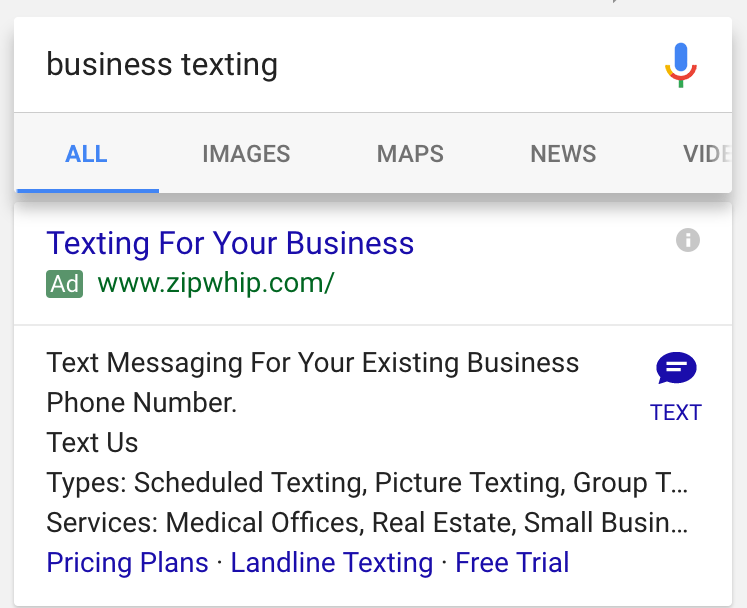
In the past, Google has used ad extensions to make it easy for searchers to call businesses they were interested in. With the latest ad format, you can now text or SMS advertisers directly from their ad.

Here is an example of how the ad format looks:

TextAdExtension

By clicking the text icon, you will be taken to your default messaging app, where a prefilled text message is started with the advertiser’s information. For example, if you click the icon in the results above, the pre-filled text message reads, “[Zipwip] I’m interested to learn more about Zipwhip.”

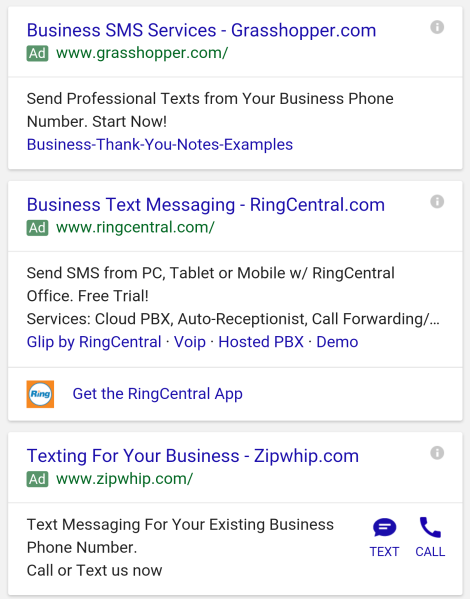
Judging by other results like the one below, the text ad extension can be combined with ad call buttons to provide a variety of ways to contact your business.

TextAdExtension2

Barry Schwarz was the first to report this new ad format. When he reached out to Google for more information, he was provided with this statement:

We’re always experimenting with new ways to connect our advertisers to customers but don’t have further details to share at this time.

Google Logo

While loading speed is a crucial issue for most mobile internet users, Google’s “Mobile-Friendly Algorithm” isn’t currently using it as a ranking factor for mobile pages. However, that is likely to change when Google releases their next mobile-friendly update.

According to reports from the recent Search Marketing Summit in Sydney this week, Google Webmaster Trends Analyst Gary Illyes confirmed Google would be including page speed as a factor in the next mobile update. But, it may be months until that update arrives.

The inclusion of page speed seems like common sense. The majority of mobile users are likely to leave a page if it doesn’t load within five seconds, and some are even more impatient. From Google’s perspective, including page speed as a factor means they are more likely to help users find a site they will be happy with on the first click as often as possible.

It also makes sense considering Google introduced their version of Accelerated Mobile Pages recently.

Want to know how your site stacks up in terms of page speed or other mobile friendly factors? Google has also released updated versions of their mobile-friendliness and page speed tests for both desktop and mobile in one place.

The new tool, available here, combines all the free site evaluation tools Google offers in one easy-to-read report. You can also get a more extensive report emailed to you for deeper analysis.

google-animation-01-2016

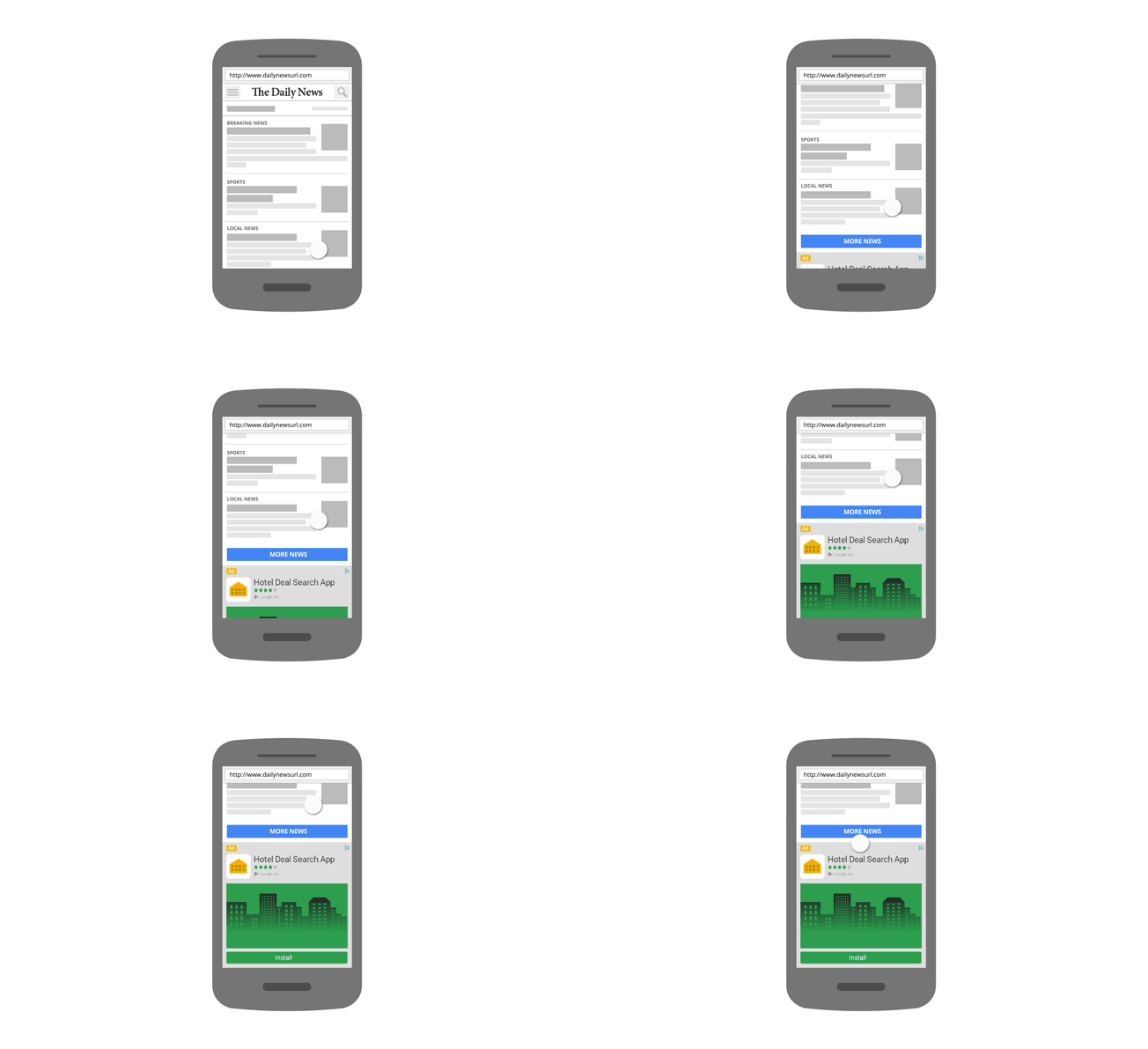
If you own a smartphone, chances are you know the frustration of accidentally tapping on an ad you had no interest in when you were trying to scroll down a page. These accidental taps aren’t just annoying to users, either. Advertisers hate these mobile clicks because they wind up paying for clicks from users who had no intention of converting.

Now, Google is stepping in to improve their mobile ad performance and user experience by altering how their ads operate on mobile devices.

Of course, Google has been trying to fight back against accidental mobile clicks for a considerable time now, but its recent announcement extends their initiative to its native ad formats. Before, their efforts were limited to just search and display ads. The search giant says they are stepping up their efforts because accidental clicks and taps are bad for everyone. Beyond simply being an inconvenience for advertisers and users, Google says accidental taps also drive down the value of ads.

“When we look at the effect for advertisers in mobile apps, we observe double the value per click,” Google said in a blog post. “We work hard to ensure that the clicks advertisers are charged for are more meaningful, and we hope sharing insight on these protections helps raise awareness and guide the wider advertising ecosystem.”

The changes being rolled out to native ads prevents accidental clicks in a few ways. First, Google ignores any clicks that are unusually fast, comparing itself to a professional baseball player having 680 milliseconds to tell whether they should swing at a pitch.

“That’s fast, even for a professional who’s paying close attention to hitting the ball,” Google said. “We think it’s virtually impossible for someone to read, understand, and take action on an ad in that amount of time.”

Additionally, Google says it will ignore when a user likely accidentally taps on an ad by excluding clicks on the edge of an ad. According to the search engine, clicks on the middle of an ad are associated with “dramatically higher” conservation rates and show much higher intentionality than those on the edge of ads.

banner-1000935_640

Google is continuing its efforts to combat online display advertising fraud, with new defenses against a scam technique known as clickjacking.

If you’ve ever tried to press play on a video, open a link, or start a song and wound up on another page unexpectedly, clickjacking is most likely the culprit.

This is done by overlaying an essentially transparent layer over a legitimate web page. This way everything looks normal, but as soon as you try to take any form of action you trigger a behavior on the transparent overlay. The action may be used to trigger one-click orders from Amazon, take you to malware-laden sites, gain Facebook or Twitter likes, commit ad fraud, or any number of malicious behavior.

To fight back against this, Google is removing publishers engaged in clickjacking from its network entirely. The company has also developed a new filter specifically to exclude invalid traffic on display ads from clickjacked pages on both mobile and desktop.

In a blog post about the new efforts to fight clickjacking, Andres Ferrate, Chief Advocate of Ad Traffic Quality at Google, explained:

When our system detects a Clickjacking attempt, we zero-in on the traffic attributed to that placement, and remove it from upcoming payment reports to ensure that advertisers are not charged for those clicks.

Yesterday, we reported that a significant number of websites had been hit with Google penalties over the weekend for “unnatural outbound links.” Since then, Google has clarified that the manual penalties issued this weekend were specifically related to bloggers giving links to websites in exchange for free products or services.

Google had issued a warning a few weeks ago urging bloggers to disclose free product reviews and nofollow links in their blog posts related to these products. Now, they’ve taken action against sites who ignored the warning.

In the warning, Google told bloggers to “nofollow the link, if you decide to link to the company’s site, the company’s social media accounts, an online merchant’s page that sells the product, a review service’s page featuring reviews of the product or the company’s mobile app in an app store.”

As Barry Schwartz reports, John Mueller from Google explained the penalties in several threads on the Google support forums, telling people to look at the warning Google published recently named Best practices for bloggers reviewing free products they receive from companies. In one comment, Mueller went on to say:

In particular, if a post was made because of a free product (or free service, or just paid, etc.), then any links placed there because of that need to have a rel=nofollow attached to them. This includes links to the product itself, any sales pages (such as on Amazon), affiliate links, social media profiles, etc. that are associated with that post. Additionally, I imagine your readers would also appreciate it if those posts were labeled appropriately. It’s fine to keep these kinds of posts up, sometimes there’s a lot of useful information in them! However, the links in those posts specifically need to be modified so that they don’t pass PageRank (by using the rel=nofollow).

Once these links are cleaned up appropriately, feel free to submit a reconsideration request, so that the webspam team can double-check and remove the manual action.

If you are a blogger or company who has participated in an agreement to give free products to reviews, be sure to check your Google Search Console messages to see if you’ve been hit by the latest round of manual penalties.

Google Authorship

In a move that should please many online businesses, Google is making it easier to leave reviews on the platform. Finally, users can leave reviews without a Google+ account.

To clarify, while you don’t need a Google+ account, you do still need a regular old Google account. The change was first spotted by Conrad O’Connell from Serptests.com.

The difference seems small, but in this case, semantics is everything. By not requiring a Google+ account, Google is opening the door to a considerable number of reviews. Considering review counts and overall rating are top ranking signals for local search, this also means it will be easier to improve your local rankings with reviews.

This doesn’t mean you will have to do with an enormous amount of anonymous or troll reviews either. The first and last name of the reviewer will still be shown, so you shouldn’t have to worry about being flooded with one-star reviews by nameless accounts.

At the same time, Google also fixed a well-known bug which would keep reviews from being submitted from a mobile device for businesses without another pre-existing review.

Reputation is everything for local businesses, and these changes make it easier than ever for your customers to spread the gospel of your quality service or products.