Tag Archive for: Google

Last month, Google told the world it would be shuttering its Google Trusted Stores program, its long-standing ratings and certification program. Well the time has come, as the program said farewell this week. In its place, Google has launched “Google Customer Reviews” – a new ratings program that aims to be more accurate and valuable to consumers.

Customer Reviews vs. Google Reviews

The launch of the new program has brought some confusion, as Google now has two separate ratings systems.

The classic ratings system allows users to leave reviews and ratings on any business’s listing. These “Google Reviews” are then aggregated into the search results. While the system mostly works, there is one big issue – literally anyone can leave a review, whether they’ve been to your business or not.

With “Customer Reviews”, Google is aiming to make reviews more accurate and reliable by only allowing those who have legitimately made a purchase from the business’s website. That means no trolls bringing down your rankings, but the new program really only works for online retailers.
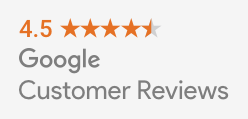
image01

After you’ve collected some reviews, you can highlight your high rankings on your site with a customizable badge.

Notably missing from the program is the customer protection aspect of the Trusted Stores program. Online businesses will have to turn to other certification programs to help prove they are a legitimate and reputable business.

How To Join Google Customer Reviews

Businesses that were already participating in the Trusted Stores program have been automatically migrated over to the new program.

If you’re an online merchant who isn’t already participating in the program, follow these four steps:

  1. Sign into or sign up for a Google Merchant Center account.
  2. Select “Merchant Center programs” from the dropdown menu in the upper-right corner.
  3. Click “Get Started” within the Google Customer Reviews card and accept the Program Agreement.
  4. Add the survey opt-in code to your site.

Once you’ve gotten all set up, you can put the badge code for displaying your seller rating anywhere you want on your website.

google-my-business-1

Have you ever given a marketing company control of your Google My Business accounts and listings so they can help manage your local marketing? Have you ever tried to get your account bad after you decided to part ways?

It has been notoriously difficult and time-consuming to regain ownership of your Google My Business listings in the past, but Google has launched a new feature to streamline the process.

If you’ve been unable to reclaim your listings, you can now start the verification process to prove you are the rightful owner or representative for your listings with just a few steps:

  • Go to Google My Business.
  • Log in with the Google account you use to manage your business.
  • Enter the business name or address and select your business from the search results.
    • There is a chance you may see text showing part of the email address that originally verified the listing. If you control this email address, you can sign into that account to access your business listing.
  • Complete and submit the form.
  • Google will contact the current owner of the listing asking them to contact you. In the meantime, you will receive a confirmation email with a link to check the status of your request.
  • Allow seven days for the current owner of the listing to respond to the request. If they do not respond within a week, you will be able to verify your affiliation with the business and regain control of the corresponding listings.

As part of its #NoHacked campaign to raise awareness and prevent site hacking, Google released its latest annual review of hacked sites this week. As the data shows, site hacks will continue to be a major issue for webmasters for the foreseeable future.

From 2015 to 2016, the number of hacked sites grew by 32%. According to Google, hackers are becoming more aggressive but many webmasters are also letting down their guards. Instead of proactively keeping their site and security up to date, a significant number of webmasters are letting their sites become vulnerable and outdated. These sites are easy targets for hackers.

While the number of sites getting hacked is on the rise, Google is willing to show forgiveness to those affected. The company says it approved 84% of reconsiderations requests from webmasters who have cleaned up their site from any hacking. However, Google also says it was unable to inform over half (61%) of affected site owners because their sites were not verified in Search Console.

What To Do If Your Site Has Been Hacked

In addition to the report, Google has also released several new documents aimed at educating webmasters about what to do if your site gets hacked and how to protect yourself.

These new help documents recently released by Google include:

The company has also released help documents focused on specific types of common site hacks, such as Gibberish Hacks, Japanese Keyword Hacks, and Cloaked Keywords Hacks.

How To Prevent Site Hacks

As always, an ounce of prevention is worth a pound of cure. Google’s top recommendation for facing the epidemic of site hacking is to avoid letting it happen in the first place. Specifically, they suggest keeping all software and plug-ins on your site up-to-date and keeping an eye on any announcements from your Content Management System (CMS) provider.

Also, be sure your site is verified in Search Console so Google can notify you in the event your website does get hacked.

Google Logo

With Google’s extensive personalization of search results for users, it has gotten harder and harder to tell when a major shakeup happens thanks to changes to Google’s algorithms. That hasn’t stopped people from guessing a major algorithm shift has occurred when they notice significant changes to how sites are performing across the board.

This happened last week when many major authorities in SEO speculated Google unleashed a major algorithm update. Of course, Google won’t confirm that any major changes happened, but Webmaster Trends Analyst for Google, John Mueller, did take the time to remind everyone “we make changes almost every day.”

Google’s Gary Illyes took the stance even further, tweeting “we have 3 updates in a day average. I think it’s pretty safe to assume there was one recently…”

The truth is, the days of the major Google algorithms like Penguin and Panda upending the search world overnight are largely over. Instead, Google has shifted to a model of constant evolution, tweaking and changing things perpetually.

When there is a new important algorithm, such as recent mobile-friendliness algorithms, the company tends to warn businesses ahead of time. Even then, these recent algorithm updates have been benign, only affecting a small number of websites.

The best plan isn’t to be on constant watch for unannounced shifts, and react. Instead, take a proactive stance by making sure your site follows all of Google’s latest best practices and provides value to searchers. If you do that, you should make it through any changes Google throws at you any time soon.

Google Logo

Do you have an on-site search engine to help visitors find the products and content they want? Do you rely on Google’s Site Search service for your search engine? If so, you should begin making plans for a replacement.

Google has confirmed it will be shutting down the Google Site Search product and discontinuing support by the fourth quarter of 2017.

Google Site Search powered internal search engines with Google’s own search technology, charging users based on monthly query volume for the product.

The paid site search product wasn’t Google’s only on-site search product. The company is directing consumers using the company to use either the ad-powered free custom search engine or cloud search product.

In a statement to Search Engine Land, a Google spokesperson said:

We are winding down the Google Site Search product over the next year, but will provide customer and technical support through the duration of license agreements. For GSS users whose contract expires between April 1st and June 30th, 2017, we are providing a free 3-month extension with additional query volume to allow more time for them to implement the necessary changes to their site. GSS customers may also take advantage of our Custom Search Engine solution, an ads-supported model that offers similar functionality. We continue to build out new functionality and invest in new technology that make enterprise search a great experience for our customers. Just recently, we introduced the general availability of Google Cloud Search for G Suite customers.

Giving your visitors a place to comment on content or in a forum on your site is a great way to encourage interaction and build a bond with potential customers. But, it can be a headache trying to keep any sort of open comment area clean from spammers, trolls, and other sorts of nogoodniks.

This creates two different problems. If visitors see your pages and blog posts are followed by nothing but spam and other types of website vandalism, they’re likely to think less of your brand and potentially move on to someone else. Additionally, you can even get penalized by search engines like Google if it detects an abundance of spam or malicious links or code on your site.

So what can you do to keep your forums and blog comments clean of those seeking to use the opportunity for their own ends without shutting it all down? Google recently offered a few tips to make sure the only comments and posts your visitors see are from real humans interested in building a valuable discussion around your brand and products:

  • Keep your forum software updated and patched. Take the time to keep your software up-to-date and pay special attention to important security updates. Spammers take advantage of security issues in older versions of blogs, bulletin boards, and other content management systems.
  • Add a CAPTCHA. CAPTCHAs require users to confirm that they are not robots in order to prove they’re a human being and not an automated script. One way to do this is to use a service like reCAPTCHA, Securimage and  Jcaptcha .
  • Block suspicious behavior. Many forums allow you to set time limits between posts, and you can often find plugins to look for excessive traffic from individual IP addresses or proxies and other activity more common to bots than human beings. For example, phpBB, Simple Machines, myBB, and many other forum platforms enable such configurations.
  • Check your forum’s top posters on a daily basis. If a user joined recently and has an excessive amount of posts, then you probably should review their profile and make sure that their posts and threads are not spammy.
  • Consider disabling some types of comments. For example, It’s a good practice to close some very old forum threads that are unlikely to get legitimate replies.
  • If you plan on not monitoring your forum going forward and users are no longer interacting with it, turning off posting completely may prevent spammers from abusing it.
  • Make good use of moderation capabilities. Consider enabling features in moderation that require users to have a certain reputation before links can be posted or where comments with links require moderation.
  • If possible, change your settings so that you disallow anonymous posting and make posts from new users require approval before they’re publicly visible.
  • Moderators, together with your friends/colleagues and some other trusted users can help you review and approve posts while spreading the workload. Keep an eye on your forum’s new users by looking on their posts and activities on your forum.
  • Consider blacklisting obviously spammy terms. Block obviously inappropriate comments with a blacklist of spammy terms (e.g. Illegal streaming or pharma related terms) . Add inappropriate and off-topic terms that are only used by spammers, learn from the spam posts that you often see on your forum or other forums. Built-in features or plugins can delete or mark comments as spam for you.
  • Use the “nofollow” attribute for links in the comment field. This will deter spammers from targeting your site. By default, many blogging sites (such as Blogger) automatically add this attribute to any posted comments.
  • Use automated systems to defend your site.  Comprehensive systems like Akismet, which has plugins for many blogs and forum systems are easy to install and do most of the work for you.

Google+ is dead. Long live Google+.

Google announced it is retiring the “classic” Google+ we all know and replacing it with an all-new updated version with several big updates. The company says it is aiming to please users with several of the most heavily requested updates from the Google+ community.

”With this latest round of updates, we believe the new Google+ is really your Google+— designed around your suggestions, requests and needs. It also means it’s time to say goodbye to classic Google+ on the web, which we’ll be turning down on January 24.”

Here are a few of the things you can expect when the “new” Google+ launches on January 24:

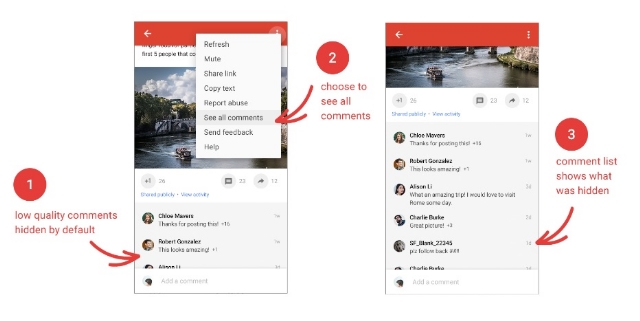
Hide Low-Quality Comments

Google+Comments

Google+ will begin to automatically bury low-quality comments that its algorithms deem non-conductive to conversation. It’s hard to know how exactly the function will work, but you can opt to leave the “low-quality comments” visible to everyone if you desire.

Putting Content First

Google+Images1

Google+ is aiming to trim the fat with its new update by reducing the amount of wasted space on the screen. Instead, it aims to put the focus on content with more images that you can even zoom in on.

Events Make Their Return

Events disappeared from Google+ some time ago, but the ability to create and join events is coming back. However, the company says it still needs to refine Events based on user experience, so expect it to be a work in progress when it launches.

“And Much More”

While Google is relaunching Google+ on the 24th, they say their work is far from over. “Our aim is to make Google+ the best place to connect around the things you care about,” the company says. Google is encouraging users to give their feedback and help shape the new Google+ as it takes shape in the future.

Google has officially begun rolling out the intrusive mobile interstitial penalty yesterday after months of warnings the penalty would be launched on January 10, 2017.

The roll-out was confirmed by both John Mueller and Gary Illyes yesterday.

The penalty is specifically designed to target intrusive interstitials that pop-up immediately after landing on a page from a Google mobile search result. However, it does not affect pages with delayed interstitials triggered by a click or action on the website.

Google specifies this means “pages where content is not easily accessible to a user on the transition from the mobile search results may not rank as highly.”

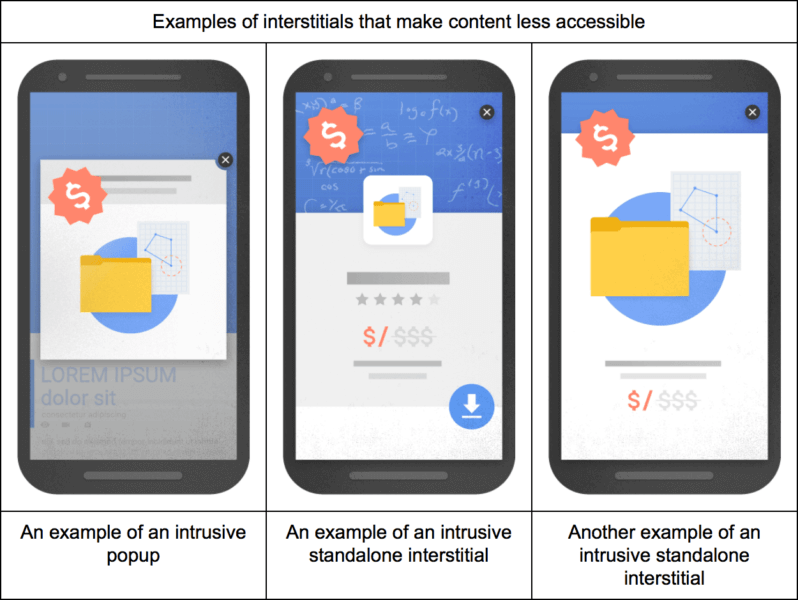
Google also detailed three specific types of interstitials it deems as problematic:

google-mobile-interstitials-penalty-bad-798x600

  • showing a popup that covers the main content, either immediately after the user navigates to a page from the search results or while they are looking through the page.
  • displaying a standalone interstitial that the user has to dismiss before accessing the main content.
  • using a layout where the above-the-fold portion of the page appears similar to a standalone interstitial, but the original content has been inlined underneath the fold.

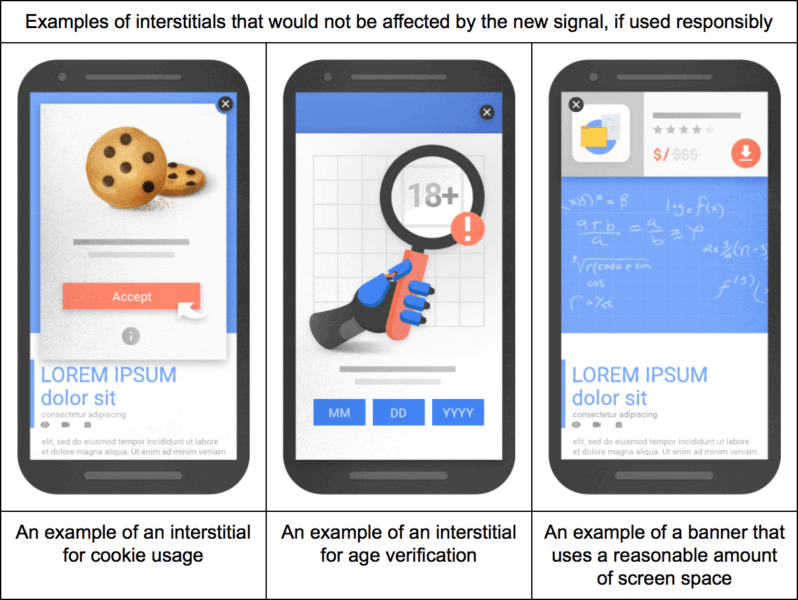
The company also detailed three types of interstitials that would not be affected by the penalty, so long as they are “used responsibly”:

google-mobile-interstitials-penalty-good-798x600

  • Interstitials that appear to be in response to a legal obligation, such as for cookie usage or for age verification.
  • Login dialogs on sites where content is not publicly indexable. For example, this would include private content such as email or unindexable content that is behind a paywall.
  • Banners that use a reasonable amount of screen space and are easily dismissible. The app install banners provided by Safari and Chrome are examples of banners that use a reasonable amount of screen space.

Google HTTPS Warning

Google is making some changes to protect users’ sensitive information online, and it could lead to your site being marked as non-secure by Google’s web browser at the end of this month.

Google released a warning that as of the end of January 2017, Chrome will mark sites without HTTPS as non-secure if they collect private information like passwords or credit cards.

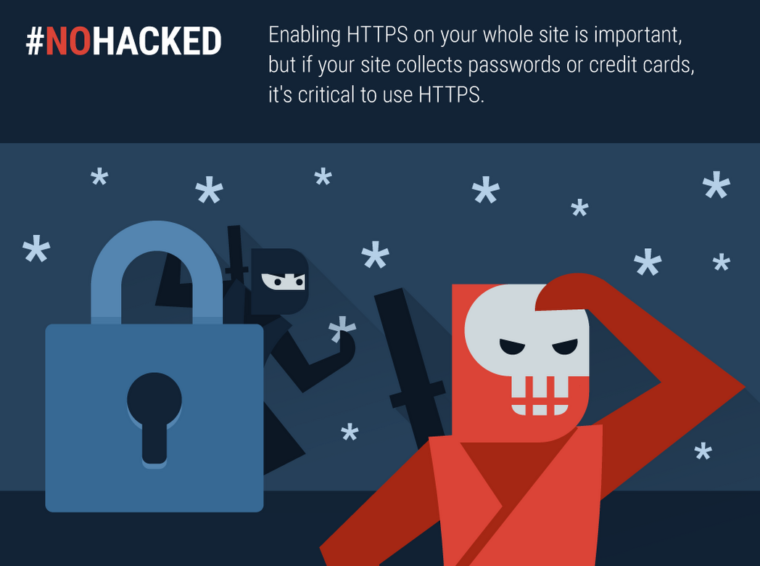
Google #NoHacked HTTPS

“Enabling HTTPS on your whole site is important, but if your site collects passwords, payment info, or any other personal information, it’s critical to use HTTPS.”

The company has encouraged implementing HTTPS in the past by making it a (very minor) search ranking signal. Now, from the sound of the alert, the company says an entire site will need to be HTTPS if any pages collect payment or sensitive information.

Switching over to HTTPS is an easy process, but you should begin preparing to make the switch now if your site fits the criteria. Otherwise, you are likely to be flagged as non-secure in February and lose a large amount of your web traffic.

Year in Search

Google has finally released its annual year in search list, breaking down the biggest stories and searches of the past year. As usual, it is broken down into several categories and countries, making it easy to see what was trending in 2016 in your area or around the world.

Google’s Top 10 Worldwide searches of 2016:

  1. Pokémon Go
  2. iPhone 7
  3. Donald Trump
  4. Prince
  5. Powerball
  6. David Bowie
  7. Deadpool
  8. Olympics
  9. Slither.io
  10. Suicide Squad

The top searches for the US are almost identical, except for a few changes. “Powerball” bounces up to the top slot, because it can only be played in America. Meanwhile, “iPhone” slides entirely off the list.

Google’s Top 10 US Searches of 2016:

  1. Powerball
  2. Prince
  3. Hurricane Matthew
  4. Pokemon Go
  5. Slither.io
  6. Olympics
  7. David Bowie
  8. Trump
  9. Election
  10. Hillary Clinton

While the iPhone 7 didn’t make the top US searches, it does lead the worldwide top tech searches of the past year. Apple also dominates 3 of the top 4 searches for consumer technology. Considering its recent reveal, it is also somewhat surprising to see the Nintendo Switch also makes the list at number 9.

Google’s Top 10 Consumer Tech Searches Worldwide:

  1. iPhone 7
  2. Freedom 251
  3. iPhone SE
  4. iPhone 6S
  5. Google Pixel
  6. Samsung Galaxy S7
  7. iPhone 7 Plus
  8. Note 7
  9. Nintendo Switch
  10. Samsung J7

Of course, there are plenty more interesting categories in Google’s Year in Search 2016 to look through including beers, fashion designers, GIFs and much more. Check out the lists for yourself.