Tag Archive for: Google

Keymaster

Source: Jason Tamez

Does Google control the internet? Of course no one has control over the entire existance of the internet, but the major search engine has a huge influence in how we browse the web. So, it is interesting to hear a Google representative entirely downplay their role in managing the content online.

Barry Schwartz noticed the statement in a Google Webmaster Help forums thread about removing content from showing up in Google. It’s a fairly common question, but the response had some particularly interesting information. According to Eric Kuan from Google, the search engine doesn’t play a part in controlling content on the internet.

His statement reads:

Google doesn’t control the contents of the web, so before you submit a URL removal request, the content on the page has to be removed. There are some exceptions that pertain to personal information that could cause harm. You can find more information about those exceptions here: https://support.google.com/websearch/answer/2744324.

Now, what Kuan said is technically true. Google doesn’t have any control over what is published to the internet. But, Google is the largest gateway to all that content, and plays a role in two-thirds of searches.

This raises some notable questions for website owners and searchers alike. We rarely consider how much of an influence Google has in deciding what information we absorb, but they hold some very important keys to areas of the web we otherwise wouldn’t find.

As a publisher, you are obliged to follow Google’s guidelines in order to be made visible to the huge wealth of searchers. It is an agreement which often toes uncomfortable lines as the search engine has grown into a massive corporation encompassing many aspects of our lives and future technology.

When you begin marketing and optimizing your site online to become more visible, you should keep this agreement in mind. A lot of people think of Google as a system to take advantage of in order to reach a larger audience. While you can attempt to do that, you are breaking the agreement with the search engine and they can penalize your efforts at any time.

Mandela 2008

Nelson Mandela in 2008
Source: WikiMedia Commons

Not to be outdone by Bing, Google published their top ten lists of the year, centered around their list of global trending searches of 2013 and their annual “Year-End Zeitgeist” page. The list is dominated by public figures and huge events, but it also features a few entries from popular electronics released this year. However, unlike many other lists, the public figures are exclusively male, and mostly associated with tragedy.

Both Paul Walker and Cory Monteith, two star actors who passed at young ages, are on the list, and the highest ranked trending search of the year was awarded to Nelson Mandela, the recently deceased South African leader who has made such a huge impact on his home country and around the world. As Google says:

It’s perhaps unsurprising that the #1 trending search of 2013 was an international symbol of strength and peace: Nelson Mandela. Global search interest in the former President of South Africa was already high this year, and after his passing, people from around the world turned to Google to learn more about Madiba and his legacy.

Google’s Top 10 Trending Global Searches of 2013:

  • Nelson Mandela
  • Paul Walker
  • iPhone 5s
  • Cory Monteith
  • Harlem Shake
  • Boston Marathon
  • Royal Baby
  • Samsung Galaxy s4
  • PlayStation 4
  • North Korea

Along with their Trending Global Searches list, Google published their Year-End Zeitgeist page, which lists more than 1,000 top ten search lists from over 70 countries. It includes topics such as the most searched celebrity pregnancies (Kim Kardashian), most searched Fortune 500 (Google), most searched for movies (Man of Steel), and the most searched TV shows of the year (Breaking Bad).

Of course, Miley Cyrus made a serious impact in search after her notorious MTV VMA performance, by contributing to the most searched “What is…?” question, which was “What is twerking?” She also won the most searched person of the year, showing controversy always leads to a surge of interest.

To top it all of, Google released a video to spotlight all of the highlights of the year:

Paid ads on social media are becoming more and more prevalent, to the extent that Facebook finally admitted recently that businesses will be practically forced to pay for brand outreach on their platform. Which makes it so surprising that Google+ had, until recently, strayed away from paid advertising. But, the search engine giant may have had an ace up their sleeve this entire time as they have recently unveiled their form of promoted posts, called “+Post” and it is a doozy.

Most aspects of +Post are extactly what you have come to expect from paid advertising on social networks. A brand pays for priumium placement of a post, and more users are shown the ad. It is a simple model which has worked for numerous other social media platforms. What makes +Post different is where the ads will be shown.

The majority of social media networks are only able to show promoted posts on their social media platform. Facebook promoted posts show up in your Newsfeed, “Promoted Pins” will be appearing on Pinterest soon, and Instagram is rolling out their own curated form of promoted posting to ensure ads fit their market and the style of Instagram. But, Google+ is connected to something much larger: all of Google’s network and products. So, +Post will have a massively larger reach than other social networks’ forms of paid advertising.

As Google explains:

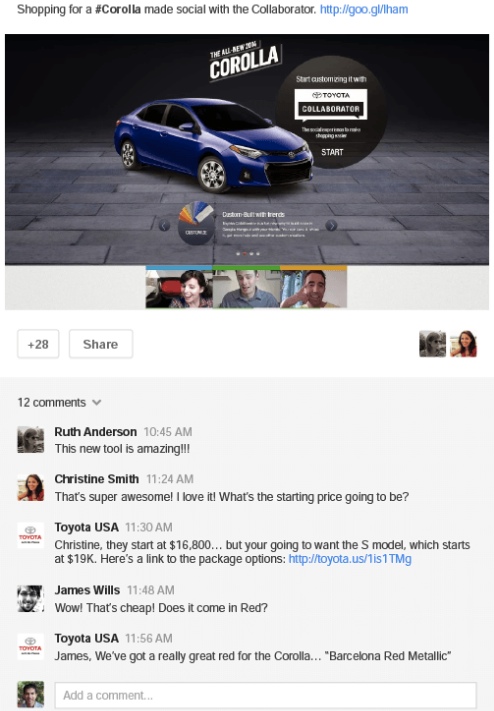
+Post ads amplify your brand’s content by easily turning Google+ posts into display ads that run across the web. The live, social ad format allows you to go beyond clicks to live conversations with your audience. People can join a Hangout On Air, add a comment, follow your brand or give a +1, right from an ad.

+Post Screenshot

This is an incredibly smart move for the search engine, as Google+ is still struggling to find a larger active user base, and the advertising model may drive more users to their social platform. The +Post ads act like regular posts in Google+ no matter where they are displayed, which effectively bleeds Google+ into all other aspects of Google (more so than before).

In Google’s own words:

Ads become more relevant with social context. Comments, +1s, and shares from friends can move people to engage with your ad. Social actions on ads and Google+ add up together, showing the full picture of engagement with your content. +Post ads expand in a lightbox to bring full screen social creatives across the web.

Jessica Lee from Search Engine Watch reports a few brands have gotten to try out +Post before the announcement, specifically Toyota who was used for Google’s promo video:

http://youtu.be/4yCUgx7H2zo

Google has been making a move towards providing searchers more lengthy and thorough content in recent history. They estimate that roughly 10 percent of all searches call for in-depth article information and they have been aiming to make those types of sources more available, especially when it may be more relevant for users.

The first big move came a couple months ago, back in August. The search engine launched an update to include in-depth articles for relevant searches, with a special block of articles at the bottom of the search results page.

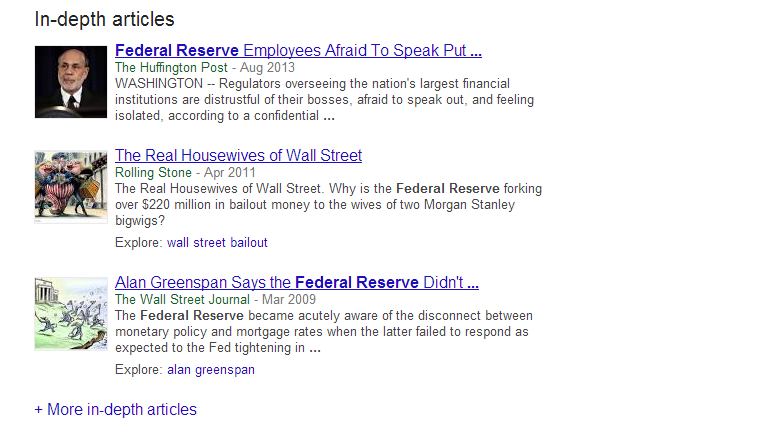
Now, Google has expanded the in-depth articles section so that users can view even more comprehensive articles by adding a new link which reads “More in-depth articles” beneath the initial selection of sources. Clicking that link shows 10 more articles on the same page. A screenshot of the update is below:

In-Depth Article Update Screenshot

The latest update also implemented the ability to explore related topics with an explore section next to articles which may be connected to other keywords. Search Engine Land notes that you can also search exclusively for in-depth articles by adding &ida_m=1 to the end of your search URL.

Currently this new feature doesn’t have much impact on the content your brand creates, but the trend could have huge implications for the future of search and Google’s focus. For now the majority of searches call for less extensive results, but eventually longer and more detailed content could be hugely rewarding for those willing to put in the effort.

Google is attempting to bridge the gap between apps and normal internet use, and it appears their first step is to make apps part of the search results for Android users. When logged in, you will also be able to see what apps you have and search the content within them.

“Starting today, Google can save you the digging for information in the dozens of apps you use every day, and get you right where you need to go in those apps with a single search. Google Search can make your life a little easier by fetching the answer you need for you – whether it’s on the web, or buried in an app,” Scott Huffman, VP of engineering, announced on Google’s Inside Search blog.

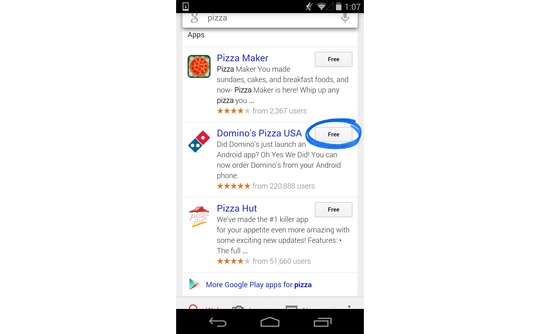
Google App Search Graphic

These results won’t be ads for apps. Instead, when the best results for a query come from an app, Google Search will include the app in the result and make it easy to download or access. If you already have the app, you will just have to touch “Open in app” and you will be taken to the relevant content.

The app results will be grouped together, so don’t expect them to hurt many sites’ rankings or visibility. These results are just another option added for user convenience.
Currently only a few apps are compatible with the Open in App feature, including:

  • AllTrails
  • Allthecooks
  • Beauytylish
  • Etsy
  • Expedia
  • Flixster
  • Healthtap
  • IMDb
  • Moviefone
  • Newegg
  • OpenTable
  • Trulia
  • Wikipedia

“This is just one step toward bringing apps and the web together, making it even easier to get the right information, regardless of where it’s located,” Huffman wrote.

Search Engine Watch reports the new ability is currently limited to English version users of Android 2.3 or higher within the United States.

Google is making it easier for webmasters to identify and address smartphone specific errors they might not have known about in the past. Previously, detecting and fixing errors that happen on smartphone errors was complicated, so the search engine added a section to the crawl errors report in Webmaster Tools that displays the more common errors Google sees webmasters make in regards to how mobile users access their site.

Pierre Far, Google Webmaster Trends Analyst announced the feature earlier today, saying that some of the errors may “significantly hurt your website’s user experience and are the basis of some of our recently-announced ranking changes for smartphone search results.” While Google is trying to help make it easier for webmasters to solve problems with their site, the search engine is also using this as another means to push webmasters towards making their sites more mobile friendly.

The new report for smartphone errors looks like this:

Smartphone Errors

Some of the errors included are:

  • Server errors: A server error is when Googlebot got an HTTP error status code when it crawled the page.
  • Not found errors and soft 404’s: A page can show a “not found” message to Googlebot, either by returning an HTTP 404 status code or when the page is detected as a soft error page.
  • Faulty redirects: A faulty redirect is a smartphone-specific error that occurs when a desktop page redirects smartphone users to a page that is not relevant to their query. A typical example is when all pages on the desktop site redirect smartphone users to the homepage of the smartphone-optimized site.
  • Blocked URLs: A blocked URL is when the site’s robots.txt explicitly disallows crawling by Googlebot for smartphones. Typically, such smartphone-specific robots.txt disallow directives are erroneous. You should investigate your server configuration if you see blocked URLs reported in Webmaster Tools.

Not only are these errors capable of ruining the user experience for visitors on mobile devices, they can severely damage your site’s visibility if you don’t resolve the issues quickly. At least now there is a convenient way for you to find the problems.

Google's John Mueller Courtesy of Google+

John Mueller

Recently I discussed a common issue sites have where a misplaced noindex tag on the front page of a site can keep search engines from crawling or indexing your site. It happens all the time, but it isn’t the only reason your site might not be crawled. The good news is there is little to no long term damage done to your site or your SEO, according to a recent statement from Google’s John Mueller.

Barry Schwartz noticed Mueller had responded to a question on the Google Webmaster Help forums from an employee for a company who had accidentally blocked GoogleBot from crawling and indexing their site. In John Mueller’s words:

From our point of view, once we’re able to recrawl and reprocess your URLs, they’ll re-appear in our search results. There’s generally no long-term damage caused by an outage like this, but it might take a bit of time for things to get back to “normal” again (with the caveat that our algorithms change over time, so the current “normal” may not be the same state as it was before).

So don’t worry to much if you discover you find your site has been having problems with crawling or indexing. What matters is how quickly you respond and fix the problem. Once the issue is solved, everything should return to relatively normal. Of course, as Mueller mentions, you might not return back to your exact same state because these things are always fluctuating.

Maybe Google really is listening. At long last, they have finally added one of the most requested features for AdWords by implementing the simple “Undo” function. It is exactly what it sounds like, basically backing up settings for all aspects of your account and keeping track of the changes you made. If you click the button, your campaign will return to the state it was at the specified time.
The most obvious benefit of the new feature is that it will make testing in your campaigns easier. If your newest test results in a lower click through rate (CTR) or cost per action (CPA), all you have to do is undo the changes with a single click.

“The ability to undo changes in AdWords will be a valuable feature to advertisers,” Lisa Raehsler of Big Click Co. told Search Engine Watch. “Sometimes changes will have a different impact on an account than what was intended. Simply using ‘undo’ will save time and ultimately money.

“But remember that account edits influence one another,” Raehsler said. “Some optimization edits are interdependent, so a change on Monday may have forced another change on Thursday. Now the ‘undo’ button is something to consider as a change in and of itself.”

There are still some kinks to be worked out, as it currently doesn’t appear that all changes are being documented, and it is unclear whether multiple changes are being grouped into a single undo.

For business owners this means you can more easily control and target your advertising campaigns. You don’t have to undo your changes by hand any longer, which saves you time to invest in other more important tasks.

The “Undo” feature isn’t live for everyone yet, so it may just be an experiment Google is running. But, hopefully they decide to work out the bugs and make it a universal feature. We have certainly been asking for it long enough.

googleadwordsYou may have noticed earlier this month that the AdWords Bid Simulator tool has a new feature which offers estimates for conversions in addition to impressions and clicks to show how bid changes may affect conversion volume and values.

For each bid option that appears in the tool, the bid simulator gives the number of conversions and conversion values if assigned or set. As Ginny Marvin explains, conversion estimates display how many clicks you would likely result in a conversion in one day, based on a “recent 7 day period.” Notably, Google does not say their estimates will be based on the most recent 7 days.

Google says the estimates will be more accurate if you have more conversion history and conversion volume in your account, so you will want to have conversion tracking set up and stable for a couple weeks before you start trying to use the bid simulator conversion estimates.

Matt CuttsUsually Matt Cutts, esteemed Google engineer and head of Webspam, uses his regular videos to answer questions which can have a huge impact on a site’s visibility. He recently answered questions about using the Link Disavow Tool if you haven’t received a manual action, and he often delves into linking practices which Google views as spammy. But, earlier this week he took to YouTube to answer a simple question and give a small but unique tip webmasters might keep in mind in the future.


Specifically, Cutts addressed the need to have a unique meta tag description for every individual page on your site. In an age where blogging causes pages to be created every day, creating a meta tag description can seem like a fruitless time-waster, and according to Cutts it kind of is.

If you take the time to create a unique meta tag description for every page, you might see a slight boost in SEO over your competitors, but the difference will be negligible compared to the other aspects of your site you could spend that time improving. In fact, overall it may be better to simply leave the meta description empty than to invest your time paying attention to such a small detail. In fact, on his own blog, Cutts doesn’t bother to use meta descriptions at all.

Cutts does say that you shouldn’t try to skimp on the meta tag descriptions by using copy directly from your blog. It is better to have no meta tag description than to possibly raise issues with duplicate content, and Google automatically scans your content to create a description any time you don’t make one.