Tag Archive for: Google

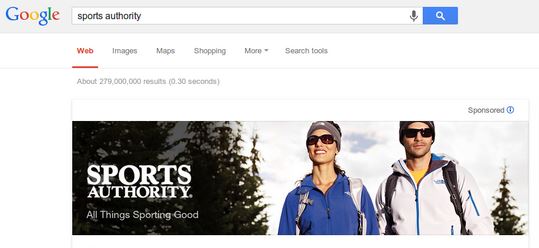
sports-authority-google-brand-banner-ad

You may remember the uproar from last October, when Google began experimenting with huge banner ads that ran across the top of branded search results. Many hailed them as the first sign of a completely branded search engine, while others weren’t as bothered by the large graphics appearing strictly on branded searches.

Either way, you shouldn’t expect to see the ads any longer. During a SMX West keynote discussion with Danny Sullivan, Google’s Armit Singhal declared the test to be over while saying that the test had failed.

Ginny Marvin suggests the test ads weren’t getting high enough click-through rates (CTR) to justify expanding or keeping around, but even Marvin admits CTR would be an odd metric to measure the success of the ads considering they acted more as a graphic introduction to brands you were searching for and didn’t include call-to-actions.

The test was very small in comparison to most Google tests, with only about 30 advertisers participating. Their banners were only shown on about 5 percent of search queries. Maybe Singhal or someone else from Google will explain how the tests were failures, but I wouldn’t bet on it. Most likely, the tests will just be forgotten like many other failed Google experiments.

However, if you missed the chance to catch some of these ads when they were appearing, or you are simply nostalgic for some nice branded banners, Marketing Land put together a slide show with many of the banners when they were still active, which you can view below.

Matt CuttsGoogle has been bringing down the hammer on spammy websites quite a bit recently with more specific penalties for sites that aren’t following guidelines. There have been several high-profile cases such as the Rap Genius penalty, and several attacks on entire spammy industries. But, if you are responsible for sites with spammy habits, a single manual action can hurt more than just one site.

It has been suggested that Google may look at your other sites when they issue manual actions, and Matt Cutts has all but confirmed that happens at least some of the time.

Marie Haynes reached out to Cutts for help dealing with a spammy client, and his responses make it clear that the client appears to be linked to “several” spammy sites. Over the course of three tweets, Cutts makes it obvious that he has checked out many of the spammer’s sites, not just the one who has received a manual action, and he even tells one way Google can tell the sites are associated.

Of course, Google probably doesn’t review every site penalized webmasters operate, but it shows they definitely do when the situation calls for it. If your spammy efforts are caught on one site, chances are you are making the same mistakes on almost every site you operate and they are all susceptible to being penalized. In the case of this client, it seems playing against the rules has created a pretty serious web of trouble.

John MuellerThere is no escaping a Google penalty without following the rules and doing the hard work to clear your name. It is old news that if you have suffered a penalty on your site and you moveto a new domain and redirect the URLs to that new domain, the penalty stays around thanks to the redirects.
However, some SEO’s may attempt to escape the penalty by moving their site to a new domain without redirecting the URLs. That way, theoretically Google can’t follow you and put the penalty on your moved site too. Unfortunately, Google’s John Mueller has quashed the notion pretty thoroughly.

In a recent Google Webmaster Hangout, Mueller explained that even if you move the site and don’t redirect, Google may still find you and apply the penalty again. Roughly 23 minutes into the video below, John answers Barry Schwartz’s question on the topic by explaining that if you just copy and paste the pages onto a new site without many changes, Google may still be able to pick up on the site move. Even if you do not set up 301 redirects or use the change address tool in Google Webmaster Tools, Google could potentially still know you moved domains and pass along the penalty.

John does explicitly explain in the video that Google doesn’t rely on their signals alone to pass along the penalty. But, if they receive signs that you are trying to hide the same site elsewhere under a new URL without fixing the core issues with your site, they will investigate and likely apply the penalty.

In the end, you will have to do the hard work you are avoiding to ever get rid of the penalty completely. It may sometimes be better to completely tear down a site and start from scratch to fix the issues that earned you the penalty to begin with, but you can’t just run away from it forever.

You can view the video below or here.

SpellingPretty much anything Google’s most popular engineer Matt Cutts says makes headlines in the SEO community, but often his Webmaster Chat videos and advice aren’t mind-blowing by any stretch of the imagination. For instance, we recently covered a video where Cutts explained that bad grammar in the comment section most likely won’t hurt your ranking (unless you allow spam to run rampant).
For content creators, it was a legitimate concern that poorly written contents might negate the hard work putting into writing legible and well-constructed content. However, many used this to run headlines that Google doesn’t care about grammar, which is not even close to being confirmed.

As Search Engine Land points out, way back in 2011, Cutts publicly stated that there is a correlation between spelling and PageRank, but Google does not use grammar as a “direct signal.” But, in his latest statement on the issue Cutts specifies that you don’t need to worry about the grammar in your comments “as long as the grammar on your own page is fine.” This suggests Google does in fact care about the level of writing you are publishing.

It is unclear exactly where the line is for Google at the moment, as they imply that grammar within your content does matter, but they have never stated it is a ranking signal. Chances are a typo or two won’t hurt you, but it is likely Google may punish pages with rampant errors and legibility issues.

On the other hand, Bing has recently made it pretty clear that they do care about technical quality in content as part of their ranking factors. Duane Forrester shared a blog post on the Bing Webmaster Blog which states, “just as you’re judging others’ writing, so the engines judge yours.”

Duane continues, “if you [as a human] struggle to get past typos, why would an engine show a page of content with errors higher in the rankings when other pages of error free content exist to serve the searcher?”

In the end, it all comes down to search engines trying to provide the best quality content they can. The search engines don’t want to direct users to content that will be hard to make sense of, and technical errors can severely impact a well thought-out argument.

As always, the best way to approach the issue is to simply write content for your readers. If your content can communicate clearly to your audience, the search engines shouldn’t have any problems with it. But, if a real person has trouble understanding you, the search engines aren’t going to do you any favors.

Many businesses only use their Google+ Local profile for SEO. It is an important part of increasing your brand’s visibility on Google and it is incredibly easy to sign up, reap the benefits, and leave the profile alone from then on. But, it is crucial to make sure you at least set the profile up completely, otherwise you might get some interesting results.

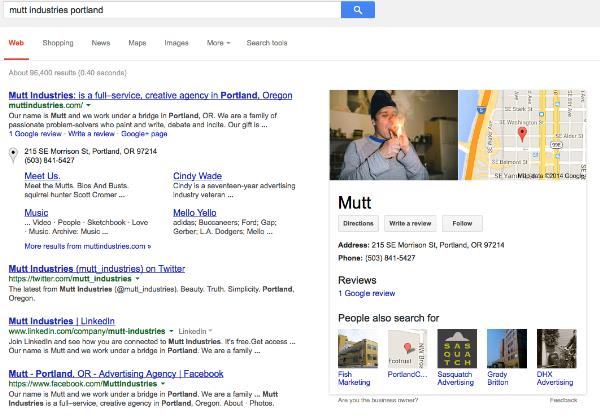
When you leave parts of your profile empty, especially your photos, Google tends to do their best to fill in the gaps. But, this doesn’t aways have the best results. For example, take Mutt Industries from Portland. Todd Mintz spotlighted their appearance on Google Plus Local and search results.

Mutt Industries

If you don’t upload pictures to your profile, Google will just use whatever they can find to fill the spot, and it might be and entirely random photo from your WordPress content. In Mutt’s case, that random photo also seemingly shows someone doing something still illegal in the majority of states, including Oregon. Obviously the image isn’t displayed prominently on Mutt’s website. It is just a random low-quality image from their hosted content.

Mike Blumenthal also noted that their Google+ Local Page is pretty much entirely devoid of all content. It has been claimed, but there is nothing else for Google to work with. If they had added just a single photo, they likely would have avoided the mix-up altogether.

If you aren’t going to use your Google+ Local Page in an attempt to engage the community, at least be sure to add enough to make your business identifiable and allow you to have some control over how you appear to searchers. A “Full-Service Creative Agency” might not be too hurt by a stoned appearance, but you probably don’t want people to think your serious business has gone to pot when they search for you.

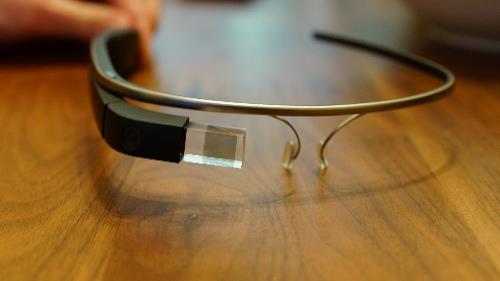
Despite not being available to the public any time soon, Google Glass has already raised quite a bit of a stir. But, not all of the stories have been good.

Source: WikiCommons

Source: WikiCommons

While plenty of testers or “Google Glass Explorers” have used the technology to engage with the world around them in a new way, there have been concerns about the safety of wearing Glass while driving or doing other activities. There have also been reports of those wearing Google Glass getting into confrontations with others for various reasons surrounding the technology.

Now, Google has released an official list of do’s and don’t’s for Google Glass to help mitigate the more negative stories that keep popping up. If you’re one of the lucky few getting to test drive Google Glass before its public release, you might consider heeding the guidelines they shared for the best experience possible.

The Google Glass Do’s:

  • Explore the world around you. Glass puts you more in control of your technology and frees you to look up and engage with the world around you rather than look down and be distracted from it. Have a hangout with your friends, get walking directions to a fantastic new restaurant, or get an update on that delayed flight.
  • Take advantage of the Glass voice commands. Glass can free your hands up to do other things like golfing, cooking, or juggling flaming torches while balancing on a beach ball (but also see Don’ts #2). This is great for looking up how many ounces in a cup while you cook, or taking a one-of-a-kind photo from your unique perspective.
  • Ask for permission. Standing alone in the corner of a room staring at people while recording them through Glass is not going to win you any friends (see Don’ts #4). The Glass camera function is no different from a cell phone so behave as you would with your phone and ask permission before taking photos or videos of others.
  • Use screen lock. Glass screen lock works like your smartphone’s screen lock: it passcode-protects your device to help prevent others from using it. If you ever lose your device or have it stolen by a budding online resale entrepreneur, you can turn off Glassware and perform a remote wipe (e.g. factory reset) of the device, removing all your information from the device. All you need to do is go to your MyGlass page on your browser, or the MyGlass App on your phone.
  • Be an active and vocal member of the Glass Explorer Community. The Explorer Program was created in order to have a place where our Explorers can give feedback, share content and communicate with the Glass team. It’s been hugely successful over the past year and this is due to our wonderful group of Explorers. They are constantly sharing their worlds with us and with each other, allowing us to hear and work on all the great feedback and stories our Explorers give us (and, wow, do they give us a lot!).

The Google Glass Don’t’s:

  • Glass-out. Glass was built for short bursts of information and interactions that allow you to quickly get back to doing the other things you love. If you find yourself staring off into the prism for long periods of time you’re probably looking pretty weird to the people around you. So don’t read War and Peace on Glass. Things like that are better done on bigger screens.
  • Rock Glass while doing high-impact sports. Glass is a piece of technology, so use common sense. Water skiing, bull riding or cage fighting with Glass are probably not good ideas.
  • Wear it and expect to be ignored. Let’s face it, you’re gonna get some questions. Be patient and explain that Glass has a lot of the same features as a mobile phone (camera, maps, email, etc.). Also, develop your own etiquette. If you’re worried about someone interrupting that romantic dinner at a nice restaurant with a question about Glass, just take it off and put it around the back of your neck or in your bag.
  • Be creepy or rude (aka, a “Glasshole”). Respect others and if they have questions about Glass don’t get snappy. Be polite and explain what Glass does and remember, a quick demo can go a long way. In places where cell phone cameras aren’t allowed, the same rules will apply to Glass. If you’re asked to turn your phone off, turn Glass off as well. Breaking the rules or being rude will not get businesses excited about Glass and will ruin it for other Explorers.

Internet commenters aren’t quite known for their excellent grammar or insightful conversation. While there are plenty who contribute and expand on content with helpful information in the comments, there are also more than a few who struggle with language or actively try to troll other users with garbled borderline nonsense.

For most users, these types of commenters are a simple annoyance at most. But, for those who spend long hours crafting grammatically correct and easily-readable content, the less readable comments can cause some worry. While quality content is most important for users, content creators also aim for high legibility because it can affect rankings.

It is no secret that nonsensical or poorly written content doesn’t tend to perform well on search engines, but what about those comments that aren’t so carefully put together? Can comments with bad grammar or readability hurt your content’s rankings? According to Matt Cutts, Google’s most popular spokesperson, the answer is not really.

“I wouldn’t worry about the grammar in your comments. As long as the grammar on your own page is fine … there are people on the Internet and they write things and it doesn’t always make sense,” Cutts said in a recent Webmaster Chat video. “You can see nonsense comments on YouTube and other large properties and that doesn’t mean that YouTube video will be able to rank.”

The primary exception to this rule is spam comments. While nonsense comments or poorly written comments aren’t much of a problem for you, spam comments should still be removed to protect your SEO and generally improve user experience and site quality.

“Just make sure that your own content is high-quality. You might want to make sure that people aren’t leaving spam comments, if you’ve got a bot, then they might leave bad grammar,” Cutts said. “But if it’s a real person and they are leaving a comment and the grammar is not slightly perfect, that usually reflects more on them than it does on your sites, so I wouldn’t stress out about that.”

So breathe easy content creators of the internet; so long as you keep putting effort into making great content, you should be safe from any trouble with Google.

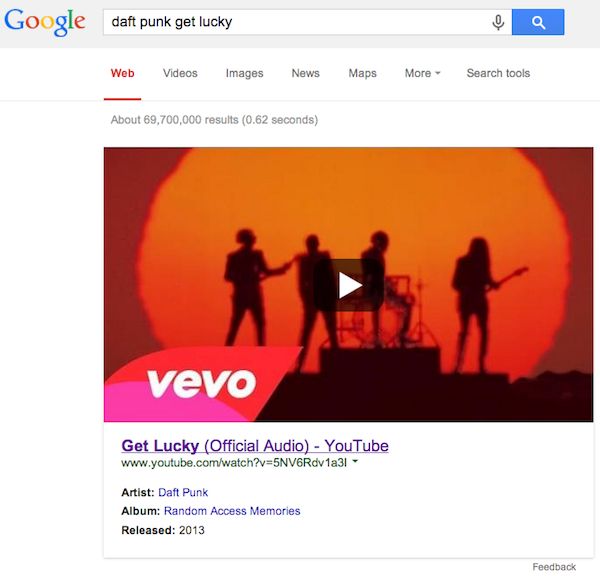
Looking for your favorite music video? Since MTV hasn’t shown music videos for the past 20 years, you will probably turn to Google. Now, Google is making it easier to find the videos your searching for by giving more prominence to the top playable music video result. So, if you’re searching for “Get Lucky” by Daft Punk, it will be hard to miss the official version of the video at the top of the page.

Daft Punk Get Lucky Google Search

The thumbnail images for the videos look like they would be playable on the page, but in actuality they link back to the page for the video. It’s possible they play icon on the image might hint towards future usability for YouTube videos, or it might just be a little misleading.

Of course, the tool isn’t perfect, and you shouldn’t expect to get the “official” video or a video from the artist’s official account every time. For example, Search Engine Watch highlights a case where searching for “Let Me Ride” by Dr. Dre doesn’t pull up a video from the DrDreVEVO account, because that video hasn’t been uploaded to the official account.

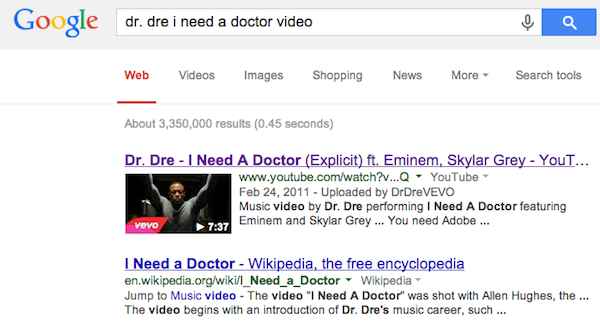
Similarly, searching for “I Need a Doctor” by Dr. Dre doesn’t trigger the new large YouTube thumbnails, even though there is an official video uploaded to the account.

dr-dre-i-need-a-doctor-google-search

“This was already available in September 2013 when you searched for an artist and then clicked on a song – you’d see a preview of the music video if it was available to display,” said a Google spokesperson. “Yesterday we made it easier to get to – you can now just search for a song directly and see the video screenshot right away.”

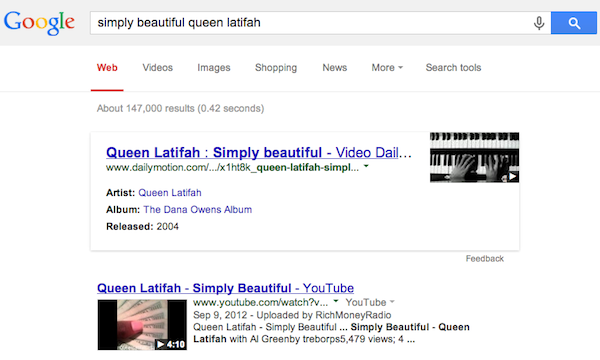
It is notable that the huge thumbnail appears to be exclusive to YouTube. When Google pulls from other sources like Dailymotion, it shows the smaller thumbnail and link layout. For example, the video for “Simply Beautiful” by Queen Latifah looks like this:

simply-beautiful-queen-latifah-google-search

With Google’s constant updates, it is easy to miss some of the new features they roll out with less publicity than their biggest products receive. However, even the smaller revisions to Google Search make a huge affect on how we search and use the internet in general. Jessica Lee recently rounded up some of the less talked about changes Google has been making so you can be sure you haven’t missed anything lately.

1) Date Selector in Hotel Carousel Search Results

The Carousel results box at the top of localized searches for hotels and restaurants has only been around for a few months now, and Google is already making regular updates to the function. While most of the work has gone into normalizing what queries get carousel results.

But, they’ve also implemented some new, interesting features such as a date selector for hotel searches. Now, you can easily weed out hotels that aren’t available on the days you will need lodging.

hotels-in-new-york-date-selector-google-carousel

In a statement to Search Engine Land, Google said:

We’re always adding features to search to help people find what they need and get things done faster — you can now more easily research hotels when planning a trip and filter by user ratings and hotel class, as well as select specific dates.

2) Cards for Local Results

“Answer Cards” have slowly been spreading across Google’s platform for a while, but they were largely reserved for specific questions or brands. You needed a specific and targeted search to wind up with the convenient card at the top of the search results. But, lately the cards have begun to deliver more detailed answers such as the address of a nearby retailer. Mike Blumenthal highlighted the change with an example of searching for a brand name + location (Dress Barn locations Amherst):

dress-barn-amherst-answer-card

But, queries with multiple results still get the traditional pack results:

dress-barn-pack-results

3) Answers to Complex Questions

The answer cards have also gotten better at providing answers for trickier questions in general. The people running the Google Operating System spent a good amount of time trying to stump Google’s answer feature, but they’ve found the task has gotten much harder as the feature has been improved.

In their words:

Google used to only answer simple questions like “who’s the prime minister of Canada?” or “what’s the population of China?” Thanks to the Knowledge Graph project, Google can answer more complicated questions like “who played Batman?”, “what’s the latest album of Celine Dion?”, “what are the main attractions in Spain?”.

To test this out, one of the authors asked Google a question without a definitive answer: what is the “distance to Mars”.

google-direct-answer-distance-to-mars

Google can even tell you why the sky is blue.

google-direct-answer-why-is-sky-blue

4) Distance Results

Google is able to tell the distance from most locations other than planets. In fact, Google announced on Google+ that users can now get the distance from any two locations on earth, no matter how far apart they are. The example Google offered was the “distance between Siberia and Hawaii.”

google-how-far-is-it-from-hawaii-to-siberia

5) Streamlined Search Options

The Google Operating System blog explained how they have updated search options to be more responsive to your individual search query:

Google removed a few specialized search options that were usually displayed in the “more” drop-down: recipes, patents, discussions, blogs, places. The list of links to services like Maps, Images, News, Flights, Shopping is reordered based on your query. This isn’t a new idea, it was implemented a long time ago by Google, but now it’s used more often.

search-options-google

Over the past year Google has been pushing to streamline the look and functionality of many of their products. They have redesigned several of their products, and replaced many tools webmasters rely on with new tools with better performance. AdWords is the next tool on their list for an overhaul, as Google announced earlier this week while highlighting “more screen real estate to the tools and reports you love.”

Their announcement also assures you, “By updating AdWords to the look and feel that we use across Google, you’ll spend less time getting where you want to go in your account, and more time focusing on growing your business.”

The redesigned AdWords will be implementing several stylistic and functional aspects from Google’s broader network, such as moving navigation links like billing, help, and account setting into the gear icon.

adwords-menu

They have also shifted key campaign information above the fold in the dashboard, so you won’t have to scroll to get to the information you’re looking for. You can also quickly see who is signed in for accounts with multiple users

On the purely aesthetic side, Google has brought more white space into the page, especially within charts and tables. They also softened their color palette to make AdWords “easier on the eyes.”

adwords-charts

You can expect to see the changes appear within the next couple of weeks. In the meantime you can acclimate yourself to the updates with a short video Google released focused on navigating the redesigned AdWords.