SmartphoneNot long ago Google announced its upcoming mobile-friendly algorithm change, but the search engine is making efforts to help webmasters prepare as well as possible. Google has been offering a steady stream of information helping webmasters avoid common mistakes while converting websites to mobile-friendly designs.

After answering questions over Twitter, Google also decided to directly ask webmasters what they were confused about and what problems they were encountering. Then, Google compiled the most common mistakes and shared them in a simple and easy to explore list.

According to Google, the most commonly mentioned mobile mistakes are:

  • Blocked JavaScript, CSS and image files: In order for Googlebot to see your site as a real user would, always allow access to these files in your site’s robots.txt.
  • Unplayable content: This consists of certain types of videos, or other content, that are not playable on mobile devices, such as license-constrained media or media that requires Flash.
  • Faulty redirects: If you have separate mobile URLs, you must redirect mobile users on each desktop URL to the appropriate mobile URL.
  • Mobile-only 404s: Some sites serve content to desktop users accessing a URL but show an error page to mobile users. Instead, redirect mobile users to an equivalent mobile page to avoid 404s.
  • App download interstitials: This is when websites block the view of pages with a prompt to download the site’s native app. Instead, use a small HTML banner at the top of the page.
  • Irrelevant cross-links: This is when users are linked to desktop-optimized pages from the mobile version of the site, and vice versa. Check your links to make sure that they point to the correct equivalent page.
  • Slow mobile pages: In order to avoid user frustration, ensure your mobile pages load quickly. You can check your page speed with Google PageSpeed Insights.

You can learn more from the complete guide here.

Firefox Yahoo

Google has been heavy-handed in trying to woo Firefox users back to their search engine since Yahoo became the default search engine for the browser. It also appears to be working.

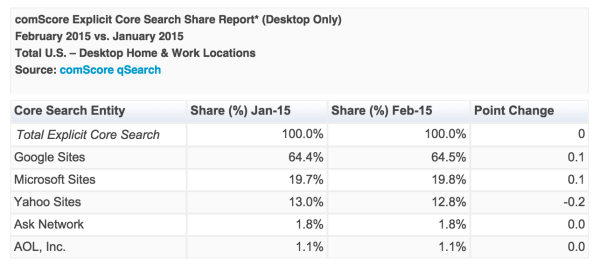
ComScore released the latest US search market share numbers for February and it seems Yahoo is gradually losing the gains they have made since they made a deal to become the default search engine for the browser and Google is reaping the benefits.

Screen-Shot-2015-03-18-at-10.47.35-AM-600x278

Since the switch over lost Google a small portion of users, Google has been practically begging users to make switch back. While there hasn’t been a mass exodus back to the motherland of Google, Yahoo is seemingly losing a slow but steady stream of users back to Google.

According to comScore’s report, Yahoo lost approximately 10 percent of its search volume from January to February, while Google recouped a tenth of a point along with Bing. This lines up with another recent report from StatCounter which also indicated a loss by Yahoo between January and February.

Screen-Shot-2015-03-18-at-10.57.59-AM-600x379

From the time Yahoo became the primary search engine to January, Yahoo had gained 1.2 points. Now Yahoo is still above their previous levels, but it has list .2 percent of those gains. The question is whether the trend continues.

It is important to note comScore’s numbers don’t include data from mobile searches, where Google is even more dominant.

Gary Illyes at SMX West Photo Credit: Steve Boymel

Gary Illyes at SMX West
Photo Credit: Steve Boymel

After months of hints, Google officially announced they would be including mobile-friendliness as a ranking factor in their search engine results last week. Now we are getting more information about how the mobile-friendliness signal will be implemented when it goes into effect next month.

Google’s Gary Illyes answered several questions about the new ranking signal at SMX West, where he explained the ranking factor would operate in real time and works on a page-by-page basis.

The conversation started when Gary was asked if there was a deadline for when webmasters need to have their sites updates to avoid being negatively affected by the launch of the signal. According to his response, the algorithm will operate in real time, so you could theoretically update any time you want and expect to start benefiting from the signal immediately.

Most likely, the signal won’t actually operate in real time for webmasters, but will reflect the version indexed by Google. That means sites that don’t get indexed very often may want to ensure their sites are updated soon, while sites that are crawled and indexed daily can address the issue when they see fit.

Google has not clarified, but all sites will still get the most benefit from having their webpages ready before the April 21st launch.

Gary also stated the algorithm will operate on a page-by-page basis, so you will need to ensure every important individual page is updated.

This is important for many webmasters who have sub-sections or unique areas of their page that would be difficult to make mobile-friendly. If you have pages that aren’t intended for mobile users, you don’t have to worry about them impacting your other pages.

If you have many pages that aren’t easily usable for mobile visitors, you might want to reconsider your strategy overall as more traffic is coming from smartphones and tablets every day. The new ranking algorithm is a big statement from Google about the importance of mobile in the current state of the internet, and you can expect to continue to struggle if you resist the changing tides.

Google Mobile

Google has been giving webmasters some pretty heavy hints that mobile-friendliness was important to the search engine, and today the company made it official. Mobile-friendliness and indexed apps are officially ranking factors in search results.

The motive behind the addition to the search engine algorithms is fairly obvious. People are using mobile devices more and more to search the web, and mobile-focused ranking factors such as these are the best way to ensure quality results no matter what device you come from.

The mobile algorithm update won’t take effect until April 21, so you have time to make any necessary changes you may have been procrastinating on until now.  Google also says the update will affect all mobile searches in any language around the world.

If you are concerned your site may not be up to Google’s mobile standards, they offer a mobile-friendly test. Google also suggests examining mobile usability issues by reviewing the Mobile Usability Report in Google Webmaster Tools.

In the meantime, Google will begin considering information from indexed apps as a ranking factor for signed-in users with the app installed on their phone. This way, content from indexed apps on your phone have the potential to rank higher in the search results you see. As a side-effect however, app developers will have to establish a relationship between their sites and app deep links.

The release of Google My Business was intended to make it easier for businesses to maintain a consistent appearance across all of Google’s services, but one feature was seriously lacking. While Google My Business allowed businesses to upload an image to their profile, the companies still had difficulty controlling which images would be used in various listings.

That is a serious problem when you are trying to establish a consistent brand presence online.

Screen-Shot-2015-02-23-at-2.24.26-PM-515x600

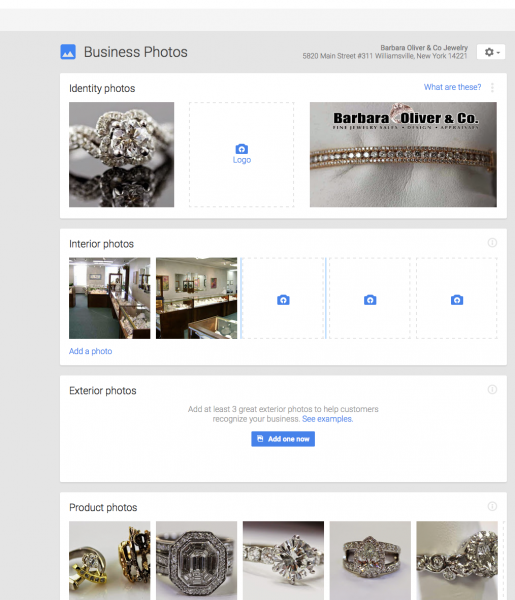
Today, Google announced a major update to Google my Business that finally gives companies some agency in their appearance across Google’s platform. As the announcement explains:

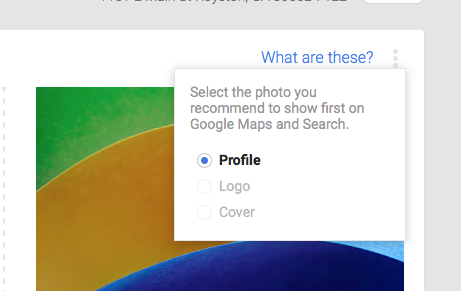
Starting today, you can tell us which image you’d like to appear when customers search for your business on Google. Just log in to Google My Business on the web or in the Android or iOS apps, and visit the Photos section. While you’re there, you can also give your business a fresh look online by updating your profile, logo and cover photos.

Google My Business Photos

The upgrade unifies Google’s three interfaces for images into one simple interface. There is no longer any guesswork in making sure your brand is always presented how you want it on the search engine.

Google Help Files explains the best practices for uploading photos for your business:

Your photos will look best on Google if they meet the following standards:

  • Format: JPG, PNG, TIFF, BMP
  • Size: Between 10KB and 5MB
  • Minimum resolution: 250px on the longest side for profile & logo photos; 720px on the longest side for other business photos
  • Aspect ratio: The longer dimension of the photo should be no more than four times the shorter dimension. Landscape photos look better than portrait photos on Google products. Panoramic photos may use different aspect ratios.
  • Quality: The photo should be in focus, well-lit, have no photoshop alterations, and no excessive use of filters. The image should represent reality.

Google is in the process of rolling out a new hacked page classifier which puts a notice below sites in the search listings believed to have malicious code or other hacking issues. The only problem is, many webmasters are reporting getting labeled as hacked incorrectly.

Yesterday, Google’s John Mueller acknowledged that a small number of sites are being mislabeled in the search results, which is obviously discouraging to anyone considering clicking on the link.

You can tell if your site is affected by simply searching for your site on Google and seeing if a small blue text appears below the title tag reading “This site may be hacked.” If you don’t see it, you’re in the clear. On the other hand, if you’re seeing that line it means your site has either been mislabeled or really has been hacked.

Mueller suggests having someone experienced in working with hacked sites to review your site to ensure there are no problems. If they give your site a clean bill of health, you will have to notify Google.

This Site May be Hacked

The search engine says to fill out this form if you believe your site is mislabeled as hacked. Once it is submitted, someone at Google will review it and remove the label if they also find no issues. There is no indication how long it will take Google to review your site and remove the label, especially with the number of sites reporting the problem.

For more information on resolving issues with hacked sites, see Google’s best practices.

Google-Webmaster-Tools-LogoGoogle Webmaster Tools is usually the best friend for any webmaster trying to keep informed, but users have noticed the normally up-to-date service has not been updated in over a week.

The problem was noted by Search Engine Land last week and has been the main topic of conversation on the Webmaster Tools forums all weekend, but so far Google has no response.

The closest thing we have to a response comes from forum user ‘Kai Z’, who wrote “Known issue. […] Give it a few days to update/ return”. Normally forum posts like this wouldn’t carry much weight but it seems notable that Google webmaster trends analyst John Mueller marked this response as ‘best answer’. Naturally this has caused quite a bit of speculation but could potentially be meaningless.

The outage seems to line up with a similar issue in Google Analytics. Many users reported data in analytics was missing for Monday February 9, but Google that problem received a prompt response from Google on its product forums: “We’re sorry for our unusually bad case of the Mondays. We’ve fixed the issue and no data was lost. Analytics users should start seeing any missed [data] soon.”

Most likely the problem will be resolved fairly quickly, but the lack of transparency from Google on what is causing the lack of updating has caused some concern within the SEO community.

Online reviews can be the deciding factor in the success of small businesses or companies that are just starting out, and yet many businesses ignore the single most powerful free form of marketing. This infographic from Web Republic breaks down the current trends and effects of reviews including:

  • Amazon is the leading review site in America and 42% of all its customers have left at least one review.
  • Other top US review sites include Google+, Yahoo, Yelp, and TripAdvisor
  • Yelp is the review site with the most global traffic
  • 84% of all consumers read online reviews, reading an average of 4-6 reviews before they begin to trust a business
  • 76% of customers are willing to pay more for hotels with better reviews.

How are you encouraging happy customers to leave reviews?

Online Reviews infographic

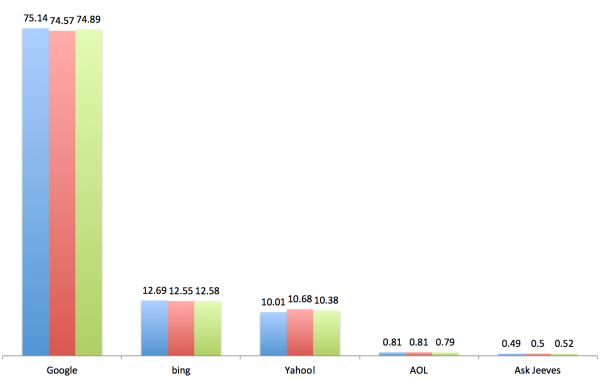
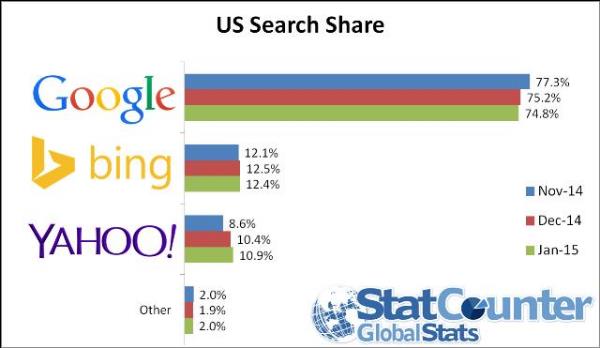
For years, Google has had a strong hold on the search industry, maintaining over a 75% market share for the desktop search market. If recent months are any indication however, that grip appears to be loosening.

According to the latest data from StatCounter, Google’s desktop search market share dipped below 75% for the first time since July 2008, continuing a downward trend that started in November.

US Search Share Jan

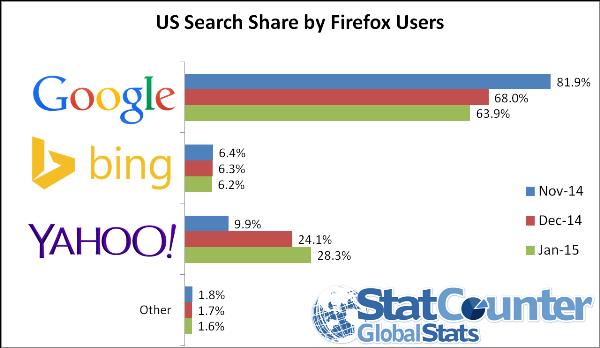
In November, Mozilla replaced Google with Yahoo as the default search engine on its Firefox web browser. Initially Google didn’t seem to be concerned, but a three month drop in search share seems to be finally getting their attention.

In mid-January Firefox users who visited the Google homepage were greeted with a banner encouraging them to set the search engine as their default. At the same time, Google also began tweeting instructions for how to replace the search engine.

US Search Share Jan Firefox

Since the five-year agreement was made between Yahoo and Mozilla, Yahoo has been consistently gaining ground, already replacing Bing as the second most popular desktop search engine. In total, Yahoo has nearly tripled its share of the desktop search market on Firefox, climbing to over 28% from less than 10% in November.

In the long run, it is still unclear whether Yahoo is going to be able to continue its ascent. While the changes are substantial, Firefox is also the least popular major desktop browser available. The change is search share is also limited to desktop, suggesting users aren’t so much choosing a new search engine but accepting what they are being given.

Despite these challenges, Aodhan Cullen, CEO of StatCounter, says Yahoo is already beating the odds:

“Some analysts expected Yahoo to fall in January as a result of Firefox users switching back to Google. In fact Yahoo has increased US search share by half a percentage point. It will be fascinating to see if these gains continue.”

It will be interesting to see if the trend continues and how Google might try to persuade more users to actively choose their search engine over the default.

Clock

Do you know the fastest way to lose potential customers on your website? You might think it would be by creating a page with poor usability, illegible text, or you could get creative and put offensive images on your front page. No matter your choice, there is something that can lose visitors before they even get the chance to see any of those options – long loading times.

Consumers simply don’t accept having to wait for what someone else can offer faster, and this is especially true online. The average consumer is willing to wait approximately five seconds before they become annoyed or frustrated with being forced to wait. If your site takes longer than that for the average user, it is practically guaranteed you are hemorrhaging visitors who aren’t willing to wait.

Long loading times also hurt your site and loses you visitors in a few less direct ways, most notably in rankings. While there are many things we don’t understand about Google’s ranking algorithm, we do know loading speed is one of the biggest factors in establishing your site’s perceived value and ranking.

So, how do you actually go about speeding up your website’s loading times and increasing its effectiveness? These five tips will help you get started:

  • Minimize on-page components. There are plenty of processes going on behind the scenes that can slow a site down. If you can combine style sheets or replace images with CSS, your site will be able to better load everything in a fast manner.
  • Compress large pages. Google has shown time and time again that sites with long-form content, videos, and shareable media are some of the best ways to rank higher, but all the extra content also means there is more to load. Try to compress your larger pages so they take up less space and consume less bandwidth when they load.
  • Use browser caching. Browser caching stores important elements from your site on a viewer’s hard drive in order to improve load times on repeat visits. A shocking number of webmasters forget to implement this tool, which can lead to slower load times for even your most loyal visitors.
  • Optimize visual content. The growing emphasis on visual content might have misled some website owners. If customers enjoy images, video, and graphics, why not fill your site with them? Unfortunately, too many improperly formatted graphics can cause a traffic jam and sluggish load speeds. Take the time to optimize visual content by limiting size, reformatting images into JPEG, and eliminating BMPs, GIFs, and TIFFs, and viewers will love you.
  • Eliminate unnecessary plugins. Particularly if you’re using WordPress, running multiple plugins contributes substantially to slower page load speeds. Though their convenience and ease of use make plugins an attractive option, using too many will cause your load speed to plummet and result in poor user experience. Remove any plugins you don’t absolutely need.