Tag Archive for: News

No matter how bad of shape your website is in, Google will crawl it. Google crawls and indexes seemingly the entire internet. Though we know they may not look as deep into low-quality websites, that doesn’t mean they haven’t at least crawled and indexed the landing page. It takes something truly special to keep Google from crawling and indexing a page, but there are two common mistakes that can actually manage to keep Google away.

Technical SEO is one of the most difficult aspects of optimization to grasp, but if you are making these two simple mistakes, it can keep search engines, especially Google, from correctly indexing your websites. If your site isn’t getting correctly indexed, you have absolutely no chance of ranking well. Until you fix the problem your site is going to be severely crippled, so it is imperative you aren’t ignoring these issues.

1. The 301 Redirects on Your Website are Broken

It is a commonly accepted practice to use 301 redirects after a website redesign. As Free-SEO-News mentioned in their latest newsletter, using these redirects properly allows you to retain the ranking equity you’ve built with your website, rather than having to start again from the bottom.

The problem is when these 301 redirects aren’t implemented properly. Even worse, sometimes properly working redirects can suddenly falter, so you can’t place your faith in the redirects working correctly forever. Code changes, new plugins, or broken databases can cause your working 301’s to begin linking to non-existing pages.

Broken links are an automatic wrecking ball to all your efforts building a solid link portfolio. The best way to ensure that all your links are working is to download a website audit tool, such as SEOprofiler, which automatically checks all of your links and redirects. If your links or redirects suddenly stop working, you will be warned before you start getting punished by the search engines.

2. Rel=canonical Attributes Are Causing Problems

Just as with 301 redirects, the rel=canonical attribute serves a legitimate purpose when used correctly. The attribute can help you avoid problems with duplicate content, but those using the tag without knowing what they are doing can find themselves with some major issues.

Two of the biggest faux pas that we see regularly committed by site owners are to add a rel=canonical attribute which points to the index page to all web pages or to other pages that use the ‘noindex’ attribute. In both scenarios, Google won’t index the web pages at all.

The best advise is to simply stay away from the rel=canonical attribute unless you are absolutely sure what you’re doing. The only proper time to use the attribute is on duplicate pages, and anywhere else will result in significant problems. The problems that can come from using the attribute incorrectly are much worse than those you might see by failing to use the tag on duplicate pages.
You may remember that Google recently started testing large banner ads on branded searches. It raised quite a stir in the online community, mostly because it seemed that Google blatantly broke an older promise to never show banner ads. But, Bing is taking branded search result ads to the next level.

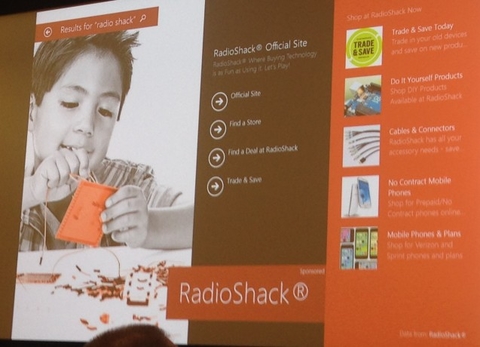
Larry Kim reports that last week, at the Bing Ads Next conference, Bing Ads announced their new ad format for exact match keyword searches, specifically those done within the latest Windows 8 update. Instead of a relatively small banner ad, Bing Ads are rolling out Bing Hero Ads, a full landing-page like layout that aggressively promotes the exact brand.

Just as with Google’s banner ads, Bing Hero Ads are only starting with a small number of prominent brand advertisers, such as Disney, Home Depot, Land Rover, and Volkswagen. It will also be a while before you can expect to see Hero Ads on your average search. For the moment, they are only appearing in a small selection of searches done in Windows 8.1 within the US.

It will be interesting to see how the public reacts to these types of branded semi-landing pages. Google’s banner ads looked fairly customized for each brand, , and only take up a relatively small amount of on-page real estate. A full-page ad experience for exact match branded searches may be welcomed as a quick and efficient way to connect with the brand searchers are looking for. It is also possible that consumers will be turned off by the seemingly uniform ad experience.

The one clear advantage Bing’s Hero Ads have over Google’s banner ads is their ability to deep link directly to a larger amount of pages on a site. They offer links such as “contact us”, “find a store” and “request a quote” which speed up users experiences and allow them to convert more quickly.

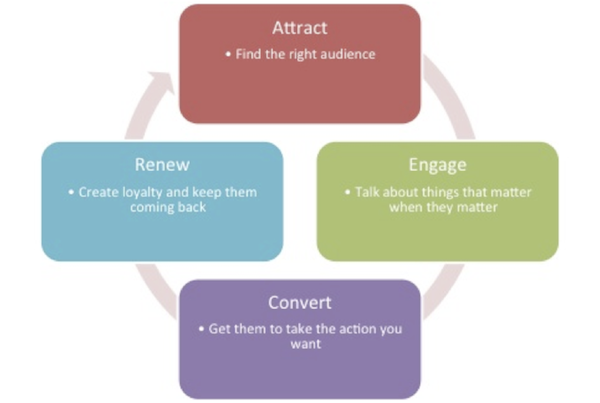
Metrics are an essential part of every online marketer’s life. They are an absolute necessity for knowing exactly how your campaigns are performing and how you can best make improvements. It may be of some surprise however that these metrics can be broken down and separated into four basic lifestyle stages of marketing: attracting, engaging, converting, and renewing. Everyone has their preferences, but Noran El-Shinnawy has some suggestions for the best metrics for each stage in your process.

Stage 1: Attract

  • Impressions

In the first stage, it is best to simply let yourself be guided by a set of three questions, metrics aren’t necessarily as important as ensuring your are communicating the right message to your audience. If you can say yes to the following three questions, you’re on the right track.

  • Is this the right message?
  • Is this the right audience?
  • Is this the right time?

For PPC, getting these three questions right relates to how you are handling techniques like keyword choice, targeting, and bidding.

Stage 2: Engage

  • Clicks
  • CTR

Creating the ads is the fun part of marketing. You get to be creative and finally engaging your creative side of your brain is a welcome relief from data and graphs. The metrics will help you measure how others are relating to your copy, but you can also check out these five tips for writing better ads.

Stage 3: Convert

  • Conversion
  • Cost
  • Cost Per Conversion
  • Conversion Rate
  • Revenue Per Conversion
  • ROI
  • Average Position
  • Average
  • CPC

Most often we find ourselves thinking about ROI purely in terms of dollars and sales. But, not every business benefits from that model. For others, ROI could be better informed by being associated with the value of page views, leads generated, and other such considerations.

Start out by installing a conversion tracking and analytics tools. This will open your eyes to the other possibilities for determining your ROI, while keeping you in-tune with the important numbers like total revenue and advertising cost. If you invest in your metrics, you can make smarter bidding decisions, and keep your focus on the most profitable ads for you.

Stage 4: Renew

  • Returning Visitors
  • Returning Visitors Revenue

The end phase is where you make improvements and complete the cycle. After the third phase, visitors have two options. They can convert, or they can choose to not convert. In both cases, there is valuable information to be gathered.

If they didn’t convert, investigate and find out what kept them from converting. You can go after them with targeted remarketing campaigns, or you can analyze their path to determine why they weren’t convinced to convert. Was there a technical problem on your site?

Did they not find your products or services compelling? Were your prices too high? Finding out these answers tells you what you need to do in the future.

Most people may not know this, but web design has two distinct sides. You’ll notice this when you begin to build a site and learn you need to hire a designer and a web developer, or one of those rare few who are great at both. But, what does this actually mean? Why do you need two separate people to build one site?

The Designer

To understand why web design has these two distinct facets, you have to understand the basics of how a site is created. A web designer creates the look and style of your page using graphics and design software such as Photoshop. But, this design isn’t a functional site. To bring everything to life, the design has to be coupled with code.

The designer is generally considered to be creative side of the team. Their job is to work with the client to dream up a look and feel that matches the brand. These are the artists who you imagine working to create a website. A web designer succeeding in the current market will be able to tell you all about color and typography, the importance of spacial relationships, and how these effect your audience.

The Developer

The developer is the “behind-the-scenes” person who makes everything run. These are the people who actually build the skeleton and muscles to the designer’s skin. They use HTML, Javascript, JQuery, and CSS to make everything technically work together.

This is the technical side of the creation process. These people usually have a degree in computer science or programming, and are very technologically minded. While a designer may be creative, a developer will likely be more detail-oriented.

Why Not Both?

While these sound like separate jobs, they are both working towards the same goal. You can’t have one without the other. But do you really need two separate people for this? In the current market, the answer is most often yes. While many designers are relatively informed on coding, and developers are aware of the creative process establishing the look of the site, these are both complex jobs which require specialized talents.

There are those who bill themselves as both, and many are perfectly capable of building an entire site by themselves. However, these are few and far in between. The best designers and developers have read up on the other side of the process, and may even have a fair amount of technical skill. But, you’ll benefit from building a team instead. The extra set of eyes will spot any flaws before resources are invested in the wrong areas, and you’ll have someone specially suited for sides on either side of the aisle.

If there is one way to concisely explain the changes Google’s search algorithms have gone through in the past couple years, it would boil down to “bigger is not always better.” Gone are the days that you can jam as many keywords as you could fit into a paragraph of text, or buy up countless thousands of links and hope to rank highly.

However, the more you do to offer quality content and information to your users while staying in line with Google’s practices, the more success you’ll see.

Those two ideas are fairly common knowledge now, but they have created their own fair share of questions. Where should the balance between quantity and quality lie? How is this content evaluated? Does quantity of content outweigh quality of content?

Google has given some insight into how content is evaluated in the past, and it is clear that you won’t get far with an excessive amount of paper-thin content. Still, the number of indexed pages your site has does indeed have an effect on your ranking. So how exactly does this work and what is the balance?

Matt Cutts, Google’s head of Webspam, addressed this type of issue head-on in his most recent Webmaster Chat video. He was asked, “Does a website get a better overall ranking if it has a large amount of indexed pages?”

Cutts explained that having more indexed pages isn’t a magic ticket to higher rankings. He said, “I wouldn’t assume that just because you have a large number of indexed pages that you automatically get a high-ranking. That’s not the case.”

However, having more indexed pages does have some clear benefits. The more pages you have, the more opportunities you have to rank for different keywords. But, this is only because you should be covering a larger variety of keywords and topics across that larger group of pages.

A larger number of indexed pages is also likely to improve your overall links and PageRank, which can affect your ranking. But, the link isn’t direct. Simply having more pages won’t improve much for you. Instead, you have to use those extra pages to deliver valuable content and information to your users. If you’re just filling your site with a meaningless wealth of pages to be indexed, you won’t be seeing any improvement anytime soon.

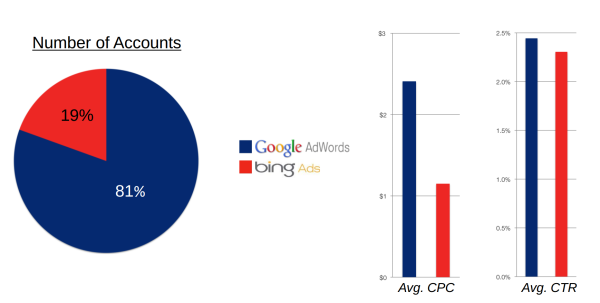
Just as with search, when we talk about PPC advertising, we almost naturally shift the majority of our attention to Google and their AdWords advertising platform. It makes sense on the surface, Google receives a significantly higher volume of search than other engines and even higher CTRs. But, some marketing analysts are beginning to believe it may be more effective to put an emphasis on Bing ads, especially if you are advertising for a small business.

Pricing Engine, a small business marketing platform, has found that Bing ads are “more efficient” than AdWords, as they become a lower cost source of leads for small businesses.

As Search Engine Land reported, Pricing Engine examined their own data from hundreds of accounts, and they found that CTRs were indeed marginally higher on Google, but CPCs were significantly higher. As such, it seems that you actually get more for your dollar with Bing ads.

Big brands will still favor the higher volume of searches on Google, but smaller businesses don’t require the same kind of scale. Investing in marketing with a better return per cost may pay off in the long run.

Now that the dust has settled after some extended debate, it seems clear that responsive design is here to stay. It won’t last forever, but it certainly isn’t a flashy trend that is going to fade away soon. It makes sense responsive design would catch on like it has, as it makes designing for the multitude of devices used to access the internet much easier than ever before.

Almost as many people accessing the internet right this moment are doing so using a smartphone or tablet, but they aren’t all using the same devices. A normal website designed to look great on a desktop won’t look good on a smartphone, but similarly a site designed to work well on the new iPhone won’t have the same results on a Galaxy Note 3.

This problem has two feasible solutions for designers. Either you can design multiple versions of a website, so that there is a workable option for smartphones, tablets, and desktops, or you can create a responsive website which will look good on every device. Both options require you to test your site on numerous devices to ensure it actually works great across the board, but a responsive site means you only have to actually design one site. The rest of the work is in the tweaking to optimize the site for individual devices.

That all explains why designers love responsive design as a solution for the greatly expanding internet browsing options, but we have to please other people with our designs as well. Thankfully, responsive design has benefits for everyone involved. The design solution is even great for search engine optimization, which is normally not the case with design and optimization working together. Saurabh Tyagi explains how responsive design benefits SEO as much as it does consumers.

Google Favors Responsive Sites

SEO professionals spend a lot of their time and efforts simply trying to appease the Google Gods, or trying to follow the current best practices while also managing to outplay their competition. Google has officially included responsive design into its best practice guidelines, as well as issuing public statements calling for websites to adopt the design strategy, so naturally SEOs have come to love it.

One of the biggest reasons Google loves responsive sites is that it allows websites to use the same URL for a mobile site as they do for a desktop site, instead of redirecting users. A site with separate URLs will have a harder time gaining in the rankings than one with a single functional URL.

Improves the Bounce Rate

Getting users to stay on your page is actually easier than you might think. If you represent yourself honestly to search engines, and offer a functional, readable, and generally enjoyable website, users that click on your page are likely to stay there. By ensuring your website is functional and enjoyable on nearly every device, you ensure users are less likely to hit the back button.

Save on SEO

Having a separate mobile site from your desktop site means double the SEO work. Optimization is neither cheap, fast, or easy, so it doesn’t make sense to waste all that extra time and work on basically duplicate efforts. Instead of having to optimize two sites, responsive websites allow SEOs to put all their efforts into one site, saving you money and providing a more focused optimization effort.

Avoids Duplicate Content

When you’re having to manage running two sites for the same business, it is highly likely you will eventually end up accidentally placing duplicate content on one of the sites. If this becomes a regular problem, you can expect punishments from search engines which could be easily avoidable by simply having one site. Responsive design also makes it easier to direct users to the right content. One of Google’s biggest mobile pet peeves of the moment is the practice of consistently redirecting mobile users to the front page of the mobile site, rather than to the mobile version of the content they asked for. Responsive design avoids these types of issues altogether.

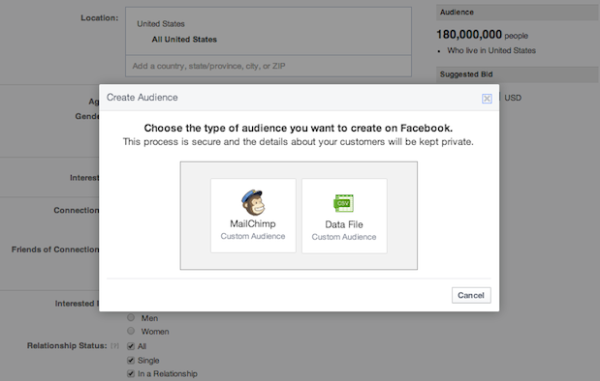
Facebook advertisers using the social platform’s API and Power Editor tool have had access to their Custom Audiences ad targeting tool for a short time. But, many advertisers have yet to get access to the targeting tool until now.

Starting yesterday, Facebook will has begun rolling out the ad targeting tool to a limited number of US advertisers, with a global roll-out beginning next week. Amy Gesenhues says all advertisers around the world can expect to see the feature by late November.

This is especially of interest to small businesses who will be able to use their own customers lists to directly reach out to people on Facebook. You will also be able to use MailChimp lists with Custom Audiences for the first time.

Facebook already claims thousands of advertisers are using Custom Audiences, but this will open the door for countless other advertisers to access the feature via Facebook’s ad interface. You will even be able to access the feature from Facebook’s mobile app, assuming you have already uploaded your contacts.

There has been quite a bit of speculation ever since Matt Cutts publicly stated that Google wouldn’t be updating the PageRank meter in the Google Toolbar before the end of the year. PageRank has been assumed dead for a while, yet Google refuses to issue the death certificate by assuring us they currently have no plans to outright scrape the tool.
Search Engine Land reports that yesterday, Cutts finally explained what is going on and why there have been no updates while speaking at Pubcon. Google’s ability to update the toolbar is actually broken, and repairing the “pipeline” isn’t a major priority by any means. The search engine already feels that too many marketers are obsessing too much over PageRank, while Google doesn’t see it as very important.

But, Cutts did give some insight as to why Google has been hesitant to completely kill off PageRank or the toolbar. They have consistently maintained they intend to keep the meter around because consumers actually use the tool almost as much as marketers. However, at this point that data is nearly a year out of date, so suggesting consumers are the main motive for keeping PageRank around is disingenuous.

No, it turns out Google actually uses PageRank internally for ranking pages, and the meter has been consistently updated within the company during the entire period the public has been waiting for an update. It is also entirely possible Google likes keeping the toolbar around because Google wants the data users are constantly sending back to the search engine.

While the toolbar may be useful for the company internally, PageRank has reached the point where it needs to be updated or removed. Data from a year ago isn’t reliable enough to offer anyone much value, and most browsers have done away with installable toolbars anyways. If a repair isn’t a high enough priority for Google to get around to it at all this year, it probably isn’t worth leaving the toolbar lingering around forever.

If you have been reading up on SEO, blogging, or content marketing, chances are you’ve been told to “nofollow” certain links. If you’re like most, you probably didn’t quite understand what that means, and you may or may not have followed the advice blindly.

But, even if you’ve been using the nofollow tag for a while, if you don’t understand what it is or how it works you may be hurting yourself as much as you’re helping.

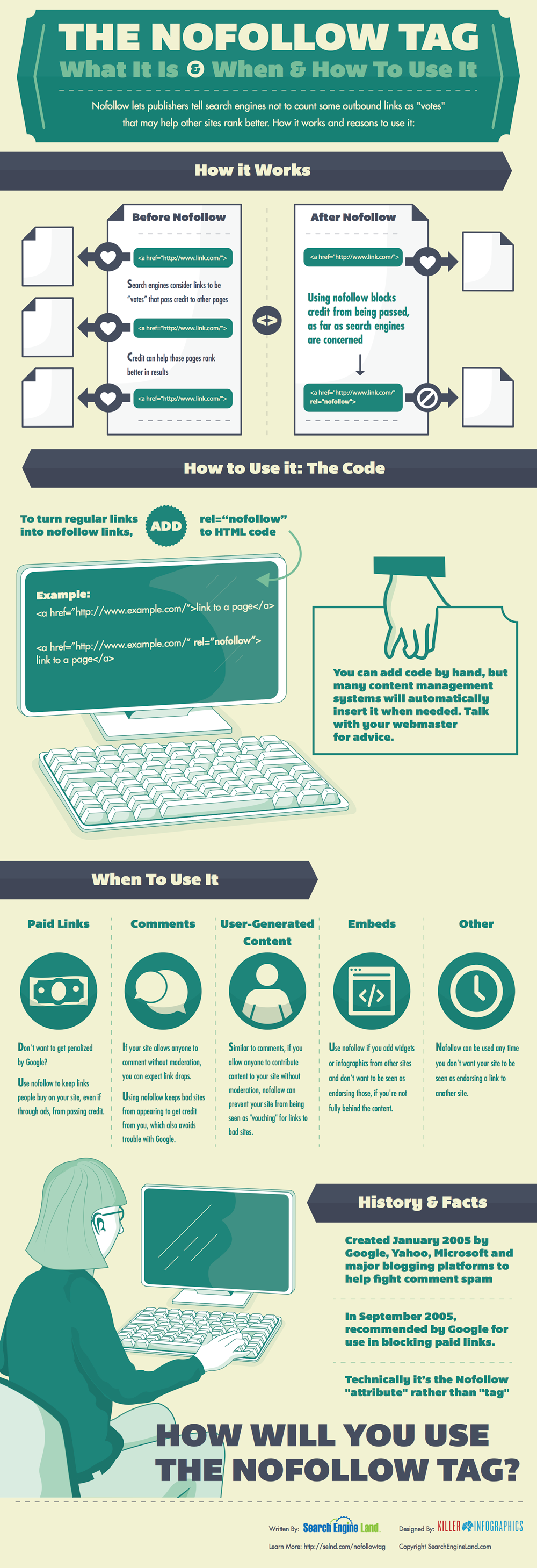
The nofollow tag is how publishers can tell search engines to ignore certain links to other pages. Normally, these links count similar to votes in favor of the linked content, but in some circumstances this can make search engines think you are abusing optimization or blatantly breaking their guidelines. Nofollowing the right pages prevents search engines from thinking you are trying to sell you’re influence or are involved in link schemes.

To help webmasters and content creators understand exactly when to nofollow, and how it affects their online presence, the team from Search Engine Land put together an infographic explaining when and how to use the tag. They also created a comprehensive guide to the tag for those who prefer long walls of text to nice and easy infographics.