Tag Archive for: Google

Starting on Monday of this week, small business owners in the UK became eligible for Google’s newest service, AdWords Business Credit. Essentially, Google created a credit card that can only be used for paying for a businesses AdWords account.

As Ingrid Lunden reports for TechCrunch, the program launched in beta 1400 U.S. companies last year and nearly three-quarters of those companies now use AdWords Business Credit as their “primary form of payment.”

Now, Google shifts its focus to the UK, where revenue in the 2nd quarter made up about 11-percent of the companies total revenue.

The card will carry an 11.9-percent APR in the UK, which is up from 8.99-percent in the U.S. during the pilot program. No annual fees will be included. You may note that this is lower than major credit cards. This is likely because Google intends to make an increase in profits by driving more businesses to AdWords and increasing the investment their, not from interest rates.

It is way too common for people in SEO to forget to align their SEO strategy with social media activity. Often, the two teams work completely disconnected from the other. This is in no way a comprehensive, efficient marketing plan.

SEO must be integrated into social media activity. Here are some suggestions for specific strategies you can take to bump up the effect your social media activites have on SEO performance.

1) Using Social Media for Link Development – Since search engines have begun incorporating social signals into their ranking algorithm, it has become essential for SEOs to pay attention to social media. Now Google+ has become a part of Google search, and Bing uses Facebook data to personalize what people see in their search results.

While all of that is practically common knowledge, Ray Comstock at Search Engine Watch believes “link development is the most important benefit that social media can bring to the SEO table.” Google’s Panda and Penguin updates has made using social media to foster relevant link connectivity has become as important as they could be. The most effective way to market content online is through social media.

It is critical for SEO professionals take advantage of the activities of their social media team to gain relevant links through marketing quality content.

2) Aligning You Blog for SEO and Social Media – If you can create consistently quality content, blogging is easily one of the more efficient ways to build links and authority. It attracts links within your industry, but it also becomes keyword focused content that tends to rank highly in the long-term. Most often, bloggers forget to create relating internal links from a company’s blog to their main website content. Blog posts are an opportunity to direct people to other relevant content, especially your own.

3) Aligning Your Blogging Team for SEO & Social Media – Blogging is an important part of an SEO strategy, so you want to make sure your blogging team is trained on the best SEO policies and practices, as well as giving them the most important keywords and landing pages on your site. If you do that, your team will be more likely to create content based around those keywords, and creating internal links within the blog assists with your SEO goals. Plus, it is always nice for visitors to be able to find more content on your site.

Bloggers should also be interacting with the authoritative blogs in your area of expertise by contributing in intelligent and thoughtful ways which will build relationships with other experts in your field. It builds your reputation as well as making valuable connections that can lead to guest blogging.

By making sure your SEO and social media efforts are alligned, you both streamline the process in an effective way, as well as boosting SEO performance from a link building perspective.


Bad URL structure is far too common of an issue in SEO. It can drag down your rankings, keep your pages from appearing in search engine indexes and destroy ranking authority from any other pages and websites you are a part of.

This is sometimes the fault of content management systems who can build poor URL structures within the websites. Elsewhere, some platforms devise URLs with illegal characters.

Search engines do try to read and index even the most poorly made URLs, but paying attention to your URL management and optimization has its own set of benefits. It’s about time you made sure you are doing your part.

It isn’t difficult to diagnose URL based issues, however. You can check for errors and warnings that suggest URLs are causing the issues, and you can audit all of your URLs for proper syntax.

Google and Bing Webmaster Tools also have reports that reveal duplicate content. From there, you can examine the webpages themselves and their locations. Google and Bing aren’t even the only ones with these types of tools. Plenty of third-party SEO tools can help identify these types of issues. Also make sure to check for unsafe characters.

Tom Schmitz from Search Engine Land has charts to help make clear what characters you should be using and when. He also has many other suggestions on how to solve issues with poor URL structures.


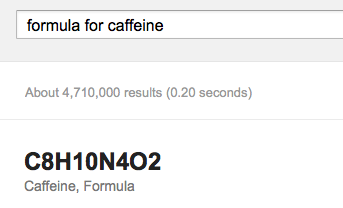
Google seems to keep adding more details to their SERPs. The newest one is finding formulas for various chemical compounds.


Just do a search for “formula for” and follow it with your compound name and it will display the chemical formula in most cases. I can see this coming in handy for students wanting shortcuts for their chemistry assignments. Whether or not that’s good is a bit more subjective.

While I’ve written extensively about why you should have an optimized site for mobile, I’ve rarely directly mentioned the two most obvious points for why you should. Websites that aren’t mobile friendly annoy visitors and it’s bad business.

Mobile users have more immediate needs, and they look for content that is designed to fit their needs.

A recent Google survey of mobile users says that 72% emphasized the importance of websites that are mobile-friendly. However, as important as mobile optimized sites are to users, 96% said they have visited a site that doesn’t work properly on their device.

The survey had 1,088 US participants who own smarphones and use them for internet browsing, and the survey was performed by independant groups.

Roughly three-quarters of respondents said they are more likely to visit a mobile optimized site than one that isn’t mobile-friendly, and they are five times more likely to give up on their task if the site isn’t optimized for mobile needs.

Following with those numbers, most customers said they are more likely to buy online when the site they find meets their mobile needs. Unfortunately, 61% are more likely to leave if the site isn’t mobile friendly. Even worse, when visitors find sites that aren’t mobile friendly, they are disappointed in the company itself.

So what are the needs of mobile users? They want sites that load in less than 5 seconds, big finger-friendly buttons and quick access to business contact information. They also want the pages to be designed to fit their screen, and links to the company’s social media profiles.

Basically, they want pages that work easily on a mobile interface, with easily accessible information and efficient designs. Mobile users want to be able to act immediately and most aren’t doing research on their mobile devices. They want ways to make contact and take action.

If your page isn’t meeting these needs, you are probably losing customers.

If you want to read the actual list of what the survey says mobile-users want, read Miranda Miller’s article at Search Engine Watch.

Google Remarketing was recently updated to make it easier to set-up and easier to use. In case you aren’t familiar, Google Remarketing allows you to present users, who were previously on your site, with relevant ads as they continue browsing the web.

Marc Weisinger, of Search Engine Watch, has three key reasons you should be using one of the most powerful tools available to online marketers.

1. It’s Simple and Easy

Previously, implementing the remarketing code was a several step process. Now, you install one simple code in the footer of each page of your site and get on with your day. You can’t get much easier than one step.

2. The Possibilities are Endless

With the universal tag in place, you can use the Adwords interface to target specific groups. How specific? Well, that is up to you.

Want to target only those users who landed on a promotion page? Done.

Want to target only users who added a product to their cart, but didn’t end up buying? Done.

Plus, each new target group you set up gets the benefit of the cookies already stored by your universal tag.

3. Target Positive or Negative Audience

Before starting your next email marketing campaign, use the Adwords interface to target users who click through from your email to your site.

Alternatively, you can instead choose to exclude those users because, afterall, they sound pretty loyal and engaged already. That way, you don’t bombard them with your ads and are sure to instead target those users that may have seen your email but weren’t convinced right away.

We’ve talked quite a bit about the quickly growing use of mobile devices to search the web. The latest reports show between 10% to 20% of all traffic on the web, and some popular websites, claim that roughly a fourth of their traffic is coming from mobile devices, if you include tablets.

Of course, this all shows that ignoring mobile web use at this point is not a good decision. Those that are innovating in the field of mobile optimization will have a much brighter future than those that continue to resist the mobile shift. The sooner you optimize your site for mobile use, the better chances your company will do well in the future.

There are two factors that differentiate mobile devices from other traditional computing devices. They both are obvious, but both factors have undeniably huge effects on users’ web experiences. The first is portability. Since mobile users are accessing the web on the go, their current location and activities become important to what they are accessing online. The second factor is screen size. Mobile screens do seem to be getting larger, but they will never go anywhere near standard computer screen size. Take advantage of screen size limitations of mobile users, rather than fight it.

With between 15-20% of all searches on Google, Bing, Yahoo, etc. coming from mobile users, how does that change search behavior?

Search Behavior Due to Location

Microsoft’s research has found that 30% of all mobile searches are related to their location, and 61% of searches end in a phone call. Like I said, a person’s locations and activities are clearly important to mobile user’s.

Of course, the recent changes to search engines have made great strides to customize search results based on user’s locations, but you should still make an effort to specify your business’s location on search engines using their web master settings.

The major search engines also look for location signals from the title and text present on a website. If you own a local business, make it easy for them to find these signals. Emphasize the location on the site so search engines prioritize your website in search results around your area.

Can you still take advantage of mobile users’ locations even if your business has more than one location? Of course!

If your business has multiple locations, you should be creating internal pages for your different locations, with a present hierarchy starting from the homepage so that search engines will notice the location specific pages too. You will still have to deal with standard issues such as speed, relevance, and backlinks, but taking advantage of location will help get individual pages ranked based on where your users may be.

Search Behavior Due to Screen Size

Screen size contstraints are a more physical limitation, but it strongly effects how people search and visit pages. The clearest difference between mobile and desktop search is the number of paid results and advertisments. On most search engines, there are far less paid ads on mobile because of the screen size. That means organic results on mobile are more important than on desktop.

Screen size also limits the number of results you recieve at any given moment. On a typical smartphone you can only see a few results at a time. Desktops give users a broad range of results immediately, but on mobile the top three results are key. Mobile users are not prone to research, and they rarely go past the first page of results, so it is important to get your page as high in the rankings as possible.

Search behavior on mobiles are certainly unique from their desktop counterparts, and mobile requires a similarly unique SEO strategy. Of course, desktop is still important, so the best way to approach the issue is by creating a seperate mobile site that is optimized for mobile user experience. The longer you wait to optimize, the more trouble you will have later.

For more, read Paras Chopra’s article at Search Engine Land.

 

Want to know what features and capabilities consumers are wanting from mobile websites? Google has released the results of a recent survey and, while the findings aren’t anything earth shattering, they also included data that could be beneficial to you.

The results have reaffirmed that smartphone users want sites to be optimized for their smaller screen, and they will leave those that aren’t, but Google also took the time to collect data on what users want in their experiences with mobile sites. Google used two independent research firms to survey over 1,000 adults in the US, who were also involved in focus groups and required to keep journals of their mobile activites throughout the third quarter of this year.

So what are users wanting from mobile sites? According to Google, users expect websites to load in less than five seconds. They also want mobile websites to allow them to act immediately. Seventy-six percent of smartphone owners want to use their phones to get locations for businesses and sixty-one percent like businesses to allow customers to contact them at the time.

Most want information available within a few clicks, with buttons large enough for their fingers. Other widely desired features were conveniently placed search bars, “click to call” buttons, unidirectional scrolling (up-down or left-right), and interestingly many desire the ability to go to the full non-mobile site. Google even gathered data on what users are looking for in sites for specific industries. Greg Sterling at Marketing Land has a break-down for these individual industries, if you’re interested.

Most of these findings are inline with what you would expect, but they also show how the expectations of mobile users are quickly getting higher. If you don’t raise your own standards to meet those of your customers, your business will not fare well in the future.


Want to know how to evaluate your buisiness’s performance in social media? Is your time and effort getting acceptable returns? Andrew K. Kirk, of Social Media Examiner, has 4 goals you should be tracking to ensure a positive social media ROI.

1. Brand Recognition

Obviously, you need people to be aware of your business. But the more people know, the more likely they will become active members of your online community.

Track your growing popularity with Klout, which gives you a social influence score based on your performance across multiple social media sites. Log your score each month and think about what actions you took during that time frame. Soon, you should be able to pinpoint what positively and negatively affects you online presence.

2. Traffic

Just as people need to be aware of your business, people also need to visit your website. Visitors will likely learn more about your business directly from your site than from anywhere else.

With Google Analytics, you can easily track visits and discover what is affecting those.

3. Repeat Business

Any business needs repeat customers to thrive. For your online presence to thrive, you need visitors to return to your site and stay longer.

To track loyalty, you can customize Google Analytics and then do a little math. Well worth it in the end.

4. Conversions

The previous steps don’t necessarily translate into an improvement in your bottom line. Afterall, the effort you put into your online presence better be worth it. You should know the ratio of overall visitors to your site to conversions. You should also know the correlation of social media activity to conversions and the source for the majority of your traffic that converts.

Again, Google Analytics has you covered. By setting up some goals and tinkering a bit, you’ll soon have all the data you need to measure your goals and get the most out of your time on social media.

Google’s algorithm changes over the last decade have really made huge shifts in the way we search things. They also really help developers stay on their toes.

Initially, the SEO business was all about rankings. You told your client how you would get their keywords to the top of the search, and then showed them how high they were coming up in searches. Of course, it took a while to get their site to the top, but once you did, they were content.

Now, thanks mostly to Search+, it is the job of SEOs to get their clients to stop thinking about ratings. What Search+ has done is customize the results for every search you make based on search history, location, social media usage, and other criteria. That means everyone gets results catered to them, but it also results in your client’s site not appearing high in the rankings for some people.

Sujan Patel offers some other methods of tracking how your websites are performing, all of which can be found in Webmaster Tools and Google Analytics.

There are simple reports like “visitor growth” that show how your site is trending quickly and clearly, as well as old metrics that have risen in popularity. Such measurement tools like Impressions give you ideas of how your pages are appearing for similar search terms.

Another old metric that has become much more useful is your site’s average ranking. In January, Google announced changes to how they score site’s average rankings and now it gives a much closer average of “how a link’s position in Google search results should be important.”

While the older ways of Google made it easier for you to see how your site is performing, the changes in recent months have actually been an improvement for marketing towards target demographics. Unfortunately, this means improving your analytic skills is essential if you want to succeed. You may not be able to give your client keywords to search to see their performance, but if you know your analytic tools, you can still quickly show them how your SEO path is helping them grow their business.