Tag Archive for: Google

You might not have noticed, but AdWords is working a little different since an algorithm update was quietly introduced on Tuesday. For the most part, not much is different, but there is a notable change in the ad extensions are now working as a factor in determining as positioning.

The update was announced in a blog which details all of the parts of the update. But, the big takeaway is that AdWords was updated mainly to take into account the new features that have rolled out over the past year.

Ad extensions now have an affect of how ads are positioned in Google’s search results. To show how this is working, Google gave the example of two identical ads with the same bid and quality score. With the update, the ad with extensions is more likely to appear in the higher ad position.

You may also see that a higher quality score, bid, or a combination of both also increases the likelihood of extensions appearing. Ad Rank also plays a similar role in deciding whether extensions appear.

As for what this means to marketers, Chris Roat, Staff Software Engineer for Google, says that Google expects ads with extensions to perform better and possibly see a lower cost per click with a higher click-through rate:

“You may see lower or higher average CPCs in your account. You may see lower CPCs if your extensions and formats are highly relevant, and we expect a large positive performance impact relative to other competitors in the auction. In other cases, you may see higher CPCs because of an improvement in ad position or increased competition from other ads with a high expected impact from formats.”

There has been quite a bit of speculation ever since Matt Cutts publicly stated that Google wouldn’t be updating the PageRank meter in the Google Toolbar before the end of the year. PageRank has been assumed dead for a while, yet Google refuses to issue the death certificate by assuring us they currently have no plans to outright scrape the tool.

Search Engine Land reports that yesterday, Cutts finally explained what is going on and why there have been no updates while speaking at Pubcon. Google’s ability to update the toolbar is actually broken, and repairing the “pipeline” isn’t a major priority by any means. The search engine already feels that too many marketers are obsessing too much over PageRank, while Google doesn’t see it as very important.

But, Cutts did give some insight as to why Google has been hesitant to completely kill off PageRank or the toolbar. They have consistently maintained they intend to keep the meter around because consumers actually use the tool almost as much as marketers. However, at this point that data is nearly a year out of date, so suggesting consumers are the main motive for keeping PageRank around is disingenuous.

No, it turns out Google actually uses PageRank internally for ranking pages, and the meter has been consistently updated within the company during the entire period the public has been waiting for an update. It is also entirely possible Google likes keeping the toolbar around because Google wants the data users are constantly sending back to the search engine.

While the toolbar may be useful for the company internally, PageRank has reached the point where it needs to be updated or removed. Data from a year ago isn’t reliable enough to offer anyone much value, and most browsers have done away with installable toolbars anyways. If a repair isn’t a high enough priority for Google to get around to it at all this year, it probably isn’t worth leaving the toolbar lingering around forever.

Google is always making changes and updates, but it seems like the past couple weeks have been especially crazy for the biggest search engine out there. There have been tons of changes both big and small, but best of all, they seem to all be part of one comprehensive plan with a long term strategy.

Eric Enge sums up all the changes when he says Google is pushing people away from a tactical SEO mindset to a more strategic and valuable approach. To try to understand exactly what that means going forward, it is best too review the biggest changes. By seeing what has been revamped, it is easier to make sense of what the future looks like for Google.

1. ‘(Not Provided)’

One of the hugest changes for both searchers and marketers is Google’s move to make all organic searches secure starting in late September. For users, this means more privacy when browsing, but for marketers and website owners it means we are no longer able to see keyword data from most users coming to sites from Google searches.

This means marketers and site-owners are having to deal with a lot less information, or they’re having to work much harder to get it. There are ways to find keyword data, but it’s no longer easily accessible from any Google tool.

This was one of the bigger hits for technical SEO, though there are many work arounds for those looking for them.

2. No PageRank Updates

PageRank has long been a popular tool for many optimizers, but it has also been commonly used by actual searchers to get a general idea of the quality of the sites they visit. However, Google’s Matt Cutts has openly said not to expect another update to the tool this year, and it seems it won’t be available much longer on any platform. The toolbar has never been available on Chrome, and with Internet Explorer revamping how toolbars work on the browser, it seems PageRank is going to be left without a home.

This is almost good news in many ways. PageRank has always been considered a crude measurement tool, so if the tool goes away, many will have to turn to more accurate measurements.

3. Hummingbird

Google’s Hummingbird algorithm seemed minor to most people using the search engine, but it was actually a major overhaul under the hood. Google vastly improved their abilities at understanding conversational search that entirely changes how people can search.

The most notable difference with Hummingbird is Google’s ability to contextualize searches. If you search for a popular sporting arena, Google will find you all the information you previously would have expected, but if you then search “who plays there”, you will get results that are contextualized based on your last search. Most won’t find themselves typing these kinds of searches, but for those using their phones and voice capabilities, the search engine just got a lot better.

For marketers, the consequences are a bit heavier. Hummingbird greatly changes the keyword game and has huge implications for the future. With the rise of conversational search, we will see that exact keyword matches become less relevant over time. We probably won’t feel the biggest effects for at least a year, but this is definitely the seed of something huge.

4. Authorship

Authorship isn’t exactly new, but it has become much more important over the past year. As Google is able to recognize the creators of content, they are able to begin measuring which authors are consistently getting strong responses such as likes, comments, and shares. This means Google will be more and more able to filter those who are creating the most valuable content and rank them highest, while those consistently pushing out worthless content will see their clout dropping the longer they fail to actually contribute.

5. In-Depth Articles

Most users are looking for quick answers to their questions and needs with their searches, but Google estimates that “up to 10% of users’ daily information needs involve learning about a broad topic.” To reflect that, they announced a change to search in early August, which would implement results for more comprehensive sources for searches which might require more in-depth information.

What do these all have in common?

These changes may all seem separate and unique, but there is an undeniably huge level of interplay between how all these updates function. Apart, they are all moderate to minor updates. Together, they are a huge change to search as we know it.

We’ve already seen how link building and over-attention to keywords can be negative to your optimization when improperly managed, but Google seems keen on devaluing these search factors even more moving forward. Instead, they are opting for signals which offer the most value to searchers. Their search has become more contextual so users can find their answers more easily, no matter how they search. But, the rankings are less about keywords the more conversational search becomes.

In the future, expect Google to place more and more emphasis on authorship and the value that these publishers are offering to real people. Optimizers will always focus on pleasing Google first and foremost, but Google is trying to synergize these efforts so that your optimization efforts are improving the experience of users as well.

A couple weeks ago, Google released an update directly aimed at the “industry” of websites which host mugshots, which many aptly called The Mugshot Algorithm. It was one of the more specific updates to search in recent history, but was basically meant to target sides aiming to extort money out of those who had committed a crime. Google purposefully targeted those sites who were ranking well for names and displayed arrest photos, names, and details.
Seeing how a week went by without response, you wouldn’t be judged for thinking that was the end of the issue, but finally one of the biggest sites affected, Mugshots.com, publicly responded to Google’s update. Barry Schwartz reported Mugshot.com published a blog post, in which they claim Google is endangering the safety of Americans.

Mugshots was among three sites who suffered the most from the algorithm, the others including BustedMugshots and JustMugshots.

In their statement, they say, “Google’s decision puts every person potentially at risk who performs a Google search on someone.”

If Mugshots.com could tone down the theatrics, they might have been able to make a reasonable argument. However, they also ignore there are many other means for employers and even common citizens to find out arrest records and details in less humiliating and more contextualized means.

Google’s Carousel may seem new to most searchers, but it has actually been rolling out since June. That means enough time has past for marketing and search analysts to really start digging in to see what makes the carousel tick.
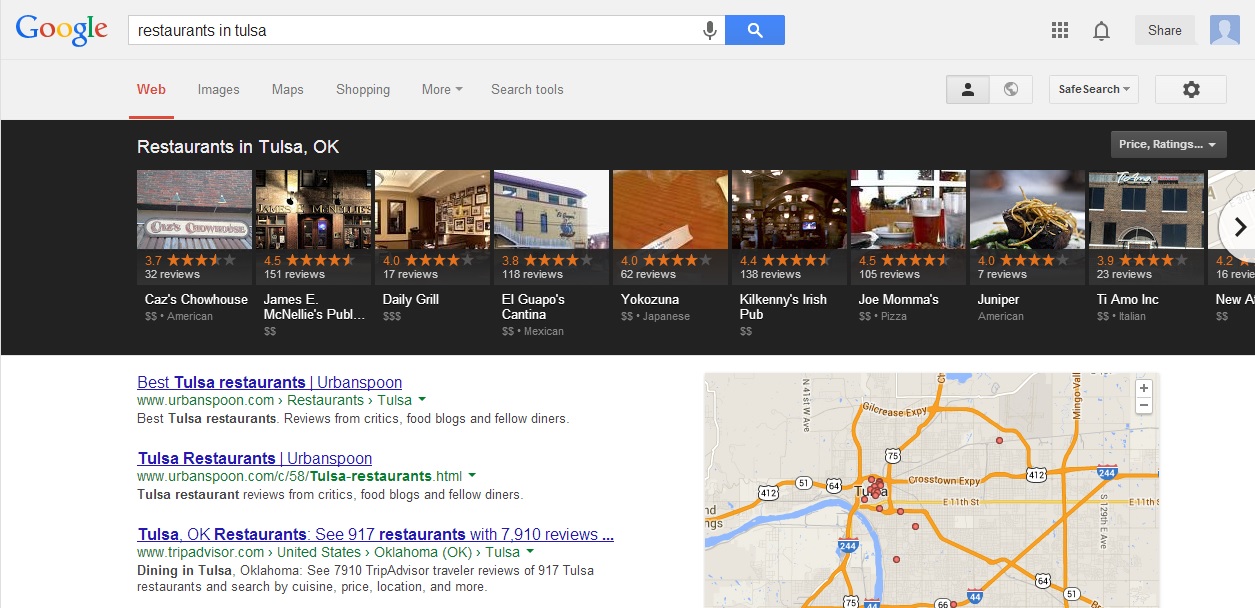
If you’ve yet to encounter it, the carousel is a black bar filled with listings that runs along the top of the screen for specific searches, especially those that are location based or for local businesses such as hotels and restaurants. The carousel includes images, the businesses’ addresses, and aggregated review ratings all readily available at the top, in an order that seems less hierarchical than the “10 pack” listings previously used for local searches.

Up until now, we’ve only had been able to guess how these listings were decided based on surface level observations. But, this week Digital Marketing Works (DMW) published a study which finally gives us a peak under the hood and shows how businesses may be able to take some control of their place in the carousel. Amanda DiSilvestro explains the process used for the study:

  • They examined more than 4,500 search results in the category of hotels in 47 US cities and made sure that each SERP featured a carousel result.
  • For each of the top 10 hotels found on each search, they collected the name, rating, quantity of reviews, travel time from the hotel to the searched city, and the rank displayed in the carousel.
  • They used (equally) hotel search terms—hotels in [city]; best hotels in [city]; downtown [city] hotels; cheap hotels in [city].
  • This earned them nearly 42,000 data points on approximately 19,000 unique hotels.
  • They looked at the correlation between a hotel’s rank in a search result based on all of the factors discussed in step 1 to determine which were the most influential.

Their report goes into detail on many of the smaller factors that play a role, but DMW’s biggest findings were on the four big factors which determine which businesses are shown in the carousel and where they are placed.

1. Google Reviews – The factor which correlated the most with the best placement in the carousel were by far Google review ratings. Both quantity and quality of reviews clearly play a big role in Google’s placement of local businesses and marketers should be sure to pay attention to reviews moving forward. However, it is unclear how Google is handling paid or fake reviews, so many might be inspired to try to rig their reviews. For long-term success, I would suggest otherwise.

2. Location, Location, Location – Seeing as how the Google Carousel seems built around local businesses, it shouldn’t be a surprise that location does matter quite a bit. Of the 1,900 hotels in the study, 50 percent were within 2 miles of the search destination, while 75 percent were within 13 minutes of travel. Businesses would benefit from urging customers to search for specific landmarks or areas of cities, as you never know exactly where Google will establish the city “center”.

3. Search Relevancy and Wording – According to the findings, Google seems to change the weight of different ranking factors depending upon the actual search. For example, searching “downtown [city] hotels” will result in listings with an emphasis on location, while “best hotels in [city]” gives results most dependent on review rankings.

4. Primary Markets and Secondary Markets – It seems both small and larger businesses are on a relatively flat playing field when it comes to the carousel. Many small hotels are able to make it into the listings, right next to huge chains. The bigger businesses may have more capabilities to solicit reviews, but no hotel is too small to be considered for the carousel.

Google made waves last week when they announced the expansion of how “Shared Endorsements” are used in ads, as well as the change to their terms of service to reflect this. The funny thing is, most people don’t understand what is actually changing.

The majority were simply confused when they heard that Google was implementing the use of social information into ads, because that has been going on for about two years now. But, as Danny Sullivan explains, the devil is in the details.

Throughout 2011, Google made changes which allowed advertisers to begin integrating images of people who liked their pages on Google+ into text and display ads. All that really showed was a small profile picture, and the phrase “+1’d this page.”

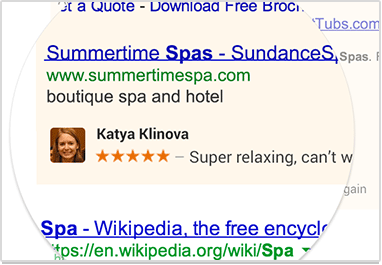
Starting on November 11, that won’t quite be the case. More than simply the people who +1 a page is going to be shown in ads. For example, if you comment, leave a review, or even follow a particular brand, those types of actions can be shown in ads on Google. A mockup of how it will appear is below.

These changes won’t take place until November, but don’t expect a prompt roll-out. It is possible you may start seeing the changes starting the 11th, but more likely it will gradually appear over the span of a few days or even a couple of weeks.
Not much else is known about how advertisers will be able to create these types of ads yet. Most likely, Google would not have announced the update this early, except they had to get the terms of service updated before they could even begin to implement this feature.

If you don’t want to appear in any of these types of ads, you can go to this page and click the tickbox at the bottom to opt out for all ads in the future.

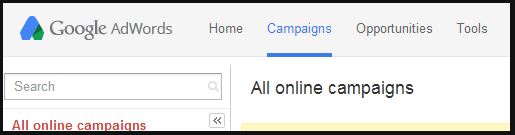
It seems like everything looks different over at Google these days. Not only has their logo subtly flattened out, but the way we see a significant number of searches has been greatly altered with the introduction of the Google Carousel. Now, AdWords seems to be following suit as reports have started to come in of a new logo and web UI design.
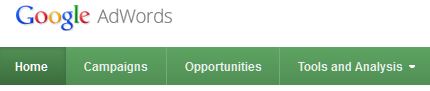
As Search Engine Land reported, Rick Galan tweeted out a screenshot of the new appearance. The logo is now integrated directly into the navigation bar and the green coloring of the bar has been replaced by Google’s widely used desaturated blue-grey.

The new AdWords logo might by signaling a redesign of all Google product logos towards a more flat design, such as what they have done with their flagship logo. Their old logo is below for comparison.

It could also simply just be a test as Google has not released any public statement or announcement for the logo, so much is unclear, especially how long a roll out might take. No one knows when we will see the change, but don’t be surprised if your AdWords experience looks different in the near future.

Leave it to Matt Cutts to always be there to clear the air when there is an issue causing some webmasters confusion. One webmaster, Peter, asked Matt Cutts whether geo-detecting techniques is actually against Google’s policies, as it is common for websites to be designed so that users are given the information (price, USPs) most relevant to their lives based on geo-location.

In some understandings of Google’s policies, this may be against the rules, but it turns out all is fine, so long as you avoid one issue.

In one of his Webmaster Chat videos, Cutts explained that directing users to a version of a site, or delivering specific information based on location are not spammy or against Google’s policies. It only makes sense to offer viewers information that actually applies to their lives.

What Google does consider spam is directing their crawlers or GoogleBot to a web page of content that users cannot see. Sending GoogleBot to a different location that what visitors see is a bad idea, which is considered spam or a form of cloaking. Instead, treat GoogleBot as you would any user, by checking the location information and sending the crawler to the normal page reflecting that data.

Most of the changes we see to Google are relatively minor. The average user might notice that the layout is a little different, or the ads are in a new place, but in general most of the massive changes to Google occur under the hood, in their search ranking and spam fighting algorithms. But, as you’ve probably seen by now, Google Carousel is Google’s latest update, and it is a fairly substantial change to how Google users see results.

The carousel is a row of images across the top of some search engine result pages (SERPs) laid on top of a black background. At the moment, the carousel contains up to 20 results, and it appears mainly on SERPs for travel, hospitality, or restaurant related searches. However, the carousel has also sporadically been appearing on queries for sports, entertainment, and education, suggesting the future directions the carousel may be expanding in.

Instead of getting what was called the 6- or 10-pack, users get these images as well as review ratings, property name, and address. To compliment the new carousel you also see the usual sponsored links you often get for other searches. Interestingly, the variation of terms for which the carousel appears seems to be random. Jim Yu from Search Engine Watch notes that a search for “hotels near disneyland” gets the carousel, while “disneyland hotels” did not.

The first bit of good news for search marketing professionals is that all of the results included in the carousel are essentially all in the first spot. Of course the majority of viewers will likely view the results from left to right, but they are not visually ranked in the same manner they were before.

The other good news is that the Google Carousel opens up numerous opportunities for local businesses to strengthen their brand online. BrightEdge research reported that the carousel currently affects 14 percent of keywords across all industries, with travel and hospitality being the most affected.

Restaurants are also highly impacted by the new layout, while entertainment terms only get the carousel for five percent of searches. Clearly, those most affected are also those with the most to gain: local businesses.
There are a few things you can do to ensure you’re business gets into the carousel for relevant searches in your area, and to be sure to beat the other competition within the listings. Yu suggests:

  • Set up a Google Places for Business and Google+ page. You can visit this post to learn more about the most important aspects of both services, and understand how to merge the two types of pages for a single business.
  • Make sure images for your pages are high resolution, unique, and up to date. Keep them sorted in terms of priority, so that users will see the images you want them to first.
  • Encourage happy customers to review your business on Google. Not only will it help you gain conversions online, research has shown it plays a large role in getting your business in the carousel.

SpeedometerHave you noticed a difference using Google on your smartphone this past week? Last week Ilya Grigorik, a Google developer advocate, announced Google was making a tiny tweak which should speed up mobile search on both Safari and Chrome by 200-400 milliseconds.

The company implemented an attribute called <a ping>, which allows them to basically do the click tracking and redirect practically at the same time, as Barry Schwartz explained.

You might not actually be experiencing search with the change, since Google is “gradually rolling out this improvement to all browsers that support the <a ping> attribute.” Grigorik also took the time to explain exactly how the change works:

What’s the benefit? Whenever the user clicks on a result, typically they are first sent to a Google URL redirector and then to the target site. With <a ping>, the click is tracked using an asynchronous call, meaning that the user sees one less redirect and a faster overall experience!