Since the introduction of Google’s Penguin algorithm many have suggested that links are no longer important for SEO. I’ve even seen some misguided folks suggesting all links are outright bad. As usual the truth is more complicated than that.
It has become such a common issue that veteran SEO writer used his regular column over at Search Engine Watch to attempt to fully answer whether links are important for SEO these days. The exact question he was asked was “do you feel Google is putting less emphasis on links as part of their algorithm?”
The truth is there are a variety of types of links that have been devalued and count very little or are poisonous to your SEO. BUT, these links were almost entirely the type “that never should have been counting in the first place.”
You see, the types of links being devalued are being brought down because they are spammy. Google has gotten increasingly smarter and better at its job of helping people find what they want on the internet without running into spam or low-quality sites. The devalued links come from junk directories, link networks, paid link brokers, article databases, link wheels, etc. The list could go on and on. But, this hasn’t brought down the quality links that good SEO professionals have built.
In Ward’s opinion, quality links matter even more now. Google can tell a lot of information about links in your profile, and they are swift to penalize low quality or spammy links, but they are even more rewarding to those who have the “right” kind of links.
Any SEO professional or online marketer you hire to help raise your brand’s profile online should be able to tell the difference between good and bad links. They know what Google doesn’t like, and they stay out of trouble. However, the best online marketers know that organic search traffic and link building are only a part of a much larger system.
00TMOhttps://www.tulsamarketingonline.com/wp-content/uploads/2018/07/TMO-Logo.pngTMO2013-09-17 11:32:452013-09-17 11:32:45Are Links Still Important in SEO?
Google recently integrated their Panda algorithms into their normal indexing process, and this has sprung up a whole new batch of questions from webmasters. The most common question is specifically how site owners will know if their site has been hit by Panda. Really, it was only a matter of time before Matt Cutts, the noted Google engineer and head of Webspam, addressed the issue.
And that is what he did earlier this week, when Cutts used one of his Webmaster Help videos to respond to Nandita B.’s question, “how will a webmaster come to know whether her site is hit by Panda? And, if her site is already hit, how she will know that she has recovered from Panda?”
Now that the Panda algorithm is a part of the normal search indexing process, finding out if you’ve been affected by Panda won’t be near as easy. You can’t just compare your analytics reports with recorded dates for Panda rollouts. But, Cutts does have some suggestions if you think your site has been affected.
Cutts said, “basically, we’re looking for high quality content. So if you think you might be affected by Panda, the overriding goal is to make sure that you’ve got high quality content.”
Of course, high quality content in this context means sites that offer real value to users. It appears integrating Panda was actually one of the last steps in a shift towards a high focus on high quality content. They’ve been suggesting focusing on value for a long time, and now it is officially a large part of the normal search algorithm.
https://www.tulsamarketingonline.com/wp-content/uploads/2018/07/TMO-Logo.png00TMOhttps://www.tulsamarketingonline.com/wp-content/uploads/2018/07/TMO-Logo.pngTMO2013-09-12 12:34:122013-09-12 12:34:12What Are You Supposed To Do If You Think You’ve Been Hit By Panda?
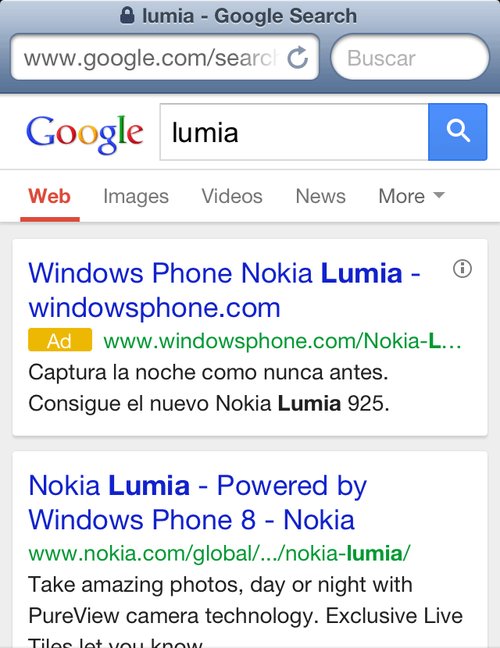
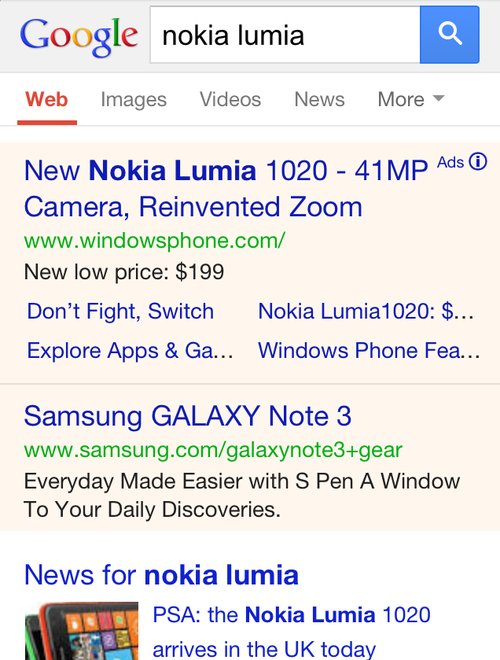
Over the next few days you might notice some changes to the way Google displays their mobile AdWords ads. Search Engine Land reports Google is currently testing out a new look which simultaneously makes the entire result page look more cohesive while keeping ads clearly labeled.
The first change you will likely notice is the way Google is using color. Google have been using lightly colored backgrounds to signify ads, but with this test they may be moving towards placing both ads and organic listings in white boxes in front of a gray background. Similarly, the gray background that has been behind the Google logo and search box is gone.
Instead of identifying ads with colored background, there is a new eye-catching yellow ad icon directly next to the display URL. The icon is significantly more attention grabbing than the old small “ad” that was previously to the right of the headline.
You can see the new style being tested above, while the current version is below.
00TMOhttps://www.tulsamarketingonline.com/wp-content/uploads/2018/07/TMO-Logo.pngTMO2013-09-12 11:39:112013-09-12 11:39:11Google Tests Out New Style For Mobile AdWords Ads
AdWords violations can throw a massive wrench into your advertising plans and completely derail a campaign. Any good marketer tries to avoid making the mistakes that can get your text ads disapproved or suspended, but many will still encounter the fearsome email from the AdWords team warning you about violations.
The 10 minute video was posted by Google’s Courtney Pannell, with the majority of the presentation coming from Ly and Joshua. They discuss the most important AdWords violation topics including:
How Sites are Reviewed by Google
Why Sites Are Disabled
How to resubmit Sites
If you encounter a warning from Google about AdWords violations, you will definitely want to watch this video.
Have you ever searched for a term only to find a page that says “we have no articles for [your search term]” and a whole bunch of ads? Most people have come across these sites with auto-generated content, often called “Made for AdSense” or MFA sites. These pages are created for the sole reason of luring people in, and hoping they click an AdSense ad to leave the page instead of hitting the back button.
The majority of these types of websites use a script to automatically generate content that takes snippets from search results or web pages with those keywords. They don’t offer real content in any way and have absolutely no legitimate value. It makes many wonder why they’ve encountered these kinds of pages in the Google search results.
One user directly asked Matt Cutts, Google’s head of webspam, if the search engine is doing anything about the pages, such as penalties or removing these sites from the index. As you would expect, Google already has a policy in place, and Cutts encourages users to report any pages like this they come across. He states:
We are absolutely willing to take action against those sites. We have our rules in our guidelines about auto-generated pages that have very little value and I have put out in the past specific calls for sites where you search for a product – a VCR, a laptop, or whatever – and you think you’re going to get a review, and the first thing you see is ‘0 Reviews found for [blah blah blah].’
As Google sees it, even if these pages are from legitimate search engines, they don’t belong in the rankings. Users don’t really like searching for something and being sent to another page of search results. They want to be directed straight to real content.
There are very few times when search results snippets should be indexed. The only real time it might be considerable is if you have exclusive data that no one else has. But, there is no time when a supposed search results page with 0 results should ever be indexed.
To put it simply, Google is already trying to fight against these sites. They aim to find and penalize all they can, but they also want people to report them with a spam report if possible so that the lowest amount possible slip through the cracks.
https://www.tulsamarketingonline.com/wp-content/uploads/2018/07/TMO-Logo.png00TMOhttps://www.tulsamarketingonline.com/wp-content/uploads/2018/07/TMO-Logo.pngTMO2013-09-06 12:38:502013-09-06 12:38:50What is Google Doing About Low-Value Auto-Generated Content Sites?
Don’t say Google doesn’t at least try to listen to webmasters. Though many webmasters have some pretty big (and often legitimate) grudges against the biggest search engine, it can’t be said they don’t at least try to reach out for opinions. One example of Google trying to receive feedback from site owners appeared last night, as Matt Cutts, Google’s head of webspam, tweeted out a call for webmasters and SEOs to fill out a survey.
Specifically, Cutts called for owners of small but high-quality websites who believe they should be doing better than they are in the rankings. It won’t end up affecting your rankings immediately, but it may give Google some information that will help them keep the playing field vaguely even for small businesses and big companies alike. The form reads:
Google would like to hear feedback about small but high-quality websites that could do better in our search results. To be clear, we’re just collecting feedback at this point; for example, don’t expect this survey to affect any site’s ranking.
The survey only asks two short questions. First, it calls for the name and URL of the small site you believe should be ranking well. Secondly, Google would obviously like to hear your opinion about why the site should rank higher. It is extremely straightforward, and shouldn’t take all that long for most webmasters to complete.
https://www.tulsamarketingonline.com/wp-content/uploads/2018/07/TMO-Logo.png00TMOhttps://www.tulsamarketingonline.com/wp-content/uploads/2018/07/TMO-Logo.pngTMO2013-08-29 11:56:062013-08-29 11:56:06Matt Cutts Asks For Feedback From Small Sites That Aren’t Ranking Well
In his attempt to fix some confusing wording Google has been using, Matt Cutts, Google’s head of webspam, used his latest Webmaster Help video to clarify that page load speed is not any more important for rankings on mobile than it is for desktop searches.
This comes after Google has been publicly emphasizing the need for sites to load quickly, noting that mobile users are highly likely to leave a page if it doesn’t load fast enough. While Google isn’t backing off of that stance, Cutts wanted to make it clear that there isn’t a difference in how this speed is ranked from mobile to desktop.
If all things are equal, meaning all other aspects of two sites are ranked evenly, the site that loads faster will almost certainly be given the higher ranking in search results by Google, but that is true on smartphones and desktop computers alike. It is also just a sensible part of the algorithm, as slow pages will likely lose a large number of visitors just during the loading time, making it a lower-value site.
But, as internet speeds across devices and across the globe vary, Cutts said Google doesn’t have plans to give an exact amount of seconds your site should load in, but if it becomes obvious to Google that mobile users are getting more frustrated by slow sites than their desktop counterparts, they may consider weighting loading speed more for mobile searches. It just isn’t the case yet, and there are no plans currently to make it so.
https://www.tulsamarketingonline.com/wp-content/uploads/2018/07/TMO-Logo.png00TMOhttps://www.tulsamarketingonline.com/wp-content/uploads/2018/07/TMO-Logo.pngTMO2013-08-27 14:25:362013-08-27 14:25:36Is Loading Speed More Important For Mobile? Matt Cutts Says No
We’ve all seen the cycle of Google updates. Every time there is a change to the algorithms, the blogs all light up with announcements, a fair sized group panics while the rest ride out the storm, and then the “how to recover” posts start rolling in. Eventually the excitement tapers off, and then it is time for a new update.
Probably the most shocking thing about all the commotion is how many people freak out in the first place. While some of Google’s changes are pretty significant, it isn’t like they don’t warn webmasters ahead of time with what direction they are headed for ranking websites. They won’t give the specifics, but they normally denounce a practice well before they start penalizing for it.
That is all my long-winded way of saying we don’t all have to be afraid of the next Penguin or Panda update. By simply following the best practice guidelines and keeping some solid tips in mind, you’ll find you have no reason to worry. Erin Everhart recently shared some great tactics you can use to keep your website in Google’s good graces.
1) Focus on Branding, Not on Ranking
It is no secret that Google isn’t actually a fan of a lot of what constitutes search engine optimization, mostly because of the way many try to take advantage of every loophole to get rankings. The common idea of SEO focuses solely on improving rankings, while Google wants to rank sites based on value to their consumers.
To start thinking like Google, you need to get your mind off of ranking and focus more on building your brand. If you search for any type of product like a flat screen TV, the results will be almost entirely brand names. Google views brand names as trustworthy and valuable parts of their community, and that goes for small businesses as well as large companies. Simply sponsoring events in the community and interacting with users in positive ways go a long way with search engines.
Of course, it would be naive to say the big brands don’t have advantages, but it isn’t the reason you think. Google evaluates them the same way they evaluate everyone else, but these brands are large enough that they never resort to the keyword stuffing, anchor text over-optimizing stuff that so many SEO professionals try to use.
2) Create a Good User Experience
Along the lines of taking your focus off of rankings, Google has been pleading with the SEO community to take their attention to actually delivering quality experiences for users. The search engine wants to deliver great sites that users will enjoy being on, not low quality pages with the most optimization. To achieve this, the engine made site quality more important than link profiles and has been refining their guidelines to push for faster sites with better content.
For marketers and optimizers, this can be a little confusing. Who exactly defines a “high quality site” and what are the criteria? Well we know the faster your site is, the better off it will fare. But, there are many more amorphous factors to deal with. The only real way to find out exactly what your users will like and how to make the highest quality site for them is testing. Run every type of test you can. Do user testing. Do split testing. Research your market.
3) Preserve Your URLs
It is a little bit of an outdated practice at this point, but it remains true that old URLs still rank the best. The only reason you should resort to changing your URLs is to fix an absolute mess of site architecture or absolutely have no choice. But, if there is any way you can avoid it, do. Canonicals and 301s reduce equity that you’ve built up, and new pages have to start all over again.
Instead, bigger companies like Apple use the same page for every new product launch, unless they release an entirely new product like the rumored upcoming smartwatch. They simply update the existing page to reflect the new product, while the old iPhone gets pushed to a new page. This way, you can take advantage of the equity you already have.
Conclusion
Focusing your SEO efforts on rankings isn’t sustainable any longer. You may shoot up the rankings more quickly than those creating a high quality campaign, but you’ll live in fear of every algorithm update, and eventually you will get hit. Chances are, you probably already have been penalized once, unless you’re walking the straight and narrow.
00TMOhttps://www.tulsamarketingonline.com/wp-content/uploads/2018/07/TMO-Logo.pngTMO2013-08-22 11:16:072013-08-22 11:16:073 Tips for a Successful Long Term SEO Campaign
How fast does your website load on mobile devices? Under five seconds? If you said yes to the second question, you are probably pretty happy with your answer. What about under one second? Probably not. But that is how fast Google says sites should load, according to their newest guidelines for mobile phones.
Before you start freaking out at the suggestion their site is supposed to load in under a second, it should be clear that Google isn’t mandating an insane guideline. They don’t actually expect most websites to completely load that quickly. Instead, they are focusing on the “above the fold” content. They think users should be able to get started playing with your page quickly, while the rest can progressively load.
It is probably a wise insight, considering most mobile users say they are more likely to leave a site the longer it takes to load. On smartphones, every second really counts, and if you can get the above the fold content loaded within a second, most users will be happy to wait for the rest of the content while they start exploring.
“…the whole page doesn’t have to render within this budget, instead, we must deliver and render the above the fold (ATF) content in under one second, which allows the user to begin interacting with the page as soon as possible. Then, while the user is interpreting the first page of contents, the rest of the page can be delivered progressively in the background.”
To match with the new guidelines, Google also updated its PageSpeed Insights Tool to focus more on mobile scoring and suggestions over the desktop scoring. They also updated scoring and ranking criteria to reflect the guideline changes.
00TMOhttps://www.tulsamarketingonline.com/wp-content/uploads/2018/07/TMO-Logo.pngTMO2013-08-15 11:18:102013-08-15 11:18:10Google Updates Mobile Guidelines With Focus On Loading Times
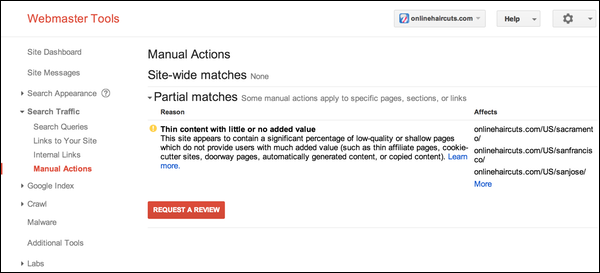
Google has long been alerting webmasters when they placed a manual action against the site, but last week they made it even easier to know for sure whether a site’s search rankings are being penalized with a manual action. The search engine has added a new feature to Webmaster Tools called the Manual Actions viewer.
The Manual Actions viewer is seen under the “Search Traffic” tab, and it is meant to act as a complimentary alert to the email notifications they already send out to websites receiving a manual action. With the new tool, webmasters don’t have to rely on waiting for an email. Instead, they can check their site’s condition any time.
According to Google, less than two percent of all domains within its index are manually removed for spammy practices, so most legitimate webmasters will never see anything within the tool other than a display reading “No manual webspam actions found.”
However, for those who get targeted for spammy practices, the Manual Actions viewer will show existing webspam problems under two headings titled ‘site-wide matches’ and ‘partial matches’. They will also include information on what type of problem exists from a list of roughly a dozen categories including ‘hidden text and/or keyword stuffing’, ‘thin content’, and ‘pure spam’.
For the partial matches listed in the tool, Google also gives access to a list of affected URLs for each type of spam problem. For example, if you have a notification for thin content, you will be able to see all the URLs targeted. There is a limit of 1,000 URLs per problem category, but that should be plenty for al but massive websites like YouTube.
Within the tool, there is also quick access to a new ‘Request a Review’ button that appears any time there are manual actions listed. When you click the button, a pop-up window opens which lets the webmaster give Google details on how you have resolved the issues.