Giving your visitors a place to comment on content or in a forum on your site is a great way to encourage interaction and build a bond with potential customers. But, it can be a headache trying to keep any sort of open comment area clean from spammers, trolls, and other sorts of nogoodniks.

This creates two different problems. If visitors see your pages and blog posts are followed by nothing but spam and other types of website vandalism, they’re likely to think less of your brand and potentially move on to someone else. Additionally, you can even get penalized by search engines like Google if it detects an abundance of spam or malicious links or code on your site.

So what can you do to keep your forums and blog comments clean of those seeking to use the opportunity for their own ends without shutting it all down? Google recently offered a few tips to make sure the only comments and posts your visitors see are from real humans interested in building a valuable discussion around your brand and products:

  • Keep your forum software updated and patched. Take the time to keep your software up-to-date and pay special attention to important security updates. Spammers take advantage of security issues in older versions of blogs, bulletin boards, and other content management systems.
  • Add a CAPTCHA. CAPTCHAs require users to confirm that they are not robots in order to prove they’re a human being and not an automated script. One way to do this is to use a service like reCAPTCHA, Securimage and  Jcaptcha .
  • Block suspicious behavior. Many forums allow you to set time limits between posts, and you can often find plugins to look for excessive traffic from individual IP addresses or proxies and other activity more common to bots than human beings. For example, phpBB, Simple Machines, myBB, and many other forum platforms enable such configurations.
  • Check your forum’s top posters on a daily basis. If a user joined recently and has an excessive amount of posts, then you probably should review their profile and make sure that their posts and threads are not spammy.
  • Consider disabling some types of comments. For example, It’s a good practice to close some very old forum threads that are unlikely to get legitimate replies.
  • If you plan on not monitoring your forum going forward and users are no longer interacting with it, turning off posting completely may prevent spammers from abusing it.
  • Make good use of moderation capabilities. Consider enabling features in moderation that require users to have a certain reputation before links can be posted or where comments with links require moderation.
  • If possible, change your settings so that you disallow anonymous posting and make posts from new users require approval before they’re publicly visible.
  • Moderators, together with your friends/colleagues and some other trusted users can help you review and approve posts while spreading the workload. Keep an eye on your forum’s new users by looking on their posts and activities on your forum.
  • Consider blacklisting obviously spammy terms. Block obviously inappropriate comments with a blacklist of spammy terms (e.g. Illegal streaming or pharma related terms) . Add inappropriate and off-topic terms that are only used by spammers, learn from the spam posts that you often see on your forum or other forums. Built-in features or plugins can delete or mark comments as spam for you.
  • Use the “nofollow” attribute for links in the comment field. This will deter spammers from targeting your site. By default, many blogging sites (such as Blogger) automatically add this attribute to any posted comments.
  • Use automated systems to defend your site.  Comprehensive systems like Akismet, which has plugins for many blogs and forum systems are easy to install and do most of the work for you.

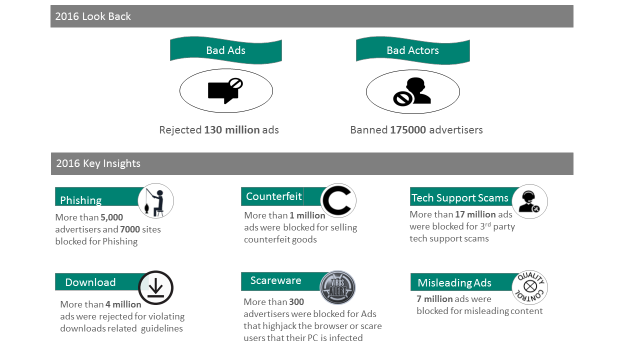
It’s no secret that there are lots of bad people trying to operate scams online. Bing’s latest report on bad ads makes that crystal clear, as the search engine has removed over 130 million ads and banned 175,000 advertisers in just the last year.

Somewhat surprisingly, that number is actually 120 million fewer ads than in 2015. In comparison, both those ads combined are still dwarfed by Google’s 1.7 billion blocked ads in 2016.

As the Bing Ads’ Ad Quality in Review 2016 report explains, the ads were rejected for “direct policy compliance issues or intention to mislead users.” It continues:

“We introduced new policy around software download advertising that reduced unwanted and potentially malicious ads for many top free software programs. We ramped up systems that detect browser hijacking ads, phishing attempts, scareware ads, ads targeting the most common sites on the internet, and ads with multimedia content. We also enforced policies directed towards gender determination ads to comply with country specific regulations.”

The report specifically highlights six different types of bad ads it removed in 2016:

1-1

  • Phishing: More than 5,000 advertisers and 7,000 sites were blocked for phishing.
  • Counterfeit: More than 1 million ads were blocked for selling counterfeit goods.
  • Tech Support Scams: More than 17 million ads were blocked for third-party tech support scams.
  • Download: More than 4 million ads were rejected for violating download-related guidelines.
  • Scareware: More than 300 advertisers were blocked for ads that highjack the browser or scare users that their PC is infected.
  • Misleading Ads: 7 million ads were blocked for misleading content. This is a huge drop compared to 2015, when Bing rejected 30 million ads.

Bing emphasized the scale of their efforts with a final comparison, saying “if one person took a minute to find and take down a bad ad or actor, it would take them nearly 500 years to remove the same number of bad ads or actors found by our automated methods in 2016.”

The Super Bowl is advertising’s biggest day of the year with brands spending millions to get their products in the spotlight. Many tune in just to enjoy the biggest ads of the year and this year commercials gave audiences a fair share of laughs, pangs of nostalgia, and surprises – though maybe not anything as shocking as the Patriot’s comeback.

Of course, these days you don’t have to sit through the big-game (and insanely long pre-show) to see the ads. Several advertisers shared their campaigns early on YouTube, and the others were uploaded as they aired for you to watch and re-watch.

To make sure you catch the best and biggest ads of this year’s Super Bowl, I collected five of the most unforgettable commercials you’re likely to hear people talking about:

Snickers Live Commercial

https://youtu.be/_9M_wQDTTdk

Most brands spend weeks shooting and editing their commercials ahead of the game to make sure everything is absolutely perfect. Snickers took a different route this year with a live commercial starring Adam Driver which ends in a (perfectly orchestrated) catastrophe. It’s a novel twist on the typical Super Bowl ad in a way that perfectly ties into the message, and I predict other brands may follow their lead in the future.

Avocados From Mexico

https://youtu.be/VneoEvAJX0g

Comedy in Super Bowl ads usually boils down to celebrities doing zany things (and yes, we will get to one of those soon). But, the funniest ad in this year’s game is almost entirely celebrity free – aside from SNL’s Jon Lovitz, if you consider him a celebrity.

Instead, it sets up a simple premise of a secret society gathering to discuss their recent leaks, including all the most well-known conspiracy theories. Even better, the brand took a risk and slipped in a “Deflategate” joke knowing there was a good chance the Patriots would make it to the Super Bowl – and it payed off beautifully.

T-Mobile – #NSFWireless

https://youtu.be/pNCG9fHGXB0

T-Mobile went with the “celebrities doing zany things” angle this year, with mixed results. While the dancing Justin Bieber ads were eye-rollingly awkward, two hilarious commercials starring comedian and actress Kristen Schaal more than make up for their missteps.

Schaal, playing a Verizon customer addicted to being treated poorly by her service provider, perfectly sells the message that only a masochist would enjoy the customer experience of T-Mobile’s competitors.

It’s a 10 – Four Years

Perhaps unsurprisingly, politics also played a major role in ad campaigns from several advertisers including Budweiser and Audi. While those ads were beautiful, my favorite political ad of the night took a lighter tone. Opening with “America, we are in for at least four years of awful hair,” It’s a 10 urges viewers to “do your part by making up for it with great hair.”

Understated and smart, the brand left a mark on their night with a truly bipartisan message urging everyone to take pride in their hair.

Tide Cleans Terry Bradshaw’s Shirt

https://youtu.be/jF3otdfvSBQ

Terry Bradshaw and Tide teamed up last night to tear down the walls between reality and advertisements like never seen before. Many viewers noted that Bradshaw returned from commercial in the second quarter with a conspicuously large stain on his shirt, which prompted mass ridicule on social media.

But, the joke was on us. Bradshaw’s stain was setting up a Tide ad telling an epic journey from the broadcasting booth to actor Jeffrey Tambor’s house to clean out the stain and do some quiet sitting in front of the TV. The ending is enjoyable enough on its own, but the creative breaking of the fourth wall makes Tide’s campaign a standout ad of the night.

Google+ is dead. Long live Google+.

Google announced it is retiring the “classic” Google+ we all know and replacing it with an all-new updated version with several big updates. The company says it is aiming to please users with several of the most heavily requested updates from the Google+ community.

”With this latest round of updates, we believe the new Google+ is really your Google+— designed around your suggestions, requests and needs. It also means it’s time to say goodbye to classic Google+ on the web, which we’ll be turning down on January 24.”

Here are a few of the things you can expect when the “new” Google+ launches on January 24:

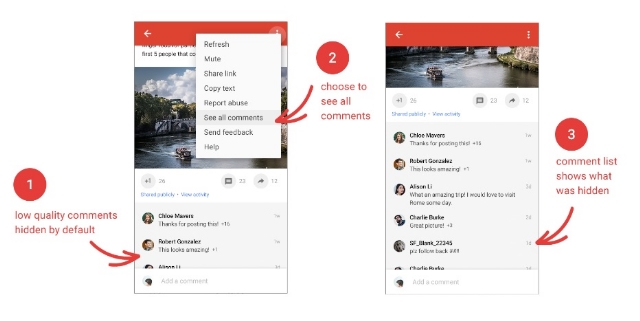
Hide Low-Quality Comments

Google+Comments

Google+ will begin to automatically bury low-quality comments that its algorithms deem non-conductive to conversation. It’s hard to know how exactly the function will work, but you can opt to leave the “low-quality comments” visible to everyone if you desire.

Putting Content First

Google+Images1

Google+ is aiming to trim the fat with its new update by reducing the amount of wasted space on the screen. Instead, it aims to put the focus on content with more images that you can even zoom in on.

Events Make Their Return

Events disappeared from Google+ some time ago, but the ability to create and join events is coming back. However, the company says it still needs to refine Events based on user experience, so expect it to be a work in progress when it launches.

“And Much More”

While Google is relaunching Google+ on the 24th, they say their work is far from over. “Our aim is to make Google+ the best place to connect around the things you care about,” the company says. Google is encouraging users to give their feedback and help shape the new Google+ as it takes shape in the future.

Google has officially begun rolling out the intrusive mobile interstitial penalty yesterday after months of warnings the penalty would be launched on January 10, 2017.

The roll-out was confirmed by both John Mueller and Gary Illyes yesterday.

The penalty is specifically designed to target intrusive interstitials that pop-up immediately after landing on a page from a Google mobile search result. However, it does not affect pages with delayed interstitials triggered by a click or action on the website.

Google specifies this means “pages where content is not easily accessible to a user on the transition from the mobile search results may not rank as highly.”

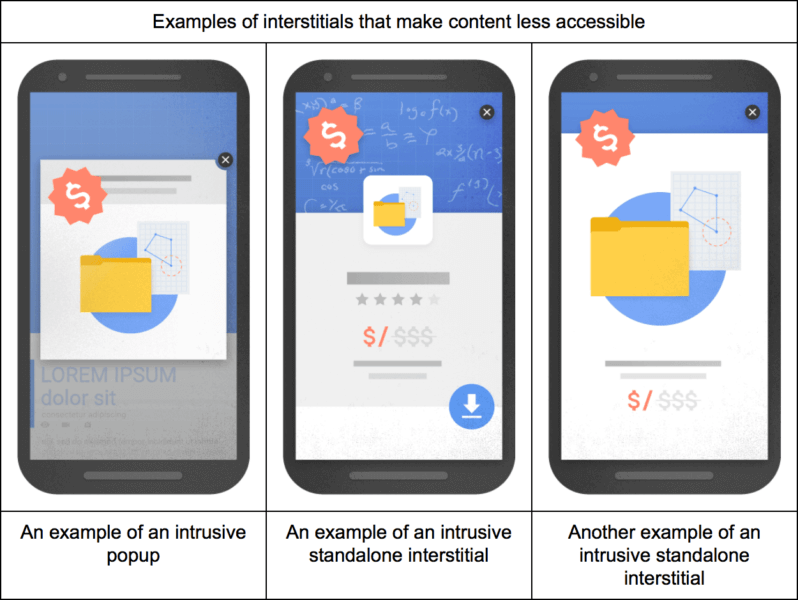
Google also detailed three specific types of interstitials it deems as problematic:

google-mobile-interstitials-penalty-bad-798x600

  • showing a popup that covers the main content, either immediately after the user navigates to a page from the search results or while they are looking through the page.
  • displaying a standalone interstitial that the user has to dismiss before accessing the main content.
  • using a layout where the above-the-fold portion of the page appears similar to a standalone interstitial, but the original content has been inlined underneath the fold.

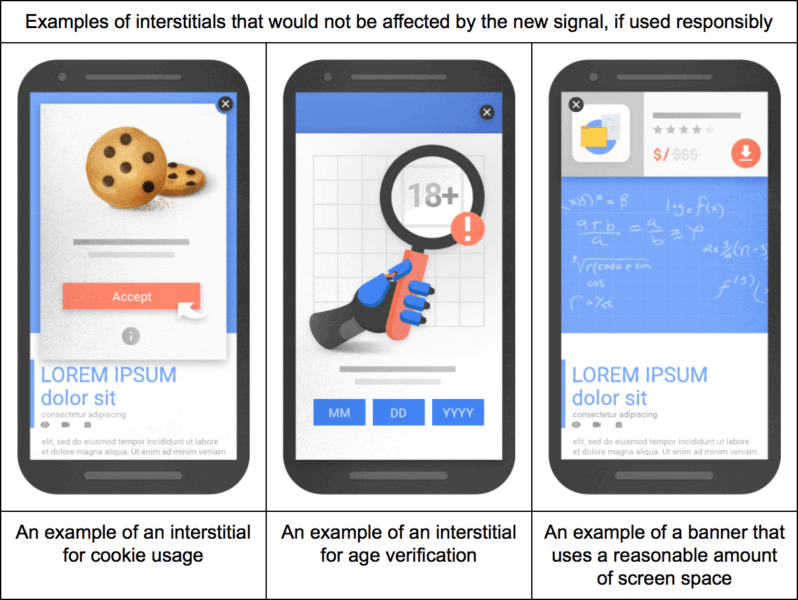
The company also detailed three types of interstitials that would not be affected by the penalty, so long as they are “used responsibly”:

google-mobile-interstitials-penalty-good-798x600

  • Interstitials that appear to be in response to a legal obligation, such as for cookie usage or for age verification.
  • Login dialogs on sites where content is not publicly indexable. For example, this would include private content such as email or unindexable content that is behind a paywall.
  • Banners that use a reasonable amount of screen space and are easily dismissible. The app install banners provided by Safari and Chrome are examples of banners that use a reasonable amount of screen space.

Video finally came into its own as a content marketing format over the past year, with the launch of 360-degree videos, Facebook Live, and all sorts of new features for video marketing on Twitter, Instagram, and Snapchat.

It was only a matter of time, as video has been a huge part of the online ecosystem since the launch of YouTube all those years ago. Currently, estimates suggest up to 78% of all people watch videos online every week and 55% percent make it a daily activity.  That means if you have been ignoring online video as a marketing channel for your business, you’re missing out on a huge and highly engaged audience.

With the start of the new year, many businesses are considering finally making video marketing a part of their larger advertising strategy. If you aren’t, you might want to reconsider. This infographic created by HighQ shows exactly why 2017 is poised to be the year video marketing blows up. You don’t want to be lagging behind when it does.

Video Marketing Infographic

untitled-design-27-700x400

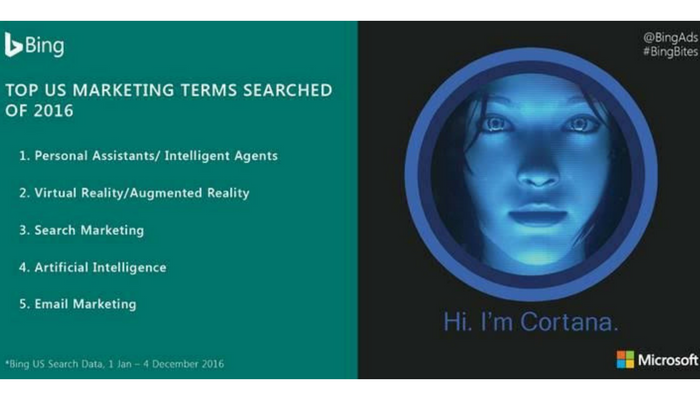
Bing has unveiled the top marketing keywords searched for throughout last year, based on their US search data. The new reveal sheds light on what people are thinking of and what the biggest upcoming trends are, with personal assistants beating out the competition.

”Personal assistants and artificial intelligence were a clear priority for marketers over the past year. Advances in chat bots and virtual assistants, such as Alexa, Cortana and Amazon Echo – as well as updates to several smartphone chat bots, were likely drivers for these search terms.”

Of course, Microsoft owns both Cortana and Bing, so it is possible that played a role in the high rank of personal assistants on the list. Still, the popularity of other services such as Siri and Alexa shows that virtual assistants are quickly becoming a major part of the tech and marketing landscape.

In addition to personal assistants, Bing says augmented reality and virtual reality are also poised to play a big role in marketing.

”Virtual and augmented reality came second to intelligence, with the popularity of searches representing the growth of this technology throughout 2016 – and it’s likely continual development into next year.”

Check out the rest of the top marketing search terms for 2016 below:

  1. Personal Assistants/ Intelligent Agents
  2. Virtual Reality/Augmented Reality
  3. Search Marketing
  4. Artificial Intelligence
  5. Email Marketing

Google HTTPS Warning

Google is making some changes to protect users’ sensitive information online, and it could lead to your site being marked as non-secure by Google’s web browser at the end of this month.

Google released a warning that as of the end of January 2017, Chrome will mark sites without HTTPS as non-secure if they collect private information like passwords or credit cards.

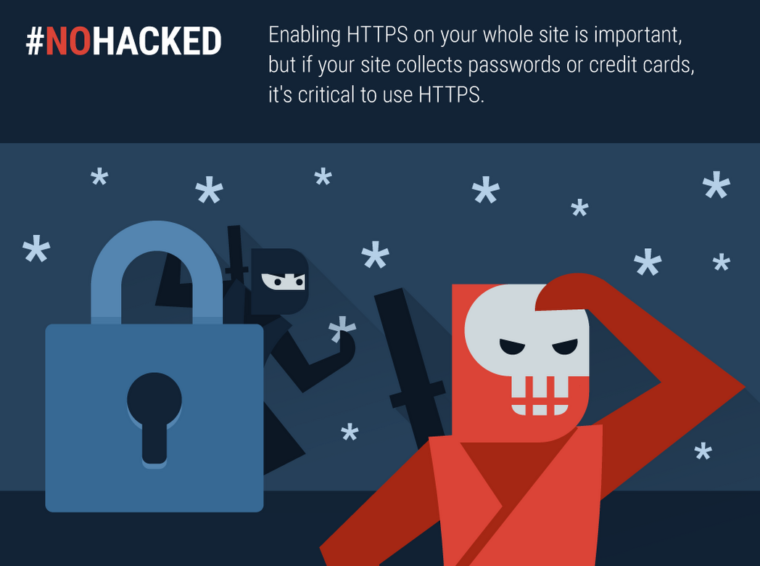
Google #NoHacked HTTPS

“Enabling HTTPS on your whole site is important, but if your site collects passwords, payment info, or any other personal information, it’s critical to use HTTPS.”

The company has encouraged implementing HTTPS in the past by making it a (very minor) search ranking signal. Now, from the sound of the alert, the company says an entire site will need to be HTTPS if any pages collect payment or sensitive information.

Switching over to HTTPS is an easy process, but you should begin preparing to make the switch now if your site fits the criteria. Otherwise, you are likely to be flagged as non-secure in February and lose a large amount of your web traffic.

Negative SEO alert

There’s a new malicious SEO tactic making the rounds and your Google My Business listings could easily be the victim, according to web security company Sucuri. The company says individuals are sneaking inappropriate or damaging photos into GMB listings with the intent of damaging a business’s reputation and image.

What makes this type of exploit unique, however, is that it doesn’t take any hacking skills to do. Unlike other negative SEO tactics, this specific technique does not include hosting images on a client server, malicious code, or even breaking into an account.

Ultimately, the attack is taking advantage of Google’s lax rules for uploading photos to a business’s location in Google Maps. Anyone can upload images to a business’s listing, and any of these images can be used for Knowledge Graph data about the business.

While Sucuri doesn’t have evidence of this, it is possible for a person to spam a business’s listing with lewd images and then send fake hits to them to increase their perceived popularity – all with the end goal of making sure they come up when people see your business online.

How to Protect Your Listings

Unfortunately, the nature of this type of attack makes it difficult to guard against. There is no way to limit who can upload photos to your listings or determine which image gets used in Knowledge Graphs. The best you can really do is to actively keep an eye on your listings and which photos are appearing next to your listings.

You can also watch to make sure no one is uploading inappropriate pictures to your Google My Business photos. While you can’t stop people from uploading lewd images, you can easily remove any associated with your location.

Year in Search

Google has finally released its annual year in search list, breaking down the biggest stories and searches of the past year. As usual, it is broken down into several categories and countries, making it easy to see what was trending in 2016 in your area or around the world.

Google’s Top 10 Worldwide searches of 2016:

  1. Pokémon Go
  2. iPhone 7
  3. Donald Trump
  4. Prince
  5. Powerball
  6. David Bowie
  7. Deadpool
  8. Olympics
  9. Slither.io
  10. Suicide Squad

The top searches for the US are almost identical, except for a few changes. “Powerball” bounces up to the top slot, because it can only be played in America. Meanwhile, “iPhone” slides entirely off the list.

Google’s Top 10 US Searches of 2016:

  1. Powerball
  2. Prince
  3. Hurricane Matthew
  4. Pokemon Go
  5. Slither.io
  6. Olympics
  7. David Bowie
  8. Trump
  9. Election
  10. Hillary Clinton

While the iPhone 7 didn’t make the top US searches, it does lead the worldwide top tech searches of the past year. Apple also dominates 3 of the top 4 searches for consumer technology. Considering its recent reveal, it is also somewhat surprising to see the Nintendo Switch also makes the list at number 9.

Google’s Top 10 Consumer Tech Searches Worldwide:

  1. iPhone 7
  2. Freedom 251
  3. iPhone SE
  4. iPhone 6S
  5. Google Pixel
  6. Samsung Galaxy S7
  7. iPhone 7 Plus
  8. Note 7
  9. Nintendo Switch
  10. Samsung J7

Of course, there are plenty more interesting categories in Google’s Year in Search 2016 to look through including beers, fashion designers, GIFs and much more. Check out the lists for yourself.