Tag Archive for: News

Twitter has become an undeniable force in modern culture. Even if you aren’t signed up for the social media platform, you can hardly turn on the television without being bombarded by tweets and hashtags.

Every major news network solicits tweets from their viewers in order to get real-time responses to issues, and any new episode of a show is bound to have at least one hashtag hovering in the bottom corner of the screen.

But, those TV hashtags highlight one of the biggest problems with Twitter: few people actually understand hashtags or how to use them efficiently. Sure, we all know how to tag Instagram photos with them, or we slap a silly hashtag on the end of tweets to add a little more information, but the number of people actually using hashtags to organize and sort through the constant tidal wave of new tweets is actually quite low.

It isn’t that Twitter’s users aren’t smart enough to use hashtags more efficiently, but it is difficult to make hashtags a very useful sorting device without going through a middleman. Twitter’s search engine can let you broadly search hashtags, but if you want to actually make sense of the mess you most likely need an extra tool to help you out.

Ann Smarty from Search Engine Journal pulled together five such tools to help Twitter users everywhere turn hashtags into a vital part of their information consumption every day. If you want to be smart with your hashtags, these tools are the best place to start.

1. Twitter Chat
twitter-chat-tool

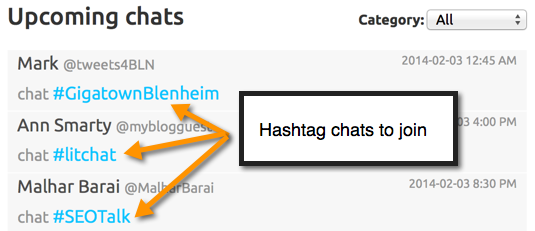
When Twitter began using hashtags, it didn’t take long for users to figure out that the tags can be used to create a conversation between numerous people. Rather than directly messaging an individual, you are able to put a topic or “chat title” in the form of a hashtag so users are able to create a real discussion. But, the conversation was still cluttered and not well laid out for the average reader.

TwChat allows you to take those hashtags and monitor them in real time. It also lays the tweets in a more cohesive way, so that you can more quickly read and understand the conversation. Best of all, it is super simple to use, free, and doesn’t require downloaded software.

2. TagDef
TagDef

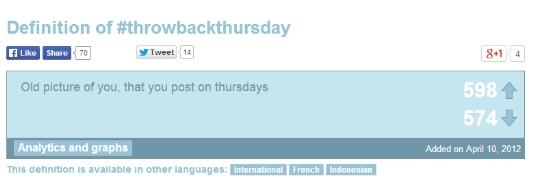
Originally, there was an unspoken rule that hashtags should be easy to understand at a glance. Obviously, this rule has fallen apart over time. Hashtags tend to be a combination of slang, inside jokes, and promotional material that makes no sense without context.

With the help of TagDef, you won’t have to worry about not being caught up with the latest American Idol hashtag or the slang younger people are using to keep up with the meaning behind hashtags popping up in your feed. The tool lets you search a hashtag and get the meaning instantly. You can also edit and add your own meanings. TagDef acts like Urban Dictionary exclusively for hashtags (and potentially a little less focused on profanity).

3. Hashtags
Hashtags Tool

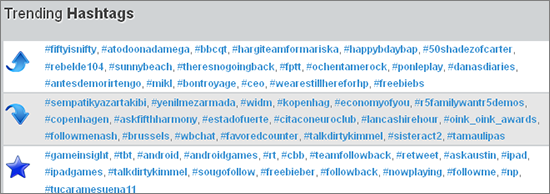
Hashtags gained its reputation as the largest hashtag database on the web, but there is much, much more there. The site includes analytics, how to articles, blog posts, a chatroom, a forum, a hashtag dictionary, events, trending hashtags, popular hashtags (long-term), and even more.

4. Tagboard
tagboard

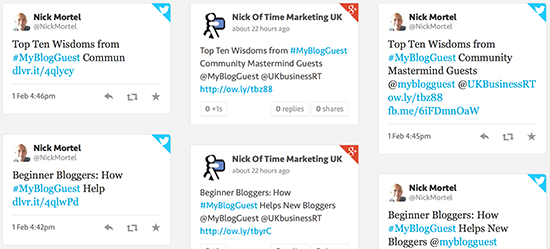
Of course, hashtags aren’t limited strictly to Twitter. The history of hashtags goes all the way back to IRC chats, but they have spread to nearly every major social networking platform out there. Facebook, Instagram, Google+, and Vine have all implemented the organizing tool. Tagboard takes hashtags from across all those different platforms and displaying them all on one page. You can even use it as a social network dashboard, allowing you to like, share, or retweet as you desire without ever having to leave the site.

5. Hashtagify.me
hashtagify

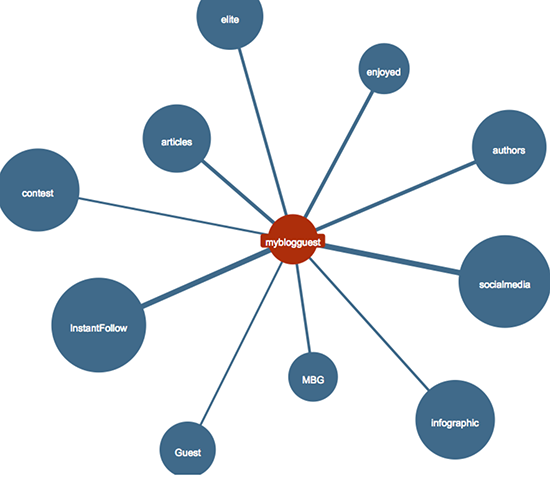
There is no rule you have to use only one hashtag per post. In fact, many add three or more hashtags on a large number of their posts, but it can be hard to see how they are related from Twitter’s site. Hashtagify helps you see how different hashtags are related and their usage patterns, as well as offering in-depth analysis in their pro version. They also have active breakout alerts, so you can always be the first to know about the new cool hashtag.

John MuellerThere is no escaping a Google penalty without following the rules and doing the hard work to clear your name. It is old news that if you have suffered a penalty on your site and you moveto a new domain and redirect the URLs to that new domain, the penalty stays around thanks to the redirects.
However, some SEO’s may attempt to escape the penalty by moving their site to a new domain without redirecting the URLs. That way, theoretically Google can’t follow you and put the penalty on your moved site too. Unfortunately, Google’s John Mueller has quashed the notion pretty thoroughly.

In a recent Google Webmaster Hangout, Mueller explained that even if you move the site and don’t redirect, Google may still find you and apply the penalty again. Roughly 23 minutes into the video below, John answers Barry Schwartz’s question on the topic by explaining that if you just copy and paste the pages onto a new site without many changes, Google may still be able to pick up on the site move. Even if you do not set up 301 redirects or use the change address tool in Google Webmaster Tools, Google could potentially still know you moved domains and pass along the penalty.

John does explicitly explain in the video that Google doesn’t rely on their signals alone to pass along the penalty. But, if they receive signs that you are trying to hide the same site elsewhere under a new URL without fixing the core issues with your site, they will investigate and likely apply the penalty.

In the end, you will have to do the hard work you are avoiding to ever get rid of the penalty completely. It may sometimes be better to completely tear down a site and start from scratch to fix the issues that earned you the penalty to begin with, but you can’t just run away from it forever.

You can view the video below or here.

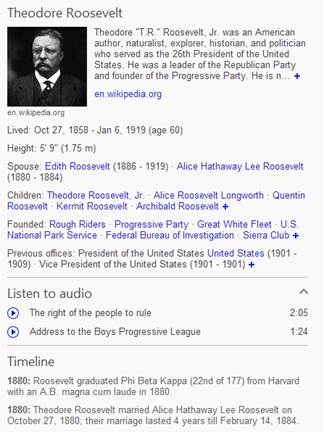
bingtimelineteddyrBing is quickly expanding their new timeline feature for celebrities and historical figures. Just a few weeks after premiering the feature for athletes participating in the Sochi Olympics, Bing has added the feature to searches for about half a million famous people.


If you haven’t seen the timeline feature, it is similar to Google’s Knowledge Graph, as both highlight important information on figures in a concise column. For example, the column includes standard information such as height, spouse, children, and parents. But, with the timeline feature, Bing also includes a chronological list of important events or dates in the life of the figure you searched for.

The timeline includes footnotes for all the major events, as well as listing the year they occurred. But, don’t expect to get those results for every celebrity. Bing says that in some cases where “you would be more interested in another type of information” about the celebrity, the timeline information won’t be shown in favor of more relevant data.

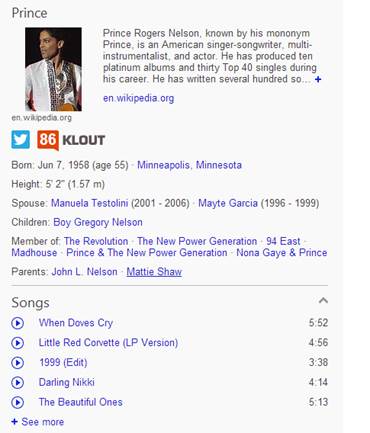
Search Engine Watch points out that this is most true for actors and singers. When you search for Prince, you won’t be shown a timeline. Instead, you will be shown information about his most popular sings, albums, and even romantic interests.

bingtimelineprince

If you use Bing and haven’t run into one of these timelines yet, just keep searching for celebrities or historically important people. Bing has made it clear the half a million celebrities with timeline featured are just the start of an even more robust search result system.

The biggest question this raises is whether the timeline will always be exclusive to celebrities, or whether Bing’s relationship with Klout may indicate an intention to expand their Klout-verified snapshots with features similar to timeline. Would you want searchers to be able to automatically see a timeline for you in a search engine?

Source: Search Engine Land

Source: Search Engine Land

Google is usually pretty public with their guideline revisions, but some of their smaller updates are easy to miss. Last week, Google made a small announcement of the Google Help forums that they have made a clarification update to their Google Places quality guidelines, which could affect local businesses who don’t update their information.

The guidelines establish exactly what business owners can name their business within Google Local. This needed to be clarified, as before it wasn’t clear why type of descriptors were allowed in business titles and how many would be acceptable. The revised guidelines make this clear:

  • Your title should reflect your business’s real-world title.
  • In addition to your business’s real-world title, you may include a single descriptor that helps customers locate your business or understand what your business offers.
  • Marketing taglines, phone numbers, store codes, or URLs are not valid descriptors.
  • Examples of acceptable titles with descriptors are (in italics for demonstration purposes) are “Starbucks Downtown” or “Joe’s Pizza Restaurant“. Examples that would not be accepted would be “#1 Seattle Plumbing”, “Joe’s Pizza Best Delivery” or “Joe’s Pizza Restaurant Dallas“.

SpellingPretty much anything Google’s most popular engineer Matt Cutts says makes headlines in the SEO community, but often his Webmaster Chat videos and advice aren’t mind-blowing by any stretch of the imagination. For instance, we recently covered a video where Cutts explained that bad grammar in the comment section most likely won’t hurt your ranking (unless you allow spam to run rampant).
For content creators, it was a legitimate concern that poorly written contents might negate the hard work putting into writing legible and well-constructed content. However, many used this to run headlines that Google doesn’t care about grammar, which is not even close to being confirmed.

As Search Engine Land points out, way back in 2011, Cutts publicly stated that there is a correlation between spelling and PageRank, but Google does not use grammar as a “direct signal.” But, in his latest statement on the issue Cutts specifies that you don’t need to worry about the grammar in your comments “as long as the grammar on your own page is fine.” This suggests Google does in fact care about the level of writing you are publishing.

It is unclear exactly where the line is for Google at the moment, as they imply that grammar within your content does matter, but they have never stated it is a ranking signal. Chances are a typo or two won’t hurt you, but it is likely Google may punish pages with rampant errors and legibility issues.

On the other hand, Bing has recently made it pretty clear that they do care about technical quality in content as part of their ranking factors. Duane Forrester shared a blog post on the Bing Webmaster Blog which states, “just as you’re judging others’ writing, so the engines judge yours.”

Duane continues, “if you [as a human] struggle to get past typos, why would an engine show a page of content with errors higher in the rankings when other pages of error free content exist to serve the searcher?”

In the end, it all comes down to search engines trying to provide the best quality content they can. The search engines don’t want to direct users to content that will be hard to make sense of, and technical errors can severely impact a well thought-out argument.

As always, the best way to approach the issue is to simply write content for your readers. If your content can communicate clearly to your audience, the search engines shouldn’t have any problems with it. But, if a real person has trouble understanding you, the search engines aren’t going to do you any favors.

bing-2Google isn’t the only search engine waging a war on black hat or manipulative SEO. Every major search engine has been adapting their services to fight against those trying to cheat their way to the top of the rankings. This week, Bing made their latest move against devious optimizers by amending their Webmaster Guidelines to include a stern warning against using keyword stuffing to try to rank highly.
The warning cuts the cheating SEOs no slack, cautioning that Bing may demote or entirely delist sites caught using keyword stuffing. The change wasn’t officially announced, but Barry Schwartz says it appeared in the guidelines sometimes yesterday.

The new section on keyword stuffing reads:

When creating content, make sure to create your content for real users and readers, not to entice search engines to rank your content better. Stuffing your content with specific keywords with the sole intent of artificially inflating the probability of ranking for specific search terms is in violation of our guidelines and can lead to demotion or even the delisting of your website from our search results.

Many businesses only use their Google+ Local profile for SEO. It is an important part of increasing your brand’s visibility on Google and it is incredibly easy to sign up, reap the benefits, and leave the profile alone from then on. But, it is crucial to make sure you at least set the profile up completely, otherwise you might get some interesting results.

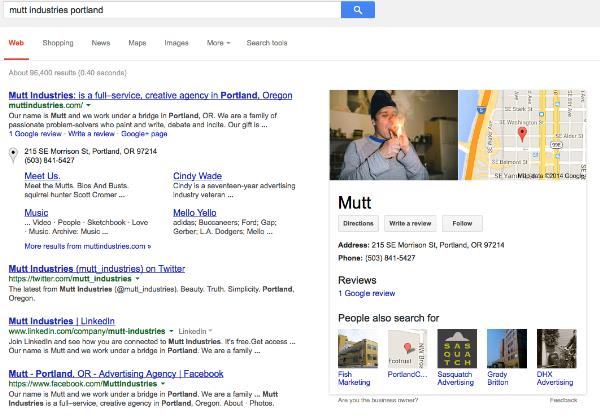
When you leave parts of your profile empty, especially your photos, Google tends to do their best to fill in the gaps. But, this doesn’t aways have the best results. For example, take Mutt Industries from Portland. Todd Mintz spotlighted their appearance on Google Plus Local and search results.

Mutt Industries

If you don’t upload pictures to your profile, Google will just use whatever they can find to fill the spot, and it might be and entirely random photo from your WordPress content. In Mutt’s case, that random photo also seemingly shows someone doing something still illegal in the majority of states, including Oregon. Obviously the image isn’t displayed prominently on Mutt’s website. It is just a random low-quality image from their hosted content.

Mike Blumenthal also noted that their Google+ Local Page is pretty much entirely devoid of all content. It has been claimed, but there is nothing else for Google to work with. If they had added just a single photo, they likely would have avoided the mix-up altogether.

If you aren’t going to use your Google+ Local Page in an attempt to engage the community, at least be sure to add enough to make your business identifiable and allow you to have some control over how you appear to searchers. A “Full-Service Creative Agency” might not be too hurt by a stoned appearance, but you probably don’t want people to think your serious business has gone to pot when they search for you.

The SEO community is sometimes thought of being a stuffy industry, but we like to have fun like any other group of people. For example, you probably would never have guessed that there are online games specifically aimed at the optimization community.

Yet, in the past week two such games have been found, both very SEO-centric. They’re a cool novelty and they offer about as much fun as the games they are based on.

First we have Donkey Cutts, a Donkey Kong knock-off, using prominent SEO personalities and tech imagery in the place of an oversized monkey and barrels. Obviously Matt Cutts from Google is featured, but players are also able to pick from other SEO personalities (though there is some disagreement who exactly the characters are).

Donkey Cutts

There is also Madoogle, a clone of Angry Birds which lets you attack black hat SEOs with some more easily recognizable SEO faces. This one includes versions of Matt Cutts (again), Rand Fishkin, Lisa Barone, and Barry Schwartz.

Madoogle

They probably won’t help you rank much higher, but these games might allow you to relax for a few minutes while still keeping SEO fresh in your mind.

Despite not being available to the public any time soon, Google Glass has already raised quite a bit of a stir. But, not all of the stories have been good.

Source: WikiCommons

Source: WikiCommons

While plenty of testers or “Google Glass Explorers” have used the technology to engage with the world around them in a new way, there have been concerns about the safety of wearing Glass while driving or doing other activities. There have also been reports of those wearing Google Glass getting into confrontations with others for various reasons surrounding the technology.

Now, Google has released an official list of do’s and don’t’s for Google Glass to help mitigate the more negative stories that keep popping up. If you’re one of the lucky few getting to test drive Google Glass before its public release, you might consider heeding the guidelines they shared for the best experience possible.

The Google Glass Do’s:

  • Explore the world around you. Glass puts you more in control of your technology and frees you to look up and engage with the world around you rather than look down and be distracted from it. Have a hangout with your friends, get walking directions to a fantastic new restaurant, or get an update on that delayed flight.
  • Take advantage of the Glass voice commands. Glass can free your hands up to do other things like golfing, cooking, or juggling flaming torches while balancing on a beach ball (but also see Don’ts #2). This is great for looking up how many ounces in a cup while you cook, or taking a one-of-a-kind photo from your unique perspective.
  • Ask for permission. Standing alone in the corner of a room staring at people while recording them through Glass is not going to win you any friends (see Don’ts #4). The Glass camera function is no different from a cell phone so behave as you would with your phone and ask permission before taking photos or videos of others.
  • Use screen lock. Glass screen lock works like your smartphone’s screen lock: it passcode-protects your device to help prevent others from using it. If you ever lose your device or have it stolen by a budding online resale entrepreneur, you can turn off Glassware and perform a remote wipe (e.g. factory reset) of the device, removing all your information from the device. All you need to do is go to your MyGlass page on your browser, or the MyGlass App on your phone.
  • Be an active and vocal member of the Glass Explorer Community. The Explorer Program was created in order to have a place where our Explorers can give feedback, share content and communicate with the Glass team. It’s been hugely successful over the past year and this is due to our wonderful group of Explorers. They are constantly sharing their worlds with us and with each other, allowing us to hear and work on all the great feedback and stories our Explorers give us (and, wow, do they give us a lot!).

The Google Glass Don’t’s:

  • Glass-out. Glass was built for short bursts of information and interactions that allow you to quickly get back to doing the other things you love. If you find yourself staring off into the prism for long periods of time you’re probably looking pretty weird to the people around you. So don’t read War and Peace on Glass. Things like that are better done on bigger screens.
  • Rock Glass while doing high-impact sports. Glass is a piece of technology, so use common sense. Water skiing, bull riding or cage fighting with Glass are probably not good ideas.
  • Wear it and expect to be ignored. Let’s face it, you’re gonna get some questions. Be patient and explain that Glass has a lot of the same features as a mobile phone (camera, maps, email, etc.). Also, develop your own etiquette. If you’re worried about someone interrupting that romantic dinner at a nice restaurant with a question about Glass, just take it off and put it around the back of your neck or in your bag.
  • Be creepy or rude (aka, a “Glasshole”). Respect others and if they have questions about Glass don’t get snappy. Be polite and explain what Glass does and remember, a quick demo can go a long way. In places where cell phone cameras aren’t allowed, the same rules will apply to Glass. If you’re asked to turn your phone off, turn Glass off as well. Breaking the rules or being rude will not get businesses excited about Glass and will ruin it for other Explorers.

Internet commenters aren’t quite known for their excellent grammar or insightful conversation. While there are plenty who contribute and expand on content with helpful information in the comments, there are also more than a few who struggle with language or actively try to troll other users with garbled borderline nonsense.

For most users, these types of commenters are a simple annoyance at most. But, for those who spend long hours crafting grammatically correct and easily-readable content, the less readable comments can cause some worry. While quality content is most important for users, content creators also aim for high legibility because it can affect rankings.

It is no secret that nonsensical or poorly written content doesn’t tend to perform well on search engines, but what about those comments that aren’t so carefully put together? Can comments with bad grammar or readability hurt your content’s rankings? According to Matt Cutts, Google’s most popular spokesperson, the answer is not really.

“I wouldn’t worry about the grammar in your comments. As long as the grammar on your own page is fine … there are people on the Internet and they write things and it doesn’t always make sense,” Cutts said in a recent Webmaster Chat video. “You can see nonsense comments on YouTube and other large properties and that doesn’t mean that YouTube video will be able to rank.”

The primary exception to this rule is spam comments. While nonsense comments or poorly written comments aren’t much of a problem for you, spam comments should still be removed to protect your SEO and generally improve user experience and site quality.

“Just make sure that your own content is high-quality. You might want to make sure that people aren’t leaving spam comments, if you’ve got a bot, then they might leave bad grammar,” Cutts said. “But if it’s a real person and they are leaving a comment and the grammar is not slightly perfect, that usually reflects more on them than it does on your sites, so I wouldn’t stress out about that.”

So breathe easy content creators of the internet; so long as you keep putting effort into making great content, you should be safe from any trouble with Google.