Tag Archive for: Google

Say goodbye to “Google My Business” and say hello to “Google Business Profiles” as the search engine streamlines its tools for businesses.

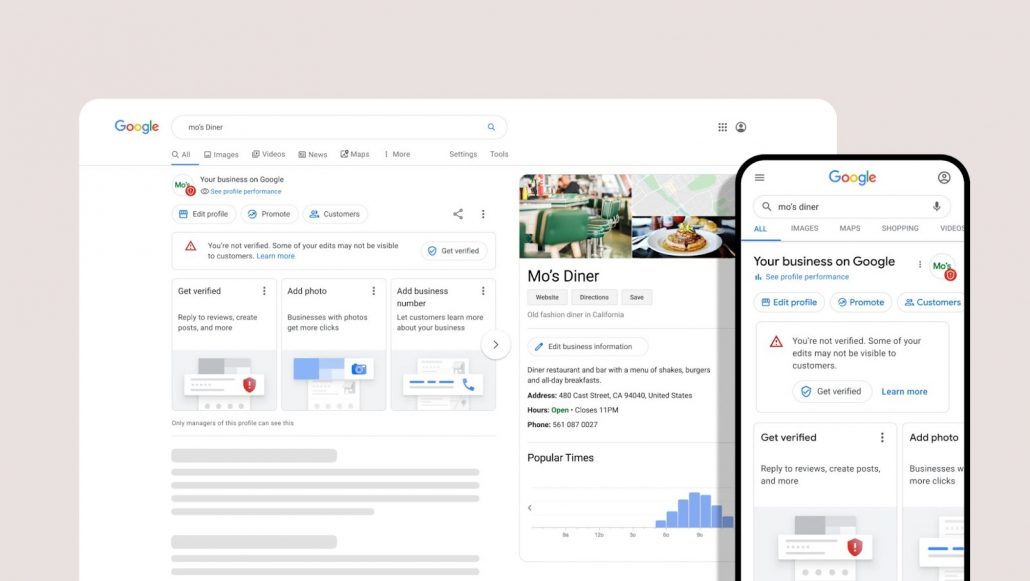
Though much will stay the same for businesses listing their services on Google, the rename marks some significant changes – such as where and how your businesses can claim their profile. Starting now, your brand can claim its profile directly from either Google Search or Google Maps.

Below, we will talk a bit more in-depth about how you can claim your listing and what this means for existing listings.

How to Claim a Google Business Profile

When signed into the Google account associated with your business, the fastest way to claim your listing is to simply search for your business name. 

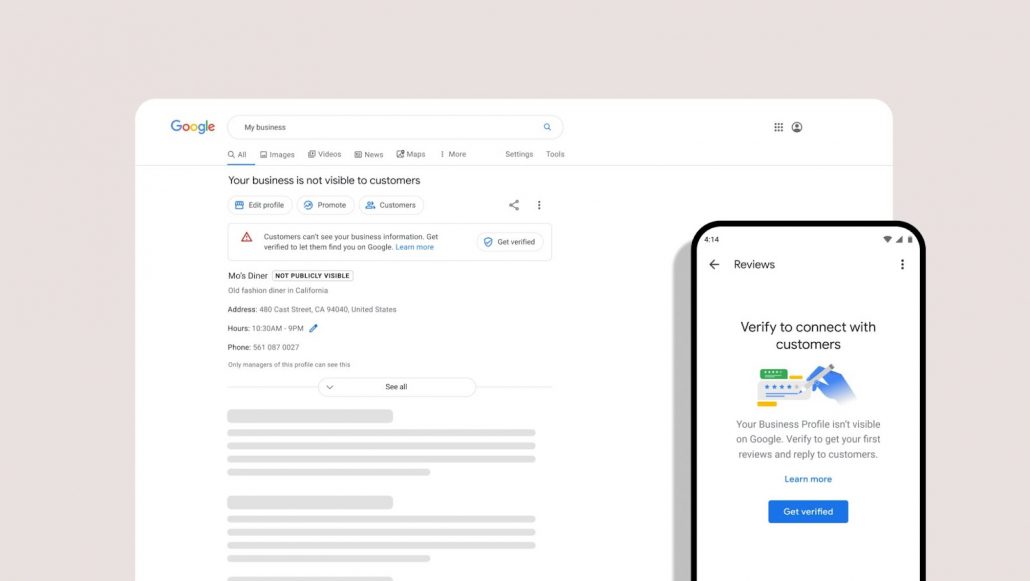
This will bring you to a prompt that will allow you to verify your listing or challenge someone who has already made a claim for your listing. 

Once claimed and verified, you will be able to edit any information shown and add additional details like photos, videos, unique services, and Google Posts.

Is Anything Else Changing?

For the most part, everything else is staying the same regarding local business listings on Google. Their appearance will stay the same, as will the optimization methods to ensure your business appears for relevant searches. 

What will change is where you are editing this information. 

For example, the search engine says it is no longer necessary to use the specific Google My Business website or app to update your listing.

The app will be phased out in early 2022, though you can still use the website if you are managing multiple listings. It will simply be renamed to “Google Business Profile Manager.”

For now, this is all the news we have about the relaunch of Google My Business and Google Business Profiles. More info will be coming in the coming months as the relaunch rolls out.

When it comes to ranking a website in Google, most people agree that high-quality content is essential. But, what exactly is quality content? 

For a number of reasons, most online marketers agreed that Google defined high-quality content as something very specific: text-based content which clearly and engagingly communicated valuable information to readers.

Recently, though, Google’s John Mueller shot down that assumption during a video chat. 

While he still emphasizes that great content should inform or entertain viewers, Mueller explained that the search engine actually has a much broader view of “content quality” than most thought.

What Google Means When They Say “Quality Content”

In response to a question about whether SEO content creators should prioritize technical improvements to content or expand the scope of content, Mueller took a moment to talk about what content quality means to Google.

“When it comes to the quality of the content, we don’t mean like just the text of your articles. It’s really the quality of your overall website, and that includes everything from the layout to the design.

This is especially notable, as Mueller specifically highlights two factors that many continue to ignore – images and page speed. 

“How you have things presented on your pages? How you integrate images? How you work with speed? All of those factors, they kind of come into play there.”

Ultimately, Mueller’s response emphasizes taking a much more holistic view of your content and focusing on providing an all-around great experience for users on your website. 

There is an unspoken aspect to what Mueller says which should be mentioned. Mueller subtly shows that Google still prefers text-based content rather than videos or audio-only formats. While the company wants to integrate even more types of content, the simple fact is that the search engine still struggles to parse these formats without additional information.

Still, Mueller’s statement broadens the concept of “quality content” from what is often understood. 

“So it’s not the case that we would look at just purely the text of the article and ignore everything else around it and say, oh this is high-quality text. We really want to look at the website overall.”

It is no secret that Google knows the price you, your competitors, and even the shady third-party companies charge for your products or services. In some cases, you might even directly tell the company how much you charge through Google’s Merchant Center. So, it is reasonable to think that the search engine might also use that information when it is ranking brands or product pages in search results.

In a recent livestream, however, Google Webmaster Trends Analyst, John Mueller, denied the idea.

What John Mueller Has To Say About Price as a Google Ranking Signal

The question arose during an SEO Office-Hours hangout on October 8, which led to Mueller explaining that while Google can access this information, it does not use it when ranking traditional search results.

As he says in the recording of the discussion:

“Purely from a web search point of view, no, it’s not the case that we would try to recognize the price on a page and use that as a ranking factor.

“So it’s not the case that we would say we’ll take the cheaper one and rank that higher. I don’t think that would really make sense.”

At the same time, Mueller says he can’t speak on how products in shopping results (which may be shown in regular search results) are ranked. 

Within shopping search results, users can manually select to sort their results by price. Whether it is used as a factor the rest of the time isn’t something Mueller can answer:

“A lot of these products also end up in the product search results, which could be because you submit a feed, or maybe because we recognize the product information on these pages, and the product search results I don’t know how they’re ordered.

“It might be that they take the price into account, or things like availability, all of the other factors that kind of come in as attributes in product search.”

Price Is And Isn’t A Ranking Factor

At the end of the day, Mueller doesn’t work in the areas related to product search so he really can’t say whether price is a ranking factor within those areas of Google. This potentially includes when they are shown within normal search results pages.

What he can say for sure, is that within traditional web search results, Google does not use price to rank results:

“So, from a web search point of view, we don’t take price into account. From a product search point of view it’s possible.

“The tricky part, I think, as an SEO, is these different aspects of search are often combined in one search results page. Where you’ll see normal web results, and maybe you’ll see some product review results on the side, or maybe you’ll see some mix of that.”

You can hear Mueller’s full response in the recording from the October 8, 2021, Google SEO Office Hours hangout below:

Google says it is going to be radically updating its search engine by integrating its new “MUM” algorithm into its systems. 

This will allow Google’s search engines to better understand topics, find better answers and sources, and provide more intuitive ways to explore ideas.

Accompanying these new search systems, Google is going to be redesigning its search pages with new features that provide new ways to discover information and conduct searches that are more visual.

What is the MUM Algorithm?

Introduced earlier this year, the Multitask Unified Model algorithm, or MUM, allowed Google to better find information using images and across multiple languages. 

The main purpose of the algorithm is to improve Google’s ability to search with images and other types of visual content, rather than just text.

Three Ways MUM Is Changing Search

While it is hard to know exactly how transformative the introduction of the MUM algorithm will be before it arrives, Google did highlight three key features which will be coming with the change.

  1. “Things to know”
  2. Topic Zoom
  3. Visual Topic Exploration

Google’s “Things to Know”

Using predictive models, Google’s search engine will soon intuit the most likely steps you will take after an initial search and deliver websites that will facilitate those actions.

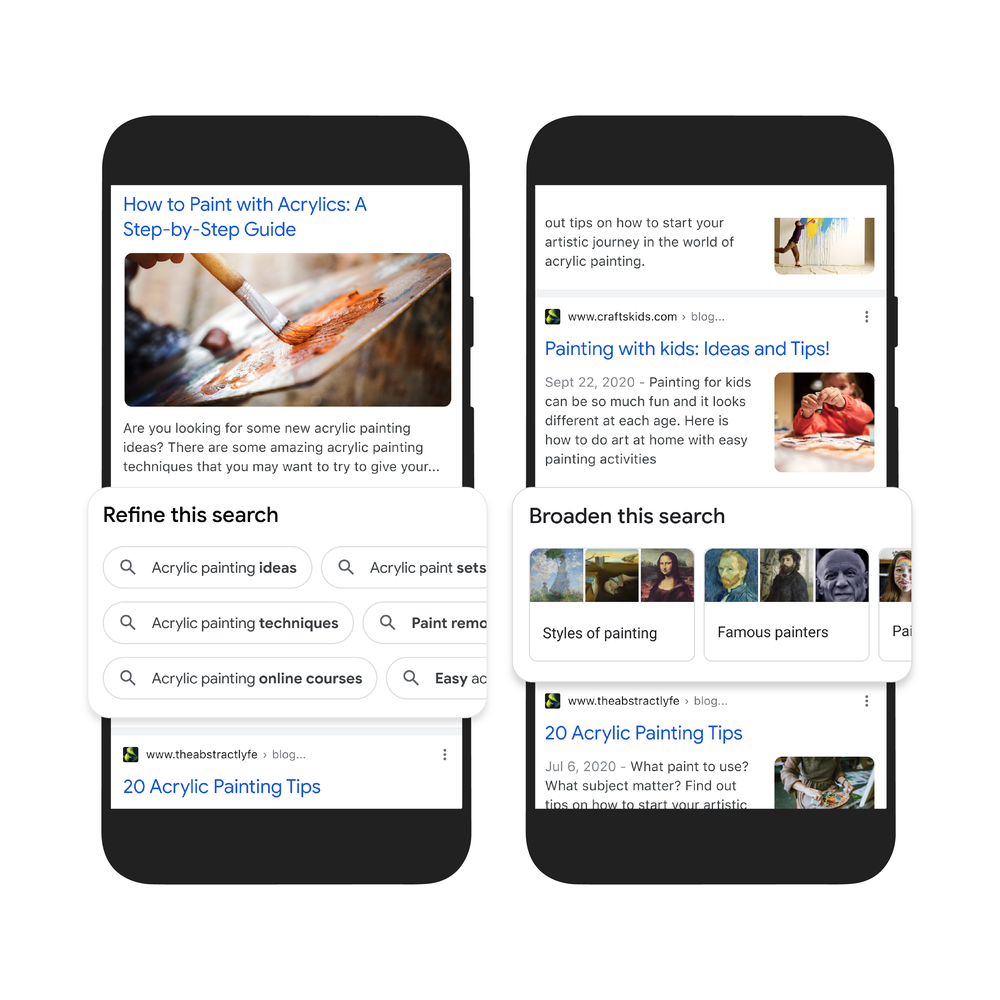
To help illustrate this process, the announcement uses the example of a user searching for “acrylic painting”.

According to the search engine’s data, there are more than 350 topics associated with that specific keyword phrase.

Using this knowledge, the “things to know” feature will then identify the most relevant or popular “paths” users are likely to take to further explore that topic and find content relating to that.

Topic Exploration

The next feature piggybacks on the last by making it easy to dive into related topics or find more in-depth information.

Using the feature, users can quickly broaden the topic they are looking at to find more general information, or zoom in to more detailed resources.

Visual Exploration

The last update enabled by MUM is actually already live on the search engine, providing a new way to visually explore topics.

Specifically, the visual search results page will appear for searches where a user is “looking for inspiration.”

As Google explains it:

“This new visual results page is designed for searches that are looking for inspiration, like ‘Halloween decorating ideas’ or ‘indoor vertical garden ideas,’ and you can try it today.”


It is likely that these new features are just the start of Google’s introduction of the MUM algorithm to revamp how it does search. Since its start, the search engine has struggled to understand visual content, but MUM finally provides a path to not only understand but deliver visual content across the entire Google platform.

In just 2020, Google has changed its search engine more than 4,500 times, according to the newly updated “How Search Works” site. 

Or, as Google puts it, “There have been 4,500 such improvements in 2020 alone.”

Whether you agree with Google’s description of their changes as “improvements”, the disclosure is interesting because it shows that the search engine continued to ramp up how frequently it updates parts of its system – even during the initial outbreak of the COVID pandemic. 

In comparison, Google made 3,200 changes to its search engine in 2019, the year before. At the same time, the company said this was nearly a 10x increase from a decade before. In 2009, the search engine reported just 350-400 changes.

What Do These Changes Include?

Google’s 2020 ‘improvements’ can include anything from updates to its user interface, changes to search results, and adjustments to how specific carousels or sub-sections like “news” function. 

As such, it isn’t all that surprising that Google is making significantly more updates to its systems than it was a decade ago. The search engine is considerably more complex and multifaceted these days compared to its 2009 counterpart. 

Still, I think many expected to see a relative slowdown to these updates as many workers began working remotely and the country braced for the spread of the novel coronavirus. 

“How Search Works” Site Gets a Redesign

This info was revealed as part of a much larger redesign of the search engine’s ‘How Search Works’ website, which “explains the ins and outs of search.”

Since 2013, Google has used the portal to help educate users about the broad principles Google uses to rank sites and filter out spam or inappropriate content. 

With the latest update, the company has “updated the site with fresh information, made it easier to navigate and bookmark sections and added links to additional resources that share how Search works and answer common questions.” 

“The website gives you a window into what happens from the moment you start typing in the search bar to the moment you get your search results. It gives an overview of the technology and work that goes into organizing the world’s information, understanding what you’re looking for and then connecting you with the most relevant, helpful information,” Google added.

Between virtual schooling, social media, and video streaming platforms, kids are more online than ever. Though children are growing up using the internet from their earliest ages, however, most evidence suggests they are more at risk for being targeted through advertising and other forms of online marketing. Now, Google is taking action to protect them.

In one recent study from SafeAtLast, upwards of 75% of children are willing to share personal information in exchange for goods or services. This obviously raises concerns about the long-term implications of gathering data from and targeting ads towards children.

As a result, Google is changing its policies regarding minors online, including removing ad targeting for those under 18 and allowing underage individuals to request for any images of them to be removed from search results. 

These are all the latest changes:

Allowing Minors To Remove Images From Google Search

“Children are at particular risk when it comes to controlling their imagery on the internet. In the coming weeks, we’ll introduce a new policy that enables anyone under the age of 18, or their parent or guardian, to request the removal of their images from Google Image results,” explains Mindy Brooks, product and UX director for kids and families at Google.

The search engine is unable to go further in removing the images from the internet entirely, but it can certainly make it more difficult to find those images. 

Changing Default Settings For Minors

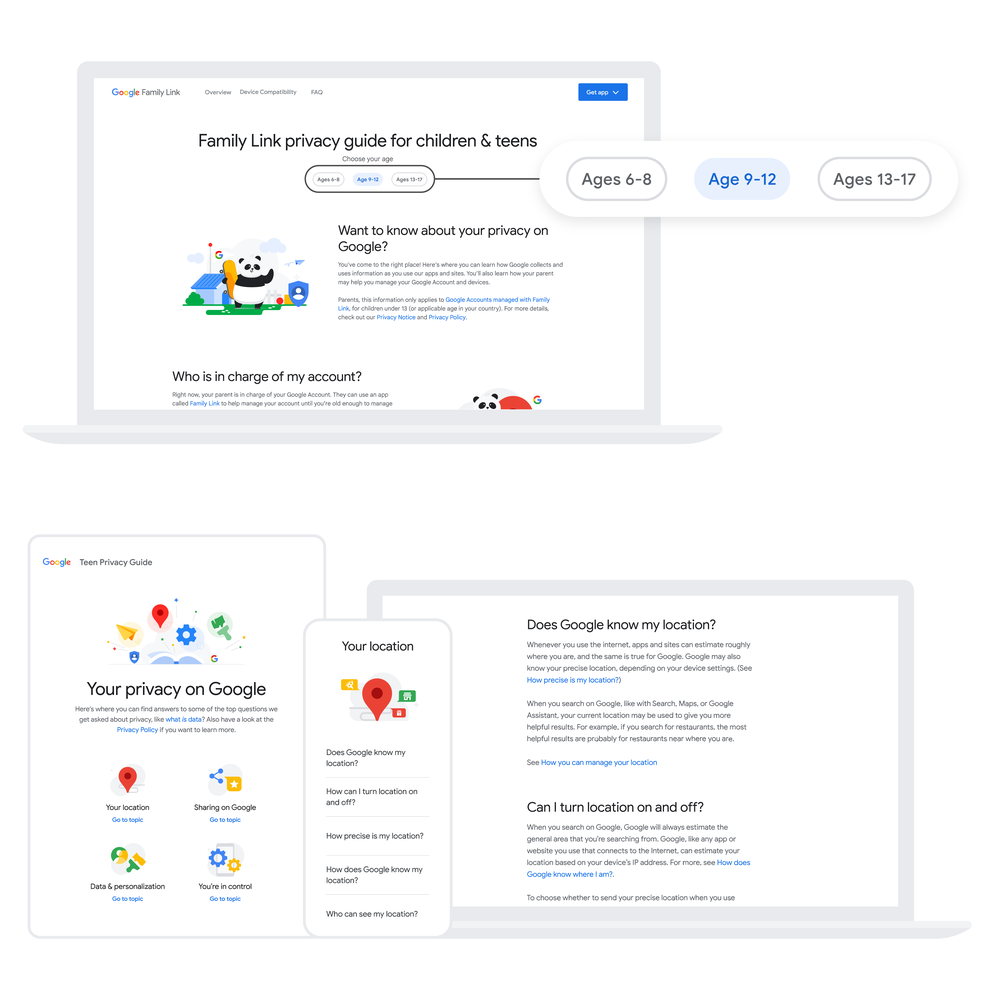
Google is making underage users’ information more private by default across its multiple platforms. That includes changing the default upload mode on YouTube to private for users under 18 and automatically enabling SafeSearch for minors on Google Search. 

Location History Is Disabled

By default, Google had already turned off location history for users between 13 and 17. Now, it has gone further by making it entirely disabled. On one hand, this may lead to less relevant search results, but also prevents excessive tracking of children through Google. 

Removing Ad Targeting For Minors 

In the upcoming months, Google Ads says it will be “expanding safeguards to prevent age-sensitive ad categories from being shown to teens, and we will block ad targeting based on the age, gender, or interests of people under 18.”

New Tools For Parents

Lastly, the company is introducing a number of new tools and features for parents across its entire product line. For example, the company is introducing Digital Wellbeing tools within the Google Home app, allowing parents to manage their children’s use of smart assistants. On YouTube, the company is also turning on ‘take a break’ and bedtime reminders by default, while turning off autoplay.

For more on Google’s latest efforts to protect the private data of children across its services and platforms, check out the full blog post here.

Right in time for the Back to School shopping season, Google is rolling out three new updates to its shopping tools for online retailers.

By creating new places for your products and promotions to be seen, highlighting your latest promotions, and adding deeper analytics for your online shop, the search giant is making it easier than ever for brands to connect with shoppers and helping shoppers find the products they want for the best price possible.

“Deals Related To Your Search”

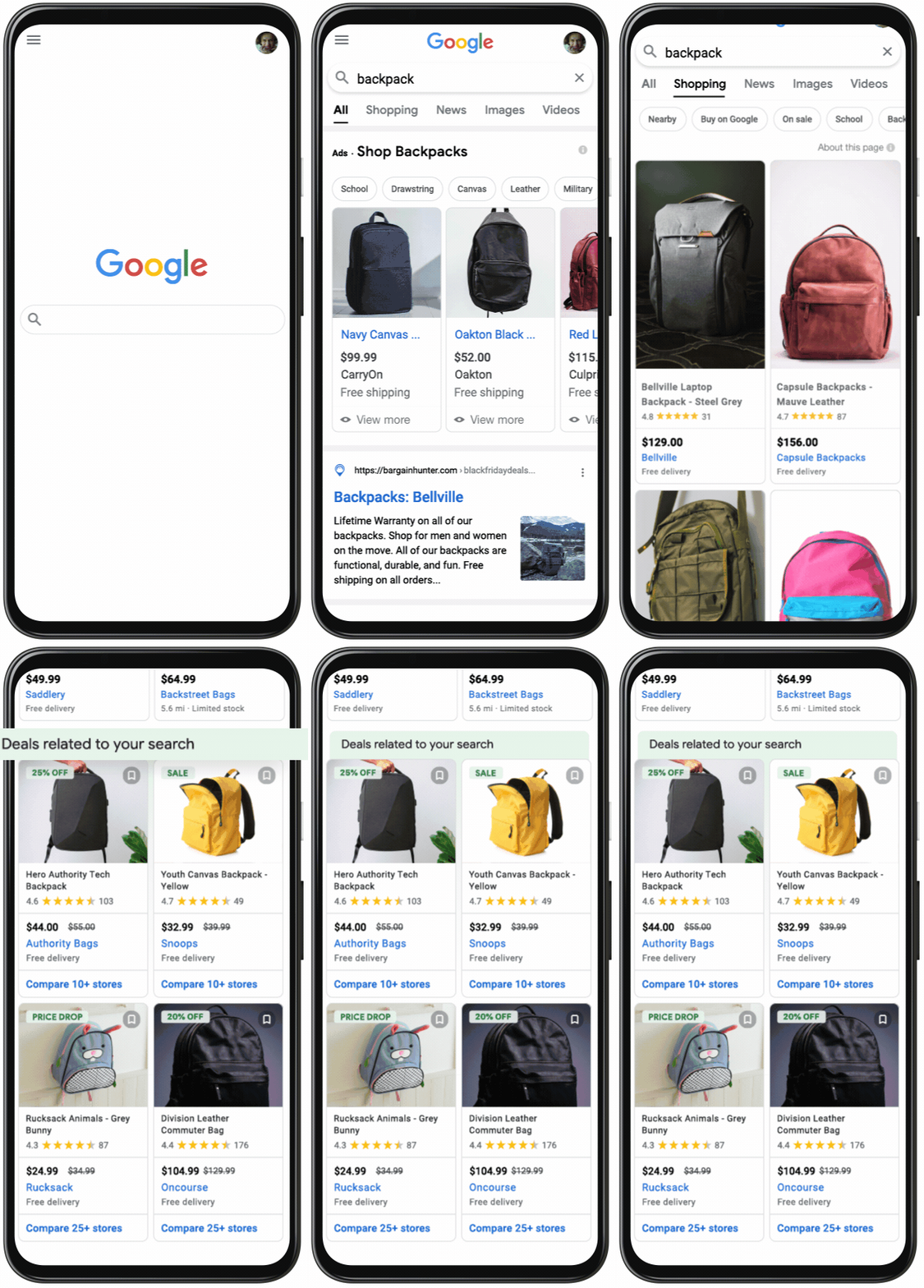
Google is creating a dedicated section for products that are discounted or similarly low-priced when users browse products. 

New "Deals related to your search" feature for online retailers

Even better, being included in this section takes no additional work once your shop is set up in Google Merchant Center (which is required for online retailers to be included in any Google Shopping results).

Google chooses which products get included “based on factors such as the discount itself, how popular a product is, how popular the site is, and more,” according to the announcement.

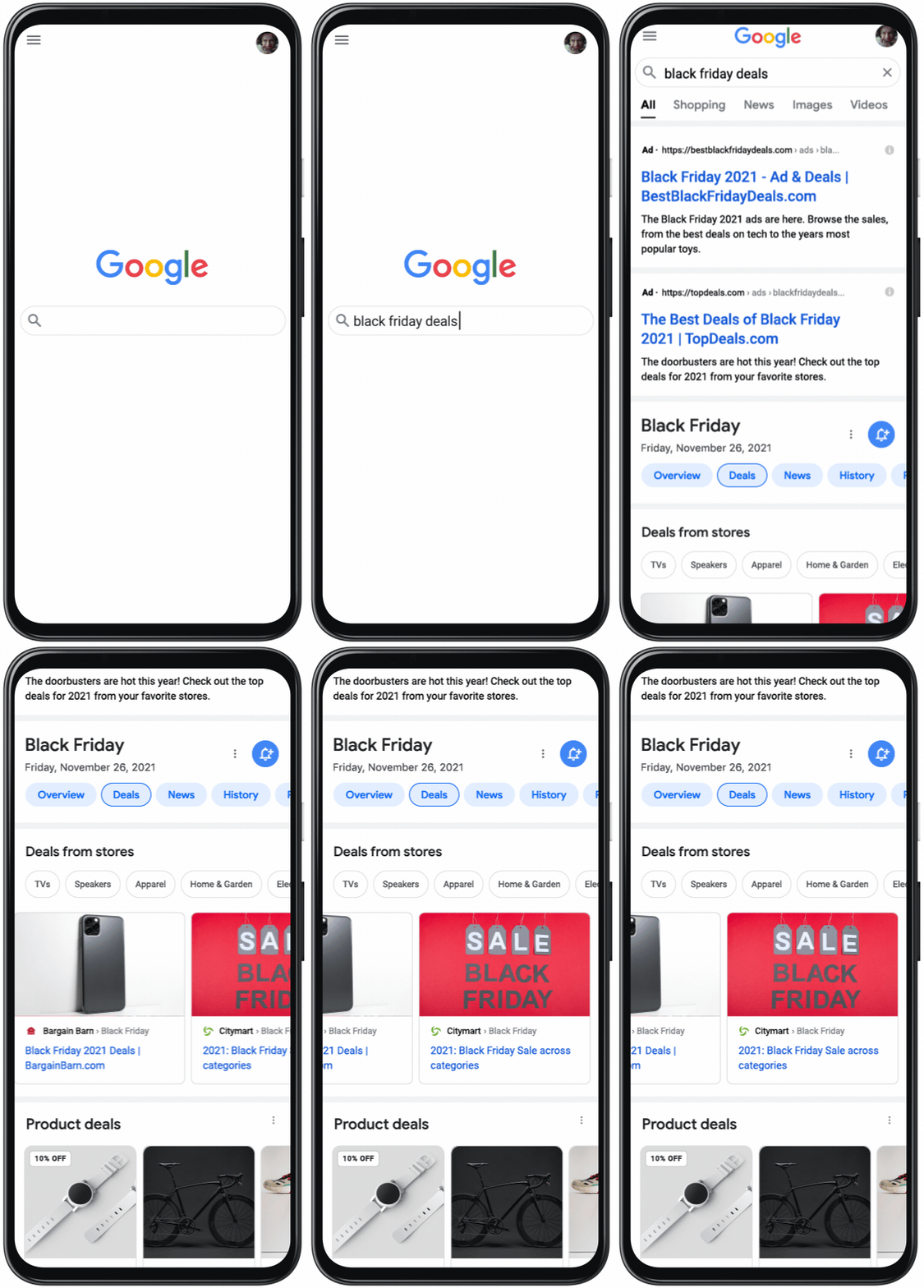
The general “Discounts related to your search” section is already live within Google’s Shopping tab, but the search engine also announced an upcoming seasonal carousel that will show deals related to upcoming shopping events like Black Friday or Cyber Monday.

New Google Shopping seasonal promotions section for online retailers

New Ways to Customize Promotions

Google says its recent efforts to make it easier to create and manage promotions have received a warm welcome from online retailers, so the company is going even further to give shops the ability to target promotions to new customers and highlight active promotions.

The company describes its new ways to customize promotions:

  • To help you attract new customers with your best deals, you can now indicate if a promotion is only available to customers who haven’t previously bought from you. The title of the promotion could now say “10% off for new users”. While these promotions will still be shown to all, shoppers will only be able to access the promotional price if eligible (e.g. they are making a first-time purchase with the retailer). 
  • To help you reach more customers, you can now highlight your promotions on free listings on the Shopping tab. You can navigate to the promotions tab in Merchant Center to choose which promotions you want to be indexed through organic traffic and appear on free listings or, alternatively, supported with ad spend.

New Merchandise Insights For Online Retailers

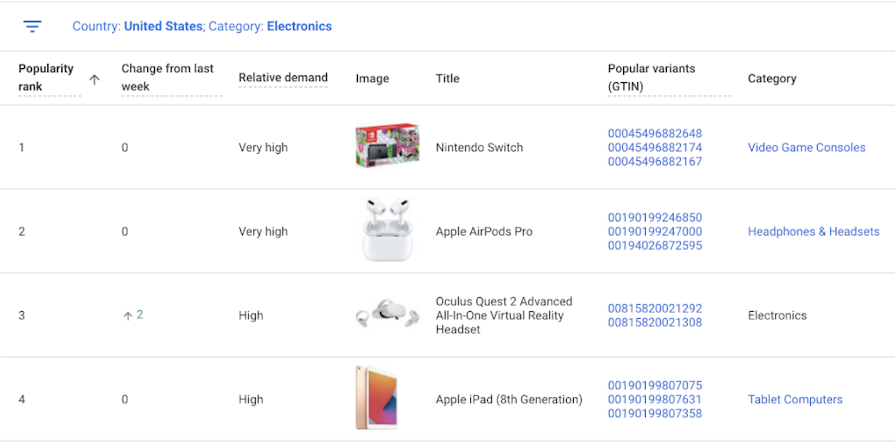
Google is adding historical best seller data to its best sellers report to help shops predict upcoming seasonal trends based on how products have performed at similar times in the past. 

Google Shopping best sellers data for online retailers

Additionally, the best sellers report is receiving a new field called ‘relative demand’ which shows the relative demand for products in the same category and country along with recommendations for potential opportunities to stock new products. 

The company says these additions will help online retailers by making it easier to keep up with the changing demands of customers.

“You can use this information during peak sales periods, like Back to School, to explore what’s top of mind for shoppers and figure out how you can adjust your product assortment and campaigns to meet these needs.”

To access the best sellers report, online retailers just first opt into market insights in the Merchant Center.

Google is rolling out a new addition to its “About this result” feature in search results which will explain why the search engine chose a specific result to rank.

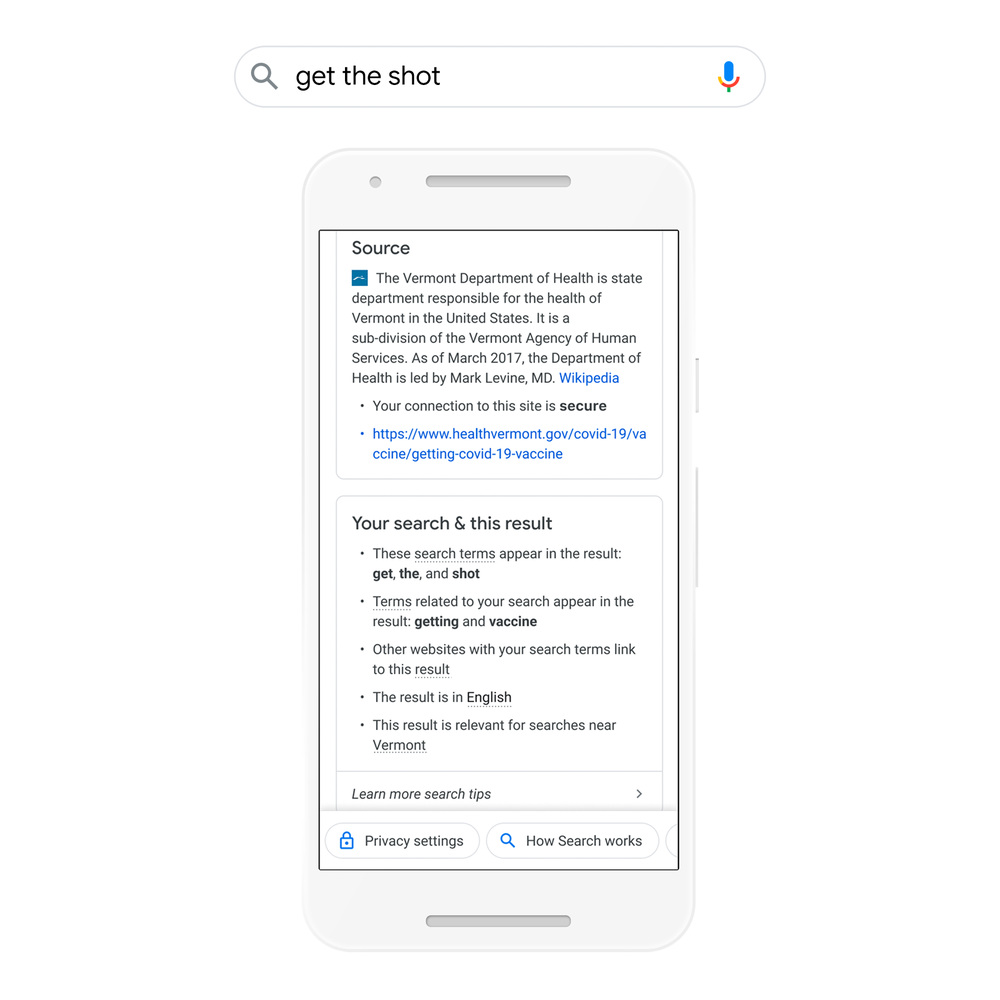
The new section, called “Your search & this result” explains the specific factors which made Google believe a specific page may have what you’re looking for.

This can include a number of SEO factors, ranging from the keywords which matched with the page (including related but not directly matching terms), backlink details, related images, location-based information, and more. 

How Businesses Can Use This Information

For users, this feature can help understand why they are seeing specific search results and even provide tips for refining their search for better results. 

The unspoken utility of this tool for businesses is glaringly obvious, however. 

This feature essentially provides an SEO report card, showing exactly where you are doing well on ranking for important keywords. By noting what is not included, you can also get an idea of what areas could be improved to help you rank better in the future.

Taking this even further, you could explore the details for other pages ranking for your primary keywords, helping you better strategize to overtake your competition.

What It Looks Like

Below, you can see a screenshot of what the feature looks like in action:

The information box provides a quick bullet point list of several factors which caused the search engine to return the specific result.
While Google only detailed a few of the possible details the box may include, users around the web have reported seeing information about all of these factors included:

  • Included search terms: Google can show which exact search terms were matched with the content or HTML on the related page. This includes content that is not typically visible to users, such as the title tag or meta data.
  • Related search terms: Along with the keywords which were directly matched with the related page, Google can also show “related” terms. For example, Google knew to include results related to the Covid vaccine based on the keyword “shot”.
  • Other websites link to this page: The search engine may choose to highlight a page which might otherwise appear unrelated because several pages using the specific keyword linked to this specific page.
  • Related images: If the images are properly optimized, Google may be able to identify when images on a page are related to your search.
  • This result is [Language]: Obviously, users who don’t speak or read your language are unlikely to have much use for your website or content. This essentially notes that the page is in the same language you use across the rest of Google.
  • This result is relevant for searches ih [Region]: Lastly, the search engine may note if locality helped influence its search result based on other contextual details. For example, it understood that the user in Vermont, was likely looking for nearby results when searching “get the shot”.

The expanded “About this result” section is rolling out to English-language U.S. users already and is expected to be widely available across the country within a week. From there, Google says it will work to bring the feature to more countries and languages soon.

Google’s take on the popular Story format hit a big milestone, as the company recently reported more than 100,000 new Google Web Stories are getting added to the search index every day. 

Combined, these daily new stories have helped accumulate more than 20 million Web Stories total since the launch of the content format. 

The report also notes that more than 6,500 new domains have published their first Web Story since October 2020, when Web Stories were launched for Android and iOS devices, as well as being added to Google Discover

This led to a significantly larger reach for Google Web Stories and a significant increase in interest from brands.

“Last October, we created a home for Web Stories in Google Discover so users could find a personalized stream of the best Web Stories from around the internet. The goal with Web Stories is to enable publishers and creators to easily build and take full ownership of their content.”

Unsurprisingly, putting the short video clips front-and-center on Google’s content discovery page has also helped millions of users check out and engage with Web Stories every day.

For those who are still skeptical about Google Web Stories, or those who just want to improve the stories they are putting out, Google compiled data from users to create five suggestions for creating the most engaging and exciting stories for your audience. 

Five Tips For Engaging Google Web Stories

  1. Lifestyle content, complete with inspirational imagery and messages, informative how-to info, or relevant product-partnerships drive the most engagement of any vertical.
  2. Thanks to a diverse array of visually engaging topics and videos, the Arts and Entertainment and Food and Drink verticals consistently get the most impressions.
  3. Users show a clear hunger for new Arts and Entertainment, Celebrity, and Sports/Gaming content. “With new TV, movie, and game releases rolling out all the time, these verticals offer opportunities for growth.”
  4. Though Google has seen successful Web Stories of all sizes, users are typically willing to click through an average of 11-15 pages before ditching a Web Story. 
  5. Users watch an average of 1.7 Stories for every Web Story opened on Google Discover. However, this can vary significantly across industries and demographics. 

For more information about Google Web Stories, check out the latest announcement in this blog post or explore Google’s playbook for creating the most engaging Web Stories here.

We all know that the search results you get on mobile and the ones you get on desktop devices can be very different – even for the same query, made at the same time, in the same place, logged into the same Google account. 

Have you ever found yourself asking exactly why this happens?

One site owner did and recently got the chance to ask one of Google’s Senior Webmaster Trends Analyst, John Mueller.

In the recent SEO Office Hours Session, Mueller explained that a wide range of factors decide what search results get returned for a search query – including what device you are using and why this happens.

Why Are Mobile Search Rankings Different From Desktop?

The question asked to Mueller specifically wanted to clarify why there is still a disparity between mobile and desktop search results after the launch of mobile-first indexing for all sites. Here’s what was asked:

“How are desktop and mobile ranking different when we’ve already switched to mobile-first indexing.”

Indexing and Ranking Are Different

In response to the question, Mueller first tried to clarify that indexing and rankings are not exactly the same thing. Instead, they are more like two parts of a larger system. 

“So, mobile-first indexing is specifically about that technical aspect of indexing the content. And we use a mobile Googlebot to index the content. But once the content is indexed, the ranking side is still (kind of) completely separate.”

Although the mobile-first index was a significant shift in how Google brought sites into their search engine and understood them, it actually had little direct effect on most search results. 

Mobile Users and Desktop Users Have Different Needs

Beyond the explanation about indexing vs. ranking, John Mueller also said that Google returns unique rankings for mobile and desktop search results because they reflect potentially different needs in-the-moment. 

“It’s normal that desktop and mobile rankings are different. Sometimes that’s with regards to things like speed. Sometimes that’s with regards to things like mobile-friendliness.

“Sometimes that’s also with regards to the different elements that are shown in the search results page.

“For example, if you’re searching on your phone then maybe you want more local information because you’re on the go. Whereas if you’re searching on a desktop maybe you want more images or more videos shown in the search results. So we tend to show …a different mix of different search results types.

“And because of that it can happen that the ranking or the visibility of individual pages differs between mobile and desktop. And that’s essentially normal. That’s a part of how we do ranking.

“It’s not something where I would say it would be tied to the technical aspect of indexing the content.”

With this in mind, there’s little need to be concerned if you aren’t showing up in the same spot for the same exact searches on different devices.

Instead, watch for big shifts in what devices people are using to access your page. If your users are overwhelmingly using phones, assess how your site can better serve the needs of desktop users. Likewise, a majority of traffic coming from desktop devices may indicate you need to assess your site’s speed and mobile friendliness.

If you want to hear Mueller’s full explanation and even more discussion about search engine optimization, check out the SEO Office Hours video below: