Tag Archive for: Google

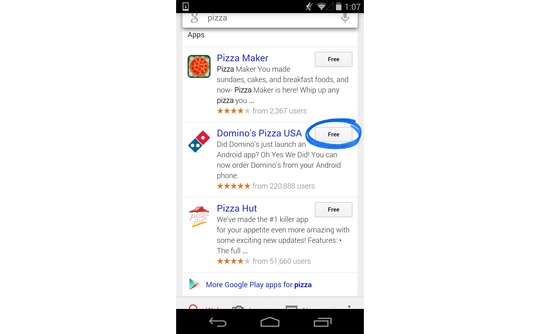
Google is attempting to bridge the gap between apps and normal internet use, and it appears their first step is to make apps part of the search results for Android users. When logged in, you will also be able to see what apps you have and search the content within them.

“Starting today, Google can save you the digging for information in the dozens of apps you use every day, and get you right where you need to go in those apps with a single search. Google Search can make your life a little easier by fetching the answer you need for you – whether it’s on the web, or buried in an app,” Scott Huffman, VP of engineering, announced on Google’s Inside Search blog.

Google App Search Graphic

These results won’t be ads for apps. Instead, when the best results for a query come from an app, Google Search will include the app in the result and make it easy to download or access. If you already have the app, you will just have to touch “Open in app” and you will be taken to the relevant content.

The app results will be grouped together, so don’t expect them to hurt many sites’ rankings or visibility. These results are just another option added for user convenience.
Currently only a few apps are compatible with the Open in App feature, including:

  • AllTrails
  • Allthecooks
  • Beauytylish
  • Etsy
  • Expedia
  • Flixster
  • Healthtap
  • IMDb
  • Moviefone
  • Newegg
  • OpenTable
  • Trulia
  • Wikipedia

“This is just one step toward bringing apps and the web together, making it even easier to get the right information, regardless of where it’s located,” Huffman wrote.

Search Engine Watch reports the new ability is currently limited to English version users of Android 2.3 or higher within the United States.

Google is making it easier for webmasters to identify and address smartphone specific errors they might not have known about in the past. Previously, detecting and fixing errors that happen on smartphone errors was complicated, so the search engine added a section to the crawl errors report in Webmaster Tools that displays the more common errors Google sees webmasters make in regards to how mobile users access their site.

Pierre Far, Google Webmaster Trends Analyst announced the feature earlier today, saying that some of the errors may “significantly hurt your website’s user experience and are the basis of some of our recently-announced ranking changes for smartphone search results.” While Google is trying to help make it easier for webmasters to solve problems with their site, the search engine is also using this as another means to push webmasters towards making their sites more mobile friendly.

The new report for smartphone errors looks like this:

Smartphone Errors

Some of the errors included are:

  • Server errors: A server error is when Googlebot got an HTTP error status code when it crawled the page.
  • Not found errors and soft 404’s: A page can show a “not found” message to Googlebot, either by returning an HTTP 404 status code or when the page is detected as a soft error page.
  • Faulty redirects: A faulty redirect is a smartphone-specific error that occurs when a desktop page redirects smartphone users to a page that is not relevant to their query. A typical example is when all pages on the desktop site redirect smartphone users to the homepage of the smartphone-optimized site.
  • Blocked URLs: A blocked URL is when the site’s robots.txt explicitly disallows crawling by Googlebot for smartphones. Typically, such smartphone-specific robots.txt disallow directives are erroneous. You should investigate your server configuration if you see blocked URLs reported in Webmaster Tools.

Not only are these errors capable of ruining the user experience for visitors on mobile devices, they can severely damage your site’s visibility if you don’t resolve the issues quickly. At least now there is a convenient way for you to find the problems.

Google's John Mueller Courtesy of Google+

John Mueller

Recently I discussed a common issue sites have where a misplaced noindex tag on the front page of a site can keep search engines from crawling or indexing your site. It happens all the time, but it isn’t the only reason your site might not be crawled. The good news is there is little to no long term damage done to your site or your SEO, according to a recent statement from Google’s John Mueller.

Barry Schwartz noticed Mueller had responded to a question on the Google Webmaster Help forums from an employee for a company who had accidentally blocked GoogleBot from crawling and indexing their site. In John Mueller’s words:

From our point of view, once we’re able to recrawl and reprocess your URLs, they’ll re-appear in our search results. There’s generally no long-term damage caused by an outage like this, but it might take a bit of time for things to get back to “normal” again (with the caveat that our algorithms change over time, so the current “normal” may not be the same state as it was before).

So don’t worry to much if you discover you find your site has been having problems with crawling or indexing. What matters is how quickly you respond and fix the problem. Once the issue is solved, everything should return to relatively normal. Of course, as Mueller mentions, you might not return back to your exact same state because these things are always fluctuating.

Maybe Google really is listening. At long last, they have finally added one of the most requested features for AdWords by implementing the simple “Undo” function. It is exactly what it sounds like, basically backing up settings for all aspects of your account and keeping track of the changes you made. If you click the button, your campaign will return to the state it was at the specified time.

The most obvious benefit of the new feature is that it will make testing in your campaigns easier. If your newest test results in a lower click through rate (CTR) or cost per action (CPA), all you have to do is undo the changes with a single click.

“The ability to undo changes in AdWords will be a valuable feature to advertisers,” Lisa Raehsler of Big Click Co. told Search Engine Watch. “Sometimes changes will have a different impact on an account than what was intended. Simply using ‘undo’ will save time and ultimately money.

“But remember that account edits influence one another,” Raehsler said. “Some optimization edits are interdependent, so a change on Monday may have forced another change on Thursday. Now the ‘undo’ button is something to consider as a change in and of itself.”

There are still some kinks to be worked out, as it currently doesn’t appear that all changes are being documented, and it is unclear whether multiple changes are being grouped into a single undo.

For business owners this means you can more easily control and target your advertising campaigns. You don’t have to undo your changes by hand any longer, which saves you time to invest in other more important tasks.

The “Undo” feature isn’t live for everyone yet, so it may just be an experiment Google is running. But, hopefully they decide to work out the bugs and make it a universal feature. We have certainly been asking for it long enough.

googleadwordsYou may have noticed earlier this month that the AdWords Bid Simulator tool has a new feature which offers estimates for conversions in addition to impressions and clicks to show how bid changes may affect conversion volume and values.

For each bid option that appears in the tool, the bid simulator gives the number of conversions and conversion values if assigned or set. As Ginny Marvin explains, conversion estimates display how many clicks you would likely result in a conversion in one day, based on a “recent 7 day period.” Notably, Google does not say their estimates will be based on the most recent 7 days.

Google says the estimates will be more accurate if you have more conversion history and conversion volume in your account, so you will want to have conversion tracking set up and stable for a couple weeks before you start trying to use the bid simulator conversion estimates.

Matt CuttsUsually Matt Cutts, esteemed Google engineer and head of Webspam, uses his regular videos to answer questions which can have a huge impact on a site’s visibility. He recently answered questions about using the Link Disavow Tool if you haven’t received a manual action, and he often delves into linking practices which Google views as spammy. But, earlier this week he took to YouTube to answer a simple question and give a small but unique tip webmasters might keep in mind in the future.
Specifically, Cutts addressed the need to have a unique meta tag description for every individual page on your site. In an age where blogging causes pages to be created every day, creating a meta tag description can seem like a fruitless time-waster, and according to Cutts it kind of is.

If you take the time to create a unique meta tag description for every page, you might see a slight boost in SEO over your competitors, but the difference will be negligible compared to the other aspects of your site you could spend that time improving. In fact, overall it may be better to simply leave the meta description empty than to invest your time paying attention to such a small detail. In fact, on his own blog, Cutts doesn’t bother to use meta descriptions at all.

Cutts does say that you shouldn’t try to skimp on the meta tag descriptions by using copy directly from your blog. It is better to have no meta tag description than to possibly raise issues with duplicate content, and Google automatically scans your content to create a description any time you don’t make one.

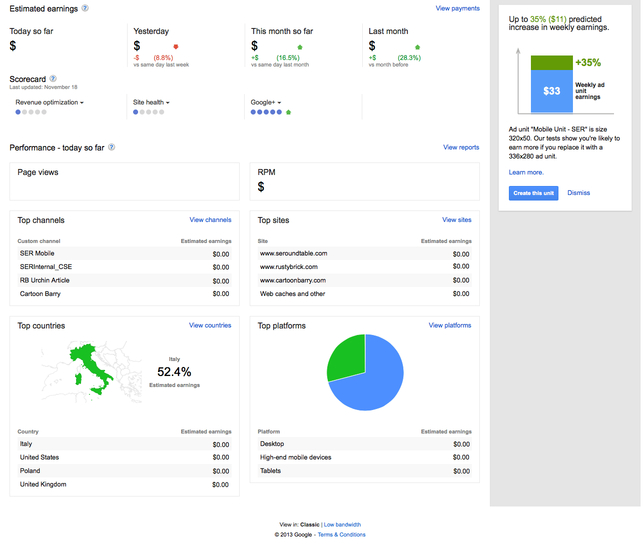
The gradual remodeling going on over at Google has made its way to AdSense. After subtly redoing their homepage and their logo, as well as those for select other Google products, the search engine is testing a new home page design for the AdSense publisher console.

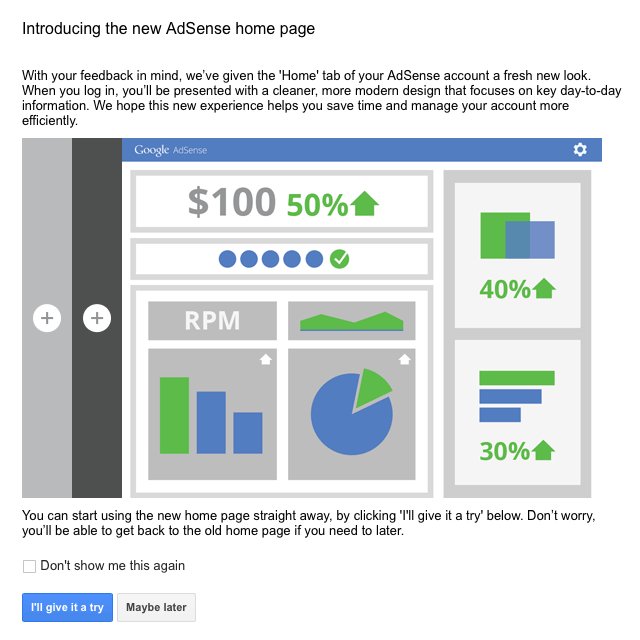
The new design can be seen immediately by logging into google.com/adsense. You will be presented with an option to try out the design or continue using the older style for the moment. They also clarify that you can return to the original home page if you decide you aren’t enjoying the new layout, which intends to help you “focus on key day-to-day information.”

This is what you will see when you login:

AdSense Layout Prompt

Here is a screenshot of the new layout:

AdSense Layout Screenshot

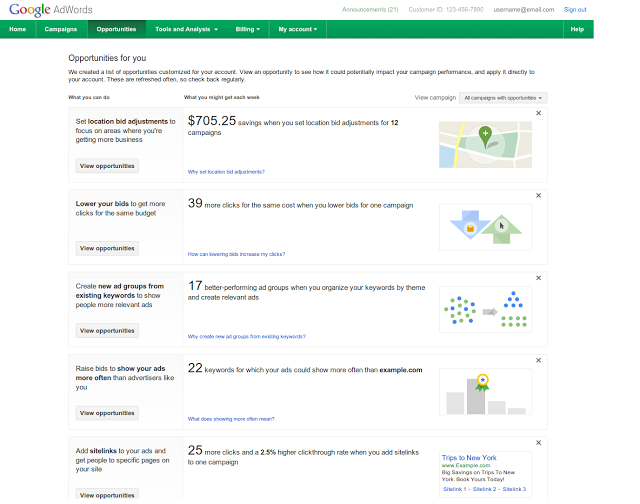
The Opportunities Tab in AdWords is getting a face-lift. It was relaunched today with several new types of features combined and displayed in one view. The tool was originally launched in 2009, intended to be “your personal AdWords assistant, surfacing insights to help you improve your performance.”

The new types give advertisers more ways to improve their performance by showing them where they should invest their energies. For example, campaign suggestions include where to add sitelinks and where to raise bids to show your ads more often than your competitors. Google even gives you suggestions for breaking out ad groups to display more relevant ads, and highlights when bids can be safely lowered to stay within your budget without losing clicks.

The opportunities tab is based on an account’s performance from the last seven days, and Google says they will be adding more opportunities to the tab in the future.

The Opportunities Tab

Click-to-Call Ads

Source: Search Engine Watch

Google announced advertisers will find that phone calls from mobile click-to-call ads are now listed in the regular Conversion columns of AdWords, as of Tuesday. This is one of the first steps since Google made their October 1st statement that they would make it easier for advertisers to optimize their bidding strategy for click to call. They are working to make phone calls an important conversion type within AdWords.

With the new update calls made by customers from an AdWords ad, for both mobile and desktop searchers, will be reported in a new column within Estimated Total Conversions.

Before now, click-to-call ads were found under a “Phone Call Conversions” column, but now advertisers will be able to integrate many free automated bidding tools from AdWords to optimize their bidding campaigns and improve performance.

This is a great move for advertisers as 70 percent of mobile searchers call businesses directly from the search results. Google estimates over 40 million phone calls are made every month from Google search ads to advertisers.

At the moment, the new click-to-call conversions are available in countries where Google has forwarding numbers available. This includes the U.S., UK, Germany, and France.

Google Hangouts IconThis Monday, site owners looking for advice will have the opportunity to have their website briefly reviewed by Google, as John Mueller announced on Google+. The short site reviews will be taking place November 18th at 10am EDT and will last one-hour. Search Engine Land suggests the event will be lead by Mueller, though no one is quite sure the format this event will be in.

To have your site reviewed, you have to add the site to this Google Moderator page. Then, if Google has the time and chooses your site, it will be reviewed live this upcoming Monday via Google+ Hangouts.

You can also RSVP for the event by going to this page and add it to your calendar.
John’s statement explained the event, saying:

For this hangout, we’ll review sites that are submitted via the moderator page and give a short comment on where you might want to focus your efforts, assuming there are any issues from Google’s point of view :).