With the constant stream of news coming out of the online marketing industry, it can be hard to keep up with all the latest updates without missing some important information. That’s why we compile all the news you may have missed this week all in one convenient place every Friday. Let’s get started:

Google Updates Guidelines Regarding Redirects

Google has had a policy against redirects intended to deceive or manipulate search engines or users, but this week they updated their Webmaster Guidelines to explicitly include mobile-specific redirects. They also include an example of a deceptive mobile redirect with a scenario where “desktop users might receive a normal page, while hackers might redirect all mobile users to a completely different spam domain.” Google details the revisions in an announcement on their Webmaster Central Blog.

Google Wants To Help You Remember Where You Parked
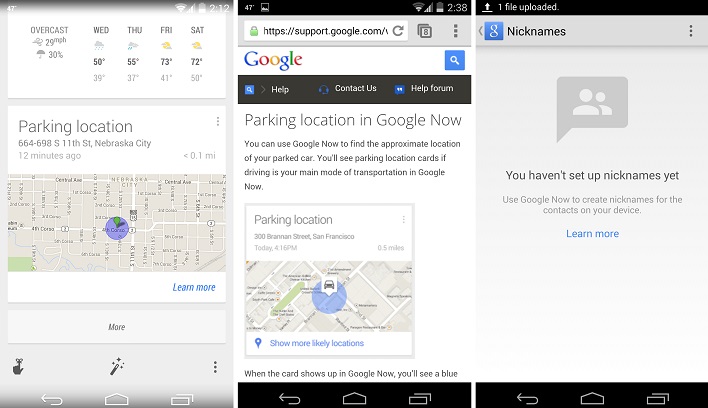
parking-location

According to Android Authority, Google’s latest update to the Android version of the Google Search App includes a new feature which can help users remember where they parked their car and even give directions on how to get back to that spot. For users parking at large venues, malls, or in heavily-populated areas, this could potentially be a lifesaver. The parking reminder works by asking if you want to save a location as a Google Now card. Then when you are ready to get back to your car, you just tap on the card in the app and directions will appear.

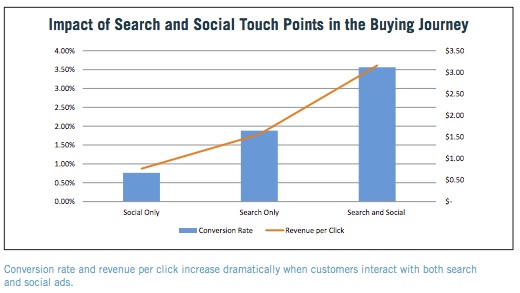
Search Ads Get More Revenue per Conversion When Integrated With Social
marin-impact-search-and-social-ads

Online marketing is quickly reaching the point where you can’t approach it in a vacuum and hope for success. The days of keeping SEO, PPC, and social media marketing apart are fading fast, if they aren’t completely gone already. A new study from Marin Software confirms this y showing that advertising performs vastly better when integrated with a social advertising strategy. Jessica Lee breaks down the details of the study at Search Engine Watch, but you can also get the full white paper here.

YouTube Now Lets Channel Owners Attach Short Intros To Their Videos

This week, YouTube announced that channel owners can now add a three-second intro to their videos, allowing them to build a stronger and more cohesive brand presence across the video platform. Channel owners must upload the intro as an unlisted video, then click “Add a channel branding intro” on the InVideo Programming page. At that point, channel owners can select which videos should include the intro. However, YouTube has said intros can not be used as ads, sponsorship, or product placements, and should not be used by channels whose videos act as advertisements.

Twitter Earns 14 Million Monthly Active Users in Q1 of 2014

Twitter’s earnings report for the first quarter of 2014 shows they continue to grow in just about every area, even outperforming Wall Street estimates in all but one area. The area in which they have continued to struggle is gaining monthly active users, but even there Twitter is showing very positive signs. While not beating Wall Street estimates, Twitter monthly users did grow by 14 million since Q4 2013, culminating in 255 million total users. This is substantially more growth than shown n Q4 2013.

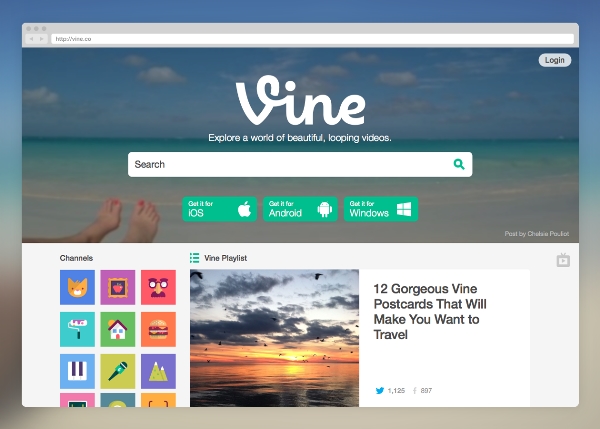
Vine is Coming To Desktop With New Features
Vine

Up until now, Vine has been confined to smartphones, but this week the social video platform has made the leap to desktop with a well laid-out website and some new features. The new features include top navigation in the left which includes the home feed and popular now feed, and all feeds can now be linked together in TV mode. The biggest addition however is the new search bar that lets users search by tag, person, or location for the first time. You can get more details in the announcement on Vine’s blog, or you can see the new site for yourself here.

Online video has reached a new level of importance in our lives over the past few years. YouTube is still the dominant service for free online video hosting and sharing, but several other platforms have taken YouTube’s lead and expanded on it in numerous ways.

Instagram and Vine have imposed limits on their video lengths to make them as sharable as possible, while Vimeo has focused its efforts on hosting primarily high-quality and visually stunning videos instead of the shaky cell-phone footage so prevalent on YouTube.

The question remains, which services do you invest your energy and resources into? If you are hoping to use the social video site to increase your brand’s visibility, you want to tailor the content you are creating to the platform most suited to your demographic.
You can get a complete breakdown of all of the major services in the infographic below.

The graphic was created by Russel Cooke, and explains what makes each service unique, as well as how each could benefit a business. If you know your market, you should be able to identify which service is most likely to connect you with your audience. From there, it’s just a matter of making content that will excite them.

SocialVideo-637x4897

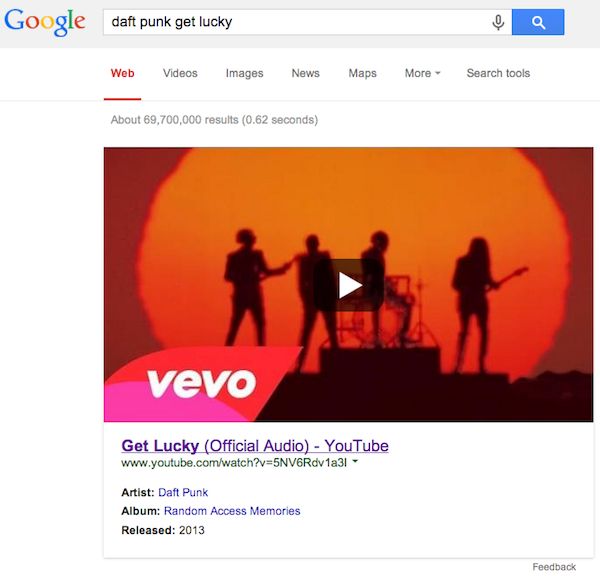
Looking for your favorite music video? Since MTV hasn’t shown music videos for the past 20 years, you will probably turn to Google. Now, Google is making it easier to find the videos your searching for by giving more prominence to the top playable music video result. So, if you’re searching for “Get Lucky” by Daft Punk, it will be hard to miss the official version of the video at the top of the page.

Daft Punk Get Lucky Google Search

The thumbnail images for the videos look like they would be playable on the page, but in actuality they link back to the page for the video. It’s possible they play icon on the image might hint towards future usability for YouTube videos, or it might just be a little misleading.

Of course, the tool isn’t perfect, and you shouldn’t expect to get the “official” video or a video from the artist’s official account every time. For example, Search Engine Watch highlights a case where searching for “Let Me Ride” by Dr. Dre doesn’t pull up a video from the DrDreVEVO account, because that video hasn’t been uploaded to the official account.

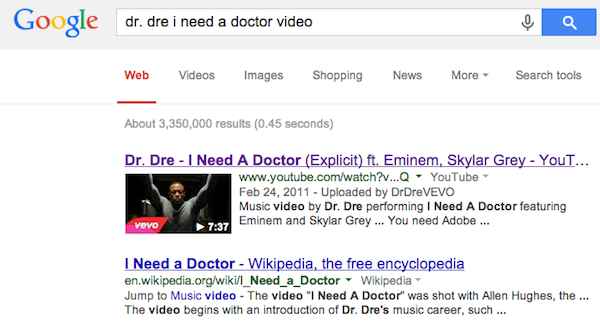
Similarly, searching for “I Need a Doctor” by Dr. Dre doesn’t trigger the new large YouTube thumbnails, even though there is an official video uploaded to the account.

dr-dre-i-need-a-doctor-google-search

“This was already available in September 2013 when you searched for an artist and then clicked on a song – you’d see a preview of the music video if it was available to display,” said a Google spokesperson. “Yesterday we made it easier to get to – you can now just search for a song directly and see the video screenshot right away.”

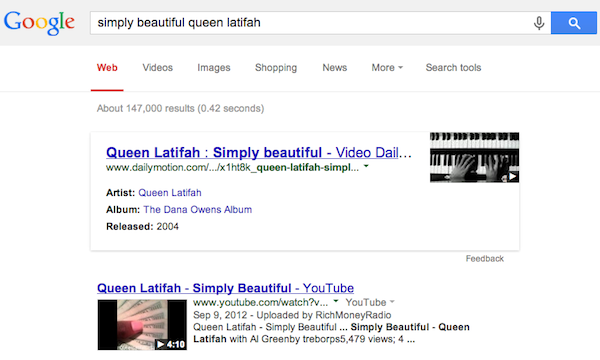
It is notable that the huge thumbnail appears to be exclusive to YouTube. When Google pulls from other sources like Dailymotion, it shows the smaller thumbnail and link layout. For example, the video for “Simply Beautiful” by Queen Latifah looks like this:

simply-beautiful-queen-latifah-google-search

YouTube Graphic

With the popularity and direct user engagement of social media platforms like Facebook and Twitter, many online marketers forget the potential for YouTube to improve your brand reputation and enforce your SEO efforts in a single move.

YouTube has a surprising amount of opportunity for optimization, especially for efforts focusing on local search. There is a relative lack of videos from small or local businesses aimed at informing the public and promoting themselves, leaving a wonderful widow for many local businesses to make an impact on their audience.

Of course, before you can optimize, you need to make sure you have a quality video that offers something of value to viewers beyond simply promoting yourself. Chris Silver Smith recently wrote about how local businesses can go about creating videos that will be worth their viewers time and make your audience interested in what you do.

There are plenty of options, but chances are you don’t want to just make an ad and throw it up online. A better approach would be a series of short videos exploring your industry, your brand, and what you offer to consumers. How-to videos can reinforce your reputation in regards to your skill, while explanations of your products and services can help viewers understand exactly what sets you apart from your competitors.

Smith also explored the ways you can optimize your videos to make sure they get seen, while also helping your local SEO efforts.

  1. Link to Your Business – At the beginning of your description, always make sure to include a link to your business website. These links are automatically “nofollowed”, so don’t expect it to help your link portfolio, but there is a chance local citation value is being conveyed to Google.
  2. Name, Address, Phone Number – Every video should include thorough contact information in multiple easy-to-find locations. Start by making it visible within the first few frames of your video. Google is able to interpret and “read” text within videos, so not only will your viewers be able to easily find you, Google will retain data contained within the video. Similarly, you may want to actually state your information out loud in the video, as spoken statements are converted into subtitle transcripts by Google’s systems.
  3. Take Advantage of the Descriptions – YouTube has one of the most generous description fields out there. While the initial paragraph users see should clearly state what the video is about, you can also include a statement about your company or a biography so that interested viewers can find it with a simple click.
  4. Tag Your Video – Along with including your business category name and your location names to the tags on videos, you should also include a handful of relevant tags for each video. Tags have a heavy impact on YouTube, so you’ll want to always make sure you include them, or your video will likely disappear into the ether.
  5. Associate the Video with Google Place Listings – Business listing in Google Places allow you to associate videos easily by putting in URLs. Make sure to use the full page URL.
  6. Associate the Video with Google+ Local Page – Adding the video to your local page allows you and any other employees to easily share the video on personal Google+ streams. The number of shares is considered indicative of popularity, so this is a good opportunity to boost your shares.
Image Courtesy of Wikipedia Commons

Image Courtesy of Wikipedia Commons

Penguin 2.0 only affected 2.3% of search queries, but you would think it did much more from the response online. Ignoring all of the worrying before the release, there have been tons of comments about the first-hand effects it seems many are dealing with in the post-Penguin 2.0 web. Those spurned by the new Penguin algorithm have even accused Google of only releasing the update to increase their profitability.

Matt Cutts, head of Google’s Webspam team, used his recent Webmaster Chat video to attack that idea head on. The main question he was asked is what aspect of Google updates Cutts thinks the SEO industry doesn’t understand. While Matt expresses concern about the amount of people who don’t get the difference between algorithm updates and data refreshes, Cutts’ main focus is the concept that Google is hurting web owners to improve their profits.

Most notably, the algorithm updates simply aren’t profitable. Google experienced decreases in their revenue from almost all their recent updates, but Cutts says that money isn’t the focus. Google is aiming at improving the quality of the internet experience, especially search. While site owners using questionable methods are upset, most searchers will hopefully feel that the updates have improved their experience, which will keep them coming back and using Google.

As far as the misunderstandings between algorithm updates and data refreshes, Cutts has expanded on the problem more elsewhere. The biggest difference is that the algorithm update changes how the system is working while data refreshes do not and only change the information the system is using or seeing.

Cutts was also asked which aspect of SEO that we are spending too much time on, which leads Cutts to one of the main practices that Penguin focuses on: link building. Too many SEOs are still putting too much faith in that single practice though it is being destabilized by other areas that more directly affect the quality of users’ experiences such as creating compelling content. Instead, Matt urges SEOs to pay more attention to design and speed, emphasizing the need to create the best web experience possible.

Cutts’ video is below, but the message is that Google is going to keep growing and evolving, whether you like it or not. If you listen to what they say and tell you about handling your SEO, you may have to give up some of your old habits but you’ll spend much less time worrying about the next algorithm update.

While quality SEO is a complex, time-consuming job, there are many types of SEO that any site owner can do. There are also a lot of basic mistakes that site owners regularly make while trying to optimize their own page.

To help prevent these easily corrected mistakes, Matt Cutts, Google’s head of their Webspam team, devoted one of his recent YouTube videos (which you can watch below) to identifying the five most basic SEO mistakes anyone can make.

1) Not Making Your Site Crawlable – According to Cutts, the most common mistake “by volume” is simply not making Google able to crawl your site, or not even having a domain to begin with.

The way Google learns about sites is through web “crawlers” that index pages by following links. If you don’t provide links allowing Google’s bots to find your site, it won’t know what is there. If you can’t reach content by clicking normal links on the page in a text browser, it might as well not exist to Google.

2) Not Using Words People Are Searching For – Google also tries to connect people with the most relevant information for the exact search they used. If someone searches “how high is Mount Everest,” they will be connected with a site using those exact words on a page before they will be suggested a page using just “Mount Everest elevation.”

My favorite example Cutts uses of this is a restaurant’s website, mainly because it seems many restaurants have very minimal websites that are insanely in need of optimization and a bit of a design overhaul. When people look for a restaurant to eat, they search for a couple of things, mainly the location, menu, and hours. If the page has those listed in plain text, Google will index that information and direct more people to the site, than those with PDF menus or no information at all.

3) Focusing On Link Building – One of the biggest buzzwords in SEO is link building. It is one of the oldest strategies, and it is constantly tweaked by Google’s algorithms to keep it in the news regularly, but it may actually be dragging you down.

When people think link building, they cut off many other ideas and marketing options which will equally boost your site. Cutts suggests instead to focus on general marketing. If you make your website more well-known and respected within your community, you will attract real people, which will bring organic links which are much more respected by the search engines.

4) Bad Titles and Descriptions – Many people neglect their titles and descriptions assuming they will either be automatically filled in, or won’t matter in the long run. If your website says “untitled” in the title bar, it will also say “untitled” in a bookmarks folder as well as actual search results. Now ask yourself, would you click on a website without a title?

Similarly, the descriptions for webpages are often blank or copy and pasted straight from the page with no context. Your description should be enticing people to want to click on your page, as well as showing that you have the answer to the question they are searching for. If people can build entire followings around 140 character tweets, you should be able to make someone want to click your page with a 160 character description.

5) Not Using Webmaster Resources – This problem can only be born out of ignorance or laziness. There are countless SEO resources available out there, and most of them are free. The best resources anyone can turn too are the Webmaster Tools and Guidelines that Google offers, but you shouldn’t just stick to those either. There are blogs, webinars, videos, and forums all happy to teach you SEO, you just have to use them. If you’re reading this however, you probably don’t have this problem.

Conclusion

The most common SEO problems, according to Cutts, are also the most simple problems imaginable. There are resources available that will help you fix all your basic SEO problems, and you’ll learn more and get better through finding them and practicing. If you’re currently dealing with trying to learn how to make your site crawlable, you have a long way to go, but if you just keep working at it, you’ll be an SEO pro eventually.

It appears Google and YouTube are starting to put in something new – automated captioning.  This will help a lot for people who are unable to receive the audio for either physical or mechanical reasons.  It’s going to start with English only, but they will be using voice recognition software to turn the audio into legible captions.

There is word that this update may affect SEO, but I have my curiosities about this.  It can only truly affect SEO if the captions are somehow written into the page code.  We can only see if this is the case once this new development in YouTube goes live.  We’ll see how it turns out.