Keymaster

Source: Jason Tamez

Does Google control the internet? Of course no one has control over the entire existance of the internet, but the major search engine has a huge influence in how we browse the web. So, it is interesting to hear a Google representative entirely downplay their role in managing the content online.

Barry Schwartz noticed the statement in a Google Webmaster Help forums thread about removing content from showing up in Google. It’s a fairly common question, but the response had some particularly interesting information. According to Eric Kuan from Google, the search engine doesn’t play a part in controlling content on the internet.

His statement reads:

Google doesn’t control the contents of the web, so before you submit a URL removal request, the content on the page has to be removed. There are some exceptions that pertain to personal information that could cause harm. You can find more information about those exceptions here: https://support.google.com/websearch/answer/2744324.

Now, what Kuan said is technically true. Google doesn’t have any control over what is published to the internet. But, Google is the largest gateway to all that content, and plays a role in two-thirds of searches.

This raises some notable questions for website owners and searchers alike. We rarely consider how much of an influence Google has in deciding what information we absorb, but they hold some very important keys to areas of the web we otherwise wouldn’t find.

As a publisher, you are obliged to follow Google’s guidelines in order to be made visible to the huge wealth of searchers. It is an agreement which often toes uncomfortable lines as the search engine has grown into a massive corporation encompassing many aspects of our lives and future technology.

When you begin marketing and optimizing your site online to become more visible, you should keep this agreement in mind. A lot of people think of Google as a system to take advantage of in order to reach a larger audience. While you can attempt to do that, you are breaking the agreement with the search engine and they can penalize your efforts at any time.
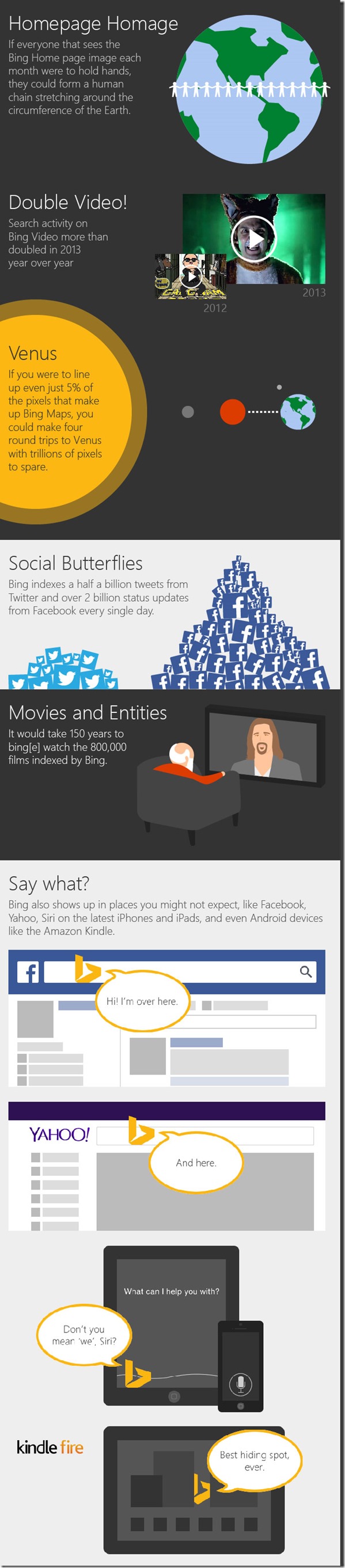
As part of their year-end wrap up, Bing posted some of their highlights from the past year in the form of an infographic on the Bing Search Blog. The infographic summarizes some interesting facts and statistics from 2013 that mostly puts a spotlight on their recent growth. But, there are some parts of the infographic marketers and business owners might take interest in.

Bing Social GraphicFor one, you have probably heard how important social media is to establishing a brand online and engaging internet users, but you might not know that Bing is often more attentive to social media than Google. While Google’s rankings may factor in social media data for website owners, actual users see very little social media presence outside of YouTube and Google+.
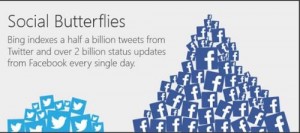
Meanwhile, Bing has been actively attempting to make Twitter and Facebook a significant part of their search engine. According to their end of the year stats, Bing indexes up to half a billion tweets from Twitter every day and over 2 billion Facebook status updates every single day. You might keep that in mind when considering which search engine you want to cater your social media efforts to.

You might also be surprised by where Bing is being used. Google is almost ubiquitous with web search, but you use Bing more often than you might think. The search engine is used on Facebook, Yahoo, Siri, and even some Android devices.

Other facts from the infographic include:

  • If everyone that sees the Bing Home page image each month were to hold hands, they could form a human chain stretching around the circumference of the Earth.
  • Search activity on Bing Video more than doubled in 2013.
  • If you were to line up even just 5% of the pixels that make up Bing Maps, you could make four round trips to Venus with trillions of pixels to spare.
  • It would take 150 years to watch the 800,000 films indexed by Bing.

The infographic is below:

Bing Year End InfographicaQQQQQQQQQQQ

The holiday shopping season is currently at a fever pitch, where it will likely stay until Dec. 26th, and more and more consumers are using the internet to aid their purchases. Online shopping isn’t new, but the prevalence of smartphones has made it easier than ever to turn to the internet to find what you need and shoppers aren’t shy about consulting the web before any purchase.

But, how does this affect shopping patterns and what are these consumers looking for exactly? If your brand is online, chances are you want to capitalize on the huge amount of online shoppers both at home and those using their smartphones while they shop. Unfortunately, a new survey from Search Engine Land and SurveyMonkey suggests this may be harder for smaller brands to do than anticipated.

It shouldn’t come as any surprise that many online shoppers are looking for well known brands, but it might raise your eyebrows to learn it is the most important factor to many shoppers. The survey conducted on November 21-22 of this year shows that 70% of shoppers are focused on finding brands they are already familiar with. The only other factor which received over 50% of the response was free shopping.

The good news is this doesn’t spell the end for local businesses trying to grow their brand during the commerce season. Location and reviews still made a strong showing in the results, as did sales. Many shoppers also focused on retailers who offer images and easily viewable prices for their products.

Smaller brands can also take some solace in knowing the survey was limited to a relatively small sample size of roughly 400 Americans using SurveyMonkey Audience. You can see a chart of the results below.

Online Shopping Survey Graphic

Source: Search Engine Land / SurveyMonkey

Google has been making a move towards providing searchers more lengthy and thorough content in recent history. They estimate that roughly 10 percent of all searches call for in-depth article information and they have been aiming to make those types of sources more available, especially when it may be more relevant for users.

The first big move came a couple months ago, back in August. The search engine launched an update to include in-depth articles for relevant searches, with a special block of articles at the bottom of the search results page.

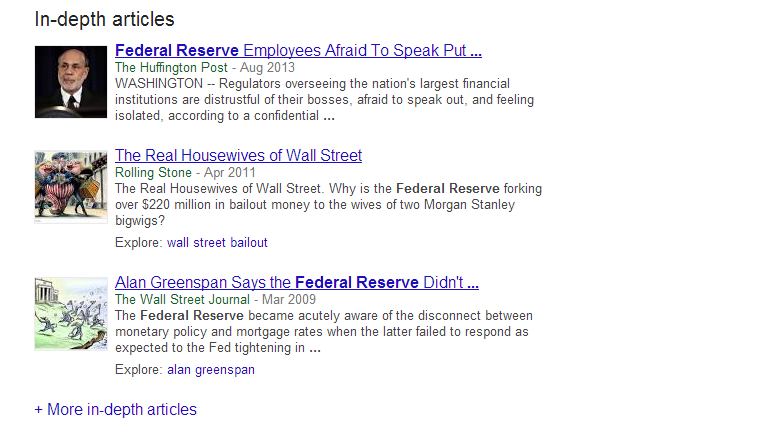
Now, Google has expanded the in-depth articles section so that users can view even more comprehensive articles by adding a new link which reads “More in-depth articles” beneath the initial selection of sources. Clicking that link shows 10 more articles on the same page. A screenshot of the update is below:

In-Depth Article Update Screenshot

The latest update also implemented the ability to explore related topics with an explore section next to articles which may be connected to other keywords. Search Engine Land notes that you can also search exclusively for in-depth articles by adding &ida_m=1 to the end of your search URL.

Currently this new feature doesn’t have much impact on the content your brand creates, but the trend could have huge implications for the future of search and Google’s focus. For now the majority of searches call for less extensive results, but eventually longer and more detailed content could be hugely rewarding for those willing to put in the effort.

Google is attempting to bridge the gap between apps and normal internet use, and it appears their first step is to make apps part of the search results for Android users. When logged in, you will also be able to see what apps you have and search the content within them.

“Starting today, Google can save you the digging for information in the dozens of apps you use every day, and get you right where you need to go in those apps with a single search. Google Search can make your life a little easier by fetching the answer you need for you – whether it’s on the web, or buried in an app,” Scott Huffman, VP of engineering, announced on Google’s Inside Search blog.

Google App Search Graphic

These results won’t be ads for apps. Instead, when the best results for a query come from an app, Google Search will include the app in the result and make it easy to download or access. If you already have the app, you will just have to touch “Open in app” and you will be taken to the relevant content.

The app results will be grouped together, so don’t expect them to hurt many sites’ rankings or visibility. These results are just another option added for user convenience.
Currently only a few apps are compatible with the Open in App feature, including:

  • AllTrails
  • Allthecooks
  • Beauytylish
  • Etsy
  • Expedia
  • Flixster
  • Healthtap
  • IMDb
  • Moviefone
  • Newegg
  • OpenTable
  • Trulia
  • Wikipedia

“This is just one step toward bringing apps and the web together, making it even easier to get the right information, regardless of where it’s located,” Huffman wrote.

Search Engine Watch reports the new ability is currently limited to English version users of Android 2.3 or higher within the United States.

Google is making it easier for webmasters to identify and address smartphone specific errors they might not have known about in the past. Previously, detecting and fixing errors that happen on smartphone errors was complicated, so the search engine added a section to the crawl errors report in Webmaster Tools that displays the more common errors Google sees webmasters make in regards to how mobile users access their site.

Pierre Far, Google Webmaster Trends Analyst announced the feature earlier today, saying that some of the errors may “significantly hurt your website’s user experience and are the basis of some of our recently-announced ranking changes for smartphone search results.” While Google is trying to help make it easier for webmasters to solve problems with their site, the search engine is also using this as another means to push webmasters towards making their sites more mobile friendly.

The new report for smartphone errors looks like this:

Smartphone Errors

Some of the errors included are:

  • Server errors: A server error is when Googlebot got an HTTP error status code when it crawled the page.
  • Not found errors and soft 404’s: A page can show a “not found” message to Googlebot, either by returning an HTTP 404 status code or when the page is detected as a soft error page.
  • Faulty redirects: A faulty redirect is a smartphone-specific error that occurs when a desktop page redirects smartphone users to a page that is not relevant to their query. A typical example is when all pages on the desktop site redirect smartphone users to the homepage of the smartphone-optimized site.
  • Blocked URLs: A blocked URL is when the site’s robots.txt explicitly disallows crawling by Googlebot for smartphones. Typically, such smartphone-specific robots.txt disallow directives are erroneous. You should investigate your server configuration if you see blocked URLs reported in Webmaster Tools.

Not only are these errors capable of ruining the user experience for visitors on mobile devices, they can severely damage your site’s visibility if you don’t resolve the issues quickly. At least now there is a convenient way for you to find the problems.

Google's John Mueller Courtesy of Google+

John Mueller

Recently I discussed a common issue sites have where a misplaced noindex tag on the front page of a site can keep search engines from crawling or indexing your site. It happens all the time, but it isn’t the only reason your site might not be crawled. The good news is there is little to no long term damage done to your site or your SEO, according to a recent statement from Google’s John Mueller.

Barry Schwartz noticed Mueller had responded to a question on the Google Webmaster Help forums from an employee for a company who had accidentally blocked GoogleBot from crawling and indexing their site. In John Mueller’s words:

From our point of view, once we’re able to recrawl and reprocess your URLs, they’ll re-appear in our search results. There’s generally no long-term damage caused by an outage like this, but it might take a bit of time for things to get back to “normal” again (with the caveat that our algorithms change over time, so the current “normal” may not be the same state as it was before).

So don’t worry to much if you discover you find your site has been having problems with crawling or indexing. What matters is how quickly you respond and fix the problem. Once the issue is solved, everything should return to relatively normal. Of course, as Mueller mentions, you might not return back to your exact same state because these things are always fluctuating.

Local SEO Infographic Banner

It constantly surprises me how many local businesses don’t believe in investing in proper online marketing and optimization. Given, I see every day how establishing a quality online presence and optimizing it for higher visibility can benefit a business. Still, many local businesses hold the conception that online marketing is only important for national level businesses, and they couldn’t be more wrong.

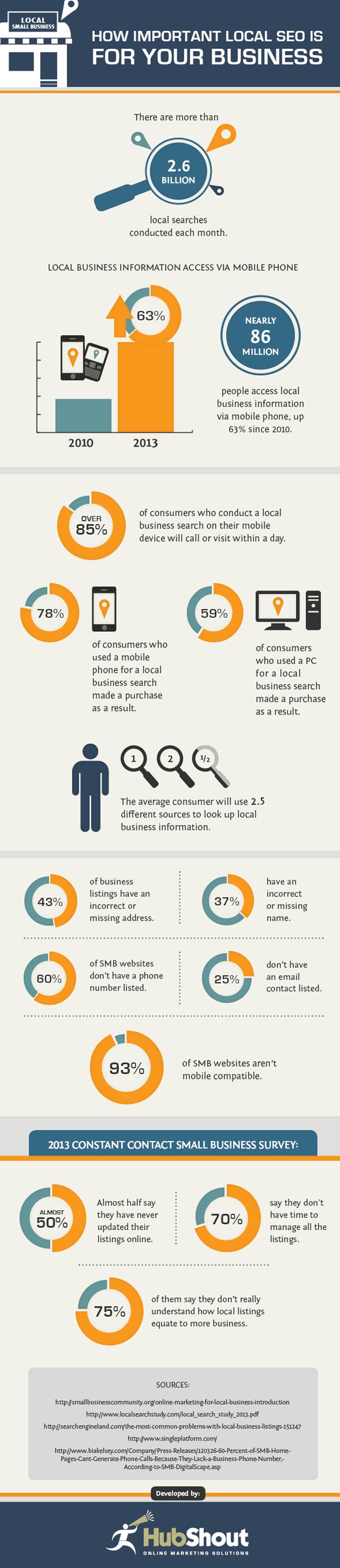
Current estimates say that more than 2.6 billion local searches are conducted every month. More importantly, statistics show that these local searchers are becoming more and more mobilized to quickly go from search to purchase thanks to the use of smartphones to search on the go. Nearly 86 million people are regularly using their mobile phones to look up local business information, and these searchers are highly primed to convert. Simply put, without an online presence and the optimization to make your brand visible you are missing out on a large chunk of potential customers.

Hubshout recently created an infographic to illustrate how important local search engine optimization (SEO) really is for your business. Not only does the infographic show what you are missing out on by neglecting your online presence, it also shows how many many businesses have yet to establish themselves online in a meaningful way. There is still a lot of untapped opportunity online, you just have to make the leap.

Local SEO Infographic

Source: Hubshout


Stop Sign

Source: Sharon Pruitt

Sometimes the source of the problem is so glaringly simple that you would never consider it. This is the case of many webmasters frustrated with their sites not being indexed or ranked by search engines. While there are numerous more technical reasons search engines might refuse to index your page, a surprising amount of time the problem is caused by you telling the search engine not to index your site with a noindex tag.

This is frequently overlooked, but it can put a complete halt to your site’s rankings and visibility. Thankfully it is also very easy to fix. The biggest hassle is trying to actually find the redirect, as they can be hard to spot due to redirects. But, you can use a http header checker tool to verify before the site page redirects.

Don’t be embarrassed if this small mistake has been keeping you down. As Barry Schwartz mentions on SEO Roundtable, there have been large Fortune 500 companies with these same problems. John Mueller also recently ran into someone with a noindex on their homepage. He noticed a thread in the Google Webmaster Help forums where a site owner had been working to fix his problem all day with the help of the other forum members. John explained the problem wasn’t nearly as complex as everyone else had suggested. It was much more obvious:

It looks like a lot of your pages had a noindex robots meta tag on them for a while and dropped out because of that. In the meantime, that meta tag is gone, so if you can keep it out, you should be good to go :).

When you encounter a problem with your site ranking or being indexed, it is always best to start with the most obvious possible causes before going to the bigger and more difficult mistakes. While we all like to think we wouldn’t make such a simple mistake, we all also let the small things slip by.

Matt CuttsUsually Matt Cutts, esteemed Google engineer and head of Webspam, uses his regular videos to answer questions which can have a huge impact on a site’s visibility. He recently answered questions about using the Link Disavow Tool if you haven’t received a manual action, and he often delves into linking practices which Google views as spammy. But, earlier this week he took to YouTube to answer a simple question and give a small but unique tip webmasters might keep in mind in the future.


Specifically, Cutts addressed the need to have a unique meta tag description for every individual page on your site. In an age where blogging causes pages to be created every day, creating a meta tag description can seem like a fruitless time-waster, and according to Cutts it kind of is.

If you take the time to create a unique meta tag description for every page, you might see a slight boost in SEO over your competitors, but the difference will be negligible compared to the other aspects of your site you could spend that time improving. In fact, overall it may be better to simply leave the meta description empty than to invest your time paying attention to such a small detail. In fact, on his own blog, Cutts doesn’t bother to use meta descriptions at all.

Cutts does say that you shouldn’t try to skimp on the meta tag descriptions by using copy directly from your blog. It is better to have no meta tag description than to possibly raise issues with duplicate content, and Google automatically scans your content to create a description any time you don’t make one.