YouTube is testing out a new feature that would improve synergy between brands and creators by automatically inserting visual links to businesses mentioned in videos. 

The feature, which is being called Places Mentions, was revealed during a recent video on the Creator Insider channel.

At the moment, the feature is limited to just Android and iOS devices using the YouTube app to watch content related to food or drinks.

The goal behind it is simply to streamline the process of finding out more about places mentioned in a video, such as in a review of a local eaterie. 

Before, creators had to manually add a text link if they wanted to direct people to the locations they mention in their videos. By automating this process, YouTube is making it easier for content creators to spread the word about your brand without having to establish a formal collaboration.

As the announcement says:

“This new feature, within the video description box, will give users an easy and engaging way to find out about places mentioned in a video.”

While the initial test is limited to food and drink videos, the company says it plans to expand the feature to more categories soon.

The announcement did not provide a specific date that we can expect to feature appear in search results, but it is safe to assume it will roll out for testing any day.

For more, check out the full Creator Insider video below:

TikTok is introducing new ways for pages to monetize their presence on the platform via digital “gifts” and tips.

Notably, these tools are exclusive to individual creators or entrepreneurs through the Creator Next monetization suite, which is not available to brands on the platform.

In a way, this makes sense as the new monetization features are designed to be direct ways for other users to reward creators for sharing great content. Let’s talk about exactly what these new features are.

TikTok Tips

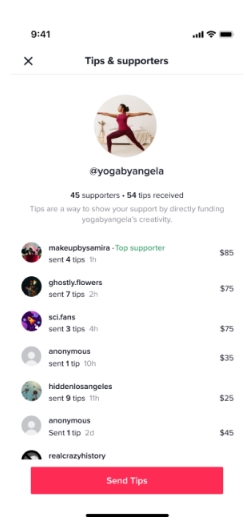
TikTok now allows users to send money directly to creators as a “tip”.

The feature is managed through Swipe and requires an account with that service to be eligible to receive tips. 

Although creators will receive 100% of the value of the initial tip, TikTok will apply a service fee to generate revenue from this feature.

Signed-up profiles will include a new icon on their profile, which will allow users to send $5, $10, $15, or custom tips up to $100.

By default, others will be able to see when you send or receive a tip, unless you specifically choose to make your tip anonymous.

To prevent misuse, TikTok limits users to $500 total or up to 100 transactions per day.

TikTok Video Gifts

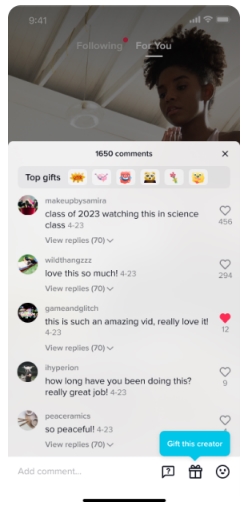
TikTok’s new Video Gifts blur the line between Reddit awards and its tipping system. It allows users to pay to reward content they love with specific gifts, which are shown to other viewers.

The big difference between this and something like “Reddit Gold” is that recipients can then exchange their rewards for actual money via a virtual currency called “diamonds”.

Interestingly, gifts come with some very unique benefits, including a boost in the platform’s algorithm:

As the announcement says:

“… a key metric that TikTok uses to assess the popularity of a video is the number of Gifts sent to a creator’s content.”

Are You Eligible?

Users interested in utilizing these monetization features must:

  • Be 18+ years old
  • Have at least 1,000 video views in the past 30 days
  • Have at least 3 posts in the past 30 days
  • Be in good standing regarding TikTok’s community guidelines
  • Reside in the US, UK, Germany, France, Italy, or Spain

If your account meets these requirements, you will be able to opt-in to the Creator Next suite.

For more, read the announcement here.

After testing the feature for much of the year, Microsoft Bing Page insights have officially launched for all Bing search results according to an announcement earlier this week.

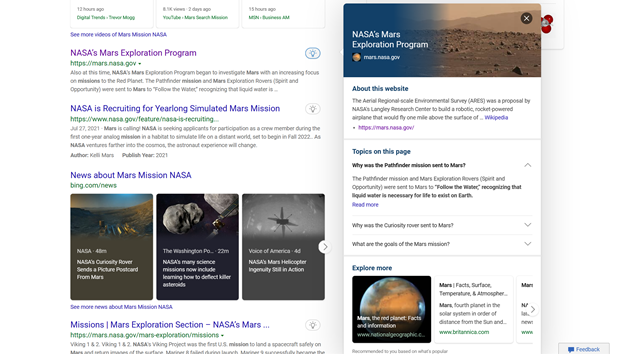
With this, users will now be able to see a small lightbulb icon on the right side of search results, which can provide additional information about the search result.

As the announcement says, Page insights “provides summarized insights from a page on your search results so you can find what you’re looking for faster.”

How It Works

The idea behind the new feature is fairly simple. Users simply click or mouse over the new lightbulb icon next to search results for more information.

According to Microsoft, this “helps you verify that the source is relevant to your needs, helps you get caught up to speed at a glance on top factoids you didn’t know about, and lets you jump straight to the relevant section of the page when you click ‘Read more’ for a specific question.”

You can see what this looks like in practice below:

Last Notes

It is important for webmasters to know this feature is currently only available on desktop search results. Microsoft is tightlipped about any possibility of bringing this to mobile search because of the “screen size required to properly display the results.”

Given that most modern search features are designed to responsively resize content based on the device being used and the importance of mobile search, this decision and statement raise more questions than they answer.

If you’d like to implement Bing Page insights for your website, simply ensure your site’s Bing snippet has the page insight feature added and that your content is accurate and relevant, or find out more from the full announcement here.

Twitter has confirmed it is dropping support for AMP pages, adding more evidence to the growing belief that AMP (or Accelerated Mobile Pages) are on their way out of use.

In an update to its developer document for AMP pages, Twitter says it is discontinuing support for the format by the end of the year:

“We’re in the process of discontinuing support for this feature and it will be fully retired in Q4 of 2021.”

This comes after some users had noticed a lack of support for AMP going back as far as October.

What This Means For You

If you have been sharing AMP links on Twitter, you can technically still do so without any significant issues. 

However, instead of being directed to the AMP versions of your content, Twitter will automatically direct users to the original content. 

It goes without saying that this negates the point of adding AMP links instead of sharing the original page. 

Why Is AMP Losing Support?

Many people dislike AMP pages for a number of reasons, citing everything from buggy performance to criticism over the boost they received in search results for a time. 

In recent times, Google has seemed to recognize this. 

First, they did this by making AMP pages less obvious in search results by removing the icon which had accompanied pages using the format. Additionally, Google dropped requirements for pages to use AMP to be eligible to be included in the Top Stories carousel. 

The most recent evidence that Google is losing confidence in AMP is the September announcement that Google News would start showing fewer AMP pages in the results.

This has all led many to believe that AMP is on its way out at Google, as well as Twitter.

Ahead of the holiday shopping season, Google Maps is launching four new features aimed at improving the in-person shopping experience for consumers and driving more sales for local businesses.

The updates not only make it easier to plan your shopping trips ahead of time but also bring many shoppers new ways to order from local businesses online.

Let’s explore these four new features:

New Local Shopping Features for Google Maps

1. Area Busyness

Everyone dreads the idea of getting stuck in a massive holiday shopping crowd when you are just trying to pick up a few things. Now, you can see an estimate of how busy a specific area is before you leave.

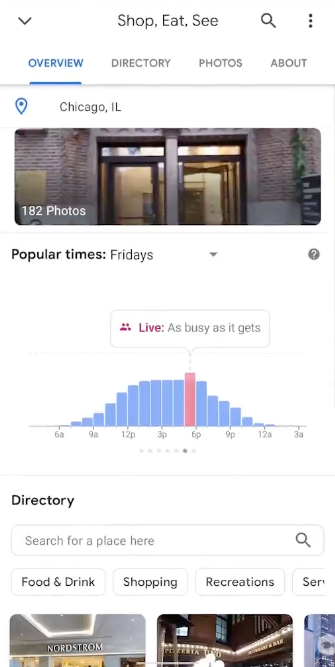
For this new feature, called Area Busyness, Google analyzes recent traffic data from local businesses nearby to gauge how many people are shopping in the area.

To see the Area Busyness information, simply open Google Maps and tap on a general area to see how busy it is.

Notably, Google says shopping malls tend to be least busy on Tuesday evenings, while Saturday is unsurprisingly the busiest time to shop.

2. Expanded Directory Tabs

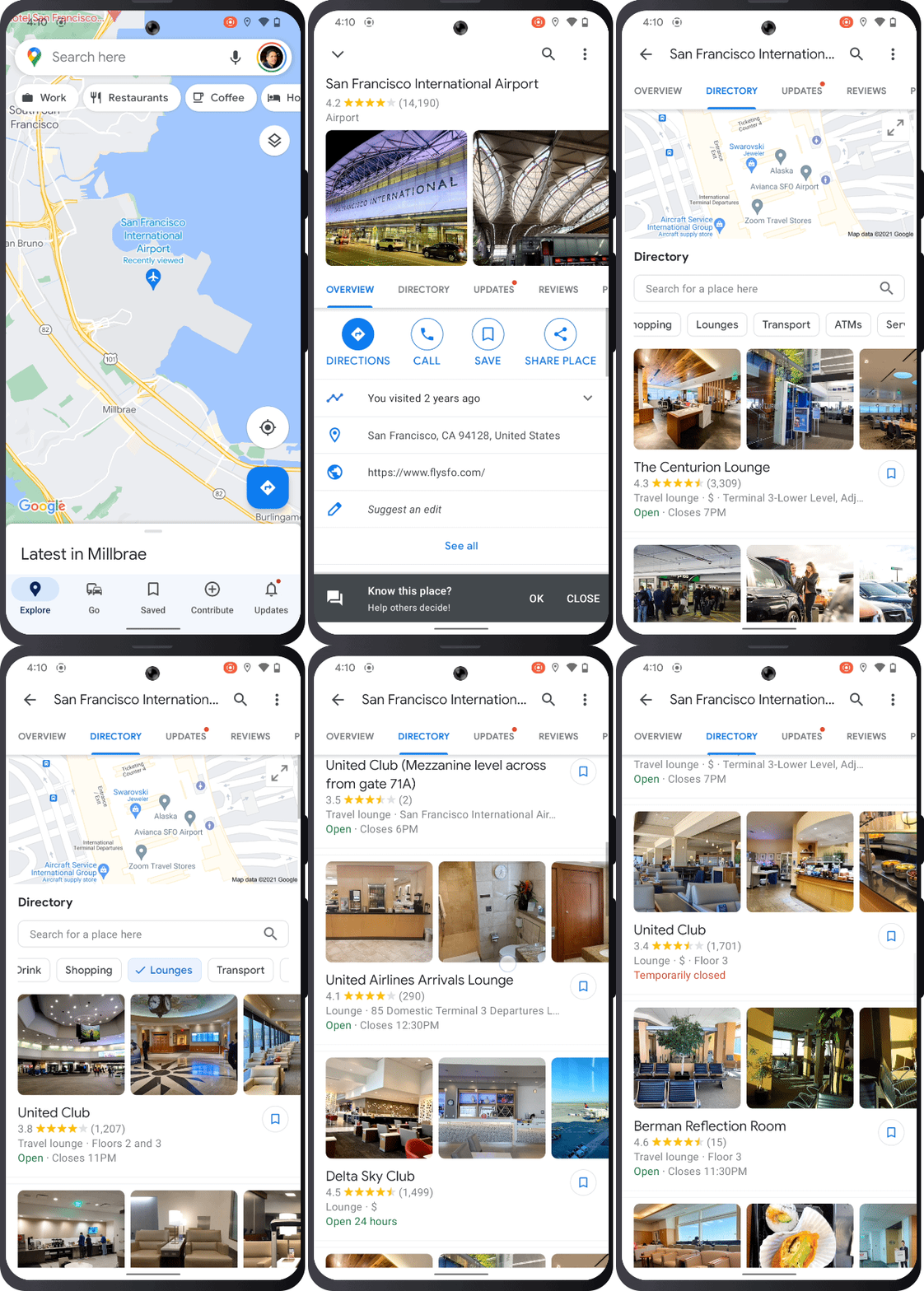
Google Maps is expanding the existing Directory tab globally for all airports, malls, and transit stations on Android and iOS devices.

The Directory tab details the stores in a shopping center, as well as showing airport lounges, car rental agencies, and other services in a building.

The tab also includes other helpful information pulled from local listings, such as whether specific stores are open and their Google reviews.

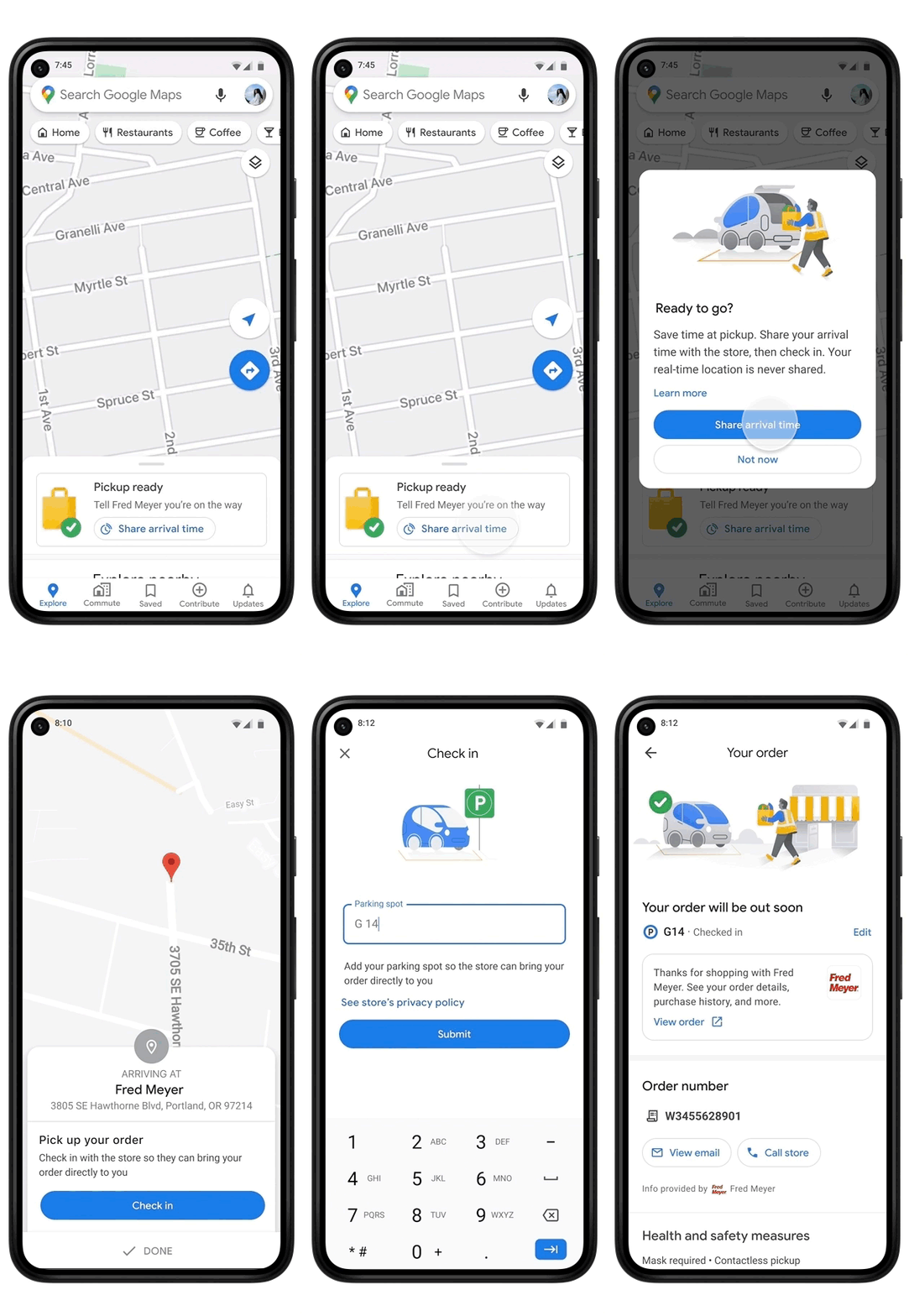
3. Grocery Shopping on Google

After testing the feature with some stores earlier this year, Google is expanded its grocery shopping feature to over 2,000 stores in 30+ states across the US.

Now, shoppers can order groceries from several large companies in the country, such as Kroger, Fry’s, Ralphs, and Marianos.

Once ordered, Google Maps tracks your order status and allows you to share your location info with the store so they will know when you arrive.

According to data from the tool before the expansion, Google says that customers who shared their ETA typically waited less than five minutes to pick up their order.

4. Additional Restaurant Info From Customers

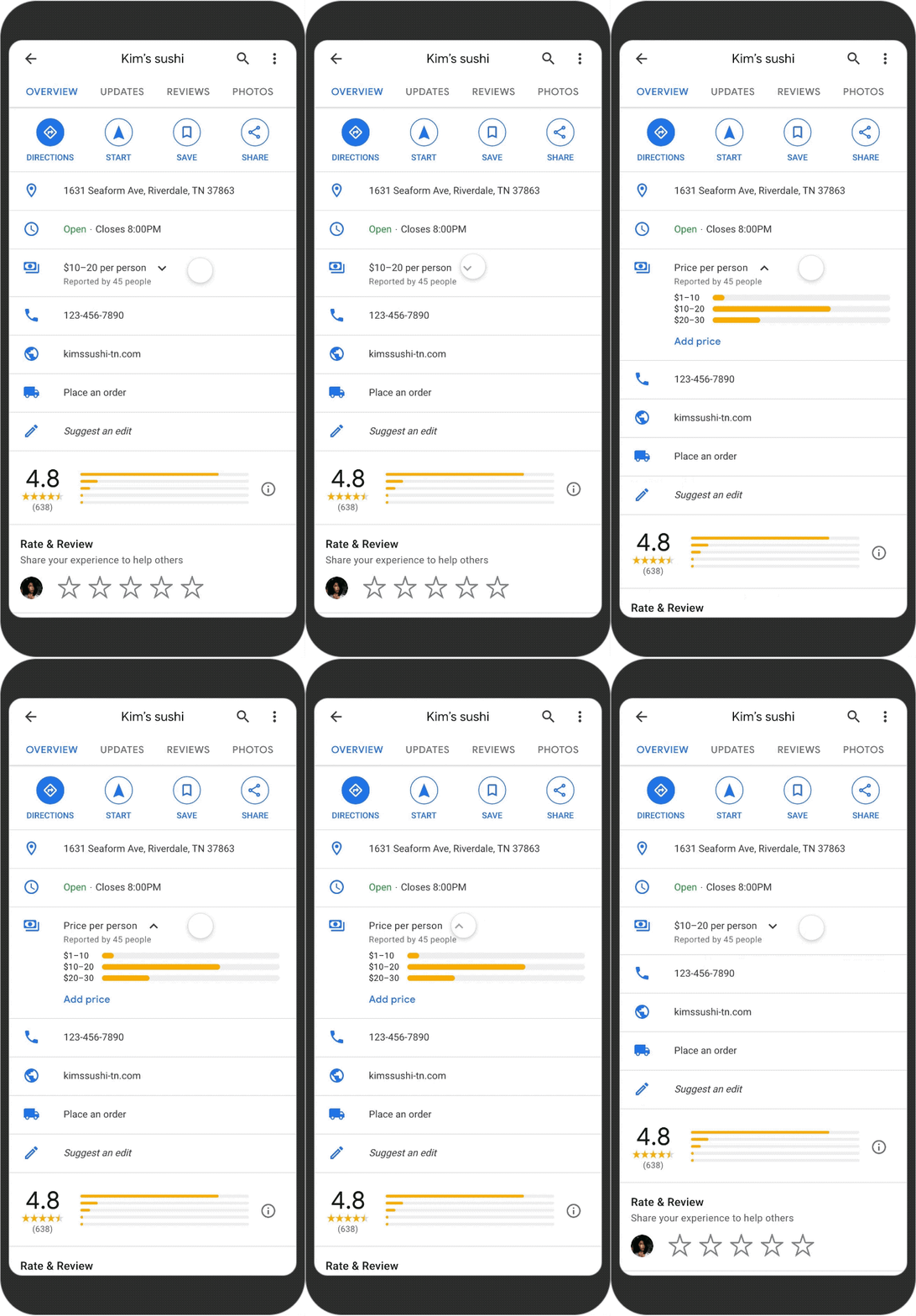
Google Business Profiles for restaurants will now include more information provided by reviewers.

When leaving a review, Google now prompts customers to estimate the restaurant’s price ranges and note any amenities the restaurant offers – such as curbside pickup, delivery, or outdoor seating.

For more information about these updates, read the blog post from Google Maps Director of Product, Amanda Leicht Moore.

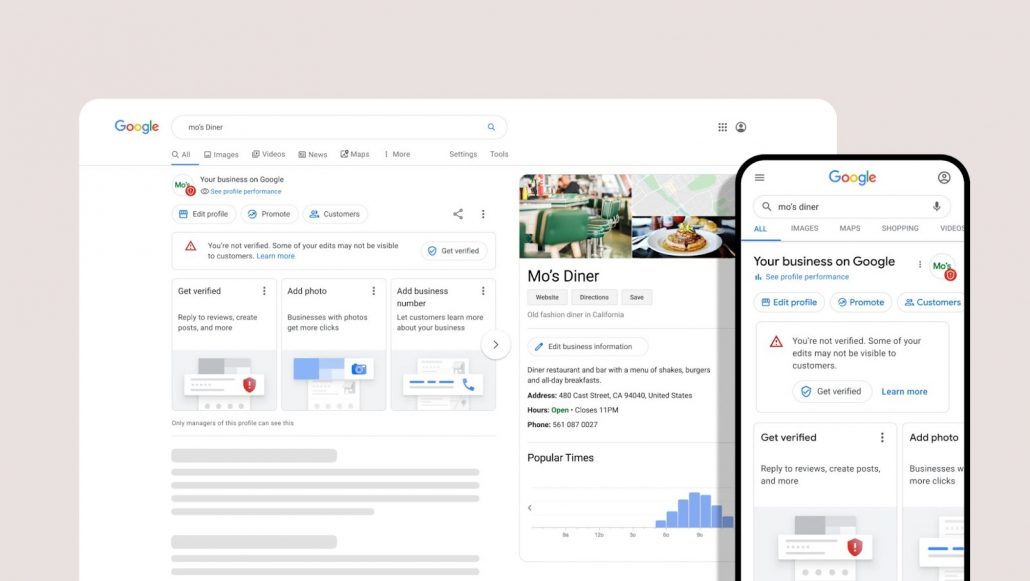
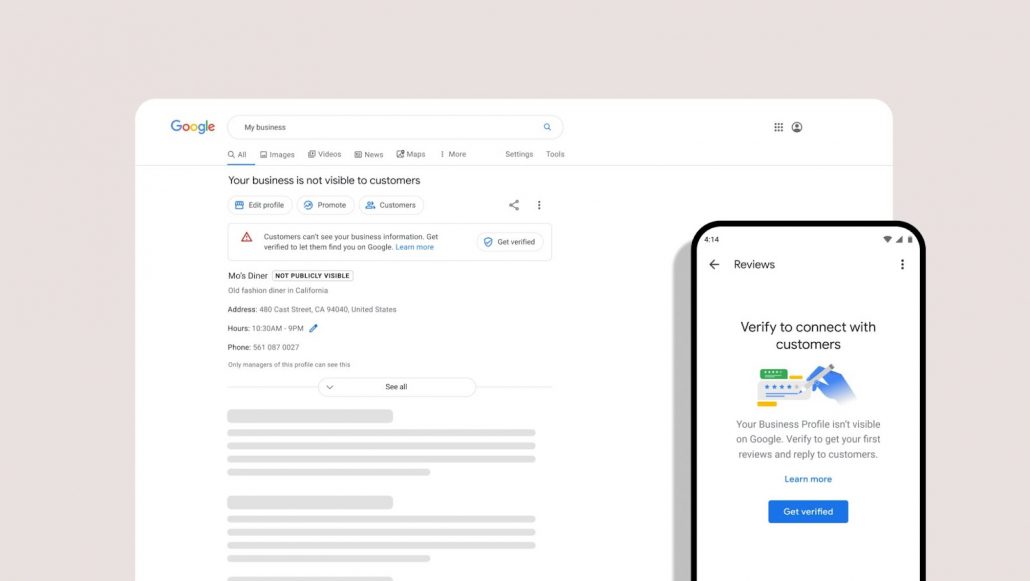
Say goodbye to “Google My Business” and say hello to “Google Business Profiles” as the search engine streamlines its tools for businesses.

Though much will stay the same for businesses listing their services on Google, the rename marks some significant changes – such as where and how your businesses can claim their profile. Starting now, your brand can claim its profile directly from either Google Search or Google Maps.

Below, we will talk a bit more in-depth about how you can claim your listing and what this means for existing listings.

How to Claim a Google Business Profile

When signed into the Google account associated with your business, the fastest way to claim your listing is to simply search for your business name. 

This will bring you to a prompt that will allow you to verify your listing or challenge someone who has already made a claim for your listing. 

Once claimed and verified, you will be able to edit any information shown and add additional details like photos, videos, unique services, and Google Posts.

Is Anything Else Changing?

For the most part, everything else is staying the same regarding local business listings on Google. Their appearance will stay the same, as will the optimization methods to ensure your business appears for relevant searches. 

What will change is where you are editing this information. 

For example, the search engine says it is no longer necessary to use the specific Google My Business website or app to update your listing.

The app will be phased out in early 2022, though you can still use the website if you are managing multiple listings. It will simply be renamed to “Google Business Profile Manager.”

For now, this is all the news we have about the relaunch of Google My Business and Google Business Profiles. More info will be coming in the coming months as the relaunch rolls out.

It is no secret that the hiring market has gotten considerably more competitive since the onset of the Covid pandemic. Now, LinkedIn is giving companies new tools to better attract new talent, improve communication, and compare yourself against your competition.

Especially in the wake of “The Great Resignation” (or, as LinkedIn is apparently calling it – “The Great Reshuffle”), the professional social network says it is “excited to introduce a few new LinkedIn Pages features that are designed to help your brand share more about your organization and culture to more quickly attract top talent while retaining your current employees.

Let’s explore exactly what these features are, how you can access them, and how they can help you solve your hiring challenges starting right now. 

Expanded My Company Tabs

For starters, LinkedIn is updating the My Company tab to make it easier to keep your employees connected, share data, and encourage employees to share branded content to their network. 

If you are unfamiliar, the My Company tab is a feature exclusively for brands on the platform with more than 201 employees, which is designed to connect coworkers even when they are working remotely. 

In the upcoming weeks, LinkedIn will be updating this tab with these new features:

  • Easily curate content from your Page Feed to the My Company tab with the simple click of a button.
  • Notify employees as soon as new content is curated and drop them right into the resharing experience.
  • Show employees how their re-share matters with a dynamic visualization of the content that others at the organization are sharing.

Share Your Workplace Policies

One thing made very clear by the current state of the workforce is that skilled workers are looking for more than a stable paycheck. They are looking for an employer that understands their needs and implements workplace policies that encourage a positive working place.

For example, LinkedIn says employees who are satisfied with their employer’s work schedule or location flexibility are:

  • 3.4x more likely to balance work and personal obligations
  • 2.6x more likely to be happy working for their employer
  • 2.1x more likely to recommend working for their employer

By sharing your company’s policies, you can help attract talent with a similar vision for their personal and work-life balance. 

Notably, the social network is giving this info a very prominent place on company pages, with policies being displayed directly in the LinkedIn Page header. That means it is one of the first things potential applicants might see when checking out your company.

See How You Compare To Your Competition

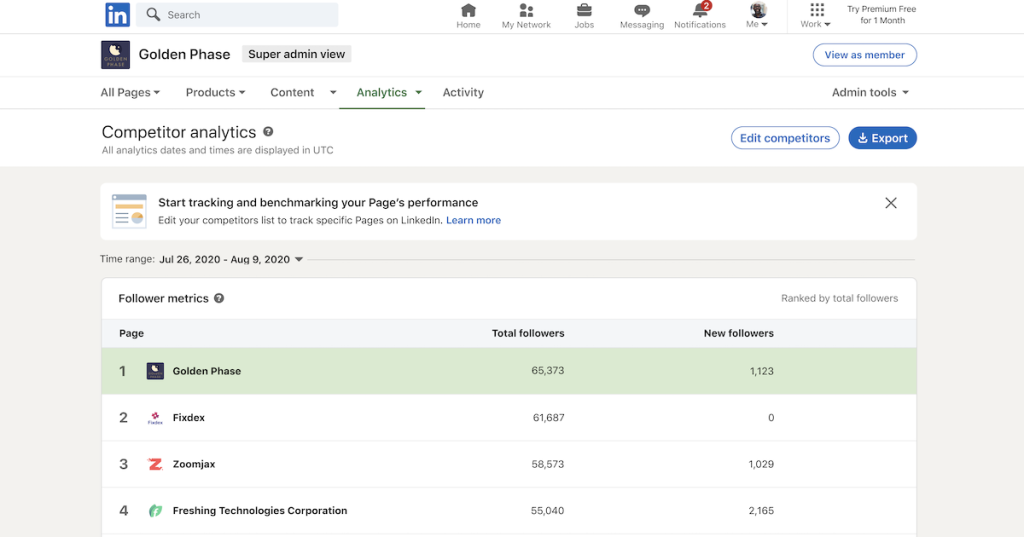
The last big update coming to LinkedIn is an addition to its Analytics tab which allows you to directly compare your page’s performance to up to nine competitors. 

In this new tab, called “Competitor analytics”, you can see how many followers your competitors have right now, along with how their latest content has performed compared to yours.

To find out more about these updates, read the full announcement from LinkedIn here.

Instagram is finally giving almost all accounts a new way to share links with their followers through Stories, after previously limiting the feature to verified or influential accounts.

Before now, the only way for most accounts to share links on Instagram was on their profile page. This made it difficult to use the platform to drive traffic to a website or online store. Often, brands were forced to resort to third-party tools to share links with their content, typically to lackluster results. 

This all made Instagram a tricky prospect for brands considering marketing their products or services on the platform. 

While this is bound to be a step in the right direction, Instagram is yet to allow links to be shared in feed posts – a common feature on most social networks.

Here’s how to start sharing links on your own stories.

Adding Links To Your Instagram Stories

Sharing links in your Instagram stories is still a fairly unique process. Rather than just copy and paste your link into a description, the platform is introducing “Story Stickers”. These function like any other sticker, except you can add a destination link that sends users to the desired page when tapped.

To add Story Stickers with links to your stories, follow these steps:

  1. Record or upload your story content
  2. Select the sticker tool from the bar at the top of the screen
  3. Select the “Link” sticker and add your desired link.
  4. Tap “Done”
  5. Customize and place your sticker.

Who Can’t Use This

Although this makes sharing links possible for a great number more users than before, there are still some restrictions. Specifically, Instagram notes that Story Stickers are not available to “brand new accounts.” 

Presumably, this is intended to prevent spammers from creating fresh accounts to share low-quality or malicious links on the platform, though it is unclear exactly what constitutes a “brand new” account. 

Additionally, the company says that accounts found to repeatedly post hate speech, misinformation, or other content that violates Instagram community guidelines will have access to link stickers revoked. 

If you’d like to find out more about the new linkable Story Stickers, check out Instagram’s announcement here.

When it comes to ranking a website in Google, most people agree that high-quality content is essential. But, what exactly is quality content? 

For a number of reasons, most online marketers agreed that Google defined high-quality content as something very specific: text-based content which clearly and engagingly communicated valuable information to readers.

Recently, though, Google’s John Mueller shot down that assumption during a video chat. 

While he still emphasizes that great content should inform or entertain viewers, Mueller explained that the search engine actually has a much broader view of “content quality” than most thought.

What Google Means When They Say “Quality Content”

In response to a question about whether SEO content creators should prioritize technical improvements to content or expand the scope of content, Mueller took a moment to talk about what content quality means to Google.

“When it comes to the quality of the content, we don’t mean like just the text of your articles. It’s really the quality of your overall website, and that includes everything from the layout to the design.

This is especially notable, as Mueller specifically highlights two factors that many continue to ignore – images and page speed. 

“How you have things presented on your pages? How you integrate images? How you work with speed? All of those factors, they kind of come into play there.”

Ultimately, Mueller’s response emphasizes taking a much more holistic view of your content and focusing on providing an all-around great experience for users on your website. 

There is an unspoken aspect to what Mueller says which should be mentioned. Mueller subtly shows that Google still prefers text-based content rather than videos or audio-only formats. While the company wants to integrate even more types of content, the simple fact is that the search engine still struggles to parse these formats without additional information.

Still, Mueller’s statement broadens the concept of “quality content” from what is often understood. 

“So it’s not the case that we would look at just purely the text of the article and ignore everything else around it and say, oh this is high-quality text. We really want to look at the website overall.”

Instagram Insights is providing businesses on its platform with a wealth of new demographic data about who is engaging with their content – as well as who isn’t engaging.

Before, the platform only gave businesses Insights about the users who were specifically following your page. 

With the latest update to Instagram Insights, this is now expanded to all the users that see your content, even if they don’t follow your page or directly engage with your posts.

Below, we’ll dig into exactly what demographic information is now at your fingertips on Instagram Insights.

New Demographic Insights on Instagram

Your Engaged Audience

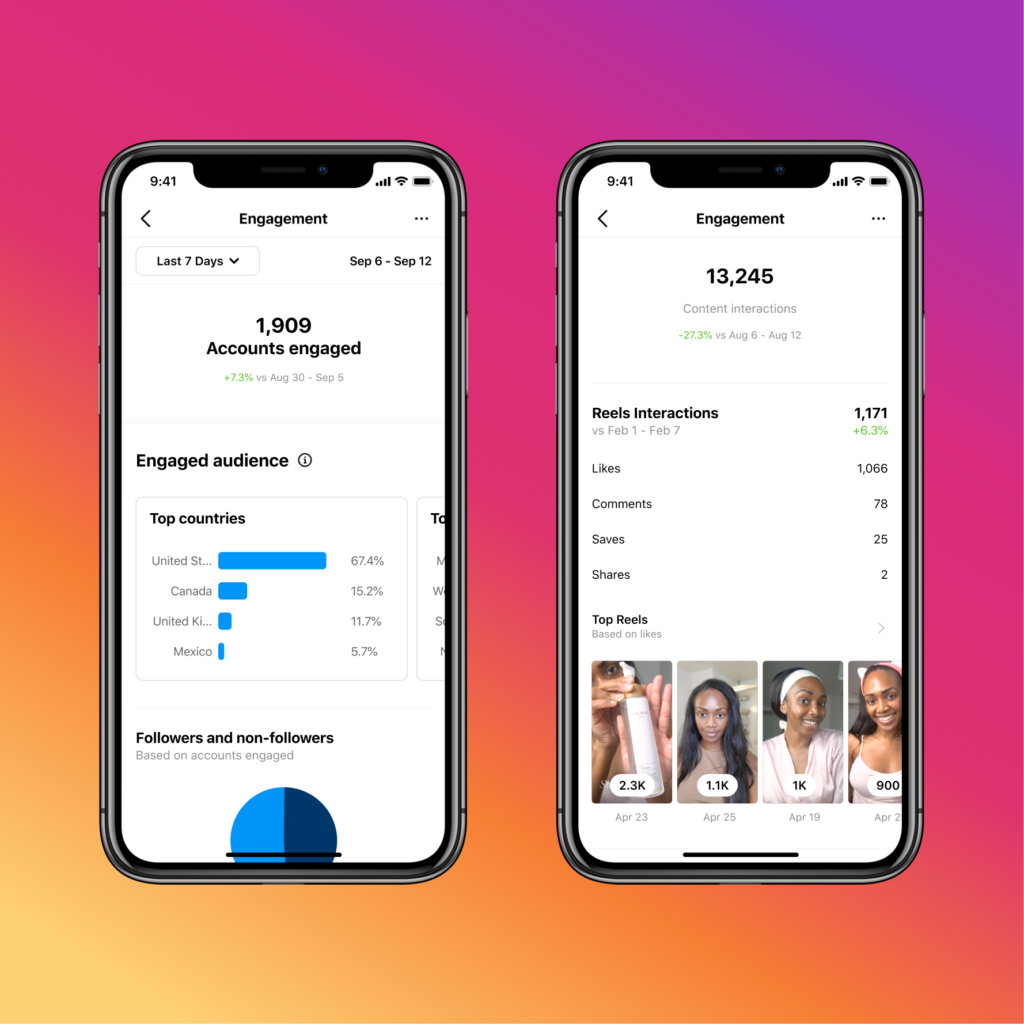
If you want to find out information about the users who are engaging the most with your content, you’ll want to look in the new Accounts Engaged section. 

Here, you’ll find a range of information including:

  • Where your most engaged audience lives
  • What gender are they?
  • How old are your most engaged audience?

Additionally, you can filter the information based on followers or non-followers and see the total number of accounts that have interacted with your posts within a set time range.

Who You’ve Reached

Of course, the number of people engaging with your content or following your page is just a fraction of the total number of users seeing your content. 

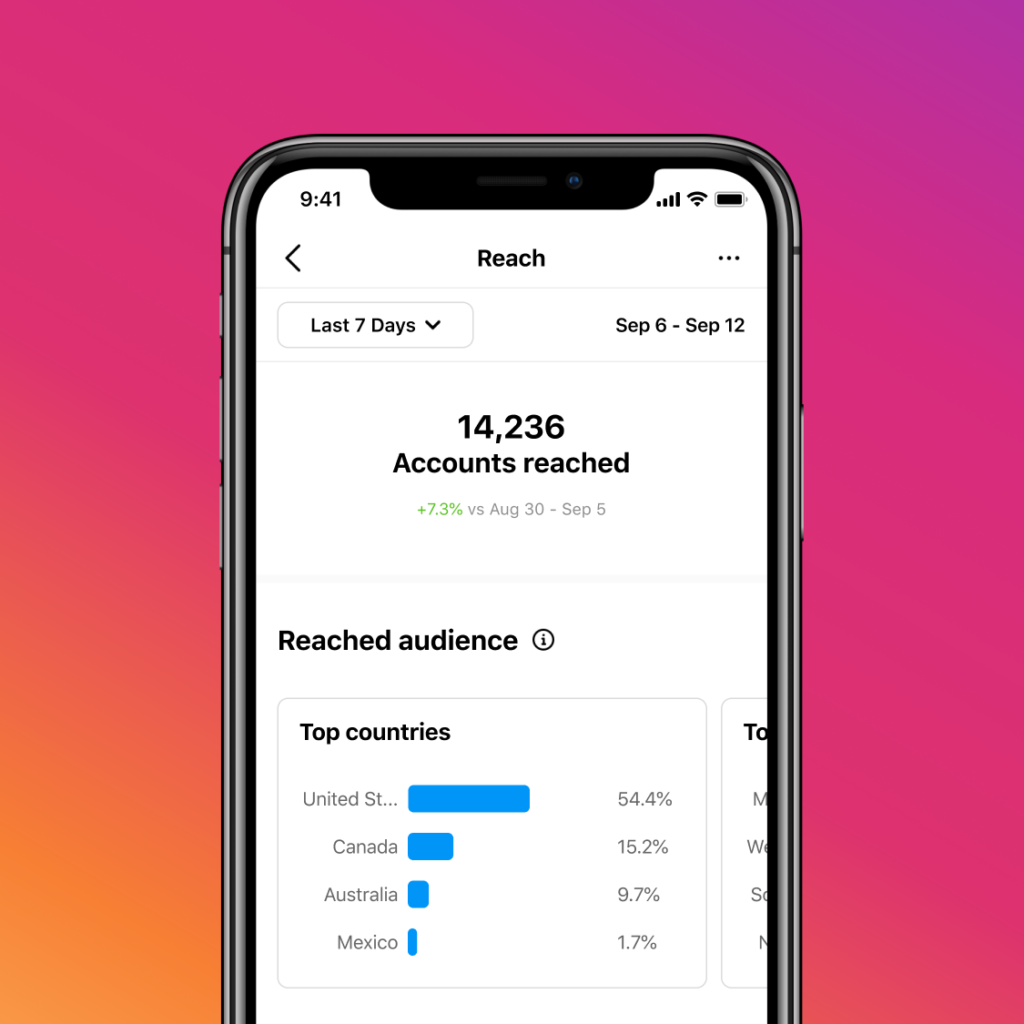
The new Accounts Reached section of Instagram Insights contains details about everyone who has seen your posts, whether they liked, commented, or kept scrolling. 

In this section, you’ll find the total number of accounts you have reached, as well as demographic details similar to those found in the Accounts Engaged section.

Where To Find Instagram Insights

If you’ve never checked out your Instagram Insights before, it is located in the main menu of the Instagram App when logged into a business account. 

From there, you can browse all these details and more – like when your followers are most online.

For more about the new demographic details available in Instagram Insights, check out the announcement here.