facebook-video

In the wake of Facebook’s successful video service, the social media giant is making two big changes for advertisers and users. Facebook announced it will be adjusting its new feed algorithm to reflect interactions with videos, as well as changing how it charges advertisers for video views.

The update will be rolling out over the next coming weeks.

While Facebook has already included likes, comments, and shares on videos, the new algorithm will also consider factors such as whether a video was unmuted or viewed in full screen.

Facebook said it believes the new factors are strong indicators that users specifically chose to see a video, and it will use the factors in ranking videos within users’ news feeds in the future. This also means that those who watch a large number of videos on Facebook will likely start seeing even more in the close future and those who do not tend to engage with videos should see fewer in their feed.

While the first change relates to videos shared organically on Facebook, the social media platform is also making changes that will affect promoted videos.

Starting today, Facebook says it will charge advertisers only if a video is watched for 10 seconds or longer. In the past, Facebook charged advertisers based on video impressions, which meant advertisers were charged the second the video started played.

Advertisers who prefer to be charged based on impressions can do so if they wish, but the new system provides a better guarantee users purposefully watched the ad you were charged for. The new option is like the result of many advertisers’ complaints that they were being charged for video views only because they started autoplaying as users scrolled past them.
 non-clickable-areas-google-display-ads-800x513

Tell me if this has ever happened to you. As you’re browsing a website, your thumb accidentally hits an ad as you try to scroll past it, launching a new page. You close it out, and try to scroll down again only to accidentally tap the ad on the page yet again, leaving you in a loop of trying to close the page and move past it but repeatedly wind up tapping an ill-placed ad that you have no interest in.

Not only is this scenario a bad experience for the user, but it is also a nightmare for advertisers who are wasting money on valueless clicks.

This has been a growing issue for the online advertising industry as mobile browsing increases, but sites have struggled to optimize their sites (and their advertising) for mobile viewers and errant taps. Now, Google is finally making changes to hopefully solve the so-called “fat finger” ad clicks problem.

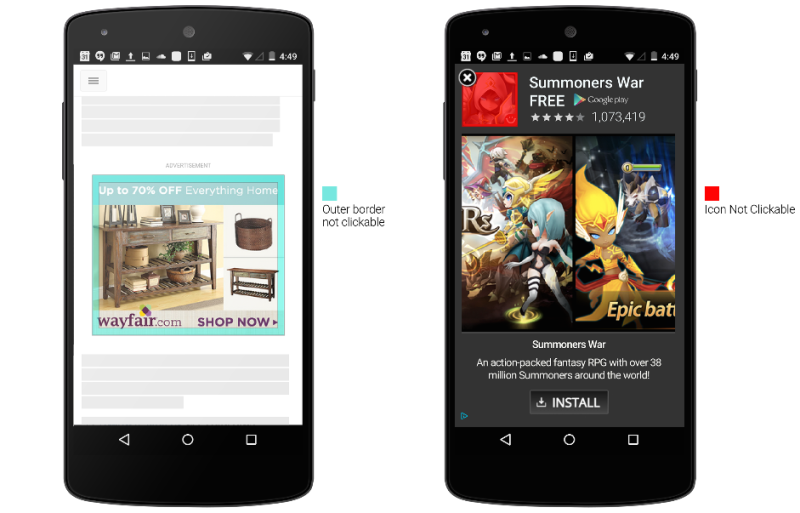
  1. First, taps close to the edge of an image ad won’t be considered clicks. Google says it has identified the border area particularly prone to accidental clicks during scrolling.
  2. Second, for in-app install ads interstitial ads like the one on the right above users won’t be able to click on the app icon because the close button is overlayed on that image. Users will need to click the call-to-action button.
  3. Finally, ads will only become clickable after they’ve been onscreen for “a short period of time”. How long that period actually is isn’t clear, but Google says the delay is to give users “enough time to examine the content of an ad”.

While most of these changes are relatively common sense (why on earth was the app icon ever considered a click?), but they are still welcomed by the advertising community who have been complaining about “fat fingers” since display ads came to mobile.

 Google-My-Business-Logo

As schools close and the temperatures soar across the country, it isn’t unusual for businesses to change their hours for the summer. It is especially common in tourist areas where shops often stay open longer to accommodate the longer days and increased store traffic.

If your business has special summer hours, now is the time to guarantee your business listing on Google shows your adjusted seasonal hours.

Today, Google launched a new initiative at gybo.com/summer to help businesses quickly check how their Google My Business listing is displaying, including whether they are currently open or closed.

Google says a recent survey of small businesses found 25% change their operating hours during summer, but only 1 percent of the businesses also adjusted their hours on Google My Business.

Considering recent studies have shown over half of all consumers use search to look for business hours, and even higher numbers use search to plan local purchases, having the wrong hours listed can be quite a big problem.

If you have special summer hours but haven’t updated your listing yet, be sure to update the listing in Google My Business. Be sure to set a reminder while you are at is so you remember to change the hours back again when fall arrives.

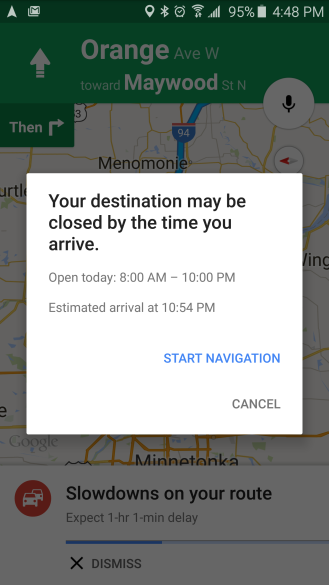
Local business owners have more incentive than ever to make sure their Google listings are correct. As first reported by Android Police, Google Maps has recently added a feature that tells users to turn around and go home if they are using Google Maps to navigate to a specific place if that location will be closed by the time they are expected to arrive.

The warning reads simply, “your destination may be closed by the time you arrive.”

If you keep up with making sure your local listings are always up-to-date and accurate, this shouldn’t be much of a worry to you, however if your business has incorrect hours listed the new feature could wreak havoc on your store traffic.

With the new feature, having the wrong time listed is almost like forgetting to turn the sign from closed to open at the start of the day.

Here is an example of the new warning:

google-maps-closed-place-warning-1434543952

Facebook Beacons

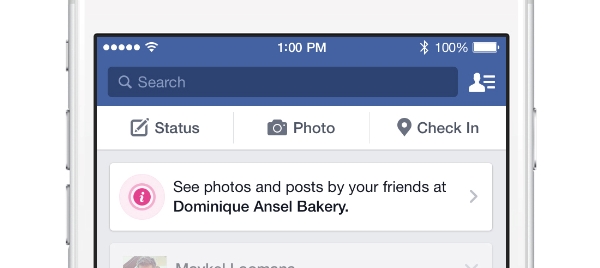
Facebook is expanding its Place Tips program, and that means retailers will finally have access to free beacons that push posts and photos related to their business when someone accesses Facebook in or near that location.

For example, if you are checking your Facebook quickly while you are waiting in line at a participating retailer you will see “more info about places you visit, including your friends’ photos, experiences and moments from that place.” Users will also be prompted to like the business’s Facebook page.

As Engadget reported, users will receive a “tip” notification for the place you are at when you open Facebook on your phone. If you tap it, you’ll be shown a series of cards related to the location. The cards will include current posts and photos from your friends who have also visited the location, as well as basic information about the business.

For now, the cards offer limited value from the perspective of the retailer, especially as advertising is not permitted. However, it gets retailers directly on users streams and is delivered based on an opt-out basis to users. That means there is still quite the potential for the program.

To make the service work, Facebook determines your location using a combination of cellular networks, Wi-Fi, GPS, and Facebook Bluetooth® beacons.

For now the Place Tips program is limited to the Facebook app for the iPhone and location services must be enabled for the tips to appear.

Mike Blumenthal did a great job explaining the importance of the announcement to small and medium businesses:

This marks the first time that beacon technology to interact with customers is being made available at scale to every business. While it might not appeal to a Macy’s that can implement their own beacon hardware and software stack, it now makes the option available for every Mom & Pop to participate with in-store customer interactions.

You can request your free beacon using this form.

Google Mobile

Most reports have made Mobilegeddon out to be a farce with only a small effect on Google’s search results overall. New analysis from digital agency Koozai, however, suggests small and medium businesses (SMB) felt quite an impact when Google rolled out their mobile friendly algorithm.

According to Koozai’s May survey of 2,000 SMB’s with 50 or fewer employees, nearly half (46%) of all respondents reported experiencing changes in ranking. Of that group, 41 percent also saw a drop in rankings by at least three spots. This may not sound like much, but a drop in just one or two rankings can have huge impacts on traffic.

“The hype that the Google mobile update would cause carnage in the search engine rankings missed the larger picture,” says Ben Norman, chief executive (CEO) of Koozai. “Exaggerating the impact meant that businesses didn’t anticipate that even small changes in their ranking can have a big impact on their organic mobile search results.”

Norman says much of the confusion is due to the idea that a single algorithm is the deciding factor when determining ranking. Google uses over 200 different factors to rank pages on search results pages, but some were led to believe the mobile optimization would be the ultimate deciding factor. On the contrary, 27 percent of businesses in Koozai’s survey reported drops in rankings despite having optimized their sites for mobile.

This leads many business owners to feel like they are being punished after acting on Google’s warnings, which Norman says illustrates how frequently SMBs are poorly educated on SEO and fail to understand e-commerce analytics.

“Many consumers today will research on mobile and then purchase on desktop,” he says. “Many SMBs are missing out on these lead-creation opportunities if they don’t know if their e-commerce sites aren’t giving their potential customers a good experience on mobile.”

Of the businesses involved, 37 percent said they were worried the mobile friendly algorithm update would impact their sales while 44 percent said they were not concerned because the majority of their sales come from desktop shopping. Nearly half said they were unsure about the relationship between devices and could not say whether mobile influenced their desktop sales. In addition, 12 percent did not know whether their sites had been optimized for mobile at all.

There were predictions well before the release of the algorithm that small and medium businesses would be the most likely to be impacted by ‘Mobilegeddon’, but many reviews of the algorithm’s effects failed to consider the disparity in their post-Mobilegeddon analysis.

It might not be a surprise to learn that Amazon dominates the search engine results pages, but you might be surprised by just how much they lead all other major brands.

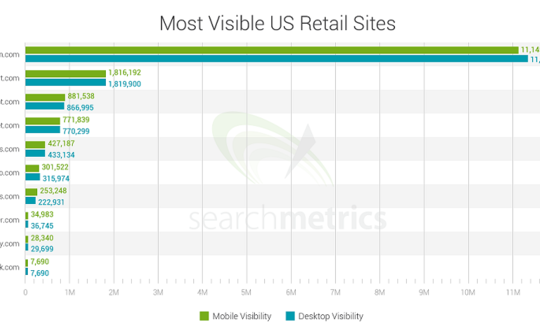
A recent performance study of 10 leading U.S. brands published by SearchMetrics makes it clear that Amazon has by far the most visibility across Google’s search results on both desktop and mobile.

searchmetrics-amazon-walmart-mobile-search-bar-chart-540x334

In the study, SearchMetrics used the top 10 retail sites listed in the National Retail Federation’s list of top 100 retailers and parsed the search results of millions of Google search terms to establish a mobile visibility score along with a desktop visibility score.

To calculate the visibility score, the study evaluated the number of times a brand appears across a keyword set, the brand’s rankings within those search engine results pages, competitiveness of keywords, and the click through rate of those results pages.

Even compared to other major competitors, Amazon is an absolute giant. With the staggering rating of 11,145,359, the online retail company dwarfs Walmart, its closest competitor with a score of 1,816,192.  Following Walmart were The Home Depot with 881,538, and Target.com, with a score of 771,839.

The focus of the study was mobile search, as it is most often the first touch point to purchase. However, the analysis also showed the rankings remain the same on desktop.

 Google-My-Business-Logo

If you run a local business and haven’t logged into Google My Business in a while you may be at risk of having Google unverify your listings, according to a statement from a Google representative today.

In a post on the Google and Your Business Help Forum, Google’s Jade Wang confirmed the news that the company has been contacting some Google My Business users that it considers to be inactive:

In some cases, we may contact Google My Business users via email to confirm that they are still actively managing a business page. If a user is unresponsive to our attempts to contact him or her and has not logged into Google My Business for a significant length of time, then we may unverify pages in the account. We’re doing this in order to continue to provide users with the best experience when they’re looking for local businesses like yours. If you find that a page in your account has been incorrectly unverified, please contact support to get assistance restoring verification.

The news was first brought to light by Brian Barwig of Integrated Digital Marketing, who posted a message today about a phone conversation he had with a Google support rep who told him that this may happen to accounts which are considered inactive for six months.

Mike Blumenthal has also shared the text of the email Google sends out to warn inactive accounts about being potentially unverified.

To help prevent this, Wang included some advice: “It’s a good idea to keep an eye on the inbox associated with your Google My Business (Locations) account. It’s also a good idea to regularly log into Google My Business (Locations) to confirm that your business information is current and accurate.”

yay2

Facebook just added one feature users have been begging for forever. For the longest time, users have been confined to sharing their emotions and experiences through boring old pictures, but finally they are free to express themselves in the true language of the internet. That’s right, Facebook now supports GIFs in the Newsfeed.

Facebook issued the following statement to TechCrunch earlier today:

“We’re rolling out support for animated GIFs in News Feed. This is so you can share more fun, expressive things with your friends on Facebook.”

Until now, Facebook users had to resort to third-party services like Giphy to embed GIFs, but Facebook finally made the step to add GIF support for images from all sites. Sharing a GIF in your Newsfeed is as easy as copy and pasting the URL in your status bar, as you would do with any other link. However, for the moment Facebook still does not allow users to upload GIFs directly.

Here’s an example of how the GIFs will look in your feed:

Facebook-supports-gifs-380x452


The GIFs currently autoplay, similar to how videos function in the Newsfeed.

For the moment, GIF support is limited to strictly people on Facebook, not business pages, but it seems likely that Facebook will be expanding support for the popular animated image format in the near future.