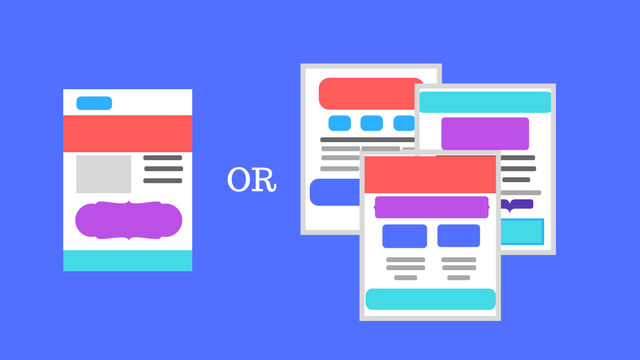
Single-page websites have taken over the internet lately. More and more businesses are choosing to streamline their sites to get straight to the point, and newer brands are opting to avoid paying to create a dozen or more pages. The question is whether single-page websites are actually good for you and your brand.

Admittedly, there are a few clear benefits from single-page websites. They tend to work well on mobile devices and load more quickly than a site with numerous pages. Since more than half of all searches are now coming from mobile sources, these can help you ensure people on smartphones don’t have to wait to check out your stuff.

There are also a variety of free tools that can help set-up a stylish one-page site, while designing a full multi-page site can cost thousands of dollars.

However, it’s not all roses and sunshine when it comes to single-page websites. Here are a few things to consider before you decide to go minimalist with a one-page website for your brand:

Lack of info

The biggest problem with single-page websites is simply cramming everything your potential customers want to know all on one page.

On a multiple-page website, you can publish all sorts of content and valuable information that helps your visitors become informed and excited about your products or services. When you cut all that down to one page, you lose a lot of the details that can be a deciding factor in turning someone from a visitor to a customer.

Even with a great layout that includes separate sections for different topics or types of services, it is nearly impossible to include everything your variety of visitors want to find.

SEO limitations

Since you can’t fit in as many types of content or information, it is also hard to target as many keywords or phrases as you have in the past. Sites with lots of pages of content can cover a huge range of keywords related to your business, helping you rank on diverse search pages that might draw in different parts of your audience.

On that note, it can also be hard to keep your site looking “active” since you are only updating it for new products or when you change your business’s phone number. Rather than keeping people up-to-date, single-page websites are typically planned to be “evergreen” and need minimal updating. That may sound nice, but search engines tend to prefer sites that are regularly adding new information and resources – not stagnant sites that are only updated a few times a year at most.

Cost vs. Effect

One of the most common reasons I hear for going single-page is that it is cheaper. You don’t have to hire a web designer to customize numerous pages with unique layouts and images or have a writer fill all those pages with copy and content.

That can all be tantalizing, but as the saying goes: “you get what you pay for.” If you use a free or cheap template for your single-page website, you risk looking bland and forgettable because others are using that exact same layout.

Even if you hire someone to create a great single-page layout, it becomes hard to make your page effective. Strategized approaches get cut to fit within the limited mold, and your copy becomes broad to cover as much as possible as quickly as you can.

All-in-all, single-pages require a ton of work to be anywhere as effective as a traditional website. You have to fight an uphill battle to optimize your site for search engines and hope your content is so insanely precise that you aren’t missing any details your customers want. So, if you are choosing a one-page site for its low-cost, you should realize it will cost you one-way or the other down the road.

The final verdict

As with any trend, it can be hard to resist the urge to be up-to-date and hip. But, trends are fleeting because they often aren’t fully thought through. There will always be a small number of brands who benefit from going to a single-page site, but most discover it’s not as great or easy as they thought it would be.
Google Accelerated Mobile Pages

Since their launch, Google’s Accelerated Mobile Pages (AMP) has been gradually growing in popularity and functionality. More than 2 billion pages now utilize the stripped-down and sped-up content system, and a new survey shows users are also responding very well to AMP.

A poll conducted by 9to5Google indicates that more than half of all internet users prefer to click on AMP content over regular links to full content hosted on your website.

The question posed by Justin Duino from 9to5Google asked: “Are you more inclined to click on an AMP link than a regular one?

With almost 1500 responses so far, 51% of people say the “Yes, I prefer the stripped down versions of websites when reading something.

The other responses include:

  • No, if I want to read something, I will open the link whether it’s AMP or not – 24%
  • No, I prefer loading the entire website – 13%
  • Yes, but only when my device is using mobile data and I don’t want to load a full website – 9%
  • Other – 2%

Of course, informal online polls are hardly considered incontrovertible proof. The results are open to interpretation and informed by numerous factors. For one, the people who frequent 9to5Google’s site are more likely to be tech-inclined and informed about the latest news and features in search. They also likely view Google in a more positive light than the average person.

Still, there is plenty of evidence that content producers and brands love AMP, but there’s been little effort to actually ask users how they feel about the format. Based on this, they are largely in favor of the stripped-down content that lets them get straight to what they clicked on with as little loading time as possible.

AdWords has launched a new feature allowing advertisers to remarket search ads to anyone who has watched their videos on YouTube, making it easier to funnel potential leads toward converting.

YouTube already lets advertisers remarket YouTube ads to people who have interacted with their channel, but the new change allows you to use the same list of people to show search ads to them as well.

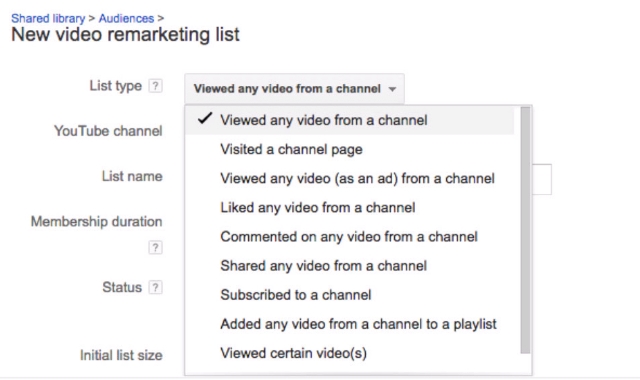
Setting up your search ad retargeting can be done by logging into AdWords and navigating to Shared library > Audiences > New video remarketing list.

From there, you can select which type of interaction you want to use to decide who to retarget to, including anyone who has viewed any video, liked a video, or left a comment.

Thanks to this, you can show ads specifically to people already familiar with your brand and what you offer, letting you re-connect with them any time they search for a relevant keyword for your business or industry.

Google has made it easy for businesses to tell users what accessibility features they provide before they ever visit the store with their latest addition to Google My Business listings.

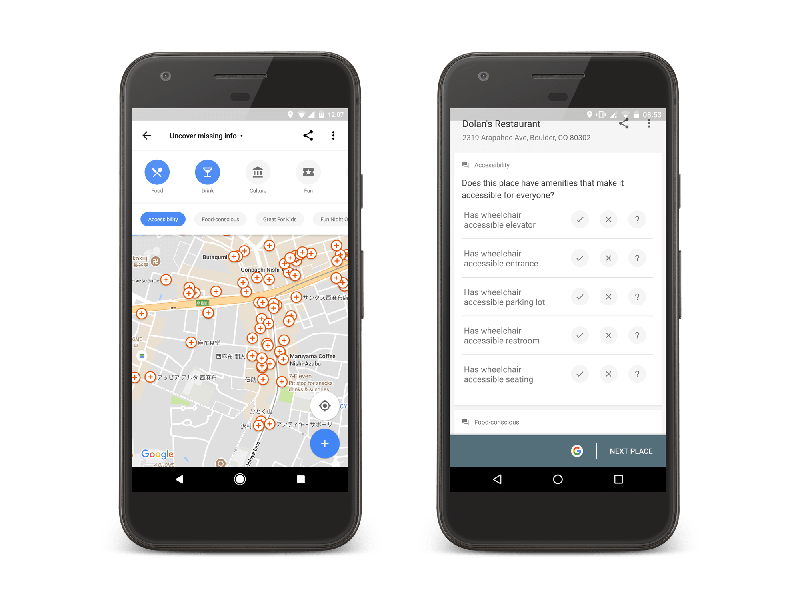
Now, you can add accessibility information about your business or search for places which provide accessibility features like wheelchair ramps and wheelchair-accessible parking.

You can update your listing by simply going to the main menu of Google Maps for Android, pulling up the main menu, and tapping on “Your contributions.” From there, go to “Uncover missing info” and sort by “Accessibility.”

This pulls up locations near you that are missing accessibility information, including your business. Then, you can begin adding accessibility attributes as needed, including:

  • Wheelchair-accessible entrances
  • Wheelchair-accessible elevators
  • Wheelchair-accessible seating, and
  • Wheelchair-accessible parking

The set-up of the new feature allows any users to add accessibility information about any business they visit, but business owners can take the initiative to update their own listings to alert shoppers about what they offer before they make the trip themselves.

Since the release of the new listing information, Google says users have added accessibility information to almost 7 million places worldwide.

Snapchat has quickly become one of the most popular social image sharing platforms around, breaking out of its teen-centric image to reach a wide audience of users. With this growth, the platform has also made extensive changes to make it easier for brands to connect with users.

This week, the company released one such new feature with the launch of “Snapchat Paperclip”. The Paperclip feature lets anyone – including brands – to attach a link to any Snap before it is shared. Until now, the only way you could include a link in a Snap was through paid ads.

The launch of Paperclip puts Snapchat ahead of the other most prominent social image platform, Instagram, which only allows links within the bio section of profiles. The only exception to Instagram’s rules is for users with over 10,000 followers. These popular figures can also include links in Instagram Stories.

The ability to include links in individual Snaps may seem like a small change, but it could be a huge win for brands looking to build an organic following. Instead of paying for ads, you can now rely on high-quality content to get users engaged and interested in your site and products. It also allows you to reach more ad-averse audiences, such as tech-savvy users who tend to block or ignore ads.

The Paperclip feature already available around the world for both iOS and Android users and is easily accessible by tapping the paperclip icon within Snapchat’s toolkit.

Along with the launch of Paperclip, Snapchat has released two other new features more aimed at average users. Voice Filters give users the ability to modify the way their voice sounds even when no using a visual lens. The other feature, Backdrops, lets users swap out the background of images with custom designs or colors.

You can see all three new features in action in this video shared by Josh Constine:

Analytics is an essential way to measure the effectiveness of your ads, but traditionally your results are kept in isolation. The only thing you have to compare against is past results.

Bing is changing that, with a new way to compare the results of your ad campaigns against how your competitors are performing.

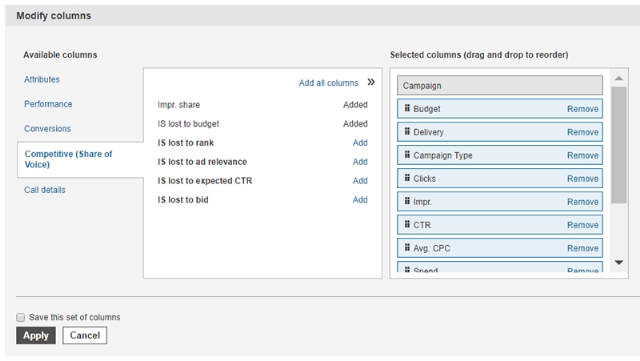
These new competitive metrics, also known as “share of voice” metrics, have been added to Bing’s in-line performance views, with details on your ads and similar campaigns in your industry. You still can’t hand-pick your local competitors and spy on their campaigns, but the new metrics will give you a better view of how you are doing within your market.

To get started, just log into your Bing Ads account and select either Accounts Summary, Campaigns, Ad Groups, or Keywords. Once you’re on any of these pages, click the Columns button. This will allow you to add any metrics from the Competitive (Share of Voice) section. Once you’ve applied your changes, these new metrics will appear in your reports.

Bing says the metrics are compatible with all other reporting features offered by the platform.

The announcement says this latest update is just “one of many” enhancements to Bing analytics the company will be releasing this year, though they are keeping those upcoming updates a secret for now.

Wish you could put personalized messages into search results? Until now, the only way for you to get a specific message out to people finding your business was to send out tweets popular enough to get included or to publish paid search ads.

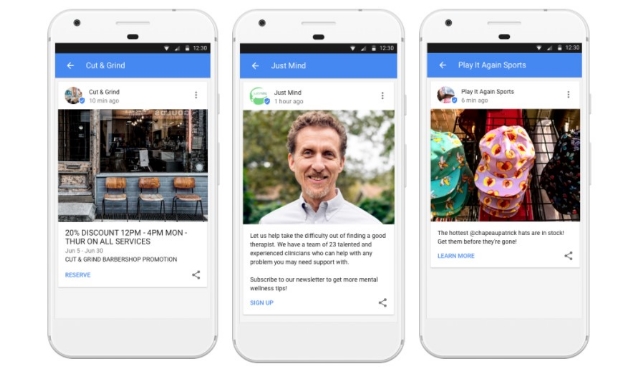
That’s all changing now, though. Google released a new feature this week called Google Posts for all businesses with a Google My Business Listing. With Google Posts, you can finally share your message on search results without the costs of ads or hit-and-miss nature of social media.

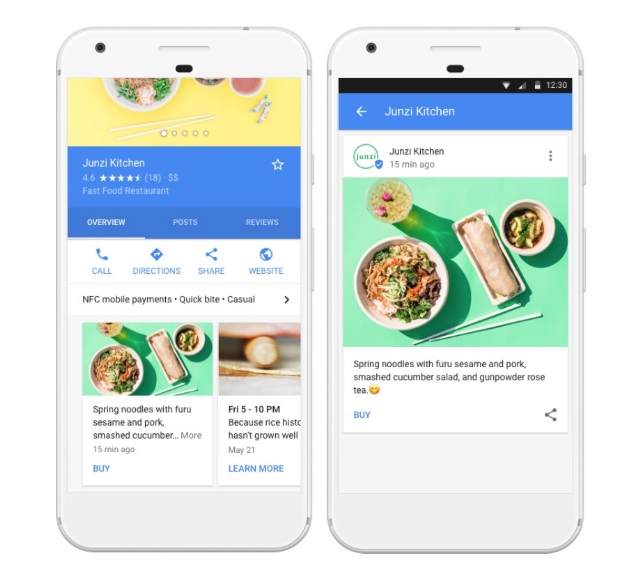
Any time you share a Post, it will appear in search results and Google Maps pages that include your business listing. The message will initially be just a small snippet, but searchers can expand it with a single tap to read more.

There are potentially limitless ways businesses can take advantage of the new feature. Specifically, Google suggests getting started by updating customers with information about new sales, upcoming events, and new product launches to build excitement.

In addition to your customized message, you can also include photos and custom calls-to-action to encourage making a reservation, signing-up for your newsletter, or linking to your latest special offer.

Google Posts are already available to any business with a verified Google My Business account. You can get started sharing your messages and customizing your listings now from any desktop, iOS, or Android device.

Do you have a website for your business? If you’re like 60% of small business owners around the world, the answer is no. Whether it is because you lack the expertise or can’t afford it, Google wants to help.

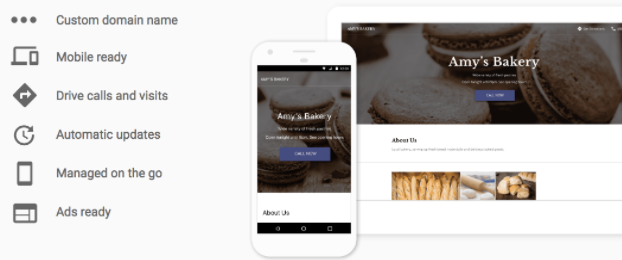
This week, Google officially released a simple one-page website builder designed to make getting your brand online quick, easy, and (most importantly) free.

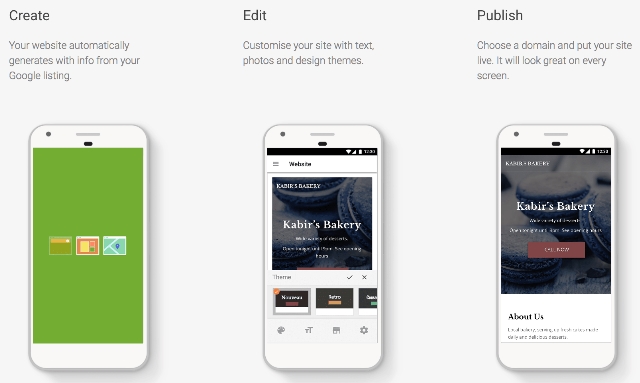
The new feature, called “Website”, allows you to create and edit a basic website for your business in just a few minutes. You can even make your site on a smartphone, as well as from a desktop device or tablet.

Website is being touted as a new part of Google My Business, meaning you will have to sign-up and fill out business information before you can use the tool. However, this also makes the process of making a site easier, since Google automatically uses this information to fill out your website. From there, you can customize it with a selection of themes, pictures, and customizable text.

If you don’t already have a GMB listing for your business, Google will automatically ask if you’d like to create a site when you sign-up. Those with existing listings on GMB can click the “Manage location” tab and select Website from the menu to get started. You can also skip right to making your website by clicking here.

The process is extremely simplified. Google will walk you through the steps and you can spend as much or as little time as you want tweaking your page before publishing it onto the web. You don’t even have to worry about hosting.

Any sites made with Website will have a URL following the structure “yourcompanyname.business.site” by default, but you can also purchase a custom domain through Google My Business within the Settings menu.

Once your website is online, any changes you make to your GMB listing will automatically be applied to your website as well.

Of course, the tool is designed to be used for very basic websites and lacks many of the features you would expect from a more comprehensive website management system. You won’t be able to create additional pages to highlight specific products or services, let alone operate a blog or robust sales page. On the upside, having a simple website for free is still better than nothing at all.

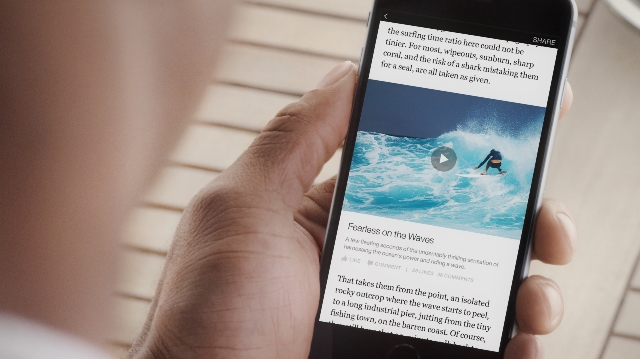
Facebook’s Instant Articles are touted as being the fastest way to deliver content on the web. They are even supposed to be faster than Google’s Accelerated Mobile Pages, which similarly streamline content to load as quickly as possible on mobile devices.

There’s just one problem: no one seems to be using them.

Even big publishers that initially led the charge to Instant Articles have slowly started dropping the service, opting instead to use regular content hosted on their website or relying solely on Google’s AMP platform.

This week, Facebook made strides to attract publishers back to Instant Articles by announcing new ways to implement ads and monetize content shared on their fast-loading pages.

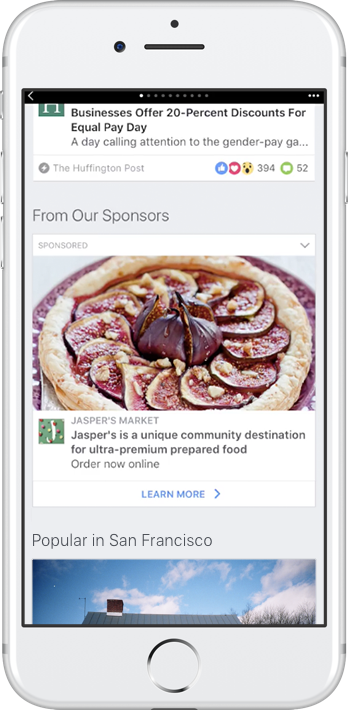
The ads are designed to be minimally invasive, only appearing within the “Related Articles” section appearing below the full articles. The company has been testing these ads since March of this year, and say they provide an “incremental increase” in the amount of revenue generated by Instant Articles, according to a blog post shared on Thursday.

As you can see in the image above, the ads look similar to most advertisements across Facebook. They put the focus on a large image, with a small bit of descriptive text and a link. For now, videos aren’t allowed but that could potentially change in the future.

The main difference between these ads and standard Facebook News Feed ads is they now appear at the bottom of the page among links to other articles, instead of in your feed.

There is one catch, however. To include the new ads in the “Related Articles” section of Instant Articles, you must also be a part of Facebook’s Audience Network.

Interestingly, Facebook says the ads can be used for virtually anything – not just branded content. The only requirement is that the ads link directly to a landing page.

While the ads may bring publishers back to using Instant Articles, the advertisers themselves may be less happy about the new ad placement. Advertisers who opt-in to placing their ads in Instant Articles can’t control whether they are prominently placed above the ad or within the “Related Articles” section at the bottom. The good news is, they can choose to block specific publishers or types of content from including their ads. That means you can at least be sure your ads aren’t appearing alongside questionable or objectionable content that could hurt your image.

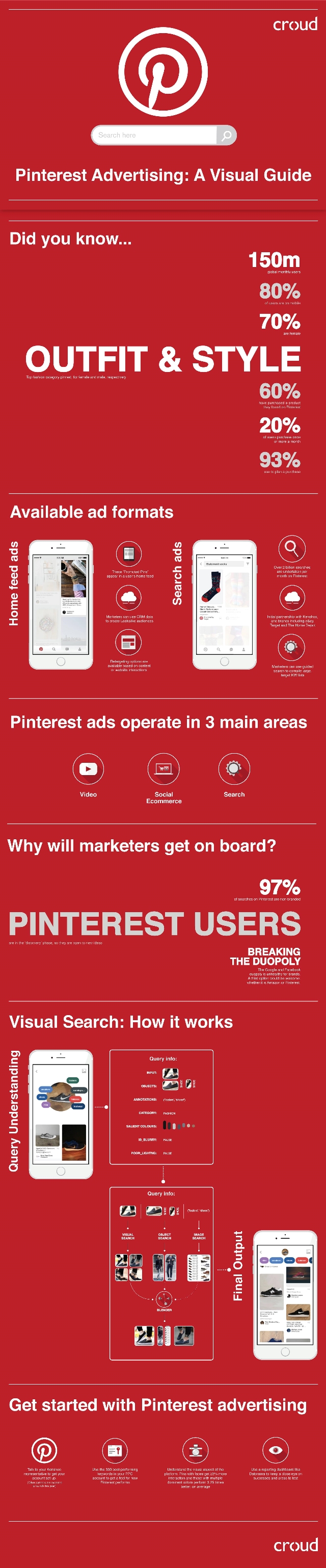
Pinterest has become one of the most reliable social media sites for retailers and brands hoping to gain a following, so it should be no surprise it is also developing one of the most extensive advertising platforms.

Over the past year, the social network has expanded its ad platform in several ways, including partnering with Kenshoo and improving their visual search functions. Still, many have been hesitant about investing heavily in an ad service that isn’t run by Facebook or Google.

There are perhaps several reasons Pinterest’s ad service has seen relatively slow adoption by most online brands, but the biggest is probably the most simple: it’s different. Instead of following the established systems of the other big online ad platforms, Pinterest has strived to maintain the visual nature and originality that have been central to its entire service.

While this may make their ads less obnoxious and more cohesive with Pinterest’s normal content, it also creates a hurdle for advertisers who don’t understand exactly what is being offered or how the ad service works.

To help make everything clear, Croud put together a suitably visual guide explaining Pinterest’s platform, why marketers are using the platform, and what options are open to marketers of every level – from Fortune 500 to “mom and pop”. Find out what the deal is with Pinterest ads below or click the image to view the full-size version: