In mid-2018, Google’s web browser Chrome made a small tweak to help users know how safe a specific site was. Specifically, it added a tag in the search bar flagging any site that had not updated to HTTPS as “not secure”.

Now, with the help of a new survey from the agency John Cabot, we are finally getting insight into how this little notification affects people’s perception of sites.

Based on a survey of 1,324 people in the UK, the survey finds that nearly half of all people respond negatively to sites which are flagged as “not secure” and many are less willing to give personal information to these sites.

According to the findings, 47% of respondents said they “knew roughly what the warning meant.” Similarly, 46% said they would not give their names or financial information to a site flagged as “non-secure”. Even more, 64% of that group say they would immediately leave non-secure sites.

The survey also found a few other fears and concerns when users come upon a non-secure site:

  • Their device was exposed to a virus — 14%
  • They had arrived on a fake version of the intended site — 12%
  • The content was “unreliable and not fact-checked” — 9%
  • Being signed up for spam email — 8.4%

Notably, the survey found that a brand’s existing perception appears to play a role in determining how people respond to a non-secure site. For example, retailer John Lewis experienced significantly less negative reactions to their site, despite being tagged as non-secure. This suggests widespread name recognition could potentially counter the warning.

Still, the findings of the survey show that a huge number of users are taking note any time they find a business website which has not implemented HTTPS encryption and many are even changing their behaviors based on this warning. If you haven’t updated your business site, these results suggest you could be losing up to 50% of your potential customers to something that is easy and affordable to implement.
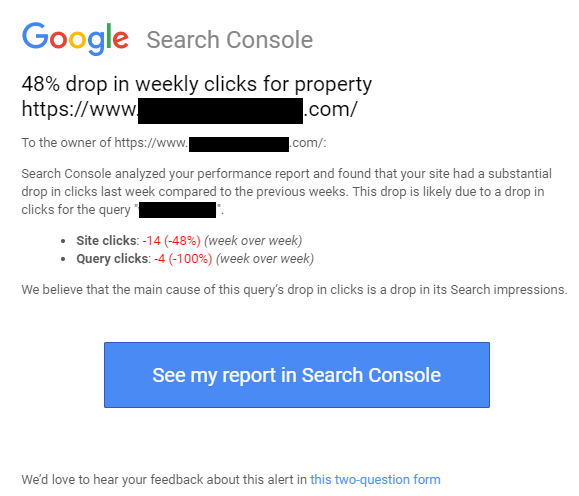
Unless you are regularly keeping an eye on your site’s analytics, you might never know when you suddenly lose a ton of traffic or clicks. That is somewhat changing, however, as webmasters can now be notified to sudden drops in clicks through Google’s Search Console.

Search Console is now sending alerts to webmasters when it detects a “substantial drop” in clicks compared to your past week’s data.

Google is doing this by reviewing your week-over-week data in the Performance report for your site. If this week’s data is drastically different, it will send a notification to verified property owners in Search Console to alert them of the problem.

The new notification was first noticed by Vance Moore III who shared a screenshot of the notification on Twitter:

It is unclear exactly how large of a drop it takes to trigger the notification. In the case above, Moore experienced nearly a 50% drop in clicks.

Of course, the tool has some obvious limits. The first is that it only compares week-to-week data. That means slower downward trends will likely not trigger a notification. Additionally, the notification appears to only be triggered by clicks but does not account for traffic or bounce-rates.

The best course of action will always be to regularly check your analytics data to properly assess your site’s performance. There, you will find everything from your click performance, to conversions, traffic, and even demographic info about your visitors.

Still, it always helps to have an extra alert in place for when sudden changes happen to your site. That way you can respond to any new issues and quickly remedy any issues that could have led to your drop in clicks.

Google My Business has released a new way for business owners to respond to online reviews, giving increased flexibility to when and where you can reply after a review.

Now, you can reply to your business reviews from your listing in Google Maps from any desktop device.

In the past, replying to reviews was only possible from the GMB app or website.

Of course, you will still have to verify your listing before you may be able to respond to reviews. Still, the release of the new way to respond to reviews makes it easier than ever for business owners to reply to reviews as soon as they see them.

Along with the new way to respond to reviews, Google has also updated its help document on the subject by adding tips specifically for responding to negative reviews.

How Google Says to Respond to Negative Reviews

First and foremost, Google encourages business owners to remember that negative reviews are not always reflective of a bad business. For instance, some customers may have mismatched expectations. In this case, replying to the review can help other customers set their expectations appropriately and provide more customer satisfaction in the future.

Additionally, Google says to follow these tips when leaving a negative review:

  • Do not share personal data or attack the reviewer personally. Instead, suggest that they contact you directly.
  • Investigate the reasons behind the reviewer’s negative impression of the business.
  • Be honest about mistakes that were made, but do not take responsibility for things that weren’t your fault.
  • Apologize when appropriate. It’s best to say something that demonstrates compassion and empathy.
  • Show that you’re a real person by signing off with your name or initials.
  • Never lash out. Never get personal. Always be polite and professional, just as you would be face-to-face.
  • Respond in a timely manner to show that you pay attention to your customer’s experience.

It is important to keep in mind that negative reviews will not automatically hurt your business. How you respond can be just as important in shaping the public perception of your brand.

A lot of people have come to think of search engine optimization and content marketing as separate strategies these days, but Google’s John Mueller wants to remind webmasters that both are intrinsically linked. Without great content, even the most well-optimized sites won’t rank as high as they should.

The discussion was brought up during a recent Google Webmaster Central hangout where one site owner asked about improving rankings for his site.

Specifically, he explained that there were no technical issues that he could find using Google’s tools and wasn’t sure what else he could do to improve performance.

Here’s the question that was asked:

“There are zero issues on our website according to Search Console. We’re providing fast performance in mobile and great UX. I’m not sure what to do to improve rankings.”

Mueller responded by explaining that it is important to not forget about the other half of the equation. Just focusing on the technical details won’t always lead to high rankings because the content on the site still needs to be relevant and engaging for users.

The best way to approach the issue, in Mueller’s opinion, is to ask what issues users might be having with your products or services and what questions they might ask. Then, use content to provide clear and easily available answers to these questions.

In addition to these issues, Mueller noted that some industries have much stronger competition for rankings than others. If you are in one of these niches, you may still struggle to rank as well as you’d like against competition which has been maintaining an informative and well-designed site for longer.

You can read or watch Mueller’s answer in full below, starting at 32:29 in the video:

“This is always kind of a tricky situation where you’re working on your website for a while, then sometimes you focus on a lot of the technical details and forget about the bigger picture.

So what I would recommend doing here is taking your website and the queries that you’re looking [to rank] for, and going to one of the webmaster forums.

It could be our webmaster forum, there are lots of other webmaster forums out there where webmasters and SEOs hang out. And sometimes they’ll be able to look at your website and quickly pull out a bunch of issues. Things that you could be focusing on as well.

Sometimes that’s not so easy, but I think having more people look at your website and give you advice, and being open to that advice, I think that’s an important aspect here.

Another thing to keep in mind is that just because something is technically correct doesn’t mean that it’s relevant to users in the search results. That doesn’t mean that it will rank high.

So if you clean up your website, and you fix all of the issues, for example, if your website contains lots of terrible content then it still won’t rank that high.

So you need to, on the one hand, understand which of these technical issues are actually critical for your website to have fixed.

And, on the other hand, you really need to focus on the user aspect as well to find what are issues that users are having, and how can my website help solve those issues. Or help answer those questions.”


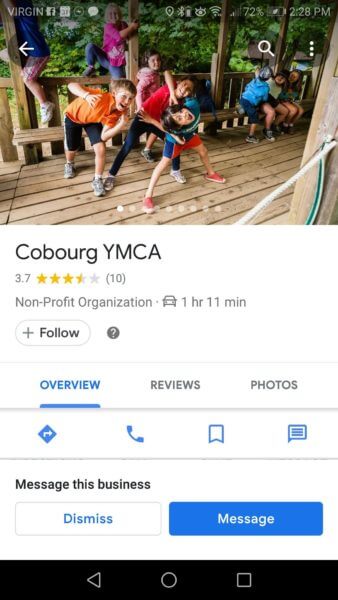
Google has allowed users to message businesses through their Google My Business listings since July of last year, but you’d be forgiven for not noticing. The prompt is typically just a small button that can be easily overlooked among all the information filling up a GMB listing.

Now, however, it appears the search engine is testing a more prominent button option within local listings.

Search Engine Land columnist Joy Hawkins shared a screenshot on Twitter of the new button, which is hard to miss when you open up a listing’s profile.

For comparison, here is what the interface normally looks like.

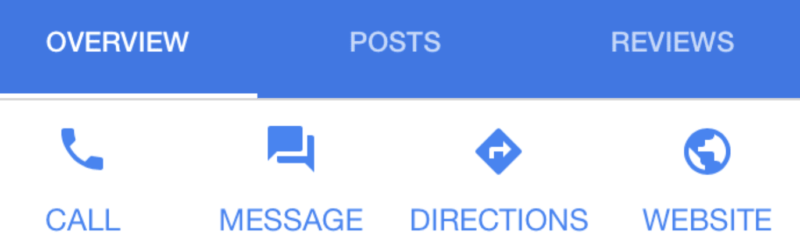
You’ll notice the small “message” icon next to the call, directions, and website icons.

While it is just a small tweak that might not ever make it out of the testing phase, it indicates that Google may be looking into new ways to promote the use of Google’s messaging tools.

Currently, the brands utilizing Google’s messaging features are in the minority. But, with the increasing popularity of using Facebook messenger for business pages, it is possible that brands could begin to make better use of Google’s online messaging and text messaging features.

This month, Google announced that more than half of all web pages in its search results around the globe are being pulled from its mobile-first index.

That means that the majority of pages being shown in Google’s search results were crawled, indexed, and ranked based on the mobile version of that page. As such, it marks a huge turning point for the increasing mobile-emphasis in web design and optimization.

What exactly is mobile-first indexing?

Over the past two years, Google has established a second, distinct index which prioritizes mobile pages and search results. This came as more than half of all search results were originating from mobile devices, rather than desktop computers.

Gradually, Google has expanded this index with the intent of eventually making it the primary search index.

With the launch of this index, Google also changed how it approached website indexing. Rather than defaulting to the desktop version of a page to assess its optimization and search value, the search engine began indexing mobile pages over their desktop counterpart. Thus, Google began its process of “mobile-first indexing.”

Is your site in Google’s mobile index?

If your site has been added to Google’s mobile-first index, you will likely have been notified within Google Search Console. Simply check your messages to see if your site has been migrated over.

If your site has not been migrated over, there is a chance that Google is having issues viewing the mobile version of your site, has found significant discrepancies between the mobile and desktop versions of your site, or has decided your mobile version is not up to snuff.

You should probably take the time to review the mobile version of your site to ensure it is properly optimized and laid out for Google’s search crawlers. You should also ensure that both versions of your site are largely similar, as Google prefers websites with parity across devices.

Google+ is being shut down four months earlier than initially announced after a second data breach, according to a new announcement by Google. Additionally, all Google+ APIs will be shut down within the next 90 days.

Originally, Google announced it would be shutting down the service in August 2019. The decision came shortly after it was discovered the platform had experienced a data breach affecting 500,000 users.

In November, it was revealed a significantly more serious data breach had occurred, affecting more than 52 million users.

Now, Google+ is scheduled to be shut down in April 2019.

While the data breaches appear to have affected a relatively large number of users, the company says there is no need for concern because there is no evidence of misuse by third-parties.

“No third party compromised our systems, and we have no evidence that the developers who inadvertently had this access for six days were aware of it or misused it in any way.”

Even if third-parties did gain access to the information made public, the company says breached data only included profile information which had been set to not-public. No financial or highly sensitive information was breached.

According to Google, the bug in the API which led to the data breach would not have given anyone access to data which could be used for fraud or identity theft.

“The bug did not give developers access to information such as financial data, national identification numbers, passwords, or similar data typically used for fraud or identity theft.”

YouTube is changing how it previews videos on its home tab by making all videos silently autoplay by default.

The new “Autoplay on Home,” as it is being called, is expected to roll out to all mobile users on iOS and Android devices within the coming weeks.

If you are a subscriber to YouTube Premium, you may already be familiar with the feature. YouTube has given its premium subscribers access to the feature for the past six months.

As the company explains in the announcement, the change was made based on user feedback. Many have been clamoring for a way to better preview videos before clicking, especially as many thumbnail images may be misleading.

“Previewing videos helps you make more informed decisions about whether you want to watch a video, leading to longer engagement with videos you choose to watch!”

While the videos will have the audio turned off by default, captions will be shown when they are available. If you have created any of the more than 2 billion videos on YouTube without captions, this will add even more motivation to create transcripts for your videos.

Thumbnail images will still be shown for a short time when users are scrolling through their feed, meaning thumbnails will still be a powerful way to grab attention or entice users to watch videos. However, the autoplay feature will prevent uploaders from sharing videos with misleading or false preview thumbnails.

If you are worried about your data usage or simply don’t like autoplay videos, Google is giving you a few options. Within the settings menu, you can turn off autoplaying videos or set autoplay to only activate when you are connected to WiFi.

While Google is never going to reveal their “secret recipe” that is used to rank the billions and billions of web pages around, the company still wants to help you ensure your site is performing as well as possible.

To help with this, Google has launched a new tool designed to evaluate your website and rate how it follows the company’s SEO best practices and guidelines.

The tool is currently in open beta, but is available to all webmasters at web.dev.

According to the search engine, the tool is the end result of more than 10 years of learning and iteration.

“As the bar for high-quality experience continues to rise, users are quickly disappointed in a web experience that doesn’t deliver. And then they’re gone.

“We believe, however, the web now has the capabilities to overcome that challenge—to give all users the best possible experience wherever they are.”

The most useful part of the tool for most webmasters will be its SEO assessment, but it also includes audits for performance, accessibility, and more.

Specifically, web.dev can evaluate a website’s:

  • Performance: Audits for metrics like first paint and time to interactive to determine lag.
  • PWA: Assesses your page against the baseline Progressive Web App Checklist.
  • Best Practices: Looks for everything from HTTPS usage to correct image aspect ratios.
  • SEO: Checks for best practices to ensure your site is discoverable.
  • Accessibility: Checks for common issues that may prevent users from accessing your content.

All you have to do to evaluate your own site is enter the URL.

Along with some simple images rating your site’s performance, you will also be given a list of recommended improvements you can make, listed in order of how important they are. The recommendations at the top of the list will have the biggest impact on your site, while those at the bottom as more minute changes that will have little effect on your ranking – though they may improve your site’s overall performance.

Web.dev also provides detailed downloadable reports which can be printed or digitally shared with site owners, providing an easy-to-understand breakdown of your site’s performance on Google.

The tool generates an up-to-date report on a daily basis, so you can also quickly see how any changes you make affect your site’s performance.

Google My Business is now letting businesses specify their service area. This is particularly big news for companies that service a wide area or tend to work in an area aside from their physical location.

In the past, the search engine automatically specified a listing’s service area based on their physical location. That could be a major problem if your business was located out of your house or a building in a suburb but largely provided service in the nearby city (or vice-versa).

Starting this week, Google My Business is finally giving listings more control over their service location, with a new separate field. Now, your physical address and service area are entirely separate fields.

This also allows businesses who don’t provide services at their physical location to leave that information blank and just input their service area.

However, Google has created a small restriction on these settings. Businesses can no longer edit the radius of their service areas. In the past, the service area would be a controllable radius. Most businesses opted for a radius of 25 miles from their physical address. This is largely unnecessary now, as you can specify exactly what your service areas are.

If you have previously set a distance around your business as a service area, that setting will continue to stay in effect for now, but you won’t be able to change it in the future. It is likely this data will disappear once the majority of listings have updated their service area information.

Rather than using radius information, the new settings allow you to specify your service area at the region, city, or ZIP level.

To update your own service area information in your Google My Business listing, just follow these steps:

  • Sign in to Google My Business.
  • Select “Info” from the menu.
  • Select “Edit” from within the service area section.
  • Enter your business’s service area information based on region, city, or ZIP code.
  • Click “Apply”.