Google announced this week it is bringing ad extensions – similar to those that appear in search ads – to YouTube ads.

The new extensions expand the capabilities of traditional ads by offering unique call-to-actions or additional information for users.

Specifically, the new YouTube ad extensions allow advertisers to include directions to brick-and-mortar store locations, show lead generation forms, or use a number of CTAs that better fit your niche.

Currently, the extensions are only available for TrueView in-stream or non-skippable video ads, though the company says it will be expanding the feature to 6-second bumper ads later this year.

Google is already exploring ways to bring more ad extensions for YouTube’s TrueView ads, and will continue to do so in the future.

For example, the company is already beta testing sitelink ad extensions which would add a series of relevant links underneath a video ad.

In the announcement, Google says the new features are aimed at driving more clicks and conversions. In a beta test with 30 advertisers, extensions like sitelinks increased conversions by more than 20% and doubled the number of clicks.

Google says it will be rolling out a new ad extension aimed specifically at driving leads for your business in the coming weeks.

The ads look similar to typical search ads with a unique call-to-action. If a user clicks on that CTA, they are taken to a form which can be quickly pre-filled with contact information from their Google account or manually entered.

In the announcement, Google says lead form ad extensions can:

“Capture interest when potential customers are searching for your company, products, or services on Google. A fast, mobile-optimized experience makes form submission easy and eliminates the extra step of navigating to your mobile site lead form.”

Based on their own testing, Google says one advertiser improved their closing rate for sales leads by 20% by using lead form extensions.

While the feature is currently limited to beta testers, it will become available to all Google Ads advertisers in the next few weeks. However, the ad extensions will not be available for advertisers in a few select areas.

Lead form extensions will not be eligible for ads relating to:

  • Adult-oriented content
  • Alcohol-related content
  • Gambling-related content
  • Healthcare and medicines
  • Political content

For more information about lead ad extensions, check out Google’s new help center document here.

Google has announced that it will begin blocking web pages with mixed content in its Chrome web browser starting December of this year. Considering that Chrome is used by more than half of all internet users, this could be a major issue that you may not even know is lurking on your site.

What is Mixed Content?

Mixed content refers to when secure webpages using the HTTPS security protocol include scripts, styles, images, or other content that is delivered through the less secure HTTP protocol.

Even linking to sites still using HTTP can be seen as delivering mixed content on your site.

As Google explains:

“Mixed content degrades the security and user experience of your HTTPS site …Using these resources, an attacker can often take complete control over the page, not just the compromised resource.”

How Google Chrome Will Handle Mixed Content

When the next update for Chrome is released in December, Google will begin doing one of two things when it encounters sites with mixed content:

  1. If an HTTPS version of that resource exists, Google will automatically upgrade that content to the newer secure version.
  2. When no such resource exists, Google will soft block the page. This will include a warning about the security risks of mixed content and an option to access the page despite the risk.

The warning screen may not deter all of your potential customers, but it can disrupt a significant chunk of your traffic, leads, and sales.

Beginning in January of 2020, Google will start taking an even stronger stance by removing the unblock option and completely blocking webpages with insecure content.

How To Check Your Site for Mixed Content

Depending on the size of your site and what platform it is built on, there are a number of free and paid options for scanning your site for mixed content.

JitBit SSL Checker

JitBit SSL Checker is a free online tool that can review up to 400 pages of your site for mixed content.

WordPress Tools

If your site is built on WordPress, you can use the Really Simple SSL Plugin to migrate your content to SSL while also checking for and fixing mixed content.

For those who have already migrated their site to SSL, there is also the SSL Insecure Content Fixer WordPress Plugin. This can scan your site for insecure resources while providing suggestions for fixing these problems.

Tools for Large Sites

Websites with a large number of pages will likely have to use paid tools to check their site. One option is Screaming Frog, which can crawl massive sites and provide insights to a wide variety of issues. One drawback, however, is that while it can pinpoint potential problems on your site, it can not directly assist you in fixing them.

Are you an SEO beginner or a business owner trying to get a grasp on the basics of online optimization? Google is launching an animated YouTube video series called “Search for Beginners” aimed at you, with the goal of explaining the concepts and techniques behind beginner-level SEO.

Google described the series, saying it is:

“… a new fully animated series for anyone who is interested in learning the basics of creating an online presence and the right Google Search tools to help customers find their website.”

The “Search for Beginners” videos will be released every two weeks and cover a wide range of topics including:

  • How Google Search works
  • Frequently asked questions about search and discoverability
  • How to change what’s showing up in snippets in Google Search
  • How to correct inaccurate information about a business
  • How to set goals for a website
  • Tips for hiring a web developer
  • Tips for hiring an SEO specialist
  • Top 5 things to consider for a website

Best of all, the videos are designed to be able to stand on their own, meaning you can check in on particular topics of interest or watch every installment.

You can watch the first episode above or subscribe to the Google Webmasters channel to be notified as each new episode is released.

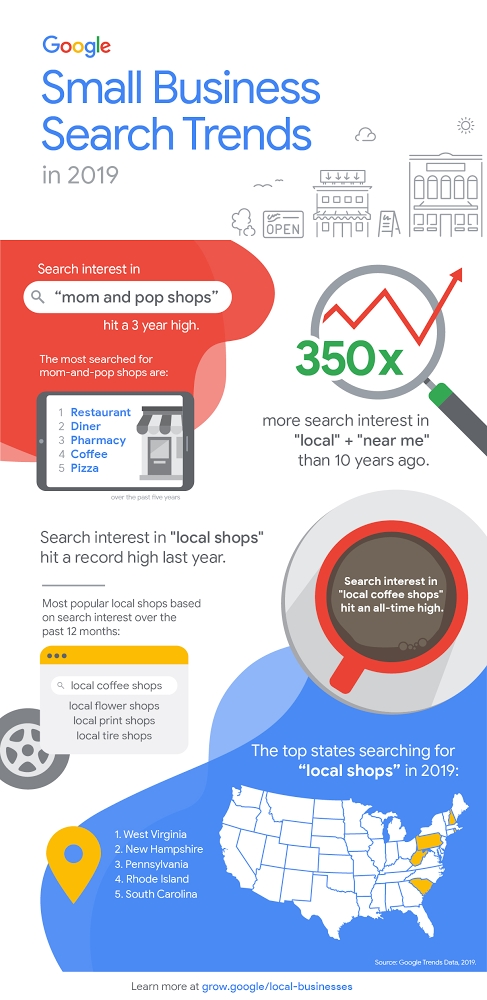
Google has released a new report showing how people are using the search engine to find small businesses around them every day. 

Overall, the report shows that local search continues to grow with “tremendous” speed. Specifically, searches with “local” + “near me” have gotten more than 350 times more search interest compared to a decade ago. 

On a more recent scale, the search engine says that search interest in “mom and pop shops” has climbed to a three year high, with especially high interest in restaurants, coffee shops, diners, pharmacies, and pizza places. 

Google also notes that search interest in “local shops” hit a record high last year. 

To make the findings easy to take in, Google created a nice infographic breaking down all the most important findings. Check it out below, or in Google’s blog post “Small Business Search Trends” here.

Google is kicking off October – which just so happens to be Cybersecurity Awareness Month – by announcing three new ways for users to hide or delete their personal activity data when using Google products like Maps, YouTube, and Google Assistant. 

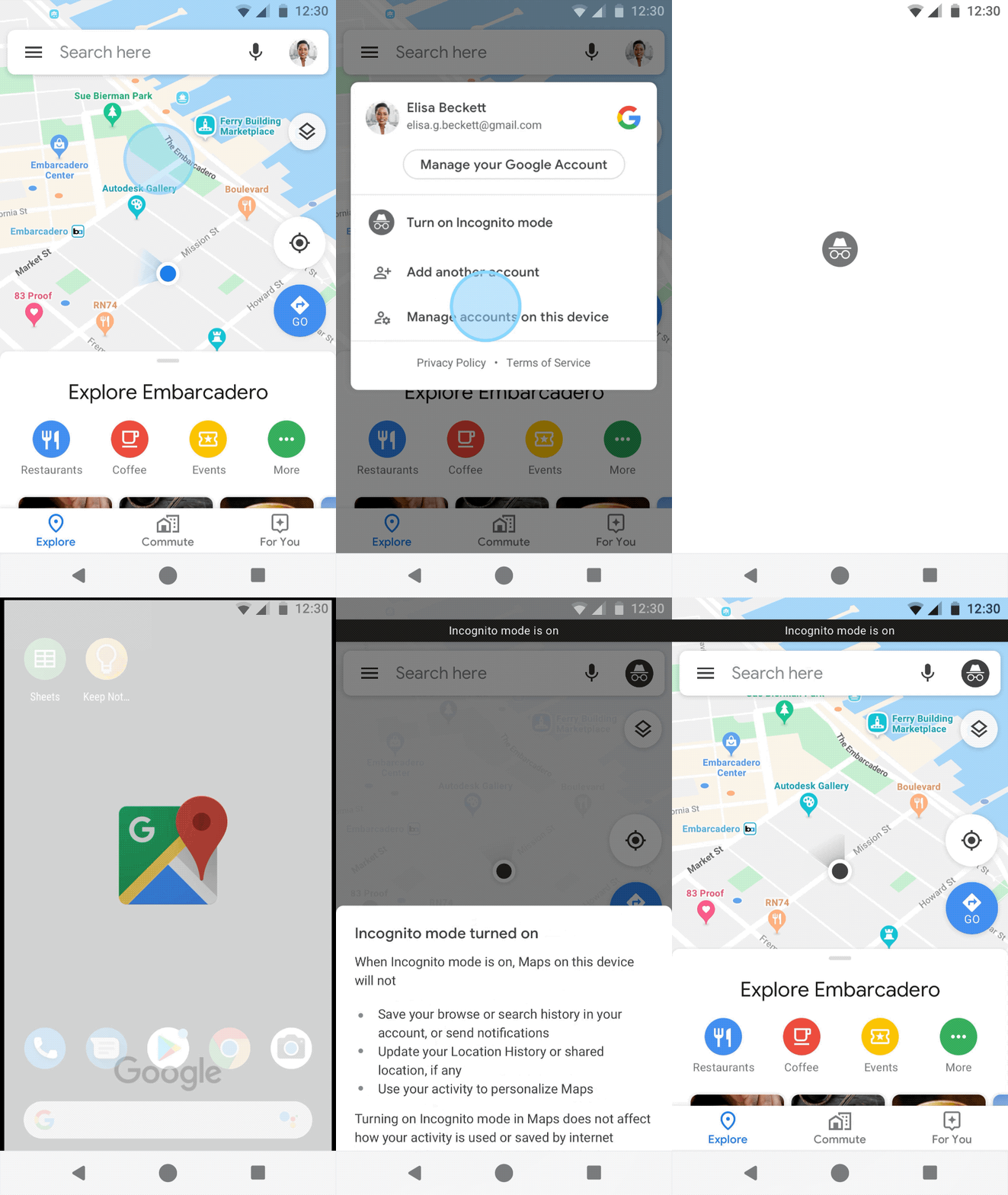
Incognito Mode For Maps

Incognito mode has been allowing people to browse the web while preventing data from being saved to their Google account or computer since 2008. Earlier this year, the company expanded the feature to YouTube, and soon it will be coming to Maps.

Once it is live, you’ll be able to quickly toggle incognito mode on and off by selecting it in the menu that appears when choosing accounts.


While the feature is coming to Android within the month, the company could only say it would be coming to iOS “soon”. 

Auto-Delete YouTube History

Google is also introducing a way for users to automatically delete their YouTube activity after a set amount of time. Specifically, you can select to keep data for 3 months, 18 months, or until you manually clear your history. 

A similar feature was introduced earlier this year for users’ location history and web activity and is expected to launch for YouTube this month. 

Managing Google Assistant Data

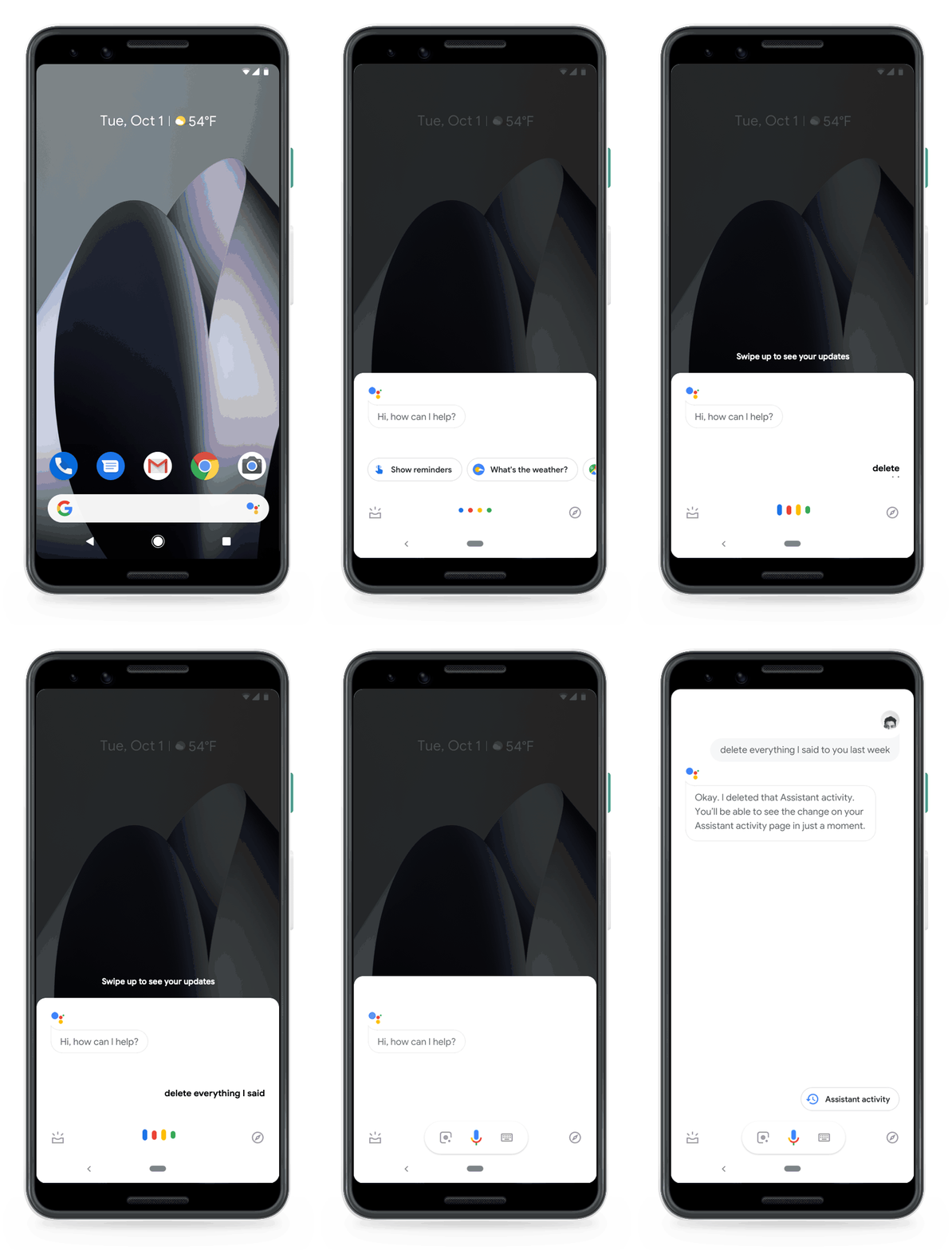
The search engine has introduced a way for people to control their Google Assistant activity using simple voice commands. 

For example, users could ask the Assistant to clear their history for the last week by saying “Hey Google, delete everything I said to you last week.”


This will be available to all Google Assistant users next week.

Google has announced they will be rolling out a broad update to their core search algorithm starting later today. 

While the updates are a regular part of maintaining and improving the company’s search engine, Google has typically been reluctant to give advance notice before the update has rolled out. In some cases, they have even been unwilling to address algorithm updates in-depth after their implementation. 

This is only the second time the search engine has announced a broad core algorithm update ahead of time, suggesting they are being more proactive in communicating with webmasters. 

Google’s Danny Sullivan says the update should start very soon and will take up to a few days to complete. 

The company’s announcement didn’t add any new guidance or recommendations for managing your site during and after the rollout of this update, but Google did recommend reviewing the existing guidelines for core updates:

  • Widely notable effects are to be expected, which can include drops or gains in search rankings.
  • Core updates are “broad” in the sense that they don’t target anything specific. Rather, they’re designed to improve Google’s systems overall.
  • Pages that drop in rankings aren’t being penalized; they’re being reassessed against other web content that has been published since the last update.
  • Focusing on providing the best possible content is the top recommended way to deal with the impact of a core algorithm update.
  • Broad core updates happen every few months. Sites might not recover from one update until the next one rolls out.
  • Improvements do not guarantee recovery. However, choosing not to implement any improvements will virtually guarantee no recovery.

Google is making it easier to find the most important information in YouTube videos for users by including timestamps in search results. 

The feature has been in testing for the better part of a year but has officially been announced this week.

As the company explains:

“Videos aren’t skimmable like text, meaning it can be easy to overlook video content altogether.

Now, just live we’ve worked to make other types of information more easily accessible, we’re developing new ways to understand and organize video content in Search to make it more useful for you.”

The feature is already rolling out, but video publishers will need to take a couple quick and easy steps to ensure the timestamps will appear when their videos show up in search results.

How To Add Timestamps To Your YouTube Videos In Search Results

The good news is there is absolutely no coding or complex technical knowledge needed to provide Google with the information necessary to include relevant timestamps. 

All you have to do is provide a simple list of timestamps and what they relate to within the description section of your videos. For example:

00:05 – Intro

01:30 – Step 1

02:15 – Step 2

03:40 – Step 3

05:00 – Conclusion

Notably, Google is extending this feature to non-YouTube videos as well. However, the process requires a bit more work to properly mark-up. To start the process of adding timestamps to non-YouTube videos, Google asks you to fill out this form. Afterward, they will provide you with the necessary information for marking-up your videos.

New research from Yext and Forbes reinforces just how important it is to keep the information on search engine results relevant to your business accurate and up-to-date. 

The findings from more than 500 US consumers indicates that people automatically assume only half of the information they see in search results is accurate. Additionally, those consumers then hold the brands responsible for any inaccurate information about them, even when it appears outside of your official channels.

The study also revealed a few more bits of interesting information:

  • 57% of respondents say they bypass search and visit a brand’s official website first because they believe the information there will be more complete and accurate.
  • 50% of consumers regularly turn to third-party sites and apps to find information about brands.
  • 48% of those surveyed said a brand’s website is their most trusted source of information.
  • 47% say they are more likely to trust a third-party site over a brand’s website.
  • 20% of current and new customers trust social media to deliver accurate brand information.
  • 28% of consumers avoid buying a brand’s product after seeing inaccurate information.

Marc Ferrentino, Chief Strategy Officer of Yext elaborated on the findings, saying:

”Our research shows that regardless of where they search for information, people expect the answers they find to be consistent and accurate — and they hold brands responsible to ensure this is the case.

… there is a significant opportunity for businesses to differentiate themselves from their competition through verification on and off of their own websites.”

You can download the full report here.

A new large-scale international study from Google shows that shoppers are increasingly using online videos to help make purchasing decisions. 

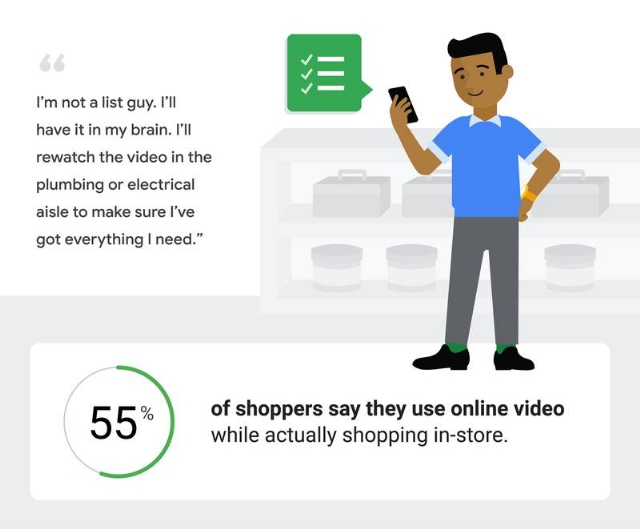
Specifically, the study – which used a mix of surveys and in-person interviews – found that more than half (55%) of consumers regularly use online videos as part of their shopping research. 

As the company says in its article:

“For more and more shoppers, video is becoming indispensable when they’re ready to buy. In fact, more than 55% of shoppers globally say they use online video while actually shopping in-store.”

Google’s Recommended Strategies For Using Video

Within the article about the report, Google also suggests a few ways brands can use videos to influence online shoppers:

Video Shopping List

One of the most surprising findings of the study is that many consumers are replacing traditional shopping lists with a video. 

“If I go to a store and forget what I need, I pull up the video to see the ingredients. I pull to the side, watch the video, and get what I need,” said one person interviewed. 

Getting Informed and Feeling Confident

For more technical fields or issues, such as finances or repairing complicated machines, videos can be an invaluable way to help shoppers feel more confident about their purchases. 

“YouTube has taught me that I’m capable of doing what I didn’t know I could do,” explained one consumer.

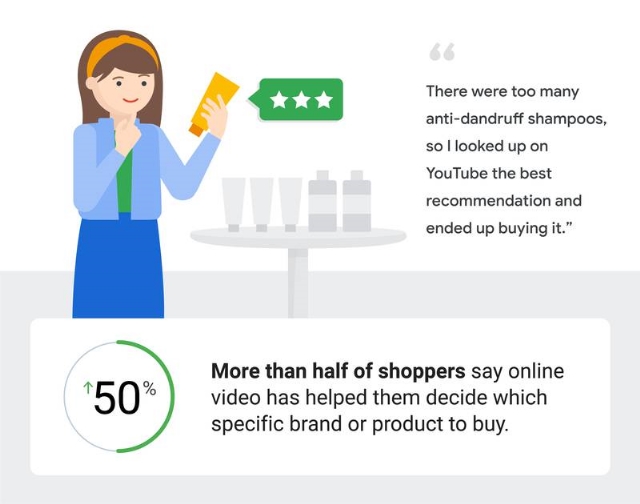
Video Reviews Can Be The Tie-Breaker

Video reviews are one of the most trusted forms of online reviews and are a popular reference point when making purchasing decisions. The wide variety of video reviews out there give people the ability to focus on the features they care most about and see which products will perform best for their needs. 

As one shopper told interviewers, “While I was in Home Depot the other day, I was on YouTube looking up drill sets to see which one was better and which one burned out quicker through stress tests.”

What This Means For Brands

It’s no big surprise that online shoppers are increasingly using videos to influence their shopping decisions. What is surprising is when and where they are referencing these videos and how they are actively using the videos within the shopping process. 

The biggest recommendation from the study is that you “think of ways your brand can show up to meet these in-the-moment needs, whether it’s through ads that spark ideas and inspiration or through more in-depth content to answer questions and help people along their path to purchase.”