Tag Archive for: Social Media Marketing


Twitter advertising

Twitter’s ad platform is reportedly in dire need of revenue. Judging by its latest advertising program the company is testing out, it appears that might be the case. The company is definitely getting quite creative in their attempts to find more business, at least.

Twitter is testing the idea of launching a subscription-advertising program designed to let smaller businesses and advertisers pay $99 a month to have their advertising automated by the company. The service would automatically promote their tweets, as well as run Promoted Account ads for the associated account each month.

“Instead of creating and optimizing separate Twitter Ads campaigns yourself, this program will do the heavy lifting. You just need to continue using Twitter as you normally do — Tweeting updates, links, and media that you want a larger audience to see. Then, the promotion of your Tweets will be automated,” as Twitter says on their business site page explaining the new program.

For now, the Twitter Subscription Ads Beta Program is invite-only while Twitter tests the waters. Based on the information available, it looks set to be aimed primarily at smaller advertisers who are using the company’s self-serve ad tools.

While this might sound nice to businesses interested in advertising but unfamiliar with the tricks of the trade, it’s important to know the program has some pretty big downsides. The biggest would be the amount of control you’re giving up.

Unlike normal ad campaigns where you get to select exactly what you’re promoting, participants in the subscription service will have little to no control over what Tweets are turned into ads or whom they are shown to. The company also notes that “not every Tweet that is added to your Promoted Tweet campaign will serve an impression, and the extent each Tweet is promoted may vary based on performance.”

If you’re thinking you might be able to fold the subscription service into your existing advertising efforts, you’ll also be disappointed to learn that isn’t possible. Any account participating in the program will lose access to Twitter’s self-serve ad platform. “In order to participate in this private beta program your previous ads account will no longer be accessible,” says Twitter.

Everyone knows social media is fickle. You can share something you think is great and get no response, while an offhand post that you threw up blows up with likes, comments, and shares. So what makes the difference?

Of course, there are countless reasons that some things perform better than others on social media, but one of the biggest factors is likely something you haven’t considered – timing.

Timing really is everything on social media, but it can be hard to discern exactly when the best time is for you to start posting. The right time on Twitter may not be the right time on Facebook, LinkedIn, or Instagram. Complicating things more, the best times are different for varying industries.

So, how do you figure out when the right time is for you? You could just try different things until something works, but I suggest using the infographic below to take a more informed approach.

The infographic from CoSchedule combines all the best data about timing on social media to give you a complete guide for discovering the prime time for your social media activity. Check it out below or head over to CoSchedule’s site for a more in-depth breakdown.

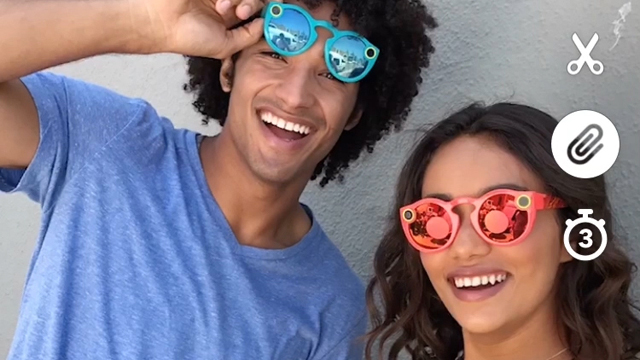
Snapchat has quickly become one of the most popular social image sharing platforms around, breaking out of its teen-centric image to reach a wide audience of users. With this growth, the platform has also made extensive changes to make it easier for brands to connect with users.

This week, the company released one such new feature with the launch of “Snapchat Paperclip”. The Paperclip feature lets anyone – including brands – to attach a link to any Snap before it is shared. Until now, the only way you could include a link in a Snap was through paid ads.

The launch of Paperclip puts Snapchat ahead of the other most prominent social image platform, Instagram, which only allows links within the bio section of profiles. The only exception to Instagram’s rules is for users with over 10,000 followers. These popular figures can also include links in Instagram Stories.

The ability to include links in individual Snaps may seem like a small change, but it could be a huge win for brands looking to build an organic following. Instead of paying for ads, you can now rely on high-quality content to get users engaged and interested in your site and products. It also allows you to reach more ad-averse audiences, such as tech-savvy users who tend to block or ignore ads.

The Paperclip feature already available around the world for both iOS and Android users and is easily accessible by tapping the paperclip icon within Snapchat’s toolkit.

Along with the launch of Paperclip, Snapchat has released two other new features more aimed at average users. Voice Filters give users the ability to modify the way their voice sounds even when no using a visual lens. The other feature, Backdrops, lets users swap out the background of images with custom designs or colors.

You can see all three new features in action in this video shared by Josh Constine:

Twitter has always been built on the idea that brevity is the soul of wit. But, it can still be hard to fit everything you need to say in just 140 characters, especially if you’re responding to someone with a long username.

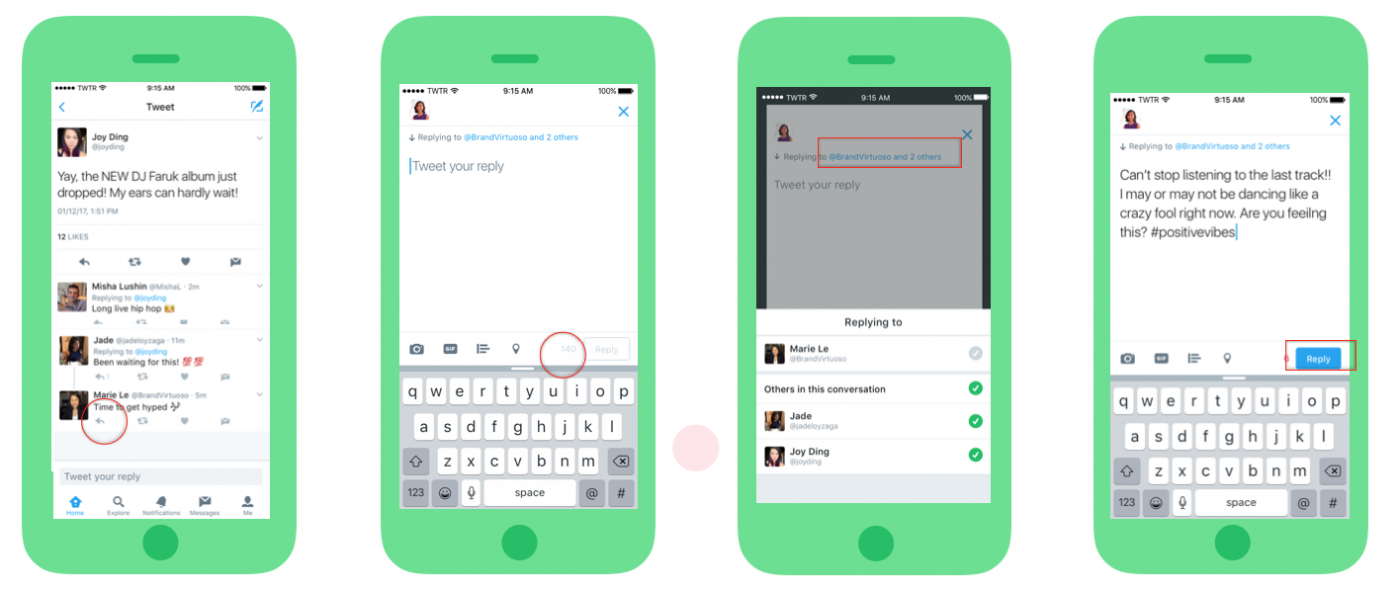
Until now, user names were included in YouTube’s character limit. That is no longer the case as of this week. Twitter announced that usernames won’t subtract from your tweet’s 140 character count from now on.

Additionally, the company is changing up how replies appear to make conversations easier to follow with three new features:

  • Who you are replying to will appear above the Tweet text rather than within the Tweet text itself, so you have more characters to have conversations.
  • You can tap on “Replying to…” to easily see and control who’s part of your conversation.
  • When reading a conversation, you’ll actually see what people are saying, rather than seeing lots of @usernames at the start of a Tweet.

“It’s now easier to follow a conversation, so you can focus on what a discussion is about, and who is having it,” Twitter explained in a blog post. “Also, with all 140 characters for your replies, you have more room to participate in group conversations.

repliesupdate

The new changes should be available to all users across PC, iOS, and Android already. According to the company’s testing, Twitter says the new features lead to higher engagement for conversations.

Periscope Logo

Since Periscope launched, it has been a minimalist affair. The app allows you to livestream video from a smartphone, and watch from any device (though only mobile users can comment or “heart” videos). That’s basically it.

The company has added a few basic features like the ability to search and save videos, but it has otherwise lacked many essential features that brands and users have been begging for.

That all looks to be changing this week, as Periscope has announced several new features that should help satisfy users and advertisers alike. From pre-roll ads and analytics to better browsing and cross-platform support, there is a lot of new stuff coming to the app in the near future.

Pre-Roll Ads

Monetizing Periscope has always been a difficult task, but the Twitter-owned company is making strides by introducing pre-roll ads. Similar to those seen on Twitter, the pre-roll ads will allow both publishers and creators to monetize their content with a quick video before their live stream goes live. The pre-roll videos will also show on replays of past live videos.

The ads are expected to roll out in the next couple months. If you want to get in on the chance to be one of the first advertisers to have access, you must be a part of Twitter’s Amplify program.

Analytics Dashboard

panalytics

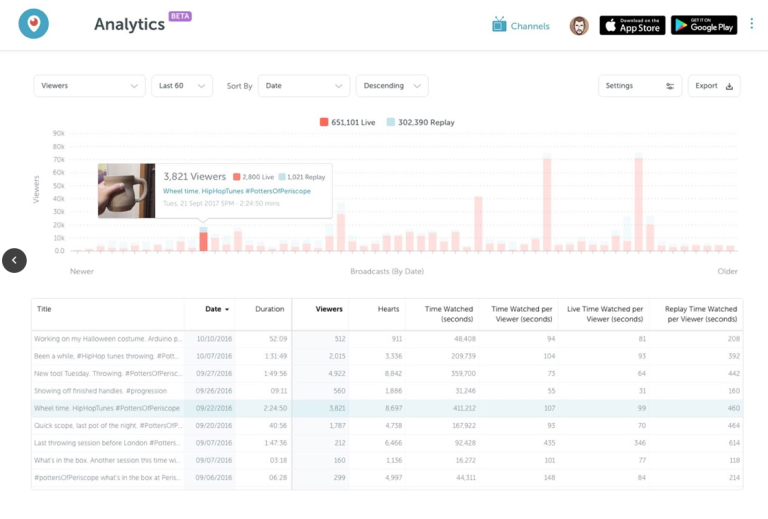
It’s hard to offer a way to monetize content without also giving publishers the chance to see how their streams are actually performing. Thankfully, Periscope is launching a new analytics dashboard that will give streamers the chance to see just how many people are viewing their videos and for how long.

The dashboard will also include information about how many hearts each video ears, as well as breaking down the time spent watching the live video and its replay. It offers a few different ways to sort the data and the ability to export data. Overall, the information is still fairly limited, but it is a good start.

Activity Details

activity-tab

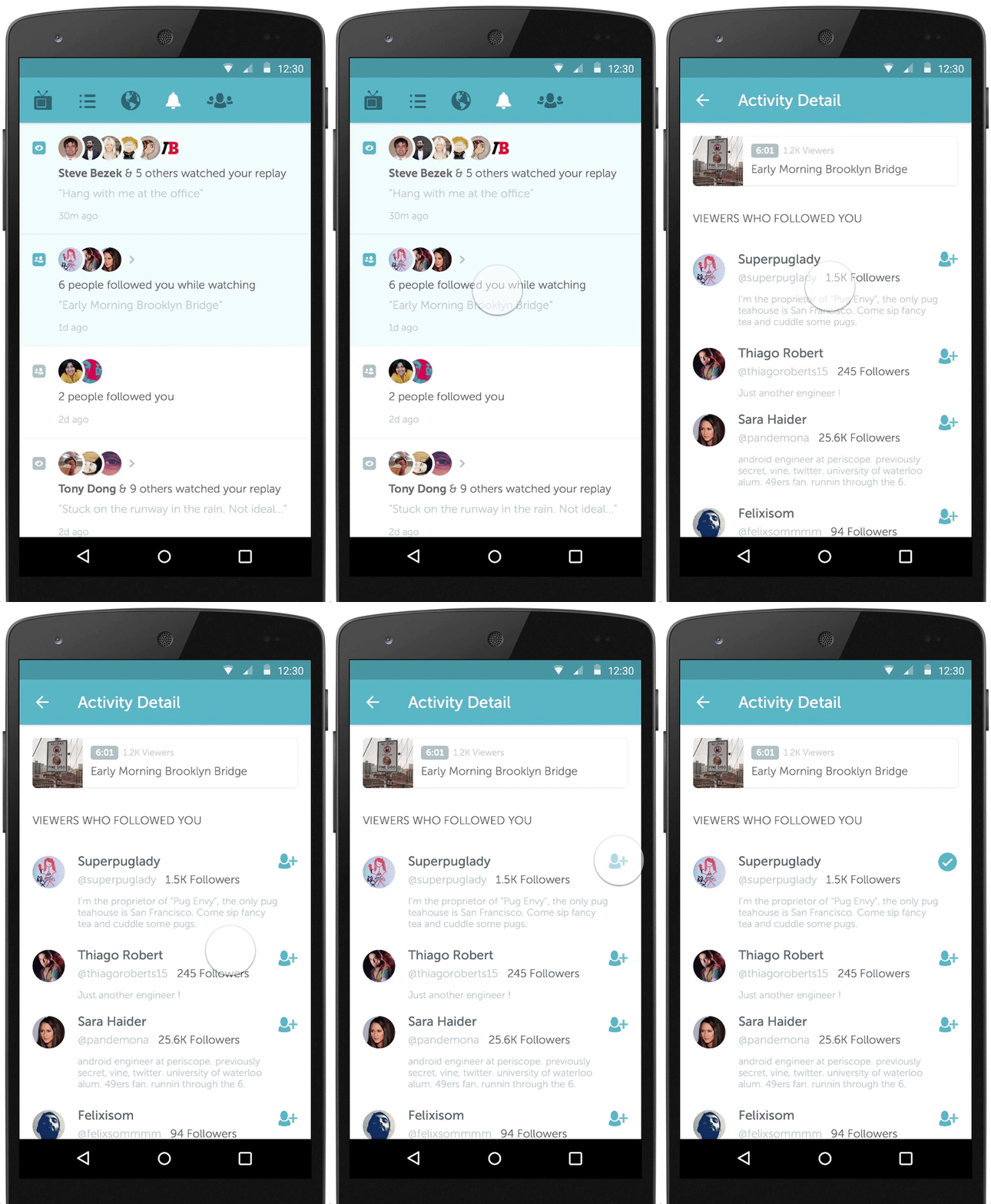
Keeping in the spirit of helping creators gauge engagement, Periscope’s new activity tab lets you see new followers and when someone watches a replay. The company says it plans to expand this tab with much more detail about your viewer’s behaviors. For now, you can see the basic engagement info in the new tab being released to Android and iOS users today.

Periscope Comes To Twitter Moments

Twitter is also working to incorporate Periscope content more prominently across its platform. The latest move to do this comes in the form making Periscope videos watchable from directly within a Twitter Moment. Moments, the company’s curated new stories, highlight top-quality content to users across the platform and could give a great deal of visibility to Periscope streamers.

BRANDPROD-286-FlashlightExtension-results-US

Pinterest has made visual search a fundamental part of their service, letting users find products and objects based on similar photos. Now, it is bringing visual search to its Chrome browser extension, which lets you search for images without ever visiting Pinterest.

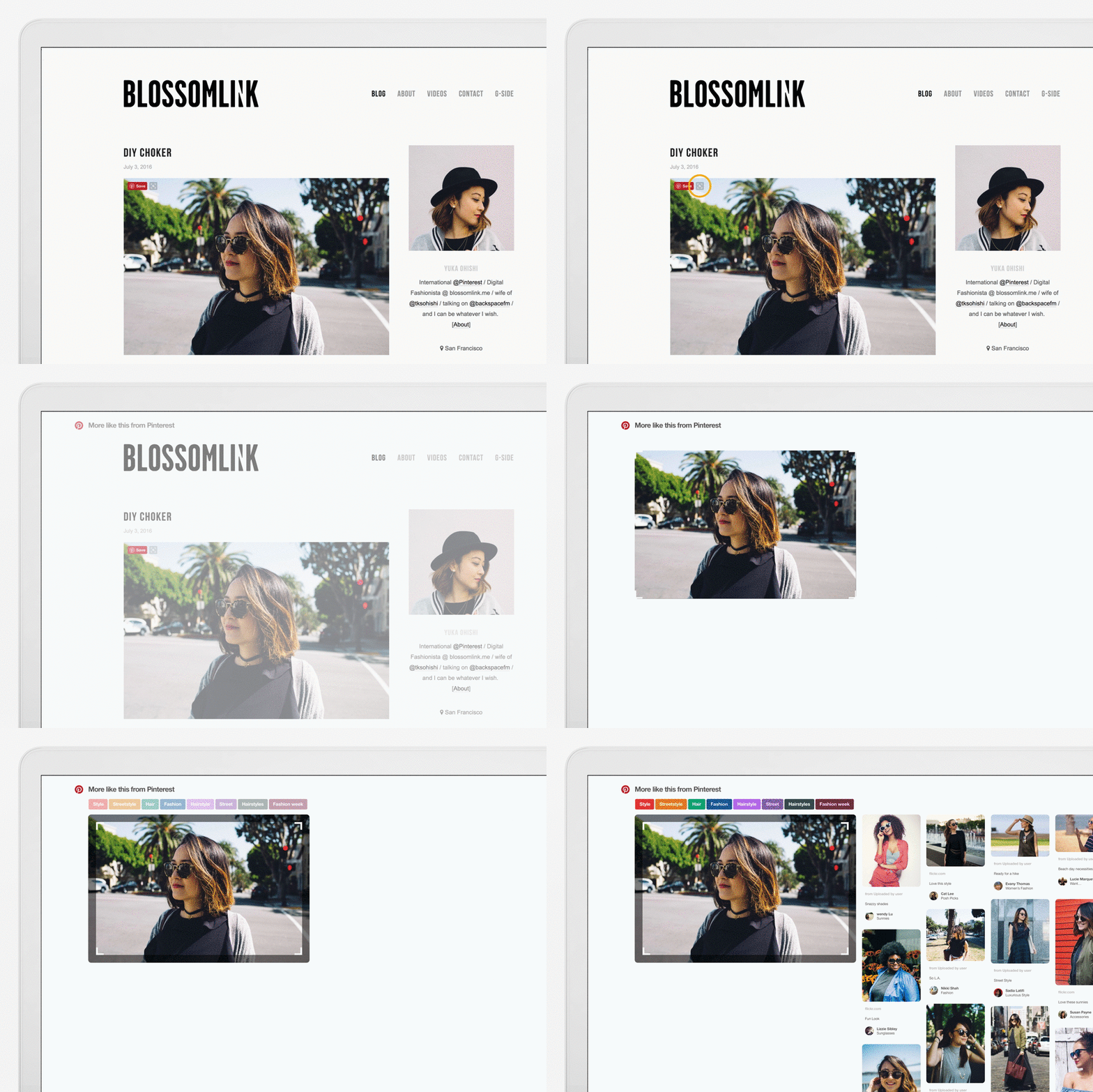
After installing the extension, all you have to do is hover over any image and click on the little magnifying glass that pops up in the corner. You can then highlight the specific area or object you want to search for.

You can also right-click on the background of any web page you visit to see visual results based on the images on that page.

BRANDPROD-286-FlashlightExtension-laptop-for gif_2-1000px

“You can even search for specific items inside an image, like that one interesting chair in the corner of a living room,” Kent Brewster, front-end engineer, Pinterest, wrote in a blog post. “Just resize the selected area to pinpoint the part of the image you want to search.”

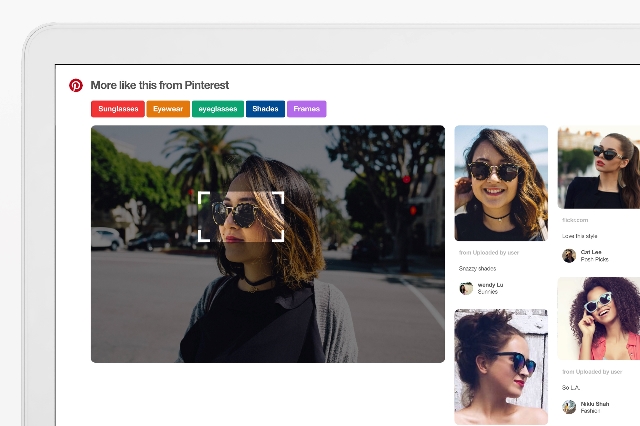
Once you’ve selected the object you want to search for, you can then refine your search using related topics, such as sunglasses, eyewear, or frames in the image above.

“You can refine your results by topic using the Pinterest search guides,” Brewster noted. “To go even deeper into your search, click any result and pinpoint whatever part of the new image you want to explore.”

For now, Pinterest’s browser extension won’t include Buyable Pins or Promoted Pins in its search results. But, I would wager those will be integrated in the near future.

Facebook Reactions

Remember when Facebook Likes meant everything when it came to getting exposure on the largest social network in the world? Well, these days it’s all about Loves. Or more specifically, Reactions.

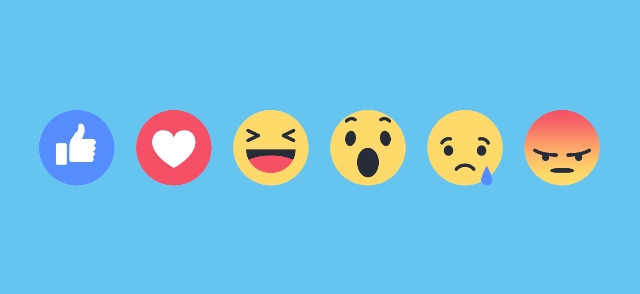
Facebook has announced it is now giving more exposure to posts that get more Reactions – Love, Haha, Wow, Sad, or Angry – rather than those with more Likes. For now, all reactions are equally weighted, but they will boost the visibility more than the traditional blue thumbs-up.

“Over the past year we’ve found that if people leave a reaction on a post, it is an even stronger signal that they’d want to see that type of post than if they left a Like on the post,” according to Facebook. “So we are updating News Feed to weigh reactions a little more than Likes when taking into account how relevant the story is to each person.”

The decision makes sense. Compared to the variety of reactions available on Facebook, Liking a post is seemingly increasingly apathetic or neutral. All it takes is a simple click to show vague support of something you see on your wall. Meanwhile, users have to take the time to specifically select the reaction that more accurately reflects their feelings.

Reactions were launched by Facebook just over a year ago, but they’ve quickly become a big part of the platform. According to Facebook’s data, Reactions have been used more than 300 billion times by users since their release.

Instagram Banner

Instagram’s carousel feature for ads has been popular with brands as a great way to highlight their products and tell a story in their ads, and now it is coming to everyone.

Instagram announced this week it will be sharing the slideshow-like carousel ads to organic posts with all users, as well as expanding the number of photos or videos that can be shared at a time.

The feature is expected to roll out to all users on iOS and Android devices in the coming weeks. When it does, both advertisers and everyday users will be able to choose up to 10 photos and videos to include in a single post. Users can then swipe through the content to see more.

instagram-carousels

Regular users will be able to sort the photos or videos in their carousel manually, choosing the best way to tell their story. Advertisers will have this option, as well as the choice to let Instagram sort the content based on performance.

While the carousel format allows users to include several pieces of content in a single post, it does have some limitations. Most specifically, carousel posts do not allow for landscape photos or vertical videos. Instead, all photos or videos included can only be in Instagram’s traditional square frame.

Instagram is also labeling carousel posts to help make them easier to recognize in your feed. Similar to video posts, all carousel posts will include an icon next to the posts’ thumbnails.

facebook-video

Over the past year or so you have probably noticed a pretty big shift happening on your Facebook News Feed. Video content has taken over, making up a huge portion of what you see on the platform.

To help sort through the influx of videos, Facebook is refining their News Feed algorithm with a new video ranking signal for videos: completion rates. Facebook has used several metrics in the past for ranking videos – including how long a person watched the video.

The problem is these metrics often benefitted shorter videos that don’t necessarily have as much value as longer video content

As the company explains in a recent update:

“One of the signals we look at is ‘percent completion’ — the percent of each video you watch — to help us understand which videos you enjoyed. If you watch most or all of a video, that tells us that you found the video to be compelling — and we know that completing a longer video is a bigger commitment than completing a shorter one. As we continue to understand how our community consumes video, we’ve realized that we should therefore weight percent completion more heavily the longer a video is, to avoid penalizing longer videos.”

For the most part, the new metric shouldn’t affect most pages sharing video content. However, they say “some shorter videos may see a slight dip in News Feed distribution.”

The key takeaway is that if you want your videos to be seen on Facebook, they have to be engaging – no matter their length.

Google+ is dead. Long live Google+.

Google announced it is retiring the “classic” Google+ we all know and replacing it with an all-new updated version with several big updates. The company says it is aiming to please users with several of the most heavily requested updates from the Google+ community.

”With this latest round of updates, we believe the new Google+ is really your Google+— designed around your suggestions, requests and needs. It also means it’s time to say goodbye to classic Google+ on the web, which we’ll be turning down on January 24.”

Here are a few of the things you can expect when the “new” Google+ launches on January 24:

Hide Low-Quality Comments

Google+Comments

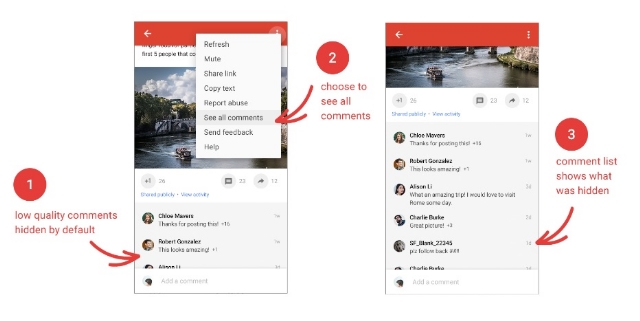
Google+ will begin to automatically bury low-quality comments that its algorithms deem non-conductive to conversation. It’s hard to know how exactly the function will work, but you can opt to leave the “low-quality comments” visible to everyone if you desire.

Putting Content First

Google+Images1

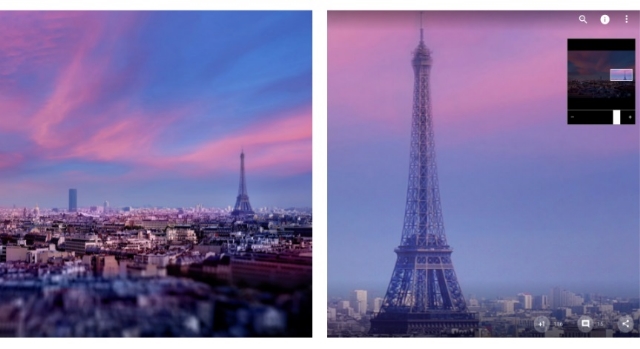
Google+ is aiming to trim the fat with its new update by reducing the amount of wasted space on the screen. Instead, it aims to put the focus on content with more images that you can even zoom in on.

Events Make Their Return

Events disappeared from Google+ some time ago, but the ability to create and join events is coming back. However, the company says it still needs to refine Events based on user experience, so expect it to be a work in progress when it launches.

“And Much More”

While Google is relaunching Google+ on the 24th, they say their work is far from over. “Our aim is to make Google+ the best place to connect around the things you care about,” the company says. Google is encouraging users to give their feedback and help shape the new Google+ as it takes shape in the future.