SimilarItems

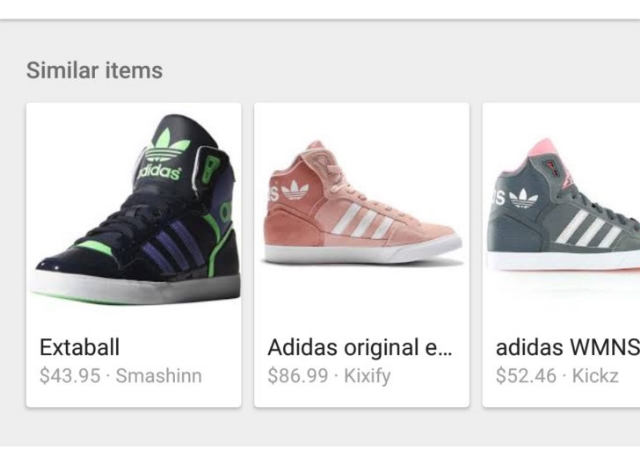
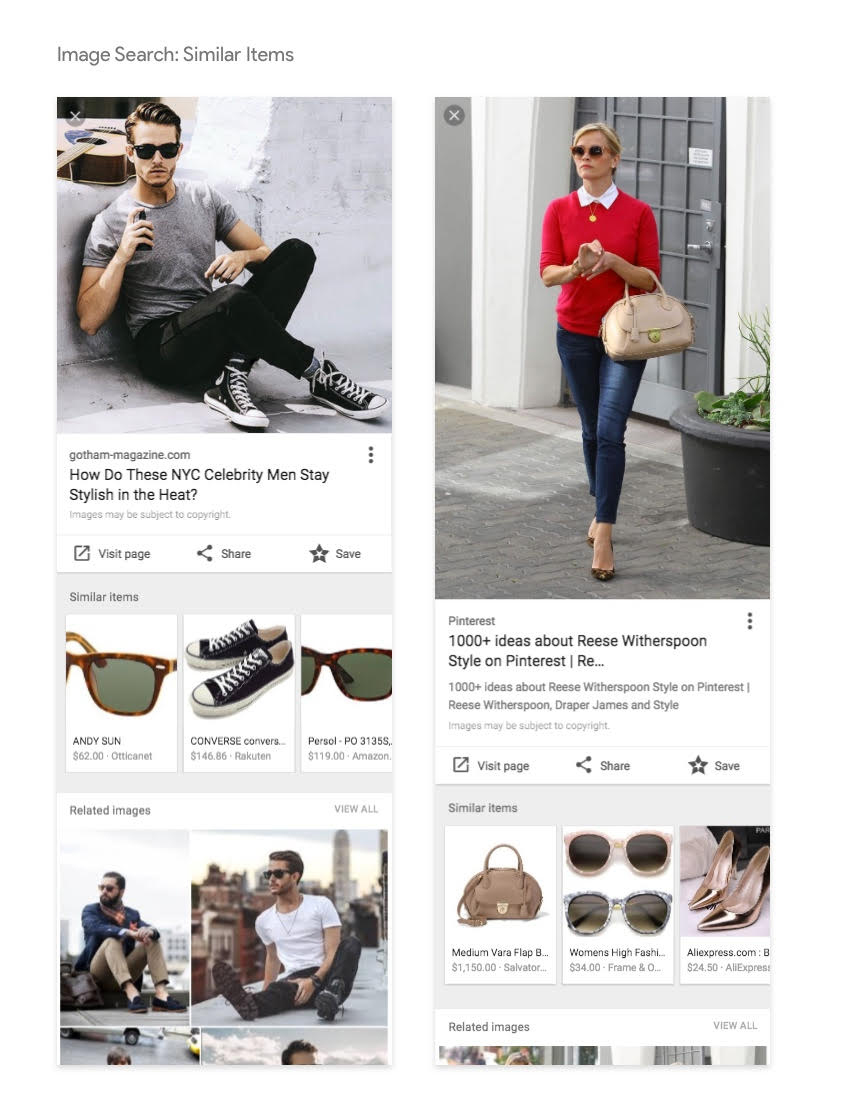
Google Image Search is making it easier for consumers to find the exact item they’re looking for with a new “Similar Items” suggestion area on searches from mobile devices. The company says the new feature will also help shoppers find new products that compliment one they were already looking for, opening an entirely new door for potential sales.

For the moment, the suggestions feature is limited to just handbags, sunglasses, and shoes. This is to allow Google to refine the feature and guarantee it is providing relevant results for searchers. Over the next few months, they aim to expand to include other apparel and potentially home & garden items.
img

”Using machine vision technology, the Similar items feature identifies products in lifestyle images and displays matching products to the user.”

In the same stroke, Google has also made the existing product results in image searches more useful for consumers by displaying price and availability information in results.

Including your products and services in the “Similar Items” feature requires adding Schema.org product metadata to the pages for every product you want to include. Theoretically, this would mean you could also exclude specific items from “Similar Items” results if desired.

The metadata markup tells Google the name, image, price, availability, & currency your business uses to include in search results. Once you’ve added the markup, it can take up to a week for Google to crawl your new data and add it to the search results.

If you’ve already implemented Schema metadata but your products aren’t showing up in the results, you may test your pages with Google’s Structured Data Testing Tool to check for errors that may be keeping your products out.
Last month, Google told the world it would be shuttering its Google Trusted Stores program, its long-standing ratings and certification program. Well the time has come, as the program said farewell this week. In its place, Google has launched “Google Customer Reviews” – a new ratings program that aims to be more accurate and valuable to consumers.

Customer Reviews vs. Google Reviews

The launch of the new program has brought some confusion, as Google now has two separate ratings systems.

The classic ratings system allows users to leave reviews and ratings on any business’s listing. These “Google Reviews” are then aggregated into the search results. While the system mostly works, there is one big issue – literally anyone can leave a review, whether they’ve been to your business or not.

With “Customer Reviews”, Google is aiming to make reviews more accurate and reliable by only allowing those who have legitimately made a purchase from the business’s website. That means no trolls bringing down your rankings, but the new program really only works for online retailers.

image01

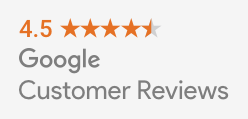
After you’ve collected some reviews, you can highlight your high rankings on your site with a customizable badge.

Notably missing from the program is the customer protection aspect of the Trusted Stores program. Online businesses will have to turn to other certification programs to help prove they are a legitimate and reputable business.

How To Join Google Customer Reviews

Businesses that were already participating in the Trusted Stores program have been automatically migrated over to the new program.

If you’re an online merchant who isn’t already participating in the program, follow these four steps:

  1. Sign into or sign up for a Google Merchant Center account.
  2. Select “Merchant Center programs” from the dropdown menu in the upper-right corner.
  3. Click “Get Started” within the Google Customer Reviews card and accept the Program Agreement.
  4. Add the survey opt-in code to your site.

Once you’ve gotten all set up, you can put the badge code for displaying your seller rating anywhere you want on your website.

Twitter has always been built on the idea that brevity is the soul of wit. But, it can still be hard to fit everything you need to say in just 140 characters, especially if you’re responding to someone with a long username.

Until now, user names were included in YouTube’s character limit. That is no longer the case as of this week. Twitter announced that usernames won’t subtract from your tweet’s 140 character count from now on.

Additionally, the company is changing up how replies appear to make conversations easier to follow with three new features:

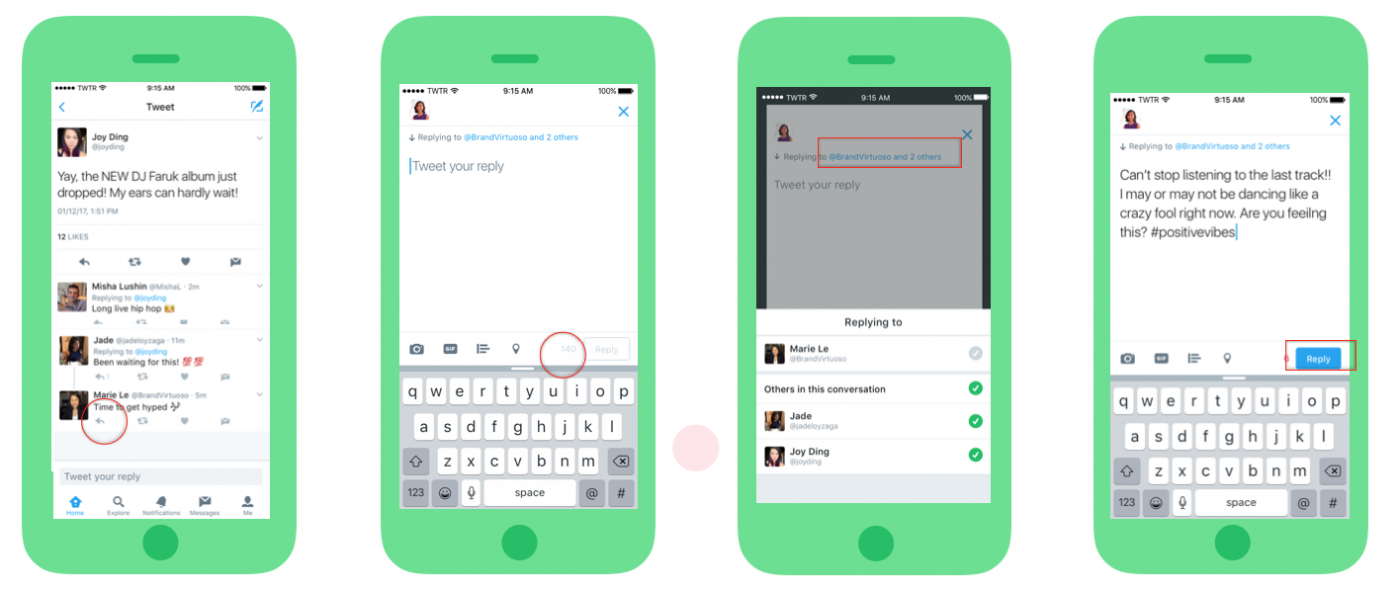
  • Who you are replying to will appear above the Tweet text rather than within the Tweet text itself, so you have more characters to have conversations.
  • You can tap on “Replying to…” to easily see and control who’s part of your conversation.
  • When reading a conversation, you’ll actually see what people are saying, rather than seeing lots of @usernames at the start of a Tweet.

“It’s now easier to follow a conversation, so you can focus on what a discussion is about, and who is having it,” Twitter explained in a blog post. “Also, with all 140 characters for your replies, you have more room to participate in group conversations.

repliesupdate

The new changes should be available to all users across PC, iOS, and Android already. According to the company’s testing, Twitter says the new features lead to higher engagement for conversations.

Periscope Logo

Since Periscope launched, it has been a minimalist affair. The app allows you to livestream video from a smartphone, and watch from any device (though only mobile users can comment or “heart” videos). That’s basically it.

The company has added a few basic features like the ability to search and save videos, but it has otherwise lacked many essential features that brands and users have been begging for.

That all looks to be changing this week, as Periscope has announced several new features that should help satisfy users and advertisers alike. From pre-roll ads and analytics to better browsing and cross-platform support, there is a lot of new stuff coming to the app in the near future.

Pre-Roll Ads

Monetizing Periscope has always been a difficult task, but the Twitter-owned company is making strides by introducing pre-roll ads. Similar to those seen on Twitter, the pre-roll ads will allow both publishers and creators to monetize their content with a quick video before their live stream goes live. The pre-roll videos will also show on replays of past live videos.

The ads are expected to roll out in the next couple months. If you want to get in on the chance to be one of the first advertisers to have access, you must be a part of Twitter’s Amplify program.

Analytics Dashboard

panalytics

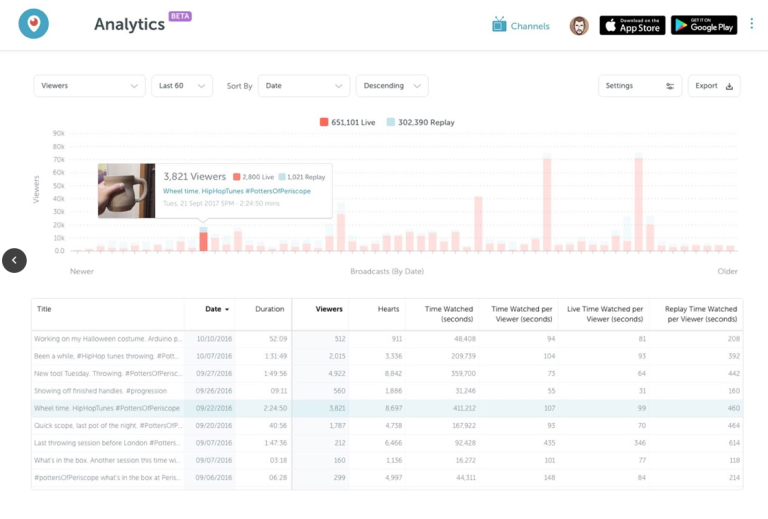
It’s hard to offer a way to monetize content without also giving publishers the chance to see how their streams are actually performing. Thankfully, Periscope is launching a new analytics dashboard that will give streamers the chance to see just how many people are viewing their videos and for how long.

The dashboard will also include information about how many hearts each video ears, as well as breaking down the time spent watching the live video and its replay. It offers a few different ways to sort the data and the ability to export data. Overall, the information is still fairly limited, but it is a good start.

Activity Details

activity-tab

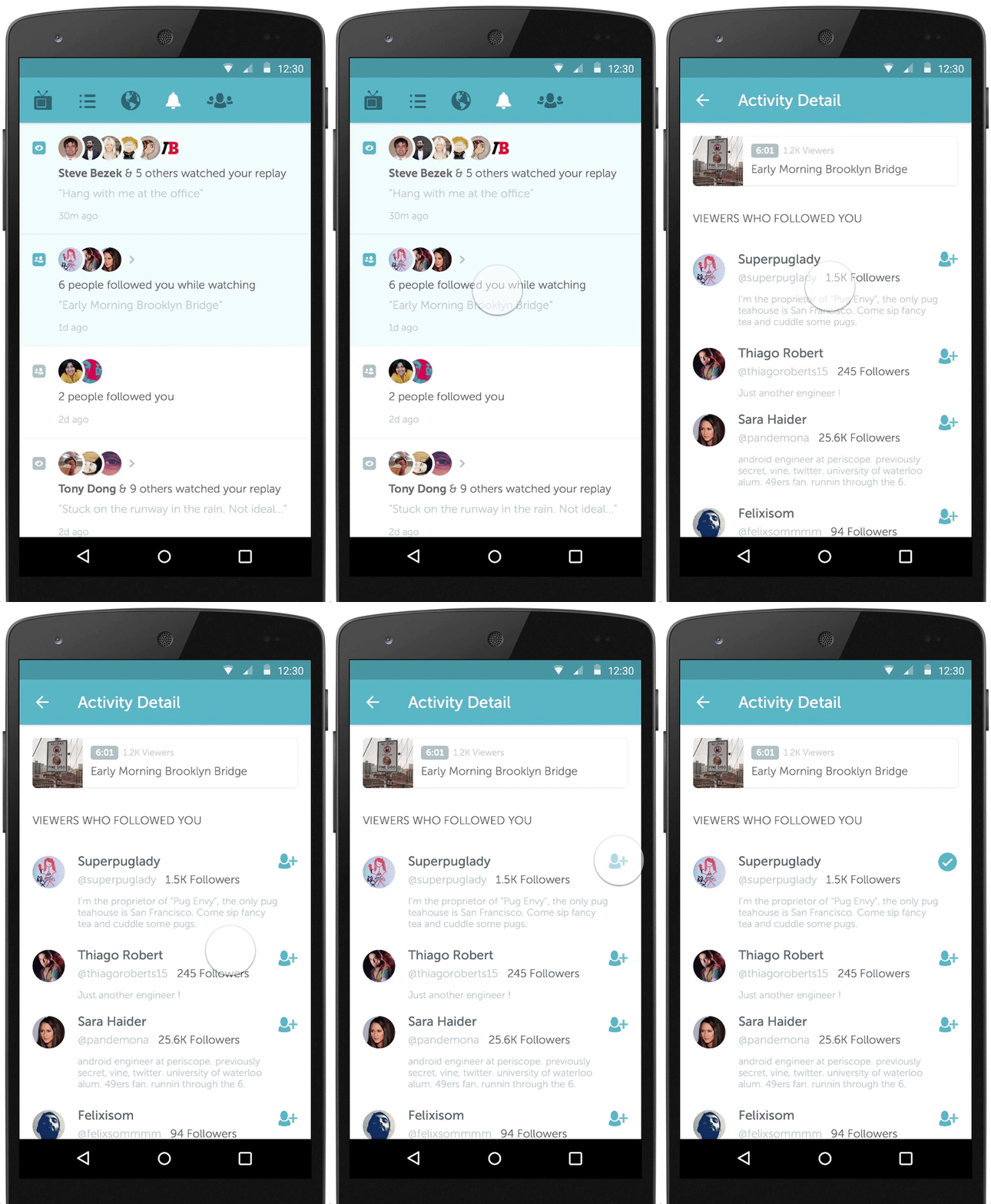
Keeping in the spirit of helping creators gauge engagement, Periscope’s new activity tab lets you see new followers and when someone watches a replay. The company says it plans to expand this tab with much more detail about your viewer’s behaviors. For now, you can see the basic engagement info in the new tab being released to Android and iOS users today.

Periscope Comes To Twitter Moments

Twitter is also working to incorporate Periscope content more prominently across its platform. The latest move to do this comes in the form making Periscope videos watchable from directly within a Twitter Moment. Moments, the company’s curated new stories, highlight top-quality content to users across the platform and could give a great deal of visibility to Periscope streamers.

google-my-business-1

Have you ever given a marketing company control of your Google My Business accounts and listings so they can help manage your local marketing? Have you ever tried to get your account bad after you decided to part ways?

It has been notoriously difficult and time-consuming to regain ownership of your Google My Business listings in the past, but Google has launched a new feature to streamline the process.

If you’ve been unable to reclaim your listings, you can now start the verification process to prove you are the rightful owner or representative for your listings with just a few steps:

  • Go to Google My Business.
  • Log in with the Google account you use to manage your business.
  • Enter the business name or address and select your business from the search results.
    • There is a chance you may see text showing part of the email address that originally verified the listing. If you control this email address, you can sign into that account to access your business listing.
  • Complete and submit the form.
  • Google will contact the current owner of the listing asking them to contact you. In the meantime, you will receive a confirmation email with a link to check the status of your request.
  • Allow seven days for the current owner of the listing to respond to the request. If they do not respond within a week, you will be able to verify your affiliation with the business and regain control of the corresponding listings.

How long does your website take to load? If it takes more than three seconds, you’re likely losing more than half of your visitors.

It is no secret that everyone wants everything as fast as possible. That is especially true on the web. The faster your page loads, the more people will stick around and the happier they will be with their experience.

What you might not know, is that your site speed can directly affect your conversions and sales.

Data from Kissmetrics shows that up to 79% of customers who aren’t satisfied with your site’s performance say they are less likely to buy from the same site again. Taking that a step further, many first-time customers may leave before they ever get a chance to see what you have to offer in the first place.

Web Development agency Skilled collected 12 case studies from real businesses in an infographic showing just how powerful page load time really is. If you’ve ever doubted the importance of keeping your site optimized to be as fast as possible, you’ll likely be a believer after seeing these:

Page Speed

Google is putting the spotlight on local businesses in search results with a new location extension ad format rolled out across AdWords this week.

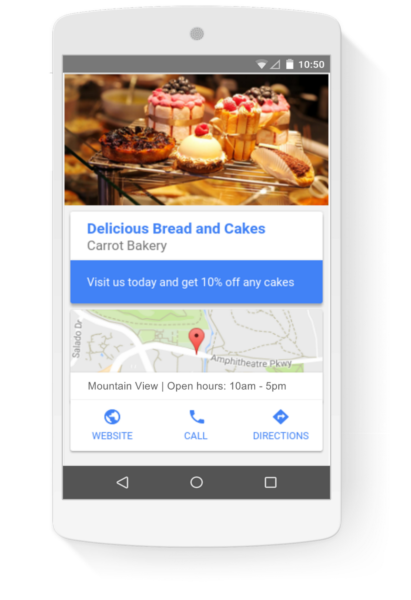
The new format includes big photos, store location and information, as well as typical ad features like an attention-grabbing headline and ad copy, as you can see in the example below.

Location Ad Format

It is still not exactly clear exactly when the ad format will be shown in Google results, but Google uses an example of a local bakery using ads to target nearby users reading a cooking blog. According to their test results, approximately 60 percent of clicks on the extension info were to get directions or store location information.

Interestingly, you may not have to do anything for some of your ads to start showing in the latest format. Text, responsive, and 300×250 image ads may be dynamically converted to the new location extension format in related searches from nearby users, unless you opt out in the Location Extension section of the Extensions tab in AdWords.

If you’d prefer to take matters into your own hands to optimize for the new format, simply select the option in the ad gallery in AdWords under “general purpose ads.” From there, you can upload up to three pictures, a logo, and your ad headline and copy.

BRANDPROD-286-FlashlightExtension-results-US

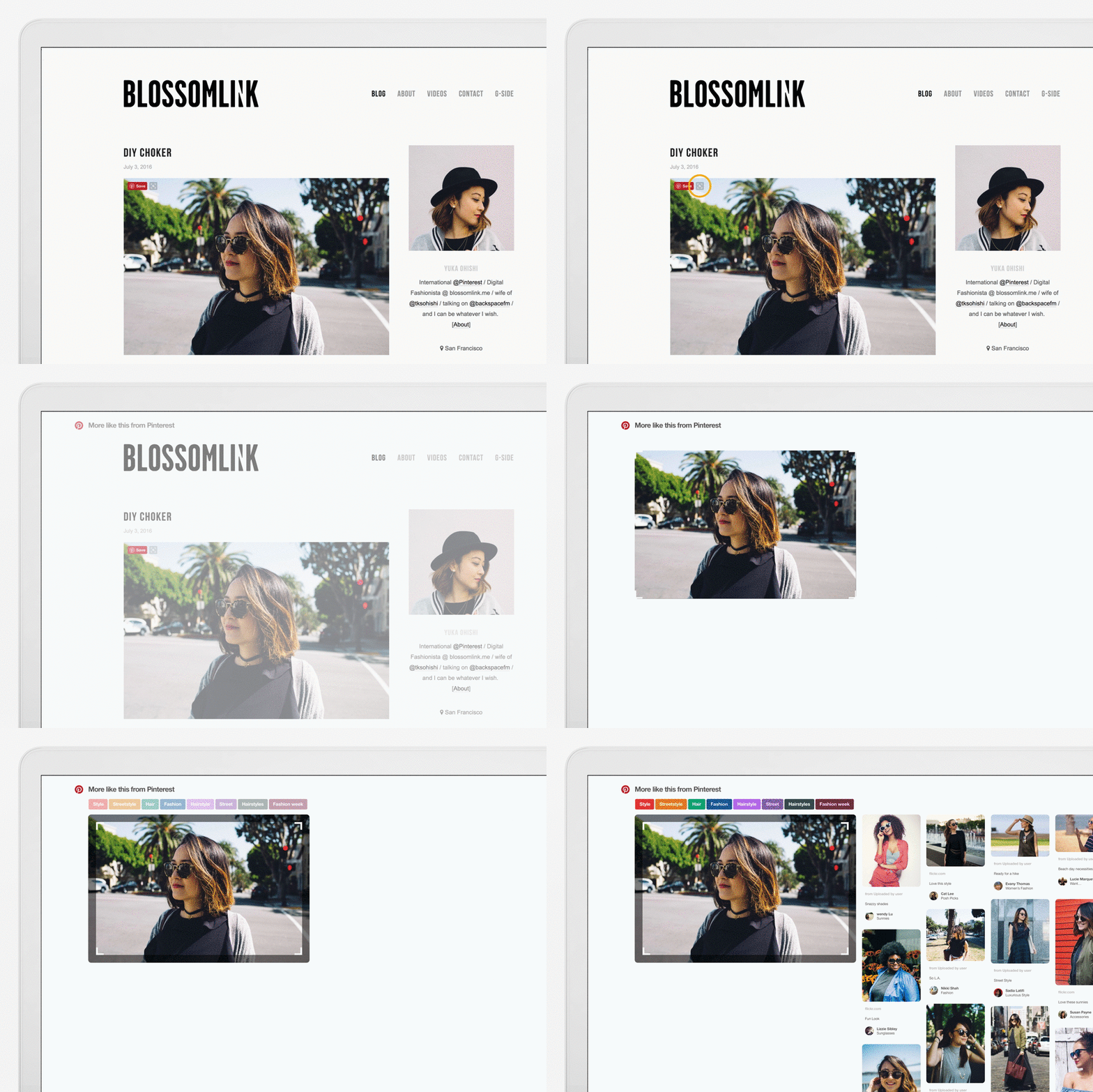
Pinterest has made visual search a fundamental part of their service, letting users find products and objects based on similar photos. Now, it is bringing visual search to its Chrome browser extension, which lets you search for images without ever visiting Pinterest.

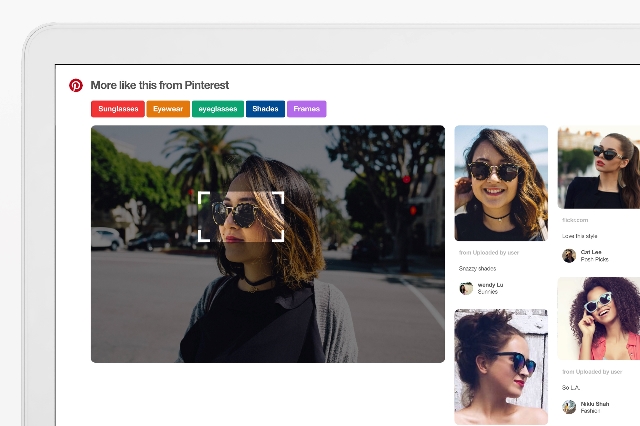
After installing the extension, all you have to do is hover over any image and click on the little magnifying glass that pops up in the corner. You can then highlight the specific area or object you want to search for.

You can also right-click on the background of any web page you visit to see visual results based on the images on that page.

BRANDPROD-286-FlashlightExtension-laptop-for gif_2-1000px

“You can even search for specific items inside an image, like that one interesting chair in the corner of a living room,” Kent Brewster, front-end engineer, Pinterest, wrote in a blog post. “Just resize the selected area to pinpoint the part of the image you want to search.”

Once you’ve selected the object you want to search for, you can then refine your search using related topics, such as sunglasses, eyewear, or frames in the image above.

“You can refine your results by topic using the Pinterest search guides,” Brewster noted. “To go even deeper into your search, click any result and pinpoint whatever part of the new image you want to explore.”

For now, Pinterest’s browser extension won’t include Buyable Pins or Promoted Pins in its search results. But, I would wager those will be integrated in the near future.

Millenials

Every few weeks I hear an influential figure in marketing talk about some new, creative strategy for reaching millennials. “You need apps!” “You need to be on this social platform!” “Cat Pictures!” “Video!”

Sure, these can all work when done right, but it raises a question: Are millennials really that hard to market to?

As Thomas Sychterz, CEO of LaunchLeap, puts it, “[Millennials] get treated like some sort of hyperactive group of wild gorillas: powerful, unpredictable and difficult to pin down. The reality is quite different and simple.”

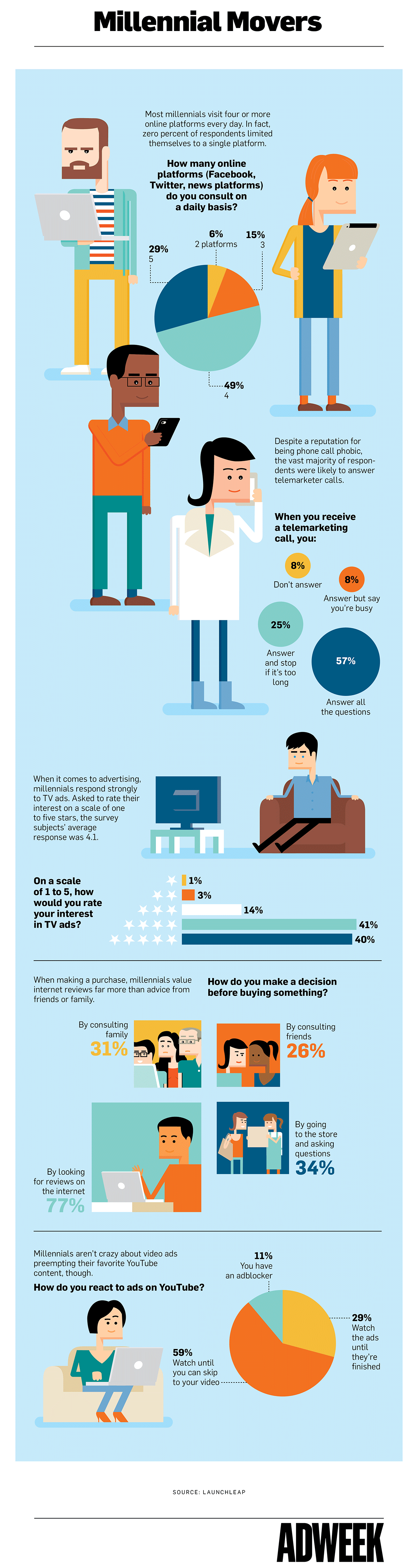
To show this, LaunchLeap, a Montreal-based consumer research startup, surveyed 18 – 35-year-olds about their internet and advertising preferences. The results definitely differ from what many would expect. Millennials aren’t as averse to more traditional forms of marketing as you’d think.

“Millennials are open to connecting with brands, drawn to bite-size content (paid or not) and intrigued by new information, product-wise. However, the main caveat is that it all needs to get done in an ergonomic, digestible and fluid manner.”

See the results of LaunchLeap’s survey in an infographic published on AdWeek below:

Millennial Marketing

Facebook Reactions

Remember when Facebook Likes meant everything when it came to getting exposure on the largest social network in the world? Well, these days it’s all about Loves. Or more specifically, Reactions.

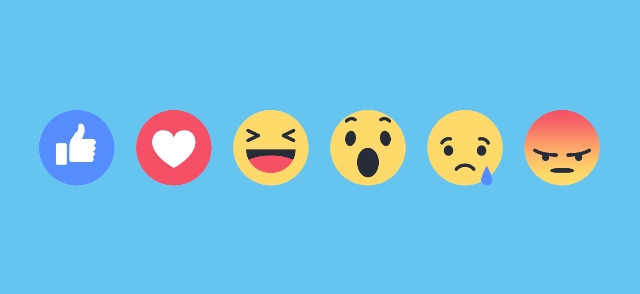
Facebook has announced it is now giving more exposure to posts that get more Reactions – Love, Haha, Wow, Sad, or Angry – rather than those with more Likes. For now, all reactions are equally weighted, but they will boost the visibility more than the traditional blue thumbs-up.

“Over the past year we’ve found that if people leave a reaction on a post, it is an even stronger signal that they’d want to see that type of post than if they left a Like on the post,” according to Facebook. “So we are updating News Feed to weigh reactions a little more than Likes when taking into account how relevant the story is to each person.”

The decision makes sense. Compared to the variety of reactions available on Facebook, Liking a post is seemingly increasingly apathetic or neutral. All it takes is a simple click to show vague support of something you see on your wall. Meanwhile, users have to take the time to specifically select the reaction that more accurately reflects their feelings.

Reactions were launched by Facebook just over a year ago, but they’ve quickly become a big part of the platform. According to Facebook’s data, Reactions have been used more than 300 billion times by users since their release.