After the smash success of Stories on Instagram, the social platform is testing new features aimed at increasing engagement. Most notably, the company introducing more open-ended question features that let viewers interact more with the Stories they watch.

Currently, Instagram users have been able to include basic polls in their Stories with multiple-choice answer options. The only other way to interact with people sharing Stories was to message them directly.

Now, the company is testing expanding the feature by allowing Instagram users to share and respond to complex questions without having to DM. The goal is to make Stories a better tool to generate actual conversations between creators or brands, and their followers.

While the feature has been spotted by numerous people and Instagram has confirmed the test with reporters, little else is known – such as when it might be available to the wider public.

The move is just the latest effort by Instagram to emphasize video on their platform and capitalize on the success of Stories, which now draw more viewers than Snapchat’s total user base. The company recently launched an even larger video platform, IGTV, which allows users to create and share long-form video content.

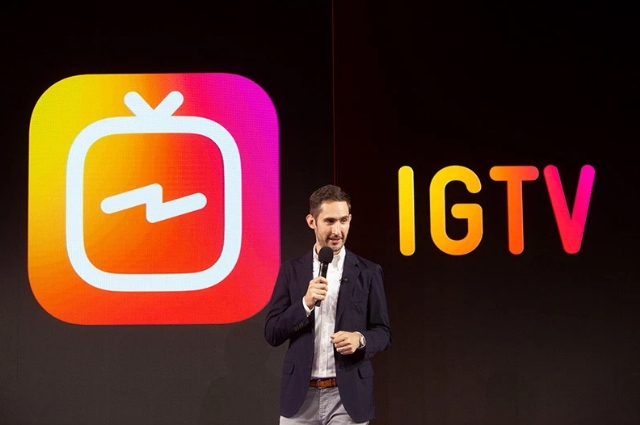
During the announcement of IGTV, CEO Kevin Systrom laid out the company’s desire to emphasize video content and how it saw its place in the social ecosystem.

“On Instagram, people are watching 60 percent more video than they did just last year,” said Systrom. “An entirely new category of video now exists, and it’s being made by creators. Teens may be watching less TV, but they’re watching more creators online … That makes Instagram one of the largest and most engaged audiences anywhere in the world.”
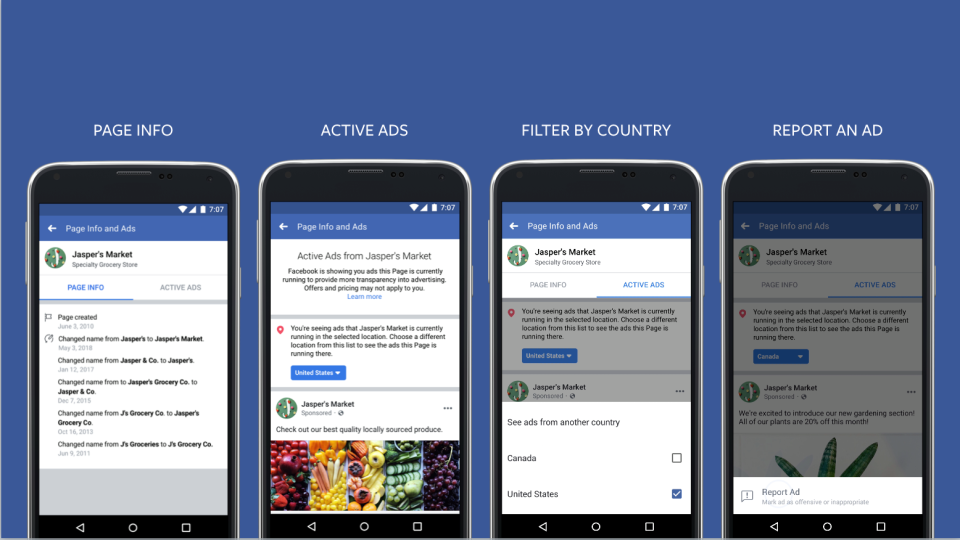

Facebook is changing how it handles the ads shown by Pages across the platform, with a new “Info & Ads” section that details all the ads your Page is running.

By going to a Page’s “Info & Ads” tab, you’ll be able to see every ad the company is running across Facebook, Instagram, Messenger, and Facebook’s partner networks whether they were targeted to you or not. You can also flag suspicious ads with a “Report Ad” button.

The tab will also include detailed information about Pages, including when it was created and any recent name changes to the Page.

“The vast majority of ads on Facebook are run by legitimate organizations — whether it’s a small business looking for new customers, an advocacy group raising money for their cause, or a politician running for office. But we’ve seen that bad actors can misuse our products, too,” writes Facebook’s director of product management, Rob Leathern, and its product marketing director, Emma Rodgers, on the company’s news blog.

The change was initially announced last October as part of sweeping changes to how Facebook handles political ads but has largely flown under the radar until now.

Facebook says this is just the beginning of changes to increase transparency between Pages and the social network’s ad platform. The company will be rolling out changes to political ad labels to Brazil ahead of the country’s upcoming elections and will continue to encourage greater transparency in advertising around the globe.

Chances are, you’ve been calling Google’s ad platform “Google Ads” most of the time you talk about running ads on the search engine and its network. Now, Google is too. AdWords is being rebranded to simply “Google Ads” as part of an effort to simplify the search engine’s services.

Google is also consolidating its other advertising products into either the “Google Marketing Platform” and “Google Ad Manager.”

According to the company, the change is designed to make it easier for small businesses to take part in online advertising across a variety of channels.

“This is primarily a name change, but it is indicative of where we have been directing the product” over the past few years, said Sridhar Ramaswamy, senior vice president for Google’s advertising services, at a press event announcing the change.

Google’s Advertising Trifecta

From now on, Google’s ad platform will be split between three major brands – Google Ads, Google Marketing Platform, and Google Ad Manager

Google Ads

Google Ads will encompass all of the services previously provided by AdWords, which Ramaswamy said will act as “the front door for advertisers to buy on all Google surfaces.”

The switch to Google ads will also include a significant change to Google’s default advertising format. The company is launching a new default ad mode called Smart Campaigns, which is designed to prioritize the actions advertisers want most. This includes using machine learning to optimize images, text, and targeting to boost performance as the ad runs.

Google Marketing Platform

The Google Marketing Platform will combine the services previously provided by DoubleClick Digital Marketing and Google Analytics 360. This makes the Marketing Platform the source for high-end tools intended for large businesses or ad agencies.

This platform will also include a number of new features from DoubleClick Bid Manager, Campaign Manager, Studio, and Audience Center.

Google Ads Manager

The last brand announced this week is Google Ad Manager, which will combine all of Google’s monetization tools for publishers, such as the DoubleClick Ad Exchange and DoubleClick for Publishers.

As Jonathan Bellack, director of product management for publisher platforms, explained, this is the result of a three-year-effort to merge the two products into a more integrated ad-buying service.

“These categories have just been breaking down for a while — all of our publishers already log into one user interface,” Bellack said. So the only thing that’s really changing is “the logo.”

The rebrand is believed to begin in July, but Google’s representatives say the ad platform will remain familiar and usable for everyone accustomed to Google’s services.

“The look and feel is going to change a little bit, but the core functionality is not changing,” said Managing Director for Platforms, Dan Taylor.

Instagram is betting big on long-form videos with a new video platform called “IGTV” which will show off videos up to an hour long. Until now, users were only allowed to upload videos up to one-minute-long, so this is a big upgrade for users.

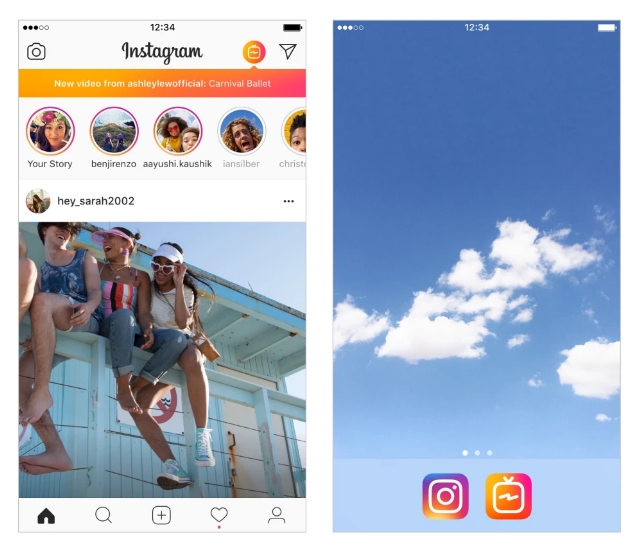
While the feature is entirely accessible within Instagram’s app and web platform, Instagram is also launching a stand-alone app available on both iOS and Android devices today.

“We made it a dedicated app so you can tap on it and enjoy video without all the distraction,” CEO Kevin Systrom explained.

So far, indications are that Instagram “celebrities” will get most of the attention within the IGTV section on the Instagram app, but businesses can still get some use out of the ability to upload longer, more in-depth videos.

Businesses may also benefit from being able to curate their own Channels of content that users can subscribe to within IGTV. This way, they will be notified anytime you post a new video.

For now, Systrom said that IGTV is entirely-ad free, but it likely won’t last forever. Once it has established itself on Instagram’s platform, I’d expect ads to start appearing.

How to start your own IGTV Channel

Creating a channel is easy and can be done within the Instagram app.

Step 1: Tap the IGTV logo near the top-right corner of your Instagram home screen.

Step 2: Tap the gear icon on the bottom right of the screen.

Step 3: Select “Create Channel” at the bottom of the screen.

Step 4: After a brief introduction to IGTV, select “Next” on the following two screens. Then, tap “Create Channel.”

Step 5: Congratulations, your channel is officially active and you can start uploading videos to IGTV.

Instagram logo

Instagram is coming up in the world. This week the social network revealed it has reached more than 1 billion monthly active users, jumping from 800 million in September of last year.

The extra 200 million users also make the site the fastest growing social network around right now by a fair amount.

For context, while Facebook remains the biggest social network overall, its growth in monthly users has fallen to just 3.14%. Snapchat, trapped by its own niche market of younger users, is growing even slower at 2.13%.

Instagram, however, continues to grow by almost 5% from quarter-to-quarter.

There is certainly some irony in the latest numbers. While Snapchat continues to stall, Instagram is largely making its gains on the back of similar features like Stories and image stickers.

Stories, in particular, have taken off to surprising popularity. According to the latest numbers, there are more people posting Stories on Instagram than Snapchat’s entire userbase.

The continued growth of Instagram also hints at Facebook’s gradual disconnect with younger users. Teens and other young social media users are adopting Instagram, rather than signing into Facebook.

The social network still has plenty of hurdles in its path, but their user growth shows it may be worthwhile to establish a business presence on the platform sooner rather than later.

Google My Business is bringing a new way to highlight your business with an attribute noting your establishment is “good for watching sports.”

The new tag comes just as the World Cup is heating up and many are flocking to bars or restaurants to watch the latest games with friends and fellow fans.

Because the World Cup is such a big event for gathering with friends to watch the competition, Google is spotlighting the new attribute directly in the “highlights” section on the overview tab of Google My Business listings.

Once the World Cup ends, the “good for watching sports” tag will be moved to the “About this business section” of local listings. However, it may also appear in the overview tab of listings depending on the situation and query.

According to Google, the only requirement for being a business that is “good for watching sports” is that you offer a TV that airs sports. That means you don’t have to be a dedicated sports grill or bar to turn yourself into a hub for the biggest sporting events.

The new attribute is one of just a few tags you can manually add to your listing, along with other options like whether you have Wi-Fi available to the public, if you are wheelchair accessible, or if you offer outdoor seating.

In some cases, Google may also apply other attributes based on customer reviews, such as noting that you are “popular with locals.” Unfortunately, these types of attributes can’t be added manually.

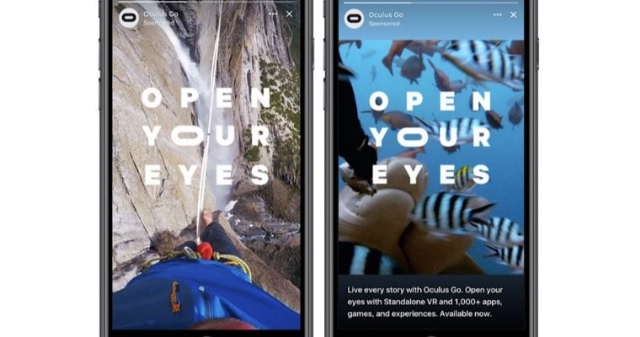
Facebook’s Stories are officially being monetized, as the social network announces new ads within their latest big feature.

The rising popularity of Facebook’s stories has been a slow growth. It has taken approximately 14 months since the launch of the feature to reach 150 million daily views.

To put that in context, Instagram’s Stories reached the same milestone within five months. Since then, Instagram Stories have continued growing to reach more than 300 million daily users.

Of course, now that Facebook has amassed a sizable audience for the feature, Search Engine Journal reports the platform is adding ads to Stories.

Facebook began testing ads in Stories earlier this month in North America and Brazil earlier this month. The ads consist of 5-to-15 second video clips, which can be skipped by simply taping through to the next story.

Compared to most of Facebook’s offerings, these new ads are relatively bare-bones. There is no click-through, no call-to-action, or any of the other ad features you are used to. However, Facebook plans to add those soon.

Along with the launch of Story ads, Facebook is working on bringing more detailed analytics about the performance of Stories to businesses, to help monitor your investment.

If you already have Story ads running on Instagram, you can automatically migrate them to Facebook. Or, you can let Facebook automatically format your news feed ads for the Story feature, including a color-matched border and text at the bottom.

Are you afraid typos or grammatical errors in your blogs might be hurting your Google ranking? According to Google Webmaster Trends Analyst John Mueller, worry no more.

The good news is typos won’t hurt your search rankings. The bad news is they may still hurt you in other ways.

Responding to a Twitter user who believed that errors in content can hurt your Google presence by getting content marked as low quality, Mueller explained that Google doesn’t actually care that much.

“It’s always good to fix known issues with a site, but Google’s not going to count your typsos (sic),” Mueller wrote.

While that might be a relief for many, there is still the obvious issue of how actual people perceive content with typos. People are prone to forgive a mistake here and there, but error-filled or poorly written content is going to be dismissed by most.

Poorly written content comes off as unprofessional and won’t help build your authority like well-edited, well-composed content. So, while you might be able to get away with some typos on Google, it always pays to take the time to edit and revise anything you are going to publish under your company name before the public ever gets to see it.

Google has given webmasters their final warning to convert their sites to HTTPS or be branded as “Not Secure” with a prominent message in the browser bar of all Chrome and all Chrome-based browsers after October of this year.

Why is Google doing this?

Google has been urging webmasters to switch their sites to the more secure HTTPS security protocol for years, using increasingly drastic measures. Currently, Google is denoting sites that are secure using a green icon in the browser bar. Since so many sites have now adopted the protocol, Google is taking this a step further with a prominent red warning for sites that are not secure.

What does this mean for you?

Internet users don’t give up their information easily. They have to trust that you won’t let their data be breached or misuse their information. If they see that your site is specifically “Not Secure”, they simply aren’t going to trust you with anything.

That could mean increasing bounce-rates for your website, fewer e-commerce sales, fewer newsletter sign-ups, or fewer internet-driven leads for your business.

Two-Stage Roll Out

Rather than “switching on” the security warnings all at once, Google will be rolling out the change in two steps.

First, Chrome will remove the green icon signifying safe websites from browser bars. In its place, they will temporarily leave the small lock icon in its place.

Then, beginning in October, Google will introduce the official red icon identifying sites that are “Not Secure.”

This latest warning from Google gives webmasters plenty of time to make the switch, but I advise taking action sooner rather than later. You can get started right now with Google’s HTTPS set-up guides here.

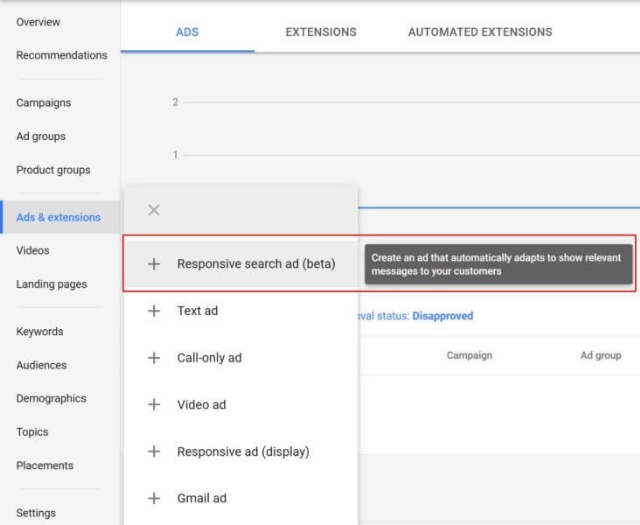
Don’t you wish you could somehow run one set of ads with the perfect headline for anyone who sees it, even when they have different needs or interests? AdWords is bringing that fantasy a little closer to reality with Responsive Search Ads.

These ad formats, currently in beta and available to some advertisers, allow you to set up one ad with multiple varying headlines and a few different descriptions which are alternated based on your advertising goal and the user’s intent.

Interestingly, these ads also get more screen real estate than standard text ads while Google is giving them a try.

The idea is to make your ad more versatile and to do the function of A/B testing for you without all the manual work. This also allows you to have a wider variety of keywords trigger your ads.

You can set up to 15 different headlines and four unique descriptions in a responsive search ad. With these, you can include headlines or descriptions for any scenario that might bring potential customers upon your services or products.

When shown, the ads will include up to three headlines instead of two, and up to two 90-character descriptions instead of the usual one 80-character description.

To best plan for this, Google recommends writing your first three headlines as if they will be shown together (in any order).

Google also suggests making headlines distinct by focusing on different features, benefits, or offers.

You can also “pin” certain headlines or descriptions into specific positions. This allows you to guarantee one headline will always be shown on top or a disclaimer is consistently positioned at the bottom of the ad.