The COVID-19 pandemic has impacted or changed almost every part of our daily lives in some way, and that holds very true when it comes to online search. 

Google has been tracking these shifts from the initial outbreak to our current time where over 4 billion people are staying home around the world and many in America are returning to work. 

In particular, Google says it has seen five key trends reflecting how online search behavior, consumers’ interests, and purchasing behavior have shifted over the past few months.

The five key trends in online search after COVID-19 include:

  1. More consumers are relying on multiple devices
  2. Increased reliance on Google search
  3. People are using online tools to create and develop virtual relationships
  4. Routines are adjusting to reflect being at home
  5. People are increasingly practicing self-care

Let’s dig into what these trends really mean and reflect:

Multiple Devices

With the huge jump in people working from home or spending extra time relaxing inside, Google has seen a similar increase in the amount of content consumption. Specifically, the company says staying home has led to at least a 60% increase in the amount of digital content watched in the US.

This means many consumers are relying on one device to indulge in their favorite content online while using another device to browse products, look up information, and connect with friends. 

Increased Reliance On Google

The search engine has seen a massive increase in searches for critical information and a wave of content designed to inform the public about safety, updated business practices, and other essential needs.

For example, Google has seen that online search interest for terms like “online grocery shopping” and “grocery delivery” grew 23% year over year in the US. 

Online medical needs have also skyrocketed, with online search interest in telemedicine climbing by 150% week-over-week. 

Building Virtual Relationships

Businesses may be opening, but many are still practicing social distancing which keeps them away from friends and family. In lieu of being able to spend time with loved ones, people are finding new ways to build relationships online:

As of April, Google Meet has hosted at least 3 billion minutes of video meetings, with nearly 3 million new users joining every day. 

Online search shows increased interest in digital recreations of normal social events, such as a rise in search interest for “virtual happy hour” or “with me” content which shows people doing ordinary tasks like cleaning, studying, or cooking. 

Changing Routines

As social distancing and quarantine continues for many, online search interest has shown that many are adapting their typical routines to be internet-first.

For example, search interest for “stationary bicycles” and “dumbbell set” has continued to rise while many try to stay healthy from home. 

Google also reports that search interest for “telecommuting” in the US has continued to grow since it reached an all-time high on Google and YouTube in March.

Practicing Self-Care

To help cope with the mental and physical toll of the COVID-19 epidemic, many are turning to online search to assist in practicing self-care from home. 

Some examples of this from Google’s report include:

  • Views of mediation-related videos are 51% higher in 2020 compared to 2019.
  • Searches for “bored” spiked significantly and have remained heightened since March. 
  • Searches for at-home activities such as “games,” “puzzles,” and “coloring books” have remained increased since March. 

Read the Full Report

The full report includes additional data as well as recommendations for responding to these changes to online search over the past few months. You can read the entire 39-page document here (PDF).
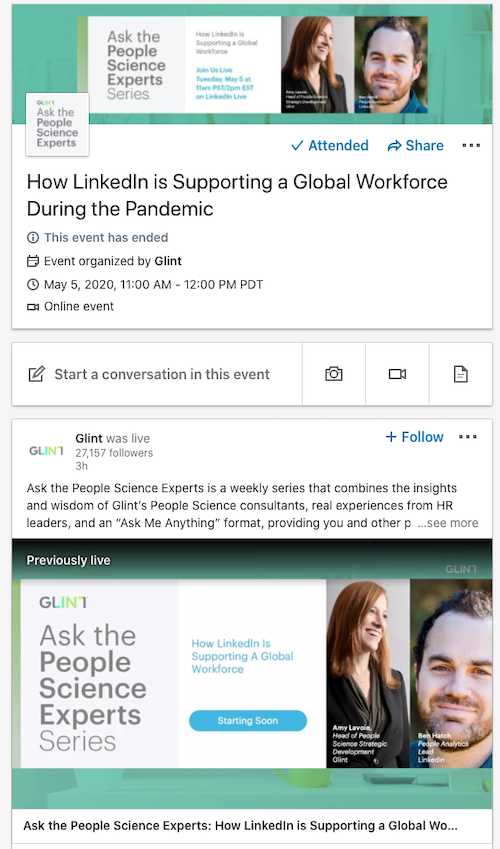
LinkedIn is in the process of launching a new way to create and host live virtual events as group meetings and conferences move online in the wake of COVID-19. 

The new events tool combines two of LinkedIn’s existing features (LinkedIn Events and LinkedIn Live) to prioritize the virtual conference needs of today’s professionals. 

By bringing these tools together, you can now easily alert users to upcoming live streaming content and build an audience for your future streams. This creates better engagement and encourages your followers to set aside time. 

LinkedIn Events

LinkedIn says it has seen huge gains in both the number of people streaming and engagement on those streams, with live video receiving up to 23 times more comments per post and 6 times more reactions per post compared to native video. 

Why Create a Virtual Event?

In the announcement, LinkedIn highlights several ways Virtual Events can help businesses:

  • Host your event safely, in a trusted environment: Using LinkedIn Live, you can choose to live stream to your Page followers or Event attendees, so you can meet audiences where they are. Admins can leverage easy-to-use 3rd-party broadcasting partners, including Restream, Wirecast, Streamyard and Socialive, with more being added in the coming months. 
  • Attract the right professional audiences: We’ve made it easy for you to share your event to your Page followers and send direct invitations to your first-degree profile connections. 
  • Drive buzz and engagement for your event: You can build buzz for your event or live broadcast by posting an update to your Page or Event feed and by recommending key posts for attendees to check out. 
  • Get more mileage out of your events: Once your virtual event is over, you can keep the conversation going with the Video tab — a dedicated hub for a Page’s organic video content that can be accessed by all members of your community. As virtual events become the norm, the Video tab helps you extend the shelf life of your digital video content.

How To Create Your Own Virtual Event on LinkedIn

To be eligible for hosting Virtual Events, your Page must also meet the criteria for accessing LinkedIn Live – which means your page must have at least 1,000 followers. 

The company has also suggested that it will only approve brands for LinkedIn Live who regularly engage with their community by responding to comments and facilitating a dialogue. 

Once you have been approved, the process is simple:

  • Select “Create a LinkedIn Event”
  • Select the option which says the event will be “online-only.”
  • Once you are ready to stream, open an accepted third-party streaming tool and select the event as the stream destination, instead of your organization’s Page.

The currently accepted third-party stream tools include Streamyard, Restream, Wirecast, and Socialive. The company has indicated it will soon be adding support for Wowza in the near future.

Once your stream begins, all event attendees will be notified through in-app or onsite notification. If enabled, attendees may also be notified through push notifications or browser alerts.

Throughout the COVID-19 pandemic, Google has been rapidly releasing new tools to assist shoppers looking for contactless pick-up options, delivery, and keep consumers up-to-date on frequently changing business hours or closings and openings. 

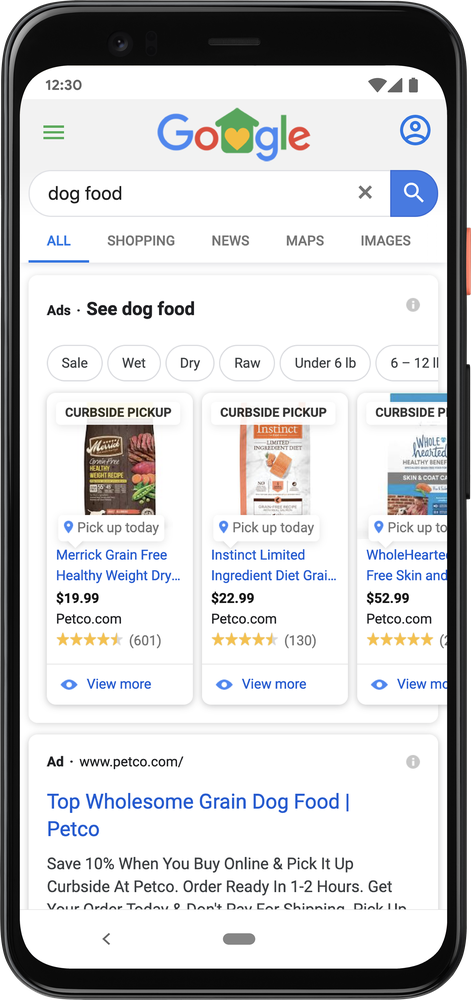
Now, the company has released a way for retailers to easily signal that they provide curbside pickup for products appearing in Local Inventory Ads. 

Delivery Is Overwhelmed, Consumers Shift To Pickup Options

With many stores across the country closed, many shoppers quickly turned to online retailers like Amazon to find their necessities and enjoyment during quarantine. Unfortunately, this led to shipping being massively overwhelmed, creating delays of up to a month for any product deemed “non-essential.”

Google says this situation directly contributed to a 70% global increase of searches for “in-stock” products within just one week from March 28 to April 4 and has continued to be an important search query for shoppers. 

While the company doesn’t provide specific data, it also suggests that searches for “curbside pickup” have been elevated since late March. 

How To Add Curbside Pickup To Local Inventory Ads

To help advertisers alert customers to alternative pickup or delivery options, Google has implemented a new label for products shown in Local Inventory Ads available with curbside delivery. 

The label is a small but significant badge for many shoppers, even as businesses reopen across the country. 

Although technically still in beta, Google announced it was opening the badge to all advertisers running Local Inventory Ads who have completed the process of onboarding for store pickup. 

Because it is still in beta, accessing the feature also requires a few unique steps. Specifically, advertisers must contact a Google Ads rep or fill out this form.

The new tag is available to all eligible advertisers anywhere Local Inventory Ads have been launched, including Australia, Austria, Brazil, Canada, Denmark, France, Germany, Japan, Netherlands, Norway, Sweden, Switzerland, the UK, and the U.S.

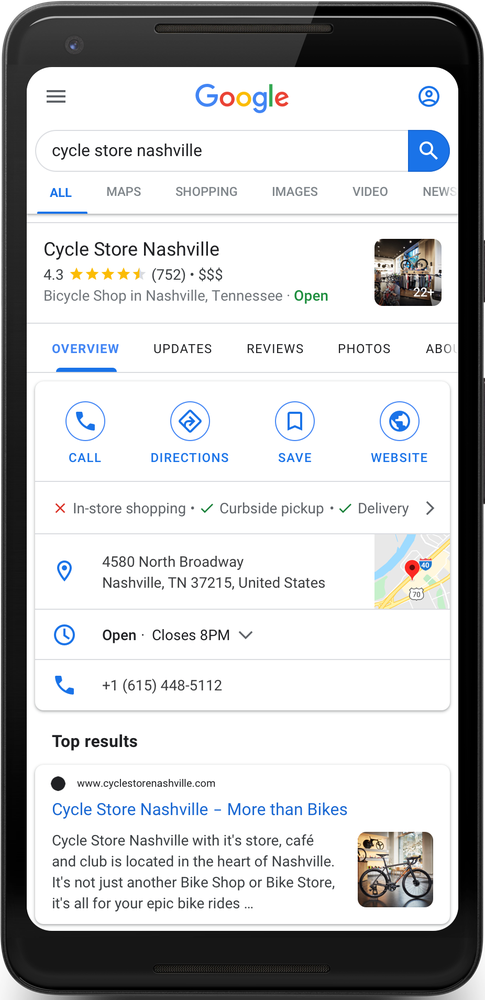
If you do not fit the criteria for this feature or are not utilizing Local Inventory Ads, the company notes that you can still use your Google My Business profile to notify shoppers to curbside pickup or delivery options by adding these attributes to your listing. 

Even before the COVID-19 pandemic, consumer behavior was prone to shifting quickly. Now, it seems buyers’ needs are changing daily – if not hourly. If there is any place this is reflected, it is in our Google searches. 

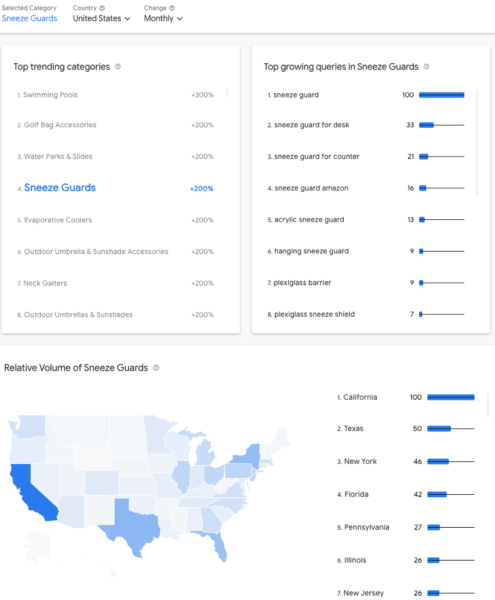
Product and purchase-related searches have been rapidly evolving as people respond to the daily updates related to the pandemic and their state’s handling of the situation. To help businesses track these changing needs and consumer behaviors, Google is launching a new tool called Rising Retail Categories.

“We’ve heard from our retail and brand manufacturing partners that they are hungry for more insights on how consumer interests are changing, given dynamic fluctuations in consumer demand,” said the company in the announcement.

“That’s why we’re launching a rising retail categories tool on Think with Google. It surfaces fast-growing, product-related categories in Google Search, the locations where they’re growing, and the queries associated with them.”

Specifically, the tool shows the biggest shifts in product-centric search categories, as well as their associated queries and the locations where the product categories are showing making the biggest waves on a weekly, monthly, or yearly basis.

The company also says “this is the first time we have provided this type of insight on the product categories that people are searching for.”

Currently, the Rising Retail Categories tool includes data for the US, UK, and Australia.

In the announcement, Google suggested a few different ways the information could be helpful for brands, including content creation, product promotion, and even the development of new products. 

In response to the ongoing COVID-19 pandemic, LinkedIn is launching a slew of new tools designed to help the job hunting and hiring process go virtual.

Specifically, the country is launching new ways for applicants to provide video introductions to hiring managers and AI-powered tools for preparing for job interviews.

Here’s what you can expect from both of these new tools:

Video Introductions

LinkedIn Video Interview Prep

Although the tool is technically still in testing, LinkedIn announced it is launching a feature aimed at making the best first impression possible – even when you can’t meet in person.

“We’ve found that 65 percent of people believe that the impression you make online is just as important as the one you make in person, but it can be challenging to show your soft skills to potential employers when you’re not in the same room.”

With LinkedIn’s new video introductions tool, hiring managers can specifically request an introduction as part of their hiring process.

Applicants can then provide recorded video responses or written replies to your questions or prompts.

“A carefully crafted response can help you stand out before the official interview process even begins,” said the company in the announcement.

AI-Powered Interview Prep

LinkedIn AI-Powered Video Feedback

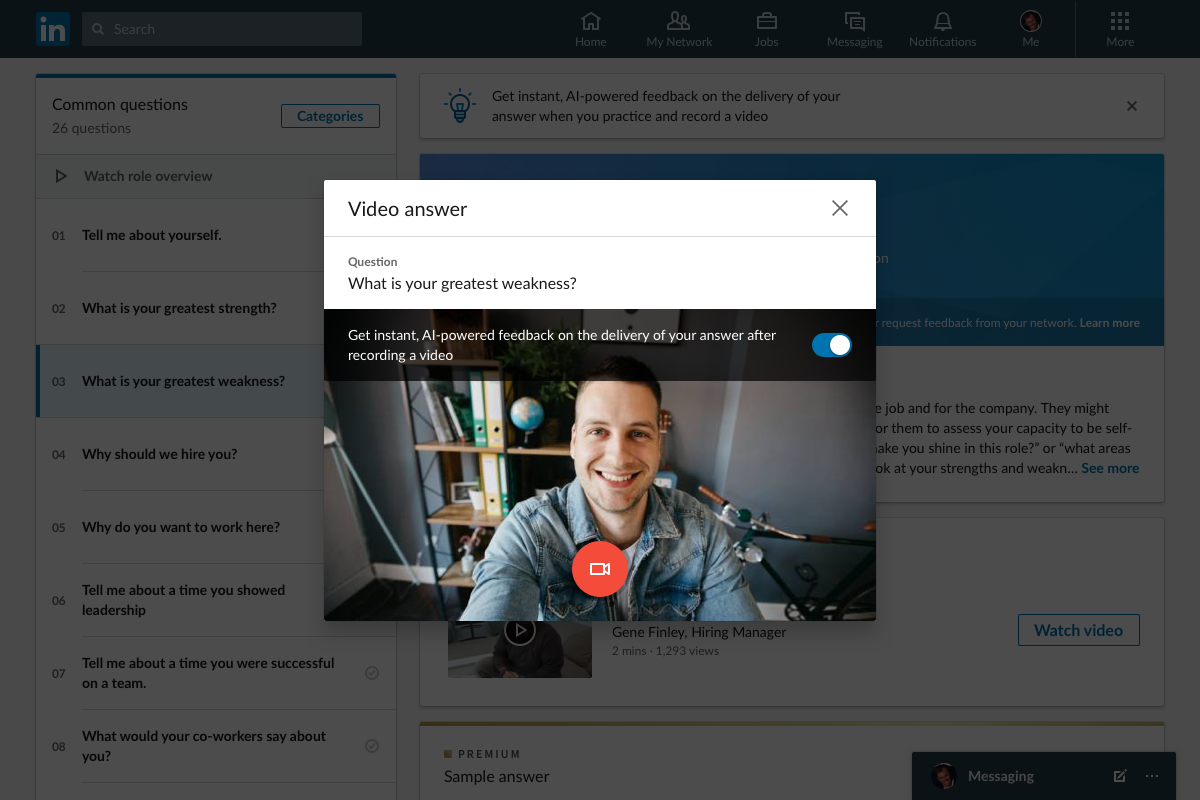
Another new tool LinkedIn is bringing to job hunters is an AI-powered instant feedback interview prep feature, which prepares job candidates for common interview questions.

“When it comes to the interview, more than 50 percent of people say they lack confidence,” explained the company in a blog post.

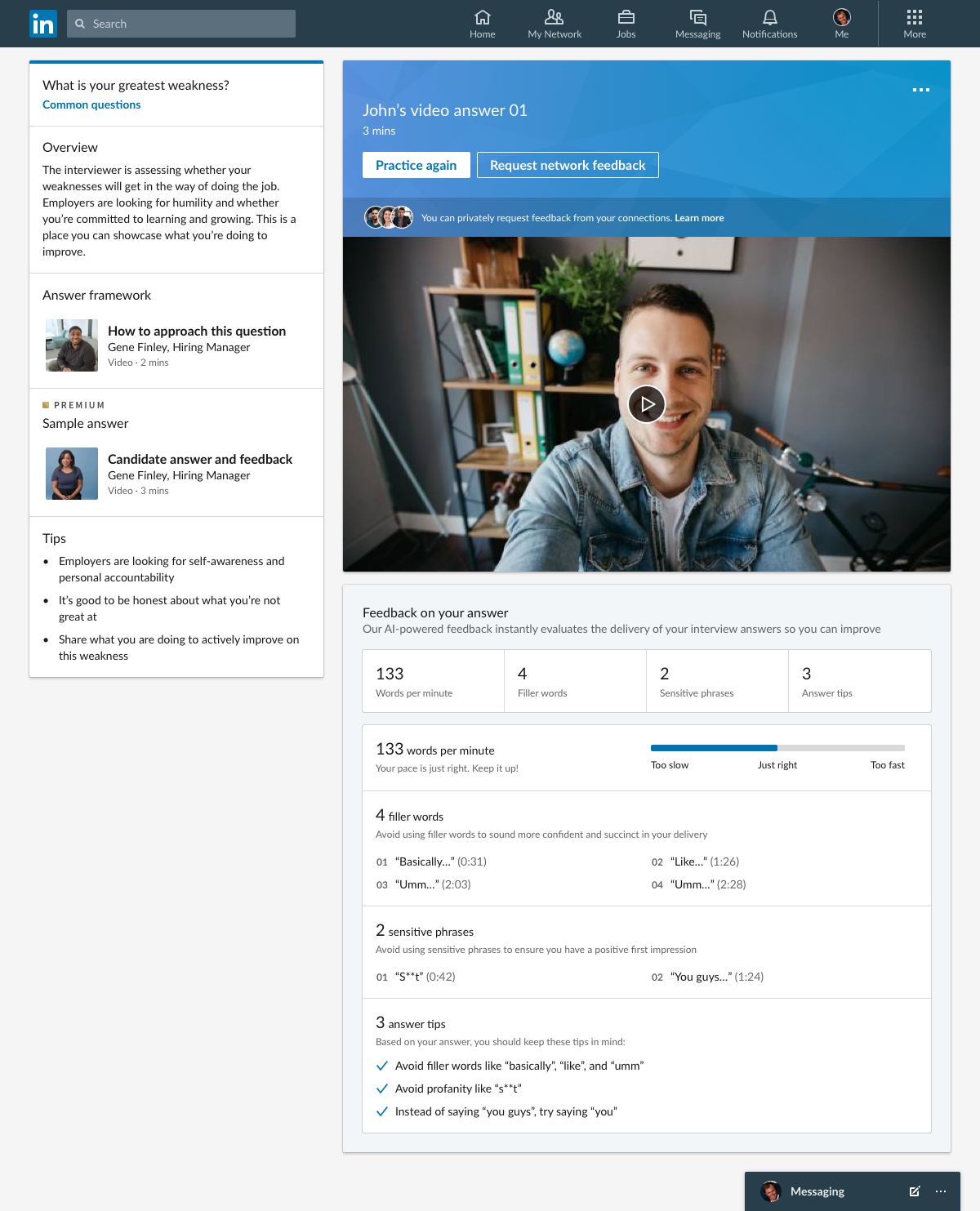
The instant feedback tool listens to candidates’ responses to common questions and analyzes their speech content and patterns to provide real-time feedback and recommendations such as how often a person uses filler words, pacing, and sensitive phrases to avoid using.

After, users can opt to send their recorded responses to their personal connections to get even more feedback from trusted professionals.

LinkedIn Tips For Video Job Interviews

Along with the announcement, LinkedIn provided three tips all job hunters should consider when preparing for a video interview:

  1. Establish a relationship quickly: You don’t have the luxury of small talk on a video call, so it’s important to build a rapport quickly with your interviewer. Be sure to use the first few minutes of the call to establish that personal connection, as this will instantly put you at ease. Check out their LinkedIn page for background information or mutual connections that could provide a good base for conversation.
  2. Find a quiet spot: In this new age of remote working, there’s always the risk of being interrupted by kids asking for help with homework, or housemates wandering into the kitchen to make a sandwich. Let your family or housemates know you have an important interview scheduled so they don’t accidentally walk in on you or make too much background noise.
  3. Check your tech: An obvious but crucial tip: take some time ahead of the interview to make sure the tech works and you know how to use it. If you need help, check out these LinkedIn Learning courses to give you the lowdown on how to use the latest video tools.

Google has released a detailed document they are calling the COVID-19 Marketing Playbook to help you create a strategy for marketing your brand during and after the ongoing pandemic. 

The recommendations included are based on Google’s own observations of how businesses are responding to the quickly changing situation and the company’s internal data.

The Three Stages of COVID-19 Marketing

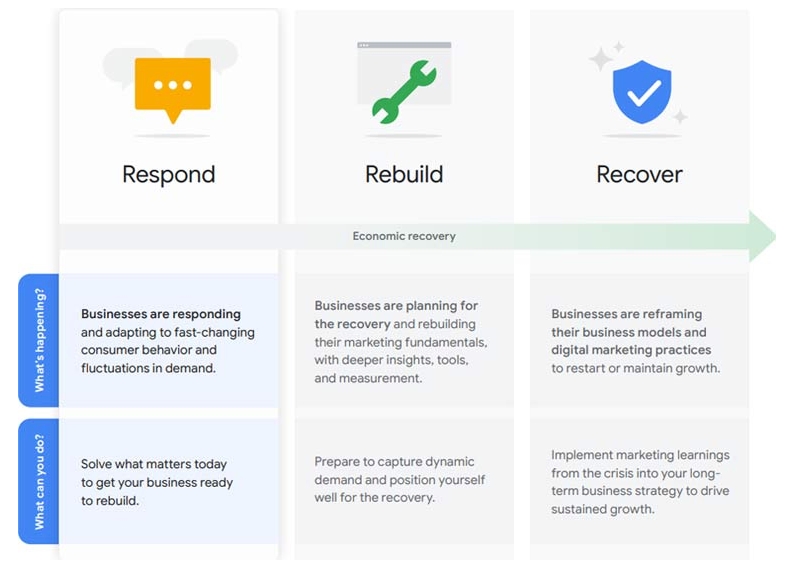
According to Google’s guide, there are three stages of marketing as the situation has unfolded:

  1. Respond
  2. Rebuild
  3. Recover/Re-frame

Here is what each of those stages mean and how you can do to help your business during each step:

Respond

What’s Happening?

Businesses are responding and adapting to fast-changing consumer behavior and fluctuations in demand.

What Can You Do?

Solve what matters today to get your business ready to rebuild.

Rebuild

What’s Happening?

Businesses are planning for the recovery and rebuilding their marketing fundamentals, with deeper insights, tools, and measurement.

What Can You Do?

Prepare to capture dynamic demand and position yourself well for the recovery.

Recover/Reframe

What’s Happening?

Businesses are reframing their business models and digital marketing practices to restart or maintain growth.

What Can You Do?

Implement marketing learnings from the crisis into your long term business strategy to drive sustained growth.

The Three Stages of COVID-19 Marketing Strategy

Similarly, Google says there are three steps to marketing your business during the pandemic:

  1. Use consumer insights to drive your approach
  2. Assess the impact on your business
  3. Take action now

How COVID-19 Has Affected Search

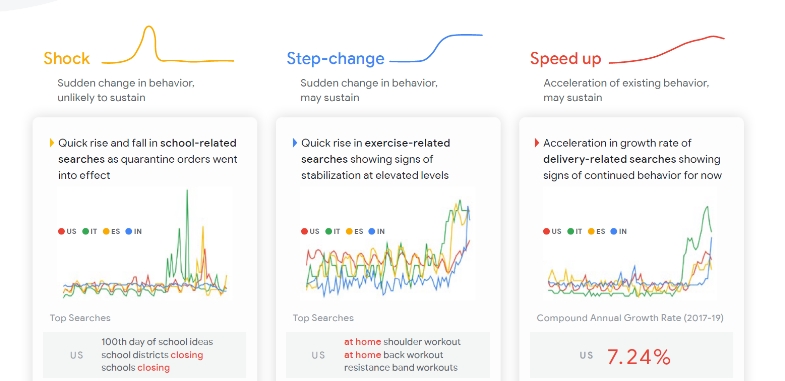
Google has identified three specific ways the ongoing COVID-19 situation has affected search patterns so far:

Shock

Sudden change in behavior, unlikely to be sustained

Example: Quick rise and fall in school-related searches as shelter-in-place orders were implemented.

Step-change

Sudden change in behavior that may sustain

Example: Quick increases in exercise-related searches have stabilized at heightened levels during this time.

Speed up

An acceleration of existing behavior that may sustain

Example: Google has seen an acceleration in the growth rate of delivery-related searches that appear to be maintaining for now.

How Google Has Responded To COVID-19

To illustrate how to put these concepts into practice, Google points to its own response to the COVID-19 pandemic and highlights five principles to ensure your strategy remains effective and relevant:

  • Context – Related to localization
  • Constantly Reassess – Being flexible and responding to changing trends
  • Creative Considerations – Evaluate if artwork, tone, words, and other create aspects are appropriate
  • Changing priorities to navigate uncertainty – Being helpful in a way that fits the current reality
  • Contribution at every opportunity – Identifying ways your brand can help that are specific to the pandemic


Download Google’s COVID-19 Marketing Strategy Playbook here (PDF) or read the full announcement about the playbook here.

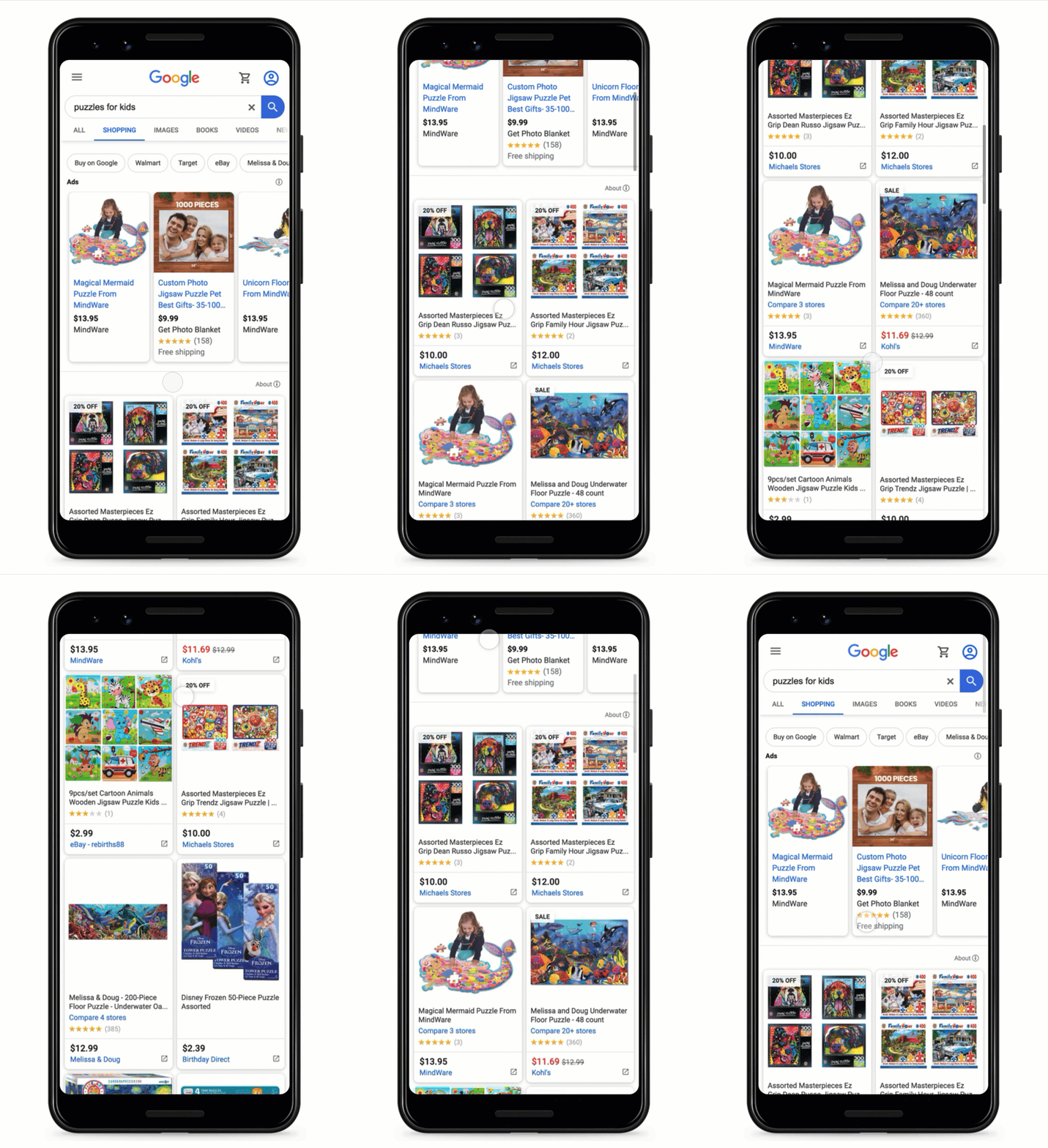
After 8 years, Google is finally bringing organic, unpaid listings into its Shopping search results.

Starting next week, the Google Shopping tab “will consist primarily of free product listings.”

Google Shopping Organic Listings

This is a huge shift from how Google has treated the section in the past. Since 2012, the Shopping tab has been exclusively for paid product listing or ads.

The decision comes during the ongoing shutdown of many local businesses, driving consumers to online retail. In particular, Amazon has seen a massive surge in usage this month.

Although the company says it had plans to open the Shopping tab for organic listings before this, Google’s President of Commerce Bill Ready noted the ongoing crisis was a major motivation for “advancing our plans to make [Google Shopping] free for merchants.”

Importantly, the change is permanent and will not revert as businesses across the country begin to reopen.

“For retailers, this change means free exposure to millions of people who come to Google every day for their shopping needs,” said Ready. “For shoppers, it means more products from more stores, discoverable through the Google Shopping tab. For advertisers, this means paid campaigns can now be augmented with free listings.”

What Happens To Paid Shopping Listings

With Google moving to make the Shopping tab more like its traditional search engine results pages, the company will begin treating paid shopping ads similarly to ads shown in other areas.

Paid shopping ads will primarily appear at the top and bottom of results pages in the Google Shopping tab. Additionally, carousels of product listing ads will continue to be only for paid ads.

How To Get Your Products Indexed

Google says the revamped shopping tab will continue to be powered by product data feeds provided through Google Merchant Center. Although GMC was once a paid service, the company opened the Merchant Center to all retailers for free more than a year ago, as it began to integrate organic product listings into search results across the platform.

To get your own products included in search results within the Google Shopping feed and elsewhere across Google, you’ll need to start a Google Merchant Center account and upload a product feed detailing the products you carry. Additionally, you must opt-in to “surfaces across Google” to be included in organic results.

YouTube is launching a new tool to help small businesses with limited budgets or means create short, stylish promotional videos.

The company is releasing a beta version of the tool ahead of schedule in recognition that the ongoing coronavirus pandemic has made it unsafe to shoot in-person videos for businesses.

“Because businesses of all sizes are strapped for time and resources and in-person video shoots are no longer practical in many countries, we are accelerating the next stage of Video Builder availability.”

The YouTube Video Builder makes it easy to create videos between 6-seconds and 15-seconds long using an array of templates and aesthetics.

Importantly, you don’t need to have any existing video footage. Businesses are just asked to provide their own images, text, and logos which are then animated into a video.

You can customize the colors, fonts, and even music thanks to Google’s royalty-free audio library.

Once finished, you are free to share the videos anywhere you like. The obvious choice would be to use it to promote your brand on YouTube. However, you can also share it on Facebook, your website, or anywhere else you choose.

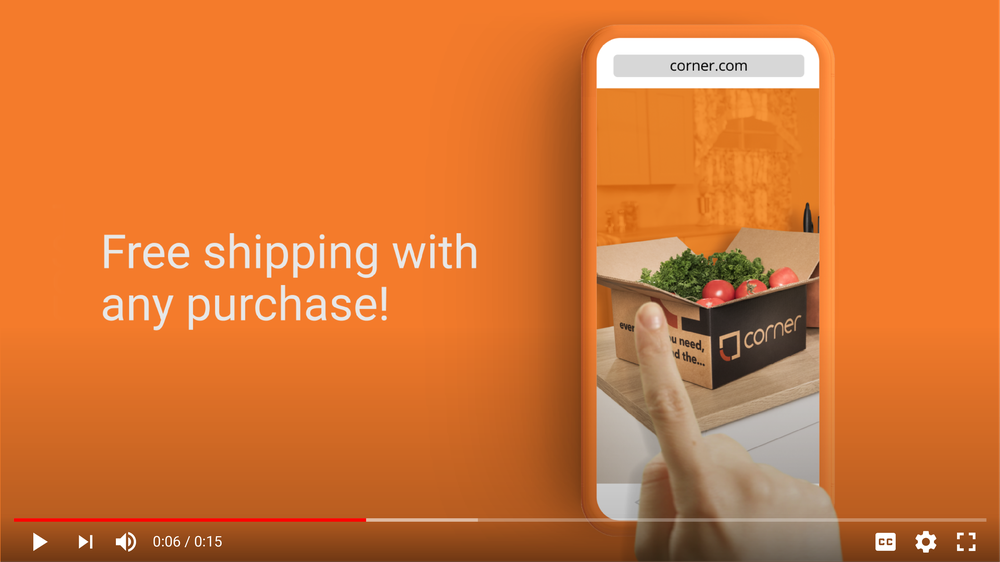
You can see an example of what a finished ad using Video Builder looks like below:

How To Use The YouTube Video Builder

As the tool is in beta access, you will need to sign up before you can get use the tool for the time being.

Once you’ve gotten access, creating a video is a simple process – as shown in the video below:

In the video, YouTube recommends creating your short video by taking these steps:

  • Select a layout suited for your goal
  • Upload your logo and select a color
  • Upload images and add copy
  • Select a font
  • Pick a music track from Google’s library
  • Click “create video” to see a preview of the finished video
  • Save the clip and upload it to your channel, website, and social media pages

The tool will save any videos you have created as a template so you can also iterate upon your finished product for several similar videos with small tweaks.

Finished videos can also be immediately used to create a YouTube or Google Ads campaign if you like, though it is not required.

For more information about using the YouTube Video Builder, check out the official help document.

As Google’s employees shifted to working from home or and limiting staffing, Google temporarily shut down the publication of several key Google My Business components.

Most notably, Google My Business put a pause on the publication of any new reviews or review replies, while also suspending the posting of new photos and Q&A’s.

GMB Starts To Gradually Return

In the last few days, Google has updated the page detailing the steps it is taking in response to COVID-19 to say:

“Review replies are now available. New user reviews, new user photos, new short names, and Q&A will gradually return by country and business category.”

Along with review replies, it appears Google is quickly taking steps to bring new user reviews back online.

New Reviews Are Coming Back

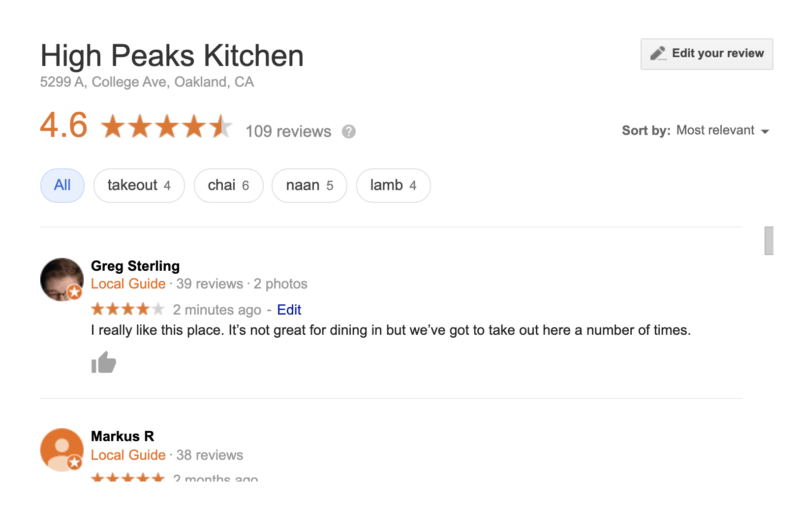
Several respected figures in the SEO community including Mike Blumenthal and Greg Sterling have reported being able to post visible new reviews for businesses in their area.

Sterling was able to independently verify his review was showing publicly for a restaurant in his area, despite a warning that the review might be delayed.


However, there are still plenty of reports out there of reviews being submitted but not being published, suggesting the process of bringing reviews back is still underway.

Pinterest expanded its online shopping capabilities this week to make it easier to find and buy products across the platform. The updates to three core parts of its commerce marketing services make its tools more accessible and provide real-time tracking of what’s in stock with which retailers.

Shop What’s In Stock

Users can now shop in-stock fashion or home decor products in multiple ways across the platform.

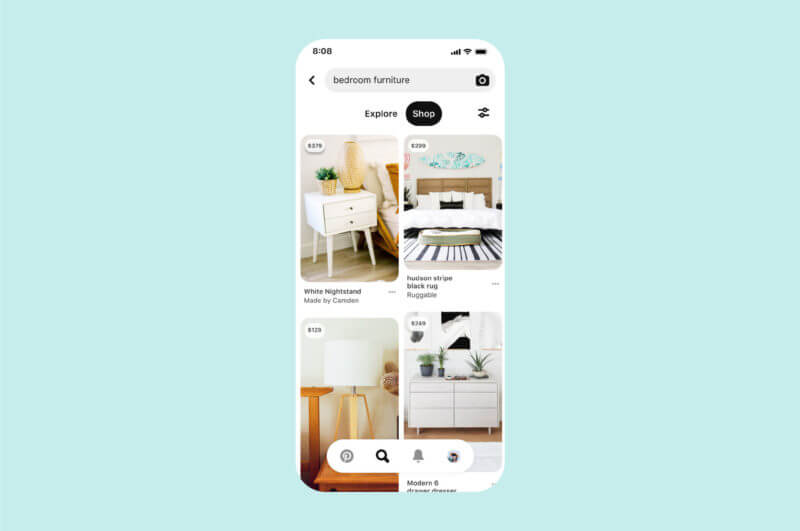
The most notable change is a new “Shop” tab which will appear on search and on boards to help filter in-stock products from retailers. The tab will also help filter based on price and brands available from retailers.

When it appears on boards, the Shop tab will highlight products from or inspired by the Pins saved within users’ home decor or fashion boards.

Visual Search

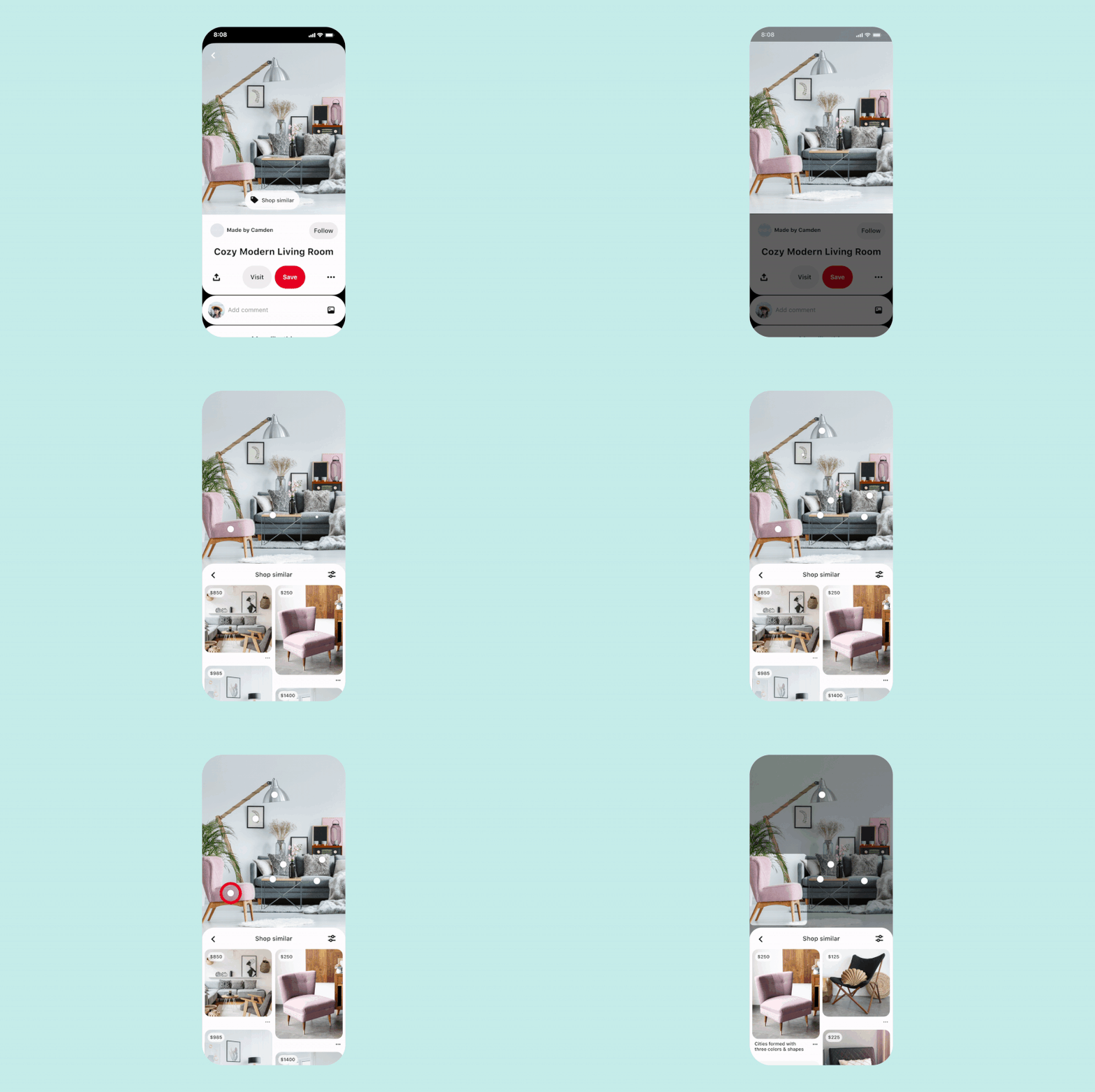
Pinterest is integrating its visual search functionality with shoppable Pins to make it easier to find products directly from your feed.

Style Guides

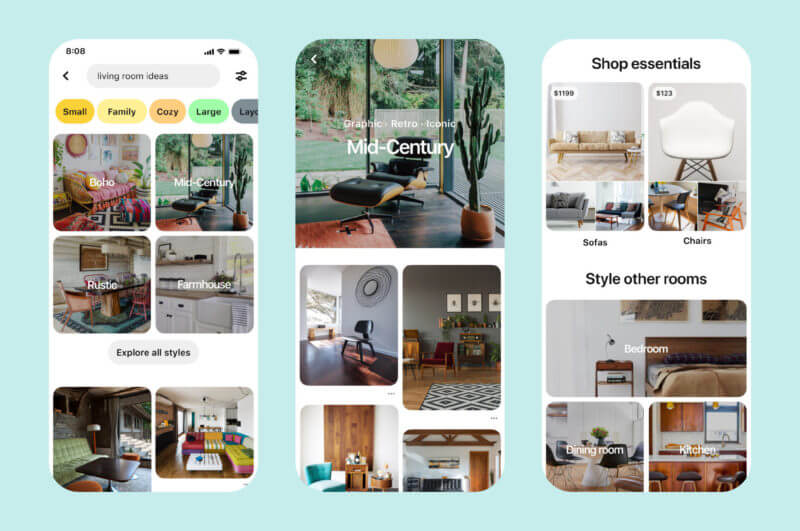
Home decor style guides are now findable using Pinterest’s search tools. These are curated collections based around specific styles such as “mid-century” or “farmhouse” and appear at the top of search results for queries like “living room ideas.”