Google+ is dead. Long live Google+.

Google announced it is retiring the “classic” Google+ we all know and replacing it with an all-new updated version with several big updates. The company says it is aiming to please users with several of the most heavily requested updates from the Google+ community.

”With this latest round of updates, we believe the new Google+ is really your Google+— designed around your suggestions, requests and needs. It also means it’s time to say goodbye to classic Google+ on the web, which we’ll be turning down on January 24.”

Here are a few of the things you can expect when the “new” Google+ launches on January 24:

Hide Low-Quality Comments
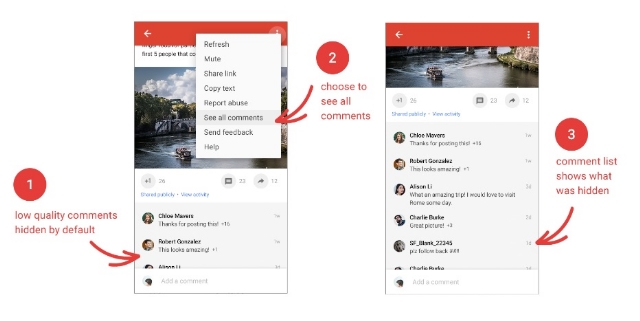
Google+Comments

Google+ will begin to automatically bury low-quality comments that its algorithms deem non-conductive to conversation. It’s hard to know how exactly the function will work, but you can opt to leave the “low-quality comments” visible to everyone if you desire.

Putting Content First
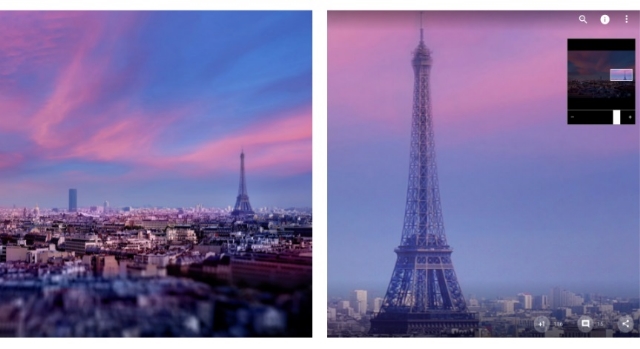
Google+Images1

Google+ is aiming to trim the fat with its new update by reducing the amount of wasted space on the screen. Instead, it aims to put the focus on content with more images that you can even zoom in on.

Events Make Their Return

Events disappeared from Google+ some time ago, but the ability to create and join events is coming back. However, the company says it still needs to refine Events based on user experience, so expect it to be a work in progress when it launches.

“And Much More”

While Google is relaunching Google+ on the 24th, they say their work is far from over. “Our aim is to make Google+ the best place to connect around the things you care about,” the company says. Google is encouraging users to give their feedback and help shape the new Google+ as it takes shape in the future.
Google has officially begun rolling out the intrusive mobile interstitial penalty yesterday after months of warnings the penalty would be launched on January 10, 2017.

The roll-out was confirmed by both John Mueller and Gary Illyes yesterday.

The penalty is specifically designed to target intrusive interstitials that pop-up immediately after landing on a page from a Google mobile search result. However, it does not affect pages with delayed interstitials triggered by a click or action on the website.

Google specifies this means “pages where content is not easily accessible to a user on the transition from the mobile search results may not rank as highly.”

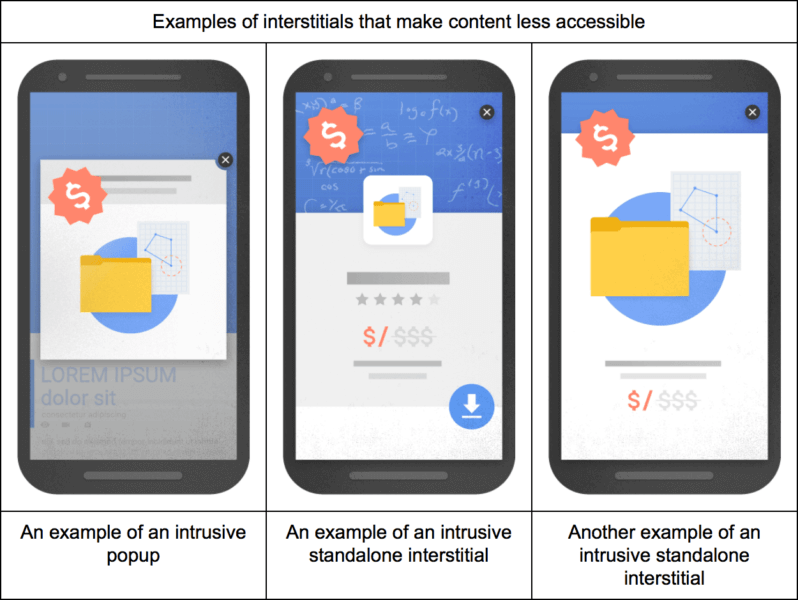
Google also detailed three specific types of interstitials it deems as problematic:

google-mobile-interstitials-penalty-bad-798x600

  • showing a popup that covers the main content, either immediately after the user navigates to a page from the search results or while they are looking through the page.
  • displaying a standalone interstitial that the user has to dismiss before accessing the main content.
  • using a layout where the above-the-fold portion of the page appears similar to a standalone interstitial, but the original content has been inlined underneath the fold.

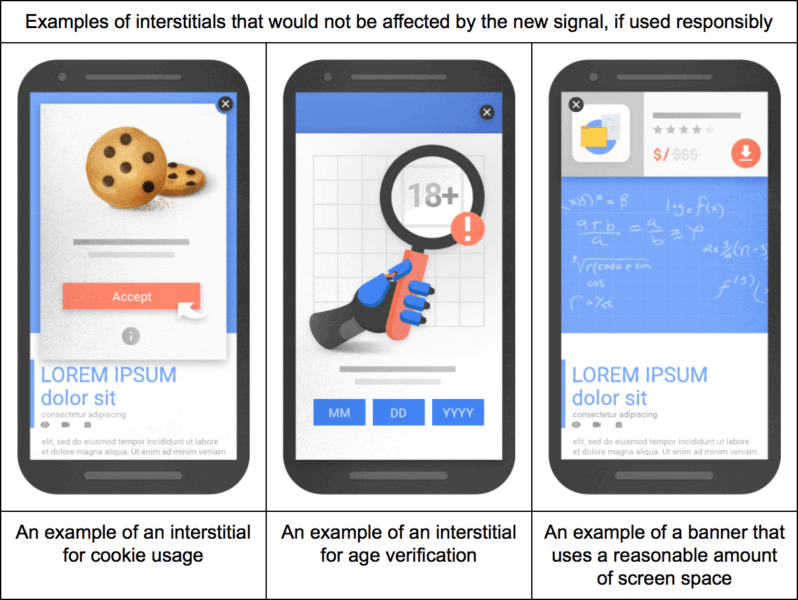
The company also detailed three types of interstitials that would not be affected by the penalty, so long as they are “used responsibly”:

google-mobile-interstitials-penalty-good-798x600

  • Interstitials that appear to be in response to a legal obligation, such as for cookie usage or for age verification.
  • Login dialogs on sites where content is not publicly indexable. For example, this would include private content such as email or unindexable content that is behind a paywall.
  • Banners that use a reasonable amount of screen space and are easily dismissible. The app install banners provided by Safari and Chrome are examples of banners that use a reasonable amount of screen space.

Google HTTPS Warning

Google is making some changes to protect users’ sensitive information online, and it could lead to your site being marked as non-secure by Google’s web browser at the end of this month.

Google released a warning that as of the end of January 2017, Chrome will mark sites without HTTPS as non-secure if they collect private information like passwords or credit cards.

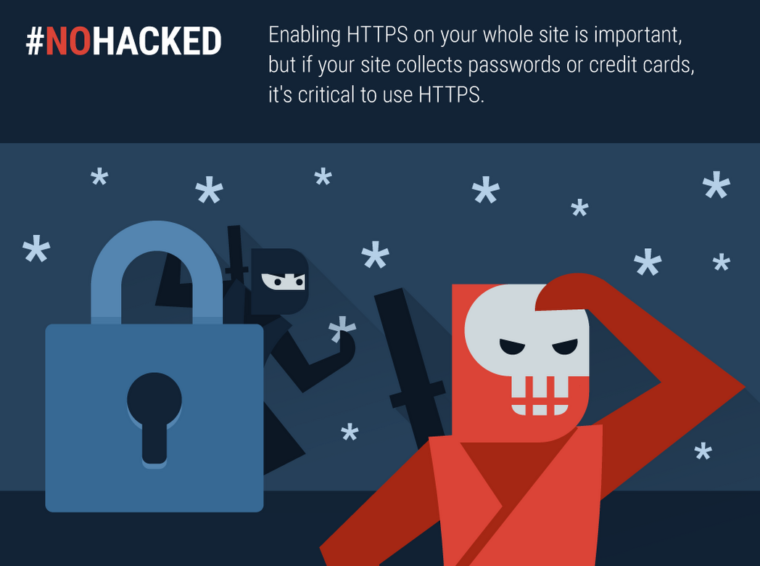
Google #NoHacked HTTPS

“Enabling HTTPS on your whole site is important, but if your site collects passwords, payment info, or any other personal information, it’s critical to use HTTPS.”

The company has encouraged implementing HTTPS in the past by making it a (very minor) search ranking signal. Now, from the sound of the alert, the company says an entire site will need to be HTTPS if any pages collect payment or sensitive information.

Switching over to HTTPS is an easy process, but you should begin preparing to make the switch now if your site fits the criteria. Otherwise, you are likely to be flagged as non-secure in February and lose a large amount of your web traffic.

Negative SEO alert

There’s a new malicious SEO tactic making the rounds and your Google My Business listings could easily be the victim, according to web security company Sucuri. The company says individuals are sneaking inappropriate or damaging photos into GMB listings with the intent of damaging a business’s reputation and image.

What makes this type of exploit unique, however, is that it doesn’t take any hacking skills to do. Unlike other negative SEO tactics, this specific technique does not include hosting images on a client server, malicious code, or even breaking into an account.

Ultimately, the attack is taking advantage of Google’s lax rules for uploading photos to a business’s location in Google Maps. Anyone can upload images to a business’s listing, and any of these images can be used for Knowledge Graph data about the business.

While Sucuri doesn’t have evidence of this, it is possible for a person to spam a business’s listing with lewd images and then send fake hits to them to increase their perceived popularity – all with the end goal of making sure they come up when people see your business online.

How to Protect Your Listings

Unfortunately, the nature of this type of attack makes it difficult to guard against. There is no way to limit who can upload photos to your listings or determine which image gets used in Knowledge Graphs. The best you can really do is to actively keep an eye on your listings and which photos are appearing next to your listings.

You can also watch to make sure no one is uploading inappropriate pictures to your Google My Business photos. While you can’t stop people from uploading lewd images, you can easily remove any associated with your location.

google-my-business-1

When it comes to marketing your business, it’s all about image. How people perceive your business will decide whether they decide to come in the door or walk away. This is especially true online.

One of the first images people will see when they find your business is almost always your photos in your local listings on search engines. Thankfully, Google has given you more control and more data on how your images are performing.

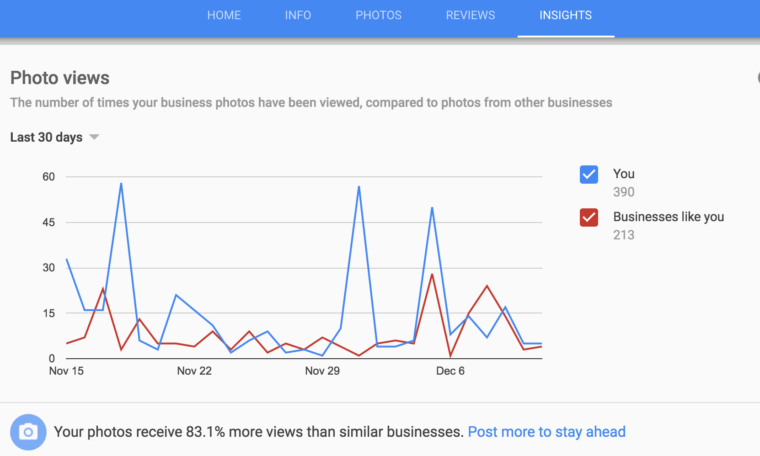
With the new insights for photos on business listings, you can see how people are responding to your listing and images and compare them against your competition.

You can easily see the new insights in your Google My Business listing by clicking the Insights tab on the top navigation bar. At the bottom of the screen, you’ll find a graph comparing your business to “businesses like you”.

screen-shot-2016-12-16-at-11-29-21-am-760x456

You can refine the time-period you want to look at by the past 90 days, past 30 days, and past 7 days.

Unfortunately, you can’t select exactly what businesses you are comparing your site against, nor do you even get to know who the “businesses like you” are. But, the new tool can still be an effective way to make sure you are making a great first impression with your listings on Google.

Year in Search

Google has finally released its annual year in search list, breaking down the biggest stories and searches of the past year. As usual, it is broken down into several categories and countries, making it easy to see what was trending in 2016 in your area or around the world.

Google’s Top 10 Worldwide searches of 2016:

  1. Pokémon Go
  2. iPhone 7
  3. Donald Trump
  4. Prince
  5. Powerball
  6. David Bowie
  7. Deadpool
  8. Olympics
  9. Slither.io
  10. Suicide Squad

The top searches for the US are almost identical, except for a few changes. “Powerball” bounces up to the top slot, because it can only be played in America. Meanwhile, “iPhone” slides entirely off the list.

Google’s Top 10 US Searches of 2016:

  1. Powerball
  2. Prince
  3. Hurricane Matthew
  4. Pokemon Go
  5. Slither.io
  6. Olympics
  7. David Bowie
  8. Trump
  9. Election
  10. Hillary Clinton

While the iPhone 7 didn’t make the top US searches, it does lead the worldwide top tech searches of the past year. Apple also dominates 3 of the top 4 searches for consumer technology. Considering its recent reveal, it is also somewhat surprising to see the Nintendo Switch also makes the list at number 9.

Google’s Top 10 Consumer Tech Searches Worldwide:

  1. iPhone 7
  2. Freedom 251
  3. iPhone SE
  4. iPhone 6S
  5. Google Pixel
  6. Samsung Galaxy S7
  7. iPhone 7 Plus
  8. Note 7
  9. Nintendo Switch
  10. Samsung J7

Of course, there are plenty more interesting categories in Google’s Year in Search 2016 to look through including beers, fashion designers, GIFs and much more. Check out the lists for yourself.

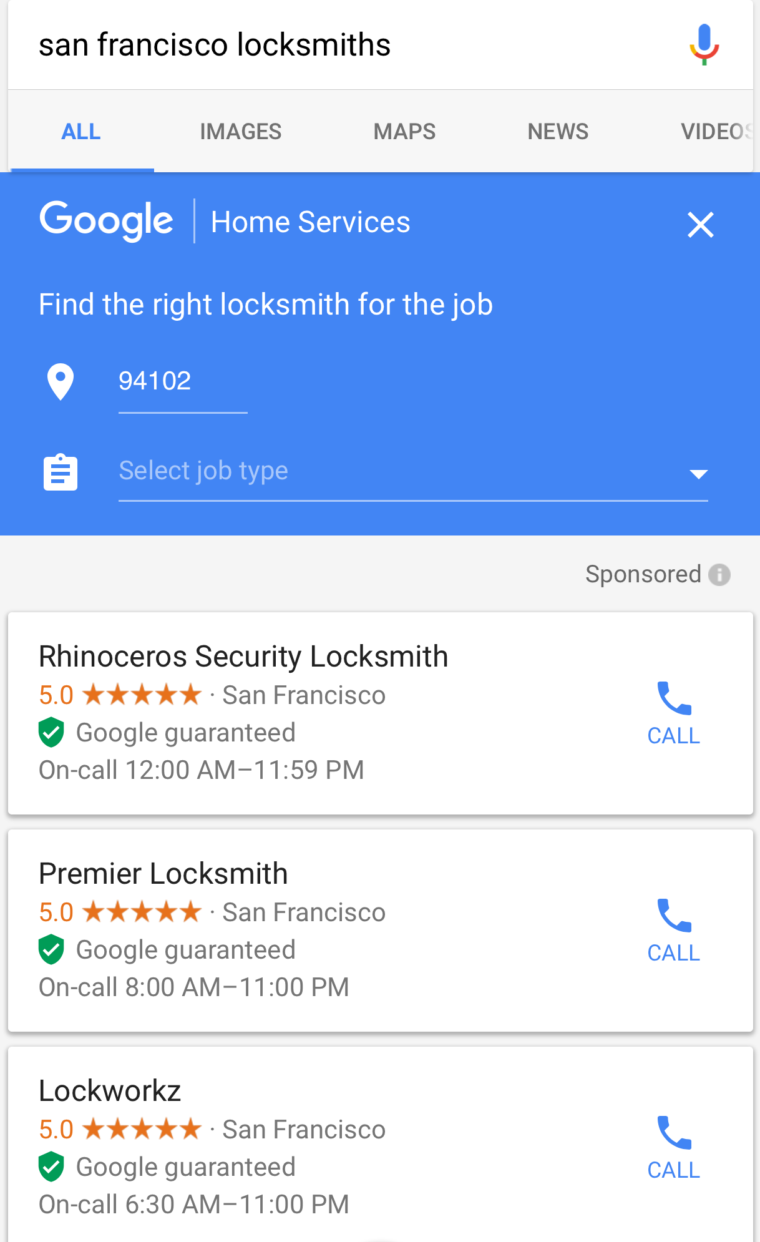
After months of testing a new verification in the San Francisco area exclusively for locksmiths and plumbers, the search engine has officially launched the “Google guaranteed” verification process.

If your business gets “Google guaranteed”, you get a special green badge next to your business in the search results – and customers get a few perks and protections through Google.

img_3099-760x1242

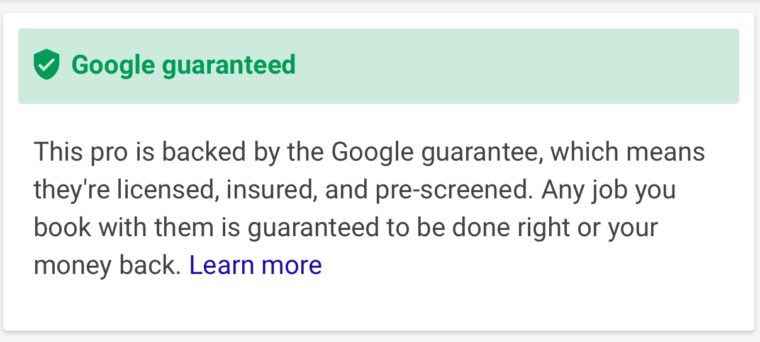
If you tap on any of the results, you are then taken to the home service ad specifically for that business, along with some extra details about what the Google guarantee really means:

img_3100-760x342

Tapping on Learn More goes even more in-depth, with a full page of details about what the Google guarantee covers and how it works:

”When you book an eligible home service pro on Google, you are protected by the Google guarantee. If you’re not satisfied with the work quality, Google may refund up to the amount paid for the job.”

What Businesses Need To Know

Currently, the Google guarantee is limited to just locksmiths and plumbers. This is because both industries have had recent issues with ad fraud and abusive advertising practices which Google is attempting to clean up.

There does not appear to be a public sign-up process for businesses hoping to be verified, and it is unclear what the verification process includes. However, this is likely to become more transparent as the verification process is extended nationwide.

What Customers Need To Know

To activate the Google guarantee, fill out this form before your first appointment. You can also call customer support at (844) 885-0761 to submit a claim or ask questions about your coverage.

Coverage

  • If you’re unhappy with the work performed, you can submit a claim and Google will cover the invoice amount up to a lifetime cap of $2,000.
  • The job must be booked through Google Home Services. Any future work completed by the same provider, unless booked through Home Services, is not covered.
  • Jobs completed before September 14, 2016, are not covered.
  • Currently only locksmith and plumbing jobs are covered.

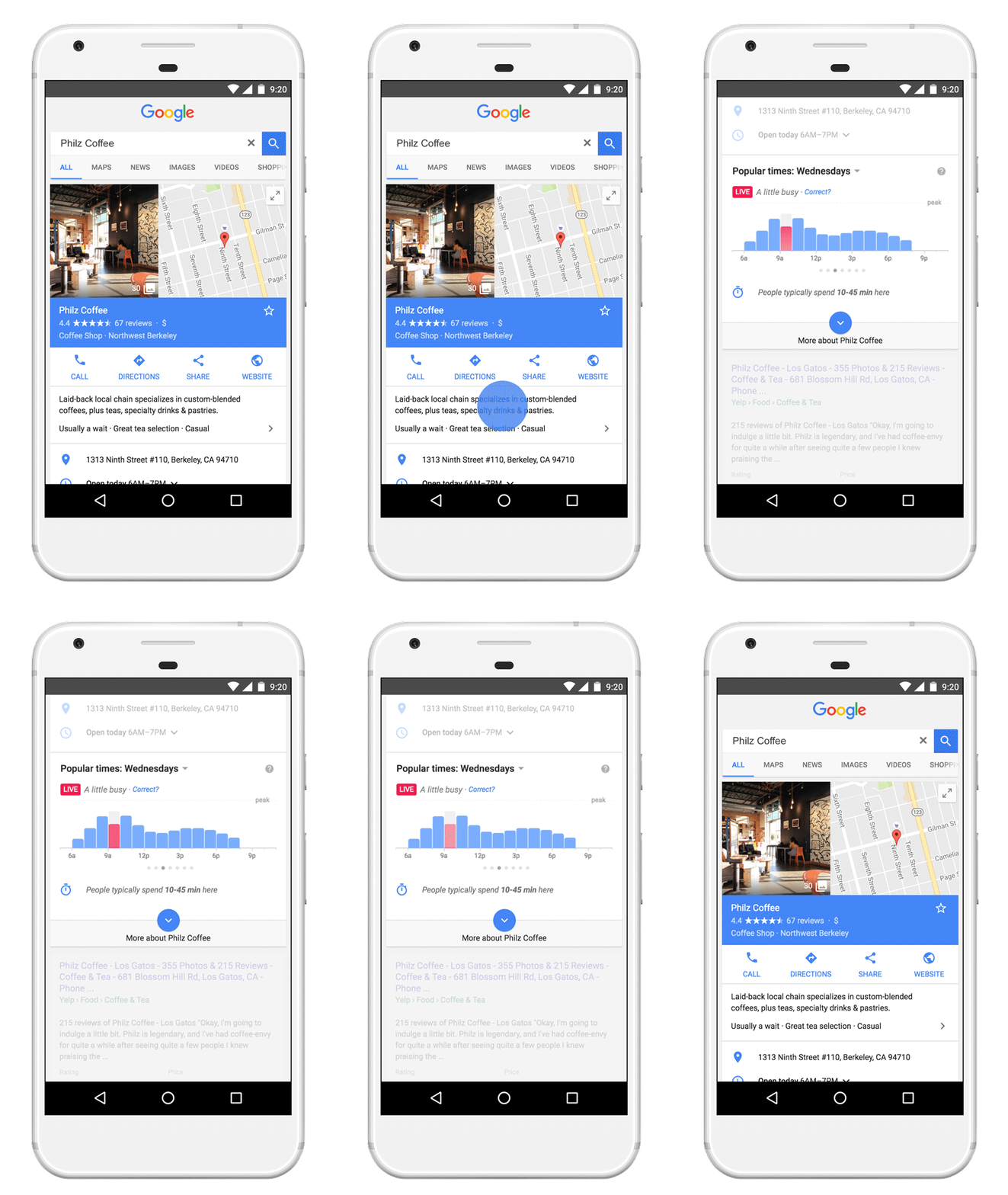
Last year, Google gave businesses the ability to list their busiest hours on Google Maps listings so that customers can better plan their shopping during the holiday season. Now, they are taking it a step further.

live-ptindevice-sf_hlgrny7

Instead of relying on businesses to update their Popular Times listings, Google Maps will use real-time data to predict just how busy a location is right now.

”Whether you’re rushing to pick up a last minute gift or seeking a lively bar for some festive spirit, check Popular Times for a sneak preview of what to expect when you arrive.”

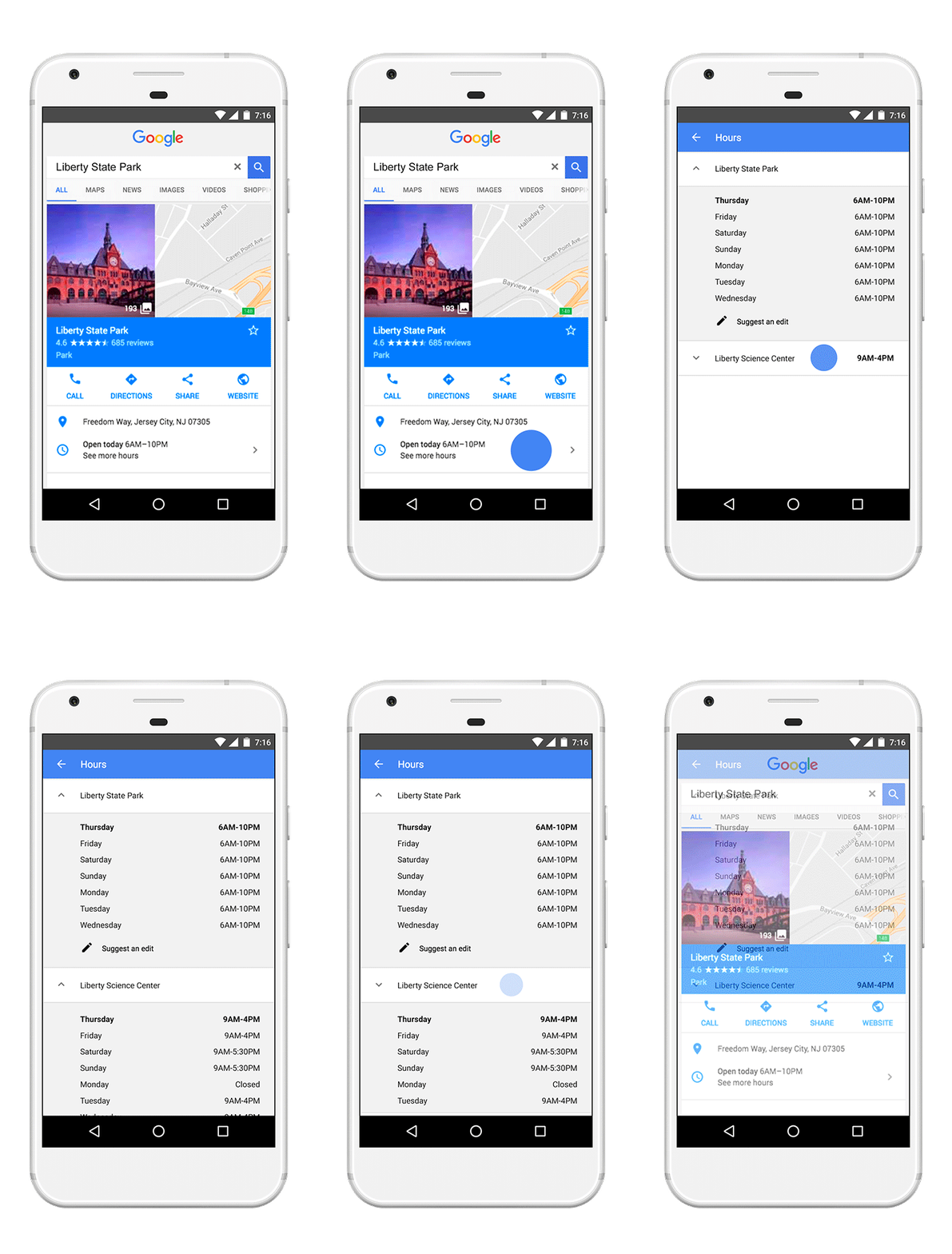
In addition to this new feature, Google is giving more flexibility to stores that operate separate departments with differing business hours. Businesses can now list separate departments and service hours in their Search and Maps listings.

servicehours-indevice-02

This new feature could be particularly useful for department stores or retail stores with pharmacy, supermarket, or automotive departments.

Google is also providing shoppers with shopping behavior data like how long people tend to spend in a store so they can make the most of their time during the holiday shopping season. Along with listing your business’s busiest hours, the search engine is also rolling out a feature that lets you tell shoppers how long the average person spends in your store.

All three new features rolled out this morning and should be live on Google Maps and Search for all users.

Google has already begun rolling out its mobile-first index to some users, but there are still a lot of questions about how exactly the search engine’s new separate index actually functions.

One such question got a surprising answer yesterday during the Google State of Search conference, as Maile Ohye told the audience that Google won’t index the AMP version of your page in the mobile search index – even when you don’t have a mobile-friendly alternative.

Google’s Gary Illyes also confirmed the news on Twitter after the conference:

That means if you’ve been using AMP pages as an alternative to making your website mobile-friendly, the search engine will skip over indexing your AMP pages in the mobile-friendly search index. Instead, it will by default choose to index the desktop version within its older index.

There is a way to force Google to index your AMP pages in this situation using a rel alternate attribute, but otherwise Google’s index will default to your desktop versions of pages.

This is particularly surprising because Google has pushed AMP as the ultimate way to deliver content to mobile users quickly and without losing ad revenue. But, in this case it seems the streamlined design of AMP pages leaves something to be desired. It may be the lack of site navigation options is what made Google decide to favor desktop over AMP in their index.

This change will most likely only affect a very small number of websites, but it is an odd choice for the search engine. The vast majority of websites who have adopted AMP also maintain a mobile version of their site.

GoogleAdWords

Google is giving AdWords’ price extensions a makeover this week to make prices even more prominent in search results, according to an announcement Monday.

Price extensions are one of Google’s many extended ad formats designed to highlight individual products and services and allow searchers to easily compare prices.

The extension was first released in July as a simple list, similar to how sitelinks are displayed. Now, Google has redesigned the extensions to appear in a card carousel near the top of search results. You can get a preview what these cards look like in the tweet AdWords released to announce the change:

The 10 languages included in the release are English, Dutch, French, German, Italian, Japanese, Polish, Portuguese, Russian, Spanish and Swedish.

While the new price extensions put the emphasis on cost, it is also useful for highlighting your brand, events, products, and related services. The ad format includes a header, description, and price.

Unlike some ad formats, price extension ads don’t direct users to a landing page. Instead, they serve as direct links to sales pages for the specific item highlighted.

The best part of this redesign is that price extension ads now take up even more valuable space at the top of search results, without costing any more than a typical ad. That means you get to make an even bigger splash without costing you anything extra.