The holiday shopping season is starting to heat up as retailers across the country prepare for the onslaught following Thanksgiving.

This year, the holiday shopping season is almost definitely going to look a lot different than in past years. Still, all estimates suggest this year’s holiday sales will be as big as ever.

To help you get prepped, Google is releasing a 27-page guide full of case-studies, useful data, and insightful predictions on this year’s holiday shopping. 

While these bits of info cover a wide range of topics, they broadly fall into 3 categories: search behavior, changes in online shopping, and buying behavior.

Google Search Behavior and Holiday Shopping

In the guide, Google highlights a range of specific search terms that have been shooting up in popularity:

  • Searches for “best affordable” have grown globally by over 60% year-over-year.
  • Searches for “fashion online shopping” are up 600% year-over-year.
  • Searches for “online clothing stores” have increased 100% globally year-over-year.
  • Searches for “available near me” have grown over 100% globally year-over-year.
  • Searches for “curbside pickup” have grown over 3,000% globally year-over-year.
  • Searches for “support local businesses” grew by over 20,000% since last year.

What This Means For You

This data provides two real takeaways for business owners. The first is that Google is seeing a huge influx of new online shoppers – especially when it comes to buying clothes. This leads us to the second takeaway, the COVID-19 pandemic has made many people reluctant to shop in-store, even when they want to support local businesses.

To accommodate this shift in behavior, it is more essential than ever that businesses provide a range of shopping methods including online stores and contactless pickup.

Changes In Shopping Behavior

With this in mind, Google conducted a survey to see how holiday shoppers are adapting to the unique challenges of 2020. Here’s what they found:

  • 69% of US shoppers plan to shop online for the holidays more than in previous years (with more people going online to browse and buy for the very first time.)
  • More than 50% of surveyed US shoppers tried a new shopping service for the first time this year.
  • More than one in ten surveyed US shoppers tried a new shopping app for the first time this year.
  • 70% of US shoppers said they were open to buying from new retailers.

What This Means For You

We are all generally resistant to change, but the reality of this year has everyone outside of their comfort zones and trying new things. This is clear in our shopping behavior.

Not only are shoppers trying new ways to shop, they are opening themselves to buying from new retailers who have stepped up to the challenge. 

Buying Behavior of Holiday Shoppers

The last selection of stats and data turns the attention towards what shoppers are expecting as they enter the holiday shopping season:

  • 62% of US shoppers will start holiday shopping earlier to avoid items being out of stock.
  • 46% of online US shoppers expect retailers to offer discounts.
  • 77% of US holiday shoppers said they would browse for gift ideas online, not in-store.
  • 46% of surveyed US shoppers agreed that “I make a deliberate effort to shop at businesses that align with my values.”
  • 66% of US consumers who plan to shop this holiday season said they will shop more at local small businesses.

What This Means For You

While the swell in people shopping locally online may seem like a broad shift in consumer desires and behavior, it can also be read as a sign that many local shoppers have been pushed online this year. 

Additionally, many consumers are making a concerted effort to support businesses in the community who may be struggling during the pandemic. 

The increase in tension surrounding the elections is also reflected in this data, as many showed they are focused on shopping at places which align with their values. 

To read the full report yourself and get even more insights into the 2020 holiday shopping season, click here

Google My Business is an essential tool for any local business trying to spread their name online. It is also deceptively complicated. 

At first glance, GMB seems very simple and easy to set up. You just fill out a few forms, answer a few questions, upload a couple of pictures,, and presto! You’ve got a GMB listing. 

Actually optimizing that listing to ensure it appears in nearby customers’ searches, however, is where things get complicated. 

As usual, Google is remarkably non-transparent about how it ranks local searches.There are a few things that have become very apparent over the years. It is pretty much undeniable that having a lot of 5 star reviews will help you rank better. On the other hand, there is reason to believe some sections have absolutely no impact on your local rankings. To get to the truth of how the algorithm works, we have to look at data from tests.

Recently, MozCon speaker Joy Hawkins shared some findings her and her team have made from their own tests and data about what GMB sections help you rank better.

Which Google My Business Sections Affect Rankings

1) Business Name

Sometimes the simplest things can become unbelievably complicated. You almost certainly chose your business name well before making a listing, and you can’t exactly change it now. 

Unfortunately, this puts some businesses at a disadvantage while others get a natural step up. 

According to Hawkins, businesses with a keyword in their name get a boost in local rankings. There is one things you can do though.

As she explains:

“The real action item would be to kind of look to see if your competitors are taking advantage of this by adding descriptive words into their business name and then submitting corrections to Google for it, because it is against the guidelines.”

2) Categories

This is another section that seems like it should be very simple. You can check up to 10 boxes that match your business, including everything from Aboriginal Art Gallery to Zoo. Where this becomes tricky is ensuring the categories you choose remains the most accurate for your business. 

Hawkins’ team found that Google is updating it’s list of categories between 2 to 10 times each month on average. In some cases, they are adding new categories that may be a more specific match for your business. Other times, they may entirely remove categories they feel are irrelevant or unnecessary. 

Either way, it is up to you to keep your business categorized properly to protect your ranking.

3) Website

The vast majority of listings use the homepage of their website as their primary website listing on everything, including Google My Business. It makes sense, and it works perfectly fine. 

What Hawkins’ found, though, is that some businesses actually benefit from choosing a more specific page of their site. For example, businesses with multiple locations can link to a specific location page to specify exactly which store you are directing them to. 

In this section, there is no agreed upon best practice. Instead, Hawkins says to test several pages over time to ensure you are maximizing your exposure. 

4) Reviews

I mentioned it up above but it bears repeating. The number of positive reviews absolutely affects your ranking in local search results. 

There is a small catch, however. According to the what Hawkins’ team has seen, increasing the number of reviews on your listing may have diminishing returns.

“So for example, if you’re a business and you go from having no reviews to, let’s say, 20 or 30 reviews, you might start to see your business rank further away from your office, which is great. But if you go from, let’s say, 30 to 70, you may not see the same lift. So that’s something to kind of keep in mind.”

Still, reviews have consistently been shown to be a major ranking factor AND they improve the click-through-rate of listings. This is obviously an area you will want to invest some energy in. 

If you want to learn a little more about how these sections impact your rankings or you want to see which fields have absolutely no effect, you can read Joy Hawkins’ original post here.

The United States Department of Justice is filing a sweeping antitrust lawsuit against Google today. The suit comes after years of investigations and accusations that Google and it’s parent company Alphabet have unfairly stifled competition to maintain its leading place in online search. 

The complaints further allege that Google then used this leverage and dominant position to sell more search ads across its platform. 

The suit will be joined by 11 state attorneys general from Arkansas, Florida, Georgia, Indiana, Kentucky, Louisiana, Mississippi, Missouri, Montana, South Carolina, and Texas. 

Some have pointed out that all involved attorneys generals are Republicans, though criticism of the search engine giant has been a bipartisan issue over the years. Democrats like Elizabeth Warren have called for similar lawsuits and breaking up the tech giant, and left-leaning states like California are reportedly pursuing similar investigations against the company. 

Notably, an investigation by the Federal Trade Commission in 2013 ended without charges, though a leaked document later revealed staff recommended a number of charges on several grounds. 

In the press conference, the DOJ said the search company has violated Section 2 of the Sherman Act by maintaining unlawful monopolies in markets for “general search services, search advertising, and general search text advertising.”

Google has also received criticism for its anti-competitive practices, including over $9 billion in fines from the European Union. Still, this marks the first time similar charges have been filed in the company’s home country. 

Concerns About Anti Competitive Practices

The lawsuit focuses on a number of business moves made by Google over the years, including using massive contracts and agreements to block competition. 

For example, Google and Apple reached a multi-billion dollar agreement to use Google’s search engine as the default on Apple mobile devices, preventing users from using other search engines by default. 

Despite these factors many say the lawsuit is far from a cut-and-dry case and could stretch on for years. Meanwhile, it could also signal the start of an avalanche of legal problems for Google is other states follow suit.

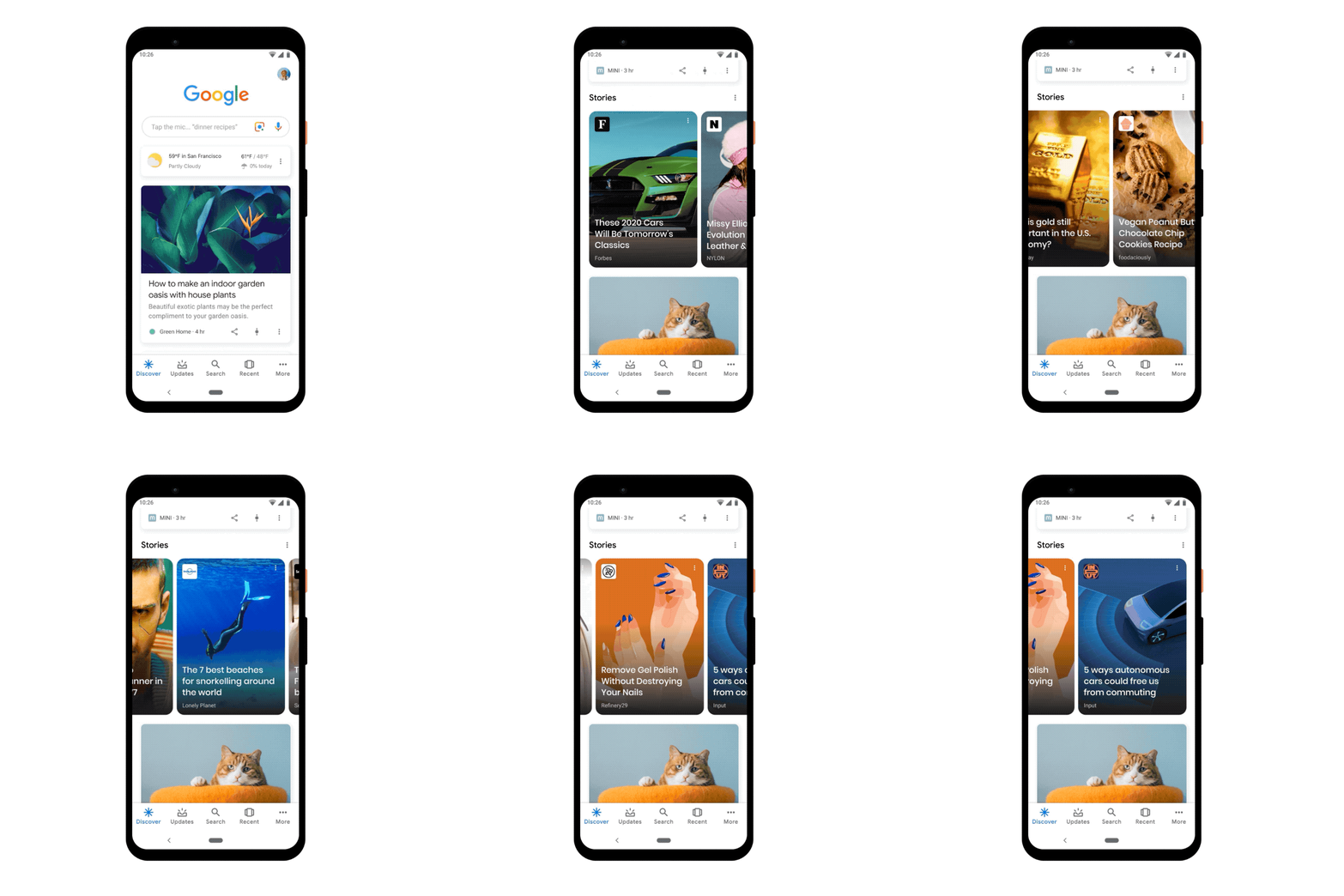
Stories are perhaps the way to share content online these days, so it is only natural that Google has been hard at work preparing its own version of the short-form content. Many users have seen Google Stories in testing throughout its various incarnations, including “Amp Stories” in 2018.

This week, the company officially launched Google Web Stories within its Google app on both iOS and Android devices. 

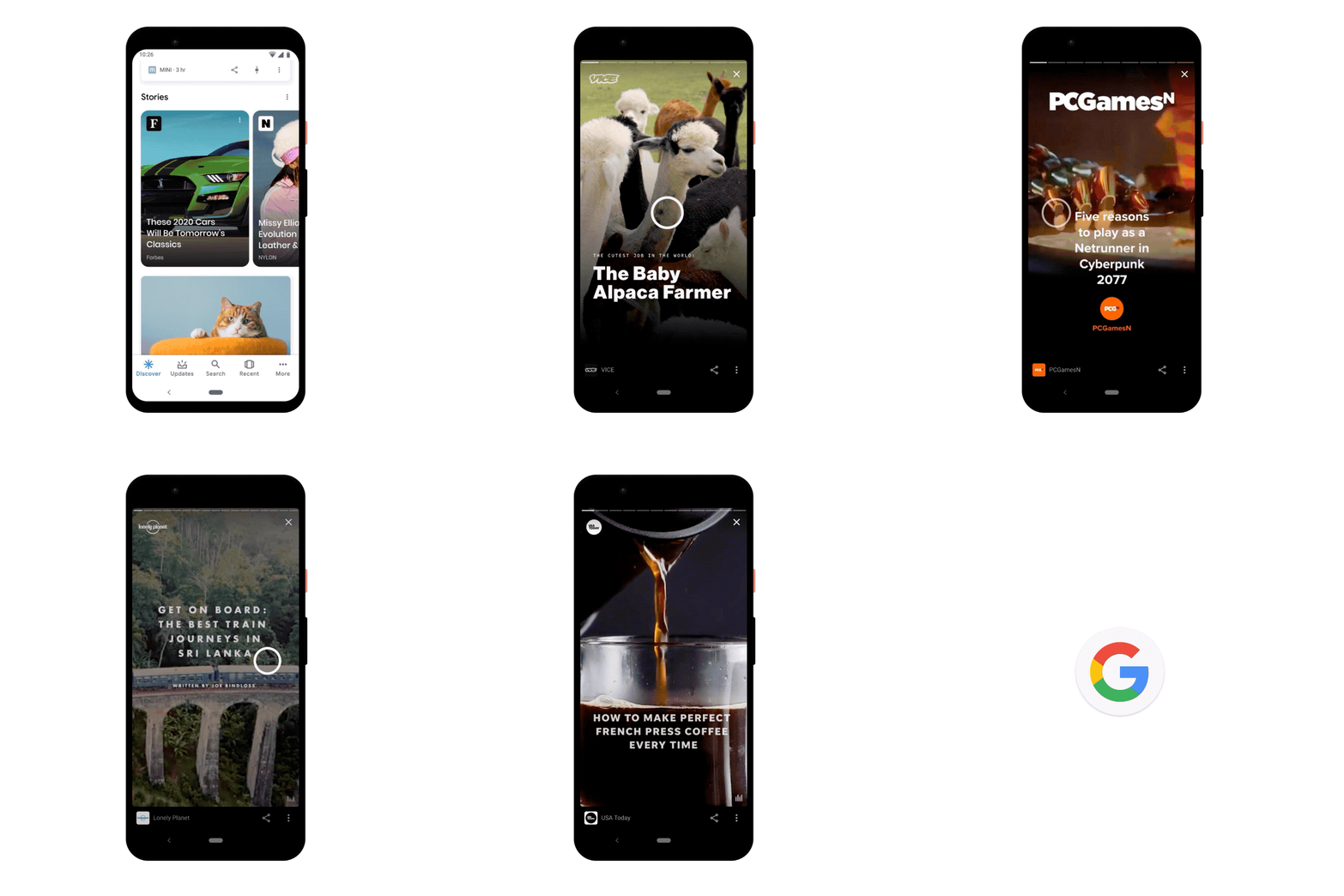
Google Web Stories can be found in a new carousel shown at the top of the Discover tab, presenting several short video, photo, or audio posts from users and publishers around the world. 

When clicked, stories will expand to a full-screen view where users can click through to your website or swipe to the next story in the carousel. 

Brands and publishers will also be able to monetize, host, share, and add links to their Stories with integration for WordPress, MakeStories, and NewsroomAI. You can even manually code a Google Web Story entirely from scratch. 

6 Rules For Making Google Web Stories

Along with the official release of Google Web Stories, the company has published a set of rules for the format. According to the guidelines, also Stories including the following types of content are prohibited:

  1. Copyrighted Content – Overall, Google is taking a relatively loose stance with what types of content can appear in Stories, especially with regards to copyrighted content. Specifically, the company says it “may” remove content that infringes on an existing copyright or links to a webpage with similar issues. 
  2. Too Long – Google is designing its Stories specifically with short-form content in mind, as such, it may block longer content. To ensure your Story gets shown, keep text down to 180 words or less, and videos a maximum of 60 seconds long. 
  3. Low Quality – You don’t need to have expensive cameras and high-end lighting to create a Story, but you do need at least a smartphone with a decent camera. Videos or images with large amounts of pixelation or distortion are prohibited. 
  4. Lack of Narrative or Theme – Google Web Stories are expected to be just that – “Stories.” They should have a narrative or at least a general theme as users go from page to page. 
  5. Incomplete Stories – While you can link to your site at the end of a story, Google warns against making users click through your site to see the entire content. Your Web Stories must be a complete package on their own.
  6. Overly Commercial Content – Brands can publish Web Stories and even convert some display ads to the format. However, the content must still provide a story or message. Content that is entirely commercial (i.e., being a simple billboard-style ad) is not allowed within the format.

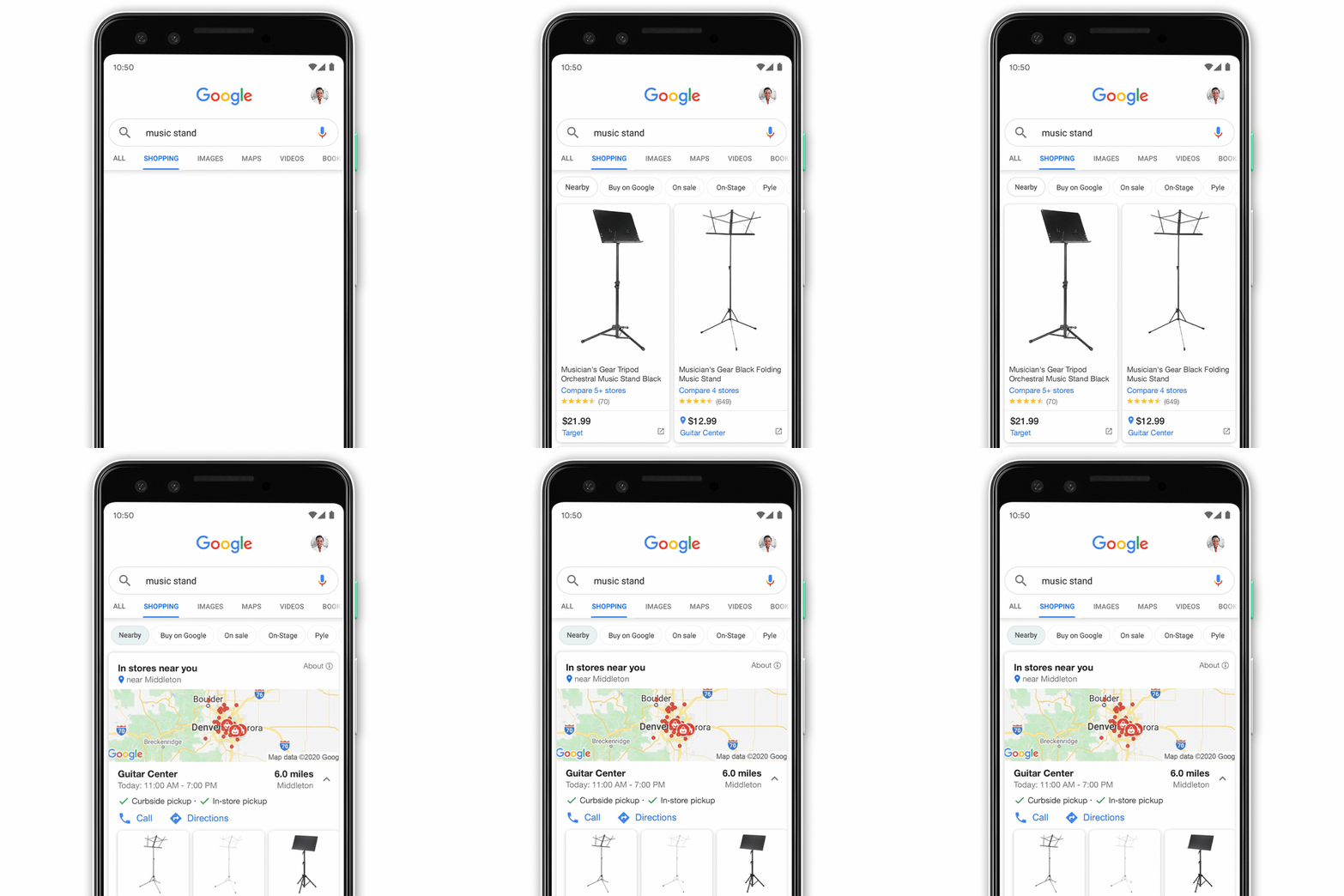
Google is making several tweaks to its shopping-related search results to make it easier to find the products you want locally and choose the pickup method you are most comfortable with. 

As the country gradually returns to our normal in-store shopping habits, many are making adjustments to ensure the safest trips to the store. 

For example, Google says that searches for “curbside pickup” and “safe shopping” have increased tenfold over the past few months and remain heightened. 

Making this more difficult, many businesses remain closed after mandatory shutdowns have passed, while others are struggling with inventory due to shipping disruptions around the world. 

With all this in mind, Google has announced three significant updates to shopping search results which make it easier for shoppers to know who’s open, what’s in stock, and how they can most safely make a purchase. 

Filter By What’s Available Locally

When looking for a specific type of product, searchers can now limit their search results to only products available nearby. 

This can be done in two different ways. 

  • Users can tap on the “Nearby” filter when looking at results within the Shopping tab.
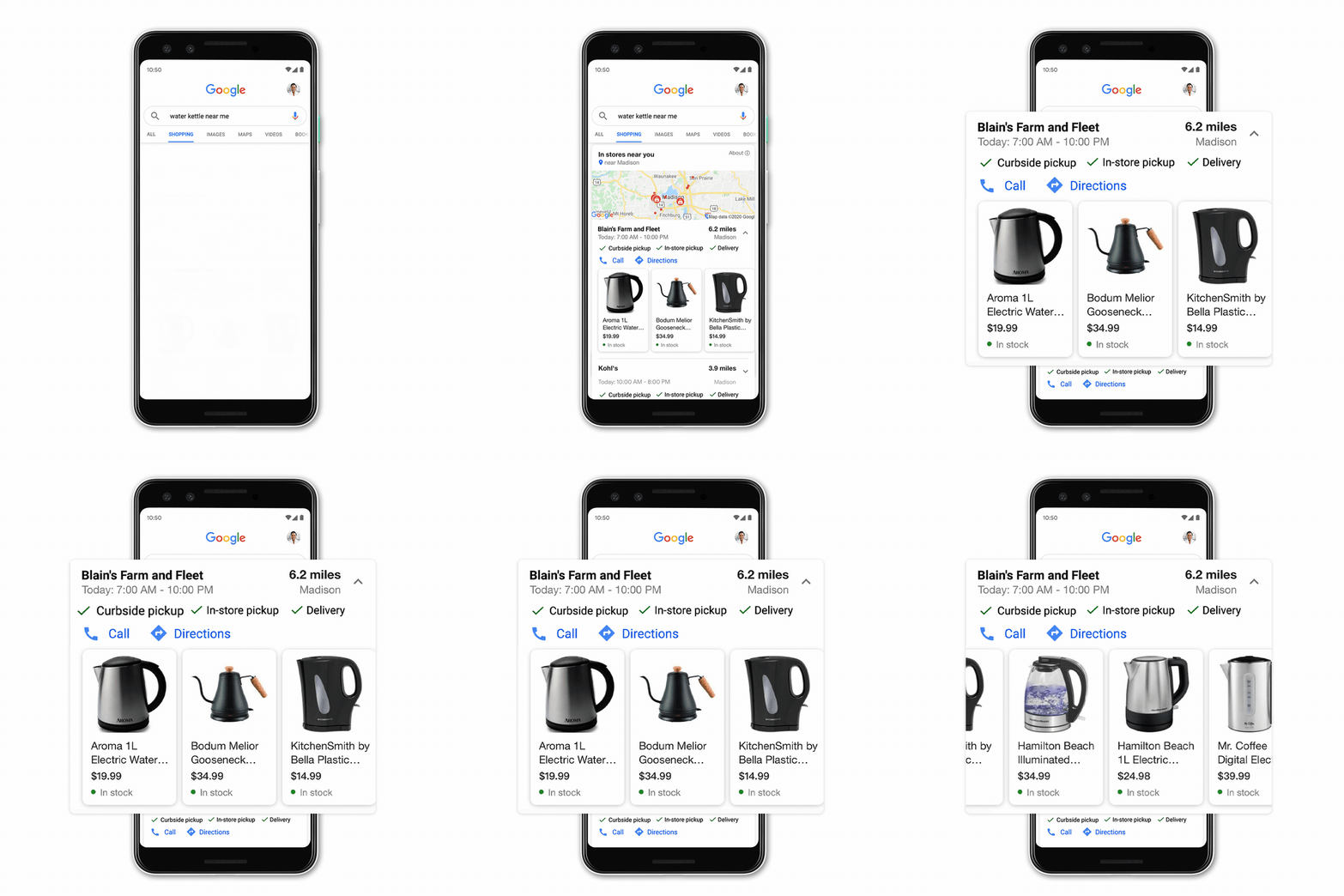
  • Users can add “near me” to product searches to automatically find products available nearby.

“Want to see an item in person before purchasing, or can’t wait for shipping and delivery?

Whatever you’re looking for, whether it’s a new laptop for working from home, a baby jacket for fall or a grill for backyard barbeques, Google makes it easy for you to see what’s available locally.”

Compare Local Hours, Locations, and Inventory

Making a trip to the store only to discover they are out of what you are looking for or the store is closed was already frustrating before the COVID-19, epidemic. 

To help solve this issue, Google is making it easier to compare the stock of local shops and see which businesses are open now. 

These details will be shown when searching “[product] near me” in a carousel of images and pricing details.

Find Convenient and Safe Pickup

Since the onset of the pandemic, Google has been prioritizing retailers who offer safe pickup options including contactless delivery or curbside pickup. 

Now, the company is introducing new ways to find safe purchase options with new labels in shopping searches. 

Along with these details, the listings will include a direct link to Maps directions so you can quickly and easily find the stores nearby. 

At the same time, Google emphasizes that calling to speak with someone is the most accurate way to check the inventory of products in real-time.

Google is testing the waters of short-form videos with a new platform similar to the popular but controversial TikTok.

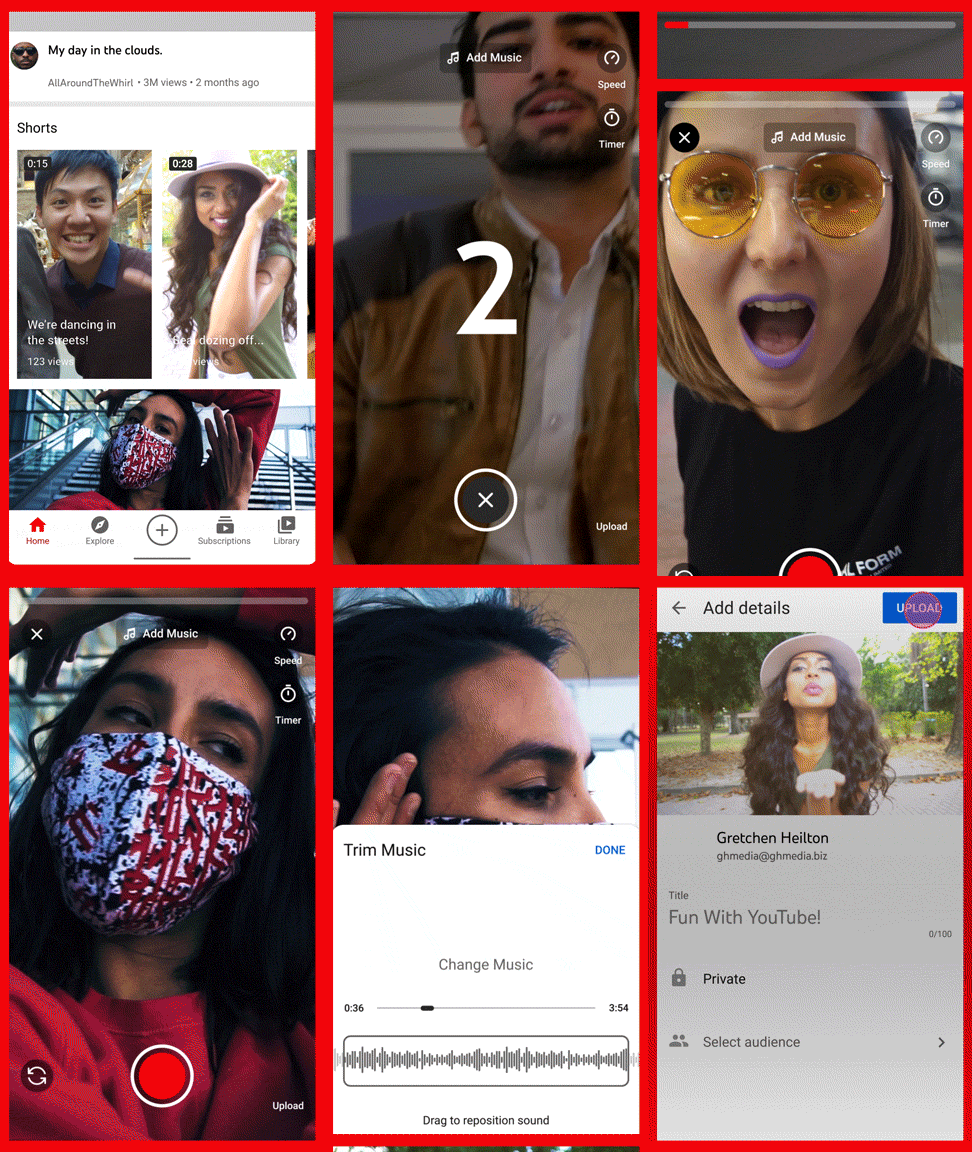
The company announced it is be launching a new service called YouTube Shorts which will focus on short, catchy videos like those found on TikTok or Instagram Reels. 

The announcement describes the new service as:

“Shorts is a new short-form video experience for creators and artists who want to shoot short, catchy videos using nothing but their mobile phones.“

For now, YouTube Shorts is limited to India as Google tests its features and public reception. 

Though features will be limited at launch, Google says YouTube Shorts will eventually include a variety of features, including:

  • Create and upload videos of 15-seconds or less.
  • Edit videos with a number of creative tools.
  • Stitch shorter clips together with a multi-segment camera.
  • Add music to videos from YouTube’s library.
  • Speed up or slow down videos.
  • Timers and countdowns.

Early Version

The version launching to users in India this week is reportedly a very limited version of the tool including only a portion of the features that will be implemented in the final release. 

The purpose of the early test is to get feedback from early users so the company can better prioritize their efforts before releasing the service to a wider audience. 

Of course, this is likely not the only reason the company decided to test the service in India. 

India banned TikTok from operating within its country on June 29 of this year, similar to the actions taken by President Trump to eventually force the company out of the U.S. 

With this in mind, there is a clear opportunity to those who launch their own take on the tool in the country sooner rather than later. Still, YouTube has already confirmed it will be bringing YouTube Shorts to more countries in the near future.

Google is unveiling a new service called Fundo which helps businesses, entrepreneurs, and creatives hold and monetize video events. With Fundo, event holders can set the date for their event, sell tickets, and connect with their followers all in one space. 

What Exactly is Fundo?

Fundo is an online platform which allows users to create and sell tickets to private events. Unlike many other online video event tools, there is no software or app to download. Everything is done directly on the platform’s site. 

Events can be easily publicized on other platforms, using a simple link to the event page. Users can also browse for upcoming events on the site.

Who Is Fundo For?

The primary audiences for the platform appear to be businesses, consultants, and celebrities, though the tools could be used by anyone looking to have private workshops or small discussion-based events. 

Specifically, the announcement calls out a few professions that may benefit from the platform:

“In addition to YouTube creators and their fans, we’re seeing authors, fitness instructors, business and lifestyle consultants and others use Fundo to find new ways to connect.”

Three Types of Events

For now, the platform allows for three different types of events to be held. These are:

1:1 Chat + Photos

The one-on-one event is pretty much what it sounds like – a way for creators to hold an event with a single individual or fan. This would typically be for a very casual conversation or low-key discussion. 

What sets this event apart is the introduction of a virtual photo booth feature which allows fans and creators to take virtual photos together.

For many professionals, this might not be all that interesting. However, YouTube celebrities or other well-known figures may find these one-on-one experiences a powerful way to connect with fans and still be able to monetize the experience. 

Meet and Greets

Meet and Greets are largely similar to the 1:1 type events, only with several fans or followers at a time. 

In the announcement, Google focuses on using these events to connect YouTube creators with fans for small roundtables and hangouts. 

As the company describes it:

“As a fan, you’ll have a variety of experiences to choose from. Join the Q&A with… channel members in a group Meet & Greet…”

Workshops

For most, this is going to be where Fundo really shines. 

Workshops allow for consultants, experts, and leaders to hold special events where they guide attendants through a process. 

For example, salon workers struggling to bring in clients during the pandemic can use Fundo to hold classes teaching basic hair care or styling to bring in revenue on the side. 

At the same time, these events help promote your core business by showing your abilities and expertise to all who attend. 

No matter what field you are in, Fundo workshops offer an opportunity to build your brand, showcase your goods, and connect with existing customers or fans all at once – and bring in a little bit of revenue while you’re doing it. 

How Secure Are Fundo Events

After the rise of Zoom Bombing – the act of breaking in and disrupting Zoom events – one of the biggest concerns for many virtual event holders is privacy and security. 

While the company doesn’t go into detail on how it prevents this from occurring, Google says there are no ways for users to crash an event without a ticket. 

As the announcement says:

“Safety is a top priority. Because Fundo is checking everyone’s ticket, there’s no risk of uninvited guests. We also have reporting and flagging features to curtail abuse.”


To sign up or find out more, check out the links below:

Sign Up: https://fundo.town/creators

Google’s Announcement: https://blog.google/technology/area-120/fundo/

Help Document: https://intercom.help/fundo/en/articles/4169996-how-does-fundo-work

Google Ads is reducing the amount of information it provides advertisers according to recent alerts many account managers have seen in the past week.

The company says it will soon stop giving advertisers data about search queries triggered when there is not “significant” data.

As the alert says:

“We are updating the search terms report to only include terms that were searched by a significant number of users. As a result you may see fewer terms in your report going forward.”

Why Google is Doing This

According to a statement to Search Engine Land, the search engine made this decision to protect user privacy.

“In order to maintain our standards of privacy and strengthen our protections around user data, we have made changes to our Search Terms Report to only include terms that a significant number of users searched for. We’re continuing to invest in new and efficient ways to share insights that enable advertisers to make critical business decisions.”

What This Means For Advertisers

On one hand, the opinion could be made that Google is streamlining its reports and preventing advertisers from being able to identify users or personal information based on individual queries.

For example, it is not unheard of for advertisers to see search terms made a single time or driving a single click in ad reports. That is likely to go away in the coming days, removing outliers and better protecting users.

On the other hand, many advertisers have expressed frustration over the lack of transparency. The decision to remove this information entirely means advertisers know less about where their money is going.

Additionally, Google hasn’t been entirely clear on what “significant” means, making many wary of what this shift will look like. If it just removes queries with single impressions, then advertisers are likely to accept it and move on. Still, there are countless low-volume queries with no risk to privacy which could be removed if Google decides to use a higher threshold. 

It’s a question we all have dealt with at least once or twice, and one that rarely has a satisfying answer: “Why did my Google rankings suddenly drop?”

Sometimes, a simple audit will reveal a technical hiccup or issue that is downgrading your rankings. Just as often, though, it appears everything is working as it should but you are suddenly further down the page or not even on the first page anymore. 

In this situation, Google’s John Mueller says there are four major reasons for sites to lose rankings. 

John Mueller Explains Why Sites Lose Rankings

In a recent Google Webmaster Central chat, Mueller was asked why a publisher who had ranked well for “seven or eight years” had suddenly lost rankings for three different sites. Notably, the person asking the question couldn’t find any signs of problems in their inbound or outbound links, and all the sites used the same keywords (they sell similar products by different brands). 

Of course, Mueller couldn’t get too specific with his answer because he didn’t have actual data or analytics on the sites. Still, he did his best to address four general reasons sites may suddenly rank worse.

1) Rankings Are Temporary

Once a site is ranking at the top for its ideal keywords, many site owners feel like they have accomplished their mission and will continue to rank there. Unfortunately, John Mueller says that rankings are malleable and change constantly.

Mueller explained:

“In general, just because the site was appearing well in search results for a number of years does not mean that it will continue to appear well in search results in the future.

These kinds of changes are essentially to be expected on the web, it’s a very common dynamic environment”

2) The Internet Is Always Changing

The reason why rankings are so prone to fluctuations is that the internet itself is always changing. New sites are being created every day, links might die, competitors might improve their own SEO, and people’s interests change.

Each and every one of these can have a big impact on the search results people see at any given time. 

As Mueller put it:

“On the one hand, things on the web change with your competitors, with other sites…”

3) Google Changes Its Algorithms

To keep up with the constantly changing internet, Google itself has to regularly overhaul how its search engine interprets and ranks websites. 

To give you one idea how this plays out, a few years ago search results were absolutely dominated by “listicles” (short top 5 or top 10 lists). Over time, people got tired of the shallow information these types of lists provided and how easily they could be abused as clickbait. Google recognized this and tweaked its algorithm to better prioritize in-depth information hyper-focusing on a single topic or issue. Now, though a listicle can still rank on Google, it is considerably harder than it used to be.

As Mueller simply explained:

“On the other hand, things on our side change with our algorithms in search.”

4) People Change

This is one that has been touched upon throughout the list Mueller gave, but it really gets to the heart of what Google does. What people expect out of the internet is constantly changing, and it is Google’s job to keep up with these shifts. 

In some cases, this can mean that people outright change how they search. For example, simple keywords like “restaurants near me” or “fix Samsung TV” were the main tool people used to find information for years and years. As voice search has become widespread and people have gotten more accustomed to using search engines all the time, queries have expanded to frequently include full sentences or phrases like “What is the best Chinese restaurant in midtown?”

At the same time, what people expect out of the same queries is also shifting with technological innovation and content trends. 

Mueller describes the situation by saying:

“And finally on the user side as well, the expectations change over time. So, just because something performed well in the past doesn’t mean it will continue to perform well in search in the future.”

Always Be Monitoring and Improving

The big theme behind all of these reasons sites lose rankings is that they are standing still while the world moves past them. To maintain your high rankings, your site has to be constantly in motion – moving with the trends and providing the content users want and expect from sites at any given time. 

This is why successful sites are also constantly monitoring their analytics to identify upcoming shifts and respond to any drops in rankings as soon as they happen.

If you want to see the full response, watch the video below (it starts with Mueller’s response but you can choose to watch the entire Webmaster Central office-hours discussion if you wish).

Google is experimenting with a new way to help people find you in search results. Limited to India for now, the search engine is rolling out new ‘people cards’ which let individuals highlight details about themselves including your website, social profiles, and other relevant sites in one spot. 

Anyone who has ever tried to make a name for themselves knows search engines struggle when it comes to finding individual people – especially if they aren’t a household name like Taylor Swift. 

Now, Google is trying to tackle this problem with a virtual business card:

“Today, we are solving these challenges with a new feature called people cards. It’s like a virtual visiting card, where you can highlight your existing website or social profiles you want people to visit, plus other information about yourself that you want others to know.”

The cards were created with entrepreneurs, performers, influencers, and freelancers in mind and allow for a small amount of customization including a short blurb and contact links. 

Google People Card Gif

When viewed, the cards initially display a person’s name, profession, and location. When tapped or clicked, it expands into a full card complete with links. 

When multiple people with the same name appear in a search result, the individuals will appear alongside each other, allowing you to select the person you are looking for.  

How Creating a People Card Works

While they are not available in the U.S. or U.K. yet, some have found workarounds using VPN services to create a People Card for themself. If you decide to do this, you should know the cards will still only appear to searchers within India until the cards are expanded internationally. 

If you still wish to create a card and can make the VPN process work (results have been mixed according to Twitter users), the process is relatively simple. 

  1. Make sure you’re signed into the Google account you want linked to your People Card. 
  2. Search for your name or query “add me to Search.”
  3. After clicking “add me to Search” on the prompt, you’ll be taken to a page where you can provide a range of details including:
    • The image from your Google account
    • A personal description
    • A website link
    • Links to social profiles
    • Your phone number
    • Your email address

While you can pick and choose which details you want to provide, Google says “the more information you provide, the easier it is for people to find you.”

The only exception is your phone number, which is required for authenticating your card. Users can choose to keep this information hidden from their card, however. 

How Google Will Vet The Cards

Accompanying the rollout of these cards (and potentially explaining the limited size of the test), Google says it is launching a number of strict quality control measures to ensure the cards are reliable:

“Our goal with Search is to always make sure people can find helpful and reliable information, so we have a variety of protections and controls in place to maintain the quality of information on people cards.”

For now, there is no mention of when People Cards could be arriving in America. Based on the excitement from many, though, it feels safe to say you can expect to see something similar stateside sooner rather than later.