
Tag Archive for: title tags

Google has confirmed it has started a “small and narrow test” using AI to rewrite site headlines in search with AI without any notification to users or website managers. 

The confirmation raised eyebrows as it used strikingly similar language as the search company used last year when it confirmed it was rewriting headlines in its Discover feed before making it an official feature a month later. 

Google Confirms Rewriting Headlines With AI

According to a report from The Verge, Google has been rewriting headlines in search for several months. Notably, many of the headline rewrites led to misleading or outright unrelated headlines. For example, researchers noted an instance where the headline “I used the ‘cheat on everything’ AI tool and it didn’t help me cheat on anything” to the shorter, less-descriptive headline “‘Cheat on everything’ AI tool.” In another case, it gave an article the headline “Copilot Changes: Marketing Teams at it Again” despite that language never being used in the article. 

Sean Hollister described the practice as similar to “a bookstore ripping the covers off the books it puts on display and changing the titles.”

While the AI rewrites seemed to be used most frequently on news sites, The Verge confirmed Google has changed headlines on other types of websites as well. 

None of these changes had any notice or disclosure that the headline users were seeing was different from the original headline. 

In a statement, Google said it aims to use AI to “identify content on a page that would be a useful and relevant title to a users’ query” and to improve “matching titles to users’ queries and facilitating engagement with web content.”

A Repeating Pattern

While it is not uncommon for Google to test features like this on a limited number of sites, Matt Southern from Search Engine Journal noted that Google’s confirmation to The Verge was eerily similar to how the company addressed using AI to rewrite headlines in Discover. 

In December of last year, the company acknowledged it was using AI-generated headlines in a “small UI experiment for a subset of Discover users.”

By January, the company announced this was officially a feature for articles appearing in Discover. 

Differences With How Google Previously Rewrote Titles

This is not the first time Google has changed headlines appearing in search. In fact, one study found that more than three-quarters of title tags were changed when they appeared in search results. 

However, the new test is unique for the way it is using AI to generate entirely new headlines. In the past, Google would rewrite titles and headlines by pulling from content directly on the related page. 

With this new test, Google is moving to create titles entirely from scratch without necessarily using phrasing on webpages, risking creating misleading or unrelated headlines. 

This could cause major issues for some publishers, as users will get frustrated and mistrust sites they believe are using misleading or “clickbait” headlines. 

For more, read the full article from The Verge (requires a subscription) or Matt Southern’s coverage from Search Engine Land.
YouTube is giving creators a new tool that makes A/B testing titles for their videos easy. This means any creators with access to advanced features will be able to guarantee they are using the most engaging titles that drive the most clicks using real-world data.

YouTube announced that the feature, previously only available to a select number of channels, would be getting widely released in a video on its Creator Insider channel this week.

In the announcement, YouTube also took time to share more details about how their A/B testing works and address some questions from the community.

How It Works

The new A/B testing feature is available in YouTube’s “Test and Compare” section, alongside the tool that allows channels to test thumbnails. With the tool, you’ll be able to test up to three different titles on a single video.

Once selected, the tool will show users the video using one of the three titles and gather performance data across a period of up to two weeks. 

Once the test is complete, you will get a notification with the results. If one title drives significantly more engagement than the others, it will become the default choice for viewers. If not, YouTube will default to the first title you provided. 

Of course, creators can always choose to override the tool and select one specific title to display.

Why YouTube’s A/B Testing Prioritizes Watch Time

While the feature has largely been positively received, many have questioned why the A/B testing tool measures and optimizes titles based on watch time rather than click-through rate. 

The company addressed this in the announcement video: 

“We want to ensure that your A/B test experiment gets the highest viewer engagement, so we’re optimizing for overall watch time over other metrics like CTR. We believe that this metric will best inform our creators’ content strategy decisions and support their chances of success.”

Understanding A/B Test Results

When the test is complete, YouTube will deliver one of three results.r

If there is one title that clearly outperforms the others, it will be declared the “Winner”.

“Performed the same” means that all of your titles drove similar amounts of watch time. One may have slightly performed better, but not by a wide-enough margin for it to be statistically meaningful. 

In some cases, YouTube may declare the test “Inconclusive” if there were not enough impressions to deliver proper results within the time period.

For more, watch the full announcement from the Creator Insider channel below:

Google has confirmed that it is sometimes replacing page titles in search results with other copy it finds more relevant. As public liaison for Google Search, Danny Sullivan, explains:

“Last week, we introduced a new system of generating titles for web pages. Before this, titles might change based on the query issued. This generally will no longer happen with our new system. This is because we think our new system is producing titles that work better for documents overall, to describe what they are about, regardless of the particular query.”

In plain English, this means that Google is rewriting the title tags accompanying web pages in some search results – often replacing it with other text from your page. This is not the first time Google has made adjustments to title tags being shown in search results, but it is definitely the most extensive rewriting the search engine has done. 

According to Sullivan, the goal of this is to highlight the most relevant content for users and focus on content that users can “visually see”: 

“Also, while we’ve gone beyond HTML text to create titles for over a decade, our new system is making even more use of such text. In particular, we are making use of text that humans can visually see when they arrive at a web page. We consider the main visual title or headline shown on a page, content that site owners often place within <H1> tags, within other header tags, or which is made large and prominent through the use of style treatments.”

Does This Mean HTML Title Tags Don’t Matter?

If Google is going to just replace the tags put on pages, why should we even bother? The answer is for a few reasons. 

Firstly, the title tags will still provide their traditional SEO value by helping the search engine understand your page.

Secondly, Google is not rewriting the majority of search results titles. According to Sullivan, Google will show the original HTML title tags in more than 80% of cases. The system will only revise title tags if it believes the current tags are either too long, stuffed with irrelevant keywords, or a generic boilerplate.

“In some cases, we may add site names where that is seen as helpful. In other instances, when encountering an extremely long title, we might select the most relevant portion rather than starting at the beginning and truncating more useful parts.”

What This Means For You

Since there is no way of opting out of this system, there is nothing for brands to change moving forward. 

The biggest changes from this will instead be in reporting, where some pages may see increased or decreased click-through rates due to changed titles in search results. 

For more, read the full statement from Google and Danny Sullivan here.

Source: Search Engine Roundtable

Source: Search Engine Roundtable

Chances are you are just beginning to get adjusted to Google’s widely-talked about search engine result pages (SERPs), but you may not have noticed the smaller details that have been tweaked to make the page look clean and coherent. For example, several eagle-eyed members of the SEO community have noticed that the redesign appears to have affected the visible title tag length for results.

The title tag, or the blue clickable link in the Google search results, doesn’t really have a defined number of characters allowed. It isn’t like Twitter, where you have a hard character limit. Instead, Google uses an algorithm to determine exactly how many characters are shown.

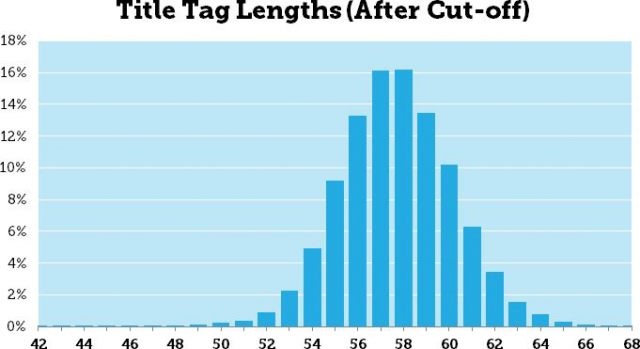
Obviously, Google hasn’t disclosed the details of their algorithm, but Pete Meyers from Moz says the title lengths range from 42 to 68 characters allowed, with most showing 57 to 58 characters.

Most importantly, this change has no direct impact on rankings. Google still reads your entire title and uses everything to helped determine rankings. However, this could make some titles less click friendly or attractive as they used to be.

You won’t be punished directly by Google for using the same strategy you previously have for titles tags, but you might refine your technique slightly to keep future titles as appealing to readers as possible.

When you write about SEO regularly, it is easy to get caught up on the things that are changing and shifting, but we often forget about the old standards of SEO and how they might fit into the new climate.

If you take a look, you will see there aren’t many articles about the importance of quality title tags in the past months or even year, even though it is one of the most powerful elements on a page. Just the title tag alone can tell a search engine your relevance to a topic of search term, distinguish yourself to searchers, and even draw in visitors, all in a single line.

Crafting a great title is deceptively difficult. It would seem creating a single line statement of the purpose of your page should be quick and simple, but crafting one that will make your page alluring to both search engines and customers alike is a complicated trick.

First, you need to match the recommended guidelines, and good luck finding a consistent set. I have seen anywhere from 50 to 70 characters suggested as the maximum you should include in a title, but so long as you are around 60 characters there shouldn’t be much of a concern. Going over risks having the terrible ellipsis trailing your truncated title.

Of course, there is no evidence Google doesn’t see all the text in your title, even when it is obscured by the “…”, but why waste the text? Searchers won’t get the entire topic you are addressing, and the extra 15 characters a search engine sees likely won’t help you. Doing something like trying to stuff keywords in after the ellipsis would actually hurt you.

Once you’ve met the common guidelines, there becomes a problem. Everyone wants a simply formula that will work every time, and one simply doesn’t exist. Every website is different, and making a title tag that is correct for your brand depends on your message and what you want to emphasize.

An amazing amount of information can be coded into 60 characters. You can tell searchers the product of brand name, descriptors, price, and many other aspects of your page simply in one sentence with very careful word choice. For products, you want to fit in as many hard facts about the products as you can in that small space. Search Engine Journal suggests product name, number, size, color, and unique features could all be included in the title, while with blog posts you want to tell searchers what question or topic you will be addressing clearly.

Just because there isn’t a magic formula for titles, doesn’t mean you shouldn’t be concerned with them. A weak title tag will get your pages ignored by everyone that sees your listing, while a quality one will stop casual browsers and show them exactly what they were looking for. Stand out and make your titles fantastic.


