Google announced advertisers will find that phone calls from mobile click-to-call ads are now listed in the regular Conversion columns of AdWords, as of Tuesday. This is one of the first steps since Google made their October 1st statement that they would make it easier for advertisers to optimize their bidding strategy for click to call. They are working to make phone calls an important conversion type within AdWords.
With the new update calls made by customers from an AdWords ad, for both mobile and desktop searchers, will be reported in a new column within Estimated Total Conversions.
Before now, click-to-call ads were found under a “Phone Call Conversions” column, but now advertisers will be able to integrate many free automated bidding tools from AdWords to optimize their bidding campaigns and improve performance.
This is a great move for advertisers as 70 percent of mobile searchers call businesses directly from the search results. Google estimates over 40 million phone calls are made every month from Google search ads to advertisers.
At the moment, the new click-to-call conversions are available in countries where Google has forwarding numbers available. This includes the U.S., UK, Germany, and France.
This Monday, site owners looking for advice will have the opportunity to have their website briefly reviewed by Google, as John Mueller announced on Google+. The short site reviews will be taking place November 18th at 10am EDT and will last one-hour. Search Engine Land suggests the event will be lead by Mueller, though no one is quite sure the format this event will be in.
To have your site reviewed, you have to add the site to this Google Moderator page. Then, if Google has the time and chooses your site, it will be reviewed live this upcoming Monday via Google+ Hangouts.
You can also RSVP for the event by going to this page and add it to your calendar.
John’s statement explained the event, saying:
For this hangout, we’ll review sites that are submitted via the moderator page and give a short comment on where you might want to focus your efforts, assuming there are any issues from Google’s point of view :).
00Taylor Ballhttps://www.tulsamarketingonline.com/wp-content/uploads/2018/07/TMO-Logo.pngTaylor Ball2013-11-14 13:37:372013-11-14 13:37:37Google Offers Short Site Reviews This Monday
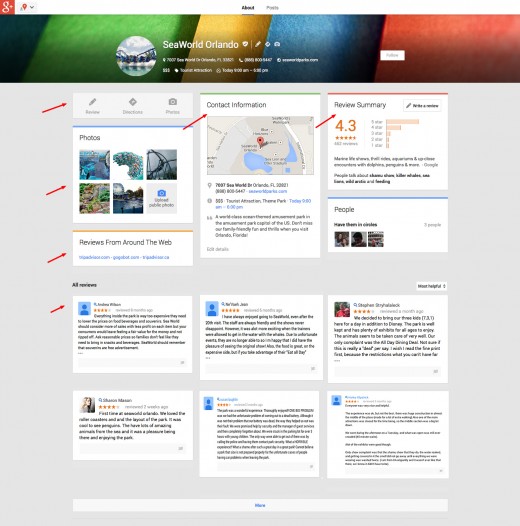
A few weeks ago, select Firefox users noticed a new “card” layout in the About page for local listings. Beginning Tuesday, it appears the layout has begun to roll out world wide. Mike Blumenthal explained the new layout, saying:
The big difference is that the page now can be displayed in either a single, two or three column layouts depending on browser window width as opposed to the current fixed two column display. Reviews will now follow the same columnar structure as the rest of the page and will not be limited to a current one column display. While this view is not yet visible in mobile, one assumes that if the view were to become universal it would likely push to mobile as well.
The page adds three iconic based calls to action near the top; review, directions & photos. The review summary has been moved up the page and photos have been moved down the page. Geo information including street address, category, hours, description and map are now consolidated into a single card near the top titled “Contact Information. “Similar Places” from around the web no longer show and “reviews from around the web” have been moved up the page to be nearer the top.
But, with the change has come an issue with reviews, at least temporarily. As of Tuesday, the number of reviews listed in the information for local businesses has dropped or begun to show wildly inaccurate review counts. It is unclear whether the actual reviews have disappeared or whether the counts are the only aspect to be affected, but users are reporting as much as a 30 review count drop. It is safe to assume the issue will be resolved quickly as the new layout is ironed out.
00Taylor Ballhttps://www.tulsamarketingonline.com/wp-content/uploads/2018/07/TMO-Logo.pngTaylor Ball2013-11-13 14:01:282013-11-13 14:01:28Google Rolls Out New Card Layout For Local Listings
It seems something odd is happening over at Google AdSense. While there is always a pretty much constant stream of complaints coming in about drops in CTRs (click through rates), they are usually isolated cases. Most often, an individual is simply experiencing a problem and their issues are easily resolved.
But, over the past week there has been an unusually large number of people complaining at both the Google AdSense Help and WebmasterWorld forums that their CTR have declined significantly in the past weeks. As Barry Schwartz noticed, not only is the number of threads enough to raise an eye, but there are some who are saying this is having a big impact on their earnings. Clearly something is afoot.
Some quotes from commenters include:
My blog traffic still increasing but adsense earnings dropped from three days. I have a message from adsense help as “Your earnings were 76% below our forecast”.
and
At the risk of getting screamed at for asking this question (yet again). My ctr went down the last 3 days (Sunday,Monday, Today) a whopping 75%!
Not everyone is experiencing the drop in CTR (Schwartz himself has seen an increase), but this appears to be a widespread enough issue to cause some alarm. The world isn’t ending, but you should probably check out your own CTR to make sure everything is alright.
00Taylor Ballhttps://www.tulsamarketingonline.com/wp-content/uploads/2018/07/TMO-Logo.pngTaylor Ball2013-11-12 15:24:152013-11-12 15:24:15Widespread Reports of CTR Dropping in Google AdSense
There’s a new manual action showing up in Google Webmaster Tools, according to Jessica Lee from Search Engine Watch. Webmaster Tools was updated over the summer so that site owners could be notified when a specific type of manual action had been taken against the site, and since then the waters have been fairly quiet. This new type of manual action, referred to as “image mismatch” is the first change we’ve seen since then.
If you see this message on the Manual Actions page, it means that some of your site’s images may be displaying differently on Google’s search results pages than they are when viewed on your site.
As a result, Google has applied a manual action to the affected portions of your site, which will affect how your site’s images are displayed in Google. Actions that affect your whole site are listed under Site-wide matches. Actions that affect only part of your site are listed under Partial matches.
If you end up receiving that message, it is up to you to ensure that your site is showing the same images to users both on your site and within Google image search results. It is possible “anti-hotlinking” tools can cause the issue, so you may have to look through your site’s code on the server.
As with all manual penalties, once the problem is fixed you have to submit your site for reconsideration and wait. And wait. And wait. Eventually, after you’ve waited for what seems like forever, you’ll get a message in your Webmaster Tools account informing whether the manual action will be revoked after review.
Manual actions are penalties at real, living Google employees have placed against your site after determining that you are violating Google’s guidelines. The majority of manual penalties have related to outright spammy practices such as user-generated spam, hidden text, and unnatural links.
00Taylor Ballhttps://www.tulsamarketingonline.com/wp-content/uploads/2018/07/TMO-Logo.pngTaylor Ball2013-11-12 13:45:432013-11-12 13:45:43New Type of Manual Action Appears in Webmaster Tools
After an underwhelming debut in February, it appears AdWords Offer Extensions is being sent to the grave in favor of Google Offers. Ginny Marvin explains that AdWords Offer Extensions was intended to allow advertisers to dedicate extra real estate in their search ads to promoting in-store coupons and discounts. There was little excitement surrounding the announcement, and a new alert informs users that Offer Extensions was sent to the chopping block on November 1st.
The alert was posted on the support page for Offer Extensions. It reads:
Starting on November 1, 2013, we will no longer support offer extensions in AdWords. On that date, offer extensions will stop showing in your ads and offer extensions reporting will stop showing in your account. No action is required.
We recommend reviewing your campaigns to ensure your messaging continues to fit your goals. To retain offer extensions reporting for your records, remember to download campaign reports before November 1. Consider using sitelinks or Google offers to promote your deals and offers in the future.
On the other hand, on October 24, Google announced an updated self-service tool that allowed US businesses to create Google Offers. This way, consumers can use their smartphones to redeem and save coupons and promotions. These offers are distributed through Google Maps, Google+, Google Wallet, and the Google Offers app and website. It appears Google is putting their investments into turning Google Offers into a success, rather than trying to force AdWords Offer Extensions to catch on.
Smartphones have revolutionized how we browse the web, but most browsing still happens within the same web browsers we have all grown accustomed to. For the most part, we do our searches and actual browsing from Chrome, Safari, or Firefox, while we limit our apps to games, reading the news, or taking care of business. But, that all could change in the near future.
Google announced late last week that they would begin allowing Android app developers to have their app content indexed. That content will then be able to be opened directly through apps on Android devices. It is a large step towards a more seamless user experience on smartphones and tablets, rather than the disjointed experience we currently enjoy.
Googlebot has been improved to be able to index the content of apps, either through a sitemap file or through Google’s Webmaster Tools, though the feature is currently only in the testing phase. This means the indexing is only currently available to a small selection of developers, and signed-in users won’t begin to see the app content in their result for a few weeks.
The update means that searches will be able to return information from app content, which will then open directly in the intended app. For websites which tend to offer the same content on both their website and their app, such as news sites, it means users will be able to pick their desired experience, whether it be from within the browser or within the app.
Jennifer Slegg reports that app developers can sign up to let Google know they are interested in having their apps indexed by filling out an application of interest. Before you do though, you should know that your app must have deep linking enabled, and you will have to provide Google with information about alternate URLs either within their sitemap or in a link element within the pages of their site.
Indexing is only available for Android apps currently, and Google has yet to comment on when or if they will extend the capability to iPhone or Windows apps.
00TMOhttps://www.tulsamarketingonline.com/wp-content/uploads/2018/07/TMO-Logo.pngTMO2013-11-11 13:10:032013-11-11 13:10:03Android App Content Begins to Be Indexed By Google
No matter how bad of shape your website is in, Google will crawl it. Google crawls and indexes seemingly the entire internet. Though we know they may not look as deep into low-quality websites, that doesn’t mean they haven’t at least crawled and indexed the landing page. It takes something truly special to keep Google from crawling and indexing a page, but there are two common mistakes that can actually manage to keep Google away.
Technical SEO is one of the most difficult aspects of optimization to grasp, but if you are making these two simple mistakes, it can keep search engines, especially Google, from correctly indexing your websites. If your site isn’t getting correctly indexed, you have absolutely no chance of ranking well. Until you fix the problem your site is going to be severely crippled, so it is imperative you aren’t ignoring these issues.
1. The 301 Redirects on Your Website are Broken
It is a commonly accepted practice to use 301 redirects after a website redesign. As Free-SEO-News mentioned in their latest newsletter, using these redirects properly allows you to retain the ranking equity you’ve built with your website, rather than having to start again from the bottom.
The problem is when these 301 redirects aren’t implemented properly. Even worse, sometimes properly working redirects can suddenly falter, so you can’t place your faith in the redirects working correctly forever. Code changes, new plugins, or broken databases can cause your working 301’s to begin linking to non-existing pages.
Broken links are an automatic wrecking ball to all your efforts building a solid link portfolio. The best way to ensure that all your links are working is to download a website audit tool, such as SEOprofiler, which automatically checks all of your links and redirects. If your links or redirects suddenly stop working, you will be warned before you start getting punished by the search engines.
2. Rel=canonical Attributes Are Causing Problems
Just as with 301 redirects, the rel=canonical attribute serves a legitimate purpose when used correctly. The attribute can help you avoid problems with duplicate content, but those using the tag without knowing what they are doing can find themselves with some major issues.
Two of the biggest faux pas that we see regularly committed by site owners are to add a rel=canonical attribute which points to the index page to all web pages or to other pages that use the ‘noindex’ attribute. In both scenarios, Google won’t index the web pages at all.
The best advise is to simply stay away from the rel=canonical attribute unless you are absolutely sure what you’re doing. The only proper time to use the attribute is on duplicate pages, and anywhere else will result in significant problems. The problems that can come from using the attribute incorrectly are much worse than those you might see by failing to use the tag on duplicate pages.
00Maxhttps://www.tulsamarketingonline.com/wp-content/uploads/2018/07/TMO-Logo.pngMax2013-11-05 14:12:222013-11-05 14:12:22Avoid These Two Mistakes Which Keep Google From Indexing Your Site
If there is one way to concisely explain the changes Google’s search algorithms have gone through in the past couple years, it would boil down to “bigger is not always better.” Gone are the days that you can jam as many keywords as you could fit into a paragraph of text, or buy up countless thousands of links and hope to rank highly.
However, the more you do to offer quality content and information to your users while staying in line with Google’s practices, the more success you’ll see.
Those two ideas are fairly common knowledge now, but they have created their own fair share of questions. Where should the balance between quantity and quality lie? How is this content evaluated? Does quantity of content outweigh quality of content?
Google has given some insight into how content is evaluated in the past, and it is clear that you won’t get far with an excessive amount of paper-thin content. Still, the number of indexed pages your site has does indeed have an effect on your ranking. So how exactly does this work and what is the balance?
Matt Cutts, Google’s head of Webspam, addressed this type of issue head-on in his most recent Webmaster Chat video. He was asked, “Does a website get a better overall ranking if it has a large amount of indexed pages?”
Cutts explained that having more indexed pages isn’t a magic ticket to higher rankings. He said, “I wouldn’t assume that just because you have a large number of indexed pages that you automatically get a high-ranking. That’s not the case.”
However, having more indexed pages does have some clear benefits. The more pages you have, the more opportunities you have to rank for different keywords. But, this is only because you should be covering a larger variety of keywords and topics across that larger group of pages.
A larger number of indexed pages is also likely to improve your overall links and PageRank, which can affect your ranking. But, the link isn’t direct. Simply having more pages won’t improve much for you. Instead, you have to use those extra pages to deliver valuable content and information to your users. If you’re just filling your site with a meaningless wealth of pages to be indexed, you won’t be seeing any improvement anytime soon.
https://www.tulsamarketingonline.com/wp-content/uploads/2018/07/TMO-Logo.png00Maxhttps://www.tulsamarketingonline.com/wp-content/uploads/2018/07/TMO-Logo.pngMax2013-10-29 13:48:502013-10-29 13:48:50Matt Cutts Says More Indexed Pages Doesn’t Always Lead To Better Rankings
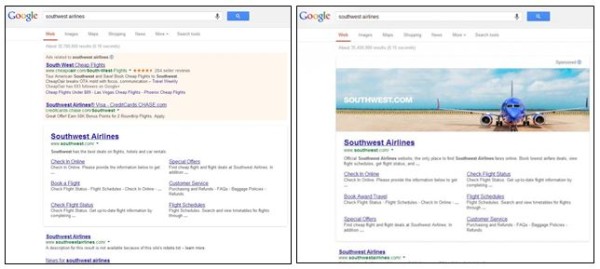
Last week some people began noticing that large banner ads were appearing on Google for a select few branded search results. This test of huge banner ads has caused quite a bit of a stir across the internet, especially because it seems to break a promise Google made all the way back in 2005.
When Google partnered with AOL eight years ago, Marissa Mayer, then Google VP of search products and user experience, issued a promise that users would never see banner ads on their results. She said:
“There will be no banner ads on the Google homepage or web search result pages. There will not be crazy, flashy, graphical doodads flying and popping all over the Google site. Ever.”
One could argue that some of the Google Doodle homepage logos commemorating special events would qualify as “crazy, flashy, graphical doodads”, those have never caused any worry because they are simply a flourish added to the homepage logo. However, it is indisputable that the new ad tests Google is running breaks their “no banner ads” promise outright. But, is it a bad thing?
The most notable aspect of the banner ads is that they only appear for branded searches. That means, if you search for Crate & Barrel, you might be shown the banner for Crate & Barrel. You won’t, however, be seeing any ads for random companies unrelated to your search, as you would normally associate with the term ‘banner ad’.
These ads are also linked to the brand’s website, providing users with an obvious, visually pleasing way to immediately find the business they are looking for. With careful moderation of banners, they could potentially allow businesses to essentially own their branded searches.
One of the biggest concerns for consumers regarding these ads is how they are used. Few users will be upset for the easily identifiable link with an aesthetically pleasing image showing when they search for a specific brand. However, if this test expands and advertisers are ever allowed to use these banners to advertise sales or other more advertising-styled banners, there may be a backlash.
Currently, it is estimated that 30 advertisers are currently being involved in the test, including Southwest Airlines, Virgin America, and Crate & Barrel. The test banner ads are also only being shown for 5 percent or less of search queries, so it is entirely possible you won’t run into one for quite a while.
Search Engine Land has created a FAQ for advertisers curious how this might affect the future of Google marketing, and Google released a statement on Friday, which read:
“We’re currently running a very limited, US-only test, in which advertisers can include an image as part of the search ads that show in response to certain branded queries. Advertisers have long been able to add informative visual elements to their search ads, with features like Media Ads, Product Listing Ads and Image Extensions.”


 There’s a new manual action showing up in Google Webmaster Tools,
  After an underwhelming debut in February, it appears AdWords Offer Extensions is being sent to the grave in favor of Google Offers. Ginny Marvin
 No matter how bad of shape your website is in, Google will crawl it. Google crawls and indexes seemingly the entire internet. Though we know they may not look as deep into low-quality websites, that doesn’t mean they haven’t at least crawled and indexed the landing page. It takes something truly special to keep Google from crawling and indexing a page, but there are two common mistakes that can actually manage to keep Google away.