Guest posting has become a staple of online marketing. It allows you to get those coveted links that will help you rank higher on search engines AND spread your message to a wider audience. Plus, it makes you look like a bigger authority in your field.
Unfortunately, when there is something that good, people will always try to take advantage of it. There has been a rise recently in the sites using guest posts to spread spammy links or cheat their way to higher rankings. It has become such a problem, Google had to issue a staunch warning to anyone trying to misuse guest posts.
As Google explains:
Google does not discourage these types of articles in the cases when they inform users, educate another site’s audience or bring awareness to your cause or company. However, what does violate Google’s guidelines on link schemes is when the main intent is to build links in a large-scale way back to the author’s site.
The search giant does specify a few factors you should be wary of when guest posting:
Stuffing keyword-rich links to your site in your articles.
Having the articles published across many different sites; alternatively, having a large number of articles on a few large, different sites.
Using or hiring article writers that aren’t knowledgeable about the topics they’re writing on.
Using the same or similar content across these articles; alternatively, duplicating the full content of articles found on your own site (in which case use of rel=”canonical”, in addition to rel=”nofollow”, is advised).
Basically, if you are doing guest posting in good faith, you probably aren’t in danger. You have to go out of the way to start using spammy practices or pumping out low-quality content. However, if you are breaking any of these rules you put yourself at risk of being punished and losing your high rankings.
Conversely, if you are being harassed by a spammy content creator to publish bad content, Google says you can submit a complaint via the spam report form.
00Taylor Ballhttps://www.tulsamarketingonline.com/wp-content/uploads/2018/07/TMO-Logo.pngTaylor Ball2017-05-29 16:18:242017-05-29 16:18:24Google issues a strong warning against using guest posts for links
Google has been using its Accelerated Mobile Pages technology to deliver content almost instantaneously for over a year, and now it is starting to spread the technology to new areas of its platform.
Specifically, Google says it is beginning to use AMP technology to speed up search ads in two different ways.
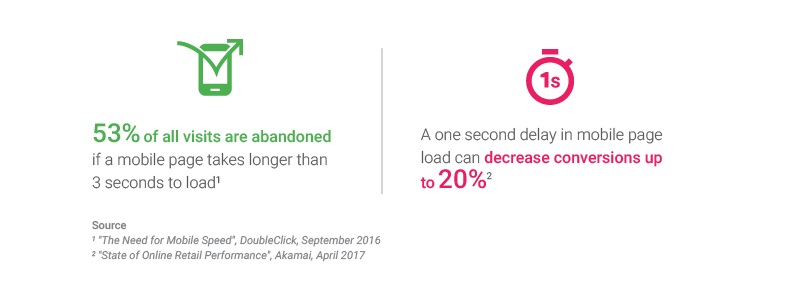
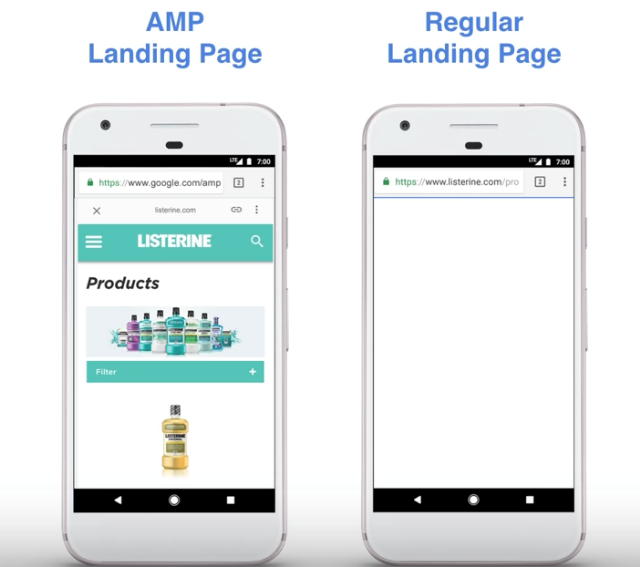
Firstly, Google AdWords is launching a beta program allowing advertisers to create landing pages using Accelerated Mobile Pages. The result is a faster transition from seeing the ad to being able to convert, and less chance of someone leaving because they get tired of waiting for your site to load.
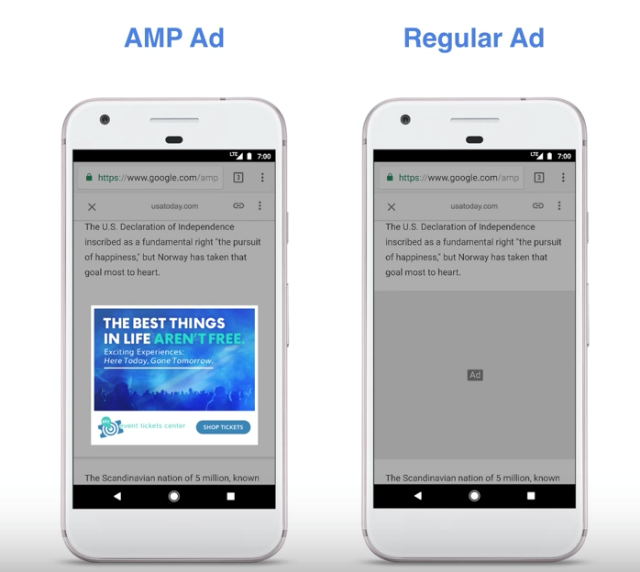
Secondly, Google is boosting all ads across the entire Google Display Network by automatically converting them to a new AMP ad format. As of today, the search engine has already converted a “significant” number of ads across its display network.
Google says its new AMP ads load 5 seconds faster than regular ads without any visual changes. This way, ads on AMP pages can load just as quickly as the content, creating a more seamless experience.
Retailers are increasingly relying on Google Shopping Ads to promote their products and increase sales. In fact, some estimates suggest more than half of all retailer ad spend in the US is spent on Shopping Ads.
However, the increased popularity is making it harder than ever to compete within Google Shopping listings. With so much competition, how are you supposed to guarantee your products will show up for interested searchers?
Well London ad agency Cliqteq has some answers for you. With their helpful infographic, you can learn seven great ways to boost your Google Shopping performance and get even more attention with your ads:
00Taylor Ballhttps://www.tulsamarketingonline.com/wp-content/uploads/2018/07/TMO-Logo.pngTaylor Ball2017-05-19 15:35:192017-05-19 15:35:197 Ways To Boost The Performance of Your Google Shopping Ads [Infographic]
Online marketing can be a scary world sometimes. You invest time and money on building up your brand and improving your online visibility, but it can all come crashing down overnight. It’s terrifying to think of, but it is the reality of the internet – everything is always changing.
While there is no 100% guaranteed way to protect your brand from this risk, you can take a few steps to help you sleep easier and feel assured you won’t wake up to a marketing nightmare. As long as you cover these bases, you’ll be safe from the most common disasters that befall brands online.
Don’t let your domain get snatched up
Website domains are kind of a funny thing. They are the foundation you build all your online marketing efforts on. But, once you have it set it is incredibly easy to forget. It’s one of those things that seems like it should last forever.
But, of course, that’s not the case. If you aren’t keeping an eye on things, it can be easy to one day wake up and discover your domain registration has expired. That alone can be enough to make for a stressful morning, but in some cases you may find you have lost your domain entirely.
Having your domain snatched up when it lapses is shockingly common and can happen to businesses of any size. Even huge brands and public figures like the Dallas Cowboys and Microsoft have dropped the ball and had to pay huge amounts to regain control of their domains.
Thankfully, most registrars now offer services to help you maintain control of your domain. Some allow for auto-renewal, while others offer text message warnings before your domain expires. In the case of GoDaddy, the service keeps your domain safe for almost 20 days after it expires so that you can get them back.
Watch your rankings (properly)
I know more than a few business owners who maintain the same ritual. Every few days, they will pull up the browser of choice and check their ranking for a few specific keywords. So long as they remain fairly high on the first page, they stay happy.
If that sounds like you, I have some bad news. The search results you see aren’t necessarily what others are seeing and you may have been sliding down the page for everyone else all this time.
Every major search engine does some form of customizing search results for individual users based on a variety of factors. This can include demographic data, location information, and search behaviors. So, if you’re regularly visiting your website or searching from inside the office, you’re pretty much guaranteed to be high-up when you search for your company.
Instead, get a real look at how you are performing by using an analytics service. There are a number of free services available, but I always recommend Google Analytics as a starting point. The learning curve can feel steep, but once you’ve got the hang of it, you can quickly find everything you want to know about your site’s performance.
Take control of your reputation
Stop me if you’ve heard this one before: A small business is gaining steam and popularity. Suddenly it all comes screeching to a halt, as your internet traffic dries up and your website stops converting. The culprit? A single bad review in the right place.
It is perhaps the scariest campfire story you can tell a business owner. Sites like Yelp have become notorious for destroying local businesses who handled a negative review the wrong way.
In some cases, the business owners just try to ignore the bad review while it festers and drives away any interested customers. Unfortunately, ignoring the problem doesn’t make it go away. In even worse situations, a business owner can let their emotions get to them and lash out at the reviewer – a move pretty much guaranteed to make you go viral for reasons you don’t want.
Neither of these is the right approach, and both can cause you headaches for a long time to come.
Thankfully, there is a right way to make sure your online reputation remains stellar no matter how scathing of a review you get from a disgruntled customer – address it head on every time. Rather than letting it get to you, keep an even head and treat every customer how you’d like to be treated. You’d be shocked to see just how many angry customers can be flipped into brand advocates so long as they feel their voice is heard.
The most important thing here is to be sure to watch all the major places people are likely to be talking about your business and be able to respond appropriately. This includes Yelp, Twitter, and Facebook. Check at least once a day to make sure you haven’t gotten any new reviews that need your attention. While you’re at it, it also never hurts to take the time to show your thanks to any positive reviews or mentions you’ve received as well.
Bing is giving advertisers until July 31st of this year to adjust to the new extended text ads format. After that, they will have to make the switch because Bing will stop supporting the creation and editing of the popular standard text ad format.
The company is giving some leeway to those who still prefer standard text ads, saying “all your existing standard text ads will continue to serve alongside expanded text ads for the foreseeable future.” Eventually Bing will stop supporting and serving standard text ads entirely, but they will give advertisers a warning when they plan to finally shut it down entirely.
To prepare for the change, Bing listed several best practices and tips to make the most of expanded text ads (EXTAs):
Create EXTAs within existing campaigns and ad groups along current STAs
Use Standard Text Ads as a baseline to measure how well Expanded Text Ads are performing
Create a 1:1 ratio of EXTA to STA ads in each ad group to maximize EXTA impressions
Helps avoid impression and click loss while testing EXTAs
Assures that EXTAs inherit all ad extensions and other set ups from the existing STAs
Once you are confident in the Expanded Text Ads performance, customers can move to 100% adoption, and delete their STAs
Take full advantage of the additional character limits
Use your best performing STA copy as a starting point when creating EXTAs
Experiment with messaging (try different length combinations)
Remember that headlines are important. Longer headlines help increase the visual space of text ads and help communicate additional information to searchers
Think about using content such as domain, display, description, query in ad title 2
00Taylor Ballhttps://www.tulsamarketingonline.com/wp-content/uploads/2018/07/TMO-Logo.pngTaylor Ball2017-05-11 15:25:182017-05-11 15:25:18Bing Plans To Stop Supporting Standard Text Ads Soon
These days, everyone knows about content marketing in some form. Whether you’re a business releasing blog posts and videos, or a consumer downloading ebooks and clicking on sponsored posts, there’s no denying that content marketing is ubiquitous in the modern day.
But, you might be surprised to learn this isn’t a new phenomenon. Content marketing has been around long before the social media, blogs, or even the internet.
It would be hard to pin down exactly when someone got the idea to promote something through content in some form, but Uberflip suggests content marketing’s seeds go all the way back to cave paintings in their Back to the Future themed infographic.
Let’s hop in the Delorean and check out all the landmarks and milestones that have shaped our modern content obsessed culture with A Visual History of Content Marketing:
00Taylor Ballhttps://www.tulsamarketingonline.com/wp-content/uploads/2018/07/TMO-Logo.pngTaylor Ball2017-05-08 15:15:112017-05-08 15:15:11Explore The History of Content Marketing With Doc Brown [Infographic]
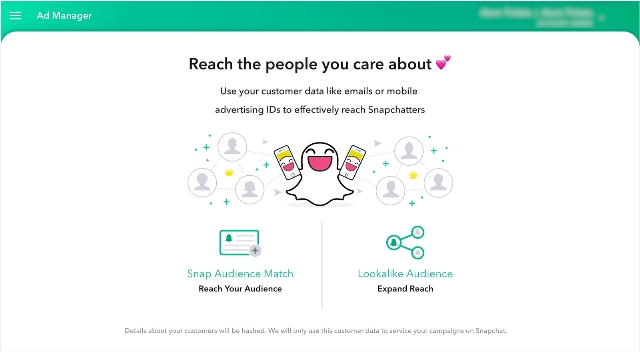
For years, the only way to advertise on Snapchat was by spending hundreds of thousands of dollars to work directly with the company for custom advertising. Gradually Snapchat has been opening the doors to advertisers, but still require interested businesses to work with third-party partners to purchase ad space.
Starting this June, that all changes. Snapchat is preparing to throw the doors open to businesses of all sizes and budgets with a new self-service ad manager and Snapchat Mobile Dashboard.
Combined, these new tools allow any business or publisher to create and track video Snap Ads from anywhere. Most importantly, they also simplify the process so that anyone can get involved – instead of just high-level advertisers with massive marketing budgets.
Compared to other social ad platforms, Snapchat’s Ad Manager still looks to be relatively limited. For example you can’t directly purchase Sponsored Geofilters or Lenses through the tool, however, there is a separate self-serve tool for geofilters. However, it is a significant step forward for the platform that has always seemed like a walled garden when it comes to advertising.
In addition to the new Snapchat Ad Manager and Mobile Dashboard, the company is releasing Snapchat Business Manager to let you control permissions and roles for team members helping publish and monitor your ads. All three will be available in June to everyone in the U.S., U.K., Canada, France, Germany, Australia, and select other countries.
00Taylor Ballhttps://www.tulsamarketingonline.com/wp-content/uploads/2018/07/TMO-Logo.pngTaylor Ball2017-05-04 15:00:062017-05-04 15:00:06Snapchat Is Preparing To Launch A Self-Serve Ad Manager
Paid search advertising continued to rise last year, accounting for almost $35 billion in ad spend, but the IAB’s latest revenue report shows big shake-ups in where that money is going.
During 2016, desktop paid search dropped by 10 points and was down by almost $3 billion. However, mobile paid search shot up, leading to an overall increase in paid search revenues by almost $6 billion.
As such, mobile ad spending also surpassed spending on desktop search advertising for the first time ever. Throughout the year, mobile accounted for 51 percent of digital ad spend in the US. Notably, it was even higher in Q4, where it represented 53 percent.
In total, digital ad spending accounted for $72.5 billion in 2016, rising 22 percent from 2015. Mobile is largely responsible for this increase, as it grew across every digital format, including search, display, and social. Most notably, mobile video ad revenue jumped 145 percent year over year. The cumulative mobile spending across formats nearly reached $37 billion in just the last year.
Randall Rothenberg, President and CEO of IAB, best sums up the report by highlighting the versatility and ubiquity of mobile devices to reach customers no matter where they are:
“Mobile fueled the internet economy in 2016, with advertisers showing their confidence in digital to achieve their marketing goals. This increasing commitment is a reflection of brands’ ongoing marketing shift from ‘mobile-first’ to ‘mobile-only’ in order to keep pace with today’s on-the-go consumers.”
00Taylor Ballhttps://www.tulsamarketingonline.com/wp-content/uploads/2018/07/TMO-Logo.pngTaylor Ball2017-04-27 14:06:212017-04-27 14:06:21Digital Ad Spend Jumped in 2016, All Thanks To Mobile Advertising
If you’re a business investing any amount of your budget into online marketing, there’s a good chance you are running ads on Google. So, it may raise your eyebrows to learn the company operating one of the largest online ad platforms is about to release a new feature that will block ads on Chrome.
Indeed, Google is updating its web browser to block ads by default. However, it appears Chrome’s ad blocker will only filter specific types of ads which are considered “unacceptable” by the Coalition for Better Ads standards.
“Unacceptable ad types would be those recently defined by the Coalition for Better Ads, an industry group that released a list of ad standards in March. According to those standards, ad formats such as pop-ups, auto-playing video ads with sound and ‘prestitial’ ads with countdown timers are deemed to be ‘beneath a threshold of consumer acceptability’.”
The news makes it fairly certain that Chrome’s ad blockers will be significantly less aggressive than many third-party options, but it is unclear exactly how it will work. It is possible the site may only block specific offending ads, but the report indicates Google is also considering blocking ads across an entire site if any ads are deemed unacceptable.
In other words, play by Google’s rules or have all your ads on your site blocked.
Many consider the news that Google is preparing an ad blocker to be a surprise, but there is a reasonable argument for the decision. The rise of ad blocker usage isn’t going away, with many citing malicious, aggressive, or annoying ads as their primary reason for using a third-party blocker.
By taking a proactive action to block offending ads by default, the company may be able to pull some users back from blocking all ads entirely. That means the typical ads across their platform would continue getting shown and generating revenue instead of being removed by a third-party app.
There are a lot of questions about how exactly the ad blocker will function, but the WSJ says you can expect to learn more about the feature “within weeks.”
00Taylor Ballhttps://www.tulsamarketingonline.com/wp-content/uploads/2018/07/TMO-Logo.pngTaylor Ball2017-04-21 13:55:242017-04-21 13:55:24Built-In Ad Blocker Is Coming To Google Chrome
YouTube is arguably the largest online video platform on the internet (though Facebook is providing some tough competition), so it is interesting that the platform has been one of the slowest to provide a widely available way to live stream.
That may be starting to change, however, as YouTube is significantly lowering the number of subscribers a user needs before being able to stream.
YouTube only introduced its public live streaming feature back in February, although it has partnered with large events to provide live streams for years. Even then, a user needed to have at least 10,000 subscribers before they were allowed to start streaming.
Over the past week, that threshold was quietly reduced to just 1,000 subscribers. Rather than announce the change, it was only discovered after a change to one of YouTube’s help pages.
The subscriber requirement is just one of a couple different stipulations required for streaming. Users must also have a verified channel and have not received any live stream restrictions in the past 90 days. Live stream restrictions are punishments placed against channels that have violated YouTube’s terms of services.
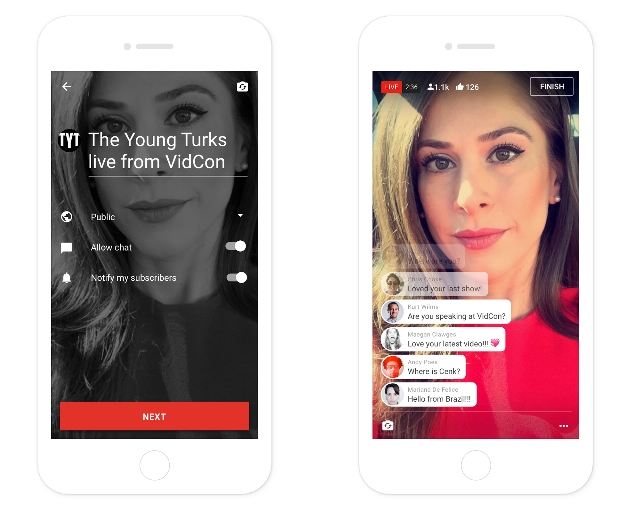
To start a live stream, follow these simple steps:
Tap the camera icon
Grant permissions allowing the YouTube app to access the Camera, Mic, and Storage.
Verify your account if you have not previously.
Tap GO LIVE.
Name your live video and set the privacy setting for your stream