Facebook is launching a mobile app version of its Creator Studio which helps users monitor and manage their page and content on the go.

While the iOS and Android apps will allow you to keep better in touch with your content while out of the office, the mobile version is still intended to be a companion to the more comprehensive desktop version.

As the company says in its announcement:

“The app is an evolution of and mobile complement to Creator Studio, the desktop hub dedicated to helping creators and publishers manage their content, track performance, and connect meaningfully with their audiences on Facebook. The new experience offers the same actionable insights and meaningful engagement metrics, all from the ease of a mobile device.”

Although the Creator Studio app does not provide the full suite of features available in the desktop version, it does include some of the most popular and informative tools for page managers, such as:
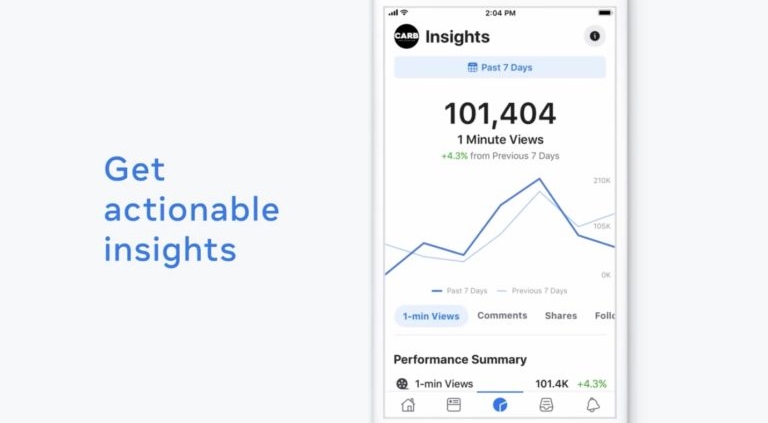
Facebook Creator Studio Insights

  • Rich Insights: Data and engagement metrics about how content is performing, like “1 Minute Views” and “Avg. Minutes Viewed”
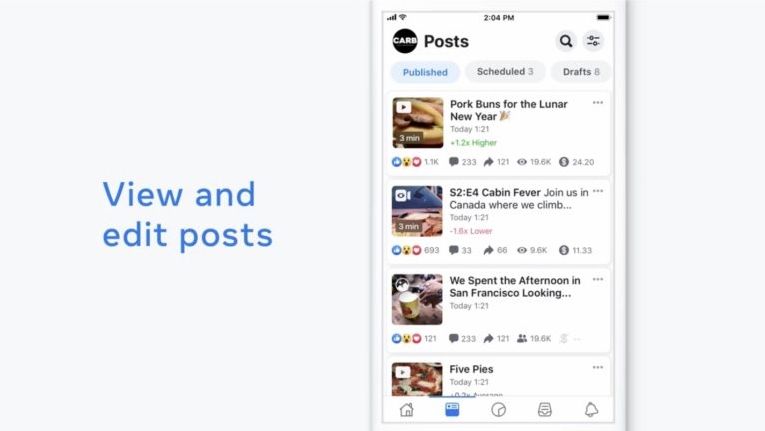
Facebook Creator Studio Content Management

  • Post-Uploading Edits and Fixes: Ability to edit video titles and descriptions, delete and expire posts, publish drafted posts and reschedule scheduled posts, enabling easy content adjustments
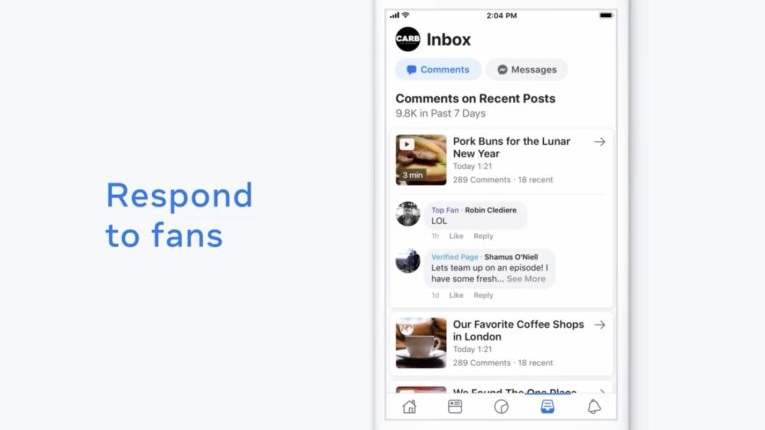
Facebook Creator Studio Messaging

  • Connect with Audiences: Reach fans and followers in real-time, from anywhere with the ability to read and respond to Facebook messages and comments using Inbox directly in the app
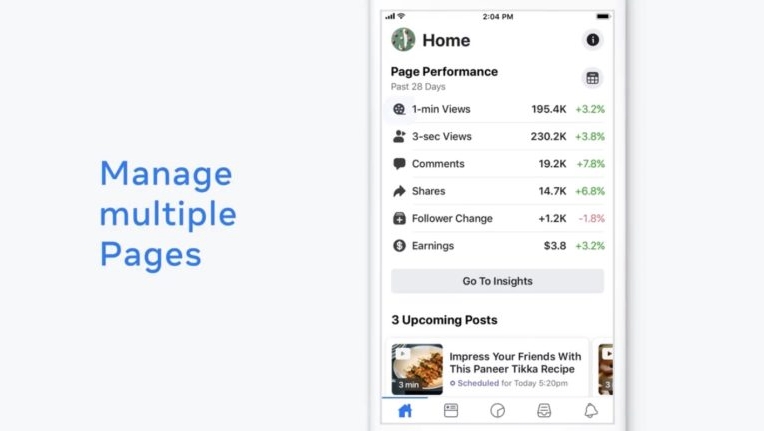
Facebook Creator Studio Manage Multiple Pages

  • Multi-Account Support: Manage multiple Pages on Facebook and toggle between them from the same app in the same session–no need to log out of one to log into another to access multiple Pages
  • Notifications: Immediate in-app notifications for key milestones

The most obvious omission is the ability to upload content or create new posts. At the moment, the Creator Studio app only allows you to manage or edit content that has already been posted or scheduled.

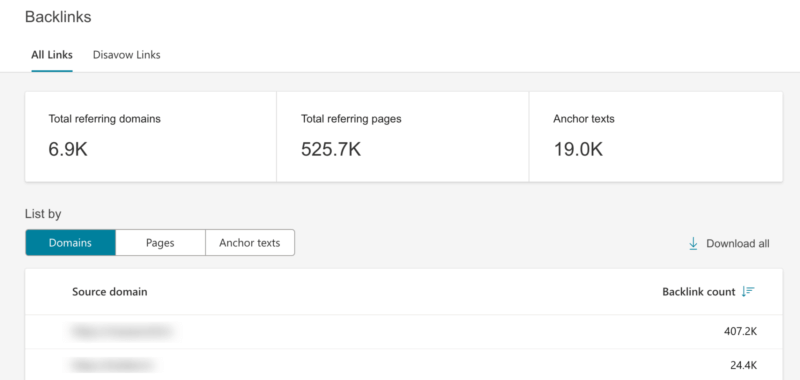
Bing revealed major overhauls to its Webmaster Tools suite this week. The new layout and features aim to make the tools available to SEOs and webmasters faster, easier to use, and more actionable.

As SMX West, the company said the first phase of the overhaul would be coming the first week of March, with a sleeker interface and three primary new features:

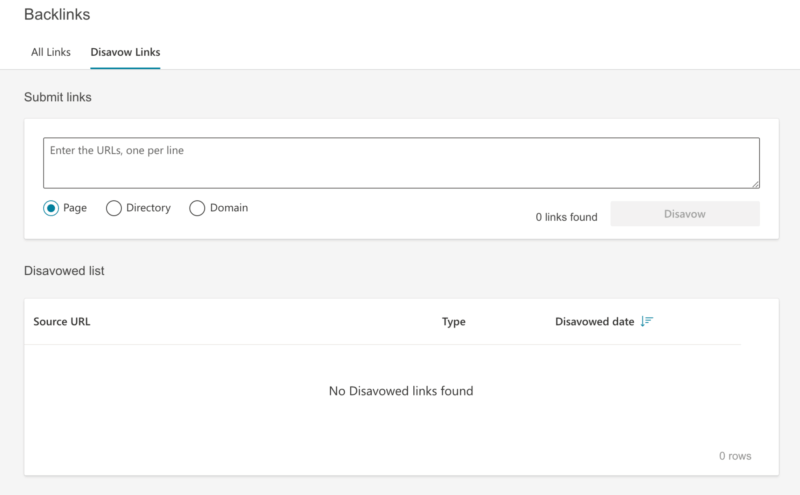
  • Backlinks Portal: The current inbound links report will be merged with a disavow links tool to become part of the backlinks report portal.
  • Search Performance: Similarly, the company is combining its page traffic and search keywords reports into a unified search performance report.
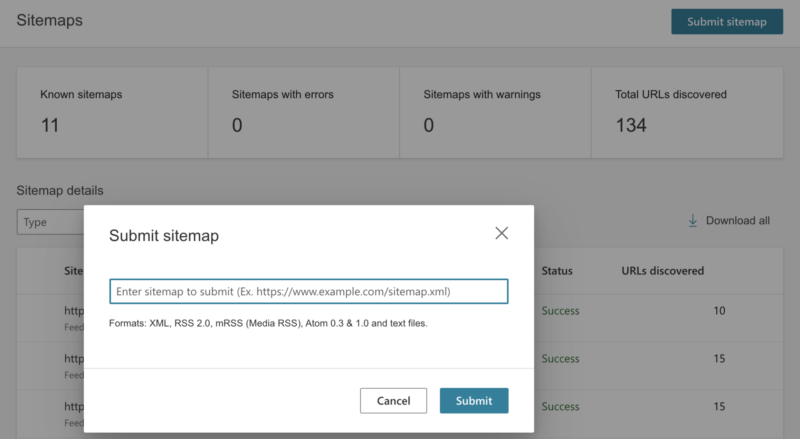
  • Sitemaps: Bing is giving its current sitemaps page a general overhaul to make it more valuable to online marketers and webmasters.

When It’s Coming

As the company said in its announcement:

“We are delighted to announce the first iteration of the refreshed Bing Webmaster Tools portal. We are releasing the new portal to a select set of users this week and will be rolling out to all users by the 1st week of March.”

What It Looks Like

Search Engine Land provided several screenshots of what the new portal will look like once it goes live:

Search Performance Report

Backlink Report

Disavow Link Tool

Sitemaps

Once they go live, anyone with a Bing Webmaster Tools account can access the new features by navigating to the Sitemaps, Inbound Links, Page Traffic, or Search Keywords reports.

Why It Matters

Despite being frequently overlooked by brands and marketers, Bing has been quietly cementing its grasp on a significant percentage of the search market. The new tools will make it easier for those taking advantage of this opportunity to better understand their website’s performance and refine their efforts for even better performance in the future.

New analysis from market research firm FocusVision shows that the average B2B buyer consumes 13 pieces of content before making a purchase or signing a contract.

That finding and more comes from a large survey of executives at companies with at least 500 employees and $50 million in annual revenue. Additionally the participating companies had purchased a marketing technology solution within the past year.

What Content Do B2B Buyers Consume?

Of the 13 pieces of content that B2B purchasers explore, the majority (8) tend to be marketing pieces delivered directly from the company, while the other five consisted of third-party content.

The content also takes a wide range of shapes, including video, blog posts, reviews, customer testimonials, and market analysis.

The B2B Purchasing Journey Through Content

FocusVision’s report suggests it takes an average of two to six weeks and three or four internal decision makers for B2B buyers to make the big decision. Much of this time is spent researching by connecting with content that might inform their purchase.

When asked how they found content, the majority said they found it directly on a vendor’s website or through search and social media.

The complete responses were:

  • Directly through vendor website — 70%
  • Internet search — 67%
  • Social media  — 53%
  • Sent to me via email — 41%
  • Word of mouth — 33%

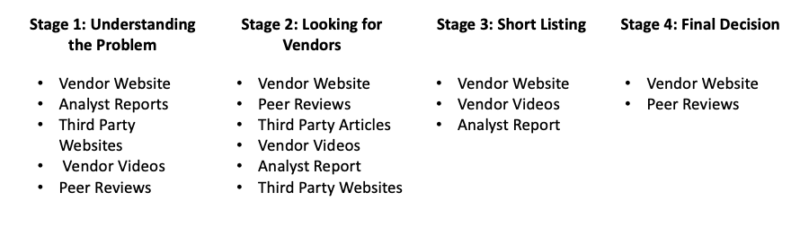
The study also identified four unique buying stages with specific types of content present during each phase:

  1. Understanding the problem
  2. Looking at vendors
  3. Short-listing
  4. Final decision

The most useful types of content according to B2B buyers were

  • Product specifications and functionality — 67%
  • Product comparisons — 65%
  • Product success stories — 60%
  • Content specifically showing value to internal stakeholders — 54%
  • Product tutorials — 49%
  • Troubleshooting and problem solving — 48%

Notably, the study found some variance in how companies with higher revenues used content to inform their decisions. Those with revenues above $250 million tended to rely more on third-party content and market analysis, rather than first-party content.

What This Means For You

If you provide products or services to other businesses, the findings make it clear that content is essential for marketing your brand to other professionals. Without it, influential buyers may not hear about your product or have enough details to make an informed decision.

If you’ve ever doubted the power of search engine optimization, just look at the events playing out surrounding the recently released movie Birds of Prey (and the Fantabulous Emancipation of One Harley Quinn). 

After the film significantly under-performed on its opening weekend, Warner Bros. has decided to revise the name to the simpler Harley Quinn: Birds of Prey for better SEO.

As the company explained to The Verge this week, the new title places the popular character’s name at the front of the title instead of hiding it towards the end. The idea behind is a “search expansion for ticket sites” to make the title easier to find for movie-goers who may be less familiar with the Birds of Prey title.

Attentive watchers noticed the change occurring three days after the film’s release across numerous ticket sites.

Did SEO Tank Birds of Prey?

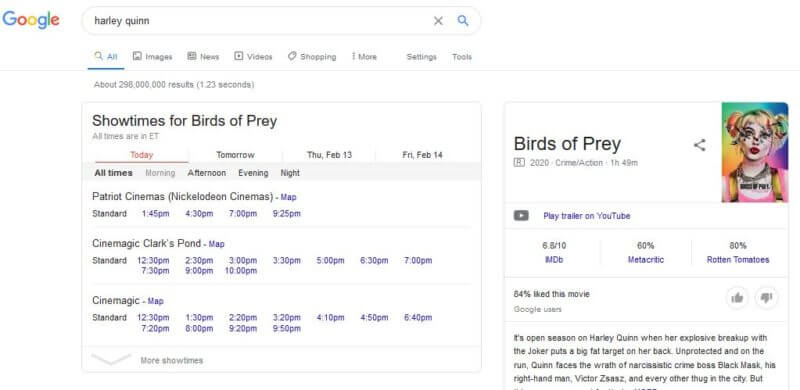
It is too early to really tell how big of an impact the change will really have to the movie’s success. There is some evidence that Google and other major search engines were already surfacing information about the movie and ticket availability when just searching “Harley Quinn” before the change took effect.

Image Source: George Nguyen/Search Engine Land

The revision could actually cause more confusion, as many details about the movie – such as its YouTube trailer – still show the original movie title.

However, the power of SEO and branding can’t be ignored. Studies have shown that more than half of consumers only click on brands they are familiar with within search results. It is also hard to gauge exactly how many potential film goers were turned away or frustrated by irrelevant search results before the change took place.

Either way, the events following the release of Birds of Prey provide a real-world example of how SEO and branding affect the viability of even the biggest products.

When creating content to help your SEO, many people believe they should aim for an “ideal” word count. The perfect number has ranged from 300 to 1,500 words per post depending on when and who you ask. There’s just one problem – Google’s leading experts say there is no perfect word count.

Why Do Word Counts Seem Important?

Since Google is relatively tight-lipped about the exact recipe they use to rank sites on its search engine, SEO experts have traditionally had to rely on their own data to understand the inner-workings of the search engine.

Sometimes, this information is later confirmed. Marketing experts had long believed that site speed was an important ranking signal for Google before the company confirmed its impact.

The problem is this approach relies strongly on correlation – which can be unreliable or lead to incorrect conclusions.

This is also why the “ideal” word counts recommended by “experts” tends to vary so wildly. When we have to rely on relatively limited data (at least, compared to Google’s data), it can skew the conclusions taken from the data.

This is where Google’s John Mueller comes in.

What Google Has To Say

The company’s leading experts have repeatedly denied that they consider word counts to be an important ranking signal. Some have suggested it is lightly considered, but the impact is negligible compared to other factors like keyword relevance or backlinks to the page.

The latest Googler to speak out about the issue is John Mueller, Webmaster Trends Analyst at Google.

In a recent tweet, Mueller used a simple analogy to explain why focusing on word counts is the wrong approach.

Simply put, focusing on how long each piece of content is puts the attention on the wrong area. If you write long posts, simply for the point of hitting a total number of words, there is a high risk of drifting off-topic or including irrelevant details.

The better approach is to create content with the goal of answering a specific question or responding to a specific need. Then, write until you’ve provided all the relevant information – whether it takes 300 or 1,500 words to do so.

In the latest episode of Google’s “Search for Beginners” series, the company focused on 5 things everyone should consider for their website.

While it is relatively straight and to the point, the video shares insight into the process of ranking your site on Google and ensuring smooth performance for users across a wide range of devices and platforms.

Specifically, Google’s video recommends:

  1. Check if your site is indexed: Perform a search on Google for “site:[yourwebsite.com]” to ensure your site is being properly indexed and included in search results. If your site isn’t showing up, it means there is an error keeping your site from being crawled or indexed.
  2. Provide high quality content: Content is essential for informing users AND search engines about your site. Following the official webmaster guidelines and best practice documents will help your site rank better and improve overall traffic.
  3. Maximize performance across all devices: Most searches are now occurring on mobile devices, so it is important that your site loads quickly on all devices. You can check to ensure your site is mobile friendly using Google’s online tool here.
  4. Secure your website: Upgrading from HTTP to HTTPS helps protect your users information and limit the chance of bad actors manipulating your site.
  5. Hire an SEO professional: With the increasingly competitive search results and fast-changing results pages, Google recommends hiring an outside professional to assist you.

The video actually implies that hiring an SEO professional is so important they will be devoting significantly more time to it in the future. Here’s what the presenter had to say:

“Are you looking for someone to work on [your website] on your behalf? Hiring a search engine optimizer, or “SEO,” might be an option. SEOs are professionals who can help improve the visibility and ranking of your website. We’ll talk more about hiring an SEO in future episodes.”

Google says it is walking back a significant recent redesign of its desktop search results after widespread negative reaction.

Earlier this month, the company released an update which brought desktop search results closer to the current mobile results, including changing how ads appeared in the results.

However, many said the change made it difficult to distinguish between paid advertisements and organic search results.

This isn’t the first time Google has been accused of making it difficult to tell ads from organic results, however it is the first time the company has agreed to backtrack on the changes.

In a Tweet, the company said: “Last week we updated the look of Search on desktop to mirror what’s been on mobile for months. We’ve heard your feedback about the update. We always want to make Search better, so we’re going to experiment with new placements for favicons.”

Despite the negative response, Google says initial tests of the change were positive and cited the warm response to similar mobile search results designs.

Read the full statement below:

“We’re dedicated to improving the desktop experience for Search, and as part of our efforts we rolled out a new design last week, mirroring the design that we’ve had for many months on mobile. The design has been well received by users on mobile screens, as it helps people more quickly see where information is coming from and they can see a prominent bolded ad label at the top. Web publishers have also told us they like having their brand iconography on the search results page. While early tests for desktop were positive, we are always incorporating feedback from our users. We are experimenting with a change to the current desktop favicons, and will continue to iterate on the design over time.”

A surprising competitor has entered the arena of search engines, as Verizon Media has announced the launch of its privacy-focused search engine called OneSearch.

The search engine says it will not track, store, or share any data from users including personal and search-related information, aligning itself more with search engines like DuckDuckGo than Google.

The search engine is available now at OneSearch.com.

While DuckDuckGo may be more established, OneSearch hopes to make it easier for businesses committed to privacy by integrating the search engine with existing products.

As the company explains in the announcement:

“OneSearch doesn’t track, store, or share personal or search data with advertisers, giving users greater control of their personal information in a search context. Businesses with an interest in security can partner with Verizon Media to integrate OneSearch into their privacy and security products, giving their customers another measure of control.”

The search engine is also taking privacy a step further by adding an “advanced privacy mode” which delivers search results via encrypted links which will expire within an hour.

In the announcement, OneSearch highlights their full suite of privacy-centric features, including:

  • No cookie tracking, retargeting, or personal profiling
  • No sharing of personal data with advertisers
  • No storing of user search history
  • Unbiased, unfiltered search results
  • Encrypted search terms

As OneSearch promises not to sell users’ data, it will instead rely on advertising to provide its search engine for free. Rather than using users’ browsing data, the search engine says it will show ads based on contextual data such as the current keyword being queried.

Currently, the search engine is only available in North America on desktop or mobile browsers. The company says it plans to expand the search engine to other countries soon and will be launching mobile apps for Android and iOS later this month.

LinkedIn is launching three new features for users aimed at encouraging the community to engage more and form deeper connections with followers.

The new features are part of an initiative to bring new updates to LinkedIn’s 50 million organizations using the site to reach customers, prospects, employees, and potential collaborators.

To start of 2020, the site is making it possible for users to invite others to follow their page, stream using LinkedIn Live, and post to their page in new ways.

Invite New Followers

One of the hardest parts of getting a social metwork page off the ground is gaining new followers. Now, LinkedIn is giving page managers the ability to invite users who share a first-degree level of connection to your page.

Users can also choose to entirely opt out of these invites if they prefer to not receive invitations to follow pages.

LinkedIn Live Integration

LinkedIn is also working to better integrate their streaming platform by allowing pages to broadcast live streams.

In the past, live streaming was strictly only available to personal profiles on the site.

This could prove to be a boon for pages on the site, as the company says live streams generate up to 7 times more reactions and 24 times more comments compared to typical video posts.

To get access to live streaming on your brand’s page, page managers can apply on the LinkedIn Live website.

Post as a Page or Member

When posting new content, users can now select a conveniently located switch on the homepage to choose between posting as yourself or an organization you represent.

Previously, the only way to post as your page required you to visit your organization’s page and post directly from that page. Now, users can easily post to their preferred page from one place.

You can see what the new features look like in action in the video from LinkedIn below:

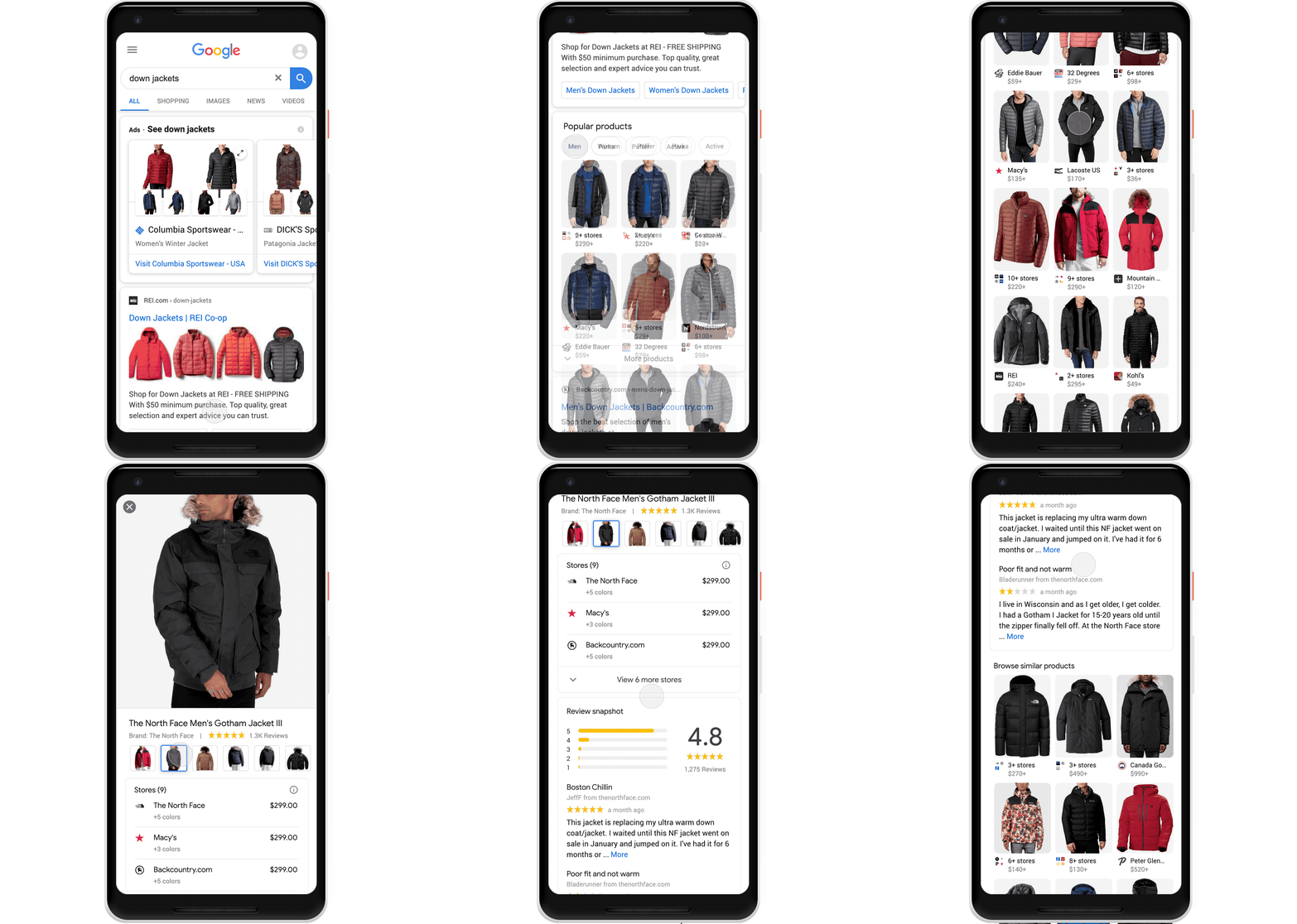
For years, the only way to showcase your products within Google’s search results has been through paid shopping ad campaigns.

Though effective, these Shopping campaigns have grown increasingly competitive and more costly, despite more popular shopping sites like Amazon and Pinterest offering organic ways to promote your goods.

Now, Google is returning to its organic search roots with a new way to showcase clothes and other retail products in a specialized search results format for mobile users.

What Are Popular Products Listings?


The Popular Products section is designed to pull together relevant products for searches focused on shopping or retail.

As the company explains in the announcement:

“Starting today, you’ll begin to see clothes, shoes and accessories from across the web in one place on Search on your mobile device, so you can easily browse lots of different stores and brands at once.”

The search results in the section can also be further refined by style, department, and size, with each listing taking interested shoppers to a store’s website.

How To Get Your Products In The Popular Products Section

Though it takes a little bit of specialized work, the process of including your products is relatively easy for most website managers.

Firstly, retailers start the process by uploading their products into Google’s Merchant Center – a free tool available for all retailers. Additionally, you can increase the chances of your products being included by including structured markup data in your product listings.

As Google says:

“Just as we don’t charge sites to be part of the Google Search index, participating retailers appear in this new feature for free. Retailers can learn more about what types of products are eligible to appear in this shopping experience on Search.”