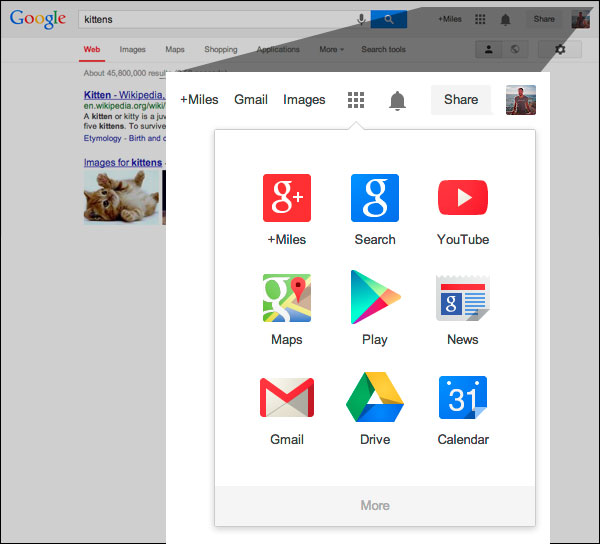
Yesterday you may have noticed a couple changes when you opened up Google. The first is the most obvious – it was accompanied by a little help box explaining the change – but Google has officially implemented their new app launcher in the main Google navigation bar for quick and easy access to other Google products.
You’ll be familiar with this app launcher if you use Android devices or Chromebook computers. Search Engine Land also reports that the grid-style launcher has been in testing since February or earlier.
The other change is a lot more subtle, but still of note for the design community. Google has flattened their logo, keeping up with the hot trend. Flat design is especially popular at the moment as Apple’s new flat iOS also rolled out earlier this week. The colors in the Google logo are also slightly different, but you won’t be too thrown off by the tweaks.
Many will have already seen the updates, but if you’re Google page still looks the same as it always has, be patient. Google says it should be completely rolled out over the next couple months on most Google products.
00TMOhttps://www.tulsamarketingonline.com/wp-content/uploads/2018/07/TMO-Logo.pngTMO2013-09-20 10:33:162013-09-20 10:33:16Google Officially Rolls Out Their New Logo and App Launcher
If you ask some marketing professionals, they may acts as if it is common knowledge that Google +1’s help raise your rankings on the search engine results. However, that “knowledge” is more an assumption based on a few correlation studies such as those done by Searchmetrics and Moz. These studies found extremely high correlation between Google +1’s and high rankings, but as you should know, correlation does not equal causation.
In fact, Google’s most prominent mouthpiece and Distinguished Engineer Matt Cutts has openly debunked the theory that more +1’s lead to higher rankings. But, that only sparked more debate. Whether or not there is a causative link between these two is much more fuzzy than many might tell you.
In an attempt to get to the bottom of this question, Stone Temple Consulting decided to conduct a real study of the effect Google +1’s have on search rankings. The difference is this study would be a real examination of causation, not correlation. The result: “Google Plus Shares did not drive any material ranking changes that we could detect.”
Eric Enge, leader of the study, did admit there were some possible limitations to the study. One of the biggest issues is the potential amount of links not showing up in the monitoring tools used in the study. In Enge’s estimate, the cumulative links found by Open Site Explorer, Majestic SEO, and Ahrefs is at best 50 percent of the total links to a site. It could even be as low as 30 percent of the links.
There was also a fair chance that general ranking movement and algorithm adjustments that are always occurring might not have been noticed in the study. In general, all studies of this sort are also very vulnerable to Google’s general complexity. There are so many factors involved which are not fully disclosed that any number of things could not have been taken into account.
Enge admits to these issues early, but he still stands by his study and the findings. He published a full review and report of the study and its methodology on Stone Temple Consulting’s website earlier this week. You can find all of the dirty details there, but the simplest conclusion is that Google shares are not driving up rankings. There will of course be many who still don’t believe this, and the debate will go on, but this tilts the scales away from what was considered conventional wisdom by many.
00TMOhttps://www.tulsamarketingonline.com/wp-content/uploads/2018/07/TMO-Logo.pngTMO2013-09-19 12:02:212013-09-19 12:02:21Recent Study Says +1’s Aren’t Driving Up Rankings
Google recently integrated their Panda algorithms into their normal indexing process, and this has sprung up a whole new batch of questions from webmasters. The most common question is specifically how site owners will know if their site has been hit by Panda. Really, it was only a matter of time before Matt Cutts, the noted Google engineer and head of Webspam, addressed the issue.
And that is what he did earlier this week, when Cutts used one of his Webmaster Help videos to respond to Nandita B.’s question, “how will a webmaster come to know whether her site is hit by Panda? And, if her site is already hit, how she will know that she has recovered from Panda?”
Now that the Panda algorithm is a part of the normal search indexing process, finding out if you’ve been affected by Panda won’t be near as easy. You can’t just compare your analytics reports with recorded dates for Panda rollouts. But, Cutts does have some suggestions if you think your site has been affected.
Cutts said, “basically, we’re looking for high quality content. So if you think you might be affected by Panda, the overriding goal is to make sure that you’ve got high quality content.”
Of course, high quality content in this context means sites that offer real value to users. It appears integrating Panda was actually one of the last steps in a shift towards a high focus on high quality content. They’ve been suggesting focusing on value for a long time, and now it is officially a large part of the normal search algorithm.
https://www.tulsamarketingonline.com/wp-content/uploads/2018/07/TMO-Logo.png00TMOhttps://www.tulsamarketingonline.com/wp-content/uploads/2018/07/TMO-Logo.pngTMO2013-09-12 12:34:122013-09-12 12:34:12What Are You Supposed To Do If You Think You’ve Been Hit By Panda?
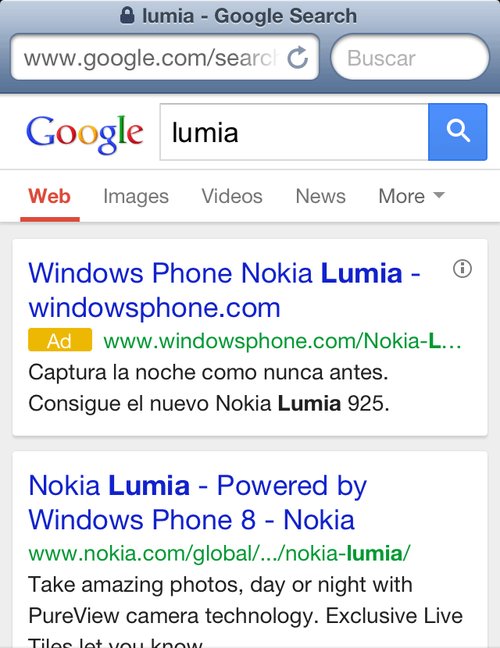
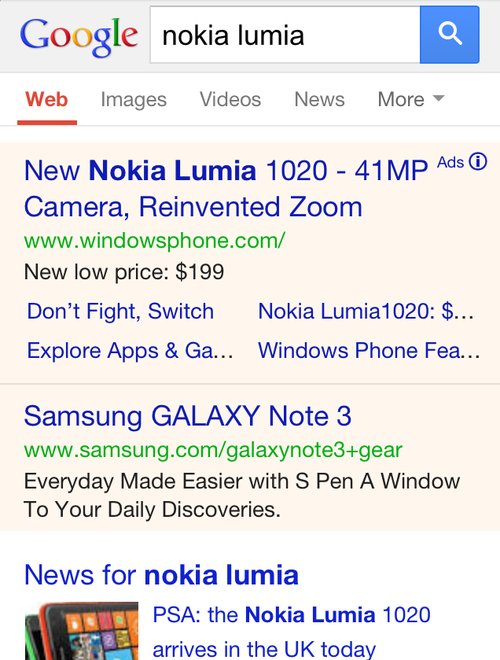
Over the next few days you might notice some changes to the way Google displays their mobile AdWords ads. Search Engine Land reports Google is currently testing out a new look which simultaneously makes the entire result page look more cohesive while keeping ads clearly labeled.
The first change you will likely notice is the way Google is using color. Google have been using lightly colored backgrounds to signify ads, but with this test they may be moving towards placing both ads and organic listings in white boxes in front of a gray background. Similarly, the gray background that has been behind the Google logo and search box is gone.
Instead of identifying ads with colored background, there is a new eye-catching yellow ad icon directly next to the display URL. The icon is significantly more attention grabbing than the old small “ad” that was previously to the right of the headline.
You can see the new style being tested above, while the current version is below.
00TMOhttps://www.tulsamarketingonline.com/wp-content/uploads/2018/07/TMO-Logo.pngTMO2013-09-12 11:39:112013-09-12 11:39:11Google Tests Out New Style For Mobile AdWords Ads
AdWords violations can throw a massive wrench into your advertising plans and completely derail a campaign. Any good marketer tries to avoid making the mistakes that can get your text ads disapproved or suspended, but many will still encounter the fearsome email from the AdWords team warning you about violations.
The 10 minute video was posted by Google’s Courtney Pannell, with the majority of the presentation coming from Ly and Joshua. They discuss the most important AdWords violation topics including:
How Sites are Reviewed by Google
Why Sites Are Disabled
How to resubmit Sites
If you encounter a warning from Google about AdWords violations, you will definitely want to watch this video.
Have you ever searched for a term only to find a page that says “we have no articles for [your search term]” and a whole bunch of ads? Most people have come across these sites with auto-generated content, often called “Made for AdSense” or MFA sites. These pages are created for the sole reason of luring people in, and hoping they click an AdSense ad to leave the page instead of hitting the back button.
The majority of these types of websites use a script to automatically generate content that takes snippets from search results or web pages with those keywords. They don’t offer real content in any way and have absolutely no legitimate value. It makes many wonder why they’ve encountered these kinds of pages in the Google search results.
One user directly asked Matt Cutts, Google’s head of webspam, if the search engine is doing anything about the pages, such as penalties or removing these sites from the index. As you would expect, Google already has a policy in place, and Cutts encourages users to report any pages like this they come across. He states:
We are absolutely willing to take action against those sites. We have our rules in our guidelines about auto-generated pages that have very little value and I have put out in the past specific calls for sites where you search for a product – a VCR, a laptop, or whatever – and you think you’re going to get a review, and the first thing you see is ‘0 Reviews found for [blah blah blah].’
As Google sees it, even if these pages are from legitimate search engines, they don’t belong in the rankings. Users don’t really like searching for something and being sent to another page of search results. They want to be directed straight to real content.
There are very few times when search results snippets should be indexed. The only real time it might be considerable is if you have exclusive data that no one else has. But, there is no time when a supposed search results page with 0 results should ever be indexed.
To put it simply, Google is already trying to fight against these sites. They aim to find and penalize all they can, but they also want people to report them with a spam report if possible so that the lowest amount possible slip through the cracks.
https://www.tulsamarketingonline.com/wp-content/uploads/2018/07/TMO-Logo.png00TMOhttps://www.tulsamarketingonline.com/wp-content/uploads/2018/07/TMO-Logo.pngTMO2013-09-06 12:38:502013-09-06 12:38:50What is Google Doing About Low-Value Auto-Generated Content Sites?
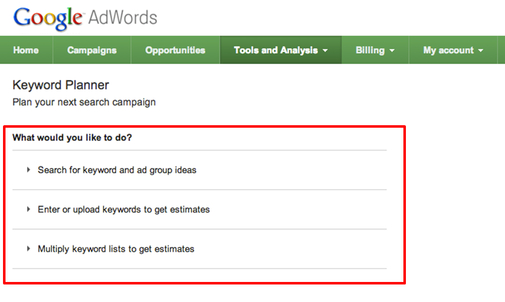
The time has come. As of yesterday, the Google Keyword Tool is officially dead. The sentiments are mixed as the tool has been frequently used by webmasters and SEO professionals across the world, but Google has offered a replacement called the Keyword Planner which has some advantages over the old tool. It also has some drawbacks associated with the switch.
In Google’s opinion, the Keyword Planner can accomplish all the important tasks the Keyword Tool could, as well as that of the Traffic Estimator. There are even some new features included which neither of the older tools offered. Matt Southern from Search Engine Journal broke down the pros and cons of being forced to make the change, which are shared below. Chances are in a few months you won’t even remember using the old Keyword Tool, but the transition could take some getting used to.
Positives
The Keyword Planner allows local SEO professionals and marketers to acquire keyword search volume data down to a city level with better geographic segmentation than the Keyword Tool and Traffic Estimator. It also has the ability to bundle geographic regions together.
SEO professionals and marketers are also able to upload up to 10,000 keywords from their own list to get performance data. The planner displays search volume by ad group, landing page, and any other categorization established by the user.
Negatives
The most common gripe I have heard about the Keyword Planner is that, unlike the Keyword Tool, the planner required users to be logged into AdWords before being able to use the tool. However, there are some functions removed from the Keyword Tool which will have a larger impact on how you view and understand the data.
The Keyword Planner does not feature match type data for search volume, device targeting, and doesn’t include global vs. local monthly searches. The ability to filter by closely related search terms is also missing, though Google has stated it will be back within the coming weeks. They explained the missing match types and device differentiation in a statement, which read:
In general, you’ll notice that the average search volume data is higher in Keyword Planner as compared to the exact match search volume data you got with the Keyword Tool. That’s because we’ll show you the average number of searches for a keyword idea on all devices (desktop and laptop computers, tablets, and mobile phones). With Keyword Tool, we showed the average search volume for desktop and laptop computers by default.
Don’t say Google doesn’t at least try to listen to webmasters. Though many webmasters have some pretty big (and often legitimate) grudges against the biggest search engine, it can’t be said they don’t at least try to reach out for opinions. One example of Google trying to receive feedback from site owners appeared last night, as Matt Cutts, Google’s head of webspam, tweeted out a call for webmasters and SEOs to fill out a survey.
Specifically, Cutts called for owners of small but high-quality websites who believe they should be doing better than they are in the rankings. It won’t end up affecting your rankings immediately, but it may give Google some information that will help them keep the playing field vaguely even for small businesses and big companies alike. The form reads:
Google would like to hear feedback about small but high-quality websites that could do better in our search results. To be clear, we’re just collecting feedback at this point; for example, don’t expect this survey to affect any site’s ranking.
The survey only asks two short questions. First, it calls for the name and URL of the small site you believe should be ranking well. Secondly, Google would obviously like to hear your opinion about why the site should rank higher. It is extremely straightforward, and shouldn’t take all that long for most webmasters to complete.
https://www.tulsamarketingonline.com/wp-content/uploads/2018/07/TMO-Logo.png00TMOhttps://www.tulsamarketingonline.com/wp-content/uploads/2018/07/TMO-Logo.pngTMO2013-08-29 11:56:062013-08-29 11:56:06Matt Cutts Asks For Feedback From Small Sites That Aren’t Ranking Well
In his attempt to fix some confusing wording Google has been using, Matt Cutts, Google’s head of webspam, used his latest Webmaster Help video to clarify that page load speed is not any more important for rankings on mobile than it is for desktop searches.
This comes after Google has been publicly emphasizing the need for sites to load quickly, noting that mobile users are highly likely to leave a page if it doesn’t load fast enough. While Google isn’t backing off of that stance, Cutts wanted to make it clear that there isn’t a difference in how this speed is ranked from mobile to desktop.
If all things are equal, meaning all other aspects of two sites are ranked evenly, the site that loads faster will almost certainly be given the higher ranking in search results by Google, but that is true on smartphones and desktop computers alike. It is also just a sensible part of the algorithm, as slow pages will likely lose a large number of visitors just during the loading time, making it a lower-value site.
But, as internet speeds across devices and across the globe vary, Cutts said Google doesn’t have plans to give an exact amount of seconds your site should load in, but if it becomes obvious to Google that mobile users are getting more frustrated by slow sites than their desktop counterparts, they may consider weighting loading speed more for mobile searches. It just isn’t the case yet, and there are no plans currently to make it so.
https://www.tulsamarketingonline.com/wp-content/uploads/2018/07/TMO-Logo.png00TMOhttps://www.tulsamarketingonline.com/wp-content/uploads/2018/07/TMO-Logo.pngTMO2013-08-27 14:25:362013-08-27 14:25:36Is Loading Speed More Important For Mobile? Matt Cutts Says No
Negative SEO has been a topic of debate for a while now, especially since links became dramatically more risky with the introduction of Google Penguin. It is entirely possible competitors could simply point hundreds or thousands of low-quality or negative backlinks towards your site with the intention of causing your site to be penalized or possibly even completely removed from Google’s index. Buying links went from being a tool for cheating to algorithms to a weapon for destroying, or at least handicapping, competitors.
Google acknowledged this issue with the introduction of the Disavow Links tool, by giving webmasters a way to protect their site. The problem is, everyone seems to be using it wrong. According to Marcela De Vivo from Search Engine Watch, the Disavow Links tool isn’t best used after a site has been penalized. Instead, it should be used in combination with a link audit before you ever run into trouble.
It makes sense, the entire point of a backlink audit is to check the quality and status of all of the links in your profile. If you’re auditing properly and regularly, you won’t ever have to worry about algorithm updates or manual actions. You could catch every low quality link and disavow before search engines identify them.
Auditing isn’t difficult either. All you have to do is download your backlinks from your Google Webmaster account or any other backlink tool, and look for any links pointing back to your site that you either don’t recognize or look questionable. Usually fishy or spammy links are easy to pick out. Then, you can take action by emailing the owner of those sites and asking for the link to be removed. If that fails, all you have to do is turn to the disavow tool.
Running these types of audits is like exercising for your website. When done regularly, audits keep your site healthy, removes any unhealthy links from the profile, and makes it easier to fight off outside attacks. If you’re regularly auditing your links, you’ll quickly spot any negative or blackhat SEO attempts. Everyone living in fear of Penguin updates is spending too much time being reactive. If you proactively manage your backlink profile, penalties will seem far less menacing.
https://www.tulsamarketingonline.com/wp-content/uploads/2018/07/TMO-Logo.png00TMOhttps://www.tulsamarketingonline.com/wp-content/uploads/2018/07/TMO-Logo.pngTMO2013-08-21 13:26:382013-08-21 13:26:38Why You Aren’t Using the Disavow Links Tool Right

 Yesterday you may have noticed a couple changes when you opened up Google. The first is the most obvious – it was accompanied by a little help box explaining the change – but Google has officially implemented their new app launcher in the main Google navigation bar for quick and easy access to other Google products.