AdWords In Store Visits

It is no secret that many consumers often get annoyed with ads. Either they get worn down by sites that go overboard with ads littered across their pages or they just get tired of seeing ads that aren’t relevant or interesting to them. Thankfully, Google has found a way to give users the power to only see the ads they want.

Google is sending out notifications to users through Chrome and Gmail alerting them to a new web portal which puts the power to control ads into the users’ hands – among many other things.

The opt-in service allows you to voluntarily give Google a small number of personal details and surveys your interests to better target ads that are actually useful to users.

The feature is a part of Google’s new portal called ‘My Activity’, which displays all your activity across Google and Google devices in reverse chronological format including your past searches, visited websites, Map searches, and ads you’ve interacted with.

Obviously this might make many people nervous to see all the information Google can collect and store about their activity, but the portal also gives you the power to delete any information you don’t want to be there.

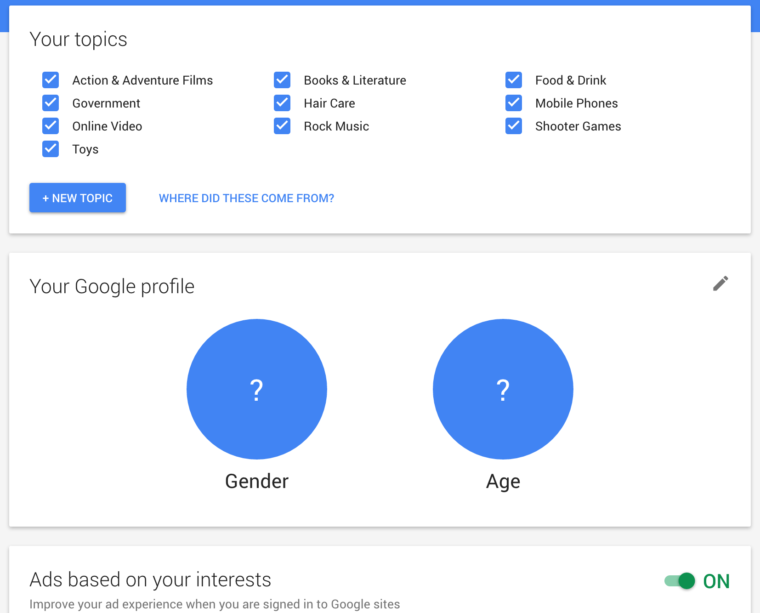
The ability to control the ads you see is specifically in a section of the portal called Ads Personalization. Here you will find checkboxes on topics you want to see ads on, along with sections to provide your age and gender.
Screen-Shot-2016-06-29-at-8.52.37-AM-760x613

If you turn on the feature, Google will use this information to serve you ads based on your previous search history, recently watched videos on YouTube, and other information you provide. Conversely, by opting in you are agreeing to provide Google with information about ads you have interacted with.

Users who don’t opt-in will be shown ads based on other more general information such as location data.

Google is far from the first company to use user data to target ads towards users. In fact, they’ve been doing this for years. However, this is possibly the first time a company has so transparently allowed users to control what information is being collected and how it is being used to serve them ads.
GoogleAdWords

As more people are searching for businesses from a variety of devices like smartphones and tablets, it is important that businesses provide a diverse number of ways to get in touch. Now Google is testing a new AdWords extension that will allow users to contact advertisers in an entirely new way.

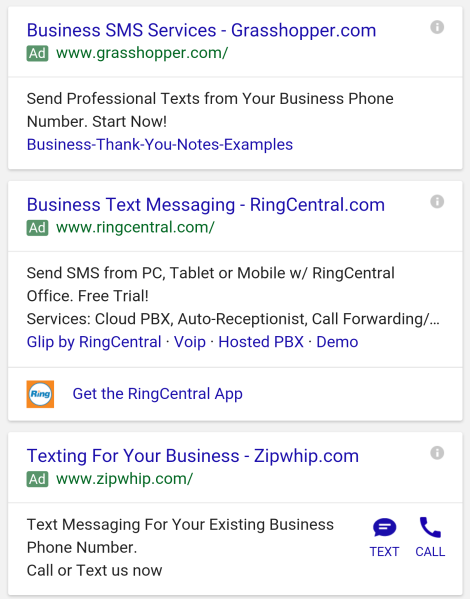
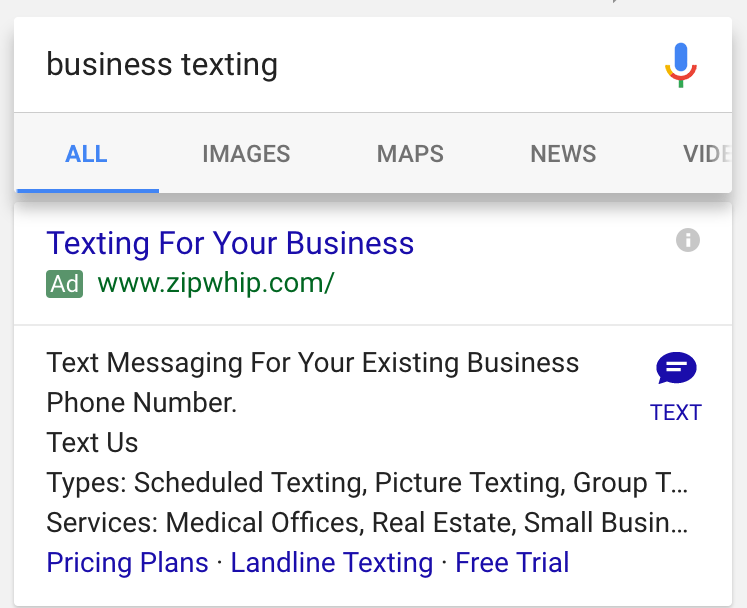
In the past, Google has used ad extensions to make it easy for searchers to call businesses they were interested in. With the latest ad format, you can now text or SMS advertisers directly from their ad.

Here is an example of how the ad format looks:

TextAdExtension

By clicking the text icon, you will be taken to your default messaging app, where a prefilled text message is started with the advertiser’s information. For example, if you click the icon in the results above, the pre-filled text message reads, “[Zipwip] I’m interested to learn more about Zipwhip.”

Judging by other results like the one below, the text ad extension can be combined with ad call buttons to provide a variety of ways to contact your business.

TextAdExtension2

Barry Schwarz was the first to report this new ad format. When he reached out to Google for more information, he was provided with this statement:

We’re always experimenting with new ways to connect our advertisers to customers but don’t have further details to share at this time.

Keeping a clean and orderly URL structure for your site can be more than just a helpful way of keeping your pages organized. SEO-friendly URL structure can also make your site easier for search engines to index and modestly improve how Google and Bing rank your site.

Unfortunately, establishing the absolute best URL structure can be a bit confusing. Some would have you believe it is more art than magic, while others would argue “everybody is doing it wrong”.

John E. Lincoln from Ignite Visibility and Brian Dean from Backlinko set out to clear up the confusion with a handy infographic that explains the best practices for keeping your URLs easy to index and easy for users to sort through, including the most common questions like URL length and keyword usage.

See the infographic below or at Search Engine Land.

SEOFriendlyURL

Google Logo

While loading speed is a crucial issue for most mobile internet users, Google’s “Mobile-Friendly Algorithm” isn’t currently using it as a ranking factor for mobile pages. However, that is likely to change when Google releases their next mobile-friendly update.

According to reports from the recent Search Marketing Summit in Sydney this week, Google Webmaster Trends Analyst Gary Illyes confirmed Google would be including page speed as a factor in the next mobile update. But, it may be months until that update arrives.

The inclusion of page speed seems like common sense. The majority of mobile users are likely to leave a page if it doesn’t load within five seconds, and some are even more impatient. From Google’s perspective, including page speed as a factor means they are more likely to help users find a site they will be happy with on the first click as often as possible.

It also makes sense considering Google introduced their version of Accelerated Mobile Pages recently.

Want to know how your site stacks up in terms of page speed or other mobile friendly factors? Google has also released updated versions of their mobile-friendliness and page speed tests for both desktop and mobile in one place.

The new tool, available here, combines all the free site evaluation tools Google offers in one easy-to-read report. You can also get a more extensive report emailed to you for deeper analysis.

google-animation-01-2016

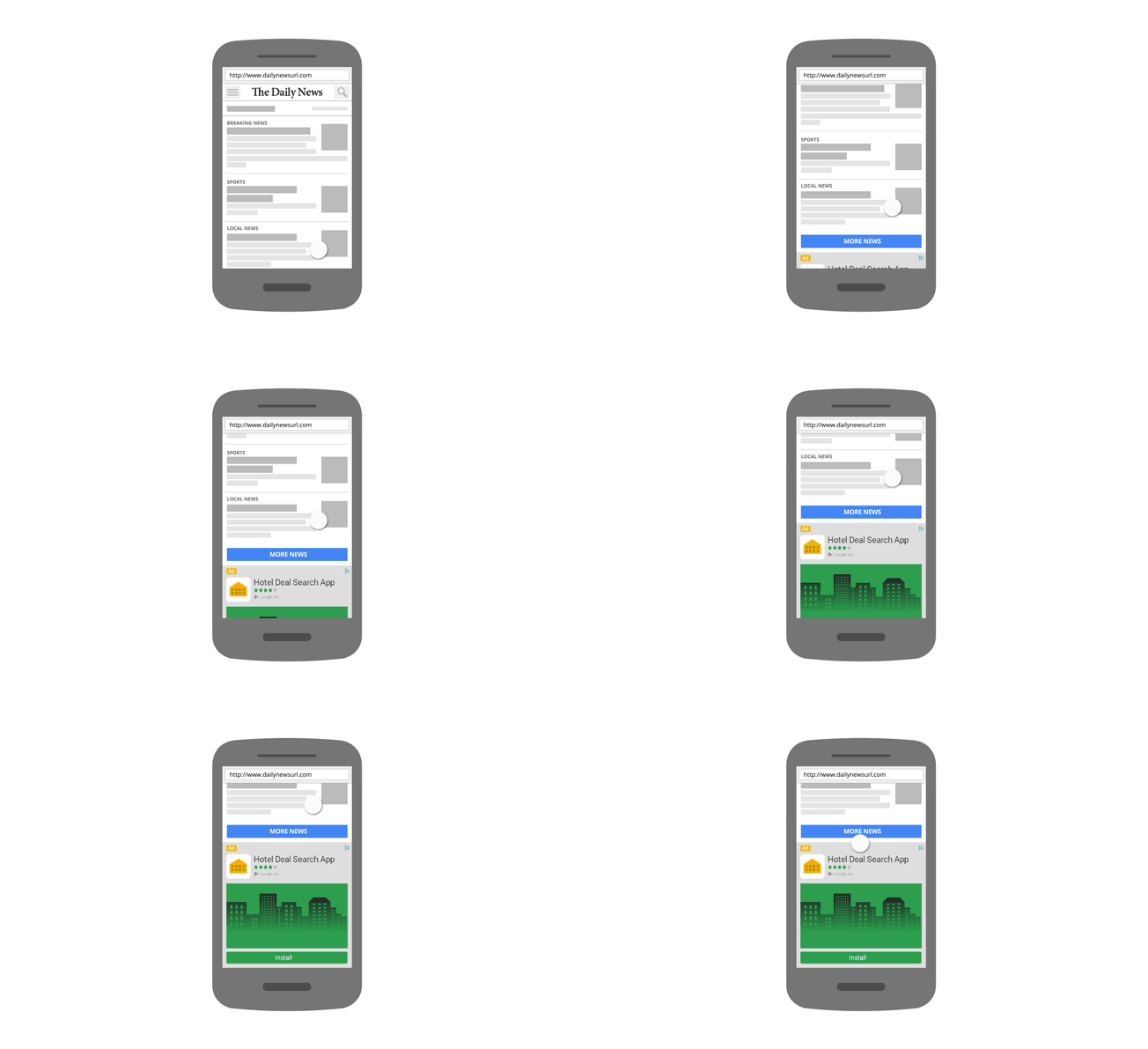
If you own a smartphone, chances are you know the frustration of accidentally tapping on an ad you had no interest in when you were trying to scroll down a page. These accidental taps aren’t just annoying to users, either. Advertisers hate these mobile clicks because they wind up paying for clicks from users who had no intention of converting.

Now, Google is stepping in to improve their mobile ad performance and user experience by altering how their ads operate on mobile devices.

Of course, Google has been trying to fight back against accidental mobile clicks for a considerable time now, but its recent announcement extends their initiative to its native ad formats. Before, their efforts were limited to just search and display ads. The search giant says they are stepping up their efforts because accidental clicks and taps are bad for everyone. Beyond simply being an inconvenience for advertisers and users, Google says accidental taps also drive down the value of ads.

“When we look at the effect for advertisers in mobile apps, we observe double the value per click,” Google said in a blog post. “We work hard to ensure that the clicks advertisers are charged for are more meaningful, and we hope sharing insight on these protections helps raise awareness and guide the wider advertising ecosystem.”

The changes being rolled out to native ads prevents accidental clicks in a few ways. First, Google ignores any clicks that are unusually fast, comparing itself to a professional baseball player having 680 milliseconds to tell whether they should swing at a pitch.

“That’s fast, even for a professional who’s paying close attention to hitting the ball,” Google said. “We think it’s virtually impossible for someone to read, understand, and take action on an ad in that amount of time.”

Additionally, Google says it will ignore when a user likely accidentally taps on an ad by excluding clicks on the edge of an ad. According to the search engine, clicks on the middle of an ad are associated with “dramatically higher” conservation rates and show much higher intentionality than those on the edge of ads.

GoogleAdWords

When it comes to search results pages, everyone wants the top spot. That goes for advertisers as well. But, a new analysis from Adobe Media Optimizer suggests the first ad on the page might not always be the best for your dollar. In fact, the 4th position may produce the best results in some situations.

The only catch is that sometimes Google doesn’t display the fourth ad.

According to the findings published in Adobe’s April 2016 Advertising Report, cost per click (CPC) is down ever since Google removed ads from the right side of the page. Meanwhile, click-through rates (CTR) has gone up.

The Adobe Advertising Report reviews three months of aggregated anonymous data from search advertising customers. The company specifically says they hoped this particular assessment would help customers understand Google’s decision to cut ads from the right-hand rail of desktop search results in February of this year.

Overall, the analysis found the changes impact smaller advertisers more because these advertisers generally depend on lower volume keywords. Due to the removal of the right-rail ads, smaller advertisers are having to pay our more to reach the top spots. They are also seeing 10% fewer clicks for less expensive keywords that appear in the lower ad spots.

The results also show that costs per click have risen for the number 1 and 2 positions by 6% and 7% respectively. Meanwhile, costs for the 3rd and 4th positions dropped by 8% and 10% respectively, showing advertisers are placing more of an emphasis on reaching the top spots.

Despite this, the lower positions are actually producing better click-through rates. CTRs for the 4th position jumped by 18% while the rates for the 1st and 3rd position rose by 13% and 2% respectively. Rates for the 2nd position have remained the same.

When all this is taken together it shows that the lowest spots on the AdWords results may provide the best value for advertisers, especially small businesses who are advertising on the platform. The results also suggest customers are responding well to the removal of right sidebar ads and engaging in ads more overall.

googladextensions

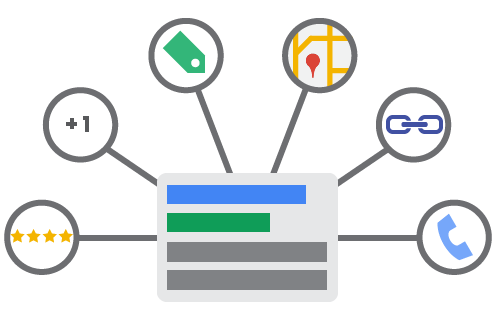
In the past, Google AdWords used a complex and confusing algorithm for deciding when to display ad extensions. Recently, the company changed this by introducing a new policy which adjusts the impact of ad formats in the ad rank formula and allows AdWords to provide an estimate of how visible an ad would be on search engine results pages (SERPs).

As of now, an ad’s visibility will depend on ad position and ad formats, meaning ads with higher positions in the SERPs will display more ad extensions than ads in lower positions. This is a shift away from past systems which allowed lower ranked ads to show more ad formats than those above them.

The term ‘ad formats’ refers specifically to visual extensions that appear on ads in search results that display extra information about a business, including phone numbers, addresses, consumer ratings, and more.

In a way, this change ads even more incentive for businesses to make sure they get the top rankings in search results pages, as they will be rewarded by having it be more likely their ad extensions are shown along with their ad. Those who are able to score the top spots will certainly be happy with the change, though, as it means they are less likely to be outshined by a lower ad on the page.

Google Mac Search

Roughly a month after Google announced it would be completely shutting down the Google PageRank Toolbar, the service finally went dark over the weekend.

Now, those who have the PageRank toolbar installed will not be able to see the 1-to-10 rankings of sites they visit, making the toolbar officially useless. The move also cuts data from any third-party toolbar that tries to retrieve a PageRank score.

Of course, if you’ve been using the PageRank toolbar recently, you have been working from outdated data. Google hasn’t updated the public PageRank scores in years, so it makes sense to finally shut it down for good.

It must be noted that PageRank isn’t completely gone. It just isn’t available to the public anymore. Google will keep using the PageRank algorithm internally to help evaluate websites.

For more about the legacy of PageRank and the PageRank toolbar, I recommend reading Danny Sullivan’s RIP Google PageRank score: A retrospective on how it ruined the web.

banner-1000935_640

Google is continuing its efforts to combat online display advertising fraud, with new defenses against a scam technique known as clickjacking.

If you’ve ever tried to press play on a video, open a link, or start a song and wound up on another page unexpectedly, clickjacking is most likely the culprit.

This is done by overlaying an essentially transparent layer over a legitimate web page. This way everything looks normal, but as soon as you try to take any form of action you trigger a behavior on the transparent overlay. The action may be used to trigger one-click orders from Amazon, take you to malware-laden sites, gain Facebook or Twitter likes, commit ad fraud, or any number of malicious behavior.

To fight back against this, Google is removing publishers engaged in clickjacking from its network entirely. The company has also developed a new filter specifically to exclude invalid traffic on display ads from clickjacked pages on both mobile and desktop.

In a blog post about the new efforts to fight clickjacking, Andres Ferrate, Chief Advocate of Ad Traffic Quality at Google, explained:

When our system detects a Clickjacking attempt, we zero-in on the traffic attributed to that placement, and remove it from upcoming payment reports to ensure that advertisers are not charged for those clicks.

GoogleAnalytics.png

Google Analytics is an essential tool for making sure your website is performing as you would like and making improvements to keep growing, whether you are a high-level marketer or a business owner who just launched their site.

If you aren’t familiar with Analytics, however, or the technical jargon that fills your reports, it can be difficult to make sense of the huge amount of information available. That can make it hard for someone new to running a website for their business to make sense of the huge amount of information available in Google Analytics.

Thankfully, you don’t have to depend on analysts, marketers, or your company’s “computer guy”, to understand how your site is performing with Google Analytics. Search Engine Watch has put together an easy-to-understand glossary for all the jargon and confusing labels that you will come across, making it simple for you to know exactly what your reports are saying about your site.

You can see the handy guide from Search Engine Watch here.