Tag Archive for: video optimization

YouTube is giving creators a new tool that makes A/B testing titles for their videos easy. This means any creators with access to advanced features will be able to guarantee they are using the most engaging titles that drive the most clicks using real-world data.

YouTube announced that the feature, previously only available to a select number of channels, would be getting widely released in a video on its Creator Insider channel this week.

In the announcement, YouTube also took time to share more details about how their A/B testing works and address some questions from the community.

How It Works

The new A/B testing feature is available in YouTube’s “Test and Compare” section, alongside the tool that allows channels to test thumbnails. With the tool, you’ll be able to test up to three different titles on a single video.

Once selected, the tool will show users the video using one of the three titles and gather performance data across a period of up to two weeks. 

Once the test is complete, you will get a notification with the results. If one title drives significantly more engagement than the others, it will become the default choice for viewers. If not, YouTube will default to the first title you provided. 

Of course, creators can always choose to override the tool and select one specific title to display.

Why YouTube’s A/B Testing Prioritizes Watch Time

While the feature has largely been positively received, many have questioned why the A/B testing tool measures and optimizes titles based on watch time rather than click-through rate. 

The company addressed this in the announcement video: 

“We want to ensure that your A/B test experiment gets the highest viewer engagement, so we’re optimizing for overall watch time over other metrics like CTR. We believe that this metric will best inform our creators’ content strategy decisions and support their chances of success.”

Understanding A/B Test Results

When the test is complete, YouTube will deliver one of three results.r

If there is one title that clearly outperforms the others, it will be declared the “Winner”.

“Performed the same” means that all of your titles drove similar amounts of watch time. One may have slightly performed better, but not by a wide-enough margin for it to be statistically meaningful. 

In some cases, YouTube may declare the test “Inconclusive” if there were not enough impressions to deliver proper results within the time period.

For more, watch the full announcement from the Creator Insider channel below:
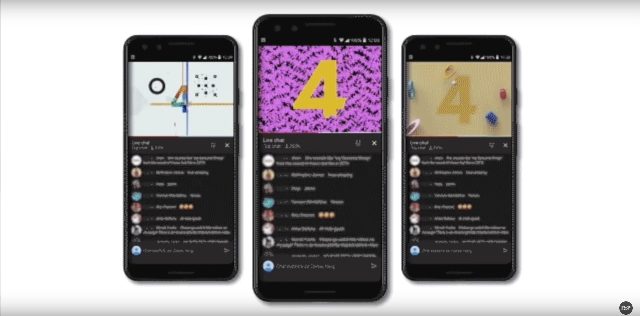
Since its introduction in 2018, YouTube Premieres has let channels hype up their upcoming videos with countdowns and reminders for subscribers. Now, the platform is revamping the tool with ‘Premieres 2.0’.

With four new features and expanded options available, YouTube says this is the biggest update to the tool since its creation.

How YouTube Premieres Works

The overall goal of YouTube Premieres is to turn the launch of your videos into a collective experience. Not only can you schedule your video ahead of time and share it to hype up your audience, Premieres also allows you to increase the interactivity with live chats or Q&A’s during your videos.

The only catch is that your channel must have at least 1,000 subscribers to take advantage of some more advanced Premieres features, though YouTube says it hopes to make the entire toolset widely available in the future.

New YouTube Premieres Features

Live Redirect

The new Live Redirect feature allows you to connect pre-recorded videos with live streaming events.

With this, you can hold pre-premiere chats or streams to build up excitement or bring a more personal feel to the event. 

Then, when it is time for your video to go live, users will automatically be directed to the new video.

An important caveat here is that Live Redirects can only be set up for videos and streams taking place on the same channel. So, video creators won’t be able to hold interviews or chats on a secondary channel and then automatically direct users to the new video on your channel.

Live Redirects will roll out to users later this month.

Trailers

Rather than having to upload an entirely separate video on your channel to build excitement for your upcoming premiere, YouTube will now let you share previews between 15 seconds and 3 minutes long.

The trailers for your upcoming videos will play for those who open a premiere watch page before the video goes live, giving more incentive to open a video early.

With the current system, you will still have to upload a public video on your channel to act as the trailer, but this new feature makes the Premiere page more effective and engaging. 

Without a trailer, your Premieres will simply show your video’s static thumbnail until the content becomes available.

Trailers for Premieres will be available to users this week.

More Countdown Themes

Although YouTube has provided an automatic countdown for immediately before your videos premiere, there has only been a single theme available. This made all premieres overly similar and many expressed frustration that the theme didn’t accurately reflect their content.

Now, you can select from a collection of 10 countdown themes with a variety of styles and moods.

These themes are aimed to cover everything from serious or educational videos to lighthearted or funny clips.

The new countdown themes will become available early next year.

 Schedule Your Premieres From Mobile

In the past, the only way to schedule a Premiere for your YouTube video was through the desktop platform. Now, for the first time, you will soon be able to schedule and manage your Premieres directly through the mobile app. 

For creators who manage their channels largely through the mobile app, this streamlines the process and makes holding a Premiere more convenient.

For more information, you can check out the video from YouTube below:

Hashtag YouTube

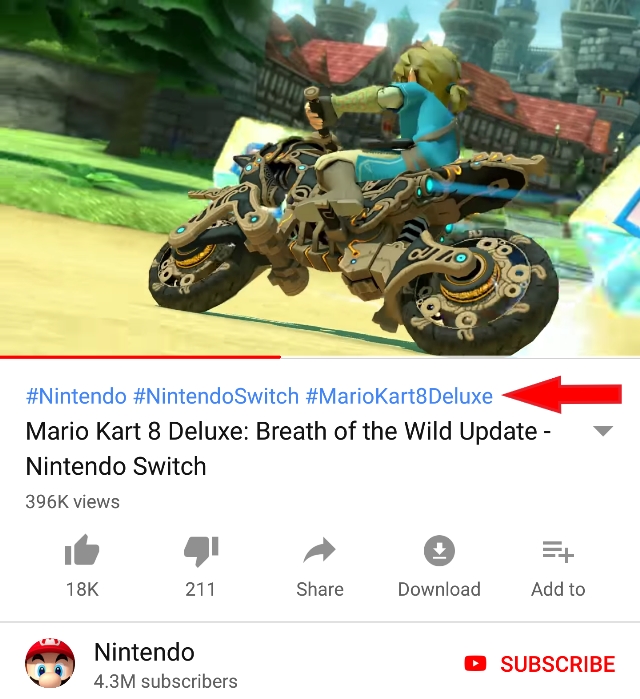
Hashtags are coming to YouTube. The video platform has begun displaying hashtags on videos to help users search and discover other videos on similar topics.

The hashtags appear on any video that has been optimized with the tags in web browsers and the YouTube Android app. So far, the hashtags are not being shown in the iOS app.

Up to three hashtags can be shown in blue text above videos’ titles and can be clicked on to open a search containing related videos.

Hashtags can be used to conduct manual searches for any video containing that hashtag, even if it is just in the video description. Hashtags can also be included in video titles.

There are a few restrictions on how hashtags can be used on YouTube, most of which are common sense. YouTube’s policies explicitly prohibit using hashtags to promote harassment or hate speech, as well as to mislead people about content.

Additionally, the platform discourages users from over-tagging their videos, which would be defined as using 15 or more tags on a single video.

Breaking these rules could lead to a variety of punishments depending on how severe the infraction is or whether someone has committed a previous offense. These could include having your hashtags be ignored, videos being removed from search results, or a video being removed from YouTube altogether.

For now, using hashtags to search provides pretty limited search results. But, I expect that will change as creators begin to optimize their channels.