Tag Archive for: News

These days, everyone has an app. Apple has over 800,000 apps in their store, and Android is close behind. Search for anything you need an app for, and there is little chance you won’t find an option delivering the solution, quite possibly even for free.

With that many apps out there, making one of your own has more than a few risks. How do you attract users? How do you find a market not already covered? How do you improve over the already available options? You’re trying to get people to flock to your application when, according to Noupe, over 60-percent of apps in Apple’s store have not been downloaded a single time.

The truth is, getting your app in front of others’ eyes requires creating a quality product, then optimizing the heck out of it. App stores work just like search engines, and there is plenty of App Store Optimization to be done.

However, just like with SEO, simply optimizing a bad product isn’t going to get you far. There are numerous concerns you must address if you want your own app to stand a chance before you even get to the optimization stage. New Relic, an analytics service, recently released a new product specifically for Apps, and they accompanied the release with an infographic any App designer would be smart to keep around for their next project.

MobileAppDevIG_final

Have you received an unnatural link penalty from Google? Are you worried about getting one? Or maybe you are just curious what constitutes an unnatural link. The answers out there are often woefully incomplete, or contradictory to other reputable sources out there.

It can sometimes feel like every different major SEO news source has their own exact definition of unnatural links, and sometimes they aren’t even that consistent. The problem just gets worse as these varying definitions are then interpreted by other writers trying to offer tips on how to recover from the penalties many have received.

If we can’t agree on a singular definition to unnatural links, how are we supposed to agree on a united way to deal with the penalties? All the confusion does is lead many site owners trying to get their site back on track down yet another wrong path.

Well, Search Engine Journal’s Pratik Dholakiya undertook the mammoth task of condensing all the information anyone could ever need to know about unnatural links and the penalties that come from them all into one informative article. From the basic information of how unnatural penalties became a huge problem for the SEO community and a singular definition for unnatural links, all the way to the secret tips many professionals haven’t been sharing, everything you need to find is there.

Another day, another Matt Cutts Google Webmaster Help video to talk about. This recent one deals with how SEO professionals pay close attention to any new Google patent that is remotely related to Search or Search Quality terms, and then speculate until some believe some very incorrect ideas about how Google is operating.

Cutts was asked what the latest SEO misconception he would “like to put to rest” and you could almost see the relief in his eyes as Cutts began explaining that patents aren’t necessarily put into practice.

“Just because a patent issues that has somebody’s name on it or someone who works at search quality or someone who works at Google, that doesn’t necessarily mean we are using that patent at that moment,” Cutts explained. “Sometimes you will see speculation Google had a patent where they mentioned using the length of time that a domain was registered. That doesn’t mean that we are necessarily doing that, it just means that mechanism is patented.”

Basically, there is a practice of SEO professionals, especially bloggers and writers, to speculate based on patents they see have been filed, and this can grow to offering tips and suggestions about how to run your website based on speculation stemming from a patent that isn’t in use, which all comes together to create some widespread misinformation.

For example, consider the speculation that comes every time Apple files patents for future phones. While they’ve recently had trouble with leaking physical prototypes in various ways, in the past, Apple kept their secrets well guarded, and the speculation based on their patents were often outlandish, and at best completely wrong.

That doesn’t mean you can’t learn and make predictions based on patents, especially if you see indicators that it has been implemented, but it is important to take every patent with a grain of salt. While Google has created the mechanisms for these patents, unless you see evidence, they probably aren’t worth getting worked up over.

Just like every aspect of design, color is subject to trends and fads, though they aren’t always obvious. Look around a city and you’re hit by a wave of color so various it is hard to make heads or tails of what color palettes are popular at the moment. Start to hone in on the individual elements however, and soon you’ll see patterns in the different billboards and store fronts that litter the landscape.

The same goes for web design. If you are looking at the entire web as a case study, it is hard to tell what is popular right now. If you pay attention to the trendsetters and heavy hitters though, the trends are pretty clear. Luke Clum from Web Design Ledger selected four color trends he has seen coming up this year, and they are indicative of many other fads going on right now.

1) Grayscale with Colorful Accents – Designers have long understood the use of bright colors on muted backgrounds to provide points of interest and direct the eye along the page. Lately, this has been refined to an art. Grayscale palettes give sites an air of sophistication while the brighter spots of color help differentiate between different aspects of the page and important content.

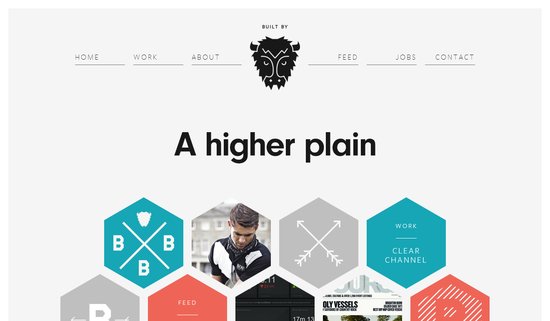
Color Palette Screenshot

2) Muted Pastels – For sites going with the grayscale with accents palette, muted pastels are often the hues of choice for those accents. A desaturated robins-egg blue or grayed out purple still jump off largely black, gray, and white pages, without throwing off the balance with overly saturated brights. These muted colors also work well with creating formal web presences, or more vintage artisanal brand images when accompanied with retro typography.

3) Neons and Brights – On the other hand, while a large group is going muted and reserved, other designers in fashion and visual mediums have been moving towards loud neon colors that scream 80’s throwback. Bright pinks and electric blues are showing up more and more places, giving businesses a perceived image as modern, energetic, and engaging.

4) Color Blocking – This is the trend that unites all of these palette fads, as well as giving a view as to what is going on in web design as a whole. Breaking sites into distinct, but aesthetically pleasing grids is one of the most irrefutable trends going on right this moment, and it all leads back to flat design. These crisp blocks of color help create an organization across the page, without separating every element with white space. It is reminiscent of illustration, minimalism design, and even the trend towards vector graphics. Plus, it can be combined with an other color trend for great results.

Conclusion

While the trends will always be changing, and some of these may not even still be en vogue by the end of the year, keeping up with what is happening across design is essential to the job, and following the latest color trends allows you to keep your site looking modern while experimenting with palettes and layouts outside of your normal wheelhouse. Sometimes, following trends will help get you away from your boring design routine.

While quality SEO is a complex, time-consuming job, there are many types of SEO that any site owner can do. There are also a lot of basic mistakes that site owners regularly make while trying to optimize their own page.

To help prevent these easily corrected mistakes, Matt Cutts, Google’s head of their Webspam team, devoted one of his recent YouTube videos (which you can watch below) to identifying the five most basic SEO mistakes anyone can make.

1) Not Making Your Site Crawlable – According to Cutts, the most common mistake “by volume” is simply not making Google able to crawl your site, or not even having a domain to begin with.

The way Google learns about sites is through web “crawlers” that index pages by following links. If you don’t provide links allowing Google’s bots to find your site, it won’t know what is there. If you can’t reach content by clicking normal links on the page in a text browser, it might as well not exist to Google.

2) Not Using Words People Are Searching For – Google also tries to connect people with the most relevant information for the exact search they used. If someone searches “how high is Mount Everest,” they will be connected with a site using those exact words on a page before they will be suggested a page using just “Mount Everest elevation.”

My favorite example Cutts uses of this is a restaurant’s website, mainly because it seems many restaurants have very minimal websites that are insanely in need of optimization and a bit of a design overhaul. When people look for a restaurant to eat, they search for a couple of things, mainly the location, menu, and hours. If the page has those listed in plain text, Google will index that information and direct more people to the site, than those with PDF menus or no information at all.

3) Focusing On Link Building – One of the biggest buzzwords in SEO is link building. It is one of the oldest strategies, and it is constantly tweaked by Google’s algorithms to keep it in the news regularly, but it may actually be dragging you down.

When people think link building, they cut off many other ideas and marketing options which will equally boost your site. Cutts suggests instead to focus on general marketing. If you make your website more well-known and respected within your community, you will attract real people, which will bring organic links which are much more respected by the search engines.

4) Bad Titles and Descriptions – Many people neglect their titles and descriptions assuming they will either be automatically filled in, or won’t matter in the long run. If your website says “untitled” in the title bar, it will also say “untitled” in a bookmarks folder as well as actual search results. Now ask yourself, would you click on a website without a title?

Similarly, the descriptions for webpages are often blank or copy and pasted straight from the page with no context. Your description should be enticing people to want to click on your page, as well as showing that you have the answer to the question they are searching for. If people can build entire followings around 140 character tweets, you should be able to make someone want to click your page with a 160 character description.

5) Not Using Webmaster Resources – This problem can only be born out of ignorance or laziness. There are countless SEO resources available out there, and most of them are free. The best resources anyone can turn too are the Webmaster Tools and Guidelines that Google offers, but you shouldn’t just stick to those either. There are blogs, webinars, videos, and forums all happy to teach you SEO, you just have to use them. If you’re reading this however, you probably don’t have this problem.

Conclusion

The most common SEO problems, according to Cutts, are also the most simple problems imaginable. There are resources available that will help you fix all your basic SEO problems, and you’ll learn more and get better through finding them and practicing. If you’re currently dealing with trying to learn how to make your site crawlable, you have a long way to go, but if you just keep working at it, you’ll be an SEO pro eventually.


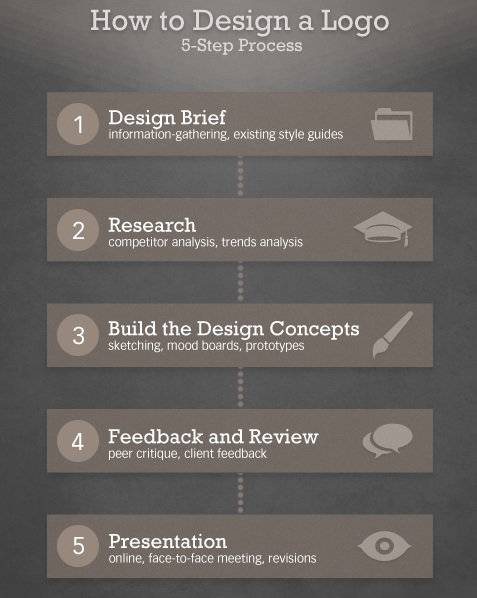
What if I told you there was a simple five step process you can use to create great quality logos? Seems to good to be true? It kind of is. There are no shortcuts to great logos, because you always have to put the work in during every step, but if your problems stem from not knowing where to get started rather than simply skimping on the effort, Martin Christie’s five step process may be just what you need.

Every designer might have their own work flow, but if you don’t have one in place you are sacrificing efficiency and most likely quality. Christie’s process starts where every good design should, with a design brief, and walks you through every step all the way up to the presentation. He simplifies it into the image below, but to get the full idea of the process, you should see it in his own words over at Design Instruct.

Five Step Design Process

Help!

Google has been getting some bad press lately surrounding their penalty notices. Their notices are notoriously vague, and this has come to the surface of the topic after the BBC received an “unnatural link” warning last month due to links pointing to a single page on the site, and Mozilla was notified of a “manual” penalty this week because Google identified a single page of spam on their site.

In both of those cases, the penalties were only applied on the individual pages in question, but that information wasn’t included in the notices, which makes for obvious concern. These cases also pinpoint one of the biggest issues with issuing notices without specifically identifying to problem for the site owners. With millions of pages of content, trying to identify the problem pages would be a needle-in-the-haystack situation.

Many have been concerned about the ambiguous notices, and Google has said they will work to improve their transparency, but what do you do if you get a notice that says you have been penalized but doesn’t tell you exactly where the problem is? Matt Cutts, head of Google’s web spam team, says you should start at Google’s webmaster help forum.

If help can’t be found in the webmaster help forums, Cutts says filing a reconsideration request could result in being given more information and possibly advice, though he concedes  “we don’t have the resources to have a one-on-one conversation with every single webmaster.”

This is notable, because many believed in the past that filing a reconsideration request after a penalty was a one-time attempt to restore your site’s name. Many speculated that Google would not be keen to reviewing repeated requests and to only file for reconsideration once the site master is sure they have solved the issues. According to Cutts, this doesn’t seem to be the case.

Telling site owners to turn to a forum or file requests where they might be given extra information doesn’t seem like very consistent advice for trying to overcome a penalty. Luckily, there are some other solutions for investigating what part of your site is causing all the problems. Danny Sullivan works through some other ways you can try to diagnose your site at Search Engine Land.

If you read many blogs, it is easy to notice how rampant content scraping is. For the lucky few out there who haven’t run into it yet, content scraping is stealing content from a site to display it on someone else’s blog, usually with Adsense ads to make money off of your hard work.

Thankfully for all the bloggers out there, experienced coders have been fighting off these content scrapers for years and they are happy to share their latest tricks to keep their content from appearing on other sites. Given, this battle is similar to the ongoing battles against copyright infringers and hackers, in that while these solutions may work for the moment, scammers and scrapers are already at work to find a way around the defenses.

None-the-less, it is better to put up a fight rather than giving up when it comes to these content bandits. Jean-Baptiste Jung, co-founder of Cats Who Code, has offered snippets you can use in WordPress to help fend off exactly these types of content thieves, each with their own unique solution.

One common way scrapers steal content is by displaying your blog within a frame on their page, with the ads in another frame so that they will always be shown, and thus earn the scrapers money. Jung’s first snippet breaks out of these frames so that your blog covers the entire window, effectively blocking the scraper site from being seen.

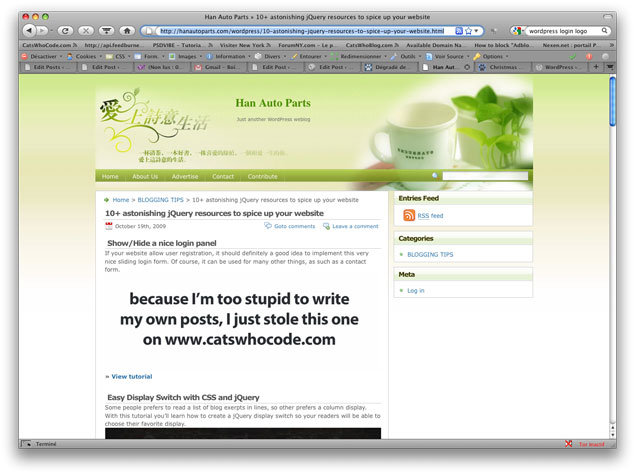
The single most frequent content scraper method is to simply use your RSS feed, and display it on their site so that they also get to take advantage of your original (or paid for) images, as well as not using their own bandwidth. To solve this problem, Jung disabled hotlinking to images so that every time someone tries to use your pictures on their site, they instead see an image informing viewers the content is stolen from your website. It is pretty entertaining to see the results he shared from one such website.

Source: Cats Who Code

Source: Cats Who Code

Obviously, most content scrapers are using tools that do all the work for them, and these tools normally steal the title as well as the content of your post. The solution here is a simple snippet that adds a link automatically to your post titles that directs back to your original post.

To get the snippets, you’ll have to head over to Jung’s article, which also offers a couple more solutions to content thiefs. If you haven’t been bothered by scrapers yet, you are either very lucky, or not paying enough attention. The bandits may eventually figure out how to thwart these defenses, but at least your content will be safe for a while.

When things go wrong with an SEO campaign, it puts everyone involved in a tricky position. The first step is obviously to figure out what happened and who is responsible in order to fix the problem, but pointing out who is responsible for failure can hurt egos and business relationships if not handled right.

The most problematic situation is when a client is at fault, which is indeed possible. The customer is always right may be a good philosophy to live by in many cases, but it isn’t actually all that true when it comes to implementation. This is especially true when you are working with someone not all that informed about SEO.

Some SEOs will try to cut out the client, but that hurts the campaign as well. Instead, the best option is making sure to educate clients about the process in order to avoid issues, though that obviously can’t keep all problems from popping up. If one does arise, it is your job to talk the issue through with your client. While it may be their fault for not following through on a responsibility, it is equally likely you are also responsible due to a failure of communication.

Amanda DiSilvestro suggested a few ways clients can end up bringing down an SEO campaign, as well as how Search Engines and SEOs themselves can derail your progress. The most common issues for clients include:

  • Failing to Change – Many times, SEOs will suggest changes to make onpage to optimize a website, and often it will mean tweaking content to include keywords or possibly editing a meta tag. Clients are often very protective of their content however, and sometimes ignore these suggestions. In this case, the SEO has done their job, but if the client isn’t willing to cooperate, there is little the expert can do.
  • Failing to Plan as a Group – When SEOs aren’t confident in their client’s understanding of optimization, they sometimes begin to ignore the client all together. But, even if a client doesn’t want to be very hands on with the campaign, they almost certainly had goals in mind when they hired the pros, and those goals should be included in the plan for optimization. If a client tries to avoid being a part of the SEO process, including reading the regular reports, there will be a schism between the SEO expert and the company, which will likely splinter the campaign and weaken it.
  • Giving Up Too Early – Too many potential clients come to SEO agencies wanting quick fixes. No matter how earnestly you try to explain that optimization is a slow process, if the client doesn’t comprehend how long it will actually take, they are likely to get frustrated and shut the whole thing down before they really had a chance to reap rewards. There is little SEOs can do here except try to really communicate about time estimates and benchmarks you expect to hit, or just refusing clients that refuse to understand there is no way to get to the number one spot on Google overnight.

Now, we all know clients aren’t always the problem. In fact, it is usually the professional that ends up torpedoing the whole campaign. SEO firms and experts have the power in the campaign, and it is a tough balancing act to get everything on a site working as well as it can to impress the search engines. There are endless reasons a campaign may not work, but unfortunately the most common all stem from just plain bad practices.

  • Going Black Hat – It seems everyone writing about SEO knows how blatantly terrible an idea black hat practices are, but yet there is are never-ending “optimization” services available that use keyword stuffing, duplicate content, cloaking, shady link building  and several other bad practices that Google already knows to look out for. Sure these services might get a site good rankings initially, but it won’t be long at all before they sink under the weight of penalties.
  • Poor Communication – Just as it was said above, even when the client is at fault, the SEO is sometimes responsible for not explaining the process or keeping the client in the loop. SEO work is a partnership, no matter how independent you may be. The client relies on you to inform them about this unique field and help them make informed decisions. If you aren’t communicating and they make a mistake it is your fault. Similarly, if you make a decision without consulting the company you are working with and they don’t like it, you have no excuse.
  • Laziness – When it all comes down to it, a lot of SEO is maintaining and tweaking things to make a site the most efficient possible at signaling to search engines. Experts can get lazy too, but when a site starts under-performing because you haven’t been paying it the attention it deserves, there is no one to blame but yourself. The solution to this one is obvious. Drink a coffee, get up, and do the work clients are expecting of you.

While these categories cover many mistakes made in SEO, there are also innocent problems like misreading a market, and simply putting your faith in the wrong type of campaign.

No one likes having the finger pointed at them when things fall apart, but it is important to honestly assess who is responsible for the faults.

A bruised ego may sting for a little, but if you are the client can put that aside and focus on the good of the site, you can use the understandings gained about what went wrong to repair SEO mistakes and bad habits. With those lessons under your wing, soon you’re site will be performing as you would like it to.

Image Courtesy of Martin Pettitt

Image Courtesy of Martin Pettitt

The entire SEO community is bracing themselves. A new Google Penguin update should be here any time, and it is looking like it will be quite a big deal. Supposedly it will be much more brutal than the already merciless update that came last April.

Judging from what we already know about Penguin, there are some ways to prepare yourself and all of your sites to make sure you don’t get hit by the first wave of penalties. Plus, if you follow these suggestions from Marcela De Vivo, you’ll be improving your SEO all around.

  1. Monthly Link Audits – Knowledge is power, and audits give you a lot of knowledge. Start with the backlinks and get a baseline. Find out how may high quality and low quality links you have. Who are these links connecting to? If there are spammy links, work to have them removed. You can choose from a huge selection of audit tools to make the process easy, and you will always know how your link profile is doing.
  2. Anchor Density – A popular way to try to cheat search engines is cranking up anchor density for money terms, and Penguin already penalizes those that do it too much. There is a good chance they will get stricter on their anchor density guidelines, so it is important to keep an eye out. You want to be under 15% for the money term. Any higher is risking penalties when the new Penguin update arrives.
  3. Link Ratios – Links are all about finding the right balance. Google talks about Earned vs. Unearned links, and when they do that they mean Images vs Mentions or Text, Sitewide Ratios, Deep Link Profiles, etc. De Vivo breaks down the categories a little more, but the main idea is to keep a good balance between them all.
  4. Use Your Webmaster Tools – For every siteowner who thinks this is obvious is another siteowner who doesn’t know what Webmaster Tools is or how to monitor it. This is the best line between you and Google, and watching the links Google displays in your account can help identify problematic links as well as keeping you informed as to how they are effecting your rankings. There are numerous problems that Webmaster Tools can inform you of, you just have to look.
  5. Don’t Do Spammy Link Building – This one is the most obvious out of all of these, but it seems no amount of telling site owners to keep away from this practice will ever stop the problem. If something sounds too good to be true in SEO, IT IS. If you can’t identify spammy links, don’t do the work yourself. Google will penalize you if it hasn’t already, and the money you spent on those links wil be wasted.

Google Penguin isn’t the bad guy, nor is it the authoritarian figure not letting anyone have fun. Google’s spam fighting efforts are keeping our browsing running smoothly, and the “innocent” people affected by these changes are participating in questionable tactics. Read Google’s best practices, and follow them. If you are taking proper care of your site and following Google’s rules, the new Penguin update won’t feel near as scary.