Tag Archive for: News

Depending on your skill set, a recent Webmaster video may be good or bad news to bloggers and site owners out there. Most people have never considered whether stock photography or original photography has any effect on search engine rankings. As it happens, not even Matt Cutts has thought about it much.

There are tons of writers out there who don’t have the resources or talent with a camera to take pictures for every page or article they put out. Rather than deliver countless walls of text that people don’t like looking at, most of us without the artistic talent instead use stock photos to make the pages less boring and help our readers understand us more. For now, we have nothing to worry about.

Cutts, the head of Google’s Webspam team, used his latest Webmaster Chat to address this issue, and he says that to the best of his knowledge, original vs. stock photography has no impact on how your pages rank. However, he won’t rule it out for the future.

“But you know what that is a great suggestion for a future signal that we could look at in terms of search quality. Who knows, maybe original image sites might be higher quality, whereas a site that just repeat the same stock photos over and over again might not be nearly as high quality. But to the best of my knowledge, we don’t use that directly in our algorithmic ranking right now.”

Logically, I would say that if Google does decide to start consideration photo originality on web pages, Cutts appears to be more worried about sites that use the same images “over and over” rather than those who search for relevant and unique stock images for articles. Penalizing every website owner without a hired photographer to continuously produce images for every new page would seem a bit overkill.

Source: Adriano Gasparri

Source: Adriano Gasparri

One of the greatest design benefits of using WordPress is how easy it can be to change themes completely. If you don’t know what I mean by that, consider a time when you’ve gone to a WordPress blog you frequent and noticed a significant change in the appearance or way the site works. A theme is basically the design and layout of the site or blog you’ve been following.

There are thousands of free customizable themes for WordPress available, and even more if you are willing to pay for a professional looking skin, and WP is built for these to be almost interchangeable – almost being the operative word.

When you’ve been running a blog through WP for a while, you accumulate a number of widgets and scripts that are used to improve the performance of your site as a whole. They can run from widgets used for tracking and ads to RSS feeds and an assortment of other additions you’ve made to your blog after you chose the theme you are working to replace or change.

When you change themes, it isn’t uncommon for the new themes to run into problems displaying or running these widgets you’ve built int your site. The standard WP widgets like Archives and Pages are almost always safe, but any special scripts for fighting spam, editing sidebars, and anything else that doesn’t come standard can become break down, bogging down or derailing your site.

OnextraPixel writer Jay Adrianna created a list of 15 things designers or site owners need to do when undertaking a change of themes. If you follow every step, all of your widgets, scripts, and plug-ins will remain safe and sound, and you’re new look will be flawless.

Every time I read something about on-page SEO, it seems like the authors are always just beating a dead horse, or at least trying to teach that dead horse about meta tags and keyword density.

Any SEO who has been around a little while knows there is much more to on-page optimization than just keywords and meta tags. There are plenty of advanced SEO strategies that improve your site, not only in the eyes of the search engines, but also from your visitors’ perspective.

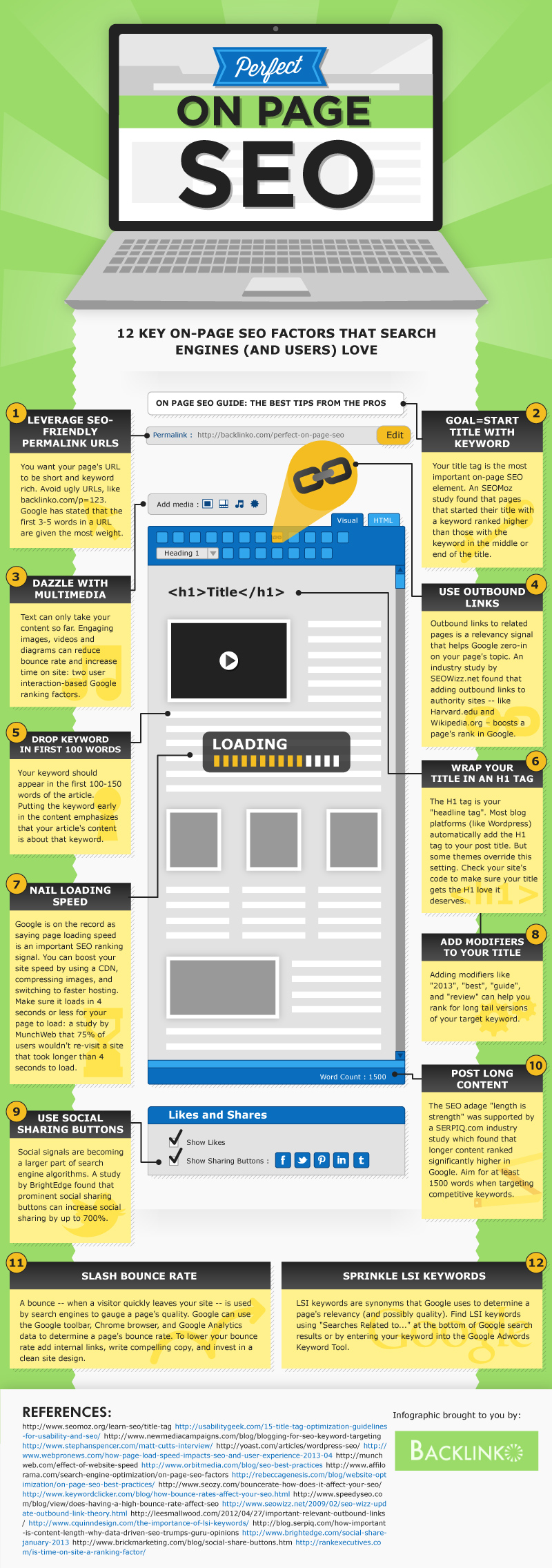
Rather than drown you in another simple list of tips and charts that you’ll find most places, the folks at Backlinko decided to create an infographic, which you can see below, that you can turn to if you want to move your on-page SEO past the very basics. As a bonus, they even included the tips and charts on their page, for those of you who prefer the traditional style.

On-Page SEO Infrographic

Source: Backlinko

Many small business owners are hesitant to really put an effort into SEO or their online presence because they feel like the web is already conquered by big companies they can’t compete with. It is common to feel like you don’t have the resources, time, or manpower to achieve any sort of success on search result pages, but local businesses actually have a much larger opportunity than they usually think.

Search engines provide a more leveled playing field when it comes to corporations and local businesses. All you have to do for efficient SEO is know where to invest your limited resources to get the most return, and show your value to the search engines. Nick Stamoulis recently discussed three main ways you can achieve SEO success, even with the limited means of a local business.

1) Build links naturally, one quality link at a time

While links have lost some of their influence in SEO, they are still a serious consideration to search engines. Google’s latest updates have many business owners scared of link building, but the truth is it will always be an important part of SEO and you can’t ignore it. The key to link building is to ensure that you are building quality links from various sources, which is best done by focusing on one at a time. This keeps your linking pattern looking natural and stays away from any gray areas.

Some will try to set link building goals or try to take short cuts, but Google has made it clear that if you don’t get penalized for your cheap tricks now, you will eventually. Arbitrary quotas only inspire efforts to get bulk links when your self-imposed deadline approaches, and easy links come with a big target on their backs.

2) Create Content For Your Audience

Content marketing is a buzzword for SEO at the moment, but some have already lost the real reason content has come to have such impact on SEO. Quality content has been favored by search engines because that is what audiences and customers want, and it inspires interaction between businesses and their customers. One of the things lost in the feeding frenzy of tasty blog posts, infographics, and ebooks is that those methods aren’t relevant for many smaller businesses.

Small businesses often offer services that draw customers not looking to spend a lot of time reading or watching videos. Instead, they want to be able to see what businesses have been doing, and what value they are contributing to the community. This can be as easy as semi-frequent announcements or updates on G+ or pictures and status updates on Facebook. Just focus on providing the information customers will want. Answer their questions, direct them to solutions, and provide something of value to those who find you online.

3) Find Your Niche

It is true that if you run a small flower shop you won’t have the same online presence that a national brand like 1-800-Flowers does. However, your smaller local net can catch better fish than a large net a national brand uses. You can establish yourself in your small market by pinpointing a variety of different ways your service can be used. That theoretical florist, for example, can cater wedding parties and high-end hotels, educate gardening enthusiasts, and help decorate local restaurants. Find what small markets aren’t cornered in your local area, and make your place.

Remember, national brands may have more money and people available to use for SEO, but value is what matters to the search engines. Ask yourself why customers keep coming to your local business rather than those corporate giants, and adapt it to the internet. If your site is worth visiting, the search engine results will reflect your worth.

Turtle and the Hare Illustration

Source: Tsahi Levent-Levi

Many businesses come to SEO agencies looking for quick and easy solutions to their online problems. More often than not, all they want is to get high up in the rankings on Google, and they want to be there now.

In the past, there were ways to make this possible, though they’ve always been perceived as shady methods of optimization. Now, with Google’s continued push to make search more rewarding for the users rather than the companies fighting for the rankings, most of those techniques are completely obsolete.

That doesn’t mean you won’t find people still trying to sell you on these methods, but you will find that if you follow their advice, you won’t see your site suddenly excelling in the rankings. Instead, you will find Google slamming the door in your face by penalizing your site for your disingenuous optimization.

I found one of these groups still pushing the out of date, insta-SEO methods in a newsletter I recently came across, but I found it humorous. It seems now even the companies selling these “quick and easy” SEO “solutions” can’t even hide the reality of the situation.

The newsletter offers four “solutions” which will all sound very familiar to anyone keeping up with the SEO industry. They suggest buying links from high PR pages, joining backlink networks, using software to get quick backlinks from social sites, and using scripts to quickly fill your website with content. Do those sound familiar? If they do, you’ve probably read a list of what NOT to do in SEO within the past year.

What makes this newsletter so funny to me is that every “solution” comes with the concession that “Google doesn’t like them at all.” Every solution spends one short paragraph detailing how the methods (used to) work, but then they are all paired with a warning underneath explaining how Google has adapted to these methods and learned to cut them out of the rankings.

There is even a checklist at the bottom which tells you when to avoid the methods, and the checklist is basically made up of asking “is the website for a company?” and “do you want to succeed?” If you answered yes to either of those, even the people offering this advice admit you shouldn’t be using “quick and easy” SEO. If I didn’t know better, I would think their advice was satire, however they seem too eager to tell business owners that these methods will get you to the top of Google quickly.

The truth is, SEO is slow and the only way to build long lasting success is to keep up to date with Google’s best practices. If you want quick online success, sure you can use these spammy methods, but they won’t last long at all, and it is better to put your money towards optimization that has some sort of long-term chance of survival.

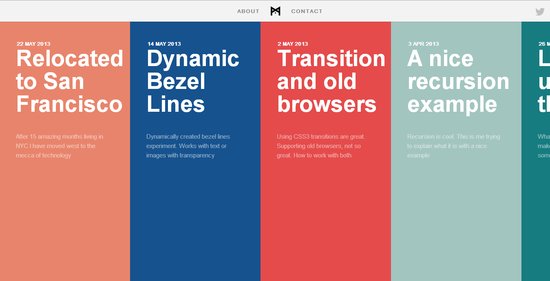
Flat Design Text Screenshot

It is no secret that flat design is the biggest trend right now, and it has raised many questions from designers trying to get caught up on the trend. One of the more common questions pertains to fonts, specifically which fonts “work best” with flat design.

Typographic focus in one of the biggest aspects to flat design and the attention to simplicity, so choosing which font you will be working with is an important step. Of course, the main point of good typography of all styles is that it is easy to read and matches the look and style of the page overall, so there is no way to suggest a font that will work in every situation.

However, for flat design you will usually be better off working with very simple fonts and font pairings, as flat design is inherently minimalistic and simple. Whereas past wisdom suggested maxing out at three font pairings per design or page, flat design streamlines it down to two fonts, and sometimes just one.

Because of flat design’s bright color schemes, lettering relies heavily on font weights and clean lines. Designmodo suggests using typefaces with even strokes that contrast against the color palette, and are bold enough to read. You also may want a dash of flair to really bring life to the page.

The trick with flat design is to not fall into boring patterns. The general trend suggests using sans serif typefaces, but it is also possible to work with novelty typefaces as well. The sans serif typefaces are popular for their easy to read nature and great contrast against backgrounds, while serif typefaces come off as formal and against the nature of the simple style, thanks to their usual embellishments.

Novelty typefaces can work well to draw visual interest to areas with bigger text that demands more attention, but it is discouraged to use these for smaller text blocks. Because of this, it is suggested to always choose a second sans serif font if your big text is in a novelty style.

The most forgotten aspect of using text in flat design is that the words you use are just as important as he typeface. Flat design demands simplicity, and overly wordy pages won’t sit within the trend. Use direct language that is brief but effective, and always cut to the point. You don’t need full sentences unless there’s a full paragraph of content. Otherwise, stick to simple word pairings.

There are other serious considerations for designers as well, such as how you use text against color as well as capitalizing on size and space opportunities within flat design. Carrie Cousins discussed those issues earlier this week in her article about typography in flat design, and she even suggested some fonts that lend themselves well to the trend.

Matt Cutts, head of Google’s Webspam team, recently announced via Twitter that a new ranking update focusing on spammy queries has officially gone live, according to Danny Goodwin from Search Engine Watch. At the same time, Google has made it clear that if you don’t have a quality mobile website, you’re going to start seeing your rankings dropping.

Spammy Queries Ranking Update

The ranking update for spammy queries is supposed to affect 0.3 to 0.5 percent of English queries, but it shouldn’t be much of a shock to anyone who has been listening to what Cutts says. It was one of the most notable updates Cutts spoke about in an earlier Google Webmaster video where he discussed what to expect from Google this summer.

Cutts says the updates are specifically focused on queries notorious for spam such as “payday loans” on Google.co.uk as well as pornographic queries. The roll-out of the update will be similar to many of Google’s recent changes in that it is being implemented gradually over the next few months.

Smartphone Ranking Changes

SmartphoneIt appears we’ve finally reached the point where slacking on mobile SEO is going to objectively hurt your site as a whole. A recent post added to the Google Webmaster Central Blog warns that “we plan to roll out several ranking changes in the near future that address sites that are misconfigured for smartphone users.”

Google named two primary mobile mistakes as their primary targets: fault redirects and smartphone only errors. Faulty redirects are “when a desktop page redirects smartphone users to an irrelevant page on the smart-phone optimized website,” such as when you get automatically sent to a homepage on a smartphone, rather than the actual content you searched for. Smartphone only errors, on the other hand, occur when sites allow desktop users reaching a page to see content, but gives smartphone users errors.

This is Google’s first big move in adding mobile configuration as a ranking consideration, but their advice belies their intent to continue to pay attention to mobile. They suggest “try to test your site on as many different mobile devices and operating systems, or their emulators, as possible.” It isn’t acceptable to only pay attention to desktop anymore.

More than a few web designers try to ignore it, but SEO is an incredibly important part of your website. Simply put, search engine optimization is the reason many people land on your site, and it can help you control who those people are to an extent. SEO should be an ever-present concern through your design process.

If you’ve managed to completely remain uninformed on SEO, it is the process of making your page as accessible and valuable to search engines as possible. It isn’t buying ads, which can attract traffic as well, but instead structuring your site in a way that reflects the preferred methods of the most popular search engines, so that they will see your website as being valuable enough to place higher up in their rankings.

If you read up on SEO much at all, it becomes clear that SEO is also constantly changing and updating, but there are basics that any website owner can do to make their page attractive to search engines and all optimization is boosted when you consider it from the beginning of your design. If you take a few steps when you first get started, you will find that every page you design performs better and more people actually lay eyes on your hard work.

Content and Text

Once you know the topic, theme, or goals for your current project, designers should brainstorm a few keywords that best describe the content that site will be used for. If you are doing a site for design, the obvious choices are “design”, “web design”, “typography”, “css” and maybe even “tutorial”.

Once you’ve chosen the proper phrases and keywords, be aware of using them throughout the site in ways that feel natural. You can fit keyword into headers, headlines, links, and meta data on every page of the site, but you should be careful about over-populating the page with these words to the point where it appears unnatural. Search engines will punish those who are obvious about “keyword stuffing”, so just don’t overdo it.

Images

First off, what search engines see and what users are shown are very different, especially concerning images. Search engines only see text, not images, so it is important they are aware of what your images show. That’s why it is smart to use alt tags on every image of your site that gives a description of what viewers are actually seeing.

For designers, another option for visual elements of the page such as banners and selected graphics is to design them using webfonts, HTML, and CSS when possible. Search engines can read those banners as regular text when created through this, which means you don’t have to worry about the markup.

Another aspect of image SEO is preparing the image properly before uploading them to your site. Huge pictures will slow down page loading time, which causes many potential viewers to leave before they even see the finished page.

Site Map

Site maps are xml files that outline the entire structure of your website, and they are like cheat-sheets to your site’s navigation. Create one, and make it live on every website you work on. Make sure it is submitted to Google so that the crawlers can use it even easier. Users also like access to sitemaps as well, though they’ll be less interested in it if your navigation is done properly.

Conclusion

There is even more a designer can do to optimize their site from the start of their workflow. However, be careful before diving too far into the SEO pool, because there are many “tips” and “tricks” offered out there that are either out of date or outright improper in Google’s eyes. SEO isn’t immediate, and any site telling you they can teach you how to get your site to the top of the results quickly is probably selling snake oil.

Design Shack offered some other credible suggestions for optimizing your site from the design stage, as well as tools that can get you started.


Google’s Matt Cutts recently made it very clear that usability is going to be one of their most important ranking factors moving forward, as they emphasize site speed and quality design as the two aspects that aren’t getting the attention they deserve.

Google isn’t the first to pinpoint how important usability is either. It has been one of the most common discussions in web design since its inception, while slowly becoming more important to users.

Quality usability is also at the heart of the of all the biggest start-up success stories. Quality products can be ignored if people get frustrated with the website, while the good or great products that are easy to access or use only attract more people and cement the public perception of a given brand.

You would think usability would have been boiled down to a science by now, or at least be such common sense that it wouldn’t be a big issue, but if it was so easy there wouldn’t be so many of the same usability mistakes all over the web, from big companies to the smallest mom-and-pop shops with an online presence.

Christian Vasile deconstructed these popular mistakes last week and offered options for those that seem to be repeatedly rejecting all the currents standards. Most of these, you’ll notice as bad decisions before you’ve gotten past the headline, but maybe you’ll be surprised to find that you’ve been continuously implementing one of the most hated design techniques around.

There is no doubt that blogging is a powerful tool for content marketers and SEOs. However, the simple days of recording your daily activities in a sort of online diary has grown to become a much more complex endeavor, especially for those who intend to use it for marketing.

The reason blogging became the mess many companies see it to be is simply that too many put too much emphasis on blogging and tried to make it something new that can drive away beginners or website owners with its complexities.

Blogging can do wonders for your SEO and your business, but there is such a thing as too much of a good thing. If you’re feeling frustrated or overwhelmed with blogging, chances are you’ve reached that tipping point. You are also probably making some common mistakes that are rather simple to fix. Most likely, you just need to simplify.

A simple way to simplify is to just narrow your focus a little more. If you find yourself trying to cover vast themes and ideas in your blog, you are using the wrong format for your thesis. For every blog post, try to stick to a single idea. You may think you’re doing that, but consider it like this: while a country like Portugal may be “one topic” it can be broken down into so many subtopics. Pick one of those subtopics, and then see if you can break it down more. If you’re interested in the local culture, zoom in more on the music. Maybe pick a specific style of music that is most relevant or interesting and focus on that.

Similarly, even if you choose one fairly specific topic that you are knowledgeable on, you can still feel compelled to write endlessly, but you probably shouldn’t. Longer posts can get a little more attention and earn you some credibility if they are well done, but articles reaching 2,500 or more words should almost certainly be considered for another medium than a blog. By over-reaching on blog post size, you can throw off the scores of people who scan for information, and limit your own output possibilities.

Depending on the size of your business, bloggers can also end up in a chain where five or six people have to sign off on every single blog post before they can go to publish. In reality, you only want two to three people being the deciding council of what content is going to the public. Two or three people are enough to ensure there are no big thematic mistakes or smaller errors like typos or factual inaccuracies, but the more people you add to that process, the more likely you’ll have to deal with more arguments about what is fit to be published.

Speaking of editing, even one-person blogging teams can get stuck in the process of over-editing. Blogs don’t have to be perfect. You want to appear reputable and intelligent, so you don’t want to put out something chock full of mistakes, but web writing is informal. You don’t need to spend the time editing a blog that you would something in a newspaper or any other type of professional writing. Your audience isn’t looking for that.

For the most part, you can feel comfortable sticking to one, or possibly two rounds of editing at most for any post. You want to ensure there are no huge cohesion errors you didn’t notice in the throes of writing, but if you misspell one work, it won’t be the end of the world.

Of course, there are many more ways you can over complicate blogging as a process. Sujan Patel recently wrote about some ways that bloggers tend to make everything more of a mess than they should. You want to put out quality content, but most of the time keeping it simple will just make it easier to see the good work you’ve done.