Facebook has made itself an absolute necessity for businesses looking to build a following, increase their visibility, engage with their fans, and even find new qualified leads. To get the most out of the most popular social network, however, you need to take advantage of all the newest tools and features Facebook is always rolling out – such as call-to-action buttons on business pages and letting you share company milestones on your profile.
Taking advantage of all these great little tricks and tools not only shows your audience that you are active on Facebook, it shows you care about making sure your fans can always contact you for questions, problems, or to share how much they like your products or services.
So how can you be sure you’re getting the most out of the largest social platform in the world? The tips in this infographic from Cafe Quill will help you get started by showing all the different ways you can be using Facebook to improve your branding and exposure while keeping your fans engaged and invested in your brand.
00Taylor Ballhttps://www.tulsamarketingonline.com/wp-content/uploads/2018/07/TMO-Logo.pngTaylor Ball2016-04-22 11:28:552016-04-22 11:28:55How To Guarantee Your Brand Is A Hit On Facebook [Infographic]
Roughly a month after Google announced it would be completely shutting down the Google PageRank Toolbar, the service finally went dark over the weekend.
Now, those who have the PageRank toolbar installed will not be able to see the 1-to-10 rankings of sites they visit, making the toolbar officially useless. The move also cuts data from any third-party toolbar that tries to retrieve a PageRank score.
Of course, if you’ve been using the PageRank toolbar recently, you have been working from outdated data. Google hasn’t updated the public PageRank scores in years, so it makes sense to finally shut it down for good.
It must be noted that PageRank isn’t completely gone. It just isn’t available to the public anymore. Google will keep using the PageRank algorithm internally to help evaluate websites.
00Taylor Ballhttps://www.tulsamarketingonline.com/wp-content/uploads/2018/07/TMO-Logo.pngTaylor Ball2016-04-19 11:40:092016-04-19 11:40:09Raise a Glass, Google’s PageRank Toolbar is Finally Gone For Good
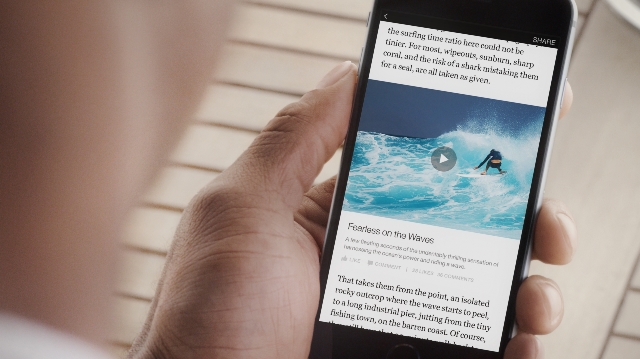
Facebook is bringing its Instant Articles to all developers and content producers. The social media platform has been slowly testing its feature, which allows publishers to share content on Facebook mobile that is fast-loading and easy to read.
During Facebook’s F8 conference, the company announced that publishers of any size or kind can now publish via Instant Articles while also sharing some statistics showing how Instant Articles have been performing so far.
According to Facebook’s data, Instant Articles leads to
20% more clicks on links to content
70% reduced likelihood of abandoning content once clicking on it.
30% more shares compared to the average mobile web articles.
Instant Articles are Facebook’s response to Google’s Accelerated Mobile Pages and other fast-loading content platforms that streamline pages to ensure they load almost instantaneously on mobile devices. Facebook’s Instant Articles are unique though, because they also allow publishers to control ad placements within their content.
Publishers can even publish native ads as Instant Articles, which are distinguished from traditional content through unique styling options and the ability to add your company’s logo.
“Facebook’s goal is to connect people to the stories, posts, videos or photos that matter most to them,” the company says. “Opening up Instant Articles will allow any publisher to tell great stories, that load quickly, to people all over the world. With Instant Articles, they can do this while retaining control over the experience, their ads and their data.”
00Taylor Ballhttps://www.tulsamarketingonline.com/wp-content/uploads/2018/07/TMO-Logo.pngTaylor Ball2016-04-15 12:16:562016-04-15 12:16:56Instant Articles Now Available For All Facebook Publishers
Google Analytics is an essential tool for making sure your website is performing as you would like and making improvements to keep growing, whether you are a high-level marketer or a business owner who just launched their site.
If you aren’t familiar with Analytics, however, or the technical jargon that fills your reports, it can be difficult to make sense of the huge amount of information available. That can make it hard for someone new to running a website for their business to make sense of the huge amount of information available in Google Analytics.
Thankfully, you don’t have to depend on analysts, marketers, or your company’s “computer guy”, to understand how your site is performing with Google Analytics. Search Engine Watch has put together an easy-to-understand glossary for all the jargon and confusing labels that you will come across, making it simple for you to know exactly what your reports are saying about your site.
00Taylor Ballhttps://www.tulsamarketingonline.com/wp-content/uploads/2018/07/TMO-Logo.pngTaylor Ball2016-04-14 11:39:382016-04-14 11:39:38Learn The Language of Google Analytics With This Handy Guide
Facebook is changing its mind on branded content, though it isn’t ready to completely dive in. The social media giant is revising its policy on branded content, which is anything that specifically “mentions or features a third party product, brand, or sponsor.”
With the latest change, Facebook is allowing any verified page to share branded content, however, the content must be labeled as such. This is a significant turn from the company’s previous stance against branded content and ads.
To help brands with verified pages label their branded content, Facebook is also offering a new tool to assist in tagging brands mentioned in the content. The company says the tool must be used every time branded content is published.
By changing their policy, Facebook is allowing companies with existing partnerships or sponsorships to bring their relationship into the world’s largest social network.
Notably, branded content can also be pushed via sponsored posts or leveraged in paid ads. The company says the new tool will hopefully lead to greater transparency while continuing to help users find valuable information.
When a brand is tagged in a piece of branded content, they will also receive access to post insights and can share the boosted post themselves.
While this is a notable change, Facebook still has some restrictions. Here is what Facebook will still not allow:
“…our branded content guidelines prohibit overly promotional features, such as persistent watermarks and pre-roll advertisements. Additionally, cover photos and profile pictures must not feature third party products, brands, or sponsors. Branded content integrations that are allowed to be posted on Facebook include content like product placement, endcards, and marketer’s logos.”
Yesterday, we reported that a significant number of websites had been hit with Google penalties over the weekend for “unnatural outbound links.” Since then, Google has clarified that the manual penalties issued this weekend were specifically related to bloggers giving links to websites in exchange for free products or services.
Google had issued a warning a few weeks ago urging bloggers to disclose free product reviews and nofollow links in their blog posts related to these products. Now, they’ve taken action against sites who ignored the warning.
In the warning, Google told bloggers to “nofollow the link, if you decide to link to the company’s site, the company’s social media accounts, an online merchant’s page that sells the product, a review service’s page featuring reviews of the product or the company’s mobile app in an app store.”
In particular, if a post was made because of a free product (or free service, or just paid, etc.), then any links placed there because of that need to have a rel=nofollow attached to them. This includes links to the product itself, any sales pages (such as on Amazon), affiliate links, social media profiles, etc. that are associated with that post. Additionally, I imagine your readers would also appreciate it if those posts were labeled appropriately. It’s fine to keep these kinds of posts up, sometimes there’s a lot of useful information in them! However, the links in those posts specifically need to be modified so that they don’t pass PageRank (by using the rel=nofollow).
Once these links are cleaned up appropriately, feel free to submit a reconsideration request, so that the webspam team can double-check and remove the manual action.
If you are a blogger or company who has participated in an agreement to give free products to reviews, be sure to check your Google Search Console messages to see if you’ve been hit by the latest round of manual penalties.
Over the weekend, Google sent out a new wave of penalties, this time smacking down sites for “unnatural outbound links.” The majority of websites are safe from the latest round of manual penalties, but you may be in trouble if you’ve been attempting to manipulate the Google search results.
As Barry Schwartz has noted, this specific penalty appears to be taking the shape of Google deciding not to trust any links on the entire site.
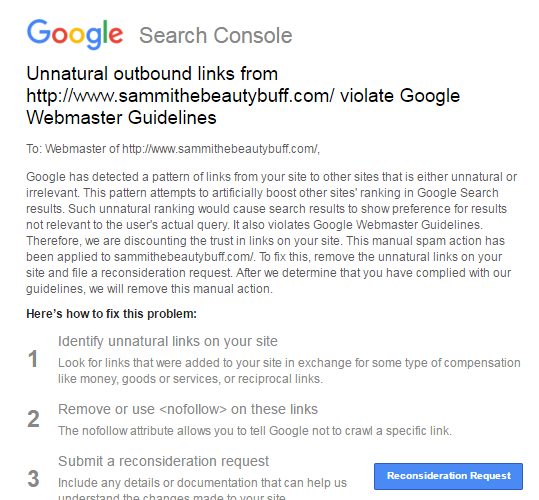
Webmasters who received these penalties were sent emails which read:
If you see this message on the Manual Actions page, it means that Google has detected a pattern of unnatural artificial, deceptive, or manipulative outbound links. Buying links or participating in link schemes in order to manipulate PageRank is a violation of Google’s Webmaster Guidelines.
As a result, Google has applied a manual spam action to the affected portions of your site. Actions that affect your whole site are listed under Site-wide matches. Actions that affect only part of your site and/or some incoming links to your site are listed under Partial matches.
Below, you can also see a copy of the message webmasters are receiving in Google Search Console about these penalties:
To make sure your site is safe, be sure to log into your Google Search Console account and check your all messages box. If you see this notification about an outbound link penalty, you can find out how to fix it and submit a reconsideration request here.
When it comes to social media, less is often more. That is especially the case for word counts of your social media posts and blog articles, according to an infographic recently shared by Express Writers.
Twitter has a cap of 140 characters per tweet, but that doesn’t mean you need to use every character available. The infographic explains that “tweets that are 100 characters or shorter enjoy 17% more engagement than longer tweets.”
“So-called ‘medium-length’ tweets (between 71-100 characters) are re-tweeted more often than large (101 characters or longer) or small (41-71 character) tweets.”
Meanwhile, you may think of Facebook as the place to go for long-form posts and blog-style content, but you would be wrong. In fact, brevity is the soul of Facebook, with the ideal length for a post being just 40 characters or fewer.
“Facebook posts with 40 characters earn 86% more engagement than longer posts,” according to the infographic, and “the second-best length of a Facebook post is 80 characters or fewer. These posts receive 66% more engagement than longer posts.”
Want to make sure your content is hitting the right notes and not exhausting the short-attention spans so prevalent on social media? Find out exactly how long your content should be in the infographic below:
00Taylor Ballhttps://www.tulsamarketingonline.com/wp-content/uploads/2018/07/TMO-Logo.pngTaylor Ball2016-04-08 10:25:142016-04-08 10:25:14Hit The Sweet Spot With Your Social Media Content Length [Infographic]
Instagram is breaking away from the model it helped pioneer by extending videos from the standard 15-second length to a full 60 seconds. The company made its name by taking advantage of the trend for micro-length videos similar to Vine’s 7-second length, but it is now stretching its legs with longer videos.
Instagram says it is making the change in order to “bring you fun, flexible and creative ways to create and watch video on Instagram.”
Of course, the new video length limits won’t be turning Instagram into YouTube all of a sudden. The extended limit simply allows people to latch onto longer and more diverse stories.
The longer clips will hopefully spur increased engagement for the company who is currently seeing record low levels of user engagement. Despite this drop in engagement, Instagram says the amount of time spent watching videos on the platform has increased over 40% over the past 6 months.
Along with the change to video lengths, Instagram also announced that iOS users are once again able to create videos out of multiple clips from the camera roll. Both new features have already begun rolling out for users and will be available for everyone in the coming months.
Of course, along with longer videos comes longer ads on Instagram, which should make marketers and businesses who use the platform happy. Longer ads translate into more opportunities to tell engaging stories and catch the attention of your audience.
00Taylor Ballhttps://www.tulsamarketingonline.com/wp-content/uploads/2018/07/TMO-Logo.pngTaylor Ball2016-04-07 11:16:412016-04-07 11:16:41Instagram Unveils New 60 Second Videos
In a move that should please many online businesses, Google is making it easier to leave reviews on the platform. Finally, users can leave reviews without a Google+ account.
To clarify, while you don’t need a Google+ account, you do still need a regular old Google account. The change was first spotted by Conrad O’Connell from Serptests.com.
The difference seems small, but in this case, semantics is everything. By not requiring a Google+ account, Google is opening the door to a considerable number of reviews. Considering review counts and overall rating are top ranking signals for local search, this also means it will be easier to improve your local rankings with reviews.
This doesn’t mean you will have to do with an enormous amount of anonymous or troll reviews either. The first and last name of the reviewer will still be shown, so you shouldn’t have to worry about being flooded with one-star reviews by nameless accounts.
At the same time, Google also fixed a well-known bug which would keep reviews from being submitted from a mobile device for businesses without another pre-existing review.
Reputation is everything for local businesses, and these changes make it easier than ever for your customers to spread the gospel of your quality service or products.
00Taylor Ballhttps://www.tulsamarketingonline.com/wp-content/uploads/2018/07/TMO-Logo.pngTaylor Ball2016-04-05 13:59:472016-04-05 13:59:47Google+ Accounts Are No Longer Needed To Leave Reviews On Google