Google Veterans

Google is releasing a new label for Google My Business listings highlighting when a business is owned or led by a veteran.

Sean O’Keefe, data scientist at Google and a former Staff Sergeant in the US Army announced the new attribute this week while also highlighting the millions of American businesses that are owned by veterans.

“More than 2.5 million businesses in the U.S. are majority-owned by veterans, and one way that I stay connected to the veteran community is by supporting those veteran-owned businesses. It’s something I can do all throughout my day, whether I’m grabbing a coffee or recommending a local restaurant to a friend.”

The tag is easily enabled and will highlight veteran-owned businesses in both Google Search listings and map results.

The label is similar in appearance and function to other attributes like “Has Wifi” or “Outdoor Seating.”

Currently, there is no verification process. All a veteran business owner has to do is follow a couple steps to enable the “Veteran-led” attribute for their own listing:

  • Sign into your Google My Business account
  • Select the location you are managing
  • Select “Info” from the menu
  • Find the “Attributes” section and select the Pencil icon
  • Search or select the “Veteran-led” attribute
  • Select “Apply”.

The new attribute is just one of many steps Google is taking to provide support for veterans, including curating search results for veterans looking for jobs and encouraging IT training. You can find out more about the initiative here.
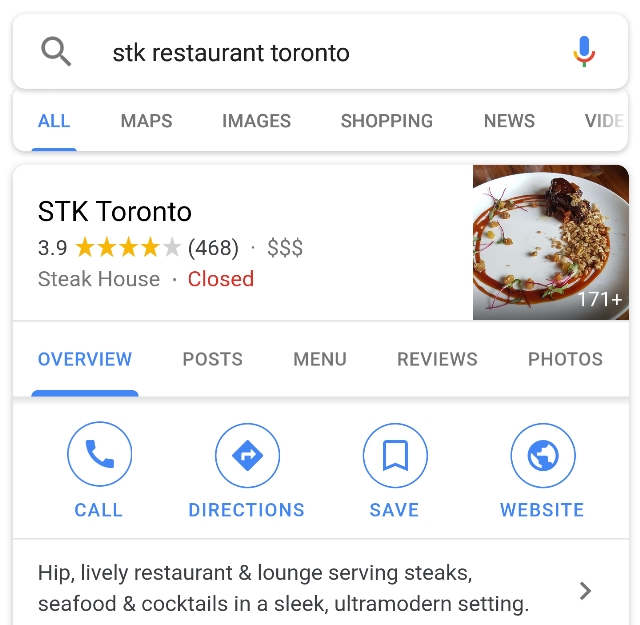
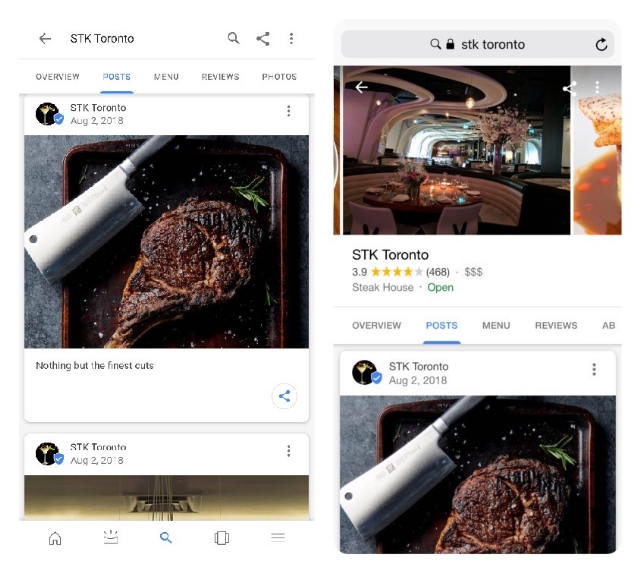
Google is testing making Posts from Google My Business listings more prominent in search engines, with a unique tab that can appear directly within local search results.

The tab will appear when you either search for a specific business or keyword that includes businesses that have created Google Posts.

As many smaller businesses with Google My Business have yet to take advantage of Google Posts, the new tab gives those who are sharing Posts a spotlight to shine with engaging content and high-quality images.

Likewise, I expect Google is hoping for the inclusion of Posts within the search results will boost the number of listings who are creating and sharing posts through GMB.

The feature is obviously in early testing as some have noticed changes to how the Posts can appear within the tab.

While Matt Southern from Search Engine Journal was able to view two separate carousels (one horizontal and one vertical) of images when viewing the Post tab, others (including myself) are only being shown a single vertical feed of Posts.

The tab is also currently limited to mobile searches and does not show up on desktop versions of Google.

Many think that B2B marketing requires a completely different approach than marketing from a business directly to consumers. There is the belief that they B2B audiences don’t use social media or Google the same way that other audiences do and that you have to use a more “old-school” approach.

However, a new survey from Clutch shows that B2B audiences are just as, if not more likely, to use search engines and social media to find business information as other demographics.

The survey of 384 consumers of online business content found that 87% frequently find business content using search engines, 85% use social media to find business content, and 75% encounter content most frequently on company websites.

The findings show that it is more important than ever for B2B-focused companies to modernize their marketing techniques and connect with clients through popular platforms like Google and Facebook.

As part of ensuring they are working with only the most reliable businesses, B2B customers extensively research the companies and products they need online as part of their purchasing process.

They also widely use the internet to keep up-to-date with the latest trends and news in their industry, providing ample opportunities for businesses to advertise and market themselves in their niche.

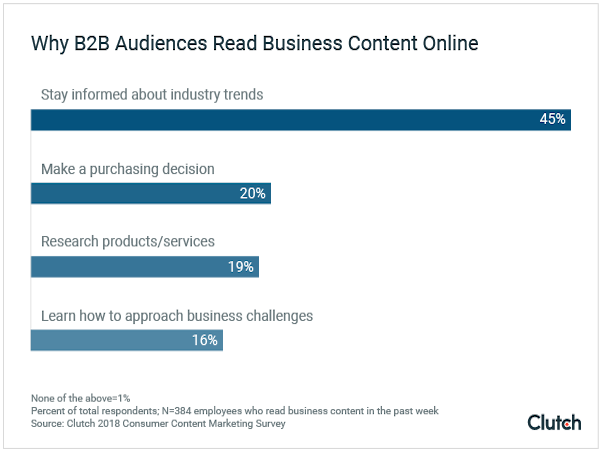
According to the survey, nearly half of B2B audiences primarily read business content online to stay aware of the latest happenings in their industry. The second most common reason was to inform their purchasing decisions.

The big takeaway here is that B2B marketing shouldn’t be stuck in the past. Purchasers are incorporating modern sources of business content and doing an increasing amount of their business purchasing online. Unless, you’re making your brand a part of those online conversations and research, you’re missing a chance to bring in customers looking for the products and services you offer.

Facebook advertising

Facebook is launching new advertising restrictions on who can promote on their platform to protect users from questionable brands or business practices.

The company announced it will no longer allow for bail bond services to promote their businesses on the social network. Additionally, addiction treatment centers will only be allowed to advertise if they have been approved by LegitScript, a third-party verification service.

The new restrictions apply across Facebook’s entire advertising platform, including on the Facebook Audience Network and Instagram.

“Addiction treatment centers that advertise to people in the US on Facebook will now be required to have certification from LegitScript, which will review their background, qualifications, compliance with state legal and regulatory licensing requirements and privacy practices,” Facebook writes on its Business blog.

Once addiction treatment centers have been verified, they will also need to complete Facebook’s Addition Treatment Centers Onboard Request before being allowed to start running advertisements.

Facebook says it made the decision based on feedback from industry and policy experts, as well as advocates in the respective industries.

“We consulted a wide range of policy experts, advocates and community organizations working in criminal justice to ensure we’re taking the right approach,” explains Facebook about the decision to remove bail bond services advertisements.

Both industries are notorious online for fraudulent or misleading advertising, which has led other big companies like Google to also clamp down on their abilities to advertise across their platforms. Last year, Google introduced similar restrictions on addiction treatment centers to ensure users are only directed to trusted treatment centers.

“We found a number of misleading experiences among rehabilitation treatment centers that led to our decision, in consultation with experts, to restrict ads in this category,” a Google spokesperson told Search Engine Land at the time.

Google My Business is adding new Insights showing how Posts from businesses are doing. This means you can now monitor your Posts and see what type of content works best for the unique placement.

For those unfamiliar, Posts are a feature of Google My Business which allow businesses to create social media-like content and highlight it within their GMB listing. As posts only last for 7 days, they are a great place for letting customers know about special short-term promotions and sales.

The new Insights for GMB Posts were announced by a GMB Community Manager who said:

“We’re excited to announce that we’re launching a new summary view of your Post Insights! Post Insights help you better understand how your posts perform with potential customers.”

The Insights are available within the Posts tab on the GMB dashboard and provide details for individuals posts or all posts from the last week or month.

Post Insights include data on the number of views and clicks you’ve received, as well as how those metrics have changed time.

It should be noted, however, that GMB will not show any percent change in the summary if any of the following issues exist:

  • Your posts received 0 views.
  • You haven’t made any posts.
  • Your percentage change is over 99.99%.

The new Google My Business Post Insights are available to everyone with a GMB listing on a desktop browser or through the mobile version of the website. It has not been rolled out to the GMB yet, though.

For years, Facebook has made it easy to integrate your other social media accounts from across the web, by allowing users to cross-post content from one platform onto Facebook. For instance, Twitter users were able to share their Tweets on Facebook without ever leaving Twitter’s platform.

That all changed last week, however, when Facebook officially deprecated its Publish actions permissions from its API, effectively making it impossible for other social networks to include built-in cross-posting.

According to Facebook, this move affects approximately 60,000 apps – including some big hitters like Twitter.

Twitter’s support team confirmed the change, though they explain there are still other ways to share Tweets across the web:

Facebook announced it would be deprecating Publish action permissions back in April, saying a few categories of apps with long product life cycles would be given extra time to update their software.

Facebook confirmed to Marketing Land’s Amy Gesenhues it had rolled out the change last week. The company also stated Facebook users could still share content using Facebook’s Share dialogs.

Essentially, this boils down to Facebook staking its territory and trying to keep users within its platform as much as possible. Unfortunately, that means users and businesses who had been using Twitter’s integration to share content on both platforms at the same time will now have to go through more tedious methods.

At the same time Facebook removed the ability to automatically publish content to the site, the company says it also removed access to its API platform for hundreds of thousands of inactive apps. Both actions are part of a recent effort from Facebook to clean up its app landscape after recent controversies of what user information apps were able to access.

Google Algorithm

After much ado, Google has rolled out its latest big algorithm update, called the “Speed Update.” And, once again, there has been little to no effect on the search results we see every day.

This is the latest in a pattern of big announcements of search algorithm updates that seem to fizzle out into nothing. It would be reasonable for many to stop caring and assume they don’t really need to worry about all these algorithm updates.

They would be wrong.

Why Google’s Algorithm Updates Matter

The other trend running through Google’s latest algorithm updates is that they have been almost universally focused on usability across devices. In other words, Google cares about how users perceive your website. Is it out of date? Slow? Impossible to read on a smartphone?

Of course, Google’s interest here isn’t entirely altruistic. They have made their name by delivering the best search results possible. If they allow low-quality sites to dominate the rankings, they wouldn’t be doing their job very well.

As a business, you also aren’t doing a very good job representing yourself if you aren’t living up to most of Google’s latest standards. People will be put off if your copy is outdated, or your site is too slow or buggy to use. This is the biggest reason you should really care. Google’s standards are (largely) the same as your potential customers’ standards.

Bringing It All Together

If you aren’t doing one of the things above, you might be able to get away with it. Some people may give you a pass for a sluggish website. It might not matter much if your copy is a year or two old if it is still relevant and accurate. Desktop users won’t even know if your site isn’t mobile-friendly. Taken together, though, it paints a really bad picture.

This is essentially how Google’s algorithm functions. There are literally hundreds of factors or signals that affect how sites are ranked. A single new search signal isn’t likely to have a big impact. Neglecting several search signals will likely have serious consequences for your rankings.

The best way to think of Google’s search algorithm is by comparing it to a test. Missing one or two answers is fine. But, the more questions you get wrong, the worse your score is. In the end, it is always best to strive to ensure your site isn’t just meeting basic standards, but is designed and optimized to perform as well as possible. This way, you’ll satisfy anyone who comes to your site, and you won’t have to worry about updating every time Google launches a new algorithm update.

Hashtag YouTube

Hashtags are coming to YouTube. The video platform has begun displaying hashtags on videos to help users search and discover other videos on similar topics.

The hashtags appear on any video that has been optimized with the tags in web browsers and the YouTube Android app. So far, the hashtags are not being shown in the iOS app.

Up to three hashtags can be shown in blue text above videos’ titles and can be clicked on to open a search containing related videos.

Hashtags can be used to conduct manual searches for any video containing that hashtag, even if it is just in the video description. Hashtags can also be included in video titles.

There are a few restrictions on how hashtags can be used on YouTube, most of which are common sense. YouTube’s policies explicitly prohibit using hashtags to promote harassment or hate speech, as well as to mislead people about content.

Additionally, the platform discourages users from over-tagging their videos, which would be defined as using 15 or more tags on a single video.

Breaking these rules could lead to a variety of punishments depending on how severe the infraction is or whether someone has committed a previous offense. These could include having your hashtags be ignored, videos being removed from search results, or a video being removed from YouTube altogether.

For now, using hashtags to search provides pretty limited search results. But, I expect that will change as creators begin to optimize their channels.


Business owners can now see exactly what search terms people are using to find their Google My Business listings with Search Query Insights, giving you an opportunity to see where your listing is succeeding and what areas may need to be better optimized.
The search query information is being added to the Insights tab and includes the most common terms and search trends that helped people find your business.

In the help page for the new feature, Google suggested: “these queries should help you create better Posts with Google and even Ads to engage your customers.”

However, the data won’t be a comprehensive list of every search term that led to your listing. It will just contain the terms used most often.

“Search queries focus on the terms that your customers used to find your business on Local Search and Maps.”

Business owners or page managers can also filter the queries based on those used within the last week or the past 28 days.

The feature will be available to all Google My Business listings soon, but Google has not provided an estimate of how long the rollout will take. Currently, some are reporting seeing search query data in their Insights tab, while it is absent for others. I would expect most will have access to the information by the end of the week, if not sooner.

After months of warnings, Google is officially rolling out its “Speed Update” for all users.

Google updated its original blog post to say the new ranking factor would be rolling out for all mobile search results throughout the day – though it is unclear exactly how long the Speed Update will take to fully go into effect.

What is Google’s Speed Update?

Essentially, Google’s Speed Update is just a mobile version of the speed-based algorithm used on desktop search results for years. Rather than rewarding the fastest sites, the update is better described as punishing the slowest sites online. This is particularly important for mobile-based search results because numerous studies have shown that people are likely to leave a webpage if it takes more than 3 seconds to load.

What this isn’t, is a large-scale algorithm shift. The majority of sites are likely to see little to no change after the roll-out. However, it is unclear just how harshly it will penalize the slowest sites out there.

Will you be affected?

Google refuses to give an exact estimate of just how many sites will be affected by the rollout, but they have said it will “only affect a small percentage of queries.”

Still, if your business’s website is notoriously slow, you may be at risk for a loss in search ranking and traffic. If you’re afraid you may be on the chopping block, you can see how your site stacks up using a number of Google’s tools, such as the Chrome User Experience report, the Lighthouse tool, or the Page Insights tool.

As always, it is recommended that you take steps to make your website as fast as possible. This can be done a number of ways, including reducing image file sizes, finding faster hosting, or reducing the number of widgets or the amount of content on a single page. Even if your site is safe from the Speed Update, you don’t want to risk losing potential customers while they wait for your page to load.