The popular “Stories” feature that has expanded from its SnapChat origins into Facebook, Instagram, and Twitter has always been known for its short-term lifespan. Stories have always been something that disappears sometime after sharing.

Now, Instagram is changing this with new ways to save and reshare your Stories long-after they’ve vanished from people’s feeds.

Instagram recently launched two updates to its Stories feature that gives users the ability to add Stories to its Archive feature and include Stories in the “Highlights” section of users’ profiles.

In a blog post, Instagram said that Stories will be automatically saved to users’ private Archives once they expire. From there, you can view or reshare your old Stories as a normal video post or add them to highlights.

The feature is turned on by default, but you can opt to turn off the Archive feature if you like.

Instagram explained, “To access the Stories in your Archive, tap the Archive icon on your profile. From there, you can easily switch between your Posts Archive and your new Stories Archive. In your Stories Archive, your stories will appear in a grid with the most recent Stories at the bottom. The first story from each day will show a date indicator to help you navigate your archive as you scroll. Only you can see your archived stories, and you can choose to turn off auto-archiving at any time in your profile settings.”
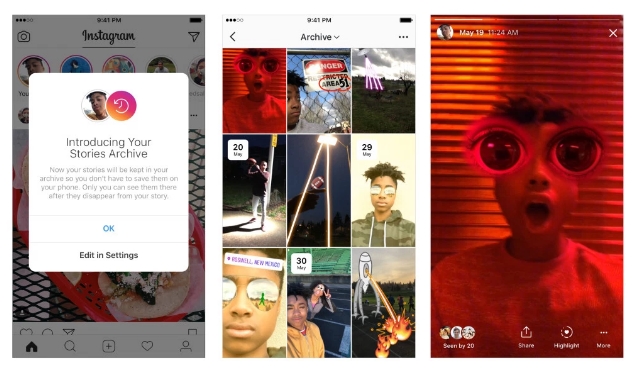
At the same time, Instagram has launched the new Stories Highlights section, where users can add Stories to their profiles.

Stories Highlights can be created by simply tapping on the New circle on the far-left side of the app. After that, just choose which Stories you want from your archives, select a cover for the Highlight, and give it a name.

Once that’s all done, the Highlights will appear as circles on your profile where they can be viewed.

You can add as many Highlights as you want, and they will remain on your profile until you delete them by tapping and holding on the circle.
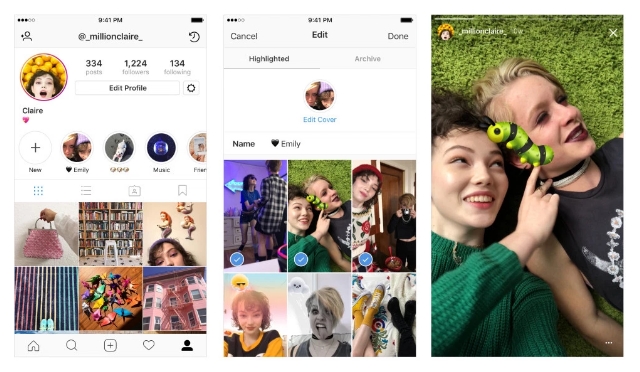
In the blog post, Instagram said: “Over the past year, Instagram Stories has become a key part of how you express yourself—but there hasn’t been an easy way to keep your Stories around for more than 24 hours. Now you can more fully express your identity by grouping Stories you’ve shared into Highlights and featuring them on your profile. Story Highlights lets you show all of the sides of your personality, and you can make highlights out of anything you’ve shared to your story in the past. From the best moments of your ongoing soccer season to all the stories you capture of your loved ones, the interests and activities that matter most to you have a home right on your profile.”

Brands and marketers will likely find these new features provide a number of ways to make Stories a more powerful marketing tool. In an email to Social Pro Daily, Instagram suggested brands can take advantage of the tools by:

  • Extending campaigns and promotions beyond 24 hours.
  • Showcasing immersive video and behind-the-scenes content on the increasingly significant profile page.
  • Re-engaging people around best-performing Stories content.
  • Sharing customer reviews
Business owners may be able to upload videos to their Google My Business accounts in the near future, based on a new feature popping up for some account owners.

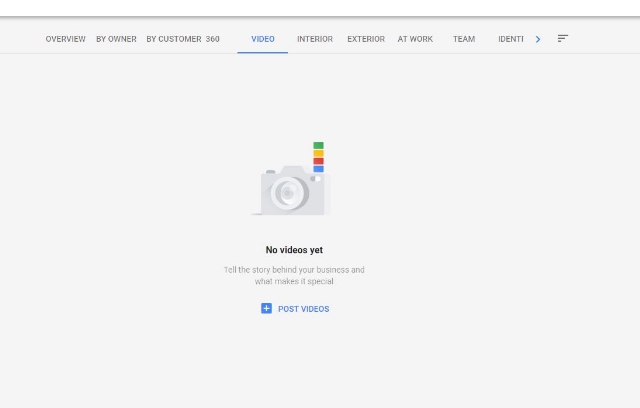
Colan Nielsen from SterlingSky noticed that some of his clients now had access to a new panel for uploading videos showcasing their stores or products.

Several others have since reported seeing the option appearing in their own accounts, however, not everyone says they can use the feature quite yet.

For now, it is unclear whether the feature is just one of the many tests Google runs on a regular basis or a slow rollout of a widely anticipated feature. Google has yet to release a statement on the issue.

It’s worth noting that this isn’t the first time videos have started showing up in GMB accounts. During the earlier years of Google My Business, Google included a similar video upload option. The tool disappeared long ago.

Since then, Google has allowed “Local Guides” – volunteers who help Google gain in-person information about businesses – have been able to upload videos to local listings. Actual business owners or account operators have not been able to until now, though.

While many can already upload videos, few have reported actually seeing their videos show up on their listings yet. When they do appear, videos are likely to be shown under the photos tab, as they do in the listing for Voodoo Doughnut in Portland:

Business owners using GMB have been asking for the ability show videos for years because they can provide a more complete view of both their stores and their products. Hopefully, the appearance of this feature for some is a sign of a much wider roll-out coming soon.

Pinterest is expanding their platform – directly into Facebook’s. Hoping to create some synergy that will bring in new users, Pinterest is launching new features directly available from Facebook’s Messenger.

The new features, built around a chatbot for Messenger, make it possible to use Pinterest without ever having to actually open Pinterest.

According to Pinterest, the move is actually just capitalizing on the social platform’s already existing presence on the site. Each week, nearly 1 million pins have been shared from Pinterest across Messenger before the launch of the cross-platform features.

Pinterest’s Facebook Chatbot

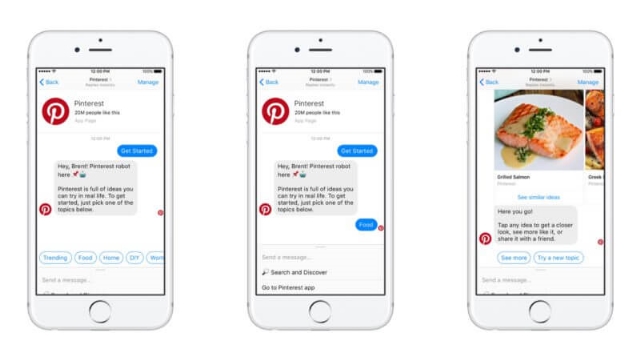
Pinterest’s new chatbot will allow users to browse Pinterest’s site and content with guided advice and recommendations. When you start a conversation with the chatbot, it will ask you to choose from a list of categories – such as “trending,” “food,” and “home.” Based on your choice, the bot will then show you a carousel of pins from that category.

You can also directly search Pinterest with text queries, however, you can not use the platform’s visual search technology by sending in pictures for similar pins.

While users might find this service to be a useful way to quickly find the pins they are most interested in, advertisers might be disgruntled to learn that the Chatbot will not include Promoted Pins.

Native Pins for Messenger

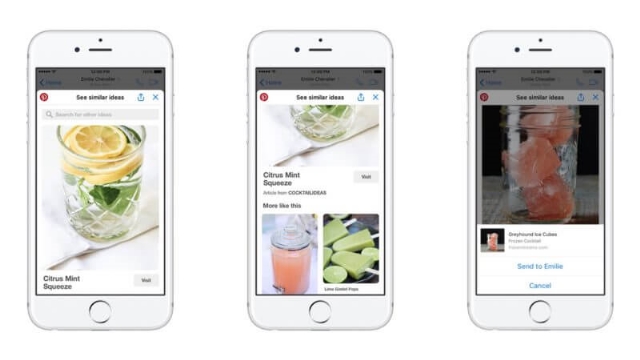
In the past, when you clicked on a pin that was shared on Messenger it would automatically open in Pinterest’s site or app. Now, pins will open within Messenger itself, thanks to the Chat Extensions feature.

Facebook’s Chat Extensions feature is designed to allow users to interact with content from other brand’s sites or apps without leaving messenger, therefore also making it easier to share that content again within Messenger.

Pinterest is using this to deliver Pins directly to users on Messenger, as well as including a gallery of Related Pins and a search bar to find more pins.

With these, users will be able to find and share pins within Messenger without ever having to leave the conversation they are having with their friends.

Interestingly, Facebook is also allowing Pinterest to generate revenue with this chat extensions. If a person’s Facebook account is connected to their Pinterest account, Pinterest will also include Promoted Pins within the Related Pins section and search results shown through the chat extension.

Instagram hasn’t become as synonymous with advertising or online marketing as it’s older sibling, Facebook, has. However, new stats announced by the company show business is booming on the popular social media platform.

Since July, more than 10 million businesses have launched business profiles – Instagram’s version of Facebook’s Pages – totaling over 25 million business profiles.

Instagram’s business profiles rolled out in May of last year and saw an initially slow response. The profiles give brands a more professional appearance on the app, including a “contact us” button and access to analytics features.

The inclusion of these business-oriented features has helped woo more advertisers to the platform, as well. Since the launch of business profiles, Instagram has increased its advertiser base from around 200,000 in February 2016 to more than 2 million in September of this year.

According to Instagram’s statistics, approximately 80 percent of Instagram’s 800 million monthly active users follow a business. Additionally, around 40 percent of the 500 million active daily users view at least one business’s profile each day.

Interestingly, two-thirds of the more than 200 million people that view a business profile each day did not previously follow the brand. That suggests the pages are effectively helping connect businesses with new potential customers and fans.

Every small business person knows there is no marketing quite as powerful as word-of-mouth. No matter what you promise in your ads, it won’t pack quite the punch as a positive, well-written review for your business. But, what if you could turn your positive reviews into your ads?

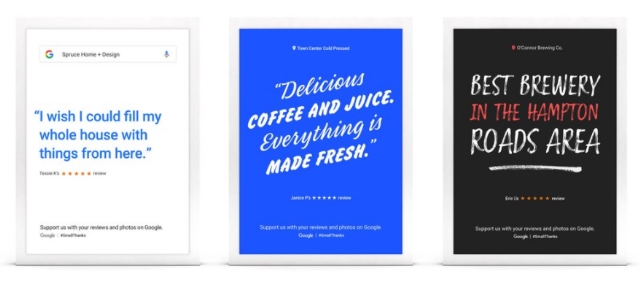
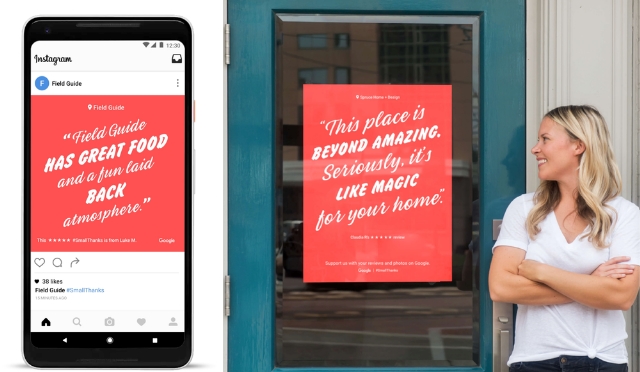
With the help of Google’s #SmallThanks Hub, you can no do just that. The new online resource aims to help small businesses create top-quality digital and printed marketing materials based on your Google reviews.

“Simply search for your business name on the site, and we’ll automatically create posters, social media posts, window clings, stickers and more — based on the reviews and local love from your customers on Google,” writes Google’s vice president of marketing for Ads & Americas, Lisa Gevelber, on The Keyword blog.

The new resource is available to all US businesses with a verified Google listing with an address.

“Reviews from your fans are like digital thank you notes, and they’re one of the first things people notice about your business in search results,” writes Gevelber in the announcement.

In the post, Google also highlighted data indicating that up to 71% of consumers say positive reviews in search results make them more likely to visit that business and that business listings boasting positive reviews receive up to a 360% increase in click-throughs to their website.

As part of the launch of the #SmallThanks Hub, Google also included a few tips for small businesses. These include keeping your Google listings up to date, encouraging customers to share reviews online, and posting “Find us on Google” stickers in their store and across social media.

As Google has continuously demoted their organic listings for search results, local SEO has risen in prominence. Instead of aiming for the top search spot, more and more businesses are prioritizing claiming the top place in Google’s local search results – which typically appear before any organic listings.

Of course, getting the top spot in the local results isn’t much easier than typical SEO work. However, it is a bit different. Google prioritizes different search signals to make sure they are delivering the most valuable businesses for your searches.

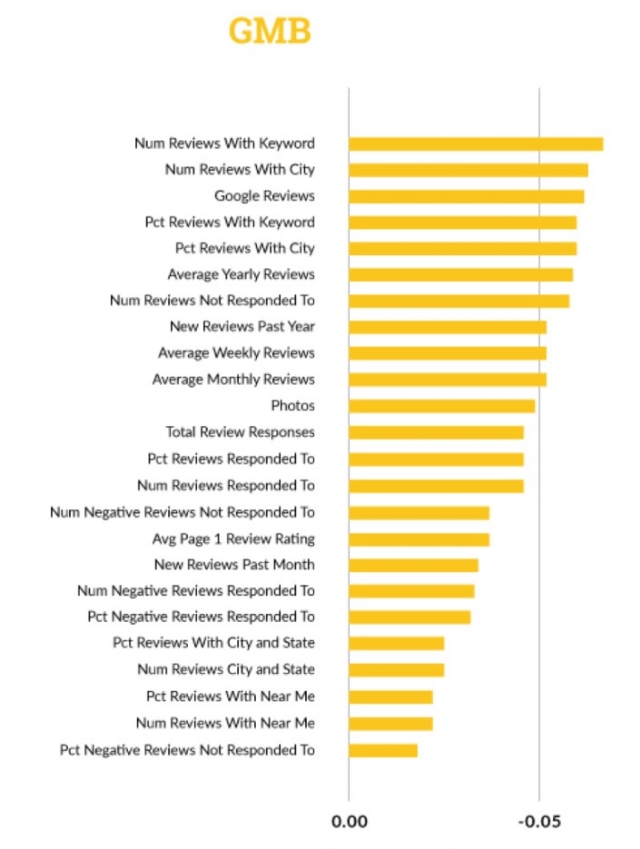
To figure out exactly what search signals matter to Google the most when sorting local results, LocalSEO Guide recently completed an in-depth review of over 200 ranking factors and 100,000 local businesses across 150 cities.

What they found shows that while organic ranking factors like links, keywords, and anchor text are important, rankings reign supreme in local search.

Specifically, “having a keyword you are trying to rank for, and a mention of the city you are working to rank in, in reviews, has a high correlation with high ranking in Google My Business results.”

The findings also indicate that engagement, such as adding photos and hours to your listing, serves as a significant ranking factor. Additionally, “responding to reviews and claiming your profiles are ways to engage with your potential customers and Google’s platform to show then you are invested.”

Elsewhere, the report suggests that traditional SEO factors such as links and on-site optimization still play a significant role in rankings. However, some off-page signals like citations and reviews on third-party sites, are declining in relevance compared to past research.

The full report details more findings and statistics to indicate exactly how those who are crushing local search are doing it. However, it is important to note that these types of studies are based entirely on correlation. We can’t say for sure exactly how Google’s systems rank local results – partially because they won’t tell and partially because they are always changing.

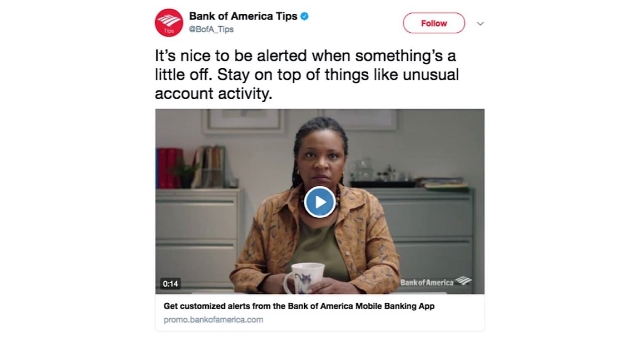
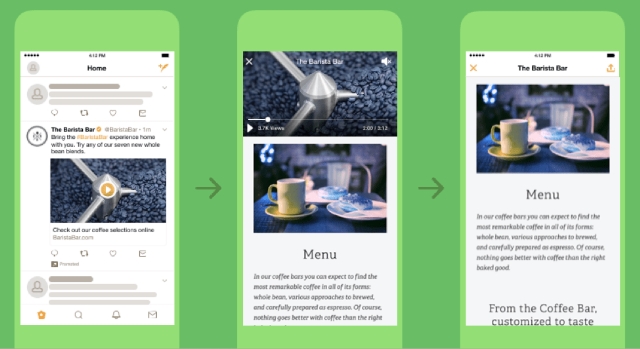
Twitter has released a new type of video ad called the Video Website Card, which is aimed at helping advertisers drive traffic to where they need it most.

Twitter Video Ads

The new ad unit uses a multi-faceted approach to help streamline the process of directing users to your site, mobile app, or any other place you want.

It starts with an auto-playing video ad which Twitter says drove twice the normal engagement of standard mobile video ads in a beta test.

After the video is over, advertisers can include a clear call-to-action to drive viewers to your preferred location. However, if a user taps the ad while the video is still playing, it will continue to play while the website loads. Twitter claims this increases user retention by over 60% because it keeps users engaged while waiting for your site to load.

As you would expect, the ad unit also includes a customizable headline and a destination URL. You can also optimize the Video Website Card for your specific goals, such as video views, website clicks, or awareness.

The ad unit is already available to all Twitter users around the world, so you can start testing the new Video Website Cards today.

It may not come as a surprise that Facebook favors native videos, but a new report shows just how much of a boost videos can get by being uploaded straight to the social media platform.

According to Quintly, native videos on Facebook get up to 530% more comments than videos shared from other sources like YouTube.

The report comes from a study originally published back in March, but which has been recently updated with data collected between January and July of this year.

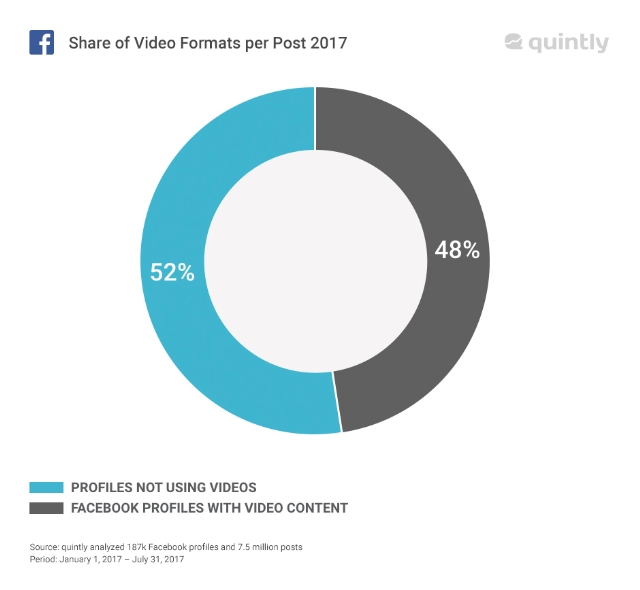
Including the new data, the study analyzed 187,000 Facebook pages and 7.5 million posts. From all this data, Quintly says it deduced that approximately 92% of all videos on Facebook are uploaded natively.

The study also shows how video has grown on Facebook recently. From January to July, almost half (48%) of all pages analyzed uploaded a video to their timeline. Of those, 92% posted at least one Facebook native video or Facebook Live video.

In comparison, only 26% of pages analyzed posted YouTube videos and 7% shared videos from Vimeo or other sources.

Facebook video’s biggest competition still comes from YouTube, but Facebook’s own clips still trounce all others in every metric.

Native Facebook videos received 168% more interactions – reactions, comments, or shares – compared to YouTube videos. They also received eight times more comments and 477% more shares.

It is highly likely that part of Facebook’s domination here is that it owns the platform, and thus, makes the rules. Facebook is almost certainly showing their own videos more prominently, which would lead to more engagement.

However, that is not the whole explanation. Native videos on Facebook’s platform also enjoy several arguably natural benefits that make them more likely to be viewed and engaged with. They can be played seamlessly from your timeline and users can react or comment as they’re watching.

In comparison, videos from other platforms have to be viewed off-site or in a separate pop-up player, and then navigate back to their timeline to like, share, or comment. At that point, they might decide to move on and keep scrolling through their feed.

Whatever the reason for native video’s domination on Facebook may be, it is clear that posting your clips directly to Facebook is the most effective way to get seen and build your brand on social media.

Google has been teasing a massive revamp to the AdWords experience for months, and now it’s finally here.

The company says the redesign and new features provide a faster, more intuitive experience with a better focus on meeting advertisers’ goals.

What’s New

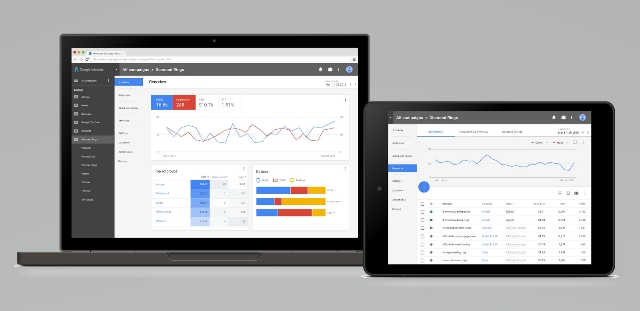
The biggest changes to the ad platform are mostly focused on design and speed.  The ad interface is less cluttered and easy to navigate, letting you put more focus on your advertising efforts without distraction.

The streamlined style also allows pages to load up to 20% faster according to Google.

Visualizations have also been improved to make it easier for you to see how your ads are performing and how people are engaging with your business.

The new experience also brings a few new features like bid adjustments and landing pages. These features have been available to those who got into the revised AdWords experience early, but this is the first chance for most advertisers to test them out for themselves.

Google has put together a number of new guides and videos to help everyone get accustomed to the new AdWords experience. You can get started by checking out the guided tour, how-to videos, or the best practices guide.

AdWords has made a pretty massive change to the way daily ad budgets can be spent, and it could wreak havoc on advertisers’ ability to manage their budgets.

Google has always allowed campaigns to spend up to 20% over their daily budget. The idea is to provide flexibility so that you can take advantage of days where your ad performs best and minimalize waste when your ad isn’t doing well.

By the end of the month, this variance evens out so that you meet your monthly budget.

Now, AdWords has massively raised the daily overspend cap. Campaigns can now spend up to double their average daily budget.

The change doesn’t directly affect your monthly budget, and Google says you will still never be charged more than your monthly budget. In the long run, it may prove to actually be a great way to ensure advertisers reach their goals more consistently. However, it also raises a number of big questions about how ad budgets are managed.

The biggest problem how the increase could affect ad visibility. If an add sees a few days that draw in significant budget overspend early in the month, they could realistically run through their ad budget early in the month. That means ads could disappear unless you increase your budget.

The response has been overwhelmingly negative, with most of the criticism focusing on the fast roll-out and lack of opt-out. The change was applied overnight to all AdWords accounts, and advertisers cannot revert back to the earlier limit.

Like most changes on Google, we will just have to wait for time to tell whether this is a big mistake or an uncomfortable improvement.