No doubt you’re aware of Facebook’s struggles since becoming a publicly traded company. Weary and wary investors want to see effective ways to monetize the social media giant, which Facebook is currently putting all its efforts into. Jon Swartz reports the latest attempt to increase revenue at USA Today.

In May, Facebook acquired social-gift-giving company Karma and, last week, announced a new service called ‘Gifts’ that will allow users to share gift certificates to retailers through their profile. Interestingly, Facebook plans to start by making Gifts available to a small group of users on the main site and through an Android app. The iPhone app isn’t expected for another few weeks.

This is the 2nd public attempt to increase ad revenue by Facebook in recent weeks. You may remember the recent announcement that Facebook Offers would now require businesses to pay to be included.

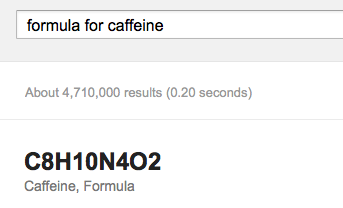
Google seems to keep adding more details to their SERPs. The newest one is finding formulas for various chemical compounds.


Just do a search for “formula for” and follow it with your compound name and it will display the chemical formula in most cases. I can see this coming in handy for students wanting shortcuts for their chemistry assignments. Whether or not that’s good is a bit more subjective.

Most corporate social media accounts are ignored or unknown. It is possible their audience isn’t engaged, or maybe just not sharing their posts. Either way, they struggle and rarely improve their status.

This is because most sites offer the same tips for getting out there, but they don’t address the real issues hiding behind the scenes that are really keeping you back. This is why we are addressing three less-known reasons your company’s social media pages aren’t getting any traction.

1) Your Material Isn’t Sharable – Very few people will share commercial messages or content. Social media are phobic of direct sales pitches, but the whole point of making corporate social media pages is to eventually sell with it. So what do you do?

You need to make sharable content that promotes your brand, rather than pitching the sale then and there. You want to use social media content to “bait-the-hook”, and once the public is on board, you can try the sale.

There are a few ways you can make sharable content. You can aim to market your product as being extraordinarily useful, but if it doesn’t provide incredible benefits immediately, most people will still view this as a sales pitch.

A better tip is to go for timeless content. The public is usually aware when a company is simply chasing the latest trend, and while it may earn the company some good short term PR, that attention will fade as quickly as it came. Most of all, just make sure your content is simple to spread. You don’t want to dumb it down, but you want your content to be streamlined so that it is easy to grasp.

Most importantly, don’t try to aggressively sell to your customers on this platform. Promote the lifestyle they want to have, and make it clear your brand will help them get there. The rest will almost do itself.

2) Lacking Core Benefit – Incentives are a great way to get others to participate and share your content. It is very easy, you offer them a reward for taking action, and they will be likely to participate in the future. However, this strategy doesn’t always work long term. Instead, try to focus on your audience’s pain points, and position your brand or content as the solution.

You should always be able to answer this question: why should someone interact with me in the first place? You can try to keep your page humorous, but that can take some extra skill and often the legal departments hold you back quite a bit. But, providing relief for problems and pains in your customers’ lives always benefits the audience and gives them reason to engage.

3) You Lack Positioning or Value Proposition – Another question you should always be able to answer, is what makes you unique or interesting? Claiming to be “low-cost” is transparent, and every brand in the market will claim they have the lowest cost value. Even claiming to be “better” than your competition or the “best” in the field read as empty boasts to many consumers.

Instead, your social media pages should stand for some set of values or ideas, even if it means making some enemies.

Brad Smith at Social Media Today shares the strategy of Stone Brewery, the largest brewery in Southern California, who announced last year that that they plan a massive expansion so they can brew the best organic ingredients, and accommodate their constant stream of visitors.

You see, Stone Brewery has taken a strong and vocal stance in their way of doing business, openly disparaging light “tasteless” lagers and their consumers. They even take this stance on their bottle labels, and they include this stance in their social media presence.

Being bold and original will gain you customers that are truly engaged in your brand, and find consumers that share the same opinions you do.

If you can address these three issues, you will be much more likely to get your commercial social media pages off the ground, and strengthen your brand. All it takes is being a little fearless and some originality.


To maximize your business’s potential, you need an online presence. But in order to be successful with your endeavors into social media, there’s a foundation that must be layed. Here are four fundamentals, or building blocks, to get you started on creating your social media presence.

1. Set Goals, Make a Plan

Without a plan and clear goals in mind, you are already doomed to fail. Afterall, if you don’t know where you’re going, how will you know when you get there? Or, more importantly, when you veer off course.

Think about how you will define success and how you plan to achieve it. Consider why you are using social media and how you’d like it to benefit your business. Also, put yourself in your desired audience’s shoes and try to discover what they’d like to see out of your profile.

The Digital Relativity blog has more on setting goals.

2. Tools

By tools, I mean the social media platform of your choosing. This goes right along with making a plan because before jumping in, you should be researching various platforms to make sure you are using the most effective one for your business.

If your target demographic doesn’t include women 18-30, maybe you can skip making a Pinterest account.

If you want to concentrate more on articles and written content, you may not need to spend time on Instagram, YouTube or Tumblr.

Not that you can’t manage more than one social media platform at once, but you’ll likely be most effective with your time if you narrow down your choice as much as possible so your message is most powerful and received by your desired audience.

3. Be a Credible Source

Once you’ve landed on the right site for you, become a source of constant, consistent, credible content. Not only should you create your own, but you can also share content from other sources. You can even share competitors content and add a little extra commentary to set yourself apart.

The idea is to send the message that your business is the expert in your field. Ideally, when people think of topics that pertain to your business, they’ll think of you.

4. Build an Audience

What good is any of this if no one is around to see what you’ve done? Certainly, being on the right social media platform is a great start. Boxcar Marketing has some tips for building an audience on specific platforms.

Having great content is also key to making sure you have users continually viewing your profile.

Once everything is in place, target influential users that boast a large following and send them your content in hopes that they’ll share it. This isn’t necessarily someone you personally think is influential, but rather someone your users will respect and likely be paying attention to already.

Also, be active on your profile and on other user’s profiles. If you receive comments on content you’ve shared, comment back and start an intelligent discussion. If you see interesting content shared by someone else, drop in your two-cents, which again helps you become a trusted expert in your field. Interaction will bring potential customers back more than sterile content.

Above all, be professional, be courteous and be relevant. Don’t stray off course from your business. This isn’t a profile where you share your views or you interests. This profile is for the users that need your service. Give them what they want.

Multimedia is clearly a popular form of communication online, but classic text is still the standard for effectively communicating with visitors. You would think, with close to a decade of the internet being accessible from most homes, most site creators would know how to handle text, but plenty are still struggling with text presentation.

So how can you make sure your content is readable? Well, there are some things you should know first. For example, reading online is 25 percent slower than when reading printed material, and according to a Nielson study, visitors are only reading between 20 and 28% percent of the words on your page. When reading printed text, readers usually take in every word, but online visitors scan, and hop from place to place.

But, we have eight ways to help you make your content more readable and help you communicate with your visitors.

1) Pick You Fonts Wisely – It hasn’t been this way forever, but thanks to web fonts, designers are able to use any font they want in their designs. This can be a gift and a curse though. While creative use of fonts can improve a page, it often comes at the expense of readability.

You can use more creative headlines because they are shorter and often larger, making them easier to scan. Just make sure the font utilizes both capital and lowercase letters. The height makes scanning more easy. For body texts, always use clear sans-serif fonts. On screen, serifs can blur together, so while serif fonts make printed text easier to read, they actually impede the process online.

2) Font Size & Line Spacing Are Important – As a designer, you should be designing for the huge range of internet capable devices out thereand their widely varying screen sizes. This is why using a fixed font size can work on large desktop screens, but often are far too big for mobile. The modern web design requires a flexible approach and percentages rather than fixed heights adapt to personal browser settings and varying screen resolutions.

When picking font sizes and line spacing, remember that the standard line height is too small. More room equals better readability.

3) Use High Contrasts – You never want your text to bleed in to the background. The more contrast between the background and text, the more readable text will be. It is also true that noisy backgrounds make almost all types of text unreadable. If you are going to place text on top of background images, make sure it is placed in the least busy area of the image, like maybe a blurred out area, or areas lacking texture. Another way to deal with this issue is placing an extra layer between your image and the text. This will help seperate the two.

4) Keep Lines Short – Because readers online tend to only skim, you want to keep your lines of text short. The best length is between 50-60 characters. If your lines are bigger, some readers may not even skim because the text appears overwhelming. They may think it will take too much time or work to read. Long lines also make it harder for your eyes to jump from one line to the next.

One way to get readers engaged is to start each article with short lines. Keeping the intro short and inviting helps hook the reader, and from there, expanding the text is more accessible.

5) Keep Paragraphs Short – 75 percent of readers online are estimated to not read websites word for word. They scan for what is most relevant to them. You want to keep your readers attention, but you also want to make sure anyone skimming your content can find what they are looking for quickly and easily.

6) Cut to the Point – It is common for writers to ramble for a few reasons. It is easy, and in print media, it helps make readers feel like they got their money worth. On the web, readers don’t care about the picture you paint with your words and they will leave if they can’t find what they are looking for.

This also suggests that simple sentences and vocabulary are more attractive to readers than long verbose sentences. If you have a new point, start a new sentence. It may seem weird, but it helps readers scan for what is important.

7) Avoid Jargon – Of course you want to appear to be an expert in your field, but you should also realize most experts are able to explain what they are talking about to the average person. Being able to simplify what you are talking about to the level a child could understand shows a real command over the technical and complicated information you possess.

Trying to use too much technical jargon can intimidate users, or make them feel like they need a dictionary near by to get through your post. This usually results in the user leaving. Instead, try to think like a normal person. Keep your posts accessible, and easy to understand.

8) Use Highlights, Lists, and Images – This also deals with the scanning nature of your visitors. Highlighting relevant keywords can help identify the main points of the paragraph, and lead reader’s eyes to what they are probably looking for. Likewise, structure your content in a way to help readers. Lists lay out specific ideas in an easily searchable format, or lay out step by step guides clearly. Images also help people stay focused on your post, especially when using image captions that act as reference points.

It is easy to see that most web readers are lazy when it comes to reading, and you want to make sure you are catering to their needs. Formatting your posts in a way that accomodates the scanning nature of online readers will actually help make viewers see more of your content. It may seem backwards, but simplifying your page format and structure can help keep readers on your site longer.

For more ways to improve your site’s usability, check out Sabina Adler’s posts at Usabilla.

 

While I’ve written extensively about why you should have an optimized site for mobile, I’ve rarely directly mentioned the two most obvious points for why you should. Websites that aren’t mobile friendly annoy visitors and it’s bad business.

Mobile users have more immediate needs, and they look for content that is designed to fit their needs.

A recent Google survey of mobile users says that 72% emphasized the importance of websites that are mobile-friendly. However, as important as mobile optimized sites are to users, 96% said they have visited a site that doesn’t work properly on their device.

The survey had 1,088 US participants who own smarphones and use them for internet browsing, and the survey was performed by independant groups.

Roughly three-quarters of respondents said they are more likely to visit a mobile optimized site than one that isn’t mobile-friendly, and they are five times more likely to give up on their task if the site isn’t optimized for mobile needs.

Following with those numbers, most customers said they are more likely to buy online when the site they find meets their mobile needs. Unfortunately, 61% are more likely to leave if the site isn’t mobile friendly. Even worse, when visitors find sites that aren’t mobile friendly, they are disappointed in the company itself.

So what are the needs of mobile users? They want sites that load in less than 5 seconds, big finger-friendly buttons and quick access to business contact information. They also want the pages to be designed to fit their screen, and links to the company’s social media profiles.

Basically, they want pages that work easily on a mobile interface, with easily accessible information and efficient designs. Mobile users want to be able to act immediately and most aren’t doing research on their mobile devices. They want ways to make contact and take action.

If your page isn’t meeting these needs, you are probably losing customers.

If you want to read the actual list of what the survey says mobile-users want, read Miranda Miller’s article at Search Engine Watch.

A recent study led by psychologist Dr. Tara Marshall found that conitnuing to be Facebook friends with an ex after your break-up can be psychologically damaging. And here you thought “Facebook stalking” was just a fun term to throw around.

Dr. Marshall concludes that keeping tabs on an ex actually hinders the healing process after a break-up. In other words, it’s harder to move on when you constantly see the person you used to date smiling in your timeline.

Another Facebook landmine exists for those who are now in a stable relationship. Finding an ex and friending them can be upsetting to your current partner, even if it’s for nothing more than catching up.

Julie Kent has more at The Cleveland Leader.

Google Remarketing was recently updated to make it easier to set-up and easier to use. In case you aren’t familiar, Google Remarketing allows you to present users, who were previously on your site, with relevant ads as they continue browsing the web.

Marc Weisinger, of Search Engine Watch, has three key reasons you should be using one of the most powerful tools available to online marketers.

1. It’s Simple and Easy

Previously, implementing the remarketing code was a several step process. Now, you install one simple code in the footer of each page of your site and get on with your day. You can’t get much easier than one step.

2. The Possibilities are Endless

With the universal tag in place, you can use the Adwords interface to target specific groups. How specific? Well, that is up to you.

Want to target only those users who landed on a promotion page? Done.

Want to target only users who added a product to their cart, but didn’t end up buying? Done.

Plus, each new target group you set up gets the benefit of the cookies already stored by your universal tag.

3. Target Positive or Negative Audience

Before starting your next email marketing campaign, use the Adwords interface to target users who click through from your email to your site.

Alternatively, you can instead choose to exclude those users because, afterall, they sound pretty loyal and engaged already. That way, you don’t bombard them with your ads and are sure to instead target those users that may have seen your email but weren’t convinced right away.

While your content quality is always important, it is always important to remember aesthetics when building up a blog. Adam Thompson from Search Engine Journal has a good rule for considering how your blog appears. “What’s on the inside only matters if the outside is attractive enough to keep viewers reading”.

This applies even when writing a blog post. Most internet users scan content instead of really delving in and reading. You need a quality title to intrigue readers, and good formatting to draw the readers to areas with the most important information. If you can do this well enough, your formatting may help grab your visitors and make them actually read.

We have a list of seven tips for formatting your blog, but beforehand, there are four requirements you need to meet.

  1. Have a high-quality theme – Make sure it is related to your brand, and if you choose a premium theme, you can have a designer customize it to match your brand.
  2. Use Great Titles – If your titles aren’t quality, visitors won’t bother to even skim the body text.
  3. Ensure you’re using social sharing buttons and widgets – Keep them relevant and easily accessible, but also remember not to clog the page.
  4. Follow SEO practices – Always make sure you meet the basic SEO best-practices such as static URLs, optimized page titles, meta descriptions, and image alt tags.
Now that we’ve covered those basic requirements, here are seven tips for successfully formatting your blog posts.
  1. Subheadlines – Breaking up your blog post with subheadlines help readers scan your post, and your subheadlines should give the reader a good idea what the post is about.
  2. Real Photos – Stock photos can always help add some good color and pizzaz, but if it isn’t adding anything unique to your post, then it shouldn’t be there. Your photos should be communicating something specific.
  3. Photo Captions – Captions help transform your pictures from basic aethetic touches to communcation of real ideas. Using captions well allows photos to be used to communicate specific information to the reader quickly.
  4. Custom Graphics – Sometimes charts or graphs may be the best way to quickly communicate information visually. While they require some extra time and money, custom graphics help clearly visualize data and spruce up your post.
  5. Pull Quotes – Pull quotes are an easy way to entice viewers to get intrigued in your post. If you use them right, your viewers will be intrigued by the quote and want more information or context.
  6. Use Color – Black text on a white background is old and boring. Add some color to liven up your page and engage viewers. It can be as simple as changing the colors of your Hx tags, or brightening up pull quotes. Don’t overdo it, and make your site neon, but use color to highlight information and attract readers.
  7. Bullet Point Lists – If your information is easily communicated in a list, always use bullet points or a numbered list. It makes it much easier for readers to scan for the interesting points, and still gain quite a bit of information.
If you can employ these tips in your blog, you will make viewers want to read, rather than trying to push them to the content. Coerce them to actually read by making it pleasant and engaging for them.


I’ve written before about the hidden cost of social media marketing. While Facebook, Twitter and the like are all free to use, their is the inherent cost of your time to keep your online presence where you want it.

Heather Clancy, of ZDNet, now reports that managing social media for small or midsize businesses often costs hundreds of dollars per month for tools or for outsourced manpower.

Clancy’s report is based on research done by Duct Tape Marketing, who’s creator, John Jantsch, attributes the findings to business owners’ realization that social media is “an essential element of the marketing mix.”

Despite spending nearly $1000 per month on social media, almost all responding business owners said their online presence has “somewhat helped” or “helped a great deal”.

It appears social media has joined the ranks of print, radio or TV ads. It’s a pay to play system, so you’d better be sure you’re getting your money’s worth.