Tag Archive for: News

Image Courtesy of Wikipedia Commons

Image Courtesy of Wikipedia Commons

With all of the different ways Google can penalize you these days, it is easy to get confused about what you need to do to fix your mistakes. Between Penguin, Panda, Unnatural Link Penalties, and Manual Penalties, there are more ways to get in trouble than ever.

Google’s increasing strictness is far from a bad thing, but it is also getting increasingly complex which makes for confusion when trying to bounce back from a mistake.

Marie Haynes knows just how confusing it can be. She has been working in SEO and writing for SEOMoz for years, but even she got confused when trying to help someone with what she thought was a Penguin-related penalty. She then saw another respected writer make the same mistake in a recent article but confusing unnatural links penalties with Panda.

It seems we need to go to the root of these issues and break down what each of these different penalties are and how they are different from each other.

The Penguin Algorithm came about last April as a algorithm change aimed at fighting webspam, which explains the initial title “The Webspam Algorithm” and it mainly targeted sites participating in link schemes and other questionable linking practices, though it also looked for indications of keyword stuffing.

The Penguin Algorithm isn’t to be confused with an Unnatural Link Penalty. The main difference is that Unnatural Links Penalties are manually taken against you rather than by an automated algorithm. They mainly place these algorithms when they believe a site is attempting to manipulate search engine results through the creation of links. The real question is what causes Google to investigate your site.

It is widely believed that filing a spam report will flag a site for manual review, but others have guessed that Google monitors more cutthroat niches such as “payday loans” or casino sites and consistently manually checks for unnatural links. Thanks to Google’s secrecy, we may never know exactly what makes Google personally examine a site.

So what is the main difference between Penguin and Unnatural Links Penalties? It really all comes down to the different way algorithms act compared to penalties taken by a living breathing person. Algorithms view all sites the same and is effective almost immediately. All sites hit by an algorithmic penalty will see the damage within the day of the algorithm update. Manual penalties on the other hand are being placed against sites at all times, and can be appealed more easily than an algorithmic penalty.

You can always recover from any of these penalties with effort, as Marie Haynes shows in her article, but you have to clean up your page and your methods. SEOs can’t get away with participating in link schemes or engaging other black hat techniques anymore, and there is no way to cheat the search engines anymore.


Every successful business or person has had to take risks to get where they are, but they normally downplay the stress and preparation that are involved in taking those leaps. It is natural to be worried, but with the proper forethought and preparation taking risks doesn’t have to be so scary.

The very nature of taking risks is not knowing if it will pay off, but if you listen for the patterns in others’ stories, you can see what risks are more likely to work out well. There are risks worth taking, and risks not worth taking. While you can plan all you want, sometimes it is best to just take a leap and see how it works out, while minimizing losses if it all goes belly up.

Amanda DiSilvestro has enough history in SEO to be able to make some pretty good guesses on what type of risks will benefit you and which are more likely to burn you. Saying yes to smart risks is the only way to get where you want to be.

One smart risk that worries many is hiring a writer with no SEO experience. Our field is so complex that it is easy to assume a writer without any experience would be able to learn fast enough to be a competent voice in SEO, let alone a writer that can take SEO principles and write about other topics accordingly. While writing for SEO is quite different from journalism or creative writing there is a good chance that any good writer you hire will be able to learn the basics of SEO fast enough to help you out.

Another common hiring fear many have is hiring a social media expert because it is so new, and so many people think they are a social media “expert” because they have a Facebook, and tweet all the time. This doesn’t mean hiring a social media expert is bad for your business, it just means your hiring process will have to take some extra effort to vet out the unqualified applicants. If your applicant doesn’t understand how social media and business function together, they aren’t an “expert” and they are more likely to cause a scandal than promote your brand’s image.

There is no path to success that doesn’t involve risks, but it shouldn’t feel like you are gambling. You should be informed enough to avoid the huge obvious problems, and the small bumps are fixable. Maybe one strategy won’t work, but every company has setbacks.

Image courtesy of Alex Ford

Image courtesy of Alex Ford

We see banners everywhere, especially in advertising. Whether they’re online, printed on cloth and draped across an entrance, or splashed across a billboard, banner ads all have the same core principles.

You wouldn’t think there is an entire art to making visually exciting and engaging banner ads, but if we can devote more than one article to the skill of making simple and attractive logos, Onextrapixel can devote each letter of the alphabet to effective banner advertisements.

Some of the entries are a little obvious like “grab attention” but they go the extra mile (or pixel if you enjoy the same type of lame humor I do) by explaining shock or surprise isn’t the real way to grab attention. Making viewers want to interact is the real trick to getting someone’s full attention.

Some of the other seemingly obvious suggestions shouldn’t need to be said, but so clearly are needed in the current marketing environment. There are only so words you can fit on a banner before it becomes illegible, and complex fonts make that word limit somewhere between one and five words. If someone can’t tell you what your ad said with just a one to two second glance, you’re trying to squeeze too much in.

Seriously, clarity is so important their list includes it three times with the entries “Message Clarity” and “Succinctness” and I don’t fault them for it. Keep your banner short. I’ve seen far too many ads at the top of my screen and running along the tops of subway cars absolute packed with words in a variety of fonts and all they ever do is hurt my eyes. Viewers remember the short and sweet.

There is obviously more to banner design than keeping it simple, but it opens up the big question addressed by many more of Onextrapixel’s list; “how do I convey a memorable message with so little?” If you can find an answer to that question, you are already well on your way to a great banner.

rsz_2971658475_e27d08f561_b

SEO experts are always happy to tell you how to improve your website, and maybe get some more conversions while your at it, but you don’t tend to hear much about what people are doing wrong. Maybe the SEO community is more positive than I’ve ever noticed, but we tend to prefer telling you what you can do better to telling you how you’re messing up.

Well today we’re going to change that, with some help from Inessa Bokhan. Sometimes it is just easier to tell people what not to do, and quickly put an end to these bad practices. She chose 17 of the most common mistakes website owners have been making for years, and I’m highlighting the worst offenders here.

One of the worst crimes you can commit as a site manager or content creator is ignoring your readers. It is so common for blog posts to go up, and the author to just vanish afterwords having moved onto new ground, even when readers are asking questions in the comments. Why would you just leave them hanging?

Creating content isn’t the whole process. We create content because Google likes it, yes, but you should also just be trying to attract real people with interesting information and a great site. Once you have those people on your site, you should be trying to keep them around as much as possible, and the best way to do that is simply interacting with them. Answer their questions, cement your reputation, and help foster a dialogue.

Another “sin” which personally drives me crazy is the constant use of registration when it isn’t necessary. There are so many times I’ve tried to read a random article, look at a picture, or register in order to leave a comment. The ability to register through Facebook or Twitter eases this problem as it doesn’t feel like such an invasion of privacy, but why would any web owner expect me to give them my private information just to see their content?

Some website owners just can’t help but turn off their “sell” switch, and “hide” advertising throughout their content.This can come in many forms, such as misleading links making you think you are on your way to a nice concise article, only to end up being offered a webinar, e-book, or even paid consulting.

As Bokhan points out, misleading links won’t even help if you have a pay-per-click campaign. Your audience will just leave. There are also those that simply break up their content with ads for those types of resources. This is a better solution than misdirection, but it is a personal annoyance to me to be distracted or have my train of thought misdirected with irrelevant paragraphs with similar formatting suddenly selling me a product.

These all lead me to the biggest mistake any website can make: lying to their customers. On the web, your customers make you or break you. Google is refined enough now that they can even identify when you are lying to your customers, and they will too. The worst case scenario is customers see through your lies immediately, and you go nowhere. The worst case is you temporarily fool them, are found out, and your reputation is destroyed through social media and forums.

Every business should be putting their customers above all else, and this is especially true on the internet where one bad customer interaction can lead to a fiasco.

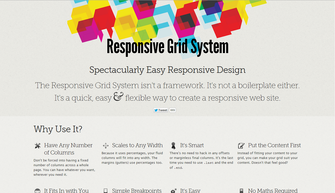
Responsive Screen CaptureYou’ve heard all about the pros and cons of responsive web design. You know it creates a consistent experience across different devices, and how it will save you from developing many different versions of the same site, but you’ve also heard that it “isn’t easy.”

Well responsive design may not be something a toddler can do, but Kendra Gaines has a way to make responsive design easy enough for almost every competent web designer out there. Thanks to the endless tools, frameworks, and plug-ins, responsive design is possible for everyone without too much fussing over the little details.

Gaines gathered 13 different responsive design tools you can use, and if you implement them all in your work flow, making your site responsive will be a simple matter you don’t have to fret over.

Even better, normally when you trade pure hard design work for tools, scripts, and other free resources, you end up sacrificing control and precision. The wide selection of these tools as well as the niche abilities of many of them make it so that you don’t have to compromise any longer.

Responsive websites are quickly becoming the standard, so it is imperative to learn how to adapt your sites to the new design world. You can still get away with your special, mobile-optimized websites if you so desire, but you are giving away consistency and features. Don’t give users a lite version. Use these easy resources to make your full website fit into anyone’s pocket.

Here’s a theoretical scenario: You’ve been hit with a manual penalty from Google. You take all the time and effort it takes to complete a link audit and remove all the bad links you’ve accumulated, and made sure your link profile doesn’t look questionable to Google’s eyes. You resubmit, but even after weeks your website is still flat-lining. What the heck?

As it turns out, that link audit and resubmission process was only half the battle. Google does use over 200 different signals to determine ranking, but links are still the heavyweights in the arena. Now think back to all those unnatural links you just removed. Often, those “bad” links were some of the most powerful in your profile, and you don’t have anything healthy replacing them.

I have some bad news. If you got hit with a manual penalty, you most likely used questionable or downright spammy methods to climb the rankings before, and that doesn’t cut it anymore. There is a way to recover, but it takes basically restarting your SEO process to get your site back in the rankings, and this time you can’t take short cuts.

Search Engine Watch suggests a four step process to getting your sites ranking again, but if you loved the spammy old ways of the web, these steps may seem counter-intuitive or just boring and difficult. Unfortunately for you if you feel that way, there aren’t many other options, and there will be less the more refined Google gets. Chuck Price put it best when he said, “adhering to the webmaster guidelines is no longer a “suggested” course of action, it is required.”

The four-step process will help you clean house on all the remnants of less savory SEO methods, and make your site look as clean and reputable as it should. Don’t try to toe the line again or take advantage of any loophole you find. You only really get one chance to come back after a manual penalty. If you get hurt again, it will be nearly impossible to fix everything.

Image courtesy of Web Treats

Image courtesy of Web Treats

Icons are essential for web design, especially when it comes to navigation. But, a problem comes with these icons. They look great at their normal size on a website, but as soon as you start pinching and zooming on a mobile device, the begin to blur similar to how pictures become more abstract the more you zoom in.

Considering these mobile devices are quickly reaching a standard with Retina or similarly high definition displays which bring attention to every low quality, blurry, or pixelated image and icon on a page, even the tiniest icon with a bad resolution when you zoom in is a big eyesore. Even when you use the Retina optimization trick of using images that are twice as large as normal and displaying them at half their actual size doesn’t protect your icons.

There is a solution however. If you notice when you are using a smartphone or tablet with a high resolution screen, when you zoom in the text maintains its integrity. Even the most scaled letters look crisp and clear. This is because fonts use a different technique to make what are essentially vector graphics in smaller file sizes so that the “image”of the letter rescales as you pinch and zoom. Luckily, your symbols and icons can be turned into these types of “icon fonts.”

The process is mostly painless and there are some clear advantages to icon fonts such as smaller file sizes, and compatibility with all modern browsers, including older versions. There is also the added benefit of not having to keep huge collections of differently sized versions of the same icons.

Web Designer Depot will help you get started turning all your vector icons into web fonts with the use of a free web app called IcoMoon.

rsz_john_muellerThere is a misconception amongst a small few that Google only wants the absolute best websites and they don’t index websites they think aren’t worth their time or space in their index. In reality, this is far from the truth.

Google is always indexing content and they index pretty much anything they can find. Supposedly, the only thing they don’t index is spam.

SEO Roundtable pointed out that Google’s John Mueller commented in a Google Webmaster Help thread recently saying “unless the content is primarily spam (eg spun / rewritten / scraped content), we’d try to at least have it indexed.”

He was responding to a question about a site bot being fully indexed over a prolonged period of time, which he believes is the result of a bug, though he didn’t have any definite answers until it is shown to the indexing team.

Before anyone gets up in arms, that statement is a little misleading on the aspect of spam. Everyone knows Google still indexes their fair share of spam, and in some cases they even get ranked. Mueller’s comments instead show how Google tries to avoid adding spam to their index, but we it is obvious that they don’t succeed in avoiding indexing all of the junk.

Getting indexed isn’t the same as ranking, but to have any chance of being ranked you have to be indexed.

Many website owners and SEOs have seen it happen. Your website is getting going, and Google is responding to your content with decent initial rankings. Everything seems fine, then gradually your ranking starts plummeting with no explanation.

You could time every day checking your rankings watching for this to happen  but that is a waste of time, as Search Engine Journal explains. Checking rankings isn’t an income generating activity, and your time is simply better spent elsewhere, like creating content or networking.

So then what is there to do about this mystery fall in the rankings? First, we have to understand what is happening, which Matt Cutts so helpfully explains in one of his latest YouTube videos.

Cutts uses an analogy of an earthquake to get to the heart of what is occurring. When an earthquake hits, the news about it is pretty broad. We know where it happened, but not many more details. Similarly, when content is posted, Google’s initial read of it is pretty wide. It is a best guess about where your content should rank.

As time goes by after an earthquake, we learn more and more. You will find out how much damage is caused, how many people died, how many aftershocks there were, and much more. As Google learns more about your content, it adjusts rankings. It contextualizes your content within the broader scope and repositions as needed.

So what can be done if you see your site drop in the ratings like this? Change up your practice. Most likely, your content is appearing to be quality at first, but Google is gradually peeling back the facade and seeing what your website really is, and it doesn’t like it.

Parallax scrolling was on almost everyone’s list of predictions for this year, but the community has been oddly quiet on the topic for a little while, most likely because it requires more finesse than many of the other trends on the tips of designers’ tongues.

To use parallax scrolling, you have to thoroughly understand what it is and how to use it. You can’t just follow a simple tutorial. You have to design around parallax ideas which requires much more time and focus.

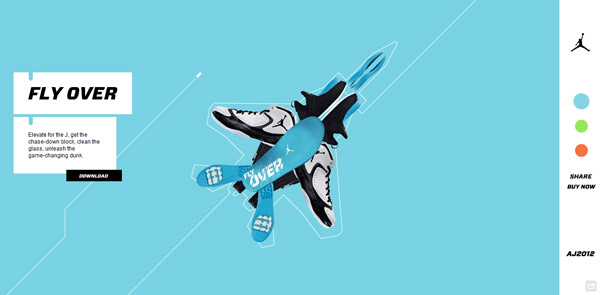
To see the effect in action, click the image.

To see the effect in action, click the image.

For those unfamiliar with the niche trend, parallax scrolling is a technique that happens when multiple layers of information and images are combined and move at different speeds to create movement, depth, or a 3-D appearance. What makes parallax scrolling different from other similar uses of this technique is putting the power in the hands of the user. Instead of an automated effect, the visitor controls the illusion with their mouse.

It is a tricky method to master, and requires quality resources to work properly. A great parallax scrolling page is easily ruined with low quality images. The scrolling can be vertical or horizontal. Though vertical scrolling is by far the more popular, horizontal scrolling is gaining a following slowly.

While it is difficult, parallax has some unique advantages over other types of designs. Many use the technique simply for aesthetics, but it also changes how users interact and read a webpage.

One of the easiest ways to see how parallax changes browsing patters is to look at its storytelling capabilities. Parallax scrolling can turn your average webpage into an interactive storybook that users can move through at their own pace. Where videos usually require sound and complete attention, stories can be told with parallax scrolling that puts the user in control, and won’t be as prone to get visitors in trouble when their at work.

Parallax scrolling is also especially adept at showcasing products. Like an online catalog  parallax techniques can make it appear as if you are flipping through a group of products, or seeing multiple angles of the same item for a better idea of what it really looks like, all while keeping the focus directly on the product by putting it front and center.

Carrie Cousins from Designmodo has a few other ideas of how you can use parallax scrolling, but the best thing to keep in mind about parallax scrolling is, as Cousins says, “the backbone of parallax is user experience.” Parallax techniques engage and intrigue users in a way that makes them feel as if they are experiencing web sites in a new way entirely. Don’t squander it with bad UX.