Tag Archive for: Google

To understand and rank websites in search results, Google is constantly using tools called crawlers to find and analyze new or recently updated web pages. What may surprise you is that the search engine actually uses three different types of crawlers depending on the situation with web pages. In fact, some of these crawlers may ignore the rules used to control how these crawlers interact with your site.

In the past week, those in the SEO world were surprised by the reveal that the search engine had begun using a new crawler called the GoogleOther crawler to relieve the strain on its main crawlers. Amidst this, I noticed some asking “Google has three different crawlers? I thought it was just Googlebot (the most well-known crawler which has been used by the search engine for over a decade).”  

In reality, the company uses quite a few more than just one crawler and it would take a while to go into exactly what each one does as you can see from the list of them (from Search Engine Roundtable) below: 
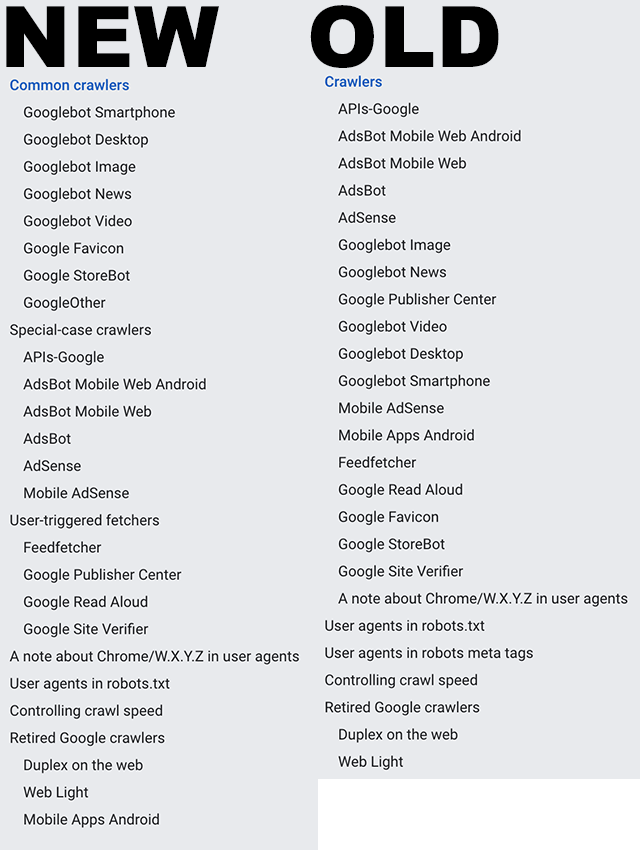
However, Google recently updated a help document called “Verifying Googlebot and other Google crawlers” that breaks all these crawlers into three specific groups. 

The Three Types of Google Web Crawlers

Googlebot: The first type of crawler is easily the most well-known and recognized. Googlebots are the tools used to index pages for the company’s main search results. This always observes the rules set out in robots.txt files.

Special-case Crawlers: In some cases, Google will create crawlers for very specific functions, such as AdsBot which assesses web page quality for those running ads on the platform. Depending on the situation, this may include ignoring the rules dictated in a robots.txt file. 

User-triggered Fetchers: When a user does something that requires for the search engine to then verify information (when the Google Site Verifier is triggered by the site owner, for example), Google will use special robots dedicated to these tasks. Because this is initiated by the user to complete a specific process, these crawlers ignore robots.txt rules entirely. 

Why This Matters

Understanding how Google analyzes and processes the web can allow you to optimize your site for the best performance better. Additionally, it is important to identify the crawlers used by Google and ensure they are blocked in analytics tools or they can appear as false visits or impressions.

For more, read the full help article here.
Typically when a site starts ranking worse for one keyword, the effect is also seen for several of the other keywords it ranks for. So what does it mean when a website only loses rankings for one keyword? According to Google’s Gary Illyes, there are a few reasons a site might experience this rare problem. 

In a recent Google SEO Office Hours episode, Illyes addressed the issue while answering a question from a site owner who had effectively disappeared from the search results for a specific keyword – despite ranking at the top of results consistently in the past. 

The Most Likely Culprit

Unfortunately, the most common cause of an issue like this is simply that competitors have outranked your website, according to Illyes:

“It’s really uncommon that you would completely lose rankings for just one keyword. Usually, you just get out-ranked by someone else in search results instead if you did indeed disappear for this one particular keyword.”

Other Potential Causes

If you believe the drop in rankings for a specific keyword is the result of something other than increased competition, Illyes recommends investigating if the issue is isolated to a specific area or part of a larger ongoing global problem. 

“First, I would check if that’s the case globally. Ask some remote friends to search for that keyword and report back. If they do see your site, then it’s just a ‘glitch in the matrix.’”

Those without friends around the globe can effectively accomplish the same thing by using a VPN to change their search location.

On the other hand, if your site is absent from results around the globe, it may be indicative of a bigger issue – potentially the result of changes to your website:

“If they don’t [find your website], then next I would go over my past actions to see if I did anything that might have caused it.”

Lastly, Gary Illyes offers a few other potential causes of a sudden ranking drop.

Technical issues such as problems with crawling or indexing can prevent your website from appearing in search results. 

Sudden changes to your backlink profile – either through mass disavowing links or through the use of low-quality or spammy links can also trigger issues with Google. If you are hit with a manual penalty for low-quality links, it is highly likely your site will stop ranking for at least one keyword (if not several).

To hear the full discussion, check out the video below:

Google released its annual Ads Safety Report this week, highlighting the company’s efforts to guarantee advertising on its platforms is safe and trusted.

Along with suspending more than 6.7 million spammy ad accounts over the last year, the report details how Google is fighting fraud, preventing potentially harmful ads from running, and protecting user privacy.

Using machine learning algorithms, Google is able to identify suspicious activity and patterns faster than ever and quickly remove fraudulent or harmful ads.

This has contributed to a huge improvement in Google’s abilities to detect spam and harmful activity at scale, leading to over 2 billion more ads being blocked in 2022 compared to the previous year. 

At the same time Google released the report, the company also announced it is launching an Ads Transparency Center to help users better understand the ads they are seeing and who is paying to display them. 

Highlights From The 2022 Google Ads Safety Report

The full Ads Safety Report includes a lot of details about how Google detects and removes malicious or spammy ads, but these were the details we think are most important for you to know:

  • Google blocked over 5.2 billion ads for policy violations
  • Ad restrictions were down by over a billion annually in 2022
  • Over 6.7 million advertiser accounts were suspended for “egregious” policy violations
  • The number of ads removed from web pages stayed largely stable compared to the previous year

What Is The Ads Transparency Center?

In response to the leap in blocked ads and suspended ad accounts, Google decided to create the Ads Transparency Center – a central knowledge hub containing information about verified advertisers and ads. 

Here you’ll be able to find detailed information about the ads a specific advertiser has run, what ads are being shown in a specific area, and more about ads appearing on the platform. 

Users can also access My Ad Center here, which gives them the ability to like, block, or report potentially problematic ads. 

For more about Google’s attempts to keep the ads on its platform safe for users, check out the full 2022 Ads Safety Report here or the Ads Transparency Center announcement here.

Just ahead of International Fact-Checking Day on April 2, Google announced a wave of new features intended to make it easier for users to learn more about where their information is coming from.

As the company revealed in a recent announcement, Google is introducing five new features to verify information online:

  • Expanding the “About this result” feature worldwide
  • Introducing an “About this author” section
  • Making it easier to learn about websites using the “About this page” feature
  • Providing context for top stories with “Perspectives”
  • Helping spot information gaps

Expanding the “About this result” feature worldwide

Launched in 2021, the “About this result” feature gives searchers access to additional information about the sources and websites that appear in search results. 

Though English-speaking countries have been able to find this information by clicking the three vertical dots next to most search results for a while, users in other countries or speaking other languages are just now getting access to the feature. 

Introducing an “About this author” section

Google is adding a new section to the “About this result” feature which gives information specifically about the author of the content you see. 

At the time, it is unclear exactly where Google will be gathering this information, but it is worth keeping an eye on as the feature rolls out – especially if your site publishes blog content.

Making it easier to learn about websites using the “About this page” feature

Google is adding a new way to access the “About this page” feature, which details information about a webpage similar to the “About this result” feature.

Now, you can learn more about a page by typing the URL of a site into Google’s search. The following search results will include information from the “About this page” feature at the top of the page. 

Here, you’ll see information about how the site describes itself and what others across the web have said about the site. 

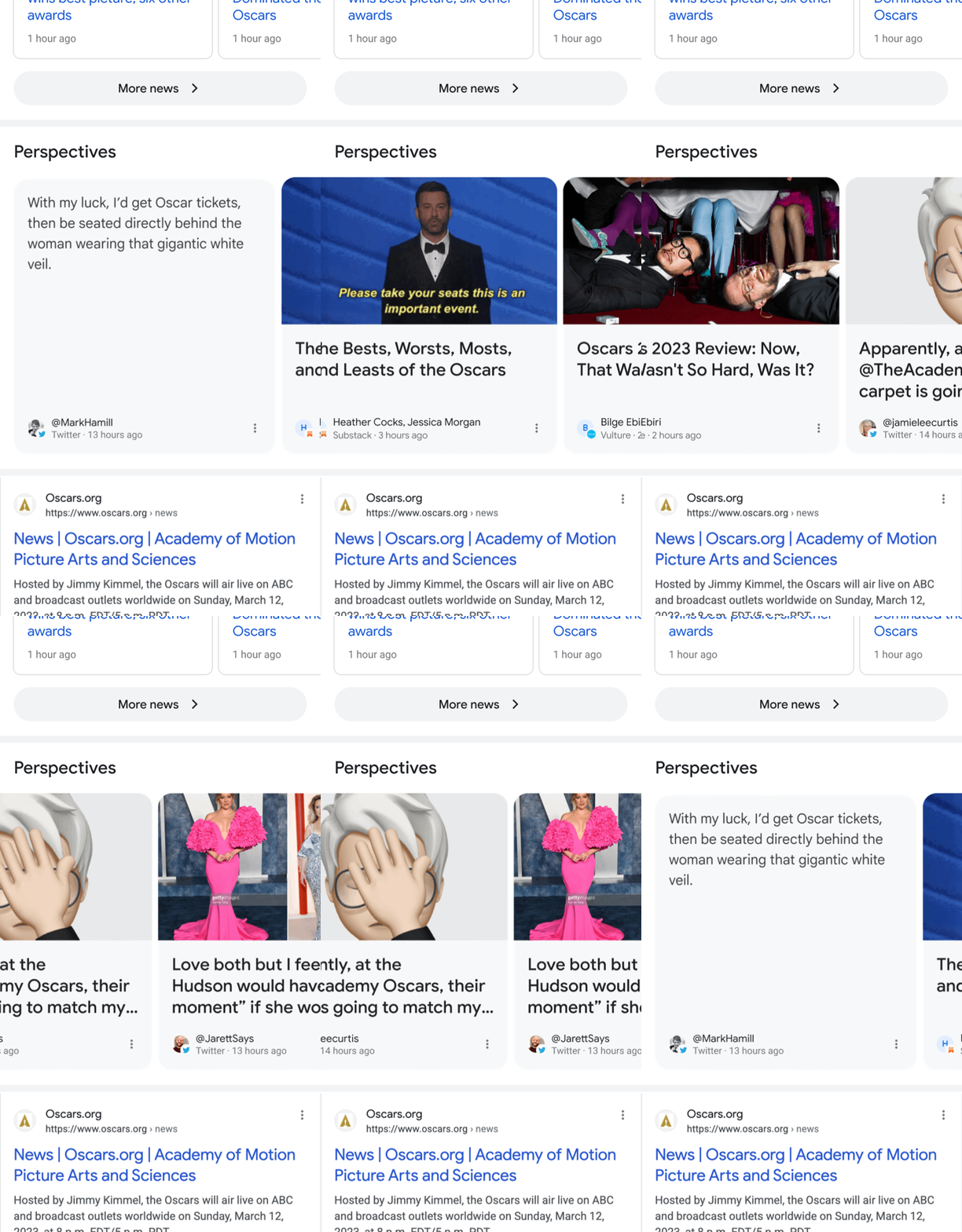
Providing context for top stories with “Perspectives”

The Perspectives carousel aims to provide additional context around Top Stories by sharing helpful insights from journalists and other experts.

The feature has been in testing since 2022, but Google says it will be widely available in the coming days. 

Helping spot information gaps

When Google is unable to confidently provide information about a topic – either because there are few good sources available or because the information is changing quickly around that topic – the search engine will display a content warning with the search results it provides. 

To learn more about these new features, read the complete announcement from Google here.

Google has started giving users in the US and UK access to Google Bard, its answer to Bing and ChatGPT’s AI chat tools. The company is doing a gradual rollout through a waitlist at bard.google.com

What Is Bard?

Bard is a generative AI. That means it will generate content for you based on prompts that you submit through a chatbot. 

In today’s announcement (partially written with the help of Bard), the company suggested a variety of ways users might be able to take advantage of the AI tool:

“You can use Bard to boost your productivity, accelerate your ideas and fuel your curiosity. You might ask Bard to give you tips to reach your goal of reading more books this year, explain quantum physics in simple terms or spark your creativity by outlining a blog post.”

Is Bard an AI Search Tool?

Yes and no. 

Bard is something of a complementary tool to Google’s search engine. While it is not directly integrated into Google Search, it is “designed so that you can easily visit Search to check its responses or explore sources across the web.”

Along with suggesting queries, you can immediately open a new tab with search results for a given query. 

At the same time, Bard is not considered a direct part of Google search. Instead, the company suggests it will be adding other AI tools to its search engine in the future. 

Bard Is In Early Stages

Throughout the announcement, Google repeatedly described Bard as an early experiment, As with Bing’s AI tools, Bard is likely to have some early quirks and weirdness as users get their hands on it. 

Additionally, Google pointed out that the AI tool is far from perfect. It can get information wrong or phrase things in misleading ways. Some of these errors may be small. In Google’s example, Bard got the scientific name for a plant wrong – Zamioculcas zamiifolia, not Zamioculcas zamioculcas. However, the company cautions it may be inaccurate in other ways.

Still, it will be fun to see what Bard can do now that it is coming to the public.

Google has confirmed it is rolling out its latest broad core algorithm update, signifying yet another potential shake-up for the search engine’s results.

Google’s broad core algorithm updates serve as some of the most significant updates for the search engine compared to the smaller updates that are happening multiple times a day. They can affect rankings for search engine results pages (SERPs) throughout Google’s entire platform.

As is usual with Google, the search company is being tight-lipped about specific details regarding the update, only going so far as to confirm the latest update. The update is also expected to take up to multiple weeks for the full impact to be obvious.

With this in mind, it is wise for brands to take note and monitor their own search performance in the coming weeks.

What Can You Do?

Aside from always striving to provide the best online experience possible with your website, there are a few specific steps you can take to safeguard your site from updates like these:

  • Monitor site performance regularly to identify early signs of issues with your site
  • Create content geared to your audience’s needs and interests
  • Optimize your site’s performance (including speed, mobile-friendliness, and user experience) to ensure your site isn’t off-putting to visitors

TL;DR

Google has launched its latest broad core algorithm update, which could potentially affect rankings for search engine results pages. The update may take several weeks to have full impact, so brands are advised to monitor their search performance. To safeguard your site, monitor its performance regularly, create audience-specific content, and optimize its performance for speed, mobile-friendliness, and user-experience.

Google continues to be relatively tight-lipped about its stance on AI-generated content, but a new statement from Google’s Danny Sullivan suggests the search engine may not be a fan.

Artificial Intelligence has become a hot-button issue over the past year, as AI tools have become more complex and widely available. In particular, the use of AI to generate everything from highly-detailed paintings to articles posted online has raised questions about the viability of AI content.

In the world of SEO, the biggest question about AI-generated content has been how Google would react to content written by AI systems.

Now, we have a bit of insight into how the search engine’s stance on AI-created content – as well as any content created solely for the purpose of ranking in search results.

In a Twitter thread, Google Search Liaison, Danny Sullivan, addressed AI-generated content, saying:

“Content created primarily for search engines, however it is done, is against our guidance. If content is helpful & created for people first, that’s not an issue.”

“Our spam policies also address spammy automatically-generated content, where we will take action if content is “generated through automated processes without regard for quality or user experience.”

Lastly, Sullivan says:

“For anyone who uses *any method* to generate a lot of content primarily for search rankings, our core systems look at many signals to reward content clea/rly demonstrating E-E-A-T (experience, expertise, authoritativeness, and trustworthiness).”

In other words, while it is possible to use AI to create your content and get Google’s stamp of approval, you are walking a very thin line. In most cases, having content produced by experts with experience providing useful information to those who want it will continue to be the best option for content marketing – no matter how smart the AI tool is.

Google has confirmed it is finally bringing near-endless scrolling to its desktop search results. Not only will this make the desktop search experience more similar to the mobile search experience, it will also make users more likely to see and engage with more search results. 

The new continuous search experience is currently rolling out for desktop search results in the United States and is likely to be expanded to other markets in the coming months.

As the search engine confirmed in a statement to Search Engine Journal, this is not quite endless scrolling. Instead after approximately six pages worth of URLs before showing users a prompt allowing them to see “more results.”

“… we’re bringing continuous scrolling to desktop so you can continue to see more helpful search results with fewer clicks. It’s now even easier to get inspired with more information at your fingertips.

“Now, when you scroll down you’ll continue to find relevant results so that you can discover new ideas. When you reach the bottom of a search results page, up to six pages of results will be automatically shown until you see a “More results” button if you wish to continue further.”

While users may like this because it brings a more seamless experience and gives them more options without interruption, this also gives Google more space to include snippets, ads, rich media, and other features without completely crowding out organic search listings.

Brands languishing past the first page of search results will likely see a slight boost in traffic as their visibility increases.

On the technical side of things, very little will be changing. There’s no need to change optimization strategies and this update will not affect reporting in Google Search Console because this tool tracks ranking positions, not what page you appear on. 

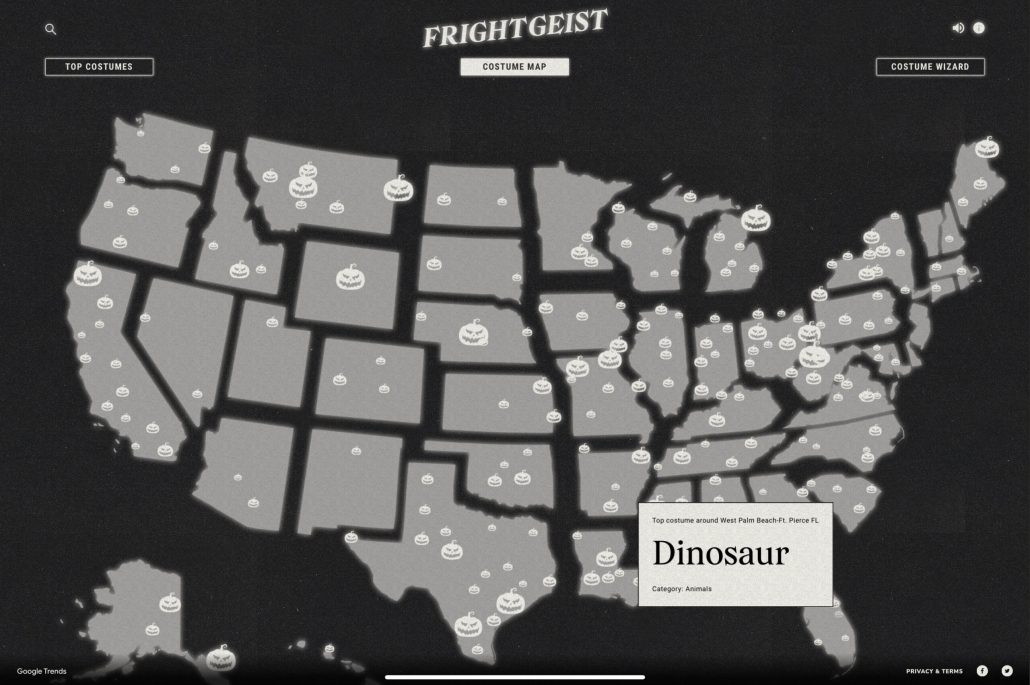
With Halloween fast approaching, Google has updated its Frightgeist website with all the latest search trends for this year’s spooky holiday.

The Halloween Frightgeist site has tracked the biggest holiday search trends annually, with a primary focus on Halloween costumes.

Notably, the tool allows you to go beyond the national search trends to find out details for a specific city or state. 

For example, it appears fairy costumes are particularly popular this year in Tulsa, as the leading costume-related search.

As Google says about the Frightgeist page:

“Every year, trillions of searches take place on Google, and Google Trends gives us an unparalleled look at what the world is searching for.”

“With Frightgeist, we went on a hunt to find the most popular Halloween costumes of 2021. Pulling from the top 500 costume searches in the United States, Frightgeist used Google Trends to tell people what costumes were trending around them and help them find a costume that was sure to turn heads.”

Below, we are going to cover the top costume search trends both nationally and in the Tulsa area, and a little bit more of what you can do with this data.

Top National Halloween Costume Ideas in 2022

  1. Witch
  2. Spider-Man
  3. Dinosaur
  4. Stranger Things
  5. Fairy
  6. Pirate
  7. Rabbit
  8. Cheerleader
  9. Cowboy
  10. Harley Quinn
  11. Clown
  12. Vampire
  13. 1980s
  14. Hocus Pocus
  15. Pumpkin
  16. Chucky
  17. Doll
  18. Angel
  19. Batman
  20. Bear

Top Halloween Costumes In Tulsa Oklahoma for 2022

  1. Fairy
  2. 1980s
  3. Spider-Man
  4. Chucky
  5. Spider

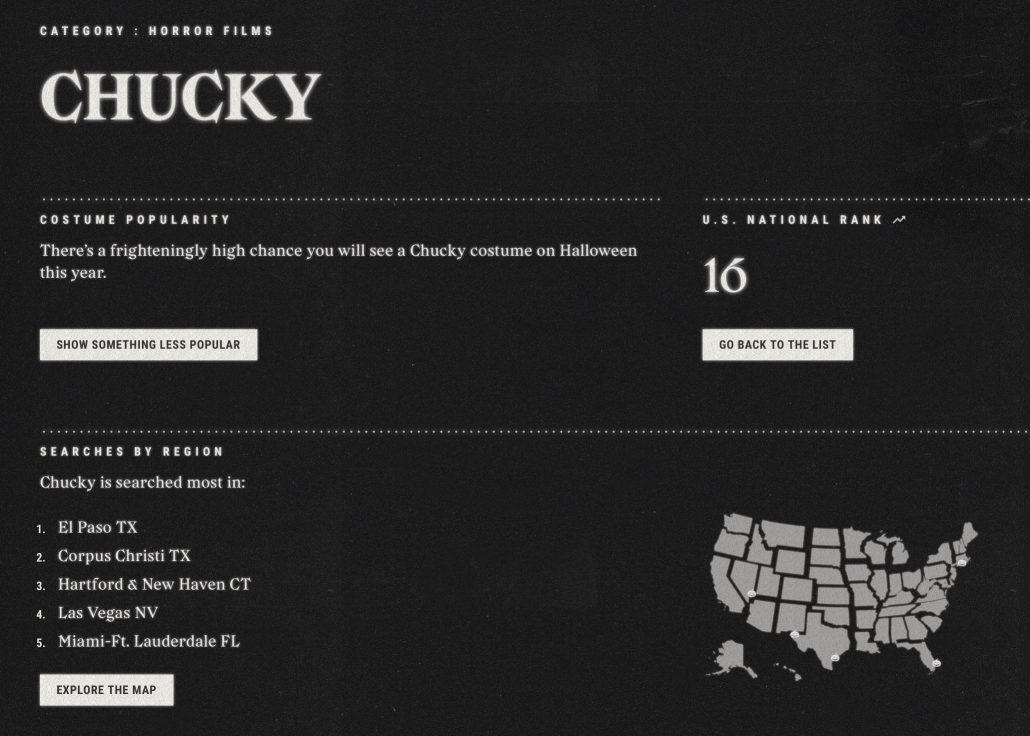
The Frightgeist site also allows you to see more details about each trending costume idea, including where it is most popular across the country, how it has performed in past years, and more.

Lastly, the site includes a costume selection wizard you can use to brainstorm what to wear this Halloween. The costume wizard lets you adjust sliders for spookiness and uniqueness and toggle between classic and modern costumes that are trending locally or nationally.

As expected, Google’s Search On conference this week brought tons of new announcements and previews of new features coming to the search engine. Though most of these features are not publicly available yet, they show that Google is intent on revamping many aspects of its search engine to make searching easier and more engaging.

Below, we are going to talk about the 5 most exciting and essential changes that both users and companies hoping to improve their online visibility should be aware of.

Google Search Shortcuts

Over the past decade, Google has steadily expanded the ways users can search for information beyond just entering a text query.

You can upload an image to find other similar images, take a pic of an equation to get help solving it, or turn on the microphone to help identify a song playing – just for a few examples.

The problem is that Google has not always done the best job of promoting these new ways to search or making them easily accessible to users.

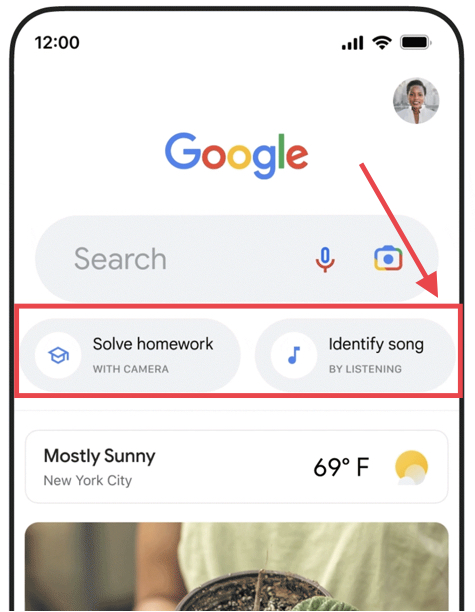
Now, that is all changing as Google is adding advanced shortcuts on the front page of the Google Search app.

You can see what this looks like in the screenshot below or, if you have an iOS device, you can see the feature for yourself by simply opening the Google app.

In-Search-Bar Results

Typically, users have to at least enter their query before they have the chance to click on a relevant result. Coming soon, however, that won’t always be the case.

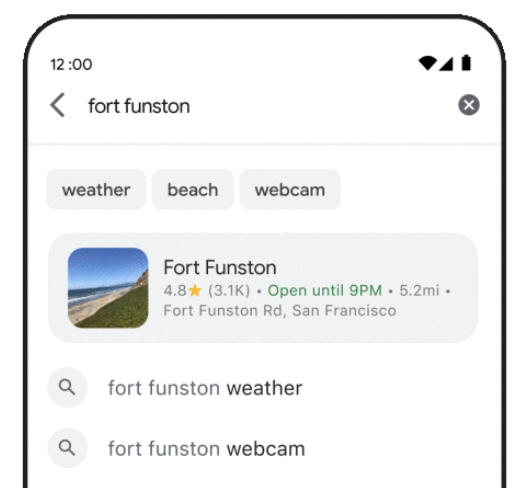
Google announced that it will soon be delivering results to users even as they are still typing in the search bar.

You can see what this might look like in the example below, where Google delivered a link to a location page directly within the search bar:

For now, it appears Google will be limiting this feature to just one result in a search bar, though we will know more when it rolls out later this year.

Enhanced Query Refinements

Along with the results like described above, Google is also adding new ways to refine your search query for the most useful results.

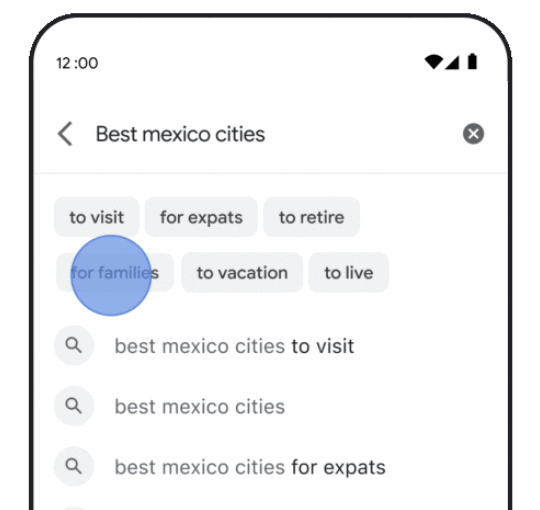
As you are typing a query into the mobile search bar, the search engine will start populating the bar with options to make your search more specific.

For example, when searching for queries like “best Mexico cities”, Google will suggest refinements like “to visit”, “to retire”, or “for families”.

More Prominent Web Stories

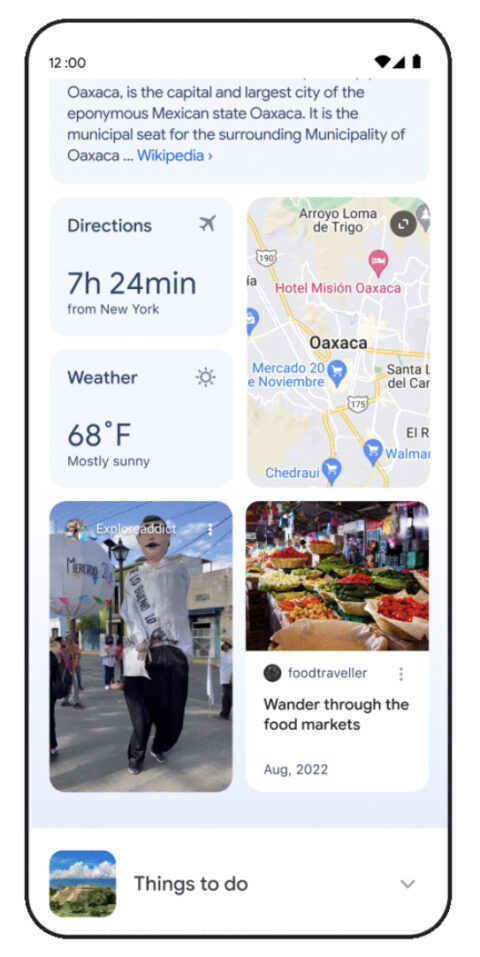
Google is making web stories a bigger part of mobile search by giving them a more prominent place in mobile search results.

As the company said in an announcement:

“So we’re also making it easier to explore a subject by highlighting the most relevant and helpful information, including content from creators on the open web. For topics like cities, you may see visual stories and short videos from people who have visited, tips on how to explore the city, things to do, how to get there and other important aspects you might want to know about as you plan your travels.”

One Page For Text, Image, & Video Search Results

Instead of making users switch between web, images, or video result tabs when searching, Google is unifying them all into one endless search result feed on mobile. 

“We’re also reimagining the way we display results to better reflect the ways people explore topics. You’ll see the most relevant content, from a variety of sources, no matter what format the information comes in — whether that’s text, images or video.”

When users would typically encounter the end of a search page, they will be given the option to either show more results or continue scrolling vertically to explore a more specific search – as seen below:

Though Google has not announced exact dates to expect these updates, the company says they will be rolling out to mobile search in the coming months.