App StoreMobile optimization has fallen out of popularity a little bit as the new responsive design trend makes the need for a secondary mobile website obsolete. Of course, there are many businesses that have opted to have a specific mobile website, but there is no denying that responsive design is gradually merging mobile and desktop optimization.

What responsive design doesn’t negate is the possible need for an app. There are over 600,000 apps in the Apple App Store alone, and more businesses are deciding to create an app for their products every day.

What many don’t realize is that apps require optimization just like websites. With the huge number of apps out there, you can’t simply get your app approved and expect to see a huge number of people downloading it.

Over the past few weeks, there has been a discussion about ASO (App Store Optimization) stemming from a Techcrunch article claiming ASO is the new SEO. We use apps more every day, relying on them for weather, news, entertainment, shopping, and organization, but I was initially skeptical as to whether ASO will ever achieve some sort of dominance.

Then I started considering my tablet usage throughout each day. I check a number of news sources including CNN and Vice, skim through the more lighthearted Buzzfeed and Cracked, and often browse Reddit. The only one of those activities I don’t do in an app is read news from Vice only because there isn’t one to use and I have checked more than once to see if an app existed (there is one for the iPhone however).

The thing is, I use these apps regularly in the morning and evenings when I’m away from work. For more casual viewers, these apps may not be used enough to justify the space they take up. Most of the apps I acquire either serve a distinct purpose, or allow me quicker access to content I would normally have to open in a web browser. The only type of apps I download without already being familiar with a company are tools.

None of this is to say apps do not have their purpose, or that optimization should be an important part of creating and managing an app, as well as reaching out to the public. However, there are many markets where the apps largely serve to make frequent visitors’ interaction with your content more efficient, and won’t reach as many uninitiated consumers as other markets would.

If you decide an app is an important product you release to the public however, ASO is practically required to keep your app from going nowhere. There are simple steps you can take such as making sure to clearly advertise the app on your website and sharing it on social media, but you can also do keyword research and find out what people are searching for.

While ASO certainly has its place, the debate over whether it will be the “new” SEO seems kind of silly to me. We may reach a point where it is important for every company to have an app, though I don’t think we are quite there. Even then, ASO will only be a small portion of what we do. SEO applies to every business online, and I don’t see it going away any time soon.

When you write about SEO regularly, it is easy to get caught up on the things that are changing and shifting, but we often forget about the old standards of SEO and how they might fit into the new climate.

If you take a look, you will see there aren’t many articles about the importance of quality title tags in the past months or even year, even though it is one of the most powerful elements on a page. Just the title tag alone can tell a search engine your relevance to a topic of search term, distinguish yourself to searchers, and even draw in visitors, all in a single line.

Crafting a great title is deceptively difficult. It would seem creating a single line statement of the purpose of your page should be quick and simple, but crafting one that will make your page alluring to both search engines and customers alike is a complicated trick.

First, you need to match the recommended guidelines, and good luck finding a consistent set. I have seen anywhere from 50 to 70 characters suggested as the maximum you should include in a title, but so long as you are around 60 characters there shouldn’t be much of a concern. Going over risks having the terrible ellipsis trailing your truncated title.

Of course, there is no evidence Google doesn’t see all the text in your title, even when it is obscured by the “…”, but why waste the text? Searchers won’t get the entire topic you are addressing, and the extra 15 characters a search engine sees likely won’t help you. Doing something like trying to stuff keywords in after the ellipsis would actually hurt you.

Once you’ve met the common guidelines, there becomes a problem. Everyone wants a simply formula that will work every time, and one simply doesn’t exist. Every website is different, and making a title tag that is correct for your brand depends on your message and what you want to emphasize.

An amazing amount of information can be coded into 60 characters. You can tell searchers the product of brand name, descriptors, price, and many other aspects of your page simply in one sentence with very careful word choice. For products, you want to fit in as many hard facts about the products as you can in that small space. Search Engine Journal suggests product name, number, size, color, and unique features could all be included in the title, while with blog posts you want to tell searchers what question or topic you will be addressing clearly.

Just because there isn’t a magic formula for titles, doesn’t mean you shouldn’t be concerned with them. A weak title tag will get your pages ignored by everyone that sees your listing, while a quality one will stop casual browsers and show them exactly what they were looking for. Stand out and make your titles fantastic.

Despite everything that has changed in SEO over the years, keywords have always maintained their importance. A good SEO campaign can only be made from a foundation of the right keywords to work from. No matter how great the rest of your strategy is, it will be weakened by the wrong keywords, because they simply don’t have the potential for return that others do.

Selecting the right keywords can be an arduous task though. You have to gather data, and then analyze the massive amounts of information so that projections on returns can be made. Gathering all that data isn’t quick, and that means it is expensive.

Startups with limited budgets or without access to paid SEO tools just don’t have the resources to do the type of expansive data gathering that quality keyword selection requires. Or so it used to be. There are several free tools out there which can often do huge amounts of keyword research for you.

A single one of these tools may not be able to do the heavy lifting that the expensive top of the line programs offer, but by implementing a few of the free tools into your workflow you can cover almost all of the ground one expensive program would.

It will always take time and effort to analyze data for projections on return for specific keywords, but it is worth the effort. With just the three free tools Marc Purtell suggests over at Search Engine Journal, you will find you can more efficiently make informed decisions about your keyword selection, and soon you’ll be on your way to a better SEO campaign.


300px-Free_Content_Logo.svgContent marketing is becoming more and more of a talking point for SEO services as more people realize they can’t try to trick search engines with pages strictly for the search crawlers and shady link profiles, but many don’t realize this is also changing the standards for content.

Content has always been an important part of an SEO campaign, but it is indisputable that its status is being raised within Google and they are tightening their guidelines. You can’t just stuff keywords into a wall of barely legible text and expect Google to think your page has value. Now your content must be informational, resourceful, and actually captivating.

The biggest question for most is what type of content they need. If they’ve done any research, they might come to you with a list of types of content like infographics and webinars they “need” according to “the internet”, but more likely you will just get asked the broad question of what type of content will be needed. Once you know their business, you can probably make some good guesses, but making a wide statement for what type of content works is a farce.

While blog posts are always a good place to start with creating content, infographics or ebooks will only help relevant areas. A nursing home probably won’t be able to find a relevant infographic, because that way of delivering information doesn’t work well for portraying the complex and focused care they will be giving loved ones. Similarly, videos don’t make much sense for a photographer to have, and tutorials don’t have much place in a medical website.

Most importantly, the content has to be quality, and it has to fit your companies needs. Even if you are delivering daily blog posts and guest blogs, they won’t have any effect if they aren’t worth reading. The best way to know what type of content you need to be making is trying to think like your competitors and customers. If you can make users happy with your website, you are already well on your way to making Google happy with your content.

Speaking of your competitors, you can do competitive analysis to find out what is working for them. I don’t mean scoping out their site and seeing what they have that you don’t. Instead you can use a number of sites and tools to see what is doing well on their site compared to yours, which will give you a good indication what type of content you should be making. Josh McCoy collected a few of those for you to get the jump on your competition.

Everyone gets distracted, or sometimes just a little lazy. When you work online, it is easy to switch tabs in the middle of a project to check your email, and end up completely off track looking at blogs or news. Having a job where you are constantly at a computer offers endless distractions that are constantly refreshing to keep you interested.

This type of distraction can be completely innocent, but it can also become a habit keeping you from getting important work done. There are ways to keep yourself from sliding off course, however. Between tools and lifestyle changes, you can increase your productivity and still be able to get away from your work when you really need to.

Richard Kirk collected five different tools you can use to keep yourself from getting distracted. One, called StayFocused, simply blocks websites you know you visit too much during the day until you are off the clock. Reddit addicts and those that can’t seem to get themselves away from Facebook until the day is over, though that could get in the way of your social marketing.

A similar conundrum is the time killed keeping up with industry news. Every SEO needs to be checking blogs and SEO news sites practically daily to keep up to date with any Google algorithm changes or big announcements, but it can also lead to lots of dead time or reading non-relevant news. Pocket helps you store articles you will want to read later so that you can come back to them when you aren’t supposed to be working. It’s great for train rides or hanging out on the couch at night.

Another option is stripping down your word processor with WriteMonkey, which will help keep you focused while trying to create content like blog posts. Minimizing distracting elements on your screen will help you keep you focused on making your content as good as it can be. If that doesn’t work, you can always download one of the many timers online to set short breaks for yourself, with a reminder when you need to get back to the grind.

Of course, all the tools in the world won’t help if the problem is internal. Most procrastination is caused by us just being lazy. I know this because I suffer from laziness as much as anyone out there. But there are simple ways to get you out of the lazy rut.

I’ve always been a big proponent of music as a motivator and a tool to help focus. Many agree, and refer to the increase in productivity while listening to music as the Mozart effect, though the legitimacy of such an effect has been questioned. Some say it distracts them while working, but in my experience turning on relaxing or more passive music while working will help you keep your mind where it needs to be.

Most also need to make changes in their habits, like using email as a means to constantly be switching tabs and getting away from their project at hand. Kirk suggests limiting your email time with a “surgery hours” model limiting you to checking your mail three times a day. There are times when you may need to respond to an email more urgently, but you can set those types of emails to alert you on your phone if you need to see them immediately. Otherwise, clients will understand a small delay, as long as you respond within a few hours.

The final tip is one you’e heard all your life. Sleeping well is essential to making you feel clear headed and ready to take on every day. Keeping a regular sleep schedule and not letting yourself stay up until two in the morning will keep that groggy feeling we’re all familiar with at bay.

Today is April Fool’s Day, and of course that means every major company has unveiled a new fake product. Google, for example, announced Google Nose, which would let you smell your results, if it worked. That’s the type of prank you normally expect to see from big companies. They’re all in good fun.

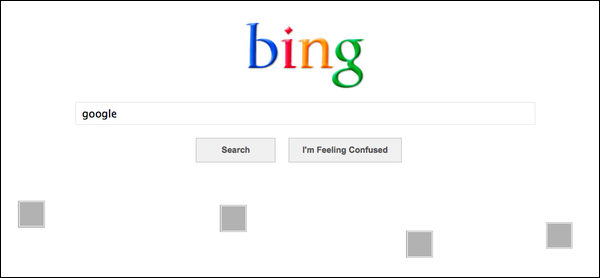
Well, Bing decided to make their April Fool’s Day prank a fake new product and a slam directed obviously at Google all in one. They announced, through a blog post, Bing Basic, a redesign of their front page, only accessible through a special “telltale query”, “you’ll get something a little more bland” than their front page.

If you guessed the “telltale query” was “Google” and that Bing Basic removes the big pictures from their front page in favor of a colorful logo, white space, and a simple search box, you’d be correct.

bing-april-fools-2013

Of course, this Google bashing is far from new for Bing, but it is kind of odd to see a company take a day normally full of nonsensical and sometimes wonderful fake ads, webpages, redesigns, and other fun little jokes and turn it into a swipe at the competition. It certainly isn’t the first time though.
In the meantime, I’ll be dreaming of the day Google Treasure Maps is a real thing.

It can be hard to notice, but Google’s search engine results pages (SERPs) are constantly changing. Sometimes it is a result of new algorithms or updates to Penguin or Panda, but often it is a result of Google’s non-stop tweaking of their formula. If you weren’t consistently studying and analyzing SERPs, you probably haven’t even noticed.

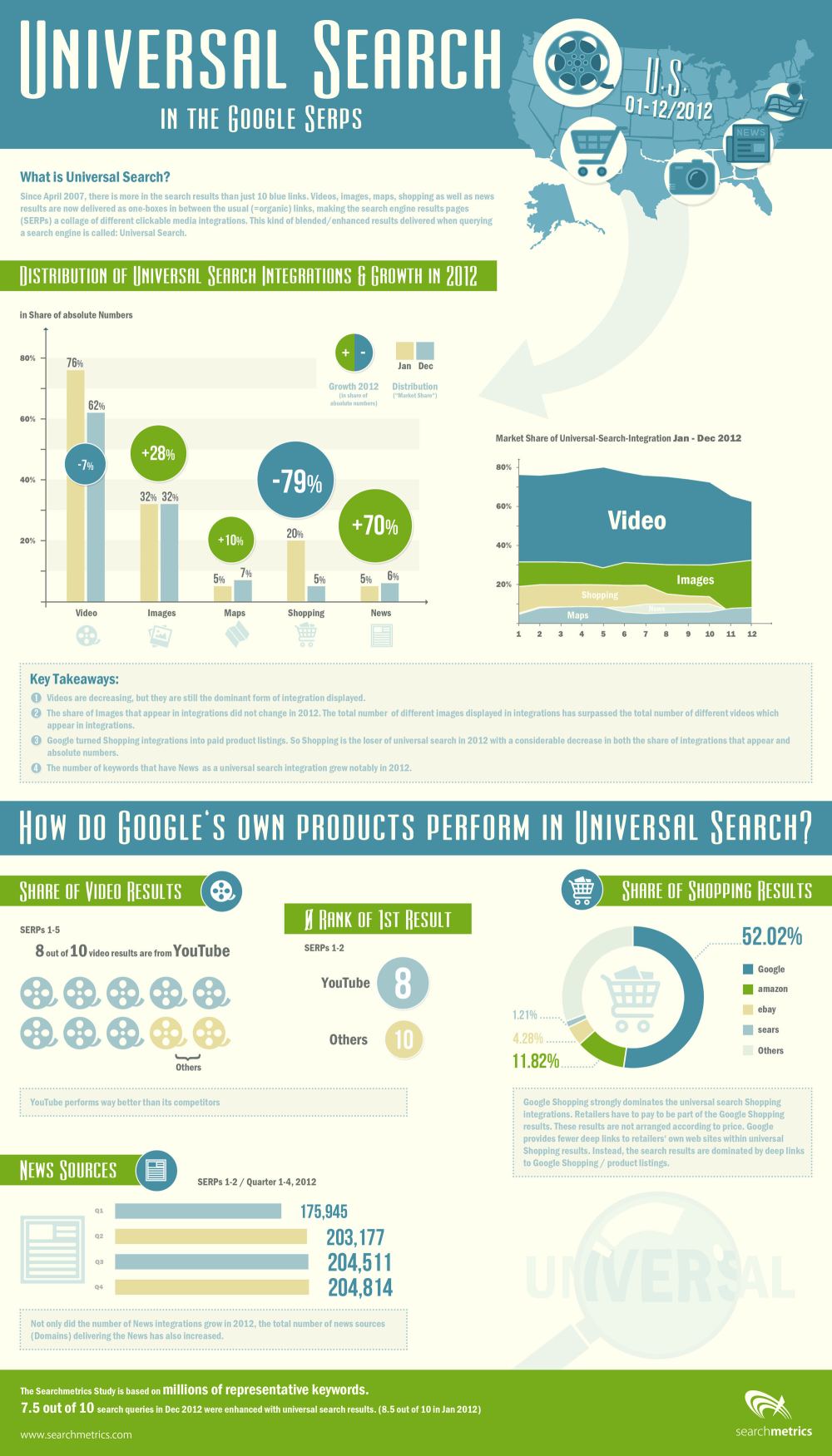
SearchMetrics does just that type of analyzing of SERPs, and they just released their study of last years result pages, and there are some interesting points for all search marketers wanting to know what Google is favoring in their results. The highlights of the study, as pointed out by Search Engine Journal, are:

  • A small decline in video integration
  • A significant increase in image integration
  • A sharp decline in shopping
  • A large increase in news integration

The decline in video integration is one of the most surprising, as I’ve heard more than one analyst predict video will be one of the most popular mediums for content marketing this year. If they’re predictions are true, video makers will have stiff competition getting their content onto the SERPs.

Similarly, eCommerce pages are on the rise, and the data suggests business owners should be considering paying into the Google Shopping network to have their products seen by more people.

On the other hand, the big increase in news shows big opportunities for content creators reporting on events and doing news worthy journalism.

SearchMetrics made an infographic to go along with the release of their study, which you can view below or here.

rsz_universal-search-in-the-google-serps

Responsive design is one of the most popular website design methods out right now. Users like having a consistent experience across different devices, without having to worry about pinching, zooming, or being restricted to a downsized version of a website. But, going responsive raises some concerns for the SEO professional managing a site.

Bonnie Stefanick explores some of the issues of high importance to SEOs when redesigning a site to be responsive, but before dealing with the questions she separates redesigns into two categories – cosmetic and full redesigns.

The main distinction between a cosmetic redesign and going all the way is URL management. If URLs are going to be changing during your redesign, you have substantially more issues than just updating the appearance of your site. The issues raised by Stefanick run closer to cosmetic redesigns, as complete redesigns have their own, much larger, can of worms to deal with.

Responsive design has its own unique style and appearance, and some times it can conflict with the best SEO practices. Such is the case with the area above the fold. Responsive design relies on negative space and giving elements area to breathe and move, but navigation and critical linking elements often get pushed down by big banners popular in responsive designs.

These large banners designers constantly put in responsive designs lead to important SEO elements being under the fold, only reached by scrolling down to find menus  By talking to the designer before the prototype is made and establishing where you main categories are on your homepage, you can avoid losing the SEO elements.

Another issue with the content above the fold in responsive designs is simply that there is no actual content. Responsive design is intrinsically visual, and designers favor the visual design elements over delivering content directly to users. Search engines notice when none of your content is above the fold, and can rank sites differently for their efficiency in directing users to the content they are trying to reach.

There are plenty of other major considerations for responsive redesigns. Clear communication with designers through the entire process can help manage many of them, but you will also have to pull your own weight to make sure your new design is working as well within your SEO strategy as your last design.

Screen-Shot-2013-03-19-at-2.26.52-PMWhile everyone in SEO collectively yells every time a Google Panda update rolls around, announced or unannounced, Google’s spam fighting algorithm Penguin may be of more concern for many website owners.

Though Google’s estimates say less than four percent of websites have been affected by Penguin, a new study by Portent suggests that Penguin will eventually be a concern for SEOs everywhere, if it continues to follow its trend.

Since the reveal of Penguin, Google appears to have become less tolerant of spammy links. The study looked at 500,000 links which show that Google has been steadily reducing its webspam tolerance, and increasing the likelihood of site penalties over time.

This isn’t an issue for most legitimate site owners, as it takes roughly 50-percent spammy backlinks in your profile to trigger a Penguin site penalty, but when Penguin came out, a site needed to have 80-percent of it’s backlinks classified as spam to attract the attention of Google.

Still, a site with 50-percent spammy links isn’t watching their profile all that carefully, and is probably engaging in some pretty questionable strategies. The concern is where Google will draw the line. Will they keep tightening their grip until only 5-percent of backlinks are allowed to be “spammy”? We won’t have any idea until another Penguin update appears.

Source: WikiCommons

Source: WikiCommons

It is no secret how important a mobile SEO strategy is in today’s market, especially with predictions coming out stating mobile internet usage will overtake desktop internet usage in the next year.

Eventually, mobile search could catch up to desktop search, and users aren’t just staying on any website they find. Two-thirds of consumers say they are more likely to purchase from a website that has a mobile-friendly website, and more than a few survey has shown how low-quality sites or long load times repel searchers like a disease.

You probably knew all this. The debate over the importance of a mobile SEO strategy is over. The real question for most web designer’s is how do I achieve a mobile-friendly website? You have two options: a responsive web design, or an entirely separate mobile website.

There are pros and cons to both methods of course, but gradually it appears responsive designs are winning, especially when SEO is a factor. Jay Taylor, writer for Search Engine Watch, breaks down three reasons why responsive design seems to be taking the lead.

The biggest reason stems from a big endorsement from Google. It is an SEO professional’s job to please the almighty Google, since they command more searches than all of the other engines combined, and Google loves responsive design so much they called it the best practice for the industry.

Google’s preference for responsive design is likely because responsive sites have one URL and the same source code, regardless of how it is viewed, which makes the site easier for Google to crawl and contextualize. Separate mobile sites, on the other hand, have separate URLs and HTML, which complicates everything for the search engine.

Further more, content on responsive sites is easier for users to interact with and share than content that is separated between different websites. If that seems weird, imagine what happens when you get a link over Facebook from a friend who was on their phone. If you open that link on your desktop, you might get sent to a stripped-down mobile website if they use the separate website method.

When Google recommends a method for achieving your mobile SEO strategy, it is always best to do as they say, but there are other reasons responsive design is slowly taking over the search market. It allows a more uniform experience across devices, and makes managing your entire strategy easier. Everyone likes their work to be easy right?