Bing is changing up how ads appear in its search engine by increasing the number of ads present at the bottom of the page and removing text ads from the sidebar of search results for US users.
Specifically, Bing is increasing from 3 bottom-of-the-page ads to 4 ads and removing sidebar text ads in the United States. Product ads, on the other hand, will remain within the sidebar.
This change also means that Bing will no longer be allowing advertisers from the US to run sidebar text ads at all.
According to the announcement, Bing was motivated to remove sidebar text ads because bottom-of-the-page ads often include richer ad formats that provide more in-depth information that possible in the sidebar.
While these changes are currently limited to the United States and Bing Ads will continue offering sidebar text ads in other countries, the company says it will be considering removing the ad type in other counties in the future.
As the announcement says, “as part of the constant evolution of the Bing search engine results page (SERP) to provide more value for our users and our advertisers we are regularly evaluating performance and quality of our ads, including ad position on the SERPs.”
Based on their data, Bing says removing the sidebar text ads increases the overall clicks for advertisers, especially those running Mainline Text Ads and Product Ads.
00Taylor Ballhttps://www.tulsamarketingonline.com/wp-content/uploads/2018/07/TMO-Logo.pngTaylor Ball2018-03-28 14:44:422018-03-28 14:44:42Bing adds more ads to the bottom of search results, removes sidebar text ads
Google has released its latest “Bad Ads” report, which shows the search giant is cracking down harder than ever on ads that violate its advertising policies.
In total, the search engine and ad platform has removed over 3.2 billion ads in 2017, nearly doubling the 1.7 billion ads removed in 2016.
79 million ads were taken down for sending users to malware-laden sites.
400,000 malware sites were blocked
66 million “trick-to-click” ads were removed
48 million ads that initiated unwanted software installation were banned
About a year ago, Google launched new brand safety controls for video and display ads. As such, they updated their policies to prohibit the monetization of inappropriate and controversial content. Reflecting these policy updates, Google reports it has removed 320,000 publishers that violate publisher policies, blacklisted 90,000 websites, and banned 700,000 mobile apps in 2017.
“After expanding our policy against dangerous and derogatory content in April 2017 to cover additional forms of discrimination and intolerance, we removed Google ads from 8,700 pages [that] violated the expanded policy,” writes Spencer.
Spencer says Google also recognizes that only a small number of publishers account for the vast majority of sites that misrepresent themselves or present themselves as another legitimate organization. Of the 11,000 websites reviewed for possible misrepresentation, 650 were blocked and 90 publishers were removed from Google’s ad network.
The report shows how Google’s latest policies have worked to cut-out ad fraud and policy breaking advertisements across their AdWords network, but they won’t be slowing down anytime soon. Search Engine Landreports that Google is poised to enact new restrictions for ads related to financial products later this year.
00Taylor Ballhttps://www.tulsamarketingonline.com/wp-content/uploads/2018/07/TMO-Logo.pngTaylor Ball2018-03-19 11:33:472018-03-19 11:33:47Google says it is blocking more than 100 “bad ads” per second
Starting today, Google’s own web browser will start blocking troublesome ads across the net. The company has been warning they would be launching their own ad blocker since last June, and has officially started rolling out. By default, Google’s Chrome browser will remove ads from sites that use disruptive ad techniques.
“A big source of frustration is annoying ads: video ads that play at full blast or giant pop-ups where you can’t seem to find the exit icon,” said Rahul Roy-Chowdhury, vice president for Chrome. “These ads are designed to be disruptive and often stand in the way of people using their browsers for their intended purpose — connecting them to content and information. It’s clear that annoying ads degrade what we all love about the web.”
What is getting blocked?
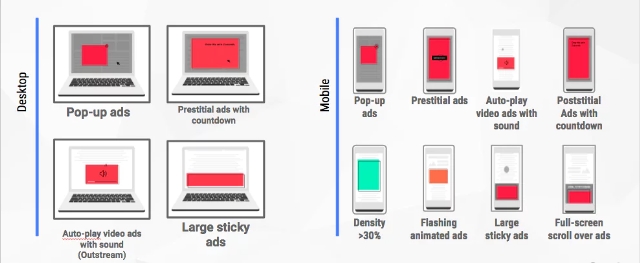
The built-in ad blocker is designed specifically to filter out ads on any sites that repeatedly show offensive or disruptive ads. These include a wide swath of frequently used ad techniques including pop-ups, prestitial ads, and flashing banner ads.
Google is using the guidelines laid out by the Coalition for Better Ads (CBA) – a collective of advertising and media companies such as Facebook, Microsoft, and Unilever.
Rather than just block the offending ads, the tool will instead block ALL ads on any site that has broken the rules repeatedly. That means, all ads get stripped away is a publisher continues to let intrusive ads persist on their site after a warning.
Chris Bentzel, engineering manager for Chromium (an open-source version of Chrome), says Google is using this approach because webmasters are largely in control over what ads they choose to display.
“Although a few of the ad experiences that violate the Better Ads Standards are problems in the advertisement itself, the majority of problematic ad experiences are controlled by the site owner — such as high ad density or prestitial ads with countdown,” said Bentzel.
According to Bentzel, Google’s mission isn’t to block ads at all. They want to encourage webmasters to clean up their sites and deliver quality, unintrusive ads (like those offered by Google AdWords).
“Our goal is not to filter any ads at all but to improve the experience for all web users.”
According to The Guardian, approximately 42% of sites that have received warnings from Google ahead of the ad blocker have since altered their ad displays.
Why start blocking ads now?
The news that Google was designing its own ad blocker raised eyebrows when it was first announced. Considering Google runs perhaps the largest ad platform online, it is a bit like the pot calling the kettle black for the search engine to complain about ads.
More likely, the decision to launch an ad blocker of their own was motivated by the growing use of third-party ad blockers across the internet. While some ad blocker companies have partnered with Google to “whitelist” the ads from the search engine, many also strip out ads published from AdWords. This cuts into Google’s potential ad reach and can cause ad spend waste in some cases.
“We’ve already seen more and more people express their discontent with annoying ads by installing ad blockers, but blocking all ads can hurt sites or advertisers who aren’t doing anything disruptive,” said Roy-Chowdhury.
Estimates from PageFair indicate approximately 11% of internet users have third-party ad blockers installed.
“By focusing on filtering out disruptive ad experiences, we can help keep the entire ecosystem of the web healthy, and give people a significantly better user experience than they have today,” Roy-Chowdhury said.
For now, Google estimates its ad blocker will only affect around 1% of all ads. So, don’t get your hopes up for an ad revolution. Most users are unlikely to notice a huge change online, and only those who are most egregiously abusing the rules are expected to be hit.
00Taylor Ballhttps://www.tulsamarketingonline.com/wp-content/uploads/2018/07/TMO-Logo.pngTaylor Ball2018-02-15 11:31:252018-02-15 11:31:25Google launches its own ad blocker for Chrome
Retargeting is undeniably a powerful way to reconnect with potential customers and remind them to take action on something they were interested in. Unfortunately, when done poorly, it can also be terribly annoying.
Now, Google is giving users the power to mute ads from brands who abuse retargeting or remarketing ads.
Retargeting ads – or as Google is calling them, “reminder” ads – are designed to gently nudge someone into taking action on a product or service they previously looked at on a website. They work by tracking what pages a user has looked at but not taken action on, then reserving that content in ads afterword.
The problem is that many fail to monitor just how frequently these ads appear to users. This causes a problem where people see an annoying number of repetitive ads that seem to follow them all around the internet.
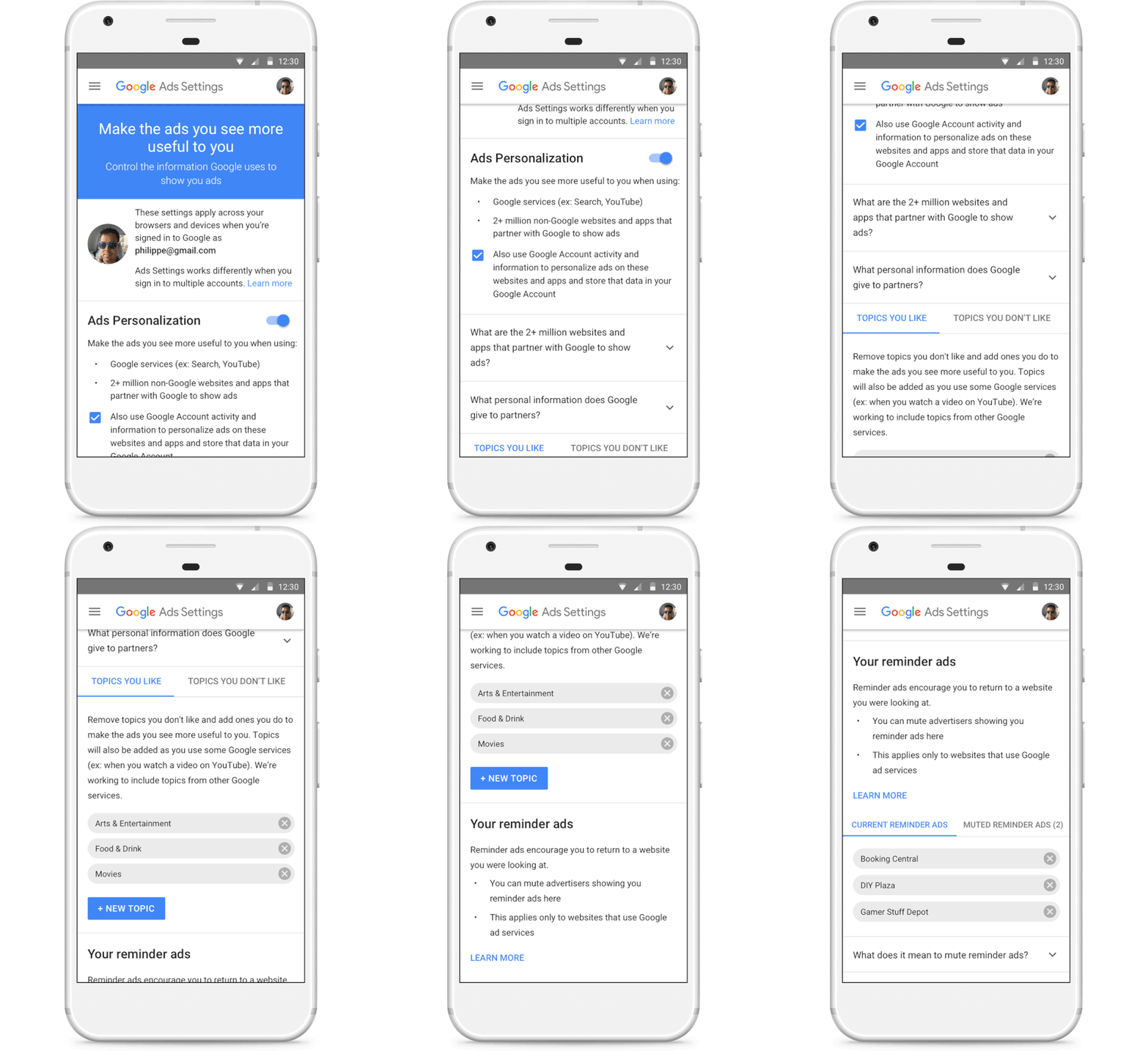
With the new section in Google’s ads settings, called “Your reminder ads,” you can now see who is retargeting ads to you with Google display ads. You can also mute these advertisers individually is they are showing repetitive or excessive retargeting ads.
If a user mutes an advertiser, their ads will entirely disappear across all of Google’s apps and websites – not just a specific offending ad or campaign. Google says it will soon be expanding this to include YouTube, Search, and Gmail.
The advertiser will be muted for 90 days and can be muted again if desired.
Google also says it has updated the mute feature to sync across devices for logged-in users. This means ads muted on laptop will also be muted on a phone or desktop, and vice-versa.
While users will likely be glad to see this feature, advertisers should take the move as an indication to check their retargeting campaigns. Make an effort to find the “sweet spot” between showing your ads enough times to have an impact without being overbearing. Otherwise, you risk being muted.
00Taylor Ballhttps://www.tulsamarketingonline.com/wp-content/uploads/2018/07/TMO-Logo.pngTaylor Ball2018-01-29 14:06:332018-01-29 14:06:33Excessive retargeting may get your ads “muted” on Google
Twitter has released a new type of video ad called the Video Website Card, which is aimed at helping advertisers drive traffic to where they need it most.
The new ad unit uses a multi-faceted approach to help streamline the process of directing users to your site, mobile app, or any other place you want.
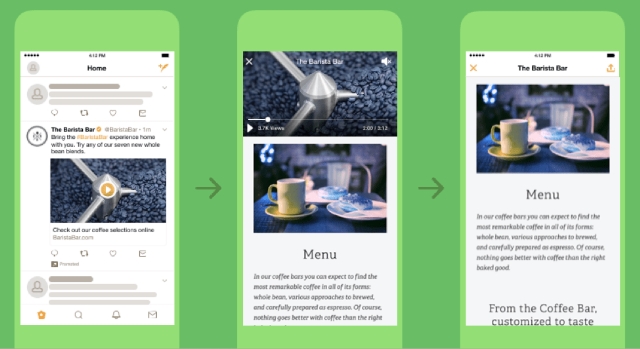
It starts with an auto-playing video ad which Twitter says drove twice the normal engagement of standard mobile video ads in a beta test.
After the video is over, advertisers can include a clear call-to-action to drive viewers to your preferred location. However, if a user taps the ad while the video is still playing, it will continue to play while the website loads. Twitter claims this increases user retention by over 60% because it keeps users engaged while waiting for your site to load.
As you would expect, the ad unit also includes a customizable headline and a destination URL. You can also optimize the Video Website Card for your specific goals, such as video views, website clicks, or awareness.
The ad unit is already available to all Twitter users around the world, so you can start testing the new Video Website Cards today.
00Taylor Ballhttps://www.tulsamarketingonline.com/wp-content/uploads/2018/07/TMO-Logo.pngTaylor Ball2017-10-23 12:22:142017-10-23 12:22:14Twitter introduces new multi-faceted video ads
Google has been teasing a massive revamp to the AdWords experience for months, and now it’s finally here.
The company says the redesign and new features provide a faster, more intuitive experience with a better focus on meeting advertisers’ goals.
What’s New
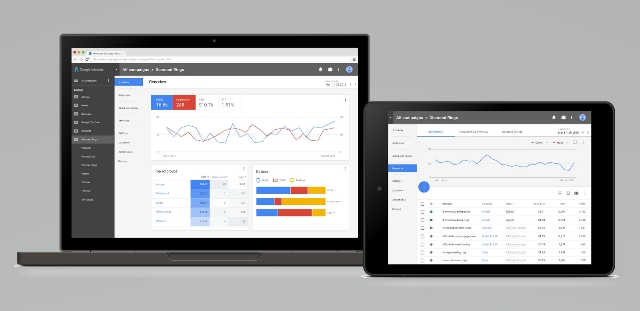
The biggest changes to the ad platform are mostly focused on design and speed. The ad interface is less cluttered and easy to navigate, letting you put more focus on your advertising efforts without distraction.
The streamlined style also allows pages to load up to 20% faster according to Google.
Visualizations have also been improved to make it easier for you to see how your ads are performing and how people are engaging with your business.
The new experience also brings a few new features like bid adjustments and landing pages. These features have been available to those who got into the revised AdWords experience early, but this is the first chance for most advertisers to test them out for themselves.
Google has put together a number of new guides and videos to help everyone get accustomed to the new AdWords experience. You can get started by checking out the guided tour, how-to videos, or the best practices guide.
00Taylor Ballhttps://www.tulsamarketingonline.com/wp-content/uploads/2018/07/TMO-Logo.pngTaylor Ball2017-10-13 12:44:312017-10-13 12:44:31The new AdWords “Experience” is now available to everyone
Don’t you wish there was an easy way to find out exactly what terms people are using to find your business online? That way, you could refine your keywords to take advantage of where you’re already succeeding and put more work into areas that aren’t getting found without hours and hours of research and analytics.
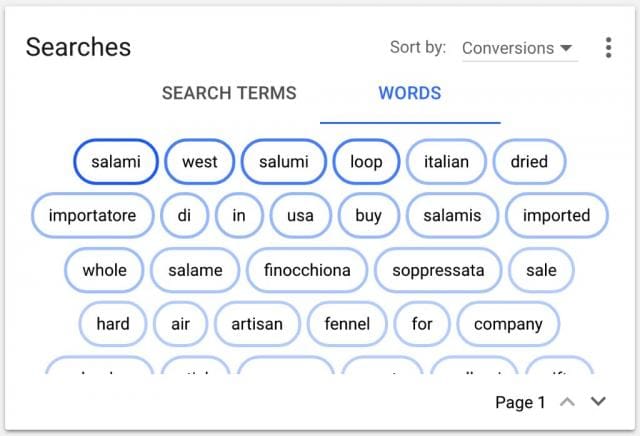
Well, now you can do just that without any expensive software or tracking services, with AdWords’ new ‘Searches’ card. The new card shown in your AdWords dashboard highlights the most popular words and phrases people are using to find your business in one convenient space.
With this information, you can better target your ads and search keywords or create negative keywords from search terms that aren’t relevant for your business. This way, you can be sure that people who are interested in what you offer are finding you.
The AdWords Searches card can be found on your Overview page of your account and looks like this:
The card is only available in the new AdWords system which recently rolled out for most countries.
Of course, the new AdWords card isn’t as powerful as comprehensive keyword research or analytics. However, it provides a quick glimpse into where you are doing well and where you can do more to promote your goods and services online.
00Taylor Ballhttps://www.tulsamarketingonline.com/wp-content/uploads/2018/07/TMO-Logo.pngTaylor Ball2017-08-29 13:39:182017-08-29 13:39:18Learn exactly how people are finding your business with the latest AdWords feature
Analytics is an essential way to measure the effectiveness of your ads, but traditionally your results are kept in isolation. The only thing you have to compare against is past results.
Bing is changing that, with a new way to compare the results of your ad campaigns against how your competitors are performing.
These new competitive metrics, also known as “share of voice” metrics, have been added to Bing’s in-line performance views, with details on your ads and similar campaigns in your industry. You still can’t hand-pick your local competitors and spy on their campaigns, but the new metrics will give you a better view of how you are doing within your market.
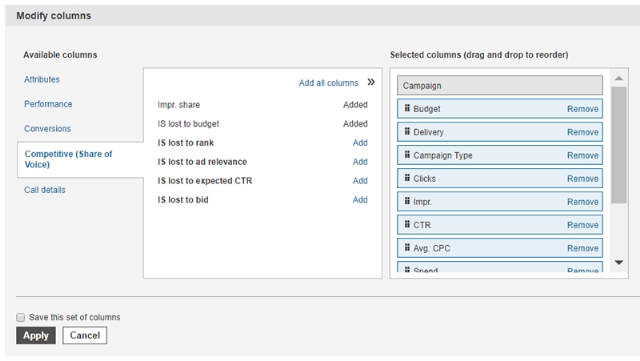
To get started, just log into your Bing Ads account and select either Accounts Summary, Campaigns, Ad Groups, or Keywords. Once you’re on any of these pages, click the Columns button. This will allow you to add any metrics from the Competitive (Share of Voice) section. Once you’ve applied your changes, these new metrics will appear in your reports.
Bing says the metrics are compatible with all other reporting features offered by the platform.
The announcement says this latest update is just “one of many” enhancements to Bing analytics the company will be releasing this year, though they are keeping those upcoming updates a secret for now.
00Taylor Ballhttps://www.tulsamarketingonline.com/wp-content/uploads/2018/07/TMO-Logo.pngTaylor Ball2017-06-28 13:55:442017-06-28 13:55:44Compare your ad results against your competition with Bing Competitive Metrics
Google has been using its Accelerated Mobile Pages technology to deliver content almost instantaneously for over a year, and now it is starting to spread the technology to new areas of its platform.
Specifically, Google says it is beginning to use AMP technology to speed up search ads in two different ways.
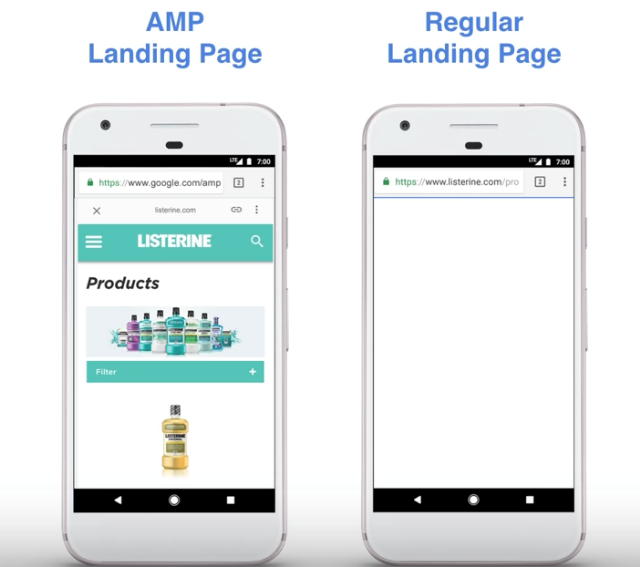
Firstly, Google AdWords is launching a beta program allowing advertisers to create landing pages using Accelerated Mobile Pages. The result is a faster transition from seeing the ad to being able to convert, and less chance of someone leaving because they get tired of waiting for your site to load.
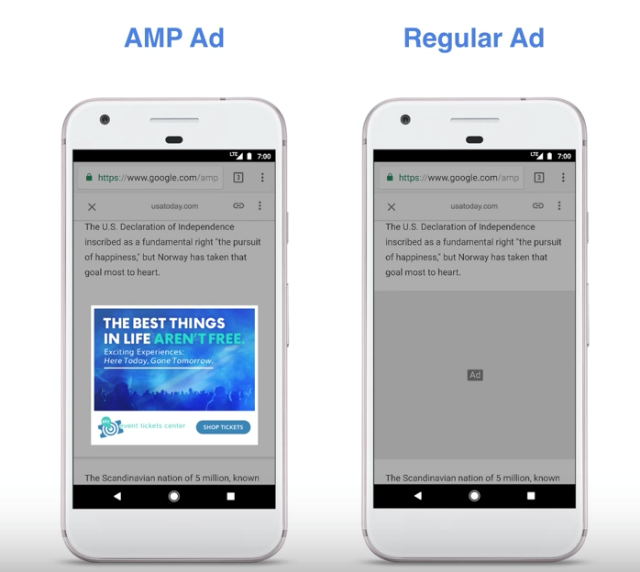
Secondly, Google is boosting all ads across the entire Google Display Network by automatically converting them to a new AMP ad format. As of today, the search engine has already converted a “significant” number of ads across its display network.
Google says its new AMP ads load 5 seconds faster than regular ads without any visual changes. This way, ads on AMP pages can load just as quickly as the content, creating a more seamless experience.
Bing is giving advertisers until July 31st of this year to adjust to the new extended text ads format. After that, they will have to make the switch because Bing will stop supporting the creation and editing of the popular standard text ad format.
The company is giving some leeway to those who still prefer standard text ads, saying “all your existing standard text ads will continue to serve alongside expanded text ads for the foreseeable future.” Eventually Bing will stop supporting and serving standard text ads entirely, but they will give advertisers a warning when they plan to finally shut it down entirely.
To prepare for the change, Bing listed several best practices and tips to make the most of expanded text ads (EXTAs):
Create EXTAs within existing campaigns and ad groups along current STAs
Use Standard Text Ads as a baseline to measure how well Expanded Text Ads are performing
Create a 1:1 ratio of EXTA to STA ads in each ad group to maximize EXTA impressions
Helps avoid impression and click loss while testing EXTAs
Assures that EXTAs inherit all ad extensions and other set ups from the existing STAs
Once you are confident in the Expanded Text Ads performance, customers can move to 100% adoption, and delete their STAs
Take full advantage of the additional character limits
Use your best performing STA copy as a starting point when creating EXTAs
Experiment with messaging (try different length combinations)
Remember that headlines are important. Longer headlines help increase the visual space of text ads and help communicate additional information to searchers
Think about using content such as domain, display, description, query in ad title 2
00Taylor Ballhttps://www.tulsamarketingonline.com/wp-content/uploads/2018/07/TMO-Logo.pngTaylor Ball2017-05-11 15:25:182017-05-11 15:25:18Bing Plans To Stop Supporting Standard Text Ads Soon