Ecommerce websites have become a major part of the internet as online shopping has taken off in recent years. However, the unique nature and structure of these sites can make them uniquely tricky to optimize.
Product variant pages, annual sales, and the need for lots of high-quality images may make it difficult to optimize these pages using some traditional SEO strategies, while other techniques remain essential for high rankings.
Thankfully, Google’s own Alan Kent has produced a short video full of SEO tips specifically for ecommerce sites. I’ll embed the full video at the bottom of the page, but we’ll also be sharing the highlights below:
8 Tips for Ecommerce SEO
Cover the Basics: Basic technical SEO like allowing Google to crawl your site or using proper page titles is crucial for helping Google find and understand your website. For starters, make sure page titles feature your brand name and product details (such as color) and use structured data to make your product pages easy for Google to sort through your online store pages.
Create Content for Every Stage of the Shopping Journey: Google knows that searchers are often looking for information rather than wanting to buy right now. This is why the search engine prioritizes sites with a wide array of content for every stage of the buyer’s journey. To help you get started brainstorming, Kent suggests providing gift ideas, highlighting reviews, and including detailed information about your products.
Markup Product Variant Pages: To keep product variants well organized, ensure every variant has a unique URL and establish a canonical page.
Reuse Regular Sale URLs: Preserve URLs from sales so they can be reused later. For example, you’ll want to use the same URLs every year for holiday sales.
Performance: When shoppers are ready to buy, they want to do so as quickly as possible. When your page is competing against a similar product page for a spot in the search results, speed is often the tiebreaker that will help you come out ahead.
Be Patient: SEO takes time to gain momentum. In many cases, it can take months for changes to impact your rankings. Don’t try to rush things or change strategies because you’re getting restless. Just keep working on improving your overall SEO.
Don’t Be Afraid To Ask For Help: Every site is unique and may not benefit equally from Google’s broad advice. Don’t hesitate to ask SEO experts how to best optimize your site or how to adopt these strategies to your needs.
Focus on Users: At the end of the day, Google wants to provide the best possible site for users. Be that site.
Have you ever wondered what the most searched keywords and phrases on Google are?
While the search engine regularly details trending search topics and trends, the company does not share details on the top overall search terms. Thankfully, Ahrefs used data from over 19.8 billion keywords to list the top searches in the U.S. and worldwide on their own.
To generate the list, Ahrefs looked at the number of times search terms were used each month and averaged these monthly totals over the course of a year.
Below, we will share the top 50 Google Searches in the U.S. and worldwide. For complete lists of the top 100 searches and lists of the most frequently searched questions, check out the full report here.
https://www.tulsamarketingonline.com/wp-content/uploads/2020/01/GoogleRankings.png360640Taylor Ballhttps://www.tulsamarketingonline.com/wp-content/uploads/2018/07/TMO-Logo.pngTaylor Ball2022-06-28 19:14:362022-06-28 19:14:38The Top Google Searches From The U.S. and Worldwide
No one likes receiving a bad review. Not only do they affect your company’s morale, but they can also easily scare off future customers if they check your reviews – and they will almost certainly read your reviews. Studies have shown that 98% of consumers read online reviews before doing business with a local company.
At the same time, there is usually very little you can do about a legitimate negative online review. In most cases, the best solution is to be humble, apologize for not delivering the quality service or products expected, and do your best to make it right.
Still, there are a few types of reviews that require more extreme responses. Thankfully, when dealing with fake, spammy, or inappropriate reviews, you may be able to get the offending reviews deleted entirely.
When Can a Review Be Deleted?
There are strict rules about what types of reviews can be deleted.
For obvious reasons, complaints that appear to be legitimate complaints about a poor experience with your brand can not be deleted.
However, Google can remove reviews for your business if they break the company’s policies and guidelines. These include rules banning deceptive, explicit, or irrelevant. Below, we will talk a bit more about exactly what violations may make a review subject to removal.
Offensive Content
As described by Google, offensive content may include any sort of content “that is clearly and deliberately provocative.”
This includes any form of hate speech or harassment, as well as reviews containing personal information.
Deceptive Content
Misleading or inaccurate reviews are a regular occurrence online. In some cases, competitors may try to hurt your reputation by manufacturing a poor experience. Personal conflicts between individuals may also boil over and result in negative reviews in an effort to get an individual fired.
This is why Google does not allow any review that is not an accurate representation of a real experience with a brand.
Mature Content
To ensure content on the search engine remains safe for all users, Google will delete any reviews containing profanity, sexually explicit content, adult themes, or graphic violence.
Regulated or Illegal Content
Reviews may not contain calls to action for products or services which may be subject to local legal restrictions. Additionally, Google warns that dangerous activities or illegal content will get reviews removed.
Irrelevant Content
Lastly, reviews must be related to an actual experience with a company’s products or services. That means rants, off-topic content, or attempts to promote one’s own products are subject to removal.
How To Get an Online Review Removed
Obviously, brands can not directly delete reviews from their Google Business Profiles. Instead, a company representative must report a review for removal through Google Search or Google Maps.
Once reported, Google will assess the review and determine if it violates any of the platform’s policies. Though this process may take several days, brands can also mitigate the damage of a misleading or inappropriate review with a response explaining the reality of the situation and noting that the review has been reported to Google.
https://www.tulsamarketingonline.com/wp-content/uploads/2022/06/Blocked-Reviews.png6751200Taylor Ballhttps://www.tulsamarketingonline.com/wp-content/uploads/2018/07/TMO-Logo.pngTaylor Ball2022-06-13 20:50:312022-06-13 20:50:33How To Get a Google Review Removed Online
As announced last August, Google is set to stop allowing advertisers to create, edit, or start running expanded text ads across the search engine’s ad network starting June 30, 2022.
Though expanded text ads have been a popular way to make your ads stand out and increase click-through rates, the company says it plans to replace the ad format with responsive search ads.
The goal, according to Google, is to simplify running ads while using automation to improve ad performance.
According to the announcement, advertisers who have already made the switch from expanded text ads to responsive search ads saw an average 7% increase in their conversions.
Why Google Is Switching To Responsive Search Ads
Things are shifting all the time online, including the ways we are searching. According to Google, at least 15% of all search queries are never-before-seen searches. With responsive search ads, Google is trying to help brands keep up to date with these ever-changing trends and to always be where their audience is.
How To Prepare
For the time being, existing expanded text ads will be largely unaffected by the change. Though they cannot be edited, existing ads in this format will continue to run as normal. However, no new expanded text ads can be created.
To help you prepare for the upcoming change, Google recommends taking these steps:
Repurpose high-performing text ad content into responsive search ads and focus on improving ad strength.
Apply changes suggested in the account’s Recommendations
Pin headlines and other copy in specific positions to ensure they always show.
Use variations to test different ad versions.
Review assets in cross-campaign reporting based on performance to identify the most effective messaging.
Evaluate incremental growth in impressions, clicks and conversions at the ad group and campaign levels.
https://www.tulsamarketingonline.com/wp-content/uploads/2022/06/20200217-5-Examples-of-Expanded-Text-Ad-Best-Practices.jpg611975Taylor Ballhttps://www.tulsamarketingonline.com/wp-content/uploads/2018/07/TMO-Logo.pngTaylor Ball2022-06-02 17:05:392022-06-02 17:05:41Google To End Support For Expanded Text Ads This Month
As part of its big Google Marketing Live event this week, the search engine announced a big makeover is coming to some shopping ads in the near future.
Initially limited to apparel-related shopping results, Google is revamping both online ads and organic listings to be more visually exciting and drive more engagement.
You can get a preview of what to expect below:
The revamp brings shopping ads more in-line with the more visual organic listings which have been rolling out since last year.
Google is accomplishing this using Search or Performance Max ad campaigns, though the images or graphics must be provided by advertisers.
As the company described the makeover:
“These will be clearly labeled as ads and will be eligible to appear in dedicated ad slots throughout the page. We’re also rolling out new ways to showcase multiple product images within Shopping ads in the U.S., along with information such as product descriptions, reviews, and product availability, with no further action required of advertisers.”
Though it is unclear when this revamp will be rolled out, advertisers should be excited by the more stylish and engaging presentation when it arrives.
At TMO, we always prioritize being able to track marketing efforts and make actionable strategies to improve on what works. This is why we have always loved online ads like that Google provides, they offer detailed information on almost any type of ads you run. There’s just been one glaring exception – video ads.
Google Ad Manager has struggled to deliver deep or informative analytics for video ads since their launch on the platform. Thankfully, this is finally changing with the announcement of several new tools and data for video advertising.
New Tools For Measuring Video Ad Performance
Programmatic Video Health Tools
With the new Programmatic Video Health Tools feature, Google will deliver actionable opportunities for improvement immediately upon logging into your account.
This is done by assessing your video performance and measuring key metrics such as viewability, impressions, and revenue.
Additionally, Google is introducing another insights card for what it is calling Video Ad Serving Template (VAST) errors.
In this card, you’ll find broad details about the number of errors in your video inventory and what may be causing these errors.
Real-Time Reporting
Since problems with your ads can literally cost you, it is important to quickly spot issues and resolve them – especially when videos might involve live streams.
To help with this, Google has introduced real-time video reporting to show detailed performance data in under 2 minutes.
Additionally, the new YouTube ads delivery tool will include information on the delivery of YouTube Video Ads
https://www.tulsamarketingonline.com/wp-content/uploads/2022/05/GAD-Video_Efficiency_Blog_Header___Social_.max-1000x1000_WaHyLhK.png5641000Taylor Ballhttps://www.tulsamarketingonline.com/wp-content/uploads/2018/07/TMO-Logo.pngTaylor Ball2022-05-23 20:46:522022-05-23 20:46:53Google Gives Brands New Tools To Track Video Ads
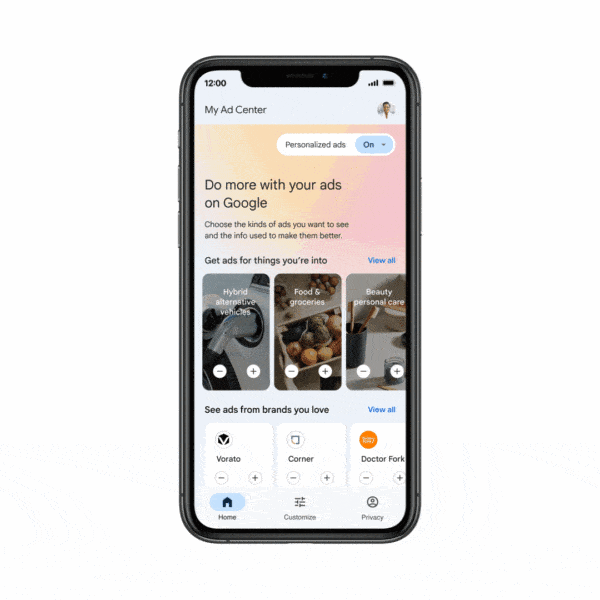
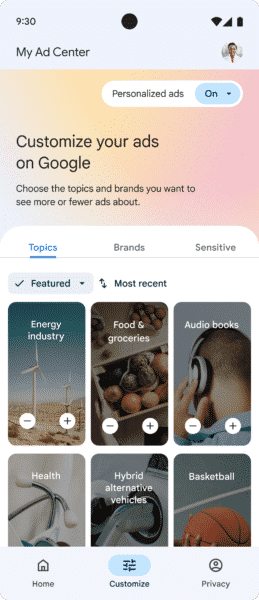
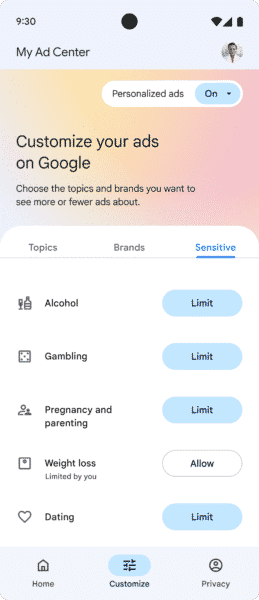
Google is giving users more significant power than ever to control what ads they see. As announced at the annual I/O Summit conference (and reported by Greg Finn), this will be done by launching a new and improved My Ad Center feature that aims to make ads more transparent and relevant for consumers.
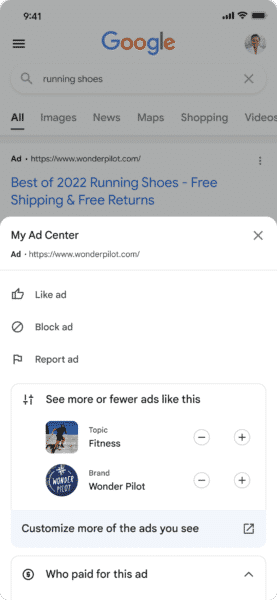
In the new My Ad Center, users will be able to find information about who paid for a specific ad and why they were targeted to see it. Additionally, users will be able to select which brands or topics they would like to receive ads for and specify the level of personalization they are comfortable with from ads.
At the time of the announcement, the My Ad Center feature is limited to only Google Search, YouTube, and Google Discover. This means users are still largely unable to dictate what type of ads they might see in other areas of Google or through the Google Display Network, though there are rumors that similar tools are coming to manage ads being shown via the display network.
Select Your Favorite Topics and Brands
Probably the most significant new introduction in the Google My Ad Center is the ability to dictate what topics or brands you are most interested in seeing ads about.
Of course, users may still see ads or topics not listed in this tool if Google believes it is relevant to them. Still, this gives you significant influence by directly telling the search engine what you want to see.
More Transparent Advertising
Beyond controlling the ads you see, My Ad Center also aims to give you more information about the ads being shown by expanding the previously introduced “about this ad” section.
Here, you will find details about who paid for an ad (using Advertiser Identity Verification) and information about why Google included you in the targeting for this ad.
Ad Personalization Settings
Personalization has become increasingly common in ads over the last few years, with advertisers using details like age, relationship status, education level, and more to create, personalize, and target ads.
Now, users can opt out of this by limiting any or all details used to personalize ads.
In this section, you can also limit or allow sensitive ad topics such as gambling, alcohol, or weight loss to be shown to you.
Lastly, My Ad Center gives users control over what data sources are used to personalize ads and where (for example, allowing personalized Google Search results or YouTube recommendations).
The new My Ad Center feature is expected to launch soon, though an exact date is unavailable.
https://www.tulsamarketingonline.com/wp-content/uploads/2021/08/Google-Child-Privacy.png450800Taylor Ballhttps://www.tulsamarketingonline.com/wp-content/uploads/2018/07/TMO-Logo.pngTaylor Ball2022-05-12 17:36:292022-05-12 17:39:27Google My Ad Center Gives You New Control Over The Ads You See
With internet speeds constantly increasing, smartphones becoming the primary way to get online, and people’s attention spans getting shorter than ever, it is absolutely crucial that your website loads quickly. Visitors will not hesitate to click the ‘back’ button and Google has slowly made loading times one of the most important ranking signals it uses.
At the same time, users have come to expect stylish, high-quality images from any website they visit. They don’t just want to find the best information. They want the best information in the most enjoyable package.
This creates a catch-22 for website owners. Users want to see a page filled with great images, but they don’t want to wait for it. Unfortunately, these high-quality pictures have the tendency to slow down how quickly websites load.
Thankfully, there are ways to mediate this by optimizing your images to make loading your web pages as efficient and quick as possible – as Alan Kent, Google Developer Advocate, shares in a recent video:
The video gets pretty in-depth at times and leans into technical details, so we will try to collect the most important tips and info below:
Google’s 6 Tips For Optimizing Online Images
1. Eliminate Image Cumulative Layout Shift (CLS)
Don’t let the jargony name intimidate you. You have no doubt encountered CLS before, and it probably frustrated you.
CLS is where text or images move as each individual component loads. Because of this, you might have text which refuses to stay in place as you try to read it, have new images popping into place where a link was visible seconds before, or potentially open an entirely different page because a link appeared right where you were trying to swipe.
Though this issue can affect any type of content on a webpage, images are frequently a leading culprit because of the amount of space they fill on a page.
2. Keep Your Images Only As Large As Needed
It can be tempting to upload images in the largest size possible, to guarantee every little detail will be included without pixelation or artifacting. Some web designers see this as “future-proofing” their site or ensuring the best quality no matter how large an image is shown.
The problem is that this can be overkill. Even when rendering an image for smaller resolutions, browsers have to download the original image and compress it to render correctly. This slows things down, as larger images take a longer time to be downloaded and rendered in the proper size for the display it is being shown on.
The complication is that displays can range wildly in size and resolution – from tiny smartphones to gigantic monitors. That makes it hard to identify exactly when an image becomes “too large.”
The easiest way to find this out is by checking out the Opportunities section in the PageSpeed Insights report, under ‘properly sized images’. Here you’ll see which images are larger than they need to be so you can replace them with more properly sized alternatives.
3. Use The Best Image Format
Which file format you choose to save your images in might seem like a minor choice, but it can have major effects on loading speeds. At the same time, choosing the right image format isn’t always as simple as choosing the one which outputs the smallest file.
While formats like JPEG or webP tend to deliver smaller file sizes from the same initial image, they do so by compressing the image. This compression subtly degrades the quality of the image to minimize file size.
On the other hand, larger file formats like PNG can preserve fine details to maintain the original quality of an image, though this results in larger files.
In many cases, your visitors may not notice the difference between a PNG or JPEG, making the smaller file the obvious choice. However, more complex images or very large images may look noticeably worse in small formats.
To identify images that may not be in the most efficient format for your site, check out the ‘serve images in next-gen formats’ section of the PageSpeed Insights report.
4. Compress Images Properly
While file formats have a big impact on how large your image files are, most formats allow you to dictate just how much compression occurs. If you’d like, you can prioritize preserving detail while receiving a slightly larger file, or you can prioritize getting the smallest file at the cost of the image quality.
To figure out what is best for your website, you can explore the ‘encode images efficiently’ section of the PageSpeed Insights report. Here, you’ll find details about images that may benefit from being compressed and how much this might shrink image files.
5. Cache Images In The Browser
Caching is a process browsers use where they temporarily store images or details from your website to s[eed up the loading process on related pages or if they return to your site.
If you do this, however, it is important for you to tell the browser how long it should keep these cached images This is done through an HTTP response header containing guidance on how to handle cached files and images.
If you’re unsure whether you’ve properly configured this header, you can also find details about this in the PageSpeed Insights report, within the ‘serve static assets with an efficient cache policy’ section.
6. Correctly Sequence Image Downloads
By default, web browsers wait to load details until they are absolutely needed. This is a practice called “lazy loading” that allows browsers to focus on the details you’re most likely to be focused on at the moment. This is not always the best process for loading larger files like images or videos, though.
To get around this, Google recommends establishing the sequencing order some parts of your site are downloaded and rendered by browsers.
Specifically, Google recommends using the following sequencing order:
“Hero Images” at the top of the page
Above the fold images
Images just below the fold
After this, Kent says most other images can be lazy-loaded without an issue.
Again, you’ll be able to find an assessment of how efficiently you are loading images on your website within the PageSpeed Insights report, under ‘defer offscreen images‘.
Despite Google being very clear about its feelings on paying for SEO links (hint: it is not a fan), I still regularly come across stories of brands spending hundreds or even thousands of dollars on links that promise to increase their rankings.
Typically, these individuals have heard success stories from others who had recently bought a ton of SEO backlinks and saw their own site jump to the top of search results. Unfortunately, this is rarely the end of the story.
Today, I wanted to highlight a more complete example of what happens when you pay for links and why.
The Full Story of Someone Who Spent $5,000 on SEO Links
In this instance, I came across someone who had spent thousands of dollars on links for SEO purposes through Search Engine Journal’s “Ask an SEO” column. In the most recent edition of this weekly article, a person named Marlin lays out their situation.
“I paid over $5,000 for SEO link building.”
From the outset, it is unclear if Marlin knew exactly what they had gotten into. While it is possible they directly purchased links from a website, there is also the potential that Marlin and their company put their trust in a questionable marketing agency that purchased or generated spammy links to “boost” rankings.
This is important because it is very common for online SEO packages to include “link building services” which are actually accomplished through link farms that will inevitably be identified and shut down. This is why it is crucial to know that the people handling your link-building efforts use proven, Google-approved strategies rather than cutting corners.
“At first, traffic was boosted.”
As promised, the initial result of buying links is frequently a quick spike in your search engine rankings. Even better, this payoff seems to come much more quickly than the rankings boosts seen from traditional link-building efforts. In some cases, you might even get a huge boost to your rankings within a week or two of paying for the service!
However, the story isn’t over.
“We then lost our rankings on those keywords and our traffic is gone!”
Despite the initially promising results, this is the inevitable conclusion of every story about paying for links.
In the best-case scenario, Google simply ignores your newly acquired low-quality links – putting you right back where you started. In some cases, depending on how widespread the link scheme appears to be, you can wind up even worse than when you began.
If Google believes you have a persistent habit of trying to manipulate search rankings, your site may receive a penalty that significantly impairs your rankings. In the worst cases, your site can be removed from search results entirely.
Why Paid Links Inevitably Fail
There is a very simple reason this story followed a predictable pattern. Google explicitly forbids any sort of “unnatural links” or link schemes. Additionally, the search engine has invested huge amounts of time and resources to identify these artificial links.
At the same time, Google is locked into a game of whack-a-mole where new link sellers are popping up all the time – which is why their links may help your rankings for a very short time.
In SEO, shortcuts are rarely as great as they appear. If you’re looking for long-term, sustainable success, the only option is to roll up your sleeves and build links the old-fashioned way: by creating great content and building real relationships with other members of your industry.
It won’t be quick and it won’t be easy, but it will be worth it in the long run.
https://www.tulsamarketingonline.com/wp-content/uploads/2022/05/Buying-Links-Bad.png6751200Taylor Ballhttps://www.tulsamarketingonline.com/wp-content/uploads/2018/07/TMO-Logo.pngTaylor Ball2022-05-03 17:22:382022-05-03 17:22:39What Happens When You Pay For SEO Links?
Ever feel like words aren’t quite enough for what you want to ask Google? But, at the same time, the Google Image Search isn’t right for the job either? You’ll be excited to hear about Multisearch, the new way to use both text and images to find exactly what you’re looking for when searching the web.
Multisearch is a new feature in Google Lens, designed to deliver results based on contextual text phrases to better understand visual queries. In the announcement, Google says it designed the feature to “go beyond the search box and ask questions about what you see.”
How Multisearch Works
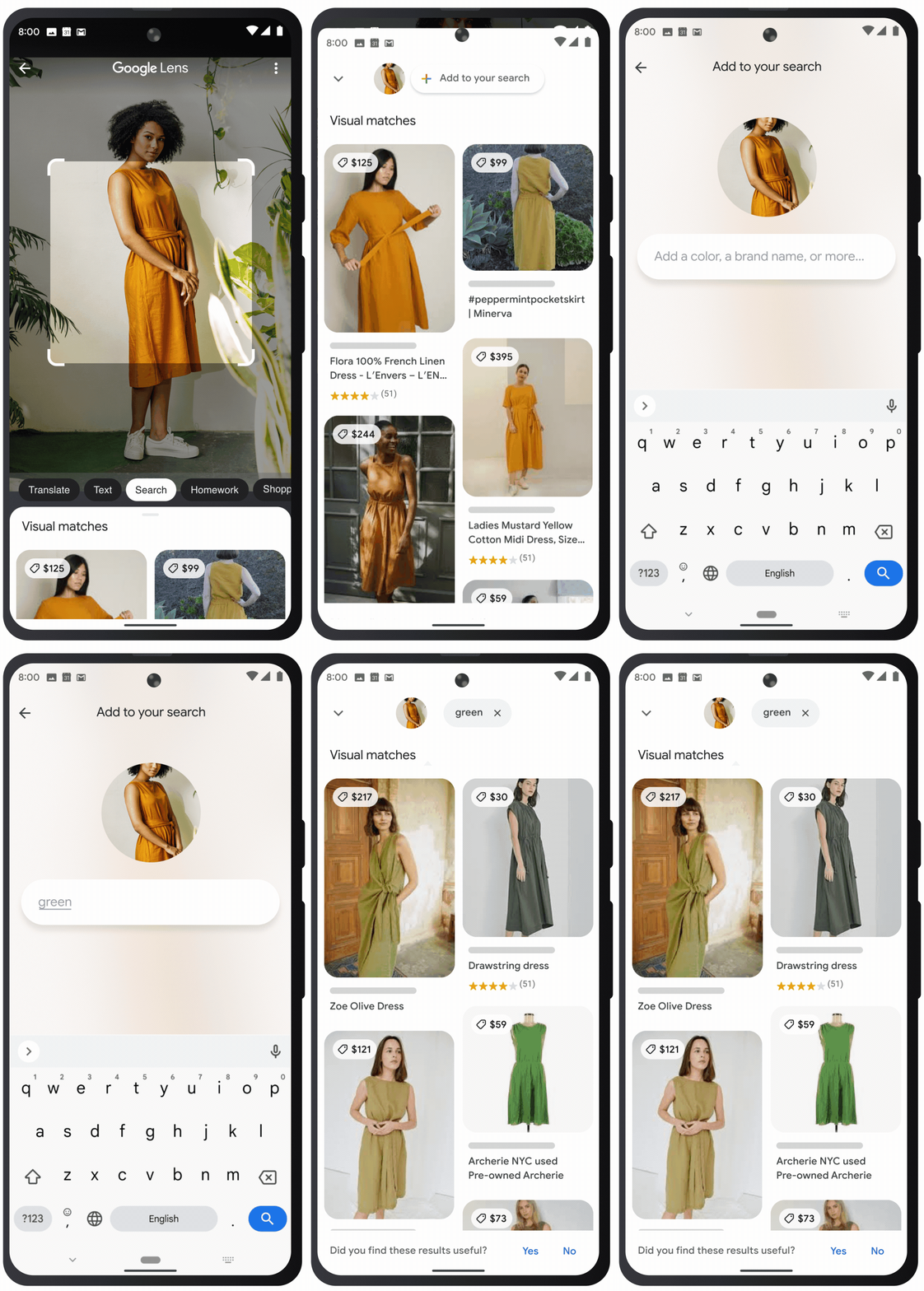
As part of Google Lens, Multisearch is still first-and-foremost about visual search. You start by opening the Google app on Android or iOS devices and uploading or taking a picture using your device’s camera. Then, you can provide more information about what you’re looking for by swiping up and tapping the “+ Add to your search” button.
Google offers a few examples of how people can use Multisearch to get better search results:
Screenshot a stylish orange dress and add the query “green” to find it in another color
Snap a photo of your dining set and add the query “coffee table” to find a matching table
Take a picture of your rosemary plant and add the query “care instructions”
In its current shape, Multisearch is best used for shopping search results. This means it is something e-commerce brands should definitely keep an eye on in the near future.
While the feature uses Google’s AI systems, the announcement clarifies it does not use the search engine’s most recent AI model, MUM – yet:
“We’re also exploring ways in which this feature might be enhanced by MUM– our latest AI model in Search– to improve results for all the questions you could imagine asking.”
https://www.tulsamarketingonline.com/wp-content/uploads/2022/04/Flow__1.max-1000x1000-1.png5641000Taylor Ballhttps://www.tulsamarketingonline.com/wp-content/uploads/2018/07/TMO-Logo.pngTaylor Ball2022-04-11 19:33:142022-04-11 19:33:16Google Multisearch Lets You Search With Pictures and Text at the Same Time